
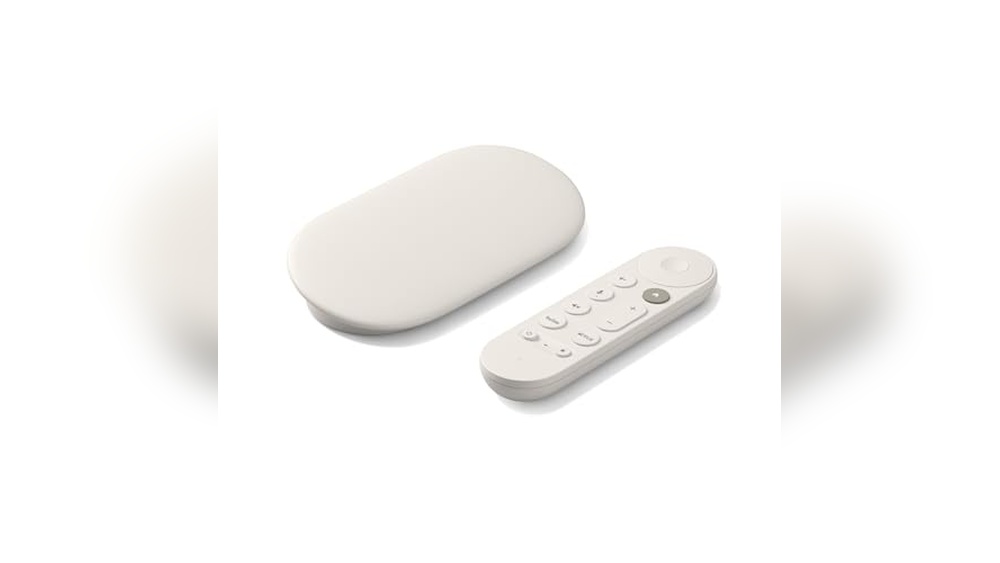
Finding The Right Smart Hub For Your Tv
Setting up a smart hub for your TV can feel straightforward until you face the many options available. You want easy access to streaming, smart home control, and seamless device connections. But with different types of devices and features, it’s not always clear what fits your needs best.
The challenge lies in balancing simplicity, compatibility, and the features you actually use. Some hubs focus on streaming quality, others on multi-device control, and some combine both. Price ranges vary too, which can make it harder to decide what gives you the most value.
This guide will help you understand the key points to consider. It aims to make your choice clearer by focusing on what matters most when picking a smart hub for your TV.
What Matters When Choosing A Smart Hub For Tv
Think about how you use your TV and connected devices daily. Are you streaming a lot of 4K content? Do you want voice control or easy switching between multiple HDMI sources? Or maybe you need a device that doubles as a smart home controller.
Consider the ease of setup and how many devices you want to connect. Some hubs come with remote controls that handle multiple functions, while others require separate accessories. Also, keep in mind the compatibility with your current TV and other gadgets.
Common Confusions To Avoid
It’s easy to get caught up in technical jargon or assume that higher price means better performance. Not all features are equally useful for everyone. For example, ultra-high resolution streaming is great, but if your internet or TV doesn’t support it, it might not matter. Similarly, some hubs offer multi-port HDMI switching, which is handy if you have many devices, but unnecessary if you mainly use one source.
Understanding your actual needs helps prevent overspending or ending up with a complicated setup.
Now, let’s look at a selection of smart hubs and related devices chosen to cover a range of typical needs and setups. This will give you options whether you prioritize streaming quality, device connectivity, or smart home integration.
Google Tv Streamer 4k
The Google TV Streamer 4K stands out as the Best Smart Hub for Tv by offering personalized, fast streaming with smart home control features.

The Google TV Streamer 4K is a compact streaming media player that connects to your TV and brings together movies, shows, and live channels in one place. It simplifies your entertainment by offering tailored recommendations based on your household’s viewing habits, helping you find content quickly without sifting through apps.
Using this smart hub feels seamless and efficient, with easy access to over 800 free live channels and popular streaming services like Netflix. The voice search remote and smart home control add convenience, making your viewing experience smooth and personalized.
What Makes This Streaming Hub Stand Out
- Personalized content recommendations for every user in the home
- Supports up to 4K HDR with Dolby Vision for sharp, vibrant picture quality
- Access to over 800 free live TV channels from Pluto TV, Tubi, and more
- Voice search remote simplifies finding shows and movies
- Smart home control integration adds convenience
- 32 GB of storage for apps and downloads
- Compact and lightweight design fits easily near any TV setup
Considerations Before Buying
- Requires HDMI 2.1 cable, which is sold separately
- Limited to compatible TVs for full 4K HDR and Dolby Vision experience
- Does not include built-in storage expansion options beyond 32 GB
Who This Smart Hub Works Best For
This Google TV Streamer 4K is ideal for households wanting a centralized, easy-to-navigate streaming experience with personalized content suggestions. It removes the hassle of juggling multiple apps by bringing diverse entertainment sources into one interface.
To get the most from this device, ensure your TV supports 4K HDR to fully enjoy the vivid picture quality and consider adding compatible Dolby Atmos speakers for immersive sound. The reliable performance gives peace of mind that your favorite shows and live channels are just a voice command away.
For anyone who values a simple, smart, and fast streaming setup, this streamer strikes a good balance between features and ease of use.
| Best for | Why |
|---|---|
| Families with multiple viewers | Personalized recommendations cater to different interests and viewing habits |
| Users wanting free live TV options | Access to 800+ free channels from popular streaming services |
| Owners of 4K HDR TVs | Supports up to 4K HDR with Dolby Vision for enhanced picture quality |
| Smart home enthusiasts | Integrates with smart home controls for added convenience |
Roku Streaming Stick Plus
The Roku Streaming Stick Plus is a reliable choice for the Best Smart Hub for Tv, offering simple 4K streaming with voice remote control.

The Roku Streaming Stick Plus is a compact streaming device designed to simplify access to popular apps and free live TV in stunning 4K and HDR quality. It plugs directly into your TV’s HDMI port and can even draw power from the TV itself, reducing clutter and setup hassle.
Using this device feels straightforward and efficient, as the voice remote allows you to control your TV and Roku with one hand, avoiding the need to juggle multiple remotes. The ability to take it on the go and watch your favorite shows anywhere adds practical convenience for frequent travelers.
Key Advantages of This Streaming Hub
- Supports brilliant 4K and vivid HDR picture quality for enhanced viewing.
- Sleek and compact design that won’t block adjacent HDMI ports.
- Powered by the TV, eliminating the need for extra cords or wall outlets.
- Voice remote controls TV power, volume, and Roku functions all in one.
- Access to a wide range of free movies, shows, and live TV channels.
- Portable for easy use while traveling without logging into other devices.
Considerations Before Choosing
- Does not include a dedicated app store for installing new apps beyond Roku’s platform.
- Requires a stable internet connection for optimal streaming performance.
- Limited to use on TVs with HDMI ports and compatible power output.
Who This Fits Best
This streaming stick is ideal for anyone wanting a no-fuss smart hub with excellent 4K HDR quality and easy voice control. It removes the clutter of multiple remotes and extra cables, making setup and use stress-free.
For travelers or those who watch TV in multiple locations, its portability and quick plug-in design save time and hassle. To get the best experience, ensure your TV supports HDMI power so you can avoid external cords.
Reliable and straightforward, this device offers peace of mind with consistent streaming and easy navigation—perfect for users who value simplicity and quality.
| Best for | Why |
|---|---|
| 4K TV Owners | Delivers sharp 4K and HDR content for high-definition viewing. |
| Users wanting fewer remotes | One voice remote controls TV power, volume, and streaming functions. |
| Frequent travelers | Compact design and portable use without needing new logins. |
| Clutter-free setups | Powers directly from TV, reducing cords and outlet use. |
Roku Express 4k+
The Roku Express 4K+ offers a reliable and easy-to-use solution for the Best Smart Hub for Tv with excellent 4K streaming quality and voice control.

The Roku Express 4K+ is a compact streaming media player designed to bring sharp 4K and HDR picture quality to your TV. It simplifies streaming by combining multiple remotes into one and supports voice search for quick access to entertainment. This device is ideal for anyone wanting a straightforward upgrade to smart TV functionality without complexity.
Using the Roku Express 4K+ feels smooth and intuitive, with a faster wireless connection that reduces buffering. The voice remote makes it easy to find shows or control the TV without juggling several remotes, helping save time and avoid frustration. It offers a consistent streaming experience with automatic updates to keep your channels up to date.
Key Benefits for Streaming Convenience
- Delivers sharp and vivid 4K and HDR picture quality optimized for your TV
- Combines TV power, volume, and Roku control into one remote
- Voice remote enables quick search and device control without typing
- Faster wireless connection ensures smooth streaming with less lag
- Customizable home screen highlights your favorite channels
- Automatic updates keep streaming apps current without effort
Considerations Before Buying
- Lacks advanced features like built-in storage or gaming support
- Does not include a subscription to premium streaming services
- Small size means it requires a nearby power source and HDMI port
Who This Smart Hub Works For
This Roku Express 4K+ suits those upgrading a standard TV into a smart TV without extra hassle. It removes the stress of managing multiple remotes and guessing which device controls what. To get the best experience, set up in a location with strong Wi-Fi for uninterrupted streaming.
Its reliable updates and simple voice commands provide peace of mind that your entertainment will keep running smoothly. If you prefer a straightforward, no-frills way to access 4K content and free live TV, this device fits well. It’s a smart, practical choice for everyday streaming needs.
| Best for | Why |
|---|---|
| Upgrading non-smart TVs | Easy plug-and-play device adds smart features without complexity |
| Viewers wanting crisp 4K streaming | Supports 4K and HDR for sharp, vivid picture quality |
| Users preferring voice control | Voice remote simplifies searching and device control |
| Households with multiple remotes | One remote controls TV power, volume, and Roku functions |
Newcare 3-port Hdmi Switch
This reliable 3-port HDMI switch is an excellent choice as the Best Smart Hub for Tv, simplifying connection of multiple devices to one display.

The NEWCARE 3-Port HDMI Switch allows you to connect three HDMI devices to one TV or monitor, eliminating the need to constantly swap cables. It supports up to 4K resolution at 60Hz, delivering crisp and clear video for devices like gaming consoles, Blu-ray players, and streaming sticks.
Using this switch is straightforward with a simple button to toggle between inputs, no extra power required. It comes with a 2.6-foot HDMI cable, making setup quick and hassle-free, ideal for home entertainment or conference rooms.
Key Benefits of This HDMI Switch
- Supports 4K Ultra HD at 60Hz for sharp video quality.
- Simple button press to switch inputs without extra power.
- Includes a 2.6-foot high-speed HDMI cable for immediate use.
- Compatible with most HDMI devices like PS5, Xbox, Fire Stick, and PCs.
- 24K gold-plated connectors ensure stable, corrosion-resistant transmission.
- Compact size fits easily in entertainment setups.
- Supports 3D and HDCP 2.2 for broad device compatibility.
Considerations Before Buying
- Auto-switching between inputs is not supported.
- Requires two or more input devices powered on for proper operation.
- No remote control included; switching is manual only.
- For optimal 4K@60Hz performance, input and output HDMI cables should be under 1.5 meters.
Who This Works For
This HDMI switch fits best for users with multiple HDMI devices who want a neat, reliable way to connect to a single TV or monitor without frequent cable changes. It removes guesswork by offering clear manual switching and supports high-quality video signals for immersive viewing.
To get the best experience, power on at least two connected devices at once to avoid signal loss. Its simple, no-fuss design offers peace of mind with stable connections and less clutter.
| Best for | Why |
|---|---|
| Home entertainment setups | Connect multiple consoles and streaming devices to one TV easily |
| Small offices and conference rooms | Quick input switching without needing extra power or complex setup |
| Gamers with several consoles | Supports high-quality 4K/60Hz video for latest gaming systems |
| Users with limited space | Compact design fits neatly without clutter |
Onn Android Tv 4k Streaming Hub
This device stands out as a Best Smart Hub for Tv by offering smooth 4K Ultra HD streaming with easy access to Android TV apps and Google Assistant voice control.

The ONN Android TV 4K Streaming Hub is a compact device that transforms your TV into a smart entertainment center with access to thousands of apps via Android TV. It supports 4K Ultra HD resolution, which means you get clear and detailed picture quality without extra equipment. The voice remote lets you search and control content easily using Google Assistant.
Using this hub feels straightforward and reliable. Setting it up involves logging into your Google account and connecting to Wi-Fi, after which you can enjoy casting from your phone or browsing apps. The built-in Chromecast adds convenience, letting you stream content from other devices without hassle.
Key Benefits for TV Streaming
- Supports stunning 4K Ultra HD for crisp viewing experience
- Access to a wide range of apps through Android TV platform
- Voice remote with Google Assistant for hands-free control
- Built-in Chromecast enables easy casting from mobile devices
- Simple setup process with Google account integration
- Compact and lightweight, fitting easily near your TV
Considerations Before Buying
- Does not include built-in storage for local media playback
- Requires a stable Wi-Fi connection for best performance
- Limited to the Android TV ecosystem, which may not suit all users
When This Device Makes Sense
This streaming hub is ideal for users who want to upgrade a regular TV with easy access to popular streaming apps and voice controls without complexity. It removes the guesswork of navigating different platforms by uniting content under Android TV and Google Assistant features.
To get the best results, ensure your Wi-Fi is strong and your Google account is ready for syncing apps and preferences. This device offers peace of mind with consistent streaming quality and straightforward operation, making it a practical addition for everyday entertainment needs.
| Best for | Why |
|---|---|
| Users wanting 4K streaming | Supports Ultra HD resolution for clearer images |
| Android app enthusiasts | Access to thousands of apps via Google Play Store |
| Voice control fans | Google Assistant enables hands-free content search |
| Mobile casting users | Built-in Chromecast allows easy streaming from phones |
Amazon Echo Show 15 Smart Display
The Amazon Echo Show 15 stands out as the Best Smart Hub for Tv by combining a large Full HD screen with built-in Fire TV for seamless entertainment and home organization.

The Amazon Echo Show 15 is a 15.6-inch Full HD smart display designed to organize your home and enhance your TV experience. It serves as a central hub that integrates your family’s calendars, to-do lists, and smart home controls, while also providing access to thousands of entertainment apps through built-in Fire TV.
Using this device feels intuitive and efficient, especially in busy environments like the kitchen. The large vibrant screen and voice commands help you manage tasks and enjoy entertainment without interrupting your workflow, saving time and reducing the hassle of switching between devices.
Key Advantages for Home and Entertainment
- Large 15.6″ Full HD display ideal for clear viewing of calendars and TV content
- Built-in Fire TV for streaming from popular apps like Prime Video and Netflix
- Customizable widgets to keep track of daily schedules and weather at a glance
- Voice-controlled smart home dashboard for easy device management
- Natural video calling with wide field of view and zoom capabilities
- Photo slideshow feature to display favorite memories on the home screen
- Active Media support for seamless music playback across multiple rooms
Considerations Before Buying
- Larger size may not suit small spaces or minimalist setups
- Subscription may be required for some streaming apps on Fire TV
- Focused primarily on kitchen and home organization rather than pure TV hub
Who This Works Well For
This smart hub is perfect for families and individuals who want to centralize home organization and entertainment in one place, especially in the kitchen or living area. It removes the stress of juggling multiple devices by combining calendars, smart home controls, and streaming in a single, easy-to-use screen.
To get the most out of it, customize your widgets to focus on the features you use daily, ensuring quick access to what matters most. This setup provides peace of mind knowing your home and entertainment are well managed from one reliable device.
| Best for | Why |
|---|---|
| Kitchen multitasking | Large display and voice control allow hands-free access to recipes, calendars, and streaming |
| Family scheduling | Widget overview of calendars and to-do lists keeps everyone on track |
| Smart home control | Central dashboard simplifies managing lights, cameras, and other devices |
| Casual streaming | Built-in Fire TV offers easy access to popular entertainment apps without extra hardware |
Acer 5-port Hdmi Switch
The Acer 5-Port HDMI Switch is an efficient Best Smart Hub for Tv that lets you connect multiple devices to a single display without hassle.

The Acer 5-Port HDMI Switch allows you to connect up to five HDMI sources, such as game consoles, laptops, or streaming devices, to a single TV or monitor. This eliminates the need to constantly plug and unplug cables, making it a practical solution for users with limited HDMI inputs.
Using this switch is straightforward thanks to its remote control and clear LED indicators. It delivers stable, high-quality 4K@60Hz video and supports DTS and Dolby audio, ensuring a smooth and immersive viewing experience without interruptions or complicated setups.
Key Benefits for Your Setup
- Connects five HDMI devices to one display, reducing cable swaps.
- Supports crisp 4K@60Hz resolution with HDR and 3D compatibility.
- Remote control and physical buttons for easy input switching.
- Gold-plated ports prevent corrosion and maintain signal quality.
- Compact metallic design with heat dissipation vents for stability.
- Compatible with popular consoles and streaming devices.
Considerations Before Buying
- Automatic input switching is not available; manual selection is required.
- Power adapter and HDMI cables are not included and must be purchased separately.
- For full 4K@60Hz performance, HDMI cables should be 10 feet (3 meters) or shorter.
When This Makes Sense
This switch is ideal for anyone who has multiple HDMI devices but only one or two HDMI ports on their TV or projector. It removes the hassle of unplugging cables and guessing which input to select. A quick tip is to label your HDMI cables so you can easily identify sources when switching manually.
By offering reliable connections and clear input indicators, this switch reduces surprises like signal loss or ghosting. It fits well in home theaters, gaming setups, or office conference rooms, delivering consistent performance without complexity.
| Best for | Why |
|---|---|
| Home theater setups | Connect TV, Blu-ray, and streaming sticks without unplugging cables |
| Multi-console gaming stations | Switch easily between PS5, Xbox, and Nintendo Switch |
| Office conference rooms | Integrate laptops, projectors, and video sources smoothly |
| Users with limited HDMI ports | Expand one HDMI output to five inputs for greater device flexibility |
Gana 4k Hdmi Switch 3-in-1
This Best Smart Hub for Tv allows seamless switching between three HDMI sources to one display, making it ideal for users with multiple devices.

This device is a 3-port HDMI switcher that lets you connect three HDMI sources to one TV or monitor. It solves the problem of constantly swapping cables by allowing you to manually switch between devices with a simple button press. It supports 4K resolution at 30Hz, making it suitable for most HD content and gaming consoles up to that specification.
Using the GANA HDMI Switch feels straightforward and reliable. The included 1.8ft pigtail HDMI cable and USB-C power connection ensure stable performance without complicated setup. Switching between devices is quick and hassle-free, making it easy to go from work to play without unplugging anything.
Key Features for Multimedia Switching
- Supports 3 HDMI inputs to 1 output, ideal for multiple device setups.
- Manual button switching avoids the need to unplug cables repeatedly.
- Supports 4K Ultra HD resolution at 30Hz and 3D display compatibility.
- Includes a fixed HDMI cable and USB-C power cable for easy installation.
- Compatible with popular devices like PS4/3, Xbox, Fire Stick, Roku, and PC.
- HD Audio and HDCP compliance ensure clear audio and video without delays.
- Compact and lightweight design fits well in any entertainment setup.
Considerations Before Buying
- Does not support simultaneous display on two monitors.
- Requires manual switching; no automatic or remote switching available.
- Gaming consoles like PS5/Xbox need manual resolution adjustment to 4K30Hz.
Who This Switch Works Best For
This HDMI switch is perfect for users who have several HDMI devices but only one display, such as a TV or monitor, and want to avoid the constant plugging and unplugging of cables. It removes the hassle and guesswork in managing multiple inputs by providing a simple, manual switch button.
To get the best experience, keep the USB-C power connected at all times to ensure stable video transmission. This switch offers peace of mind with reliable performance and solid compatibility across many common devices. If you prefer a straightforward and compact switcher without unnecessary complexity, this is a practical choice.
| Best for | Why |
|---|---|
| Users with multiple HDMI devices | Allows easy switching between three HDMI sources without unplugging cables |
| Gamers with PS4/3 or Xbox | Supports 4K30Hz resolution and works with popular gaming consoles |
| Home entertainment setups | Compatible with TVs, Fire Stick, Roku, and PCs for versatile use |
| Small rooms or offices | Compact size and plug-and-play design fit well in limited spaces |
Benfei 4-in-1 Hdmi Switch
This BENFEI HDMI switch stands out as a Best Smart Hub for Tv by simplifying connections for multiple devices without constant cable swapping.

The BENFEI 4-In-1 HDMI Switch is designed to manage multiple HDMI sources for your TV or monitor, eliminating the need for frequent cable switching. It supports up to four devices such as PS5, Xbox, Roku, or laptops, and transmits high-quality 4K@60Hz signals up to 30 feet with adaptive equalization technology.
Using this switch offers a smooth and reliable connection experience, saving time and hassle when switching between gaming consoles or streaming devices. The fixed 4ft HDMI cable helps avoid loose connections, ensuring consistent display quality without interruptions.
Key Benefits for TV Setup
- Smoothly switches among four HDMI devices without unplugging cables
- Supports high-resolution 4K@60Hz and 2K@144Hz signals for sharp images
- Adaptive equalization enables long 30ft HDMI transmission with minimal signal loss
- Includes fixed 4ft HDMI cable to prevent connection issues
- Compatible with popular devices like PS5, Xbox, Roku, FireStick, and Switch
- Compliant with HDCP 2.3 for protected content playback
- Backed by an 18-month warranty for peace of mind
Considerations Before Buying
- Requires USB-C power cable to operate; not included as a splitter
- Does not support one HDMI input to multiple outputs
- Weight is light but may require careful placement to avoid cable strain
Who This Works For
This HDMI switch is ideal for anyone with multiple gaming consoles or streaming devices wanting a clean and simple way to connect them to one TV. It removes the stress of swapping cables and guessing which input is active.
Plugging in the USB-C power ensures stable performance, making it reliable for long viewing or gaming sessions. A quick tip: always use quality HDMI cables on the source side to complement the fixed output cable and maintain signal integrity.
If you value ease of use and a neat entertainment setup, this switch offers a straightforward solution with minimal fuss.
| Best for | Why |
|---|---|
| Gamers with multiple consoles | Allows seamless switching between PS5, Xbox, Switch without unplugging cables |
| Home theater setups | Supports 4K@60Hz resolution and Dolby Atmos/DTS audio pass-thru |
| Users with limited HDMI ports on TV | Expands single HDMI input to accommodate four devices |
| Those needing long HDMI cable runs | Adaptive equalization supports up to 30ft HDMI transmission with clarity |
Ugreen 3-port Hdmi Switch
The UGREEN 3-Port HDMI Switch is a reliable Best Smart Hub for Tv that simplifies managing multiple HDMI devices with ease and remote control.

The UGREEN 3-Port HDMI Switch allows you to connect up to three HDMI devices to one display, solving the common hassle of constantly unplugging and replugging cables. It supports 4K resolution at 30Hz and includes both manual and remote control switching for convenience.
Using this switch feels straightforward and flexible. You can easily change inputs from your couch without moving, and the compact design saves space in your entertainment setup. It reliably delivers clear audio and video, making device management stress-free.
Key Benefits for TV Setup
- Switch between three HDMI devices to one display without unplugging cables
- Includes IR remote control for effortless channel swapping up to 15 feet away
- Supports up to 4K@30Hz resolution with HDR and CEC compatibility
- Compact and lightweight design fits easily in any entertainment center
- LED indicators show which HDMI port is active for quick status check
- Plug & play setup with Micro USB power for stable performance
Considerations Before Buying
- 4K resolution limited to 30Hz, not suitable for higher refresh rate needs
- Remote requires direct line of sight to the infrared receiver
- May need extra power supply for devices with high power consumption
Where This Device Fits Best
This HDMI switch is best suited for users who have multiple HDMI devices like gaming consoles, streaming sticks, or PCs and want an easy way to manage them on a single TV. It removes the hassle of swapping cables manually and reduces guesswork with clear LED indicators.
For optimal use, place the infrared receiver within sight and use quality HDMI cables under 26 feet for the best signal. This setup provides peace of mind through stable connections and consistent video quality.
Its compact size and remote control make it a practical choice for smaller spaces and casual users who value convenience over advanced features.
| Best for | Why |
|---|---|
| Multiple HDMI Device Owners | Effortlessly switch between consoles, streaming devices, and PCs without unplugging cables |
| Small Entertainment Spaces | Compact design saves room and reduces clutter in tight setups |
| Users Needing Remote Convenience | IR remote lets you change inputs from a distance without leaving your seat |
| 4K 30Hz Video Users | Supports Ultra Full HDR video at 4K resolution for clear and vibrant display |
Understanding Streaming Media Players Vs Hdmi Switches
Streaming media players like those from Google, Roku, and ONN provide direct access to streaming services and smart TV features. They are ideal if you want to upgrade a basic TV with apps, voice control, and 4K HDR content. HDMI switches, on the other hand, are designed to manage multiple HDMI inputs for one display. They help when you have several devices like gaming consoles, streaming sticks, or Blu-ray players but limited HDMI ports on your TV or monitor.
Choosing between these two depends on your setup:
- Use a streaming media player if your TV lacks smart features or you want integrated access to apps and voice assistants.
- Use an HDMI switch if you already have smart devices but need to connect multiple sources to one display easily.
Key Factors To Consider When Choosing A Streaming Media Player
Content and App Availability
Ensure the device supports your preferred streaming services and live TV options. Some platforms offer tailored recommendations and watchlist syncing across devices.
Video and Audio Quality
Look for support for 4K HDR and Dolby Vision if you want the best picture quality. Dolby Atmos support enhances immersive sound when paired with compatible speakers.
Remote and Voice Control
Voice search remotes improve navigation and accessibility. Some devices include smart home control integration for added convenience.
Storage and Performance
Consider internal storage for apps and caching, as well as the processor speed for smooth streaming and app responsiveness.
Portability
If you travel frequently, compact and powered-by-TV devices allow easy setup on different TVs without extra power adapters.
What To Look For In An Hdmi Switch
Number of Inputs and Outputs
Choose a switch that matches the number of devices you plan to connect. Most switches offer 3 to 5 HDMI inputs with one output to your display.
Resolution and Refresh Rate Support
Make sure the switch supports your devices’ maximum resolution and refresh rate, such as 4K at 60Hz or 2K at 144Hz for gaming.
Power Requirements
Some HDMI switches require external power to function properly, especially when handling multiple active sources. Check if a USB or AC power supply is needed.
Switching Method
Options include manual button press, remote control, or automatic switching. Automatic switching may not be supported on all models.
Compatibility and Features
Look for HDCP compliance, HDR support, 3D compatibility, and gold-plated connectors for stable, high-quality signal transmission.
Common Buyer Concerns And Confusion
Can I use a streaming player and HDMI switch together?
Yes, you can connect multiple streaming players or other HDMI devices through an HDMI switch to a single TV. This is useful if your TV has limited HDMI ports.
What happens if only one HDMI source is powered on with a switch?
Some switches may lose signal if only one input device is on due to power needs. Turning on multiple sources or using an externally powered switch often resolves this.
Is voice control available on all streaming players?
No, voice control availability varies by device. Check if the streaming player includes a voice remote or supports voice assistants like Google Assistant or Alexa.
Do HDMI switches affect video quality?
Quality switches with gold-plated connectors and support for high bandwidth maintain video quality. Lower-quality switches or long cables may cause signal degradation.
Setup Tips For Best Performance
- Use high-quality HDMI cables, ideally those rated for HDMI 2.0 or higher, especially for 4K content.
- Keep HDMI cable lengths within recommended limits (often under 10 feet) to avoid signal loss.
- If your HDMI switch needs power, connect it to a stable power source to ensure consistent operation.
- For streaming players, connect to a reliable Wi-Fi network or use Ethernet when possible for smoother streaming.
- Regularly update device firmware to access the latest features and security fixes.
Final Thoughts
Choosing between a streaming media player and an HDMI switch depends on your viewing habits and existing devices. Streaming players expand your TV’s capabilities with apps and voice control, while HDMI switches simplify managing multiple devices. Understanding your setup and needs will help you select the right solution. Prioritize compatibility, ease of use, and quality to ensure a satisfying viewing experience.