
Setting up a smart home can feel overwhelming. You want devices that work smoothly with Apple HomeKit and Zigbee, but the options are many and varied.
Choosing the best Zigbee hub for Apple HomeKit is tricky because these hubs serve different roles. Some act as simple bridges, while others offer additional features like cameras or sensors. There are trade-offs between ease of use, compatibility, range, and the level of control you want.
Budget also plays a role, with basic hubs costing less but offering fewer functions, and premium models providing more but at a higher price.
This article aims to clarify those choices and help you find a hub that fits your specific needs and setup style.
What To Consider When Choosing A Zigbee Hub For Apple Homekit
Focus on compatibility with your existing devices and how you plan to use the hub. Think about whether you need extra features like security cameras or sensors integrated into the hub, or if a straightforward coordinator will suffice. Also, consider the range and the number of devices you intend to connect.
These factors will guide your decision more than just brand or price alone.
The following selections are grouped by device type and capabilities. Different users have different priorities, so take time to understand which features matter most to you before deciding.
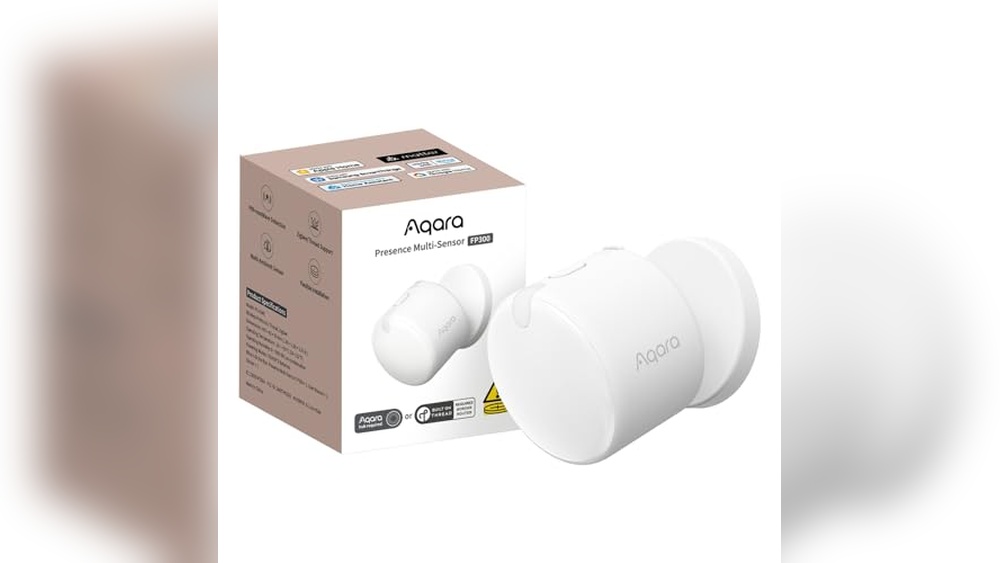
Aqara Fp300 5-in-1 Presence Sensor
The Best Zigbee Hub for Apple Homekit users who want seamless, precise motion and environmental monitoring for smart home automations.

The Aqara FP300 is a compact, wireless 5-in-1 presence sensor designed for smart homes that need reliable motion, light, temperature, and humidity detection. Its AI-powered mmWave and PIR tech means it can tell if someone’s in the room—even if they’re barely moving—so your lights and automations only activate when you really need them.
In everyday use, this sensor blends quietly into any room with its minimalist design and flexible mounting options. Setup is wire-free and fast, and integration with Apple Homekit, Alexa, Google Home, and others is smooth. The long battery life means you can install it and forget about it for years—no constant battery worries.
- Strengths:
- Works natively with Apple Homekit and supports Matter over Thread and Zigbee for broad compatibility.
- Precise presence detection with advanced mmWave and adaptive AI—great for reliable automations.
- All-in-one: combines motion, light, temperature, and humidity sensors.
- Battery lasts up to 3 years (Zigbee mode).
- Easy, wire-free installation with adjustable mount.
- Limitations:
- Requires a compatible hub for full smart home integration.
- Thread mode offers slightly shorter battery life (2 years).
| Feature | Details |
|---|---|
| Compatibility | Apple Homekit, Home Assistant, Alexa, Google Home, Matter, Zigbee |
| Detection Range | Up to 6m (20 ft), 120° field of view |
| Power | 2x CR2450 batteries (up to 3 years) |
Is The Aqara Fp300 Right For You?
If you want a “set it and forget it” sensor that just works with Apple Homekit—and saves energy by only automating when someone’s truly present—the Aqara FP300 is hard to beat. It’s ideal for those who appreciate accurate, no-fuss automation in living rooms, bedrooms, or offices.
You’ll avoid the hassle of lights turning off while you’re quietly working or relaxing.
This sensor isn’t for you if you don’t want to use a smart hub or already have a different automation system that doesn’t support Zigbee or Thread. For best results, place the sensor where it covers your most-used spaces, and you’ll enjoy a more responsive, energy-efficient smart home—without complicated setup or ongoing maintenance.
Aqara G2h Pro Zigbee Homekit Hub
Best Zigbee Hub for Apple Homekit users who want a secure, all-in-one smart home camera and hub solution.
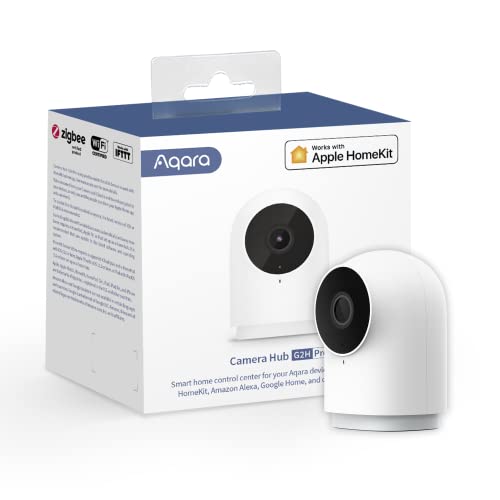
The Aqara G2H Pro Zigbee Hub is an indoor camera and Zigbee 3. 0 hub rolled into one, designed to integrate seamlessly with Apple HomeKit. It’s ideal for those who want to connect and automate up to 128 Aqara Zigbee devices, while also keeping an eye on their home with 1080p HD video and night vision.
The built-in two-way audio means you can talk to family or visitors, adding an extra layer of convenience and peace of mind.
In everyday use, this hub feels reliable and straightforward. Setting up automation rules for sensors, lights, and cameras is quick, and the HomeKit Secure Video support means your privacy is protected at every step. You won’t need to worry about complicated connections—just set it up, add your devices, and enjoy a more connected, secure home.
- Strengths:
- Supports HomeKit Secure Video for local processing and privacy
- Can act as a Zigbee hub for up to 128 devices
- Wide device compatibility: Alexa, Google Assistant, IFTTT
- Flexible storage: iCloud, microSD, or NAS
- Encrypted data and WPA3 Wi-Fi support
- Limitations:
- Requires 2.4GHz Wi-Fi (no 5GHz support)
- Power adapter and microSD card not included
- Some advanced storage features need extra setup
Who This Hub Fits Best
If you’re invested in the Apple HomeKit ecosystem and want to expand your smart home with Zigbee sensors, the Aqara G2H Pro is a dependable choice. It’s especially helpful for those who value privacy and want local video processing, or need an easy way to track security events and automation triggers in one place.
However, if you require 5GHz Wi-Fi or plan to use advanced storage options without extra setup, you may want to consider alternatives. For most users, though, the setup is simple and the features are robust. My tip: set up activity zones to cut down on unnecessary alerts, and rest assured your data is encrypted and private by default.
Meross Smart Power Strip For Homekit
The Best Zigbee Hub for Apple Homekit users who want to control multiple devices seamlessly with voice or app integration.

The meross Smart Power Strip brings together four individually controlled AC outlets and four USB ports in one neat device, giving Apple HomeKit users simple, remote control over everyday electronics. This power strip solves the hassle of managing multiple gadgets with one plug, offering compatibility not only with HomeKit and Siri, but also Alexa, Google Assistant, and SmartThings for broader smart home flexibility.
In daily life, you can easily schedule or voice-control lamps, chargers, or office accessories without leaving your seat. The flat, compact design fits discreetly on desks or behind furniture, and setup through the Home or Meross app is straightforward. I found the confidence of being able to check or turn off devices remotely reassuring, especially when I’m away from home.
- Strengths:
- Works natively with Apple HomeKit for true smart home integration
- Four AC outlets can be controlled individually, USB ports as a group
- No hub required—runs on your WiFi network
- Reliable safety features: ETL and FCC certified, flame-retardant build
- Timer and scheduling support for energy savings
- Limitations:
- Remote HomeKit control requires an Apple TV or iPad as a bridge
- Only supports 2.4GHz WiFi (not 5GHz only networks)
- USB ports are group-controlled, not individual
Is This Power Strip Right For You?
If you want reliable, Apple HomeKit-compatible power control for several devices at once, this meross strip is a practical choice—especially for home offices, entertainment centers, or bedside setups. It’s ideal if you already use Siri or HomeKit and want to avoid extra hubs or complex installations.
However, if you need Zigbee-specific support, or require each USB port to be controlled separately, you might want to explore other options.
This device takes the stress out of wondering if you left something on, and the timer/schedule features add peace of mind. Tip: Set up “scenes” in the Home app for routines like bedtime or leaving home. You can trust it’s safe and simple, even if you’re not a tech expert.
Goolinx Zigbee 3.0 Usb Hub
Best Zigbee Hub for Apple Homekit users seeking a reliable, privacy-focused, and flexible smart home coordinator for local automation.

The GooLinx Zigbee 3. 0 USB Hub is a compact and powerful solution for anyone looking to consolidate their smart devices and eliminate dependence on cloud-based hubs. Thanks to its pre-flashed firmware and native plug-and-play support for Linux-based systems, setup is straightforward and stress-free—especially for Home Assistant or Zigbee2MQTT users.
If you value privacy and want to keep your automations local, this dongle ensures that all device communications stay within your home network.
In daily use, the GooLinx dongle delivers a robust, rock-solid signal throughout large or multi-story homes, even in spaces challenged by Wi-Fi interference. Its aluminum housing and enhanced output power mean you can trust your smart devices to stay connected and responsive, without lag or dropped automations.
Whether you’re a beginner or an advanced user, you’ll appreciate the confidence and control this hub brings to your smart home setup.
- Strengths:
- Plug-and-play for Linux/Raspberry Pi (Home Assistant, Zigbee2MQTT, openHAB)
- All-local control: no cloud required, no lag
- Excellent range and stability for large homes
- Upgradeable as a router for mesh network expansion
- No vendor lock-in; works with many Zigbee devices
- Considerations:
- Requires manual driver install for Windows/macOS
- Not an out-of-the-box Apple Homekit controller (requires Home Assistant integration)
| Feature | Details |
|---|---|
| Platform Support | Linux, Raspberry Pi (native); Windows/macOS (manual driver) |
| Local Control | Yes (no cloud required) |
| Direct Device Capacity | Up to 40 (expandable to 100+ with mesh) |
| Coordinator/Router Mode | Coordinator by default; can be flashed as router |
Is This The Zigbee Hub For You?
If you want a privacy-first Zigbee hub that puts you in complete control, the GooLinx Zigbee 3. 0 USB Hub is a solid fit—especially if you’re running Home Assistant or another open-source platform with Apple Homekit support. It’s ideal for DIYers, tinkerers, or anyone who wants reliable, local device automation without the ongoing stress of internet outages or cloud lock-in.
Those looking for a true plug-and-play Apple Homekit hub without any setup may want to look elsewhere, as this dongle requires Home Assistant or similar software as a bridge. For everyone else, it eliminates the confusion of multiple hubs and the worry about privacy leaks. A practical tip: for maximum stability, install on a Raspberry Pi running Home Assistant and keep the dongle away from Wi-Fi routers. Trust that your automations will always run, even if your internet doesn’t.
Sonoff Zigbee 3.0 Usb Dongle Plus
The Best Zigbee Hub for Apple Homekit for smart home enthusiasts who want a flexible and high-performance solution compatible with major platforms.

The SONOFF Zigbee 3. 0 USB Dongle Plus is a compact and powerful Zigbee gateway that brings advanced smart home device control to your Apple Homekit setup. It solves the challenge of integrating various Zigbee devices from brands like Philips Hue, Aqara, and IKEA Tradfri, all through a single USB stick that works with Home Assistant, Zigbee2MQTT, and openHAB.
Its EFR32MG24 chip ensures stable automation and reliable sub-device management, making it a practical choice for tech-savvy users.
In real-life use, the small enclosure and bundled USB extension cable make it easy to find the best spot for strong signal coverage—no more fussing with unstable connections or interference. You can switch between coordinator, router, or Thread RCP modes with flexible firmware flashing, giving you full control over your smart home network as your needs change.
- Pros:
- Wide compatibility with popular Zigbee platforms and devices
- Strong signal and coverage thanks to the enhanced antenna
- Easy firmware updates for switching roles
- Compact and easy to place anywhere with the extension cable
- Limitations:
- No built-in Homekit support—requires integration through a compatible platform
- USB port required on your hub or server
Who Will Appreciate This Zigbee Hub?
If you want a flexible, robust Zigbee solution that works seamlessly with Home Assistant, Zigbee2MQTT, and can be integrated with Apple Homekit, this dongle is a strong fit. It’s ideal for anyone who already has or plans to use a home automation platform and likes the freedom to expand or reconfigure their setup.
If you want an out-of-the-box Homekit hub with native support, you may prefer a more specialized device.
This hub takes the guesswork out of compatibility and signal issues, letting you focus on automating your home instead of troubleshooting. For best results, use the included USB extension cable to reduce interference and ensure a rock-solid connection—giving you peace of mind as your smart home grows.
Aqara Door And Window Sensor T1
For anyone seeking the Best Zigbee Hub for Apple Homekit, this sensor is ideal for those who want seamless security and smart automation in their Apple-powered home.

The Aqara Door and Window Sensor T1 is a compact wireless contact sensor designed to enhance your smart home’s security and automation. Perfect for Apple HomeKit users, it instantly notifies you if a door or window opens, helping you stay aware and in control of your home’s safety.
Note that it requires an Aqara Hub (sold separately) and only works with Aqara-branded hubs, not with other brands.
In daily use, the sensor is unobtrusive and reliable, fitting neatly on most doors, windows, drawers, or cabinets. With its hands-free compatibility with Apple HomeKit and Alexa, you can easily check your home’s entry points without lifting a finger—giving you confidence whether you’re home or away.
- Strengths:
- Seamless integration with Apple HomeKit and Alexa
- Discreet, mini design fits almost anywhere
- Instant security alerts and automation triggers
- Limitations:
- Requires Aqara Hub (sold separately)
- Not compatible with SmartThings or other-brand hubs
- Works only on surfaces that are flat and adhesive-friendly
Is This The Right Sensor For You?
If you’re committed to the Apple HomeKit ecosystem and want a straightforward way to monitor entry points, this sensor is a great fit—especially if you already have or plan to get an Aqara Hub. It’s best suited for those who value reliable, instant notifications and easy automation for everyday security needs.
Those using other smart home hubs or needing broader compatibility might want to look elsewhere. For everyone else, you’ll find this sensor removes a lot of the worry about whether windows or doors are left open. Tip: Place your Aqara Hub centrally to maximize connection stability for all your sensors. Once set up, you can trust that you’ll always know your home’s status—no extra stress needed.
Haozee Zigbee Door & Window Sensor
Best Zigbee Hub for Apple Homekit users looking to add reliable, real-time door and window monitoring to their smart home setup.

The Haozee Zigbee Door & Window Sensor is a compact wireless detector designed for smart homes that want reliable entry monitoring. By connecting through a Zigbee hub, it lets you keep tabs on doors and windows, sending instant alerts whenever they’re opened—helping prevent unexpected entries and boosting your home’s security.
With its easy, drill-free installation and long battery life, this sensor is ideal for renters, homeowners, or anyone who wants hassle-free security. It integrates smoothly with systems like Home Assistant or SmartThings, making daily use feel seamless and dependable, so you can focus on what matters without worrying about your home’s entry points.
- Strengths:
- Fast, real-time notifications for door/window status changes
- Simple setup with included adhesive tape—no tools required
- Battery-operated design for flexible placement
- Works with popular smart home platforms via Zigbee2MQTT
- Limitations:
- Requires a compatible Zigbee hub (not included)
- Some setup knowledge needed for integration with Apple Homekit via Home Assistant
Is This Sensor Right For You?
If you want to add reliable door and window security to a smart home powered by the best Zigbee Hub for Apple Homekit, the Haozee sensor is a solid choice—especially if you value a no-drill, renter-friendly install. However, if you don’t already use a Zigbee hub or aren’t comfortable with a bit of smart home integration, you may want to consider an all-in-one device or native Homekit accessory.
This sensor takes the stress out of monitoring your home’s entry points, sending clear notifications so you always know what’s happening. For best results, place the sensor where you most want peace of mind—front doors, patio entrances, or office windows—and rest easy knowing you’ll get an alert if anything changes.
Meross Smart Power Strip For Homekit
The Best Zigbee Hub for Apple Homekit for users seeking a versatile smart power strip that integrates seamlessly with Apple’s smart home ecosystem.

The Meross Smart Power Strip is a multi-outlet surge protector designed to bring smart control to your home or office devices. It solves the common problem of managing multiple electronics by offering 4 individually controlled AC outlets and 4 USB ports, all compatible with Apple HomeKit and other major voice assistants.
A key feature is its HomeKit remote control capability, which allows seamless integration and control via Apple’s ecosystem.
In daily use, this power strip offers convenience and peace of mind by enabling voice commands and scheduling for connected devices. I found it easy to set up and reliable in operation, which saves time and avoids the hassle of manually switching devices on and off.
Its safety certifications add an extra layer of confidence when powering multiple devices.
- Supports 4 individually controlled AC outlets and 4 USB ports charging up to 4.0A
- Works natively with Apple HomeKit, Siri, Alexa, Google Home, and SmartThings
- No hub required, operates on 2.4GHz or dual-band WiFi
- Includes scheduling and timer functions with sunrise/sunset settings
- Constructed with flame retardant PC material and certified for safety (ETL, FCC)
Who Should Consider The Meross Smart Power Strip
This product is ideal for Apple HomeKit users who want to extend smart control to multiple devices without adding a separate Zigbee hub. It’s especially useful for those needing a combination of AC outlets and USB ports in one compact, reliable unit.
If you rely heavily on voice commands or remote control for your smart home, this power strip reduces complexity and helps manage energy efficiently.
If you do not have Apple HomeKit or prefer Zigbee-specific devices, this may not be the best fit. Also, users who require Zigbee mesh networking features should consider dedicated Zigbee hubs instead. For others, this device removes confusion about compatibility and simplifies smart device control in one trusted product.
One practical tip: to fully utilize HomeKit remote control, ensure you have a HomePod, Apple TV, or iPad set up as a HomeKit bridge. Rest assured, the Meross power strip offers a stable and secure connection, backed by safety certifications, so you can confidently integrate it into your smart home setup.
Abode 4-piece Smart Security Hub
Best Zigbee Hub for Apple Homekit users seeking a flexible, all-in-one security and smart home solution that is simple to expand and easy to install.
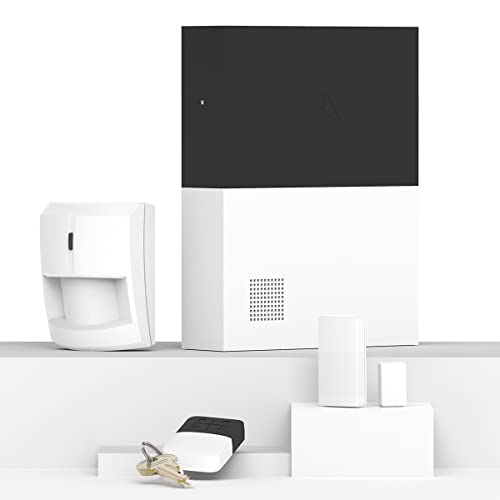
The Abode 4-Piece Smart Security Hub is a versatile home security starter kit that doubles as a powerful Zigbee and Z-Wave hub, fully certified for Apple HomeKit. It’s ideal for anyone who wants to unify security and smart home automation, with seamless iOS control and integration.
Its standout feature is Apple HomeKit certification, allowing direct use via the Home app and Siri, which is rare among DIY security systems.
Setting up the Abode system feels straightforward even for first-time users, thanks to its wireless design and clear instructions. Expanding the system with extra sensors or smart devices is quick, and everything operates reliably, so you don’t have to second-guess your setup.
The hub’s backup battery and ethernet connectivity add reassurance, even during outages.
- Strengths:
- Full Apple HomeKit compatibility for easy iOS integration
- Supports Zigbee and Z-Wave accessories alongside Abode’s ecosystem
- Expandable with additional security sensors or cameras
- Optional 24/7 professional monitoring for added peace of mind
- Simple, tool-free DIY installation
- Limitations:
- No built-in camera (must add separately if needed)
- Professional monitoring requires a subscription
Who Will Find This Hub Most Useful?
If you’re an Apple HomeKit user who wants a security system that doubles as a smart home hub—without the hassle of complex setup—the Abode 4-Piece Smart Security Hub is a reliable pick. It’s especially well-suited for those who want to expand over time, add more sensors, or combine smart locks and lights within one ecosystem.
This isn’t the right fit if you want a system with built-in cameras out of the box, or if you prefer a security hub that doesn’t require a subscription for advanced monitoring. For everyone else, the confidence of Apple HomeKit certification and the ability to centralize Zigbee and Z-Wave devices mean less worry about compatibility or security gaps. Tip: Use the iOS Home app to automate routines—like arming your system when you leave home—for extra convenience.
Useelink Zigbee Smart Power Strip
The Best Zigbee Hub for Apple Homekit choice for homeowners who want to seamlessly integrate multiple devices into their smart ecosystem with reliable automation and voice control.

The UseeLink ZigBee Smart Power Strip is a multi-outlet surge protector designed for smart home setups that rely on Zigbee-compatible hubs. If your Apple Homekit environment includes a Zigbee hub, this power strip gives you four individually controllable outlets and four USB ports (including fast-charging USB-C) to keep all your devices powered, protected, and easily managed.
Its standout feature is broad compatibility with leading Zigbee hubs and voice assistants, letting you automate or control appliances with a simple command.
In everyday use, this power strip offers both convenience and peace of mind: scheduling, remote control, and surge protection mean your devices are safer and your routines are streamlined. With voice activation and app control, it’s easy to manage everything from lamps to chargers without getting up or fiddling with switches. I appreciate how it simplifies automating small appliances, especially during busy mornings or when away from home.
- Strengths: Supports eight devices, works with major Zigbee hubs (including Echo devices with Zigbee), offers individual outlet control, and features surge protection for extra safety.
- Limitations: Requires a Zigbee hub (not included); compatibility with Apple Homekit depends on the hub you use, so double-check your current setup.
Should You Choose This Power Strip?
If you already have a Zigbee hub compatible with Apple Homekit, this smart power strip is a practical addition for automating and protecting multiple devices in one spot. It’s ideal for those who want to expand their smart setup without juggling separate plugs or risking device overloads.
However, if you don’t use Zigbee or rely solely on WiFi-based smart platforms, you’ll need to consider another option.
This product removes the guesswork from managing several devices, especially in shared living spaces or home offices. For the smoothest experience, make sure your hub is on the supported list before purchase. Once set up, you can confidently schedule, protect, and control your devices—no tech headaches required.
What To Consider Before Selecting Zigbee Hubs For Apple Homekit
Think about how much you want to mix and match brands in your setup. Consider if you value local control or rely on cloud-based features. Decide if you prefer simple plug-and-play or are comfortable with some manual setup. Your choice often comes down to balancing privacy, compatibility, and how much time you want to spend tinkering.
Who May Not Benefit From These Zigbee And Homekit Solutions
- If you don’t want to use a separate hub, these options may frustrate you.
- Buyers wanting “set and forget” simplicity with zero troubleshooting might feel overwhelmed.
- Those with only WiFi devices or who don’t use Apple HomeKit may find these products unnecessary.
- If you dislike occasional app updates or firmware flashing, reconsider.
- Renters who cannot mount sensors or dislike small devices may not find these suitable.
Best Zigbee Hub For Apple Homekit: Buyer Questions Answered
Do I Need A Specific Hub To Use Zigbee Devices With Apple Homekit?
Yes, most Zigbee devices require a compatible hub that bridges to HomeKit. Not every Zigbee hub works with Apple’s ecosystem, so check for official compatibility before purchasing.
Can I Mix Zigbee Devices From Different Brands In One Homekit Setup?
Often you can, but some hubs and devices have limited cross-brand support. It’s best to confirm device compatibility with your chosen hub and HomeKit before buying.
Will These Products Work If My Internet Goes Down?
Many Zigbee hubs and devices offer local control, which continues to function without internet. However, remote app access and voice assistants may stop working until connectivity returns.
Is Firmware Updating Or Manual Driver Installation Required?
Some Zigbee USB adapters and hubs need driver installation or firmware updates, especially for advanced setups. If you prefer to avoid this, look for hubs with native HomeKit support out of the box.
Can I Use These Zigbee Hubs And Sensors If I Only Have Google Or Alexa?
While some devices support Google and Alexa, integration levels vary. If HomeKit is not your focus, you may find simpler WiFi solutions more suitable.
Are There Privacy Risks With Zigbee Hubs?
Zigbee is generally local and private, but some hubs send data to the cloud. If privacy is a concern, choose a hub that supports full local control and review its policies.
What Should I Do If A Device Isn’t Showing Up In Homekit?
Check that your hub and device firmware are up to date, and that your hub is properly configured as a HomeKit bridge. Some devices require an extra step in the hub’s app to appear in HomeKit.
Making A Steady Choice In Zigbee Hubs And Homekit Integration
Finding the right Zigbee hub for Apple HomeKit can feel complex, but it’s mostly about matching your comfort level with setup, privacy, and compatibility. You don’t need to chase perfection—just pick what fits your space and how much you want to be involved in the details.
With a little patience, you’ll build a smart home that works the way you want. Trust that your choice, once made thoughtfully, will serve you well for years to come.