
Trying to control the TV shouldn’t be stressful, but for many older adults, complicated remotes can make something simple feel overwhelming. Tiny buttons, confusing layouts, and too many functions often get in the way. Family members may end up re-programming remotes or searching for lost instructions just to change a channel.
Choosing the right remote for elderly users isn’t obvious. Many look similar at first glance, but differ in key ways—like button size, compatibility, and setup steps. Some work with only certain TVs, others need the original remote to “learn” commands, and features like backlighting or clear labeling are hit-or-miss.
There are trade-offs between simplicity and flexibility, and it’s easy to get lost in technical details or buy something that doesn’t solve the real problem.
This guide will help you sort out what matters most so you can pick a remote that actually fits the needs of an elderly user—whether it’s for yourself, a parent, or someone you care for.
What To Focus On When Choosing
Think about who will use the remote day to day. Is eyesight or dexterity a concern? Will they need to control more than one device? Consider if the person will set up the remote themselves or need help. Many remotes promise “universal” use, but check if they work with your specific TV brand.
Pay attention to how easy it is to press buttons and whether the design feels comfortable to hold and see.
Common Mistakes To Avoid
People often buy remotes that are too complex, hoping extra features will make things easier. In reality, fewer buttons usually means less confusion. Another common mistake is overlooking setup—some remotes require the original device remote for programming, which isn’t always available.
Double-check compatibility and whether batteries are included or easy to insert.
Below, you’ll find a selection of remotes chosen for their simplicity, clear buttons, and practical features. Each one suits different needs and situations, so you can match the right remote to the person who will use it most.
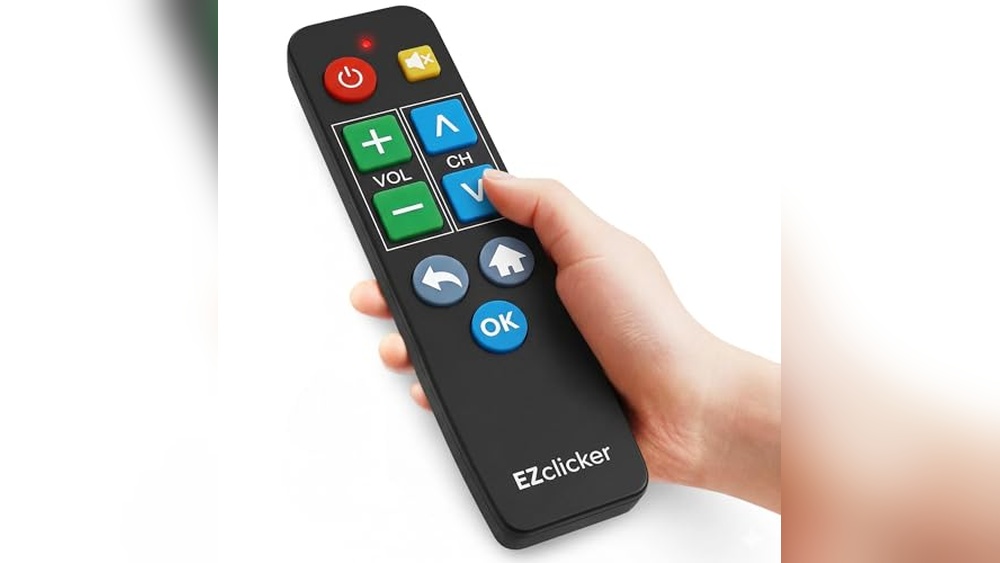
Ezclicker Big Button Tv Remote
This Best Remote Control for Elderly offers a simple, stress-free way for seniors to manage their TV without confusion or tiny buttons.

The EZClicker Big Button TV Remote is designed to help seniors, people with dementia, or anyone with limited vision or dexterity easily control their television. Its large, tactile buttons and straightforward layout eliminate the confusion of standard remotes, making daily TV use simple and frustration-free.
In everyday use, the extra-large buttons and lightweight feel make it comfortable to hold and operate. Users can confidently change channels and adjust volume without straining to see or press tiny keys. The programming process is quick and doesn’t require technical skills, creating a sense of independence and ease.
Why It Stands Out For Seniors
- Extra-large buttons are easy to see and press
- Simple controls reduce confusion
- Quick setup with just a few steps
- Lightweight and compact for easy handling
- Works with most major TV brands
- Ideal for people with vision or memory challenges
What To Keep In Mind
- Not compatible with streaming devices or cable boxes
- Batteries (2xAAA) are not included
- Limited to TV controls only
Who This Fits Best
The EZClicker Big Button TV Remote is a great fit for elderly users, especially those who find modern remotes overwhelming. It removes the hassle of complicated controls and gives back control and clarity, making watching TV enjoyable again. If you want to avoid the guesswork and constant help requests, this remote delivers peace of mind.
A quick tip: have the TV model handy to check compatibility before programming, and use fresh AAA batteries for best results. This simple remote means fewer surprises and more independence for daily TV use. If I had to recommend one remote for someone who values simplicity, this would be it.
| Best for | Why |
|---|---|
| Seniors with vision or dexterity issues | Large, tactile buttons are easy to use and see |
| People with memory challenges | Simple layout reduces confusion and mistakes |
| Homes with just a TV (no streaming box) | Universal for major TV brands, no extra device clutter |
| Caregivers seeking reliable, easy solutions | Reduces need for tech support and repeated instructions |
Ezclicker Samsung Big Button Remote
The EZClicker Samsung Big Button Remote is the Best Remote Control for Elderly, designed to simplify TV use with large, easy-to-press buttons for better accessibility.

The EZClicker Samsung Big Button Remote is a replacement remote control designed specifically for Samsung TVs. It addresses the common challenges seniors face with small buttons and complex remotes by featuring extra-large buttons and tactile feedback for easier navigation.
Using this remote feels straightforward and dependable. It requires no programming—just insert batteries and start controlling the TV confidently. Its compact size makes it comfortable to hold, reducing frustration for elderly users who may have limited dexterity or vision.
Key Benefits For Seniors
- Extra-large buttons improve visibility and ease of pressing.
- Compatible exclusively with Samsung TVs for reliable operation.
- No setup or programming needed—works immediately after inserting batteries.
- Designed with tactile feedback to aid users with limited dexterity.
- Compact and lightweight, making it easy to handle and store.
- Ideal gift for seniors, people with dementia, or visual impairments.
Considerations Before Buying
- Only compatible with Samsung TV models, not with streaming devices or other brands.
- Requires two AAA batteries, which are not included.
- Limited to basic TV controls; may not support advanced features on newer models.
Why This Works Well
This remote is best suited for seniors or anyone who needs a simple, no-fuss remote for a Samsung TV. It removes the stress of complicated remotes by focusing on large buttons and ease of use.
By eliminating programming and pairing steps, it saves time and hassle. A quick tip: keep the remote in a consistent spot to avoid misplacement and make daily use smoother. Its reliable design offers peace of mind with fewer surprises during operation.
| Best for | Why |
|---|---|
| Elderly users with vision or dexterity challenges | Large buttons and tactile feedback simplify TV control |
| Caregivers buying gifts for seniors | Easy setup and intuitive design reduce frustration |
| Owners of Samsung TVs seeking a simple replacement remote | Guaranteed compatibility and immediate use without programming |
Backlit Big Button Universal Remote
The Best Remote Control for Elderly offers simplified navigation with easy-to-read buttons and backlighting for comfortable use.

The Backlit Big Button Universal Remote is designed to make TV control easy for seniors and those who want a straightforward device. Its large, clearly labeled buttons and simple layout reduce confusion and help users find what they need fast.
The backlighting feature ensures every button is visible in low-light conditions.
Using this remote feels reassuring—no tiny buttons or complicated menus. Pairing is quick, though you’ll need your old remote for setup. Once programmed, it responds reliably from a distance and keeps entertainment routines simple. For anyone tired of squinting or hunting for controls, this remote brings consistency and confidence.
Benefits For Everyday Tv Use
- Large, backlit buttons are easy to see and press
- Works with most TV brands and common IR devices
- Quick pairing process with old remote
- Fast response time for smooth operation
- Ideal for those with vision or dexterity challenges
- Durable design tested for frequent use
Consider Before Buying
- Requires your original remote to program
- Number buttons only work if your old remote had them
- Batteries not included
- Limited to IR devices (not Bluetooth or smart TVs)
Where This Shines
This remote is best for elderly users, anyone with limited vision, or those who want a no-fuss device for everyday TV control. It eliminates the stress of small, confusing remotes and helps make watching TV feel simple again. The bright backlit buttons mean you won’t fumble in the dark.
Pairing is straightforward, but be sure to keep your old remote handy for setup. Once programmed, you can count on reliable performance and quick responses. For families, this remote adds peace of mind—no missed programs or frustration over lost controls.
If you prefer straightforward solutions, this is a solid option.
| Best for | Why |
|---|---|
| Seniors needing simple controls | Large, backlit buttons and easy layout reduce confusion |
| Low vision users | Backlit feature helps see buttons in dim rooms |
| Multi-device households | Works with TVs, DVD players, and set-top boxes using IR |
| Anyone tired of complicated remotes | Streamlined design and fast setup for less hassle |
Large Button Universal Tv Remote
As the Best Remote Control for Elderly, this remote makes watching TV simpler and less stressful for seniors and anyone with low vision.
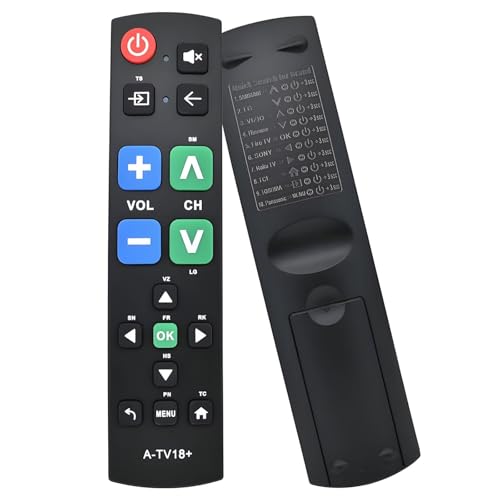
This Large Button Universal TV Remote is made for anyone who finds standard remotes confusing or hard to read. With its simple layout and extra-large buttons, it removes the hassle of tiny, crowded controls. If you want a remote that just works—without extra steps or unnecessary features—this is a practical option.
Using this remote feels straightforward and reliable. It lets you adjust channels or volume without squinting or second-guessing. The lightweight build is easy to hold, so you can use it comfortably every day. For anyone who values independence at home, it adds real confidence to daily TV watching.
Why Users Prefer This Remote
- Large, clear buttons are easy to see and press
- Simple design reduces confusion for seniors
- Works with most major TV brands
- Comfortable grip and lightweight body
- Sturdy construction for everyday use
- Ideal for low vision users
Consider Before You Buy
- No advanced features for smart TVs
- Basic look may not appeal to everyone
- May need setup for some TV models
What I’d Tell A Friend
If someone in your family struggles with tiny remote buttons or gets confused by too many options, this remote is a thoughtful solution. It’s best for seniors, people with limited vision, or anyone who wants TV controls to be less of a daily frustration.
The large buttons and simple layout eliminate guesswork and lower the chance of mistakes.
To get the best results, check your TV’s compatibility before buying—most brands are covered, but a quick look saves time later. I like that it’s easy to use right out of the box, so family members can relax and enjoy TV without asking for help.
This remote brings peace of mind by making everyday entertainment more accessible and reliable.
| Best for | Why |
|---|---|
| Seniors with vision challenges | Large buttons are easy to see and press |
| Anyone overwhelmed by complex remotes | Simple layout avoids confusion and misclicks |
| Families with multiple TV brands | Universal compatibility covers most TVs |
| Everyday home use | Lightweight, durable, and comfortable to hold |
Easymote Universal Big Button Tv Remote
Best Remote Control for Elderly thanks to its large, backlit buttons and simple setup for stress-free TV and cable box use.
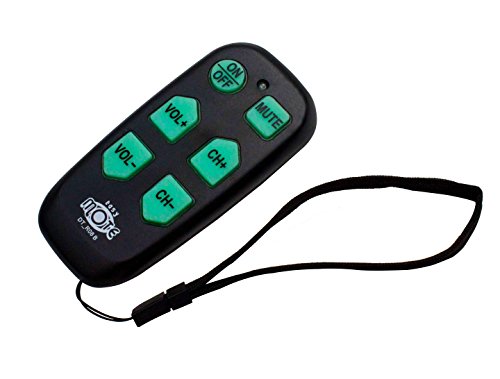
The EasyMote Universal Big Button TV Remote is designed for anyone who wants a straightforward way to control their TV and cable box. Its oversized, backlit buttons make it easy to see and use, even in low light. With just six basic controls, it removes the confusion of complicated remotes.
Using this remote feels reassuring and consistent. The strong wrist strap prevents misplacement, and setting up is simple with quick code search and learning mode. For elderly users or anyone with impaired vision, the experience is smooth—no fumbling or second-guessing, just reliable control every day.
Why This Remote Stands Out
- Large, brightly backlit buttons are easy to see and press.
- Controls both TV and cable box with one device.
- Simple handheld design suits assisted living and elderly care.
- Quick search and learning mode for easy setup and customization.
- Strong wrist strap helps prevent loss or dropping.
- Works with all major IR TVs and set-top boxes.
- Thoughtful gift for seniors or those with low vision.
Things To Consider Before Buying
- Not suitable for users who need advanced features or many buttons.
- Batteries are not included.
- Requires IR activation for certain cable boxes like Xfinity and Dish.
Who This Fits Best
This remote is ideal for seniors, caregivers, or anyone in assisted living who wants the simplest way to watch TV. It removes the stress of confusing remotes and lets you focus on enjoying your shows. If losing remotes is a worry, the wrist strap adds confidence.
For best results, use the quick search to set it up in seconds, and try the learning mode to personalize buttons for your routine. You’ll gain peace of mind knowing it works reliably and isn’t easily misplaced. If I had a loved one needing easy TV control, this would be my go-to option.
| Best for | Why |
|---|---|
| Assisted living residents | Simple interface and big buttons reduce confusion. |
| People with impaired vision | Backlit, large text makes controls easy to see. |
| Caregivers seeking reliable TV control | Quick setup and minimal buttons save time. |
| Those prone to losing remotes | Strong wrist strap helps keep the remote nearby. |
Ge Big Button Universal Remote
This is the Best Remote Control for Elderly offering large buttons and easy multi-device control to simplify TV and media use.

The GE Big Button Universal Remote is designed to control up to two devices, including TVs and streaming players, with an easy-to-read large button layout. Its ergonomic shape and simple setup make it an excellent choice for seniors or anyone who prefers a straightforward remote without complicated features.
Using this remote feels comfortable and reassuring thanks to its big buttons and clear layout, which reduce confusion and mistakes. Whether at home or in assisted living settings, users can confidently navigate their entertainment devices without frustration or guesswork.
Key Benefits For Seniors
- Large, readable buttons ideal for impaired vision
- Controls two devices, simplifying multiple remotes into one
- Ergonomic design comfortable to hold for extended use
- Easy automatic and direct code setup with preprogrammed Samsung support
- Master volume control works across devices
- U.S.-based technical support available for help
Considerations Before Buying
- Limited to controlling only two devices
- Requires two AA batteries, which are not included
- Basic functionality without advanced smart features
Who This Remote Works For
This remote is best suited for elderly users who want a no-fuss, easy-to-read device to manage their TV and one other media device. It removes the stress of complicated remotes by focusing on simplicity and comfort. A quick tip is to take advantage of the master volume control to avoid adjusting each device individually, which saves time and frustration.
The reliable design and accessible support offer peace of mind, reducing surprises when using entertainment systems. For those valuing straightforward use over high-tech options, this remote strikes a practical balance.
| Best for | Why |
|---|---|
| Seniors with vision difficulties | Large buttons and simple layout improve readability and ease of use |
| Users needing to control two devices | Supports TV plus one additional device like a soundbar or cable box |
| Care facilities and assisted living | Simple setup and operation reduce confusion for multiple users |
| Anyone preferring basic remote functions | Focuses on essential controls without complex menus or smart features |
Myhgrc Big Button Universal Remote
Best Remote Control for Elderly with oversized buttons and backlit design, ideal for simplifying TV use for seniors.
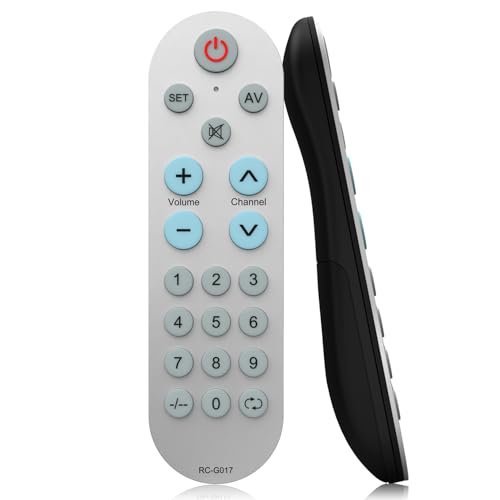
The MYHGRC Big Button Universal Remote is designed for seniors and anyone seeking a straightforward TV control experience. It solves the problem of complicated remotes by offering large, easy-to-see buttons and a backlit layout. The learning function lets you customize every button with your original remote, making it fit personal needs.
Using this remote feels comfortable and reassuring, especially for those who struggle with tiny keys or confusing layouts. The setup is simple, and once programmed, it delivers consistent control with less frustration. Seniors can confidently navigate their TV without second-guessing which button to press or struggling with dark rooms.
What Makes This Remote Stand Out
- Large, backlit buttons for easy visibility
- Works with hundreds of TV brands
- Customizable buttons via learning function
- Simple setup with clear instructions
- Reduces confusion for elderly users
- Responsive after-sale support
Points To Consider Before Buying
- Original remote required for programming
- No batteries included in the package
- Learning setup may take a few minutes
- Limited to TV functions (not for all devices)
Who This Fits Best
This remote is best for seniors, elderly family members, or anyone who prefers simplicity over complex controls. It helps remove the stress and guesswork of using modern remotes with too many buttons, providing a straightforward solution for daily TV operation.
If you want a reliable, easy-to-use remote that can be customized for individual needs, this model delivers peace of mind. A quick tip: keep your original remote handy during setup—programming goes much smoother that way. With its big buttons and backlight, users enjoy fewer surprises and more confidence, even in dim lighting.
| Best for | Why |
|---|---|
| Seniors with vision challenges | Large, backlit buttons are easier to see and press |
| Families wanting custom controls | Every button can be programmed to personal needs |
| People frustrated by complex remotes | Simple layout reduces confusion and mistakes |
| Caregivers setting up TV for elderly | Quick setup and responsive support help ensure reliability |
Xgbfh Big Button Universal Remote
The Best Remote Control for Elderly offers easy device switching and large, color-coded buttons for seniors or anyone seeking simple, reliable operation.

The XGBFH Big Button Universal Remote is designed to simplify TV and device control for seniors and those with low or impaired vision. It features large, color-coded, tactile buttons and allows seamless switching between two different devices, making it ideal for anyone who finds traditional remotes confusing or hard to read.
Everyday use feels straightforward, with easy-to-press buttons and simple mode switching for TV or streaming boxes. The layout is uncluttered, reducing mistakes and guesswork, and its compatibility with major TV brands means it works right out of the box for most homes.
This is especially helpful for caregivers or family members looking to make life a bit easier for loved ones.
Why It Makes Tv Control Simpler
- Large, color-coded buttons are easy to see and press
- Switches between two devices at the touch of a button
- Works with most TVs, streaming boxes, and audio receivers
- Designed for seniors, dementia, or impaired vision
- Minimal, uncluttered layout reduces confusion
- Cool design also appeals to younger users
Things To Keep In Mind
- Controls only two devices at a time
- Batteries (AAA) not included
- Some advanced features are hidden or minimal for simplicity
Who This Fits Best
The XGBFH Big Button Universal Remote is a smart pick for seniors, those with memory or vision challenges, or anyone overwhelmed by complex remotes. It cuts out stress and guesswork by focusing on just two devices and clear, tactile controls.
For best results, use the learning function to set up both TV and a streaming box or soundbar, so everything important is covered. This brings peace of mind to caregivers and users, knowing that accidental button presses won’t cause confusion or frustration.
I appreciate how it balances simplicity and flexibility without feeling like a compromise.
| Best for | Why |
|---|---|
| Seniors or elderly with vision difficulties | Large, color-coded buttons are easy to see and feel |
| Users with dementia or Alzheimer’s | Simple controls reduce confusion and accidental changes |
| Caregivers setting up devices for loved ones | Quick setup and reliable compatibility with major TV brands |
| Anyone frustrated by complex remotes | Minimal button layout for straightforward use |
Luckystar Big Button Universal Remote
Best Remote Control for Elderly thanks to its large, easy-to-read buttons and no programming setup.

The LuckyStar Big Button Universal Remote is designed for people who want a simple way to control their TV without hassle. Its oversized buttons are easy to see and press, making it a good choice for those with limited vision or dexterity.
No programming is needed—just insert batteries and it works with many popular TV brands.
Using this remote means less confusion and frustration when watching TV. Its natural, comfortable shape fits well in the hand, and it’s easy to keep clean. The reliable button layout keeps things straightforward, so users feel more in control and less likely to press the wrong button.
Easy-to-use Benefits
- Extra-large buttons for better visibility and accuracy
- No setup required—simply add batteries
- Works with Lg, Vizio, Sharp, Zenith, Panasonic, Philips, and RCA TVs
- Automatic search covers 1000+ TV brands
- Comfortable design, easy to hold and clean
- One-year manufacturer warranty and support
Potential Limitations
- May not control the newest TV models for some brands
- Batteries are not included
- Limited to TV use—not for streaming boxes or other devices
The Simple Use Case
This remote is best for elderly users or anyone who needs a straightforward TV control solution without extra steps. It removes the stress of programming codes or dealing with tiny, confusing buttons. If you’re helping a parent or grandparent, remind them to check their TV brand and use the automatic search if needed.
The one-year warranty adds peace of mind, making it a dependable daily tool. As someone who’s helped family members with remote confusion, I appreciate how this model prioritizes clarity and ease. Place it somewhere visible, and TV time becomes much simpler.
| Best for | Why |
|---|---|
| Seniors with vision or dexterity issues | Large buttons are easy to see and press |
| Anyone wanting no-fuss TV control | No programming—just add batteries |
| Homes with older TV models | Wide compatibility with major TV brands |
| Caregivers setting up for relatives | Reduces tech support calls and confusion |
Universal Big Button Tv Remote For Seniors
The Best Remote Control for Elderly offers large, easy-to-press buttons and simple controls for stress-free TV watching.

This remote is designed for seniors, caregivers, and anyone who needs a simple way to control their TV. Its big, color-coded buttons make it easy to use, even for those with low vision or limited dexterity. With just a few essential functions—power, channel, volume, and mute—it removes the confusion caused by extra buttons.
Using this remote feels effortless. The luminous feature helps you find it at night, and the waterproof build adds peace of mind. Setup is straightforward with auto search and learning functions, so you can get started quickly without technical frustration.
It’s consistent and reliable, making everyday TV watching less stressful.
What Makes This Remote Stand Out
- Large, tactile buttons for easy operation
- Simple layout with only essential controls
- Luminous and waterproof for visibility and durability
- Quick setup using auto search and learning functions
- Compatible with most major TV brands
- Dementia-friendly design for stress-free use
- Includes portable cord for convenience
Points To Consider Before Buying
- Not compatible with cable boxes, Fire Stick, or Roku Stick
- Limited to basic TV functions (no advanced controls)
- Batteries are not included in the package
Who This Fits Best
This remote is ideal for elderly users, people with dementia, or anyone who needs a straightforward TV control solution. It removes the hassle of complicated remotes and helps caregivers provide a smoother experience for their loved ones. The luminous feature is especially useful for nighttime use and adds a layer of safety.
If you’re tired of small buttons and confusing layouts, this remote brings reliability and confidence back to TV watching. For best results, make sure your TV is compatible and have AAA batteries ready for setup. I like how it keeps things simple—less to worry about and fewer surprises.
| Best for | Why |
|---|---|
| Seniors with impaired vision | Large, color-coded buttons are easy to see and press |
| Caregivers supporting dementia patients | Simple functions prevent confusion and frustration |
| Anyone wanting a waterproof remote | Luminous and waterproof features offer durability and safety |
| Users with only a TV (not streaming devices) | Designed specifically for TV brands, not cable or streaming boxes |
Buying Guide: Choosing A Big Button Tv Remote
Who Needs A Simplified Remote?
Big button remotes are best for seniors, those with vision or dexterity limitations, and anyone who prefers basic controls. If you often misplace small buttons or struggle with complicated layouts, these models are designed to reduce frustration.
Universal Vs. Brand-specific Remotes
Some remotes work only with specific brands, while others offer broad compatibility. Universal remotes may require setup or learning from your old remote. Brand-specific options tend to work instantly but limit flexibility.
Programming And Setup
Setup methods vary. Some remotes need manual programming or learning, while others work out of the box. Consider your comfort with following instructions and whether you still have your original remote for learning models.
Extra Features: Backlit Buttons And Device Control
Backlit buttons help in low light. Two-device remotes allow control of both TV and another device, like a cable box. Decide if you need only basic TV controls or want extra features.
Common Mistakes To Avoid
- Assuming all remotes work with streaming sticks or cable boxes. Most big button models are for TVs only.
- Overlooking the need for batteries. Many products do not include batteries.
- Not checking compatibility lists. Some remotes may not support newer TV models or all brands.
- Skipping setup instructions. Learning remotes require careful programming using the original remote.
Who Should Avoid These Products?
If you need advanced features, voice control, or smart device integration, these remotes are not suitable. Users with modern streaming platforms or complex home theaters may find them too limited.
Setup And Usage Tips
- Read the manual before starting. Setup steps can vary by model.
- Keep your original remote handy for learning features.
- Test basic functions after setup to ensure compatibility.
- Enable backlight if available for easier use at night.
- Store remotes in a consistent spot to reduce misplacement.
Care And Maintenance Notes
- Clean buttons gently with a dry cloth to prevent dirt buildup.
- Replace batteries promptly when performance drops.
- Keep remotes away from moisture and extreme heat.
- Check for firmware updates only if the manufacturer provides them (rare for basic remotes).
Faq
Will These Remotes Work With Cable Or Satellite Boxes?
Most big button remotes are designed for TVs only. Some models support cable boxes if they use infrared, but not all do.
Do I Need My Original Remote For Setup?
Learning remotes require your original device remote to copy commands. Standard universal remotes may not need it.
Are Batteries Included?
Batteries are not included with most remotes. Check the packaging or product description before purchasing.
Can I Use These Remotes With Streaming Devices Like Roku Or Fire Stick?
No, these remotes generally do not support streaming sticks. They are made for traditional TV control.
How Do I Turn On The Backlight?
Backlit models typically activate lighting by pressing specific button combinations. Refer to the manual for instructions.
What Should I Do If A Button Stops Working?
First, try replacing the batteries. If the issue persists, clean the button area and consult the manual for troubleshooting.
Final Thoughts
Big button TV remotes offer a practical solution for those who value simplicity and ease of use. If you need reliable, straightforward controls and compatibility with common TV brands, these options are worth considering. Take time to review setup needs and compatibility.
With the right choice, daily TV use can become much more comfortable.