
Talking to your computer should be simple, but on Windows 11 it rarely feels that way. Maybe you’ve tried voice typing for emails or wanted to use an assistant for meetings—only to run into awkward limitations, confusing setup steps, or missed words.
If you’ve ever found yourself frustrated by clumsy voice recognition or unclear options, you’re not alone.
The world of voice assistants and dictation tools for Windows 11 is crowded and a bit messy. Some options are built for heavy writers, others act more like general-purpose helpers, and a few try to blend with your existing workflow.
It’s easy to end up with the wrong fit, especially if you’re not sure what matters most for your day-to-day needs. Trade-offs often come down to flexibility versus simplicity, language support versus accuracy, or seamless integration versus extra hardware and apps.
This guide will help you see what really matters when picking a voice assistant for Windows 11, and how to avoid common mistakes. You’ll get clear, practical advice to help you find the best match for your work style—without the confusion.
What Actually Matters When Choosing
Think about how you want to use voice features. Do you need fast, reliable dictation for long documents? Are you looking for hands-free commands across multiple programs? Will you switch between languages or use advanced editing tools? The right choice depends less on specs and more on which problems you want to solve.
Price can signal quality or extra features, but it’s not always the main factor—compatibility and workflow matter more.
Below, you’ll find a mix of leading options, each suited to different kinds of users and situations. These were selected to cover a range of needs, from basic voice input to advanced productivity tools. Review what fits your habits before deciding.
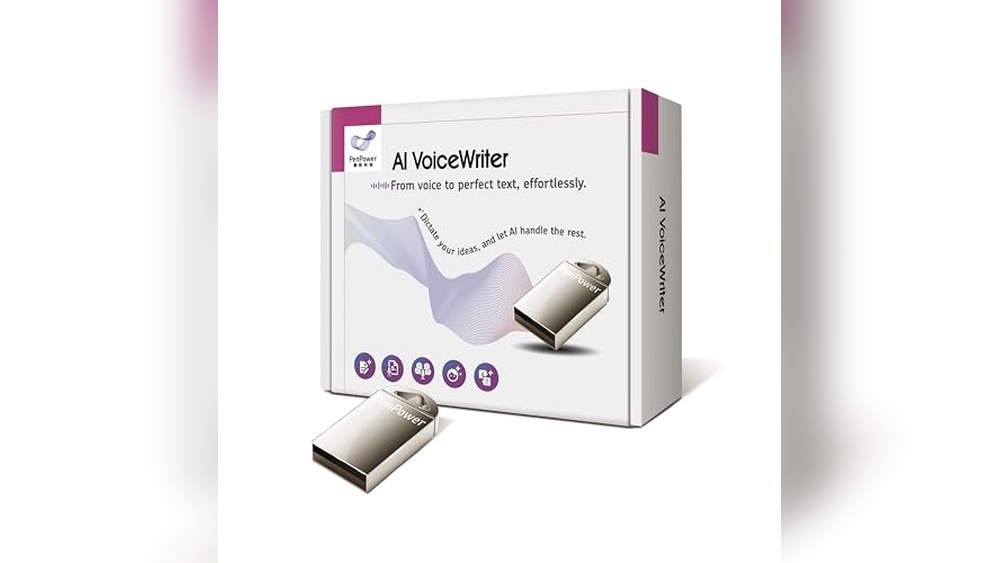
Ai Voicewriter Dictation Assistant
Best Voice Assistant for Windows 11 for hands-free typing and seamless multilingual productivity in desktop apps.

AI VoiceWriter Dictation Assistant makes desktop voice input straightforward for Windows 11 users. It lets you speak naturally and see your words appear instantly, eliminating manual typing and supporting fast, accurate speech-to-text. The USB dongle and mobile app work together, so you can use your phone’s microphone for even clearer dictation.
Using it in daily tasks feels effortless—just place your cursor in any app and start talking. Whether you’re writing emails, editing documents, or composing reports, the built-in AI tools help with proofreading and rephrasing. Switching between languages is quick, and the experience is smooth, reliable, and consistent across supported devices.
Key Advantages For Voice-driven Work
- Real-time voice typing in Windows 11 and Mac desktop apps
- AI-powered proofreading and rephrasing for polished writing
- Mobile app boosts dictation accuracy using phone microphone
- Works in Microsoft Word, Google Docs, PowerPoint, Teams, and emails
- Supports 33 languages for dictation, including major global languages
- Easy to set up and start speaking without complex menus
Things To Consider Before Buying
- Requires Windows 10 or newer, macOS 13 or newer; not for older systems
- USB dongle may be less convenient for laptops without standard USB ports
- AI writing features available only in select languages
Where This Shines
This assistant is ideal for anyone who spends hours typing on Windows 11—especially if you write in multiple languages or need to edit content quickly. It removes the hassle of manual typing, lets you focus on your ideas, and cuts down on repetitive corrections.
For professionals, students, and creators, the real-time voice input saves both time and mental effort.
If you want consistent accuracy, try using the mobile app to leverage your phone’s microphone. This can noticeably improve dictation clarity. With reliable operation and versatile compatibility, you’ll feel confident your words are captured correctly every time. I found the setup refreshingly simple compared to older voice tools.
| Best for | Why |
|---|---|
| Multilingual professionals | Switches easily between languages for global communication |
| Students and content creators | Streamlines writing, editing, and rephrasing tasks |
| Remote workers using desktop apps | Works across Microsoft Office, Teams, and Google Docs |
| Anyone seeking hands-free typing | Removes the need for manual keyboard input |
Avantree Dg45 Bluetooth Adapter
A top pick as the Best Voice Assistant for Windows 11 users needing reliable Bluetooth audio and device connections on modern PCs and laptops.

The Avantree DG45 Bluetooth Adapter adds Bluetooth capability to Windows 11 PCs and laptops, letting you connect Bluetooth headphones, speakers, keyboards, mice, and more. It’s ideal for anyone wanting to use voice assistants or stream audio wirelessly on Windows, without built-in Bluetooth.
Simple to install and designed specifically for Windows 11/10/8. 1/8, it helps solve the hassle of missing wireless connectivity.
In daily use, this adapter is dependable—connections are stable and audio streaming is smooth. You can pair up to 7 Bluetooth devices at once, so switching between accessories is seamless. With support for voice calls via Bluetooth headsets, it’s easy to join meetings or use voice assistants hands-free.
The compact design keeps your setup tidy and out of the way.
Why Windows Users Choose It
- Works natively with Windows 11, 10, 8.1, and 8
- Supports multiple Bluetooth devices at the same time
- Reliable stereo audio streaming and voice call support
- Stable, low-energy connections save battery
- Helps use Bluetooth voice assistants on PCs easily
- Compact and unobtrusive design
What To Consider Before Buying
- Not compatible with Windows 7, XP, Vista, macOS, or Linux
- Won’t work with non-Bluetooth (2.4G or Wi-Fi) devices
- Does not support gaming consoles or car stereos
Who This Fits Best
If you use a Windows 11 (or 10/8) PC or laptop without built-in Bluetooth, the Avantree DG45 is a smart choice for adding voice assistant and wireless audio features. It takes away the guesswork of device compatibility—just plug in and connect your Bluetooth headphones, speakers, or keyboards without hassle.
For remote work, calls, or hands-free assistant use, it’s a practical, low-stress upgrade.
For best results, make sure your device is running a supported Windows version and connect only Bluetooth accessories. I recommend keeping it plugged in for daily convenience and updating your drivers if needed. With this adapter, you can trust that your Bluetooth connections will be reliable, making your work or entertainment setup smoother and more enjoyable.
| Best for | Why |
|---|---|
| Windows 11 PCs without Bluetooth | Adds Bluetooth easily for audio and accessories |
| Users needing voice assistant access | Supports Bluetooth microphones for hands-free control |
| People with multiple Bluetooth devices | Connect up to 7 devices at the same time |
| Those who rely on video calls | Enables stable voice calls via Bluetooth headsets |
Samsung Galaxy Book4 Laptop
The Samsung Galaxy Book4 Laptop offers the Best Voice Assistant for Windows 11, enhancing productivity with built-in AI assistance tailored for business and student needs.

The Samsung Galaxy Book4 Laptop is a traditional laptop designed to support business professionals and students with reliable performance and enhanced AI assistance. It solves the challenge of managing multiple tasks efficiently by integrating Microsoft Copilot AI, which helps with scheduling and email management on Windows 11.
Using this laptop feels smooth and responsive, thanks to the powerful Intel Core 7 processor and ample RAM. The vivid 15. 6-inch Full HD display adds clarity for long work sessions, while the AI assistant helps reduce time spent on routine tasks, making daily work less stressful and more focused.
Key Advantages For Productivity
- Built-in Microsoft Copilot AI for seamless voice assistance and task management
- Powerful Intel Core 7 processor ensures smooth multitasking and responsiveness
- Bright 15.6″ Full HD display offers clear visuals for work and study
- Ample 16GB RAM and 1TB SSD for quick access to files and apps
- Secure fingerprint reader for safe and quick login
- Long battery life supports all-day use without frequent charging
- Sleek silver metal design balances style and durability
Considerations Before Buying
- Relatively heavy at 3.42 pounds, less ideal for ultra-portable needs
- Focused on traditional laptop form factor, not a 2-in-1 convertible
- Lacks detailed customer reviews to gauge user experience fully
Who This Works Best For
This laptop is ideal for business users and students who want dependable computing with integrated AI voice assistance on Windows 11. It removes the hassle of juggling multiple apps by streamlining tasks with Copilot AI, saving you time and reducing stress.
To get the most from this device, take advantage of the AI assistant to automate scheduling and email summaries. You’ll gain peace of mind knowing your data is protected with enterprise-grade security and fingerprint access. It’s a solid choice if you value a balance of power, productivity, and smart features without compromise.
| Best for | Why |
|---|---|
| Business professionals | Enhanced productivity with AI assistance and secure Windows 11 Pro environment |
| Students managing heavy workloads | Reliable performance and AI help to organize tasks and study schedules |
| Users needing large storage | 1TB SSD provides ample space for files, projects, and media |
| Those valuing display quality | 15.6″ Full HD screen offers sharp, clear visuals for work and entertainment |
Key Considerations Before You Decide
- Compatibility: Not all devices and operating systems are supported. Check which OS you use and if your device is on the list.
- Primary Use: Think about whether you need voice dictation, Bluetooth connectivity, or a full-featured laptop. Each product serves a different main need.
- Language and Accessibility: Multilingual or accessibility features matter if you need them. Not all products offer equal support.
- Physical Size and Portability: Consider how often you move your device or use it in different locations. Size and weight vary widely.
Common Mistakes To Avoid
- Assuming all adapters work with every operating system. Always check compatibility lists.
- Overlooking device limitations, like lack of Wi-Fi support in Bluetooth dongles.
- Expecting high-end features, such as advanced AI or security, in entry-level accessories.
- Mixing up the needs for mobile, desktop, and laptop usage. Each product is optimized for a different environment.
Who Should Avoid These Products
- If you require support for older operating systems (like Windows 7 or XP), these options may not work.
- If you need compatibility with gaming consoles, TVs, or car audio, these adapters are not designed for that.
- If you prefer fully wireless setups without mobile apps or dongles, these may add unwanted steps.
Faqs
Will These Adapters Work On Macos Or Linux?
Most are designed for Windows, with limited or no support for macOS or Linux. Always confirm before purchase.
Can I Use These Products With A Tablet Or Smartphone?
Some accessories offer mobile app support, but hardware dongles usually require a standard USB port on a computer.
What If My Device Is Not Listed In The Compatibility Notes?
It is best to assume it will not work unless confirmed by the manufacturer. Compatibility is often strict.
Do I Need Special Drivers Or Software?
Many adapters need drivers, which may be included or available online. Laptops typically work out of the box but check requirements.
Are These Products Suitable For Gaming Or Audio Streaming?
Basic Bluetooth adapters may not support advanced gaming or low-latency audio needs. Review specifications carefully.
Can I Connect Multiple Devices At Once?
Some adapters support several Bluetooth connections. Laptops handle many accessories, but limits may apply based on hardware.
Final Thoughts
Choosing between these options depends on your device, operating system, and daily workflow. Focusing on compatibility and the tasks you perform most will help you avoid frustration. A careful match of product features to your actual needs leads to a smoother experience.