
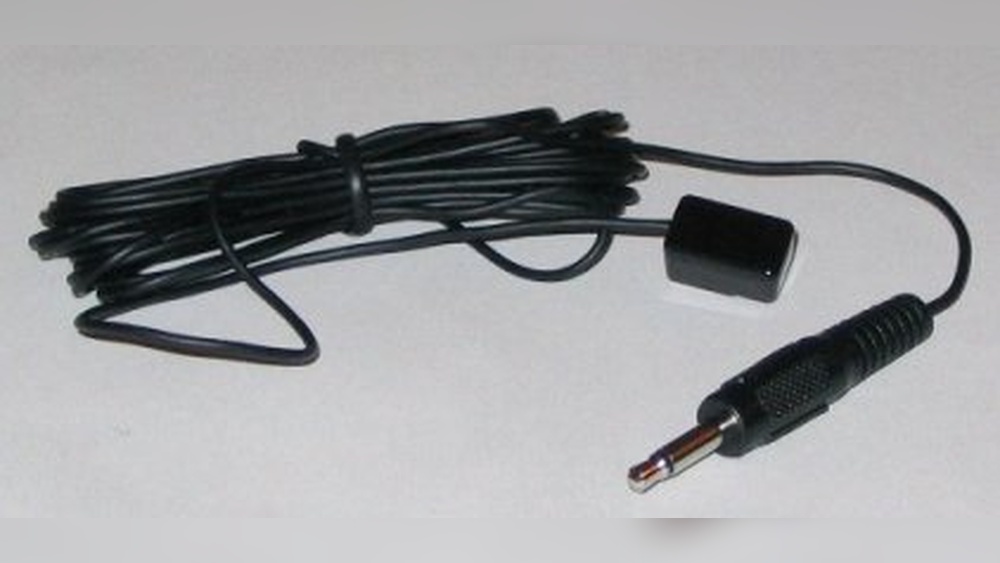
Imagine you could control your TV, air conditioner, or home theater with just your smartphone. No need to hunt for the remote. No need to worry about lost batteries. This is possible because of a small device called the IR Blaster. You may have seen this term on phone specs or smart home devices, but many people still don’t know what it actually does, how it works, and why it matters. Let’s break it down and discover how IR Blasters are shaping the way we connect with everyday electronics.
What Is An Ir Blaster?
The term IR Blaster stands for Infrared Blaster. It’s a tiny electronic device that sends out infrared signals, just like your TV remote. These signals tell your electronics what to do—turn on, change channels, adjust volume, or switch inputs. An IR Blaster is basically a universal remote, but it can be built into smartphones, tablets, set-top boxes, or even smart home hubs. It acts as a bridge, letting you control multiple devices from one place.
Unlike Bluetooth or Wi-Fi, infrared (IR) signals work by sending invisible beams of light. These beams must point directly at the target device. Most traditional remotes use infrared. An IR Blaster lets your phone or smart device mimic those remotes, making life easier and more connected.
How Ir Blasters Work
To understand how IR Blasters operate, think of a flashlight. When you press a button, the blaster emits a coded burst of infrared light. Each code matches a specific command—like volume up or channel down. The receiving device (like a TV) reads this code and reacts.
Most IR Blasters use a tiny LED (light-emitting diode) to send these signals. The device (like a phone or smart hub) stores the codes for different brands and models. When you choose a command, it sends the right code through the LED.
Step-by-step Operation
- User Input: You select a function on your phone or app (for example, “turn on TV”).
- Code Selection: The device finds the correct IR code for your TV.
- Signal Transmission: The IR Blaster sends the code as a burst of infrared light.
- Device Response: Your TV receives the signal and performs the action.
This process is almost instant. The main requirement is a clear line of sight between the blaster and the device. Walls, glass, or even thick curtains can block IR signals.
Key Uses Of Ir Blasters
IR Blasters are found in many devices and have several practical uses:
- Controlling TVs and Entertainment Systems: Change channels, adjust volume, switch inputs, and power on/off.
- Managing Air Conditioners: Set temperature, fan speed, and modes.
- Operating Projectors: Switch sources, turn on/off, and adjust settings.
- Automating Smart Homes: Integrate with smart hubs to control legacy devices that don’t have Wi-Fi or Bluetooth.
- Universal Remote Apps: Phones with IR Blasters can install apps to control almost any IR device.
Some advanced IR Blasters can even handle multiple devices at once, creating scenes like “Movie Night” where your TV, soundbar, and lights adjust with one tap.
Where Are Ir Blasters Found?
IR Blasters are built into various devices. Here are the most common places you’ll find them:
Smartphones
Many Android phones, especially from brands like Xiaomi, Huawei, and Samsung (older models), include IR Blasters. Apple iPhones have never included them, but external IR Blaster accessories are available.
Smart Home Hubs
Devices like the Amazon Echo Plus or certain smart hubs feature IR Blasters to let you control TVs, ACs, and other IR devices remotely or with voice commands.
Set-top Boxes
Cable and satellite boxes sometimes have built-in IR Blasters to control your TV or other connected devices.
Standalone Ir Blaster Modules
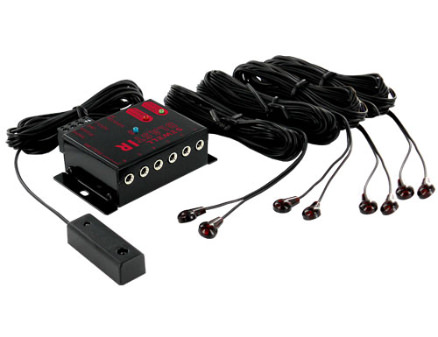
These are small dongles or boxes you connect to your phone or smart hub. They add IR control to devices that don’t have it built in.
Ir Blaster Vs. Other Remote Technologies
It’s easy to confuse IR Blasters with other wireless control methods. Let’s compare:
| Technology | Signal Type | Range | Line of Sight Required | Common Uses |
|---|---|---|---|---|
| IR Blaster | Infrared Light | Up to 10 meters | Yes | TV, AC, projector |
| Bluetooth | Radio Waves | 10-100 meters | No | Speakers, headphones |
| Wi-Fi | Radio Waves | Unlimited (network) | No | Smart home, streaming |
| RF Remote | Radio Frequency | Up to 30 meters | No | Garage doors, some TVs |
The IR Blaster stands out for its compatibility with older electronics. Many devices still rely on infrared, making IR Blasters useful even as Bluetooth and Wi-Fi become more common.
Setting Up An Ir Blaster
Using an IR Blaster can seem complicated at first, but it’s usually easy. Here’s how to set it up:
Built-in Ir Blaster On Smartphones
- Install a Universal Remote App: Many phones come with one pre-installed. Examples include Mi Remote or Peel Smart Remote.
- Select Device Type: Choose TV, AC, projector, etc.
- Choose Brand and Model: The app will guide you to select your device.
- Test Functions: Point the phone at your device and try basic commands.
- Save Configuration: Once it works, save your settings for easy access.
External Ir Blaster Modules
- Plug in the Module: Attach the dongle to your phone’s headphone jack or USB port.
- Install App: Download the app recommended by the module manufacturer.
- Follow On-Screen Steps: Similar to built-in setup, select your device and test.
Smart Home Hub Setup
- Connect to Wi-Fi: Ensure your hub is online.
- Add IR Devices: Use the hub’s app to scan or manually add devices.
- Position the Hub: Place the hub so it can “see” your electronics.
- Create Scenes: Set up routines like “movie night” or “bedtime”.
Troubleshooting Tips
- Check Line of Sight: Remove obstacles between IR Blaster and device.
- Update Codes: Some apps need updates for newer devices.
- Battery Power: External modules may need battery or phone power.
- Correct Device Model: Picking the wrong model can cause errors.

Credit: en.wikipedia.org
Real-world Examples
Let’s look at some practical situations where IR Blasters make life easier.
Example 1: Controlling Multiple Devices With One Phone
You have a TV, set-top box, and air conditioner. With a phone that has an IR Blaster and a universal remote app, you can switch the TV on, adjust the AC temperature, and change channels—all from one device.
Example 2: Integrating Ir Devices Into Smart Home Automation
You set up a smart hub with an IR Blaster. Now, when you say “Goodnight,” your TV turns off, AC sets to sleep mode, and lights dim. Even if your TV doesn’t have Wi-Fi, the hub can control it using IR.
Example 3: Replacing Lost Remotes
Your remote breaks or is lost. Instead of buying a new one, you use your phone’s IR Blaster to control the device. Some apps even let you customize the remote layout.
Advantages Of Ir Blasters
There are several reasons why IR Blasters are still popular:
- Universal Compatibility: Works with most brands and types of electronics.
- Cost-Effective: No need to buy multiple remotes.
- Convenience: Control many devices from one app or phone.
- Smart Home Integration: Adds old devices to modern smart systems.
- Customizability: Apps can change layouts, macros, and routines.
Many users find IR Blasters save time and reduce clutter. You don’t need to remember which remote goes with which device.
Limitations Of Ir Blasters
Despite their advantages, IR Blasters have some drawbacks:
- Line of Sight Required: IR can’t pass through walls or obstacles.
- Limited Range: Usually up to 10 meters, sometimes less.
- No Feedback: Unlike Bluetooth, IR doesn’t confirm if a command succeeded.
- Compatibility Issues: Some newer devices use Bluetooth or RF instead of IR.
- Smartphone Trend: Few new smartphones include IR Blasters.
These limits mean that while IR Blasters are helpful, they are not always the best solution for every home.
Popular Brands And Models
IR Blasters are made by several companies. Here are some well-known brands and their typical features:
| Brand | Device Type | Key Features |
|---|---|---|
| Xiaomi | Smartphones | Built-in IR Blaster, Mi Remote app, wide compatibility |
| BroadLink | Smart Home Hubs | Wi-Fi connected, voice control, scene setup |
| Logitech Harmony | Remote Control Hub | Multi-device control, smartphone app, smart home integration |
| Samsung | Older Smartphones | Built-in IR Blaster, Peel Smart Remote app |
| AnyMote | External Module | Bluetooth-IR bridge, customizable app |
Each brand has its own approach. Some focus on smartphones, others on smart hubs or external modules. The main difference lies in compatibility, app features, and price.
Credit: blog.solidsignal.com
Ir Blaster Apps: What To Look For
The app is often as important as the hardware. Good IR Blaster apps offer:
- Large Device Database: Supports many brands and models.
- Easy Setup: Simple steps for adding new devices.
- Custom Remote Layouts: Change button positions and add shortcuts.
- Macros and Scenes: Control multiple devices at once.
- Learning Mode: Some apps let you “teach” new IR codes from old remotes.
Popular apps include Mi Remote, Peel Smart Remote, BroadLink, and AnyMote. Make sure the app is compatible with your device and region.
Ir Blasters And Smart Home Integration
One big trend is using IR Blasters in smart homes. Many homes have older devices (like TVs and ACs) that don’t connect to Wi-Fi or Bluetooth. IR Blasters let smart hubs (like Google Home or Amazon Echo) control these devices.
Benefits Of Smart Home Integration
- Voice Control: Use commands like “turn off TV” or “set AC to 72 degrees.”
- Routine Automation: Combine IR commands with smart lights, locks, and more.
- Remote Access: Control devices from anywhere via app or internet.
Some smart hubs let you add IR Blasters as accessories. Others have built-in IR features. This connects old and new technology, making homes smarter without replacing every device.
Security And Privacy Considerations
While IR Blasters don’t carry sensitive data, they do connect to apps and sometimes smart home systems. Here are some tips:
- Use Trusted Apps: Choose apps from reputable developers.
- Secure Your Network: If using a smart hub, protect your Wi-Fi with strong passwords.
- Update Regularly: Keep apps and devices updated for bug fixes.
- Limit Permissions: Don’t grant unnecessary permissions to IR Blaster apps.
IR Blasters themselves cannot hack devices, but insecure apps or hubs can be a risk. Stay informed and take basic precautions.
Future Of Ir Blasters
Technology is changing fast. Are IR Blasters becoming outdated? Not quite. While fewer smartphones include them, smart home hubs and universal remotes still use IR Blasters to bridge old and new devices.
Trends To Watch
- Bluetooth and Wi-Fi Remotes: More devices now use wireless protocols, but IR remains common in TVs and ACs.
- Smart Home Growth: As smart homes spread, IR Blasters keep older devices relevant.
- Universal Remote Evolution: Modern remotes often combine IR, Bluetooth, and Wi-Fi for broader control.
Experts believe IR Blasters will survive as long as electronics use infrared. Their role is shifting, but they remain a valuable tool for home automation and convenience.
Common Mistakes When Using Ir Blasters
Many users run into problems. Here are mistakes to avoid:
- Blocking the Signal: Don’t place the blaster behind furniture or in another room.
- Wrong Device Codes: Always select the correct brand and model in the app.
- Ignoring App Updates: Outdated apps may not support new devices.
- Assuming All Devices Use IR: Some newer TVs or ACs use Bluetooth or RF.
- Overlooking Battery Needs: External modules may drain your phone battery or need charging.
Avoiding these mistakes makes setup smoother and use more reliable.
Non-obvious Insights About Ir Blasters
Many beginners miss these points:
- IR Blasters Can Learn New Codes: If your device isn’t listed, some apps let you teach the IR Blaster by pointing your old remote at it. This is called “learning mode.”
- IR Blasters Enable Voice Control for Old Devices: When paired with a smart hub, you can use Alexa or Google Assistant to control devices that don’t support voice commands natively.
- Location Matters: Even slight misalignment can block IR signals. Placing the device at the right angle is key.
- Macro Functionality: You can set up “scenes” where multiple devices respond to one command—for example, TV, AC, and lights adjust for a movie.

Credit: www.youtube.com
Ir Blaster Compatibility: What You Need To Know
Not every device can be controlled by an IR Blaster. Here’s what matters:
- Device Must Have IR Receiver: TVs, ACs, and projectors usually do.
- Correct Codes: The app or hub must have the right codes for your device.
- Physical Line of Sight: Make sure the blaster and device “see” each other.
- Smartphone Hardware: Only phones with built-in IR Blasters or external modules can send IR signals.
Some devices, especially new smart TVs or air conditioners, use Bluetooth or Wi-Fi. For these, an IR Blaster won’t work.
Alternatives To Ir Blasters
If you don’t have an IR Blaster, there are options:
- Universal Remote Controls: Traditional remotes that support multiple devices.
- Bluetooth Remotes: For devices that use Bluetooth, like smart TVs.
- Wi-Fi Apps: Some brands offer apps that connect via Wi-Fi, but only for newer models.
- Smart Home Hubs: Many hubs combine IR, Bluetooth, and Wi-Fi for broad coverage.
Compare features to find what suits your setup.
| Control Method | Pros | Cons |
|---|---|---|
| IR Blaster | Universal, simple, legacy support | Line of sight needed, limited range |
| Bluetooth Remote | No line of sight, newer devices | Not compatible with older devices |
| Wi-Fi App | Remote access, advanced control | Only for Wi-Fi-enabled devices |
| Universal Remote Control | Simple, multi-device | Bulky, limited smart features |
Ir Blaster Market Data
Here are some statistics to illustrate their relevance:
- Global Market Size: The IR Blaster market was estimated at over $200 million in 2022, with growth driven by smart home adoption.
- Device Usage: Over 60% of TVs and ACs sold worldwide still rely on infrared control.
- Smartphone Trends: Less than 15% of new phones in 2023 included IR Blasters, but external modules and smart hubs fill the gap.
- Smart Home Integration: 25% of smart homes use IR Blasters to control legacy devices.
These numbers show that IR Blasters remain important, especially in homes with older electronics.
Practical Tips For Maximizing Ir Blaster Use
- Position Carefully: Place your phone or hub where it has a clear line of sight.
- Update Your App: Always use the latest version for device compatibility.
- Use Macros: Set up routines for common actions like “movie night.”
- Test Regularly: After setup, check all commands to ensure reliability.
- Teach New Codes: If your device isn’t listed, use learning mode if available.
These tips help you get the most from your IR Blaster, saving time and frustration.
Frequently Asked Questions
What Devices Can I Control With An Ir Blaster?
You can control most devices that use infrared remotes, such as TVs, air conditioners, projectors, set-top boxes, DVD players, and some audio systems. The key requirement is an IR receiver on the device.
Do New Smartphones Include Ir Blasters?
Few new smartphones include IR Blasters. Brands like Xiaomi and Huawei still offer them, but Samsung and Apple do not. You can add external IR Blaster modules to some phones if needed.
Is An Ir Blaster Better Than A Universal Remote?
Both have advantages. An IR Blaster (especially in a smartphone) is more portable and customizable, while universal remotes are simple and don’t depend on apps. IR Blasters also allow smart home integration.
Can Ir Blasters Work Through Walls?
No, IR signals need a clear line of sight. Walls, furniture, and even thick curtains can block the signal. For devices in different rooms, consider Bluetooth or Wi-Fi solutions.
Are Ir Blasters Secure?
Yes, IR Blasters themselves are secure—they only send control signals. For smart hubs or apps, use secure Wi-Fi and trusted apps. IR Blasters do not transmit personal data.
Final Thoughts
The IR Blaster is a small but powerful tool for controlling home electronics. It turns your smartphone or smart hub into a universal remote, linking old and new technology. While the trend is moving toward Bluetooth and Wi-Fi, IR Blasters remain essential for millions of TVs, ACs, and entertainment systems worldwide.
If you want easy control, smart home automation, or just fewer remotes cluttering your living room, an IR Blaster is a smart choice. Remember to check compatibility, set up your devices carefully, and use the latest apps. For more details on the technology, visit Wikipedia.
Whether you’re upgrading your home or just want convenience, understanding IR Blasters gives you the power to connect, automate, and simplify your daily life.