

When you hear about mesh routers, you might think they are a complete solution for fast, reliable Wi-Fi across your home. But do mesh routers replace the need for a modem, or do you still need one? This question confuses many people, especially those setting up home networks for the first time. Understanding the roles of mesh routers and modems is key to building a strong, stable internet connection. This guide will help you see how mesh routers fit into your network, why a modem might still be necessary, and how to set up everything correctly.
Mesh routers are popular today because they solve the problem of weak Wi-Fi signals in large homes, multi-story buildings, and spaces with thick walls. Their promise is simple: better coverage, fewer dead zones, and smarter management of devices. But before you invest in a mesh system, you need to know if it can work alone—or if it needs a modem. Let’s dive into the details, break down the technology, and help you make confident decisions for your home or office network.
What Is A Mesh Router?
A mesh router is a device designed to create a Wi-Fi mesh network. Unlike traditional routers, which broadcast from a single point, mesh routers use multiple units (often called nodes or satellites) that communicate with each other. This creates overlapping coverage, so you get strong Wi-Fi even in tricky corners.
Mesh routers are often sold in packs of two, three, or more units. You place these around your home. Each unit acts as both a router and a relay, passing data smoothly. The main features of mesh routers include:
- Easy expansion: You can add more nodes to increase coverage.
- Seamless roaming: Devices switch between nodes without dropping the connection.
- Self-healing: If one node goes offline, others reroute traffic.
- Smart management: Many mesh systems have apps for setup and control.
But mesh routers don’t magically create internet. They spread it more evenly. To understand how this works, let’s look at what a modem does.
The Role Of A Modem In Your Network
A modem is a device that connects your home network to the internet. It translates data between your Internet Service Provider (ISP) and your local network. Without a modem, your devices can connect to each other, but they won’t reach the outside world.
Here’s what a modem does:
- Converts signals from your ISP (cable, DSL, fiber) into digital data
- Sends that data to your router (or mesh router) for distribution
- Receives data from your devices and sends it back to the ISP
Most ISPs supply a modem when you sign up, but you can buy your own for more control and sometimes better performance. The modem is the gateway between your home and the internet.
Mesh Router Vs Traditional Router: Key Differences
Mesh routers and traditional routers both spread Wi-Fi, but they do it differently. Knowing these differences helps you choose the right setup.
| Feature | Mesh Router | Traditional Router |
|---|---|---|
| Coverage | Multiple nodes, wide area | Single point, limited area |
| Setup | Easy, app-based | Manual, often web interface |
| Roaming | Seamless between nodes | Possible, but less smooth |
| Expansion | Add nodes as needed | Range extenders needed |
| Self-healing | Yes | No |
| Price | Usually higher | Lower |
Mesh routers shine in larger homes and spaces where traditional routers struggle. But neither type connects directly to the internet—they need a modem, unless your ISP uses a different technology.
Do Mesh Routers Need A Modem?
The short answer: yes, mesh routers usually need a modem to access the internet. Mesh routers only distribute the Wi-Fi signal—they don’t create it from scratch. If you have cable, DSL, or fiber internet, the mesh router must connect to a modem that is hooked up to your ISP.
Here’s why:
- Mesh routers are not equipped to convert ISP signals into internet-ready data. They only manage local Wi-Fi.
- Without a modem, mesh routers can’t communicate with your ISP.
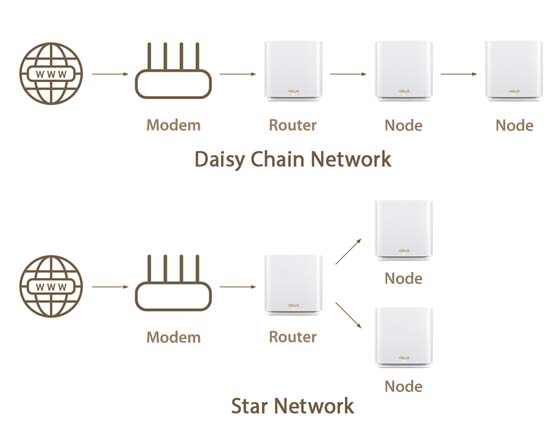
- The modem is always the first step in the chain: ISP → Modem → Router (mesh or traditional) → Devices.
There are some exceptions. If your ISP provides fiber with Ethernet handoff (rare), you may not need a separate modem—just a router. But for most homes, especially in the US, a modem is essential.
How Mesh Routers And Modems Work Together
Setting up a mesh router system with a modem is straightforward, but understanding the flow helps you avoid mistakes. Here’s the process:
- ISP Connection: The internet enters your home via a cable, DSL line, or fiber.
- Modem: The modem receives the signal, converts it to digital form.
- Mesh Router (Main Node): The main mesh router connects to the modem via Ethernet.
- Mesh Nodes: Other mesh nodes communicate wirelessly (or sometimes via Ethernet) with the main node.
- Devices: Your phones, laptops, TVs connect to the nearest mesh node.
This chain ensures your devices get internet from the ISP, distributed through the mesh network. If you skip the modem, your mesh router can only create a local Wi-Fi network—it won’t have internet access.
What If Your Isp Provides A Gateway?
Some ISPs give you a device called a gateway. This combines a modem and router in one box. Gateways can cause confusion when setting up mesh routers.
If you have a gateway:
- You can connect your mesh router to the gateway using Ethernet.
- You may need to disable Wi-Fi on the gateway to avoid interference.
- Sometimes, you need to set the gateway to bridge mode so it acts only as a modem.
Bridge mode turns off the routing functions of your gateway. This lets your mesh router take over all network management, making things simpler and avoiding “double NAT” problems (which can cause issues with gaming, VPNs, or smart devices).
Common Mesh Router Setup Scenarios
Mesh routers are flexible, but you need to match your setup to your ISP’s equipment. Here are the most common situations:
Cable Or Dsl Internet
- You have a standalone modem from your ISP.
- Connect the main mesh router node to the modem via Ethernet.
- Add mesh nodes around your home.
Fiber Internet With Modem
- Your ISP provides a fiber modem (sometimes called an ONT).
- Connect the mesh router to the modem.
- Place mesh nodes as needed.
Fiber Internet With Ethernet Handoff
- Your ISP gives you a wall jack with Ethernet; no modem is needed.
- Connect mesh router directly to the wall jack.
- Add mesh nodes.
Isp Gateway
- You have a combined modem/router device.
- Connect mesh router to the gateway.
- Set gateway to bridge mode if possible.
In nearly all cases, you need something to convert the ISP signal—a modem or gateway.
Mesh Router Setup: Step-by-step
Setting up a mesh router with a modem is simple if you follow these steps:
- Unplug the modem: If it’s already running, unplug it for 30 seconds.
- Connect the main mesh router: Use an Ethernet cable to connect the mesh router’s WAN port to the modem.
- Power up the modem: Plug it back in and wait for it to fully boot.
- Power up the mesh router: Plug in the mesh router and wait for it to start.
- Install mesh nodes: Place additional nodes where coverage is weak and power them on.
- Follow app instructions: Most mesh systems have a setup app. Follow prompts to finish setup.
- Test coverage: Move around with your phone to check signal strength.
- Adjust nodes: If needed, reposition nodes for better coverage.
If you have a gateway, set it to bridge mode before connecting the mesh router.
Can Mesh Routers Replace A Modem?
Mesh routers cannot replace a modem. They are not built to handle ISP signals. Only a modem can convert cable, DSL, or fiber signals into usable internet. Mesh routers can replace your old router, but not the modem.
Some mesh systems (like Google Nest Wifi) have built-in routing functions, but none have modem capabilities. You still need a modem to get online.
Why Some People Get Confused
Many beginners think mesh routers are “all-in-one” solutions. This is partly due to marketing, which promises “whole home Wi-Fi. ” But Wi-Fi is only half the equation—you need a modem for internet access.
Another source of confusion is ISP gateways, which combine modem and router. If you replace a gateway with a mesh router, you must understand which functions you are changing.
Non-obvious insight: If you don’t set your gateway to bridge mode, you can end up with two routers on your network. This can cause double NAT, reducing performance and causing problems with some apps.
Typical Mistakes When Setting Up Mesh Routers
Setting up mesh routers is easy, but common mistakes can cause frustration. Here are some to watch out for:
- Skipping the modem: Trying to connect mesh router directly to the ISP cable or DSL line.
- Not using bridge mode: Leaving the ISP gateway in router mode, causing double NAT.
- Bad placement of nodes: Putting mesh nodes too close or too far apart, reducing coverage.
- Mixing Wi-Fi networks: Leaving Wi-Fi on the gateway, causing interference with mesh network.
- Ignoring firmware updates: Mesh routers often need updates for best performance.
Non-obvious insight: If you have smart devices (like cameras or thermostats), double NAT can prevent them from being reached remotely. Bridge mode solves this.
Mesh Router Brands And Modem Compatibility
Most major mesh router brands work with standard modems. Some brands to know:
- Google Nest Wifi
- Netgear Orbi
- Eero
- TP-Link Deco
- Linksys Velop
These brands are compatible with most cable, DSL, and fiber modems. Always check the mesh router’s instructions for specific compatibility.
Example: Netgear Orbi works with almost any modem, but recommends bridge mode if used with a gateway.
How Mesh Networks Improve Your Home Wi-fi
Mesh networks solve many Wi-Fi problems, especially in larger homes. Here’s how they help:
- Eliminate dead zones: Mesh nodes fill in weak spots.
- No need for extenders: Extenders can cause speed loss; mesh nodes don’t.
- More devices supported: Mesh networks handle many devices smoothly.
- Automatic optimization: Mesh routers adjust channels and routes for best speed.
A mesh network is ideal if you have:
- Large home (over 2,000 square feet)
- Multi-story house
- Thick walls
- Many devices (phones, laptops, smart TVs)
- Frequent Wi-Fi dropouts
Mesh Routers, Modems, And Internet Speed
Mesh routers can improve coverage, but your internet speed depends mostly on your ISP plan and modem. If your modem is outdated, you may not get full speed, even with a mesh router.
Data: Many US homes get speeds of 100–500 Mbps, but old modems may limit you to 50 Mbps. Upgrading your modem can unlock faster speeds.
Mesh routers can distribute speed more evenly, but they don’t increase the speed coming from your ISP.
Comparing Mesh Router And Modem Functions
To clarify the roles, here’s a simple comparison:
| Device | Main Function | Needed for Internet? |
|---|---|---|
| Modem | Connects ISP to network | Yes |
| Mesh Router | Distributes Wi-Fi | No (for local network only) |
| Gateway | Modem + router in one | Yes |
If you want to access the internet, you always need a modem (or gateway). Mesh routers make Wi-Fi better but don’t replace the modem.
How To Choose A Modem For Your Mesh Router
Choosing the right modem is important for performance. Consider these factors:
- ISP compatibility: Check your ISP’s approved modem list.
- Speed support: Choose a modem that matches your ISP speed plan.
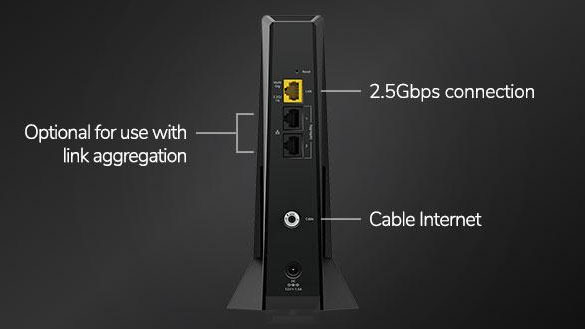
- DOCSIS standard: For cable, DOCSIS 3.1 is best for gigabit speeds.
- Ethernet port: Make sure the modem has a gigabit Ethernet port.
- Number of devices: Some modems support more connections.
Common mistake: Buying a modem that is not compatible with your ISP. Always check before purchasing.
Mesh Routers Without Modems: When Is It Possible?
There are rare cases where you don’t need a modem:
- ISP provides Ethernet handoff (fiber with no modem)
- You use mesh routers only for local networking, not internet
If you only want to connect devices locally (like printers or file sharing), you don’t need a modem. But this is uncommon—most people want internet access.
Practical Examples: Real Home Setups
Let’s look at three real-world setups:
Example 1: Standard Cable Internet
John has cable internet from Comcast. He receives a modem from the ISP. He connects his Netgear Orbi mesh router to the modem. He places two mesh nodes upstairs and downstairs. Wi-Fi covers the whole house, and internet works everywhere.
Example 2: Fiber With Gateway
Maria has fiber internet from AT&T. She gets a gateway device (modem + router). She connects her Eero mesh router to the gateway, sets the gateway to bridge mode, and disables Wi-Fi on the gateway. Mesh nodes are placed in living room and basement. The network is strong and no double NAT issues.
Example 3: Ethernet Handoff
Alex’s ISP provides an Ethernet port on the wall. No modem is needed. He connects his TP-Link Deco mesh router directly to the port, then adds mesh nodes in different rooms. The mesh router distributes internet without a modem.
These examples show how mesh routers fit into real homes. Most setups require a modem.
Mesh Router Setup Troubleshooting
If your mesh router isn’t working, check these steps:
- Check modem status: Are the lights on? Is it connected to the ISP?
- Check cables: Make sure Ethernet cables are plugged in securely.
- Restart devices: Unplug modem and mesh router, wait 30 seconds, plug back in.
- Check app setup: Follow mesh router app instructions.
- Check gateway mode: If using a gateway, confirm bridge mode is enabled.
If you still have issues, contact your ISP or check your mesh router’s support site.
Advanced Mesh Router Features
Modern mesh routers offer features beyond simple Wi-Fi:
- Parental controls: Limit access for kids.
- Guest networks: Create separate Wi-Fi for guests.
- Device prioritization: Choose which devices get fastest speeds.
- Security updates: Protect against hackers.
- Smart home integration: Work with Alexa, Google Home, or other assistants.
These features make mesh routers more useful, but they still need a modem for internet.
Should You Buy A Mesh Router?
Mesh routers are ideal for:
- Large homes
- Multiple floors
- Many devices
- Smart home setups
But if you live in a small apartment, a traditional router may be enough. Mesh routers cost more, but solve coverage problems better.
Data: Mesh router kits range from $150 to $500. Traditional routers cost $60–$200.
If you have a modem and want better Wi-Fi, mesh routers are a good choice.
Mesh Routers And Internet Security
Mesh routers often include security features, but your modem can also play a role. Secure your network by:
- Changing default passwords
- Enabling WPA3 encryption
- Updating firmware regularly
- Using guest networks for visitors
Non-obvious insight: Some mesh routers offer automatic firmware updates, reducing risk of hacking.
Credit: www.netgear.com
Upgrading Your Network: Modem And Mesh Router
Upgrading both your modem and mesh router can boost speed and reliability. If your modem is over five years old, it may limit your internet speed.
Example: Upgrading from DOCSIS 2.0 to DOCSIS 3.1 can increase speed from 30 Mbps to 1 Gbps.
Mesh routers don’t increase speed from the ISP, but can improve speed distribution inside your home.
Mesh Router, Modem, And Isp Plans
Your ISP plan determines your maximum speed. Make sure your modem and mesh router can handle the plan you pay for.
Example: If you pay for 500 Mbps, but your modem supports only 100 Mbps, you won’t get full speed.
Mesh routers help you use all the speed your modem provides, especially with many devices.
Credit: www.asus.com
Future Trends: Mesh Routers And Modem Technology
New mesh routers support Wi-Fi 6 and soon Wi-Fi 7. These standards offer:
- Faster speeds
- Better device management
- Lower latency
Modems are also improving, with DOCSIS 3. 1 and fiber ONTs supporting gigabit speeds.
In the future, some ISPs may provide “modemless” internet, but for most people today, modems are still necessary.
Frequently Asked Questions
Do Mesh Routers Work Without A Modem?
Mesh routers can create a Wi-Fi network without a modem, but there will be no internet access. You need a modem to connect to your ISP.
Can I Connect A Mesh Router Directly To My Isp Cable?
No. The mesh router cannot convert ISP signals to internet data. You must use a modem between the ISP cable and mesh router.
What Is Bridge Mode, And Why Is It Important?
Bridge mode disables the routing functions of a gateway device, letting your mesh router manage the network. This avoids double NAT and improves performance.
How Many Mesh Nodes Do I Need?
For most homes, two to three nodes are enough. Large homes may need more. Place nodes where Wi-Fi is weak for best coverage.
Can I Use A Mesh Router With Any Modem?
Most mesh routers work with any standard modem. Check your mesh router’s compatibility list and your ISP’s approved modem list before buying.
Mesh routers are powerful tools for improving Wi-Fi, but they don’t replace the modem. Understanding how these devices work together ensures you get the best performance from your home network. If you want more technical details about mesh routers and modems, you can visit Wikipedia for in-depth explanations. With the right setup, you can enjoy fast, reliable internet everywhere in your home.

Credit: www.privateinternetaccess.com