
Are All Ir Blasters The Same?
For many people, the small IR blaster is a quiet hero in their home. It lets you control your TV, air conditioner, or even your lights with just a remote or your smartphone. But as smart homes grow and technology becomes part of our daily routines, it’s natural to wonder: Are all IR blasters the same? Will any IR blaster work for your devices, or are there important differences you should know?
This guide will answer that question in detail. You’ll discover how IR blasters work, what sets them apart, and what matters when choosing one. We’ll break down the technical parts in simple language and give you real-world advice, so you feel confident about your next purchase or setup.
What Is An Ir Blaster?
An IR blaster stands for infrared blaster. It’s a device that sends infrared signals, just like the beam from your TV remote, to control electronics. IR blasters are often used to:
- Operate TVs, set-top boxes, and Blu-ray players
- Control air conditioners and fans
- Automate home theater systems
- Turn on/off or change channels even if devices are behind closed doors
Today, IR blasters can be found inside smartphones, smart home hubs, and as small standalone gadgets. Their main job: replace or copy your remote.
How Does An Ir Blaster Work?
Infrared means “below red” on the light spectrum. The IR blaster uses tiny lights to send invisible flashes of light, called signals, in patterns that electronics understand. Each button on your remote sends a unique code. The device listens for its code and responds.
Most IR blasters use:
- LED emitters to create the infrared light
- Microcontrollers to store and send signal patterns
- Power source (batteries or USB)
Some newer IR blasters connect to Wi-Fi or Bluetooth, letting you control things through your phone, voice assistant, or smart home app. Still, the last step—sending the infrared signal—works the same way as a traditional remote.
The Variety Of Ir Blasters
At first glance, all IR blasters look similar. But look closer, and you’ll find important differences. Let’s explore the main types.
Standalone Ir Blasters
These are simple devices you plug into a wall or USB port. They don’t connect to Wi-Fi but can repeat or extend your remote’s signals. Some popular uses:
- Extend control to another room
- Hide devices inside cabinets
- Use with universal remotes
Smartphone Ir Blasters
Some phones (like older Samsung or Xiaomi models) have a built-in IR emitter. With a special app, your phone acts as a remote. This is becoming less common, as newer phones often skip this feature.
Smart Home Ir Blasters
These are the most advanced. They connect to Wi-Fi or Bluetooth and link with smart home platforms (like Alexa or Google Home). You can control everything from your phone, even when you’re away. Many offer automation features, like turning on the AC when you get home.
Universal Remote Controls With Ir Blaster
These combine a handheld remote with IR blasting. You program them to control multiple devices. Some high-end models add RF (radio frequency) or Bluetooth, so you don’t need line-of-sight.
Key Differences Between Ir Blasters
Not all IR blasters are created equal. Here are the most important ways they can differ:
1. Signal Range And Angle
Some IR blasters can send signals up to 30 feet, while others struggle past 10 feet. The beam angle also matters—narrow beams need precise aiming, while wide beams are more forgiving.
2. Number Of Supported Devices
Basic IR blasters may only control a few types of devices. Advanced models can handle hundreds, supporting TVs, ACs, fans, set-top boxes, and more.
3. Supported Protocols And Brands
Each brand uses its own signal codes (called protocols). A good IR blaster recognizes many protocols, making it more universal. Cheap models may not work with less common brands.
4. Smart Integration
Some IR blasters only work with physical remotes. Others support smartphone apps, voice assistants, and home automation systems.
5. Learning Feature
A “learning” IR blaster can copy signals from your existing remote. This is vital if your device uses a rare protocol.
6. Power Source And Setup
Some IR blasters plug into USB or the wall, while others need batteries. Setup can be as easy as plug-and-play or require complex network configuration.
7. Price And Build Quality
Low-cost models may use weak emitters, cheap plastics, or lack certifications. Higher-end ones use better components, last longer, and offer more features.
Technical Specifications: How They Affect Performance
Let’s look at the specs that make a real difference.
Ir Frequency
Most home electronics use 38 kHz IR signals. However, some devices (like older air conditioners or projectors) may use different frequencies (e.g., 36 kHz or 56 kHz). A universal IR blaster should support multiple frequencies for best compatibility.
Beam Strength And Range
The strength of the emitter determines how far the signal travels. Stronger emitters handle longer distances and work even if something is in the way (like a glass cabinet). Weak emitters require you to place the blaster very close to the device.
Number Of Emitters
Some IR blasters have one emitter, others have several. Multiple emitters can send signals in more directions or to more devices at once.
Database And Upgradability
Advanced IR blasters come with a built-in library of codes for thousands of devices. The best ones let you update the database online, so you get new codes as new devices come out.
Connectivity
Wi-Fi, Bluetooth, or just basic IR? Smart blasters with Wi-Fi allow control from anywhere and integration with apps. Bluetooth is useful for certain smart home setups but is usually limited by range.
Material And Build
Thicker plastic, heat-resistant materials, and better design help IR blasters last longer—especially if you use them daily or in hot environments.
Comparing Popular Ir Blasters
Here’s a side-by-side look at three common types:
| Feature | Basic IR Blaster | Smart Home IR Blaster | Universal Remote with IR Blaster |
|---|---|---|---|
| Control Method | Physical remote only | App, voice, automation | Physical remote, sometimes app |
| Supported Devices | Limited (TV, AC) | Hundreds or more | Many (TV, AV, etc.) |
| Learning Feature | Rare | Common | Common |
| Smart Integration | No | Yes | Sometimes |
| Price Range | Low | Medium to High | Medium to High |

Credit: www.amazon.com
Common Use Cases And What You Need
Choosing an IR blaster depends on your needs. Here are some typical situations:
- Simple TV Control: A basic IR blaster works fine if you just want to control a TV or set-top box across the room.
- Smart Home Automation: Choose a Wi-Fi enabled IR blaster that integrates with your smart home platform.
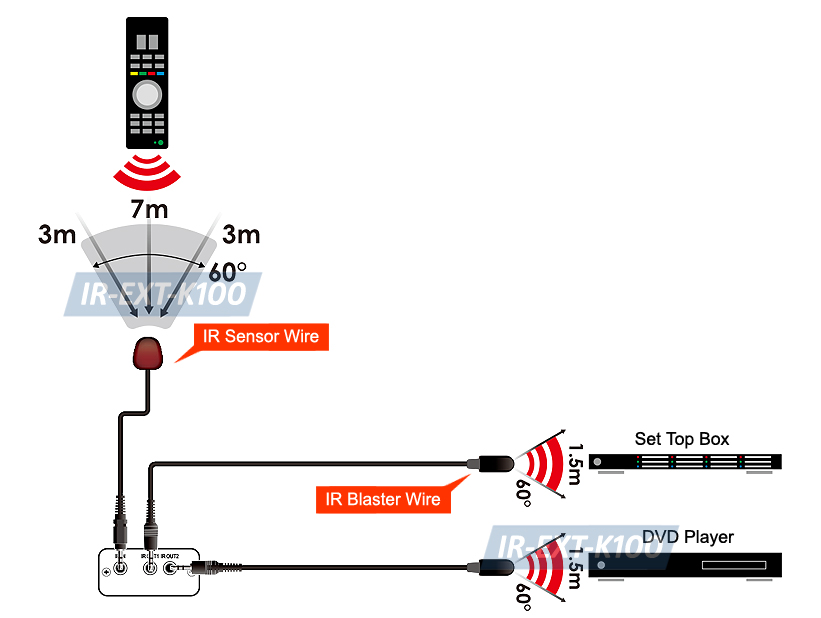
- Hidden Devices: If your devices are inside a cabinet, pick an IR blaster with strong emitters or extra “IR extenders.”
- Multiple Devices/Rooms: Look for multi-emitter IR blasters or ones that support automation rules.
- Unique or Old Devices: Make sure the IR blaster has a learning feature, so it can copy unusual signals.
Real-world Performance: What Matters Most
Two IR blasters might look identical, but their real-world performance can be very different. Here’s what users often miss:
Line-of-sight And Obstacles
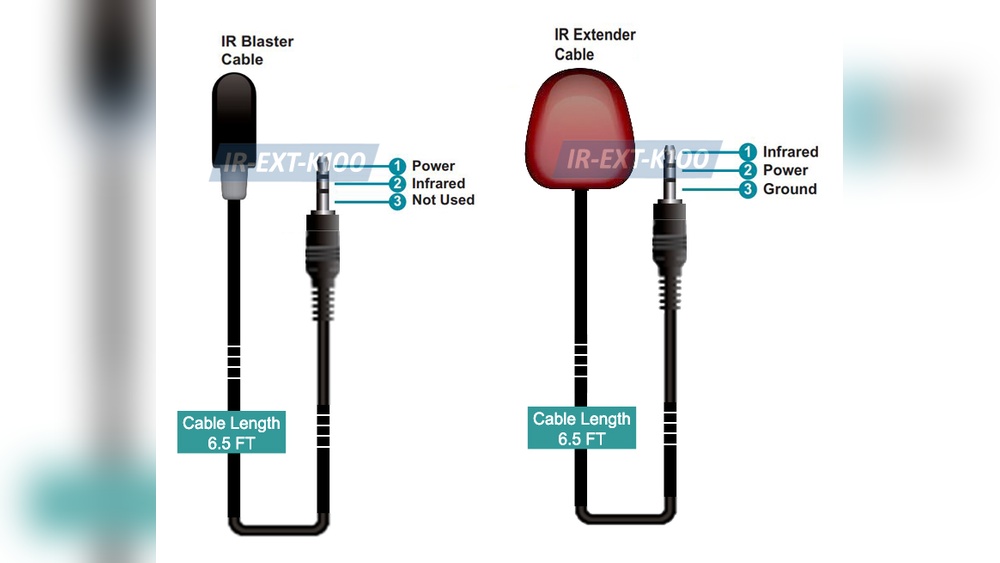
IR signals are blocked by walls, furniture, and even people walking by. Some IR blasters come with cables (“extender wires”) you can stick near the device’s receiver for better results.
Speed And Responsiveness
A good IR blaster sends signals quickly, with little delay. Cheap models may feel sluggish, especially if you send multiple commands in a row.
App Quality And Updates
For smart IR blasters, the quality of the app matters. Is it easy to use? Does it support all your devices? Is the code library updated regularly? Poor apps can make even good hardware frustrating.
Reliability And Longevity
Some IR blasters fail after a few months due to poor build quality or overheating. Spending a little more can buy you better reliability.
Credit: www.ebay.com
Setup And Installation: What’s Involved?
Setting up an IR blaster can range from plug-and-play to complex.
Plug-and-play Models
These just need power. Point them at your device, and you’re done. Great for simple setups.
Smart Ir Blasters
These usually require:
- Connecting to your Wi-Fi
- Installing an app on your phone
- Pairing the blaster with your devices
- Teaching the blaster your remotes (sometimes by pressing buttons on your remote)
Some advanced models even use cloud databases to auto-detect your devices, making setup much faster.
Universal Remotes With Ir Blasters
These often come with a detailed manual. You’ll program each device, sometimes using codes or a learning mode.
Are Cheap Ir Blasters Worth It?
You can find IR blasters for under $10 online, but there are trade-offs:
- Limited compatibility: They may only work with a few types of devices.
- Weak signal: You need to point them carefully, and they might not work across a large room.
- No updates: If you get a new device, you might be out of luck.
- Short lifespan: Cheap materials and poor design lead to early failure.
If you need basic control for one device, a budget model might do the trick. But for a smart home or long-term use, investing in a higher-quality IR blaster is usually smarter.
The Importance Of Compatibility
One of the biggest complaints from users is buying an IR blaster that doesn’t work with their device. Here’s why compatibility is tricky:
- Different brands and models use different IR codes
- Some devices use rare frequencies or special protocols
- Smart home platforms may only support certain IR blasters
Before you buy, check the compatibility lists on the manufacturer’s website. Some brands also allow you to test codes in their app before purchase.
Voice Control And Automation
Smart IR blasters can do more than just replace your remote. With Alexa, Google Assistant, or Apple HomeKit, you can say things like:
- “Alexa, turn on the TV.”
- “Hey Google, set the air conditioner to 72 degrees.”
You can also create automation rules, like turning off all electronics when you leave home or starting the fan at a certain time.
Not all IR blasters support these features—be sure to look for models with voice assistant integration and automation support.
Security And Privacy Considerations
Smart IR blasters often connect to the internet. This raises questions about data privacy and network security:
- Choose brands that use encrypted connections
- Update firmware regularly to patch security holes
- Use strong Wi-Fi passwords
Some IR blasters rely on cloud services to work. If the service goes offline or the company stops support, your device may stop working. Prefer brands with local control or strong reputations.
When Ir Blasters Aren’t Enough
There are cases where an IR blaster won’t solve your problem:
- Some modern devices use only Bluetooth or RF, not IR (e.g., some streaming sticks)
- Devices inside metal cabinets or behind thick walls may be impossible to control with IR
- Complex home theater setups may need a mix of IR, RF, and network control
In these cases, look for universal remotes that combine IR with other technologies, or use smart plugs and hubs that can handle multiple protocols.
Advanced Features: What To Look For
Here are some features found only in higher-end IR blasters:
- Macro support: Run a sequence of commands with one button (e.g., turn on TV, set input, adjust volume)
- Scheduling: Send IR commands at specific times (great for automating AC or lights)
- Multiple room support: Control devices in different rooms from one app
- Custom scenes: Combine IR control with other smart home devices (lights, sensors)
These features make a big difference if you want a true smart home experience.
Practical Buying Guide: Choosing The Right Ir Blaster
Here’s how to pick the right IR blaster for your needs:
- List your devices: Write down everything you want to control (brand, model).
- Check compatibility: Visit the IR blaster’s website for compatibility info.
- Decide on smart features: Do you want voice control, app control, or just basic remote extension?
- Consider your room: How big is it? Are devices hidden? Do you need multiple emitters?
- Read reviews: Look for feedback on reliability, app quality, and support.
- Think about the future: Will you add more devices? Choose a model that’s upgradable.
- Set a budget: Balance features and price—don’t go too cheap if you want long-term use.
Two Common Myths About Ir Blasters
“any Ir Blaster Will Work With Any Device.”
Not true. Many devices use unique codes or frequencies. Always check compatibility.
“expensive Ir Blasters Are Always Better.”
Price doesn’t guarantee success. Some mid-priced models offer better app support and regular updates than costly, older models.
Hidden Insights Most People Miss
1. The Importance Of Code Libraries
A rich, updatable code library makes all the difference. Some IR blasters can “learn” from your remote, but if the app has a big database, setup is much faster and more reliable.
2. The “learning” Feature Isn’t Always Perfect
Learning IR blasters sometimes fail with remotes that use rolling codes or special timing. If you have a very new or very old device, check online forums for user experiences before buying.
Example: Real-world Setup
Imagine you want to control your TV, AC, and fan from your phone and with Alexa. Here’s what you need:
- A smart IR blaster with Wi-Fi and voice assistant support
- The devices must be in the same room as the blaster, or you need extender wires
- Download the manufacturer’s app and connect to Wi-Fi
- Pair each device using the app’s code library or learning mode
- Link the blaster to Alexa or Google Home
- Create voice commands or automation routines
With this setup, you can say, “Alexa, turn on the TV,” or automate your AC to turn on when you get home.
Example: When A Cheap Ir Blaster Fails
You buy a low-cost IR blaster online. It claims to control any AC, but:
- It only supports a few brands
- The signal is weak; you must place it right in front of the AC
- The app is in a foreign language and hasn’t been updated in years
- It stops working after a software update
This is a common story. Spending a bit more upfront saves headaches later.
Comparison: Popular Smart Ir Blaster Models
Here’s a comparison of three well-known smart IR blasters:
| Model | Wi-Fi Support | App Quality | Voice Assistant Integration | Price Range |
|---|---|---|---|---|
| BroadLink RM4 Mini | Yes | Good, regularly updated | Alexa, Google | Low-Mid |
| Logitech Harmony Hub | Yes | Excellent, wide device support | Alexa, Google | High |
| SwitchBot Hub Mini | Yes | Simple, easy setup | Alexa, Google, Siri Shortcuts | Mid |
Each has pros and cons, so match your needs carefully.
Summary Table: Key Factors To Compare Ir Blasters
Here’s a quick reference for the main differences:
| Factor | Why It Matters |
|---|---|
| Compatibility | Ensures your devices will work |
| Signal Range | Reaches all devices in the room |
| Smart Features | App, voice, and automation support |
| Learning Mode | Handles rare or unique devices |
| App Quality | Easy setup and updates |
| Build Quality | Long-term reliability |
| Price | Matches your budget |
When To Avoid Ir Blasters
There are cases where you shouldn’t use an IR blaster:
- Your devices use only Bluetooth or RF, not IR
- You need control through thick walls or multiple floors
- You want full integration with other smart home devices, and your current gear doesn’t support IR
In these cases, consider smart plugs, Bluetooth hubs, or multi-protocol remotes.
Future Trends In Ir Blasters
The world of IR blasters is changing. Here’s what’s coming:
- More smart integrations: Support for more voice assistants and platforms
- Wider compatibility: Cloud-updated libraries for new devices
- Smaller, more powerful hardware: Better range and reliability
- Hybrid models: Devices that combine IR, RF, and Bluetooth
As more devices move to Bluetooth or Wi-Fi, the role of IR blasters may change, but they’ll remain useful for many years—especially with so many legacy electronics still in use.

Credit: www.amazon.com
Final Thoughts
So, are all IR blasters the same? Clearly not. While they share a basic purpose—sending IR signals—their features, performance, and compatibility vary widely. Picking the right IR blaster means looking beyond the price tag and thinking about your devices, your smart home setup, and your long-term needs.
Take the time to check compatibility, consider smart features, and read real user reviews.
A bit of research can save you from daily frustration or wasted money. The right IR blaster can make your home simpler, smarter, and more comfortable.
For more technical details about infrared communication, you can check the Infrared blaster Wikipedia page.
Frequently Asked Questions
What Devices Can An Ir Blaster Control?
Most IR blasters can control TVs, air conditioners, set-top boxes, fans, and other electronics that use an infrared remote. Some advanced models also work with soundbars, projectors, and even smart lights that use IR.
How Do I Know If My Device Is Compatible With An Ir Blaster?
Check the IR blaster’s compatibility list on the manufacturer’s website. If your device is not listed, a model with a learning feature can often copy the signals from your remote.
Can I Use An Ir Blaster With My Smartphone?
Yes, many smart IR blasters work with smartphone apps over Wi-Fi or Bluetooth. Some older phones have a built-in IR emitter, but this feature is becoming rare in new models.
Do Ir Blasters Need Line-of-sight To Work?
Yes, most IR blasters need a clear path between the emitter and your device, just like a traditional remote. Some models come with extender wires to help reach devices inside cabinets.
Are Ir Blasters Safe To Use?
Yes, IR blasters are safe. They use low-power, invisible light. However, always buy from reputable brands to avoid issues with poor build quality or security in smart models.