
Wi-Fi dead zones, dropped video calls, and constant buffering can turn any home into a frustration zone. Many people try boosters or extenders, but coverage gaps and slow speeds keep coming back.
Choosing a mesh Wi-Fi system feels complicated. There are lots of numbers, confusing features, and prices that vary from budget to premium. It’s not always clear how much coverage you actually need, or which technical terms matter for everyday use.
Most people just want reliable, seamless Wi-Fi everywhere—but it’s easy to get lost in details or overspend on features you won’t use.
This guide will help you understand what matters, avoid common mistakes, and find the right mesh router for your home.
How To Think About Mesh Wi-fi Choices
Mesh systems are built for full-home coverage. But not every model suits every home. Consider your space, the number of devices, and whether you want future-proof features like Wi-Fi 7. It’s easy to get distracted by top speeds or fancy extras.
Focus on coverage, simplicity, and actual needs.
What Most Buyers Get Wrong
Many people overestimate how much speed or coverage they need, or get stuck on technical specs. Others forget to check for features like easy setup, security tools, or compatibility with older devices. Decide what you really want—then look for models that fit, not just the biggest numbers.
The following mesh routers were selected for a range of home sizes, device counts, and budgets. Each is suited to different needs. Review the options to find what fits your situation best.
Tp-link Deco X55 Mesh Wifi System
A top contender in Best Mesh Routers for Whole-Home Wi-Fi, this system is ideal for those seeking seamless coverage and reliable device connections throughout large homes.

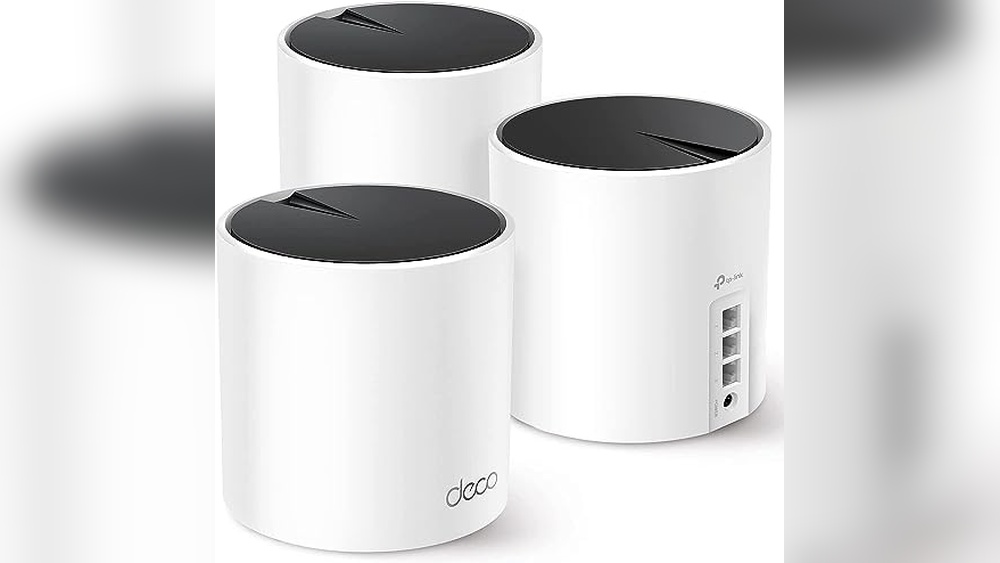
The TP-Link Deco X55 Mesh WiFi System replaces traditional routers and extenders with a single, unified network for your entire home. It solves the common problems of dead zones and inconsistent Wi-Fi by spreading fast Wi-Fi 6 coverage up to 6500 sq.
Ft. across multiple units. This system is a great fit for homes with many rooms or thick walls where standard routers struggle.
Using this mesh system means you can walk around your house without worrying about losing signal or buffering videos. The setup is straightforward, and daily use is consistent—once connected, your devices switch seamlessly between units. Managing a busy home network with dozens of devices becomes worry-free, and you won’t need to fiddle with extenders or boosters.
What Makes It A Strong Choice
- Covers large homes with seamless Wi-Fi
- Connects up to 150 devices reliably
- Removes dead zones and buffering
- Supports wired Ethernet backhaul for better speed
- Multiple Gigabit ports per unit for flexible connections
- Secure-by-Design pledge for peace of mind
Consider Before You Buy
- May be more than needed for small apartments
- Does not include advanced parental controls out of the box
- Requires space for three units
Who This Fits Best
If you have a large or multi-story home and need Wi-Fi everywhere—from basement to attic—the TP-Link Deco X55 Mesh WiFi System is a smart pick. It takes away the hassle of managing multiple routers or extenders and removes the guesswork of where your Wi-Fi might drop out.
For best results, place the units strategically to maximize overlap and reduce blind spots.
With its strong device support and secure design, you can trust that your network will stay fast and protected. Setup is simple, and you’ll spend less time troubleshooting or worrying about coverage. Personally, I appreciate not having to explain to guests where the “good Wi-Fi” spots are anymore.
| Best for | Why |
|---|---|
| Large multi-room homes | Seamless coverage up to 6500 sq. ft. eliminates dead zones |
| Homes with many devices | Handles up to 150 connected devices without slowdowns |
| Wired network fans | Each unit includes 3 Gigabit ports and Ethernet backhaul |
| Security-conscious households | Built with advanced security as a core requirement |
Tp-link Deco 7 Mesh Wi-fi System
One of the Best Mesh Routers for Whole-Home Wi-Fi, this system delivers stable coverage for large spaces and busy households.

The TP-Link Deco 7 Mesh Wi-Fi System is designed to solve spotty Wi-Fi and connect every corner of your home. With three units working together, it extends reliable internet across up to 6,600 sq. Ft. , supporting many devices without slowing down.
The dual-band Wi-Fi 7 tech means you get the newest speeds for gaming, streaming, or working anywhere at home.
Using the Deco 7 feels effortless. You can roam from room to room and stay connected, thanks to seamless AI-driven roaming. Setup is straightforward, and once running, the system manages itself to deliver consistent coverage. It’s built for families or anyone who wants to avoid Wi-Fi dead zones and enjoy smooth connections every day.
Reasons To Choose This Mesh System
- Strong coverage for large homes (up to 6,600 sq. Ft.)
- Handles over 150 devices without performance drops
- Fast speeds with Wi-Fi 7 and 4-stream support
- Flexible wired and wireless backhaul for stability
- Unified network name and seamless roaming
- Advanced security commitment from TP-Link
- Easy, self-learning network optimization
Things To Consider Before Buying
- Requires Wi-Fi 7 devices to unlock full speed potential
- May be more than needed for small apartments
- Initial setup takes a bit longer if wiring backhaul
Who This Fits Best
This mesh system is ideal for large homes, multi-story setups, or households with lots of connected devices. If you’re tired of dropped signals or want to future-proof your Wi-Fi for the latest gadgets, it delivers peace of mind and smooth performance.
It removes the stress of troubleshooting signal issues or juggling multiple networks. A quick tip: place each unit in open, central spots for the best coverage. The Deco’s AI-driven features mean fewer surprises and less tweaking as your network learns your habits. If you value consistent, secure, and hassle-free internet, you’ll notice the difference.
| Best for | Why |
|---|---|
| Large homes and multi-level spaces | Covers up to 6,600 sq. ft. with strong, seamless Wi-Fi |
| Families with many devices | Supports over 150 devices without slowing down |
| Tech enthusiasts upgrading to Wi-Fi 7 | Unlocks latest speeds and features for new devices |
| Users needing secure, reliable networks | TP-Link’s security pledge and AI-roaming mean safer, stable connections |
Tp-link Deco S4 Mesh Wifi System
A strong contender among Best Mesh Routers for Whole-Home Wi-Fi, this system stands out for its seamless coverage and simple network management.

This is a three-unit mesh WiFi system designed to replace your traditional router and extender. It solves the hassle of dead zones and spotty connections by creating one seamless network that covers up to 5,500 square feet. You get a single network name and password, so moving around your home stays simple.
Using this mesh router means you can walk from room to room without losing your connection or needing to reconnect devices. It’s reliable for homes with many devices and keeps your WiFi stable, so streaming, working, or gaming remains smooth.
The system is easy to set up and feels hands-off day to day, reducing the need to troubleshoot.
Why It’s A Standout Mesh Wifi Choice
- Covers large homes up to 5,500 sq. Ft. with one network
- No dead zones thanks to three interlinked units
- Single network name and password for the whole house
- Handles up to 100 connected devices smoothly
- Automatic device switching keeps speeds fast
- Works with Alexa for voice control options
What To Consider Before Buying
- Not the fastest option for advanced power users
- Three units may be more than needed for small apartments
- Lacks advanced customization found in some other mesh systems
Who This Fits Best
This mesh system is best for families or anyone tired of WiFi dead spots and juggling multiple network names. It’s a fit for medium to large homes where reliability and effortless use matter more than advanced tweaking. You’ll spend less time troubleshooting and more time enjoying steady connections throughout your space.
If you want easy setup, consistent speeds, and the ability to forget about your WiFi, this system removes the usual stress. For best results, place each unit on different floors or distant areas to maximize coverage. You’ll feel confident knowing your devices will stay connected as you move around, with fewer interruptions and no guesswork.
| Best for | Why |
|---|---|
| Whole-home WiFi coverage | Eliminates dead zones in houses up to 5,500 sq. ft. |
| Homes with many devices | Supports up to 100 connections without slowdown |
| Users who dislike network hassles | Single network name and auto-switching simplify daily use |
| Alexa-enabled households | Works with Alexa for easy voice control integration |
Tp-link Deco 7 Pro Mesh System
Among the Best Mesh Routers for Whole-Home Wi-Fi, the Deco 7 Pro Mesh System stands out for delivering seamless coverage and high device capacity in large homes.

The TP-Link Deco 7 Pro Mesh System is a tri-band Wi-Fi 7 mesh solution designed for large homes and demanding networks. It solves the problem of dead zones and inconsistent connections by using advanced Wi-Fi 7 features and supporting both wired and wireless backhaul, making it ideal for spaces with many devices.
Using this system feels effortless, as you get strong, unified Wi-Fi in every room. Streaming, gaming, and working from anywhere at home are consistent, and the AI-driven seamless roaming keeps you connected without manual switching. You can rely on stable speeds even with over 200 devices, so there’s less worry about lag or dropped connections.
Key Advantages For Whole-home Connectivity
- Covers up to 7,600 sq.ft. With consistent Wi-Fi
- Handles over 200 devices simultaneously
- Tri-band Wi-Fi 7 ensures fast speeds on all bands
- Four 2.5G WAN/LAN ports for flexible wired connections
- AI-driven roaming adapts to your movement for seamless streaming
- Unified network name across the whole house
- Supports both wired and wireless backhaul for maximum flexibility
Points To Consider Before Buying
- Requires Wi-Fi 7 compatible devices to fully benefit from top speeds
- Setup may be more involved for users new to mesh networking
- Large size and weight compared to basic routers
Who This Fits Best
This system is best for families or households with large homes, multiple floors, or those who want to connect many devices without sacrificing performance. It removes the stress of weak signals and manual network switching, and it saves time by automating device management and roaming.
If you want hassle-free, reliable coverage everywhere, this is a strong choice. For best results, place each unit in open areas and use wired backhaul if possible. The Deco 7 Pro’s AI-driven features mean you can enjoy peace of mind—no more dropped video calls or missed streaming moments.
I appreciate how it makes network management simple, even for those with little tech experience.
| Best for | Why |
|---|---|
| Large homes with multiple floors | Provides strong coverage up to 7,600 sq.ft. without dead zones |
| Families with many devices | Supports over 200 devices at once with reliable speeds |
| Users wanting seamless roaming | AI-driven network adapts automatically for uninterrupted connections |
| Home offices needing wired connections | Offers multiple 2.5G ports for fast, stable wired access |
Tp-link Deco S4 Mesh Wifi Kit
A standout in the Best Mesh Routers for Whole-Home Wi-Fi, this TP-Link system is ideal for seamless, whole-home coverage without dead zones.

The TP-Link Deco S4 Mesh WiFi Kit is designed to replace patchy coverage with strong, reliable wireless across your entire home. By linking two compact units, it forms a unified mesh network that eliminates dead zones and the hassle of multiple logins.
If you want a Wi-Fi solution that just works, this system stands out for its ability to provide consistent speeds to every corner.
Using this mesh system feels effortless: you move from room to room without reconnecting, and devices switch automatically to the best signal. The setup is straightforward, and once in place, you can confidently stream, work, or game without worrying about dropped connections or slow spots. It’s a real time-saver for busy homes with many devices.
Reasons People Choose This Mesh System
- Reliable Wi-Fi coverage up to 3,800 sq. Ft. with no dead zones
- Single network name and password for seamless roaming
- Supports up to 75 connected devices without slowdowns
- Easy to expand by adding more Deco units
- Simplifies home networking—no need for separate extenders
- Parental controls for safer online experiences
What To Know Before Buying
- Not the fastest option for homes needing Wi-Fi 6 or higher
- Basic design may not suit those seeking advanced customization
- Best for medium to large homes, may be overkill for small apartments
What I’d Tell A Friend
If your home Wi-Fi is full of dead spots or you’re frustrated by switching between different networks, the Deco S4 Mesh Kit is a practical fix. It’s great for families and anyone who wants hassle-free, consistent coverage for streaming, work, and smart devices.
Setting it up is quick, and you won’t have to think about your Wi-Fi again.
This system is best for those who want to remove the guesswork and stress of unreliable internet. My tip: place each Deco unit in open, central spots for optimal coverage. Once set up, you can trust the network to quietly handle the traffic—even with lots of devices online. The peace of mind comes from knowing your connection will just work, wherever you are at home.
| Best for | Why |
|---|---|
| Families with multiple devices | Handles up to 75 devices without speed drops |
| Homes up to 3,800 sq. ft. | Eliminates dead zones across large areas |
| Users who want easy, seamless roaming | Single network name and auto-switching for convenience |
| Parental control needs | Built-in features help manage internet access for kids |
Tp-link Deco S4 Mesh Wifi System
For those seeking Best Mesh Routers for Whole-Home Wi-Fi, this unit delivers seamless, reliable coverage for homes up to 2,000 sq. Ft.

The TP-Link Deco S4 Mesh WiFi System is designed to eliminate dead zones and provide stable internet across your whole home. By adding this unit to your existing Deco mesh setup, you easily expand coverage without hassle. It creates one unified network, so you don’t have to remember multiple passwords or switch between different WiFi names.
Using this mesh router feels simple and consistent. Devices automatically connect to the strongest signal as you move from room to room, making streaming and browsing smoother. You can trust it to keep your connection steady, whether you’re working from home or relaxing with entertainment.
Setup is straightforward, and maintenance is minimal.
Key Advantages For Whole-home Mesh
- Expands coverage up to 2,000 sq. Ft. with one unit
- Works seamlessly with other TP-Link Deco devices
- Unified WiFi network for easy roaming
- No need to manage multiple passwords or network names
- Automatically switches devices to the best signal
- Better coverage than traditional routers
- Simple setup and easy integration
Things To Consider Before Buying
- Requires existing TP-Link Deco system for expansion
- Single unit may not be enough for very large homes
- No built-in advanced parental controls mentioned
Who This Fits Best
This mesh router is ideal for homeowners who already use TP-Link Deco and want to cover extra rooms or floors without tech headaches. It’s great for families and remote workers who need smooth, consistent WiFi everywhere. By forming a single network, it removes the stress of dropped connections and the hassle of network juggling.
If you want a reliable upgrade with minimal setup, this unit does the job well. For best results, place each Deco unit in an open area, and keep firmware updated for improved stability. You’ll enjoy peace of mind knowing your devices stay connected as you move around, with fewer surprises or interruptions.
I appreciate how it blends into the home and just works.
| Best for | Why |
|---|---|
| Expanding existing Deco mesh networks | Easy integration and seamless coverage boost |
| Homes with WiFi dead zones | Eliminates weak spots for uninterrupted connectivity |
| Users who want simple setup | Unified network name and password, minimal effort |
| Families with multiple devices | Automatic signal switching keeps devices online |
Netgear Orbi 370 Wifi 7 Mesh System
For those seeking the Best Mesh Routers for Whole-Home Wi-Fi, this system stands out by delivering fast, reliable coverage across large spaces and many devices.

The NETGEAR Orbi 370 WiFi 7 Mesh System is designed to cover large homes with seamless wireless connectivity. It solves the frustration of Wi-Fi dead zones by using a router and two extenders to deliver consistent, high-speed internet up to 6,000 sq.
ft. With support for up to 70 devices, it’s built for busy households that need reliable connections everywhere.
Using this system means you can move around your home without worrying about dropping your connection. The setup is straightforward, and automatic security updates provide extra peace of mind. Whether you work from home, stream, or have a smart home setup, the network stays strong and consistent, so you spend less time troubleshooting and more time enjoying your devices.
Why It’s Strong For Home Wi-fi
- Covers up to 6,000 sq.ft. With stable Wi-Fi
- Handles up to 70 connected devices at once
- WiFi 7 provides faster speeds and is backward compatible
- Dual-band with Enhanced Backhaul for reliability
- Security features and automatic firmware updates included
- Simple, mesh-based setup for whole-home coverage
What To Consider Before Buying
- Does not include a cable modem (router system only)
- Premium features may be unnecessary for smaller homes
- Requires WiFi 7 devices for top speeds
Where This Shines
This system is best for families or anyone with a lot of devices needing strong Wi-Fi everywhere in a larger home. It removes the stress of weak signals and the hassle of managing multiple networks. For best results, place the extenders thoughtfully to maximize coverage in every room.
With automatic security and reliable mesh coverage, you’ll have fewer surprises and more confidence in your network. If you want to set it and forget it, this system delivers steady performance that just works—no guesswork needed. I’d recommend it to anyone tired of moving routers around or dealing with dead spots.
| Best for | Why |
|---|---|
| Large homes with Wi-Fi dead zones | Covers up to 6,000 sq.ft. with mesh extenders |
| Households with many connected devices | Supports up to 70 devices at once |
| Users wanting automatic security updates | Built-in security and firmware updates reduce risk |
| Homes upgrading to WiFi 7 | Delivers faster speeds and compatibility with new devices |
Tp-link Deco M5 Mesh Wifi 3-pack
Among Best Mesh Routers for Whole-Home Wi-Fi, this TP-Link Deco M5 stands out for reliable coverage and easy setup in larger spaces.

The TP-Link Deco M5 Mesh WiFi 3-Pack is designed to replace your traditional router and extender setup, offering up to 5,500 sq. Ft. of seamless Wi-Fi coverage. By using three units, it helps eliminate dead zones and keeps all your devices connected under a single network name.
The built-in security features and parental controls add peace of mind for families and anyone concerned about safe browsing.
Daily use feels consistent and hassle-free, with strong signal throughout the house and no interruptions as you move from room to room. Setup takes only a few minutes with the Deco app, and adaptive routing ensures stable performance even with many devices connected.
You spend less time troubleshooting Wi-Fi issues and more time enjoying reliable internet.
Why It’s Reliable For Whole-home Wi-fi
- Covers large homes up to 5,500 sq. Ft. with three units
- Eliminates dead zones and weak signal areas
- Single network name for seamless roaming
- Adaptive routing for stable connections
- Built-in antivirus and parental controls
- Quick setup via Deco app
- Works with Alexa for voice control
Things To Consider Before Buying
- May be overkill for small apartments or single rooms
- Requires Deco app for setup (not browser-based)
- Physical units may take up more space than a single router
What I’d Tell A Friend
If you’re tired of Wi-Fi dead spots and want a simple solution that covers your whole house, the TP-Link Deco M5 Mesh WiFi 3-Pack is a solid pick. It’s especially good for larger homes or families with lots of devices, removing the stress of disconnects and confusing network names.
The built-in security tools mean you don’t have to worry about basic online safety.
Once set up, you’ll notice fewer Wi-Fi problems and no need to switch between networks as you move around. For best results, place the Deco units in open areas—this helps maximize coverage. Knowing your network is protected and consistent brings real peace of mind, especially if you have kids or guests.
| Best for | Why |
|---|---|
| Larger homes (multi-story or spread out) | Covers up to 5,500 sq. ft. and eliminates dead zones |
| Families with many devices | Supports over 100 devices with stable connections |
| Parents wanting online safety controls | Built-in antivirus and parental controls included |
| Anyone wanting easy setup | Deco app guides you through installation in minutes |
Tp-link Deco Xe75 Mesh Wifi 6e
For Best Mesh Routers for Whole-Home Wi-Fi, the TP-Link Deco XE75 Mesh WiFi 6E delivers extensive coverage with next-gen reliability for larger homes and busy households.

The TP-Link Deco XE75 Mesh WiFi 6E is a tri-band system designed to replace your router and extender, blanketing up to 7,200 square feet with seamless, modern Wi-Fi. It’s ideal for eliminating dead zones and reducing buffering, especially in larger homes with lots of connected devices.
Day-to-day, you’ll notice stable, fast connections throughout your space—even on multiple floors. Setup and management are straightforward, and the network stays consistent as you move from room to room. For most families, it means less troubleshooting and more reliable streaming or work calls wherever you are at home.
Why It Stands Out In Whole-home Wi-fi
- Covers very large homes or multi-story spaces with seamless signal
- Tri-band design reduces congestion and buffering
- Dedicated 6 GHz band supports WiFi 6E devices and clean backhaul
- Handles up to 200 devices without bogging down
- Backed by advanced security commitments
- Simple, unified system replaces both router and extenders
Keep In Mind Before Buying
- 6 GHz band useful only with compatible WiFi 6E devices
- Physical units are larger than single routers
- No built-in price advantage for smaller homes
What I’d Tell A Friend
If you want reliable Wi-Fi in every corner—no matter how large your home is—the Deco XE75 is a strong pick for families or anyone with lots of devices. It removes the hassle of weak spots and constant reconnecting, so you can just enjoy uninterrupted browsing and streaming.
Setting up the system in a central spot and spacing out the units will get you the most even coverage.
This mesh system is especially reassuring if you’ve struggled with dropped connections or dead zones before. There’s peace of mind in knowing your network is secure and built for today’s smart homes. Personally, I like that it feels set-and-forget, letting you focus on what matters instead of fiddling with Wi-Fi settings.
| Best for | Why |
|---|---|
| Large and multi-story homes | Consistent signal across up to 7,200 sq.ft with mesh coverage |
| Homes with many connected devices | Tri-band design and WiFi 6E handle heavy traffic smoothly |
| Users needing simple setup | Unified system replaces multiple devices with easy management |
| Security-minded families | Complies with advanced cybersecurity standards |
Netgear Nighthawk Mesh Wifi 6 System
A top pick among Best Mesh Routers for Whole-Home Wi-Fi, offering broad coverage and easy setup for busy households.

The NETGEAR Nighthawk Mesh WiFi 6 System is designed for homes needing reliable Wi-Fi across multiple rooms. It solves dead zones and weak connections by covering up to 4,500 sq. Ft. and supporting over 25 devices. If you often deal with slow internet or dropped connections, this mesh system addresses those issues with modern WiFi 6 technology.
Using this system feels seamless—streaming, gaming, and video calls happen without interruption. Setup takes just a few minutes with the Nighthawk App, letting you manage your network without stress. Once installed, you can confidently move around your home knowing your devices stay connected, with easy options to monitor usage and tweak settings.
Reliable Coverage & Everyday Advantages
- Full-home coverage up to 4,500 sq. Ft.
- Handles 25+ devices smoothly
- WiFi 6 delivers faster, more stable connections
- Easy setup and management with Nighthawk App
- Compatible with any internet provider up to 1Gbps
- Ethernet ports for wired gaming or streaming
- Explicit Beamforming for focused signal strength
Consider Before Buying
- May be more than needed for small apartments
- Requires replacement of your current WiFi router
- Limited to 1Gbps ISP speed
- Physical size may not suit compact spaces
Who This Fits Best
This mesh system is ideal for families or anyone working from home who needs consistent Wi-Fi in every corner. It takes away the hassle of troubleshooting weak signals or juggling multiple extenders. With simple app controls, you spend less time worrying about your network and more time enjoying smooth internet.
To get the best performance, place the satellite units in areas where signal tends to drop—like upstairs or far corners. You’ll notice fewer interruptions and a dependable connection for all your devices, from smart TVs to laptops. I appreciate how it turns Wi-Fi from a daily headache into a set-it-and-forget-it experience.
| Best for | Why |
|---|---|
| Large multi-room homes | Eliminates dead zones with wide coverage |
| Families with many devices | Handles 25+ connections without slowdown |
| Remote workers & gamers | Stable, fast Wi-Fi for streaming and calls |
| Users upgrading from older routers | Simple setup, modern WiFi 6 speeds |
How To Choose The Right Mesh Wi-fi System For Your Home
Coverage Area Vs. Home Layout
Match the system’s coverage claims to your home’s layout. Large, multi-story homes need stronger mesh coverage and more units. If you have many walls or odd layouts, prioritize mesh systems with solid backhaul options.
Device Load And Future-proofing
Estimate how many devices you want to connect—now and in the future. Wi-Fi 7 and Wi-Fi 6E systems are better for busy smart homes. For fewer devices or simple use, older standards can still work well.
Wired Backhaul And Ports
If you want the most reliable speeds, check for Ethernet backhaul support and enough LAN ports. This matters for gaming, home offices, or wired streaming devices.
Security And Parental Controls
Consider how much control you need over your network. Some systems offer built-in security and parental controls, while others are more basic. Decide if these features are important for your situation.
Common Buyer Mistakes To Avoid
- Assuming higher speed ratings always mean faster real-world performance. Home environment impacts results more than specs alone.
- Ignoring compatibility. Not all mesh systems work well with every ISP or modem.
- Buying more units than needed. Too many nodes can cause interference rather than help.
- Skipping setup instructions. Small errors in placement or configuration can cause weak spots.
Who Might Want To Avoid These Products
- If you have a very small apartment or only a few devices, a mesh system may be overkill.
- Those who need advanced customization for networking might find mesh systems limiting compared to traditional routers.
- Renters with restrictive internet setups (such as locked ISP equipment) should check compatibility first.
Setup And Usage Tips
- Place nodes in open areas, away from thick walls and appliances.
- Follow the app’s guidance for node spacing. Too close or too far reduces effectiveness.
- Update firmware during initial setup. This helps with security and stability.
- Label your units if they look similar, to simplify troubleshooting later.
Frequently Asked Questions
Can I Mix Different Mesh Systems Or Brands Together?
Generally, mesh units from different brands are not compatible. Stick with the same brand and model family for best results.
Will A Mesh System Improve My Internet Speed?
Mesh systems improve Wi-Fi coverage and consistency. They do not increase your internet plan speed from your provider.
Is A Tri-band Or Dual-band System Better?
Tri-band systems usually handle more devices and backhaul traffic more efficiently. For small homes or low device counts, dual-band may be enough.
Do I Need Wi-fi 7 Or Wi-fi 6e?
Wi-Fi 7 and 6E offer better future-proofing and speeds, especially for many devices or newer phones/computers. Older devices will not benefit as much.
How Hard Is It To Set Up A Mesh Wi-fi System?
Most mesh kits offer app-based setup and are designed for non-experts. Following the included instructions is usually sufficient.
Can I Use My Existing Router With A Mesh System?
Some mesh systems can work in “access point” mode with an existing router. For best results, replace your old router entirely if possible.
Summary And Final Thoughts
Choosing a mesh Wi-Fi system is about matching features to your real needs. Consider your home size, device count, and whether you value simplicity or advanced control. Modern mesh systems reduce dead zones and are generally easy to set up.
Take a moment to assess your space and habits—this makes it easier to select a system with lasting value.