
Shooting a live broadcast or church service with one fixed camera angle never feels quite right. You’ve probably wished for smoother shots or more control—especially when the action shifts or the speaker moves.
Shopping for the best PTZ camera for broadcast gets confusing fast. There are lots of buzzwords, and it’s easy to get lost between optical zoom, tracking features, and all the different connection types. Price tags jump from budget to premium with no obvious reason.
What works for a quiet classroom might not fit a busy event or large venue. It’s hard to know what really matters until you’ve made a few mistakes.
This guide will help you cut through the noise and find a PTZ camera that matches your space, your workflow, and your budget.
What Actually Matters When Choosing A Ptz Camera?
- Think about your room size and how far your subjects will be from the camera. Not everyone needs maximum zoom.
- Consider how you’ll connect the camera—HDMI, SDI, USB, or NDI—based on your current setup and future plans.
- Decide if AI auto-tracking or remote control is important for your style of production. Some setups need it, some don’t.
- Don’t get distracted by high-end features you may never use. Simpler can be better if your use case is straightforward.
Common Mistakes People Make
- Choosing based only on price, without thinking about reliability or support.
- Assuming all PTZ cameras handle low light or audio the same way—they don’t.
- Overlooking compatibility with existing gear, like switchers or streaming software.
Below you’ll find a range of PTZ cameras chosen for different spaces, streaming needs, and budgets. Each one fits common broadcast scenarios, but the best pick depends on your exact setup and goals.
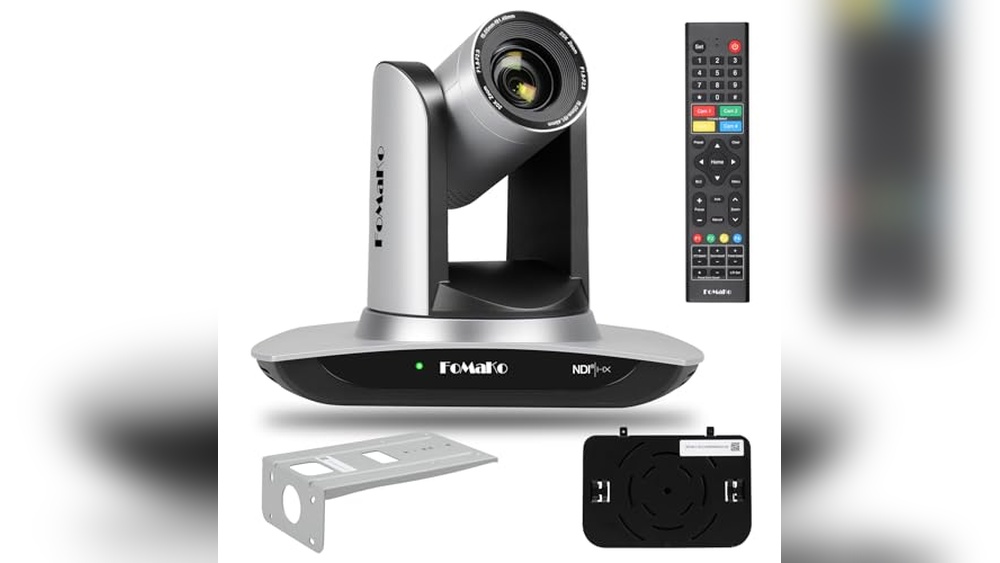
Fomako Ndi Ptz Camera With Ai Tracking
A strong pick for the Best Ptz Camera for Broadcast if you want smooth AI auto-tracking and flexible streaming for live events.

The FoMaKo NDI PTZ Camera with AI Tracking brings advanced auto-tracking and smooth pan-tilt-zoom controls to live broadcasts, church services, and education. Its NDI certification ensures stable video even with challenging network conditions, giving users flexibility for streaming and recording.
Using this camera feels straightforward, especially for those who want to reduce manual camera work. Setup is supported by free guidance, and switching between tracking modes is quick with the remote. Once in place, it consistently follows movement, letting you focus more on the event and less on the tech.
Where This Camera Excels
- AI-powered auto-tracking reduces need for manual operation
- Certified NDI 6 & NDI HX3 for stable, high-quality streaming
- Multiple video outputs: HDMI, LAN, USB3.0 for versatile setups
- Customizable tracking modes and sensitivity
- Compatible with popular streaming software (OBS, vMix, Zoom, more)
- Works well in low light with advanced noise reduction
- PoE support streamlines installation
Potential Limitations To Note
- No built-in microphone; external mic required for audio
- Some setup steps may need technical guidance
- Best suited for stationary use—portable setups may be less ideal
When I’d Pick This
This camera is best for anyone running live broadcasts in spaces like churches, schools, or event halls who need reliable auto-tracking without a dedicated camera operator. It removes the hassle of constantly adjusting the camera, so you can keep your attention on the actual event.
If you want to avoid technical surprises, the lifetime support and official NDI certification give extra peace of mind. For best results, set up your preferred tracking mode before going live, and remember to connect an external mic if you need audio.
In my experience, the consistent tracking and easy integration with streaming tools make it feel dependable even for first-time users.
| Best for | Why |
|---|---|
| Church or Worship Streaming | Tracks speakers and performers automatically, minimizing camera staff needs |
| Educational Live Events | Flexible outputs and reliable tracking for classrooms or lecture capture |
| Multi-platform Streaming Studios | NDI and protocol support ensures compatibility with most setups |
| Venues with Changing Lighting | High SNR CMOS and noise reduction keep video clear in low light |
Avkans 30x Ptz Live Streaming Camera
A top choice for Best Ptz Camera for Broadcast thanks to its versatile video outputs and reliable AI tracking for smooth, professional streams.

The AVKANS 30X PTZ Live Streaming Camera is a professional broadcast solution for anyone needing high-quality video with flexible connectivity. With simultaneous HDMI, 3G-SDI, and IP streaming outputs, it adapts easily to a wide range of live production setups, including churches, events, and lectures.
The standout 30X optical zoom helps you capture clear details from a distance, making it ideal when camera placement options are limited.
Using this camera day-to-day means spending less time troubleshooting connections and more time focusing on the content. The AI auto tracking feature is especially useful for dynamic events, keeping your subject in frame without manual adjustment. This consistency can help you deliver smooth, professional-looking streams every time, even if you’re working solo or with a small team.
Broadcast-ready Advantages
- Simultaneous HDMI, 3G-SDI, and IP outputs for maximum flexibility
- 30X optical zoom captures distant subjects clearly
- AI auto tracking keeps moving speakers centered
- Supports US broadcast standard frame rates for professional results
- Compatible with popular switchers and streaming software
- PoE support reduces cable clutter in installations
Consider Before Buying
- NDI functionality is limited to a short trial unless upgraded separately
- May be more feature-rich than needed for simple video calls
- Not the lightest camera, requiring sturdy mounting
Who This Fits Best
This camera is best for churches, event organizers, and small broadcast teams who want consistent, professional video output with minimal hands-on camera work. It takes away the stress of manual tracking and complicated wiring, letting you focus on your message or production instead of technical headaches.
For best results, pair the camera with a compatible video switcher and experiment with the AI tracking settings before your first live event. Once dialed in, you can trust it to keep your streams smooth and reliable, reducing surprises in your workflow.
If I were setting up a one-person broadcast, this would be my go-to for its hands-off operation and steady performance.
| Best for | Why |
|---|---|
| Church services and worship events | AI tracking and powerful zoom capture speakers and musicians seamlessly |
| Live event broadcasting | Multiple outputs and broadcast frame rates integrate easily with pro equipment |
| Lecture halls and conferences | Set-and-forget tracking minimizes operator workload |
| Sports and outdoor streams | High zoom and reliable connectivity cover large areas with fewer cameras |
Avkans 30x Ndi Ptz Auto Tracking Camera
For those seeking the Best Ptz Camera for Broadcast, this model offers reliable auto tracking and versatile streaming outputs for professional environments.
This AVKANS PTZ camera is designed for live broadcast needs where tracking presenters and streaming to multiple platforms matters. With 30x optical zoom and official NDI support, it simplifies capturing clear, professional video for churches, schools, events, or houses of worship.
Using this camera feels straightforward—auto tracking helps presenters stay framed, and setup is just a single Ethernet cable for power, control, and preview. It’s compatible with popular production software, making it easy to integrate into existing workflows and reduce setup stress.
Key Advantages For Broadcast Streaming
- Auto tracking keeps presenters consistently in frame
- 30x optical zoom for flexible positioning
- NDI HX2 and HX3 support for efficient network streaming
- Multiple outputs: SDI, HDMI, IP for different setups
- Easy power and control via Ethernet (PoE)
- Broadcast-standard frame rates for compatibility
- Zone tracking modes for dynamic events
Consider Before Buying
- Requires compatible software or hardware for NDI features
- Not intended for basic home webcam use
- Professional installation may be needed for optimal results
Who This Fits Best
This camera is ideal for churches, schools, or organizations needing reliable presenter tracking and versatile streaming. It removes guesswork around framing and coverage, so operators can focus on content rather than camera controls.
Setup is simplified with Power over Ethernet, and the tracking modes handle moving subjects seamlessly. For best results, preset tracking zones ahead of time to minimize repositioning during live events. The camera’s stable performance brings peace of mind during important broadcasts.
If you value consistent coverage and easy integration with broadcast systems, this model is a practical choice.
| Best for | Why |
|---|---|
| Live church services | Auto tracks pastors and presenters with flexible framing |
| School events and lectures | Handles dynamic movement and multiple tracking zones |
| Professional broadcast setups | Supports US broadcast frame rates and multiple output formats |
| Multi-platform streaming | Simultaneous SDI, HDMI, and IP streaming with simple setup |
Tenveo 4k Ndi Ptz Camera Bundle
A strong pick for Best Ptz Camera for Broadcast thanks to its precise AI auto-tracking and versatile control for seamless live production.

The Tenveo 4K NDI PTZ Camera Bundle is designed for professional live broadcasts, making it easier to capture smooth, high-quality video in dynamic environments. With advanced AI humanoid and face auto-tracking, you can focus on the production without worrying about manual camera adjustments.
The inclusion of a 7’’ LCD quad-screen joystick controller means you have real-time visual feedback and precise control at your fingertips.
Using this system during live events feels reliable and efficient. You can quickly switch views, track presenters, and adjust settings without technical hassle. The multiple output interfaces and simple setup save time, especially for church services, conferences, or live productions.
It’s a setup that brings confidence to every broadcast, letting you focus on the content instead of the equipment.
Key Benefits For Broadcasters
- AI-powered auto-tracking keeps subjects centered without manual intervention
- Versatile controller with real-time quad-screen preview for instant camera adjustments
- Multiple output options (HDMI, USB3.0, LAN/NDI) for flexible live streaming setups
- 20X optical zoom delivers sharp detail from a distance
- Easy integration with common live streaming protocols and platforms
- Reliable PoE support reduces cable clutter and simplifies installation
Things To Consider
- No built-in microphone—external audio setup required
- Bundle size and weight may not suit small or portable setups
- Requires PoE switch for network power functionality
Where This Shines
This bundle is a great fit for churches, schools, or event teams needing dependable, hands-off tracking and smooth camera control during live broadcasts. It removes the stress of manually following speakers or performers and cuts down on technical surprises, especially in fast-paced environments.
If you’re setting up for the first time, spend a few minutes exploring the quad-screen controller—it helps you master quick camera switching and tracking options.
The system’s real advantage is how it reduces guesswork and lets your team focus on the message or event, not the tech. You’ll appreciate the steady, consistent results, and the peace of mind that your camera won’t lose track of the action.
For anyone who values reliable coverage with minimal fuss, this bundle delivers.
| Best for | Why |
|---|---|
| Church and Worship Services | Automated tracking and multi-camera control for dynamic live events |
| Professional Live Streaming | Multiple video outputs and protocol support for seamless integration |
| Education & Conferences | Easy camera adjustments and real-time feedback for interactive sessions |
| Multi-Camera Productions | Simple controller interface for quick camera selection and control |
Tenveo 4k Ndi Ptz Camera
The Tenveo 4K NDI PTZ Camera stands out as the Best Ptz Camera for Broadcast by offering reliable auto-tracking and multiple streaming options for professional live events.

This camera is designed for those who need accurate tracking and high-quality video in live production settings. Its 8. 29MP sensor and 20X optical zoom ensure sharp visuals, while NDI compatibility means low-latency streaming for broadcast workflows. If you need a camera that can keep subjects centered and adapt to movement, this model addresses that challenge.
Using it feels streamlined, especially during busy events like church services or concerts. Switching between scenes is quick with preset controls, and you get peace of mind from its real-time status display. It’s easy to connect to popular software and the tally light makes communication clear for operators on the go.
Broadcast-friendly Advantages
- Dual humanoid and face auto-tracking keeps subjects centered
- 20X optical zoom for flexible shot selection
- NDI, SDI, HDMI, USB3.0, and LAN outputs for versatile setups
- Real-time IP status display simplifies troubleshooting
- Tally light improves communication during production
- Compatible with Zoom, OBS, Vmix, YouTube, and more
- Multi-camera sync capability for larger venues
Points To Consider Before Buying
- Audio device not included, so external equipment is needed for sound
- Advanced features may require learning curve for new users
- Physical size and weight may not suit compact setups
Where This Shines
This camera is ideal for broadcast professionals, churches, and anyone running live events where reliable subject tracking is critical. It takes away the stress of manual camera operation and lets you focus on the content, not the tech. The real-time status display and tally light reduce surprises and keep communication clear.
For best results, set up your camera presets before the event so you can switch scenes quickly. You’ll feel confident knowing the camera adapts to movement and keeps your subjects framed, even during busy moments. If I were advising a friend, I’d highlight its ability to simplify multi-camera workflows and its compatibility with popular streaming platforms.
| Best for | Why |
|---|---|
| Live church services | Auto-tracking ensures speakers stay centered without manual adjustment |
| Concerts and stage events | 20X zoom and fast preset switching capture dynamic movement |
| Multi-camera broadcast setups | Sync capability and tally light support coordinated production |
| Educational streaming | Easy integration with Zoom, Teams, and OBS for classroom use |
Prisual Ndi Ptz Camera Gen 5
A top pick for Best Ptz Camera for Broadcast thanks to its seamless NDI integration and intelligent auto tracking for worry-free live production.

The Prisual NDI PTZ Camera Gen 5 is a professional camera designed for live broadcasts, church events, education, and conferences. It solves common streaming challenges by offering official NDI certification for smooth video transmission and simple integration with popular production software.
The camera’s advanced AI tracking keeps presenters centered and in focus, even when there’s movement.
Using this camera feels reassuring—set up is straightforward with PoE and multiple output options, so you spend less time troubleshooting. The AI tracking means you don’t need a dedicated camera operator, and switching between presets is quick. You can trust it to keep your broadcast running smoothly, letting you focus on your message or event instead of camera controls.
Why Teams Choose This Camera
- NDI 6 & NDI HX3 certified for reliable network streaming
- 30X optical zoom captures both wide and close shots
- AI auto tracking follows speakers with minimal setup
- Works with vMix, OBS, ProPresenter, Zoom, and more
- Multiple control options, including web, remote, and controller
- Simple plug-and-play setup with PoE support
- 3-year local warranty and 24/7 expert support
Where It May Not Fit
- Priced above basic PTZ cameras due to pro features
- Some features may be overkill for small, single-person streams
- Requires network setup for full NDI functionality
Who This Fits Best
This camera makes sense for churches, schools, and event organizers who want professional-grade broadcasts without technical headaches. It eliminates the stress of dropped frames and compatibility issues, so you can focus on your content, not your gear. If you’re often switching between speakers or camera angles, the AI tracking and preset functions save time and reduce errors.
For best results, set up your preferred zones and presets during a rehearsal; this helps the AI tracking adapt to your room. With dependable support and a risk-free trial, you gain peace of mind knowing you’re backed up if anything goes wrong.
If you want your broadcast setup to “just work” when it matters, this camera delivers.
| Best for | Why |
|---|---|
| Church services & worship broadcasts | AI tracking follows speakers and pastors automatically |
| Multi-camera event streaming | NDI certification ensures reliable integration and networked control |
| Educational lectures and hybrid classrooms | Simple presets and remote control make transitions easy |
| Conference production teams | Versatile outputs (SDI, HDMI, USB, IP) suit varied AV setups |
Fomako 4k 60fps Ndi Ptz Camera
A top pick for Best Ptz Camera for Broadcast, this model stands out for its sharp 4K video and smooth AI auto-tracking in live studio or worship settings.

The FoMaKo 4K 60FPS NDI PTZ Camera is designed for anyone who needs smooth, professional video coverage in broadcast, church, or event settings. Its 30x optical zoom lets you capture details from the back of a room, solving the problem of limited camera placement.
Advanced AI auto-tracking means presenters stay in frame without manual adjustments.
Using this PTZ camera feels reliable and hands-off, especially during live events where you want to focus on content, not controls. Switching between HDMI, NDI, USB, or SDI outputs is seamless, so you can adapt to any setup. The gear-driven movement makes camera transitions precise and repeatable, adding confidence to every production.
Why Broadcasters Choose This Camera
- Ultra-smooth 4K video at up to 60fps for crisp, clear broadcasts
- Third-generation AI auto-tracking reduces need for manual camera operation
- Multiple output options (SDI, HDMI, NDI, USB) fit diverse workflows
- 30x optical zoom brings distant subjects close without loss of quality
- Gear transmission ensures accurate, reliable positioning and longer hardware life
- PoE support simplifies installation and reduces cable clutter
- Strong warranty and lifetime technical support add peace of mind
Things To Consider Before Buying
- Not the lightest option at nearly 3 pounds—consider mounting needs
- Advanced features may require setup guidance for first-time users
- Higher price reflects pro-level features, may exceed basic needs
Who This Fits Best
This camera is a great match for churches, studios, and event producers who want reliable, hands-off tracking and top-tier image quality. It removes the stress of missed shots and manual adjustments, letting you focus on the message or event. If you’re moving up from basic webcams or camcorders, you’ll notice the smooth transitions and clear images right away.
For best results, spend a few minutes adjusting the AI tracking sensitivity to match your stage or room layout—this simple step improves tracking accuracy. The included support and setup help mean you’re never alone if you hit a snag. It’s a relief to know your camera just works, every time, even in fast-changing live environments.
| Best for | Why |
|---|---|
| Church worship streaming | Auto-tracking keeps speakers in frame; clear 4K video for remote viewers |
| Live studio broadcasts | Multiple outputs and smooth PTZ make switching scenes seamless |
| Education and conferences | AI tracking follows instructors naturally; PoE simplifies classroom install |
| Esports and events | High frame rates and zoom capture fast-paced action clearly |
Fomako 4k Ndi Ptz Camera
For those seeking the Best Ptz Camera for Broadcast, this FoMaKo model stands out with its 4K UHD clarity and reliable auto-tracking performance.

The FoMaKo 4K NDI PTZ Camera is designed for professional broadcast and live streaming environments. It solves the challenge of capturing crisp, stable video in large venues, thanks to its 4K 60fps sensor and advanced optical zoom. With AI auto-tracking, presenters remain in frame without manual adjustments.
Using this camera feels seamless and dependable. The auto-frame function keeps the subject centered, while the quiet motor ensures distraction-free operation. Confidence comes from knowing every angle is covered, and switching presets is fast and simple, making live production smoother and less stressful.
Broadcast-ready Advantages
- True 4K 60fps resolution for professional video quality
- AI auto-tracking keeps speakers in frame automatically
- Low-light performance maintains clarity in dim venues
- NDI & PoE enable one-cable setup for power and control
- 255 presets for instant multi-angle switching
- Silent, fast PTZ motor minimizes distractions
- Compatible with major broadcast software and hardware
Consider Before Buying
- Requires compatible software or hardware for full NDI benefits
- Size and weight may not suit very tight spaces
- Best performance relies on strong network infrastructure
Where This Shines
This camera is ideal for broadcast teams, churches, and conference venues needing high-quality 4K video with minimal manual intervention. It removes the stress of manual camera operation and tracking, letting you focus on content instead of equipment.
AI tracking and presets save time and hassle, especially during events with multiple speakers or changing positions. For best results, set up your presets in advance and use the LCD IP display for quick network configuration. The reliable operation means fewer surprises during live sessions, giving peace of mind to any production team.
| Best for | Why |
|---|---|
| Broadcast studios | Consistent 4K quality and advanced tracking for multi-camera setups |
| Churches & large venues | Clean images even in low light and quiet motor for reverent spaces |
| Conference rooms | Easy remote control and fast preset switching for dynamic events |
| Live streaming educators | Auto-frame and dual streaming for simultaneous recording and broadcasting |
How To Choose The Right Ptz Camera For Your Needs
- Intended Use: Consider where you will use the camera—church, school, events, or live streaming. Larger venues may need higher zoom and better low-light performance.
- Video Output Options: Check for compatibility with your existing setup. HDMI, SDI, USB, and NDI all serve different workflows. NDI is best for IP-based production and remote control.
- AI Tracking Features: Not all AI tracking is equal. Some models offer customizable tracking zones and sensitivity, while others provide only basic following. Match the tracking features to your production style.
- Control Methods: Decide if you need remote, web-based, hardware controllers, or integration with broadcast switchers. Multi-camera setups often benefit from advanced control options.
- Support and Warranty: Consider brands with clear support policies, local warranty, and setup guidance. This can save time during installation and troubleshooting.
Common Mistakes When Buying A Ptz Camera
- Assuming all NDI cameras work identically. Official certification ensures stable performance.
- Overlooking the importance of lighting for image quality. Not all sensors handle low light equally well.
- Forgetting to check audio requirements. Most PTZ cameras do not have built-in microphones.
- Ignoring mounting and installation needs. Ceiling versus tripod mounting may affect camera choice.
- Choosing more zoom than needed, resulting in a narrower field of view than expected.
Who Should Avoid These Cameras?
- If you only need a simple webcam for video calls, these PTZ models are likely more complex and expensive than necessary.
- Those who need built-in microphones or all-in-one audio/video solutions should consider alternatives.
- Users not comfortable with network or AV setup might find installation challenging without support.
Setup And Usage Tips
- Plan your cable runs before installation. PoE can simplify power and data needs.
- Use the web interface or included remote for initial setup and IP address configuration.
- Set and test multiple camera presets before your live event for smooth operation.
- Regularly update camera firmware for improved stability and new features.
Frequently Asked Questions
Do I Need A Separate Controller For These Ptz Cameras?
No, most can be controlled via remote, web interface, or compatible software, but hardware controllers are helpful for multi-camera setups.
Can I Use These Cameras With Obs, Vmix, Or Zoom?
Yes, most models support standard streaming and conferencing software. Check for NDI or UVC compatibility for plug-and-play use.
What Is The Difference Between Ndi And Ndi Hx?
NDI provides high-quality, low-latency video over IP. NDI HX uses more compression and less bandwidth but may have slightly higher latency.
Do These Cameras Have Built-in Microphones?
Most PTZ cameras do not include built-in microphones. You will need to use an external audio source.
How Important Is Optical Zoom Versus Digital Zoom?
Optical zoom maintains image quality at all zoom levels. Digital zoom crops the image and may reduce clarity.
Can These Cameras Be Mounted Upside Down?
Yes, many PTZ cameras support ceiling mounting and include image flip features for proper orientation.
Summary And Final Thoughts
PTZ cameras offer flexible solutions for live events, worship, education, and professional streaming. Consider your venue size, workflow, and control preferences before choosing. Focus on certified models for reliable performance. Taking time to plan setup and understand your needs will ensure the right choice for your production.