
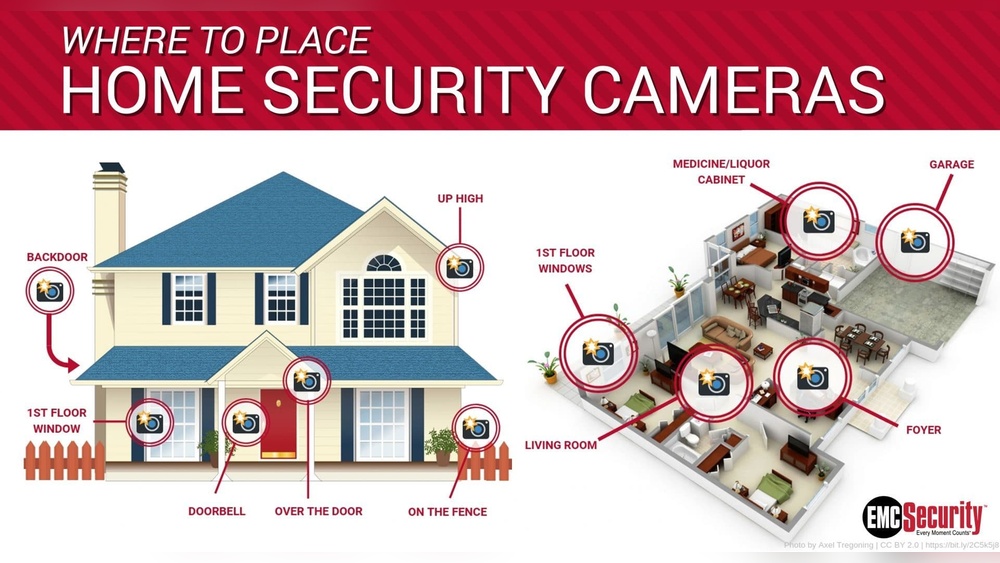
Your home should feel safe. But today, break-ins and theft are real risks for many families. Security cameras can help protect your property, family, and peace of mind. Yet, a camera only works well if you put it in the right place. Many homeowners buy expensive cameras but don’t think carefully about where to install them. Some put cameras in the wrong spot or miss critical areas, leaving blind spots that burglars can use. In this article, you’ll learn exactly where to place home security cameras for maximum safety, efficiency, and value. Whether your home is large or small, old or new, these strategies will help you set up a smart, reliable security system.
Why Camera Placement Matters
Camera placement is as important as the camera itself. A well-placed, average camera is often more effective than an expensive one in the wrong spot. The main goal is to cover entry points, high-traffic areas, and any spots that are hidden from view. When you position your cameras correctly, you:
- Deter burglars and trespassers before they try to break in
- Record clear evidence if a crime happens
- Keep an eye on deliveries, visitors, and unusual activity
- Reduce false alarms from pets, trees, or cars
Studies show that visible security cameras can reduce crime by up to 50% in residential neighborhoods. Yet, many homes have cameras that point at empty walls, face direct sunlight, or are blocked by bushes. A camera’s field of view, height, and angle all make a difference. The goal is not just to record, but to prevent crime before it starts.
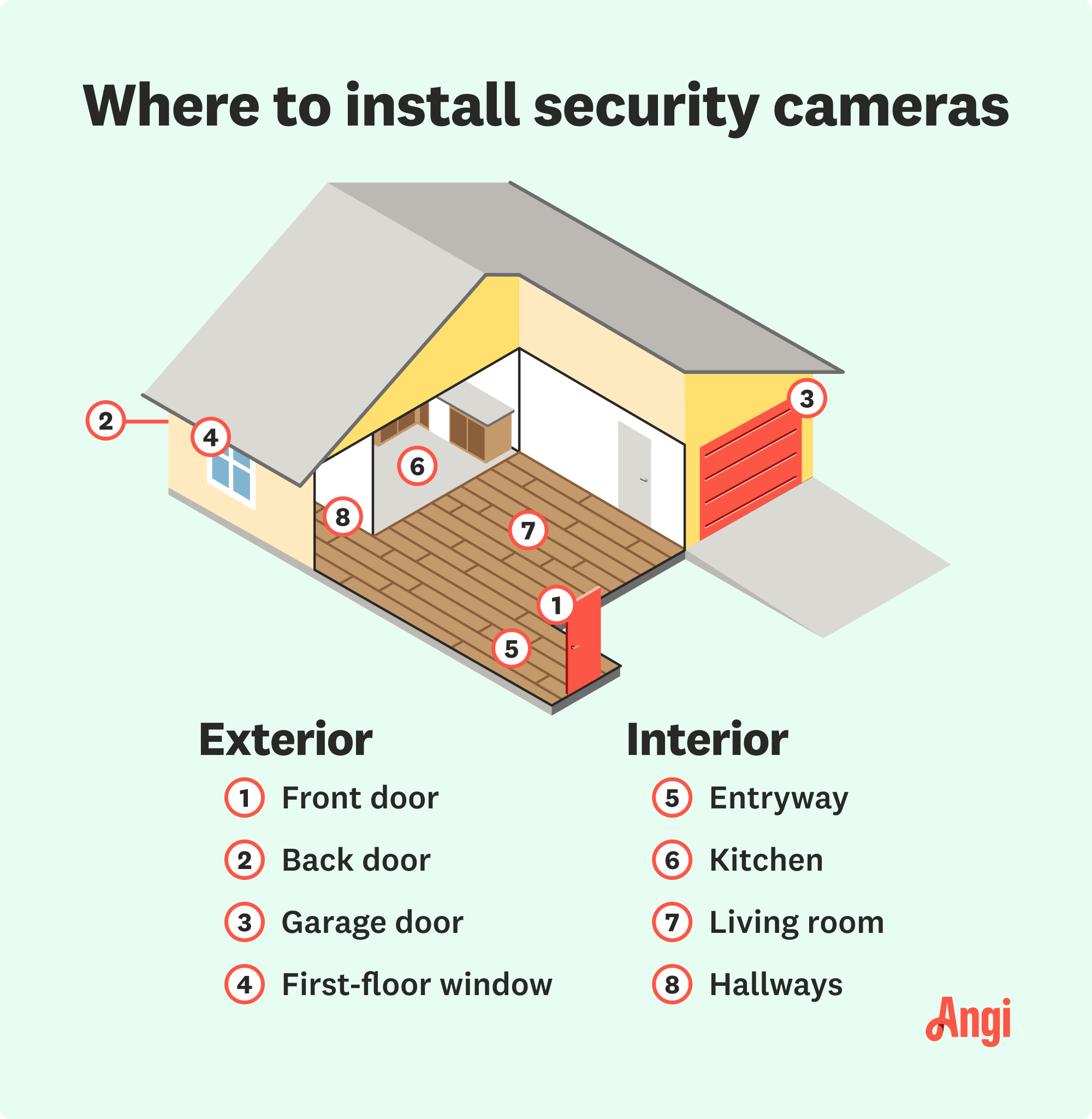
The Most Critical Areas To Cover
Every home is different, but some locations are almost always high priority. Think like a burglar: where would you try to get in? Where can someone hide or sneak around without being seen? These are the places where your cameras should watch closely.
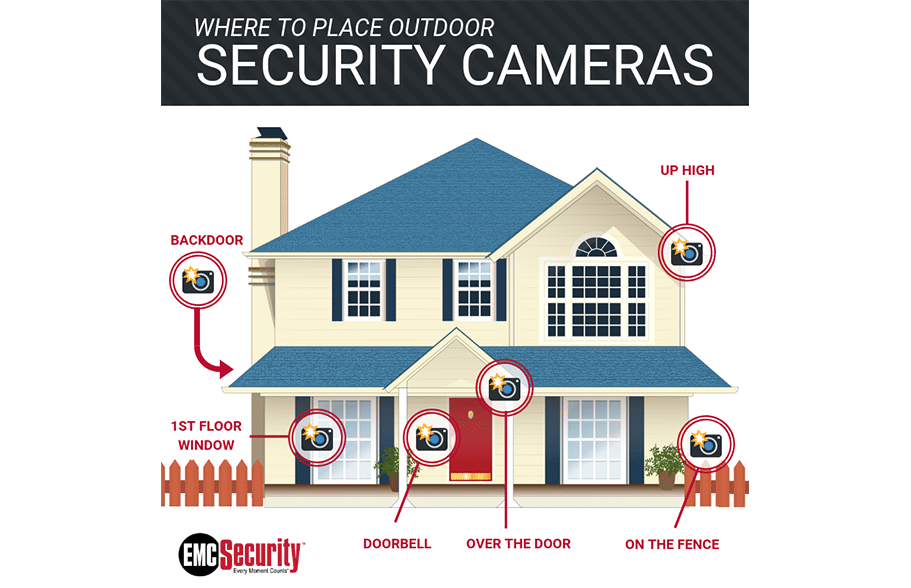
1. Front Door
The front door is the most common entry point for both guests and burglars—over 34% of burglars use the main entrance. A camera here should cover the porch, steps, and anyone approaching the door.
Tips for placement:
- Mount the camera above the door, angled downward
- Keep it out of easy reach to prevent tampering
- Use a wide-angle lens to capture packages, faces, and the surrounding area
- Avoid pointing directly into bright sunlight, which can wash out images
2. Back Door
The back door is often less visible from the street, making it attractive to intruders. In fact, about 22% of break-ins happen here.
Placement advice:
- Position the camera high enough to see the door and steps
- Cover the entire doorway, not just the handle or lock
- If your back porch is enclosed, make sure the camera can see through windows or screens
3. First-floor Windows
Windows on the ground floor are a favorite target, especially if they’re hidden by shrubs or fences.
For effective coverage:
- Place cameras to look directly at vulnerable windows, not just from a distance
- Angle cameras so window glare doesn’t block the view
- Trim landscaping to reduce hiding spots
4. Garage And Driveway
Garages are often full of valuable tools, bikes, and cars. Many burglars use the garage to enter the home.
Best practices:
- Mount a camera above the garage door to watch people and cars
- Use motion-activated lights to increase night visibility
- Place a camera inside the garage if you have an attached door to the house
5. Side Gates And Fences
Side entrances are easy to overlook. But they often provide quick access to backyards, sheds, or even your main house.
Suggestions:
- Install cameras to watch over gates and fence lines
- Make sure cameras are visible from outside to deter trespassers
- Use weatherproof models for exposed areas
6. Backyard And Patio
Backyards are private, but that privacy can work for intruders too. Patios with sliding doors are especially vulnerable.
How to secure:
- Point a camera toward the back door or patio entrance
- Cover areas where someone could hide, like sheds or large bushes
- Use night vision cameras for low-light conditions
7. Main Hallways And Staircases (indoors)
If someone breaks in, they’ll usually walk through a main hallway or up the stairs. Cameras here can capture faces and movements even if outdoor cameras miss the entry point.
Placement tips:
- Mount cameras at the end of a hallway, facing toward the entrance
- Keep cameras out of children’s or guests’ bedrooms for privacy
8. Common Rooms
Living rooms, kitchens, and family rooms are places where thieves look for electronics, cash, and jewelry. An indoor camera here can record activity and help police identify intruders.
How to do it right:
- Choose a discreet camera that blends with your decor
- Focus on main walkways, not private areas
9. Basement Entrances
Basement doors and windows are often hidden and less secure.
For extra protection:
- Place cameras at the top or bottom of basement stairs
- Cover any window wells or outside basement doors
Credit: www.security.org
Outdoor Vs. Indoor Cameras: What’s Best Where?
Not every camera is the same. Some are built for rain, snow, and dust. Others are designed for quiet, climate-controlled rooms. Choosing the right type for each location is key.
Outdoor Cameras
These are made to handle weather, dust, and sun. They are usually bigger and more noticeable, which helps scare off criminals. Use outdoor cameras for:
- Porches, driveways, and garages
- Yards, gates, and fences
- Any area exposed to the elements
Indoor Cameras
Indoor models are smaller and can be placed on shelves or mounted on walls. They’re good for:
- Hallways and staircases
- Living rooms, kitchens, and common areas
- Inside garages or basements
Comparison: Outdoor Vs. Indoor Cameras
Here’s how the two types stack up:
| Feature | Outdoor Camera | Indoor Camera |
|---|---|---|
| Weatherproof | Yes | No |
| Night Vision | Usually included | Often included |
| Visibility | High (deterrent effect) | Low (discreet) |
| Installation | Needs drilling/mounting outside | Easy to set up on shelves or walls |
Non-obvious tip: Outdoor cameras should always be rated for your specific climate. For example, a camera that works in dry Arizona may not last through New England winters.
Camera Angles, Heights, And Coverage
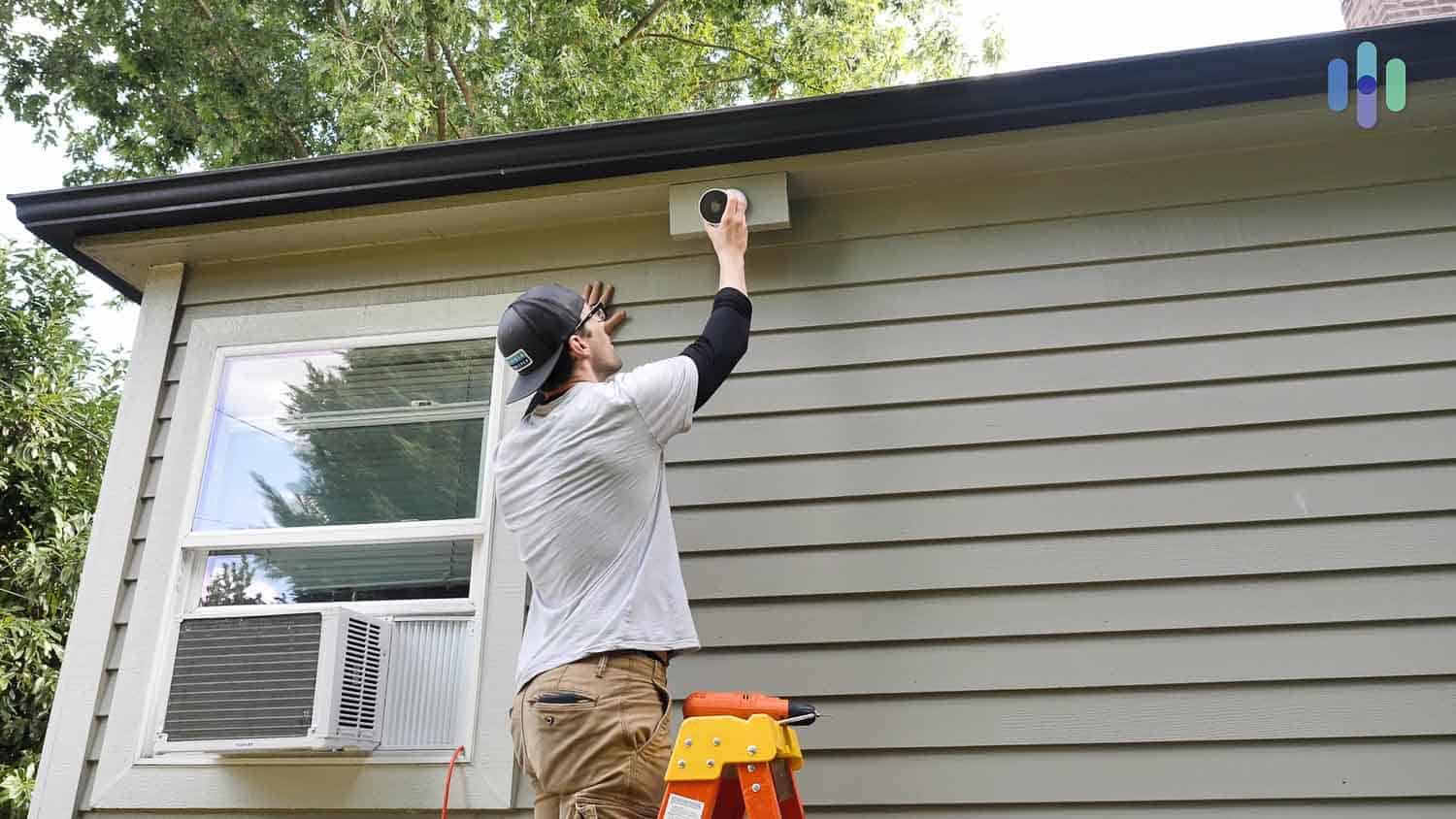
A good camera in a bad spot is almost useless. Where and how you mount your camera changes what it can see. Here’s how to get it right:
Camera Height
- Place cameras 8–10 feet above the ground for best face recognition and wide coverage.
- Too high, and you only see the top of heads; too low, and cameras can be stolen or damaged.
- For indoor cameras, mount just above door frames or on shelves at eye level.
Camera Angle
- Point cameras slightly downward. This captures faces, not just hats or hair.
- Avoid direct sunlight, which can cause glare and make details hard to see.
- Adjust the view to cover the whole area—use the camera’s app to check what it records.
Coverage Area
- Each camera has a field of view, often from 90° to 180°. Wider is not always better; too wide can mean less detail.
- Overlap camera views for no blind spots at corners or doorways.
- Test each camera at different times of day to see how light and shadows affect the image.
Example: Bad Vs. Good Placement
A camera pointed at your front steps from the side may only see feet or legs, missing faces. But a camera above the door, angled down, can capture clear images of everyone who visits.
Common Mistakes To Avoid
Placing cameras seems simple, but many homeowners make these errors:
- Ignoring Sunlight: Direct sun can wash out faces or hide details. Always check the camera view at different times of day.
- Mounting Too High/Low: Too high means you miss details; too low makes cameras easy to steal.
- Not Covering Entry Points: Many focus only on the driveway or yard, forgetting doors and windows.
- Poor Wi-Fi Signal: If your camera is too far from your router, video can be choppy or lost.
- Forgetting Night Vision: Some cameras have poor night performance. Test yours in low light before relying on it.
- Blocking Views with Plants or Decorations: Over time, bushes grow or holiday decor gets in the way.
- Not Securing Cameras: Unsecured cameras can be easily knocked down or stolen.
Pro insight: Check your camera’s field of view after storms or landscaping changes. Many people don’t realize that a camera is blocked until after a break-in.
How Many Cameras Do You Really Need?
More cameras can mean better coverage—but also higher costs and more footage to review. The right number depends on your home’s size, layout, and your security needs.
Estimating Your Needs
Consider these questions:
- How many entrances are there? (Front, back, side, garage, basement)
- Are there areas hidden from the street or neighbors?
- Do you have a large yard or multiple stories?
- What valuables do you keep in the garage or shed?
A typical single-family home often needs 4–8 cameras for full coverage. Here’s a quick reference:
| Home Type | Recommended Cameras | Key Areas |
|---|---|---|
| Apartment | 2–3 | Front door, hallway, balcony |
| Townhouse | 3–5 | Front/back door, driveway, common rooms |
| Single-family home | 4–8 | All doors, garage, yard, main hallways |
Avoid Overlapping Coverage
It’s tempting to add more cameras, but too many can overlap and waste money. Instead, use a mix of wide-angle and zoom lenses for best results.
Non-obvious insight: Sometimes, a single camera in a well-chosen spot (like a hallway with a view of multiple doors) can do the work of two or three poorly placed cameras.
Privacy Considerations And Legal Issues
Security is important, but so is privacy—both yours and your neighbors’. In the US and many other countries, laws limit where you can point cameras.
Basic Privacy Rules
- Do not record private areas: Bathrooms, bedrooms, or neighbor’s property.
- Visible notice: Some states require you to post a sign if you record audio.
- No hidden cameras: Secretly recording people in private spaces is illegal in most places.
Neighbor Relations
If your camera points near a neighbor’s yard or window, talk to them first. Explain your reasons and show the camera’s view. This avoids problems and keeps relationships friendly.
Legal Requirements
Laws vary by state and country. For details, visit the Wikipedia page on the legality of recording for up-to-date information.
Tip: Always check local rules before installing cameras, especially if you plan to record audio. In some places, audio recording is more restricted than video.
Smart Features And Modern Camera Options
Today’s security cameras offer much more than simple video. Smart features can make your system more effective—and easier to use.
Motion Detection
Most modern cameras have motion sensors that start recording when something moves. This saves storage space and makes it easier to find important footage.
Two-way Audio
With built-in microphones and speakers, you can talk to delivery people, warn off trespassers, or greet guests.
Cloud Storage
Many cameras save footage to the cloud, so you don’t lose evidence if a camera is stolen.
Mobile Alerts
Get instant notifications on your phone when motion is detected. Some systems let you watch live video from anywhere in the world.
Face Recognition And Ai
Advanced cameras can recognize family members, pets, or strangers, reducing false alarms and alerting you only to real threats.
Table: Features Comparison
Here’s a side-by-side look at popular smart features:
| Feature | Basic Camera | Smart Camera |
|---|---|---|
| Motion Detection | Limited or none | Advanced, customizable |
| Cloud Storage | No or pay extra | Often included |
| Mobile Alerts | No | Yes |
| Two-Way Audio | No | Usually |
| AI Person Detection | No | Yes |
Advice: Smart features are helpful, but test them before relying on them. Some systems send too many alerts or have trouble recognizing people in poor light.
Credit: emcsecurity.com
Power, Connectivity, And Maintenance
Even the best-placed camera is useless if it loses power or Wi-Fi. Consider these practical factors:
Power Supply
- Battery-powered cameras: Easy to install, but need regular charging. Great for hard-to-wire spots.
- Wired cameras: More reliable, but need professional installation or DIY skills.
- Solar-powered models: Good for remote spots, but need direct sunlight.
Wi-fi And Network
- Place cameras within range of your router. Thick walls or metal can block signals.
- Use Wi-Fi extenders if needed.
- For large homes, consider a mesh network for full coverage.
Maintenance Tips
- Clean lenses every few months to avoid blurry images.
- Check batteries or power connections regularly.
- Update software to fix bugs and improve security.
Pro tip: Schedule monthly tests. Walk around your home and check each camera’s live feed. This catches problems before you really need the footage.
Weather, Lighting, And Environmental Factors
Weather and lighting can change how well your cameras work.
Weatherproofing
- Use cameras rated for rain, snow, and dust (look for IP65 or higher).
- Avoid mounting under roof edges where ice or water can drip.
- In hot climates, choose cameras with heat protection.
Lighting
- Use motion-activated lights near outdoor cameras to improve night images.
- Avoid placing cameras directly under bright lights, which can cause glare.
- For indoor cameras, use soft, indirect lighting for best results.
Environmental Hazards
- Keep cameras away from bee or wasp nests.
- Trim tree branches that can block views or trigger false alarms.
- Watch out for spider webs—these can cause constant motion alerts.
Integrating Cameras With Other Security Systems
Cameras work best when they’re part of a larger security plan. You can connect them with:
- Alarm systems that sound if a door or window opens
- Smart locks that let you control entry from your phone
- Doorbell cameras that show who’s at the door
- Lighting that turns on when motion is detected
Some smart home systems (like Google Nest, Ring, and Arlo) let you control everything from a single app. This makes it easy to check all your cameras and alarms at once.
Table: Security Integration Options
Here’s a quick look at integration options:
| System | Integration Benefit |
|---|---|
| Alarm | Triggers recording and alerts |
| Smart Locks | Unlock doors remotely after checking video |
| Lighting | Improves camera footage and deters intruders |
| Voice Assistants | Show live video on smart displays |
Tip: Choose cameras compatible with your existing devices, or pick a system that offers easy upgrades in the future.
How To Plan Your Camera Placement Step-by-step
If you’re starting from scratch or adding new cameras, follow these steps for the best results:
- Map your home: Draw a simple floor plan. Mark all doors, windows, and entry points.
- Identify risks: Look for hidden spots, dark corners, and areas not visible from inside the house.
- Decide on coverage: List which places need cameras—front door, back, garage, etc.
- Pick camera types: Use outdoor models for exposed areas, indoor ones for hallways and rooms.
- Test views: Before mounting, use your phone or the camera’s app to preview coverage.
- Install at the right height and angle: Adjust to avoid glare and maximize detail.
- Check Wi-Fi and power: Make sure each camera has a strong signal and reliable power.
- Set up alerts and storage: Test mobile notifications and cloud backups.
- Review regularly: Watch saved footage and adjust positions if needed.
Pro insight: Some homeowners mount cameras temporarily with removable tape to test coverage before drilling holes. This helps find the best view without permanent damage.
Credit: employerschoicescreening.com
Frequently Asked Questions
How Many Home Security Cameras Do I Need?
Most homes need between 4 and 8 cameras for full coverage. This depends on your home’s size, the number of doors and windows, and outdoor areas you want to watch. Apartments may only need 2–3, while larger homes or properties with garages and yards may require more.
Should I Put Cameras Inside My House?
Yes, indoor cameras can help catch intruders who get past outdoor cameras. Place them in main hallways, staircases, and common rooms—but avoid private spaces like bathrooms and bedrooms. Indoor cameras are also useful for checking on kids, pets, or elderly family members.
Can I Install Security Cameras Myself?
Many modern cameras are designed for DIY installation. Battery-powered or plug-in models are easy to mount with basic tools. Wired systems may need professional help, especially if you have to run cables through walls or ceilings. Always follow the manufacturer’s instructions.
What Should I Do If My Camera Records My Neighbor’s Property?
If your camera accidentally records part of a neighbor’s yard or home, try to adjust the angle or use privacy masking features (offered by some cameras). It’s a good idea to let your neighbor know and show them what your camera sees. Respecting privacy helps avoid legal or personal disputes.
Do I Need To Post Signs About My Security Cameras?
In most places, you are not required to post signs for outdoor cameras. However, if your cameras record audio or are placed in shared spaces, some states or countries may require notice. Check your local laws to be sure. Signs can also act as a deterrent, making potential intruders think twice.
Your home’s safety starts with smart planning. Choosing the right places for your security cameras can prevent crime, protect your loved ones, and give you peace of mind. Take the time to map your home, think like a burglar, and use the latest technology to make your system strong.
With careful setup, regular checks, and respect for privacy, your cameras will work for you—day and night, rain or shine.