
If you have ever used a remote control to operate your TV, air conditioner, or set-top box, you have already experienced the technology behind IR blasters. But what exactly do IR blasters do, and why are they so important in today’s connected homes and offices?
This article explores the role of IR blasters, how they work, their applications, and why they remain relevant even as devices become smarter. Whether you are a tech beginner or just curious about how your gadgets talk to each other, you will learn everything you need to know about IR blasters.
What Is An Ir Blaster?
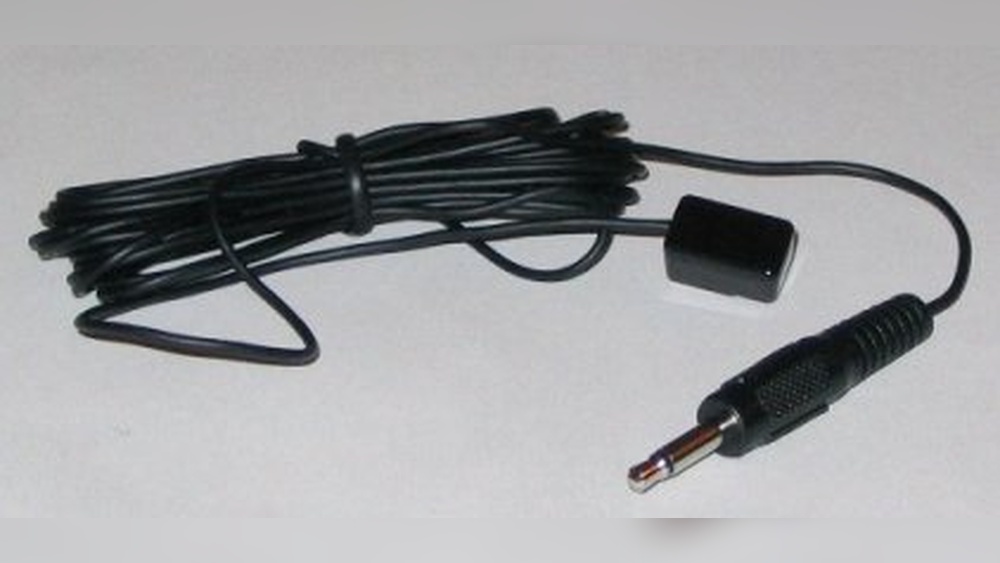
An IR blaster (Infrared Blaster) is a device that sends infrared signals to control other electronics. These signals are the same kind that remote controls use. The IR blaster acts like a universal remote, sending commands to TVs, air conditioners, cable boxes, and other devices that accept IR signals.
The term “blaster” comes from the idea that the device “blasts” infrared light across a room. Usually, you place an IR blaster near the device you want to control. It then sends the correct code to turn the device on or off, change channels, adjust the volume, or perform other functions.
How Do Ir Blasters Work?
IR blasters operate by emitting invisible infrared light pulses. These pulses carry specific codes that devices recognize as commands. For example, when you press the power button on a remote, it sends a unique pattern of infrared light. The IR blaster can mimic this pattern.
Most IR blasters work in one of two ways:
- Standalone: These are small devices with their own power source and transmitter. You program them with the codes for your devices.
- Built-in: Some smartphones, tablets, or smart home hubs have IR blaster functionality built in. These devices use internal sensors and software to send commands.
IR blasters usually have a range of about 5 to 10 meters, depending on the power and environment. Infrared light does not pass through walls or furniture, so you need a clear line of sight.
Ir Signal Basics
Infrared signals are a type of electromagnetic radiation. They work at wavelengths longer than visible light, so humans cannot see them. Most remote controls use a wavelength around 940 nanometers.
Each button on a remote sends a different code. Devices have built-in sensors (called IR receivers) that decode the incoming signal and perform the desired action.
Main Uses Of Ir Blasters
IR blasters are not just limited to TVs. They serve a range of purposes, making life easier and more automated. Here are the main ways people use IR blasters:
- Universal Remote Control: One IR blaster can control multiple devices, reducing the need for many remotes.
- Smart Home Automation: IR blasters connect to smart home hubs, allowing you to control devices with your smartphone or voice assistant.
- Streaming Devices: Some streaming boxes use IR blasters to control TVs and sound systems.
- Cable and Satellite Boxes: IR blasters help boxes change channels on TVs or recorders automatically.
- Audio Systems: They can manage power and volume for speakers and home theaters.
- Air Conditioners: Many IR blasters support AC units, letting you adjust temperature and settings remotely.
Example: Smart Home Integration
Imagine you want to turn on your TV and play music using your phone. With an IR blaster linked to your smart home hub, you can send a command from your phone. The hub translates your request into an IR signal, turning on the TV and selecting the music channel.
Types Of Ir Blasters
There are several kinds of IR blasters, each suited for different needs. Here is a breakdown:
Standalone Ir Blasters
These are independent devices with their own batteries or power adapters. You program them by teaching them codes from your remote. Standalone blasters are popular in home theaters and conference rooms.
Built-in Ir Blasters
Some smartphones (like older Samsung Galaxy and Xiaomi models) have built-in IR blasters. This allows you to use your phone as a remote for many devices.
Smart Ir Blasters
These connect to Wi-Fi or Bluetooth and work with smart home apps or voice assistants like Alexa or Google Assistant. Smart IR blasters can automate routines, such as turning off all devices at bedtime.
Usb Ir Blasters
These connect to computers or set-top boxes. USB IR blasters are used in media centers to automate device control.
Comparison Of Ir Blaster Types
To help you understand the differences, see the table below:
| Type | Power Source | Typical Use | Smart Features |
|---|---|---|---|
| Standalone | Batteries/AC Adapter | Home Theater | No |
| Built-In | Device Battery | Smartphone Remote | Sometimes |
| Smart IR Blaster | AC Adapter/USB | Smart Home Automation | Yes |
| USB IR Blaster | USB Port | Media Center | Limited |
How Ir Blasters Are Used In Real Life
IR blasters make everyday tasks easier. Here are some real-world examples:
Home Theater Control
A single IR blaster can control your TV, amplifier, Blu-ray player, and cable box. You only need one remote or app, and you can automate routines, like “Movie Night,” to dim lights and start your equipment.
Office Automation
In conference rooms, IR blasters manage projectors, screens, and speakers. Meeting organizers can start presentations with one button, saving time.
Smart Air Conditioning
Many IR blasters support AC units. You can adjust temperature from your phone, set schedules, or control from outside the house.
Streaming Device Integration
Some streaming boxes, like Roku, use IR blasters to control TVs. This lets you change channels, adjust volume, or switch inputs without needing the original TV remote.
Ir Blasters Vs Other Remote Technologies
IR blasters are not the only way to control devices. Other technologies include RF (Radio Frequency), Bluetooth, and Wi-Fi. Each has strengths and weaknesses.
Ir Vs Rf Remotes
IR remotes require line of sight. RF remotes can work through walls and furniture. However, IR blasters are cheaper and more widely used.
Ir Vs Bluetooth And Wi-fi
Bluetooth and Wi-Fi remotes allow longer range and more advanced features. But many older devices only accept IR signals. IR blasters fill the gap, letting new systems control old equipment.
Comparison Table: Ir, Rf, Bluetooth, Wi-fi
Here’s a quick comparison:
| Technology | Range | Line of Sight Needed | Device Compatibility | Cost |
|---|---|---|---|---|
| IR Blaster | 5-10 meters | Yes | Very High | Low |
| RF Remote | 20-30 meters | No | Medium | Medium |
| Bluetooth | 10-30 meters | No | Low | Medium |
| Wi-Fi | Unlimited (network) | No | Low | High |

Credit: www.youtube.com
Setting Up An Ir Blaster
Setting up an IR blaster is usually straightforward. Here are typical steps:
- Place the IR blaster: Put the device near or facing the electronics you want to control.
- Connect to power: Use batteries or plug into a power source.
- Program codes: Teach the IR blaster the codes for your devices, either by copying from your remote or selecting from a database.
- Test the setup: Use the app or remote to send commands and verify the devices respond.
- Integrate with smart home: If using a smart IR blaster, connect it to your home network and configure automation routines.
Tips For Good Setup
- Make sure the IR blaster has a clear line of sight to devices.
- Avoid placing it near sunlight or reflective surfaces, which can interfere with signals.
- Use extension cables if your devices are far apart.
Common Problems And Solutions
Even though IR blasters are simple, you might face some issues. Here are typical problems and fixes:
Devices Not Responding
This usually means the IR blaster is not aimed correctly, or the signal is blocked. Try moving the blaster, removing obstacles, or checking the batteries.
Wrong Codes
If the blaster sends the wrong signal, the device will not respond. Double-check the programming and make sure you selected the correct model.
Interference
Sunlight, fluorescent lights, and mirrors can interfere with IR signals. Place the blaster away from these sources.
Multiple Devices In One Room
If you have two TVs or two air conditioners, the IR blaster might control both at once. Use separate blasters, or position them carefully to avoid overlap.
Ir Blasters In Smartphones
Some smartphones include IR blasters, letting users control home devices directly. This feature was popular in earlier models from Samsung, Xiaomi, Huawei, and LG. Today, fewer phones include IR blasters, but you can still find them in some models.
How To Use Ir Blasters In Phones
You need an app that supports device control. Most apps have a database of codes for TVs, ACs, and other devices. You select your device, and the phone sends the right IR signal.
Example: Xiaomi Phones
Xiaomi’s Mi Remote app lets you control TVs, ACs, fans, and projectors. You choose the device brand and model, and the app learns the code.
Limitations
- Not all phones have IR blasters.
- Some newer devices rely on Bluetooth or Wi-Fi instead.
Ir Blasters In Smart Home Systems
Modern smart homes use IR blasters to bridge old and new technology. For example, smart hubs like Logitech Harmony or Broadlink can send IR signals to TVs and ACs. This means you can control these devices with your phone, tablet, or voice assistant.
Smart Home Automation Example
You can set routines like “Good Morning,” which turns on your TV and opens your curtains. IR blasters make it possible to include older devices that do not support Wi-Fi or Bluetooth.
Ir Blasters For Accessibility
IR blasters help people with mobility challenges control their devices. By using a smartphone, tablet, or voice assistant, people can turn on TVs, adjust the volume, or change channels without moving.
Real Life Case
A user with limited hand movement uses a smart hub and IR blaster to operate their entertainment system by voice. This increases independence and comfort.
Why Ir Blasters Still Matter
You might think IR blasters are old technology. But millions of devices still use IR. TVs, air conditioners, and audio systems from many brands only accept IR signals. IR blasters allow new systems to work with these legacy devices.
Data Point
According to market research, over 70% of TVs sold worldwide still use IR remote controls. Even as smart technology grows, IR remains a common standard.

Credit: www.reddit.com
Advanced Uses Of Ir Blasters
Some tech users take IR blasters further:
- Home Automation: Integrate IR blasters with smart assistants to automate routines.
- Learning Remotes: Program IR blasters to copy codes from any remote.
- Macro Commands: Send multiple commands with one button (e.g., turn on TV and set to HDMI).
Example: Macro Automation
A single tap can turn on your TV, switch the input, start your sound system, and dim the lights. IR blasters make this possible, even if devices are from different brands.
Ir Blasters In Entertainment Centers
Entertainment centers often have many devices stacked together. IR blasters can control all devices from one place, even if the original remotes are lost or broken.
Installation Tips
- Use IR repeaters to extend coverage in large rooms.
- Hide blasters behind cabinet doors using extension cables.
- Combine IR blasters with smart hubs for voice control.

Credit: www.youtube.com
Ir Blasters In Hotels And Public Spaces
Hotels use IR blasters to automate room controls. Staff can turn on TVs, ACs, and lights from a central system. This saves time and improves guest comfort.
Data Point
A 2019 study found that hotels using automated IR systems reduced room setup times by 30% compared to manual operation.
Security And Privacy Considerations
IR blasters are generally safe, but there are some things to keep in mind:
- Signal interception: IR signals are visible to some sensors, but do not carry personal data.
- Device access: Smart IR blasters connected to Wi-Fi should have secure passwords to prevent unauthorized access.
The Future Of Ir Blasters
While more devices use Wi-Fi and Bluetooth, IR blasters will remain important for years. Many brands still rely on IR, and smart homes need to connect old and new devices.
Innovations
- Smart IR blasters with AI can learn new codes automatically.
- Voice assistants are getting better at controlling IR devices.
- IR blasters are becoming smaller and more energy efficient.
Non-obvious Insights And Tips
- IR blasters can control devices hidden inside cabinets if paired with IR repeaters or extension cables. This is useful for neat home setups.
- IR blasters can be used in multi-device automation, allowing you to synchronize actions (such as turning on TV and stereo at the same time) — something most basic remotes cannot do.
- Learning mode: Some IR blasters can “learn” codes from any remote, even if the device brand is unknown.
- Smart IR blasters support voice control. You can use Alexa or Google Assistant to operate devices with IR signals.
Ir Blaster Buying Guide
If you want to buy an IR blaster, consider these factors:
Device Compatibility
Check if the IR blaster supports all the devices you want to control. Look for a large database of codes.
Smart Features
Smart IR blasters can be controlled by apps or voice assistants. Decide if you want automation or basic control.
Range And Power
Some IR blasters have weak signals. Make sure the range covers your room.
Connectivity
Wi-Fi and Bluetooth options allow more flexibility. USB models are good for computers.
Price
IR blasters range from $10 to $100, depending on features. Basic models are cheaper, but smart models offer more control.
Comparison Table: Popular Ir Blasters
Here’s a comparison of three popular IR blasters:
| Model | Smart Features | Device Compatibility | Price Range | App Support |
|---|---|---|---|---|
| Broadlink RM Mini 3 | Yes | Wide | $20-$30 | Android/iOS |
| Logitech Harmony Hub | Yes | Wide | $80-$100 | Android/iOS |
| Generic Standalone | No | Medium | $10-$20 | None |
Common Buyer Mistakes
- Not checking compatibility with devices.
- Buying a blaster with weak range.
- Ignoring app and smart features if you want automation.
- Overpaying for features you do not use.
If you need more guidance, you can find detailed reviews at Wikipedia.
Frequently Asked Questions
What Devices Can Ir Blasters Control?
IR blasters can control most devices that use infrared remote controls. This includes TVs, air conditioners, set-top boxes, audio systems, fans, and projectors. Check your device’s manual to confirm it supports IR remote commands.
Are Ir Blasters Compatible With Smart Home Systems?
Yes, many IR blasters work with smart home hubs and apps. Smart IR blasters can connect to Wi-Fi or Bluetooth and support voice assistants like Alexa and Google Assistant, making automation possible.
Can I Use My Smartphone As An Ir Blaster?
Some smartphones have built-in IR blasters. With the right app, you can control TVs, ACs, and other devices. However, not all phones have this feature, so check your model before buying.
Do Ir Blasters Work Through Walls?
No, IR signals require a clear line of sight. Walls, furniture, and other obstacles block infrared light. To control devices in different rooms, you need multiple IR blasters or extension cables.
How Do I Program An Ir Blaster?
Programming is usually done through an app or by copying codes from your remote. Many smart IR blasters have databases with codes for popular brands. If your device is not listed, you can use the learning mode to capture the signal from your remote.
IR blasters have quietly shaped how we interact with electronics. As homes become smarter, these devices bridge the gap between old and new technology, making life more comfortable and efficient. Whether you want to automate your entertainment center, simplify remote control use, or increase accessibility, IR blasters offer a simple and reliable solution.