
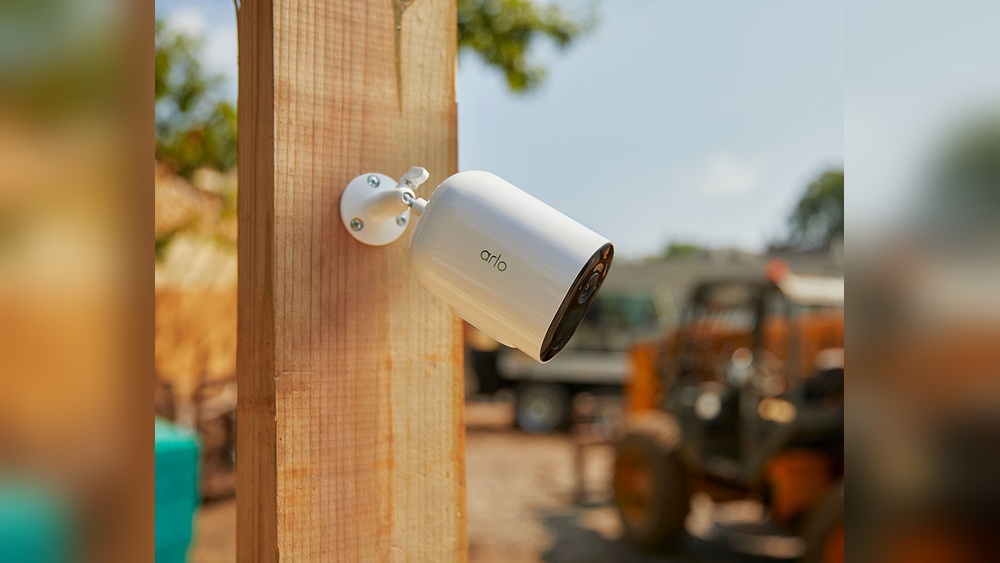
Security cameras are everywhere today, watching over homes, shops, offices, and streets. Most people think these cameras need the internet to work. But that’s not true for all types. Many security cameras can function without WiFi. This is good news for people living in areas with poor internet, or those who want extra privacy and reliability. If you’re looking for a security camera that doesn’t depend on WiFi, you’re in the right place. In this article, you’ll learn which security cameras work without WiFi, how they operate, and what to consider before buying one.
Why Choose Security Cameras Without Wifi?
Some think WiFi is essential for modern security cameras. But non-WiFi cameras have many benefits:
- No Internet Dependency: They keep recording even if your internet goes down. You don’t have to worry about losing footage during outages.
- Better Privacy: Footage stays local. There’s less risk of hacking or unwanted access from remote locations.
- Lower Data Costs: You avoid using up internet data or paying for cloud storage.
- Remote Locations: Perfect for cabins, farms, or construction sites where WiFi isn’t available.
- Simple Setup: No need to configure routers or passwords. Installation is often straightforward.
Many people choose these cameras for peace of mind and practical reasons. But there are some trade-offs. Most non-WiFi cameras don’t let you view footage live from your phone. Instead, you usually watch recorded video later. Still, for many situations, this is good enough.
How Security Cameras Work Without Wifi
Security cameras can operate without WiFi in several ways. Understanding these methods helps you choose the right camera.
Wired Security Cameras
Wired cameras use cables to connect to a recording device or monitor. They don’t need the internet for basic functions.
- Power: Most wired cameras need a power source, usually from a wall outlet.
- Video transmission: Video travels through cables (like coaxial or Ethernet) to a DVR (digital video recorder) or NVR (network video recorder).
- Storage: Footage is saved on a hard drive or SD card, not online.
- Viewing: You watch video on a connected screen, or transfer files from the recorder.
Cameras With Local Storage
Some cameras save video directly to SD cards or built-in memory.
- No cable required: These are often wireless, powered by batteries.
- Storage limits: SD cards usually range from 16GB to 128GB. When full, they overwrite old footage.
- Retrieving footage: You remove the SD card and view video on a computer.
Cellular Security Cameras
Cellular cameras use a SIM card to send data over mobile networks (like 4G LTE).
- Internet optional: They don’t need WiFi, but use cellular data for remote access.
- Best for remote areas: Useful where WiFi isn’t available but there is cell coverage.
- Costs: You pay for a mobile data plan.
Cctv Analog Cameras
Traditional CCTV cameras use analog signals sent over coaxial cables.
- No internet needed: All footage stays within the local system.
- Old but reliable: Many shops and factories use these for their reliability.
Types Of Security Cameras That Work Without Wifi
Many types of cameras don’t need WiFi. Let’s look at the most popular options.
Wired Indoor Cameras
These are common in offices, stores, and homes.
- Features: High video quality, constant power, reliable operation.
- Setup: Requires running cables between camera and recorder.
- Pros: No risk of wireless interference, stable connection.
- Cons: Installation can be tricky, especially in large buildings.
Wired Outdoor Cameras
Built for harsh weather and long-term use.
- Features: Waterproof housing, night vision, wide viewing angles.
- Setup: Cables need to be protected from rain and animals.
- Pros: Excellent for gates, parking lots, and property boundaries.
- Cons: May require professional installation.
Battery-powered Cameras With Local Storage
These are easy to place anywhere.
- Features: Built-in SD card slot, rechargeable batteries.
- Setup: Mount and insert SD card, no cable needed.
- Pros: Flexible placement, good for rental properties.
- Cons: Limited battery life, need to swap SD cards or recharge.
Cellular Cameras
Ideal for remote or temporary sites.
- Features: SIM card slot, motion detection, cloud or local storage.
- Setup: Insert SIM card, mount camera, set up data plan.
- Pros: Works where WiFi and wired connections are impossible.
- Cons: Data costs, sometimes lower video quality.
Analog Cctv Cameras
Still used in many businesses.
- Features: Simple design, often black-and-white, connect to DVR.
- Setup: Run coaxial cables, connect to monitors.
- Pros: Durable, easy to maintain.
- Cons: Lower resolution, limited features.
Comparing Security Cameras Without Wifi
Choosing the right camera depends on your needs. Here’s a comparison of the main types.
| Camera Type | Internet Needed | Storage | Installation | Best Use |
|---|---|---|---|---|
| Wired Indoor | No | DVR/NVR | Moderate | Homes, offices |
| Wired Outdoor | No | DVR/NVR | Hard | Parking lots, gates |
| Battery SD Card | No | SD card | Easy | Rental homes, cabins |
| Cellular | No WiFi, yes SIM | Cloud/SD card | Easy | Remote sites |
| Analog CCTV | No | DVR | Moderate | Shops, factories |
Important Features To Look For
When choosing a non-WiFi camera, focus on these features:
- Video Quality: Look for at least 1080p resolution. Clear video helps identify people and events.
- Night Vision: Essential for outdoor or low-light areas.
- Motion Detection: Saves storage by recording only when something moves.
- Storage Capacity: Larger SD cards or hard drives mean more days of footage.
- Power Source: Wired cameras need stable power. Battery cameras must be recharged regularly.
- Weatherproofing: For outdoor use, check for IP65 or higher rating.
- Viewing Options: Can you watch video easily on a computer or monitor?
- Audio Recording: Useful for conversations or evidence.
Many buyers miss the importance of storage capacity. If your camera records in high resolution, small SD cards fill quickly. Also, some cameras only work with certain brands of SD cards or have size limits (often 32GB or 64GB). Always check compatibility.
Another overlooked feature is audio recording. Not all cameras capture sound. If you need audio, check specs before buying.
Common Mistakes When Buying Security Cameras Without Wifi
It’s easy to make mistakes when shopping for these cameras. Here are problems to avoid:
- Forgetting about power: Some battery cameras last only a few days. Wired cameras need outlets nearby. Plan your installation.
- Ignoring storage limits: SD cards fill fast, especially with high-quality video. Choose bigger cards if you want long recording periods.
- Not checking compatibility: Some SD cards don’t work with certain cameras. Buy recommended brands and sizes.
- Overlooking weatherproofing: Indoor cameras may fail outside. Always check for waterproof ratings.
- Assuming remote access: Most non-WiFi cameras don’t let you view footage live from your phone. If you want this feature, consider cellular cameras.
- Skipping installation planning: Wired cameras need careful cable routing. Test before final mounting.
One non-obvious insight: Many people underestimate how quickly batteries drain in cold weather. Outdoor battery cameras may need frequent recharging in winter.
Another tip: For cameras with SD cards, set up a regular schedule to check and clear old footage. If you forget, the card may overwrite important events.
Real-world Examples Of Security Cameras Without Wifi
Let’s look at some actual cameras that people use every day.
Reolink Argus 2e
- Type: Battery-powered, local SD storage
- Resolution: 1080p
- Features: PIR motion sensor, night vision, weatherproof
- Best for: Homes, sheds, cabins
- Notes: Works without WiFi, but remote viewing needs internet.
Arlo Go
- Type: Cellular, SIM card
- Resolution: 720p or 1080p
- Features: Battery, SD card, cloud optional
- Best for: Construction sites, boats, RVs
- Notes: Needs cell coverage, data plan required.
Lorex Wired Security Camera System
- Type: Wired indoor/outdoor, DVR
- Resolution: Up to 4K
- Features: Night vision, weatherproof, audio
- Best for: Homes, businesses
- Notes: No WiFi needed, all footage stored locally.
Swann Analog Cctv Cameras
- Type: Analog, coaxial cable
- Resolution: 720p to 1080p
- Features: Night vision, motion detection
- Best for: Shops, warehouses
- Notes: Simple operation, reliable.
Defender Wireless Cameras With Sd Card
- Type: Battery-powered, SD card
- Resolution: 1080p
- Features: Motion activation, easy setup
- Best for: Temporary installations, rentals
- Notes: Remove SD card to view footage.
Installation Tips For Security Cameras Without Wifi
Proper installation makes a big difference in camera performance.
- Plan coverage: Decide which areas need surveillance. Draw a rough map.
- Test before mounting: Power on the camera and check the video before drilling holes.
- Protect cables: For wired cameras, use conduit or cable covers to prevent damage.
- Mount securely: Use sturdy brackets to prevent the camera from moving or falling.
- Check angles: Make sure the camera faces the right direction and covers entry points.
- Consider lighting: Night vision works best if there’s some ambient light. Avoid pointing cameras directly at bright lights.
A small but important tip: If you’re installing an outdoor camera, make sure it’s shielded from rain and direct sun. Water can seep into mounts, causing failure.
For battery cameras, place them where you can easily reach them for recharging.
Credit: www.loiret-nature-environnement.org
Local Storage Vs. Cloud Storage
Security cameras without WiFi usually use local storage. Here’s how it compares to cloud storage.
| Feature | Local Storage | Cloud Storage |
|---|---|---|
| Accessibility | On site only | Anywhere online |
| Privacy | High | Medium |
| Reliability | Not affected by internet | Needs internet |
| Storage limits | Depends on card/hard drive | Depends on plan |
| Cost | One-time | Monthly fee |
Local storage offers high privacy and reliability, but you can’t access footage remotely unless you physically visit the site. Cloud storage is more flexible but depends on internet and may cost more.
Security Risks And How To Protect Your Cameras
Even cameras without WiFi can have risks. Here’s how to protect your system:
- Physical tampering: Mount cameras high or use protective housings to prevent vandalism.
- Theft of storage: If someone steals your DVR or SD card, you lose footage. Hide recorders or use locked boxes.
- Power failures: Use backup batteries or uninterruptible power supplies for wired cameras.
- Regular checks: Inspect cameras and storage devices every month to ensure proper operation.
Don’t forget that physical security is as important as digital. Many people focus on software hacks, but most thefts involve breaking or stealing the camera itself.

Credit: www.eufy.com
Who Should Use Security Cameras Without Wifi?
These cameras are best for certain situations:
- Rural homes: Where internet is unreliable.
- Farms and cabins: Remote locations.
- Construction sites: Temporary installations.
- Rental properties: When you don’t want to rely on tenant’s WiFi.
- Shops and factories: Simple, stable systems.
If you value privacy, have spotty internet, or want a basic system, these cameras are ideal.
Key Statistics About Security Cameras Without Wifi
Security cameras without WiFi make up a large part of the market. Here are some stats:
- Around 40% of US homes with security cameras use wired or local storage systems (Statista, 2023).
- In rural areas, over 60% of users prefer non-WiFi cameras due to poor internet.
- Analog CCTV systems are still installed in more than 50% of small businesses worldwide.
- Market research shows cellular cameras are growing fast, with sales up 25% in 2022.
These numbers show that non-WiFi cameras are not old-fashioned. They are popular for practical reasons.

Credit: www.security.org
Cost Comparison: Wifi Vs. Non-wifi Cameras
Let’s compare costs. Non-WiFi cameras usually have lower ongoing costs, but sometimes higher upfront costs.
| Type | Upfront Cost | Monthly Cost | Maintenance |
|---|---|---|---|
| WiFi Camera | $50–$200 | $5–$15 (cloud) | Low |
| Wired Camera | $80–$300 | $0 | Medium |
| Battery SD Card | $70–$250 | $0 | Medium |
| Cellular Camera | $100–$350 | $10–$30 (data) | Medium |
| Analog CCTV | $60–$200 | $0 | Low |
WiFi cameras may seem cheaper at first, but monthly fees add up. Wired and analog systems have no ongoing costs.
Maintenance Tips For Non-wifi Cameras
Keeping your camera running smoothly is important. Here’s what to do:
- Check storage regularly: Make sure SD cards or hard drives aren’t full.
- Clean lenses: Dust and dirt can blur video. Wipe lenses gently every month.
- Test batteries: For battery-powered cameras, recharge or replace batteries as needed.
- Inspect cables: Look for signs of wear or damage.
- Update firmware: Even without WiFi, some cameras have firmware updates. Check manufacturer’s website.
One practical tip: Keep a spare SD card or battery handy. If your camera stops working, you can quickly swap parts.
Pros And Cons Of Security Cameras Without Wifi
Let’s review the main advantages and disadvantages.
Pros
- Reliable operation: Not affected by internet outages.
- Better privacy: Footage stays local.
- Lower costs: No cloud fees or high data use.
- Works anywhere: Useful in remote or rural locations.
Cons
- Limited remote access: Usually can’t view live video from afar.
- Storage limits: SD cards and hard drives can fill up quickly.
- Installation: Wired systems may need professional help.
- Battery life: Battery cameras need regular attention.
How To Choose The Right Security Camera Without Wifi
Here’s a simple process to help you pick the best camera:
- Identify your needs: Do you want indoor or outdoor coverage? Wired or wireless?
- Check power options: Is there an outlet nearby, or do you need batteries?
- Choose storage: SD card, DVR, or cloud (for cellular)?
- Set your budget: Consider upfront and ongoing costs.
- Read reviews: Look for real user feedback on performance and reliability.
- Test before buying: If possible, try demo models in store.
Don’t forget to measure your space. Some cameras cover wide areas, others are better for close-up monitoring.
Frequently Asked Questions
What Happens If A Security Camera Without Wifi Loses Power?
Most non-WiFi cameras stop recording if they lose power. Battery cameras may keep working for a while, but wired cameras shut off. To prevent loss, use backup batteries or uninterruptible power supplies. Always check battery levels and cable connections.
Can I View Footage From A Non-wifi Camera Remotely?
Usually, no. Non-WiFi cameras store video locally. You must visit the site and watch footage on a monitor or computer. Cellular cameras are an exception; they let you view video remotely using mobile data.
How Long Does An Sd Card Last In A Security Camera?
This depends on card size and video quality. A 32GB card can hold about 4–7 days of 1080p video. Once full, most cameras overwrite old footage. For longer storage, choose larger cards or lower resolution.
Are Analog Cctv Cameras Still A Good Choice?
Yes, for simple setups. Analog CCTV cameras are reliable, cheap, and easy to maintain. They offer lower resolution than modern digital cameras, but are perfect for shops, warehouses, and areas without internet.
Do Cellular Security Cameras Need Wifi?
No, but they need cell coverage and a SIM card with data plan. These cameras use mobile networks to send video. If there’s no WiFi or cell signal, they won’t work for remote viewing.
Security cameras without WiFi are a smart choice for many situations. They offer strong privacy, reliable operation, and flexible placement. By understanding the types, features, and common mistakes, you can choose the right camera for your needs. Whether you’re protecting a farm, a shop, or your home, non-WiFi cameras give you peace of mind without the hassles of internet dependency. For more details on security camera types and market trends, visit Wikipedia.