
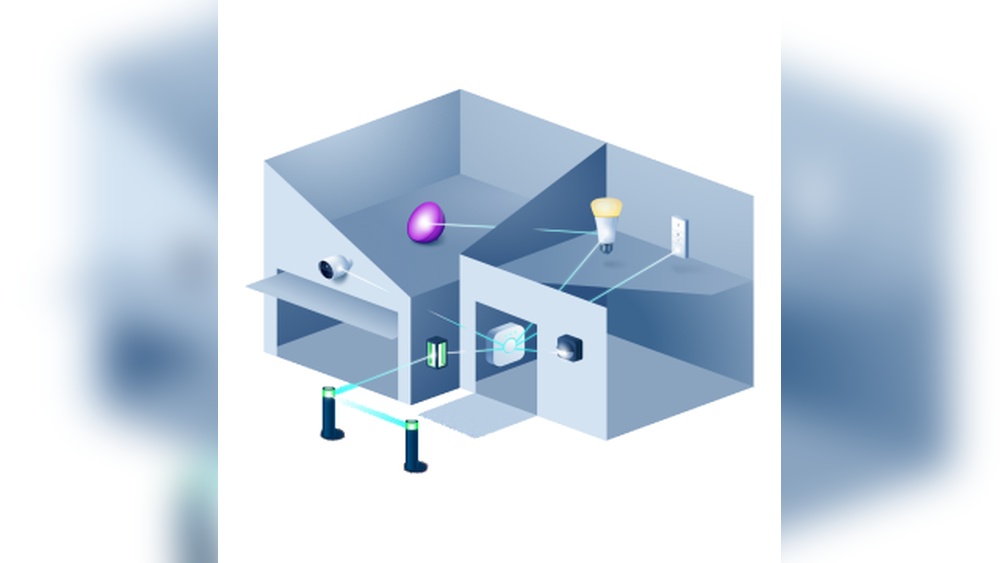
Smart homes are changing how people live. Lights, sensors, and other devices can now be controlled from your phone, voice assistant, or even automatically. One name stands out in smart lighting: Philips Hue. If you are thinking about buying Philips Hue, or you already own some bulbs, you might wonder: Is Philips Hue a Zigbee hub? This question matters because Zigbee is a popular way for smart devices to talk to each other. Understanding how Philips Hue works with Zigbee can help you build a better smart home.
Let’s explore what a Zigbee hub is, how Philips Hue uses Zigbee, and what this means for your smart home setup. We’ll look at real examples, compare Philips Hue with other hubs, and explain the technical details in simple words.
Whether you are just starting with smart home technology or want to make your system more advanced, this guide will give you clear answers.
What Is Zigbee?
Zigbee is a wireless technology. It lets smart devices talk to each other without using much power. Unlike Wi-Fi, Zigbee is made for devices that need to stay connected all the time, like lights, sensors, and switches. Zigbee works well in homes because it creates a mesh network. This means devices can pass messages to each other, making the signal stronger and more reliable.
Some important facts about Zigbee:
- It operates on the 2.4 GHz frequency, similar to Wi-Fi, but uses much less power.
- Devices form a mesh, so each device can repeat the signal and help reach distant areas.
- Zigbee is used by many brands, not just Philips.
One key thing about Zigbee is that it needs a hub or gateway. The hub connects Zigbee devices to your phone, voice assistant, or other smart home platforms. Without a hub, your Zigbee bulbs or sensors can’t talk to your phone.
Understanding Philips Hue
Philips Hue is a line of smart lighting products. It includes bulbs, light strips, lamps, and switches. The system is known for its easy setup and reliable performance. Most Philips Hue devices use Zigbee to communicate.
The main parts of the Philips Hue system are:
- Hue bulbs: These are Zigbee-based smart bulbs.
- Hue Bridge: This is the central hub that connects Hue bulbs to your home network.
- Hue app: The app lets you control lights, create routines, and link to voice assistants.
When you buy Philips Hue, the Hue Bridge is a key part. It connects to your router and lets your Zigbee bulbs talk to your phone or smart speaker.
Is Philips Hue A Zigbee Hub?
The simple answer: Yes, the Philips Hue Bridge acts as a Zigbee hub. But there are details that matter. Let’s break down how the Hue Bridge works as a Zigbee hub and what this means for you.
The Hue Bridge As A Zigbee Hub
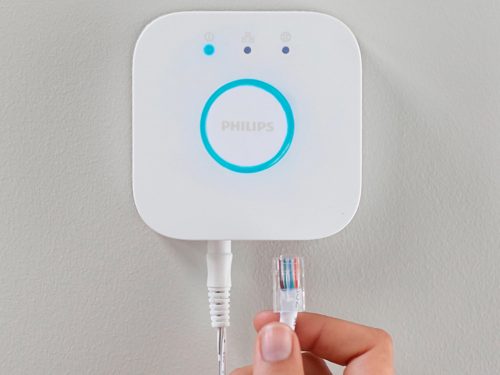
The Hue Bridge is the main controller for Philips Hue lights. It connects to your home’s Wi-Fi router using a cable. The Bridge then talks to your Hue bulbs using Zigbee. So, the Bridge is both a Zigbee hub and a gateway to your phone, tablet, or smart speaker.
What Does This Mean?
- The Bridge lets you control up to 50 Hue bulbs or devices.
- It connects Zigbee devices to your Wi-Fi network.
- It allows remote access, so you can control lights from anywhere.
- It links to other smart home systems like Amazon Alexa, Google Assistant, and Apple HomeKit.
What Makes A Zigbee Hub?
A Zigbee hub does three things:
- Connects Zigbee devices: It lets Zigbee bulbs, sensors, and switches talk to each other.
- Links to your network: It connects Zigbee devices to your phone or smart home platform.
- Manages mesh networking: It helps Zigbee devices form a strong, reliable network.
The Philips Hue Bridge does all three. It connects Hue bulbs, links them to your home network, and manages the Zigbee mesh.
Limitations As A Zigbee Hub
While the Hue Bridge is a Zigbee hub, it has some limits:
- It is made mainly for Philips Hue products.
- It does not support all Zigbee devices from other brands.
- Some third-party Zigbee bulbs may not work, or may lose advanced features.
- You cannot use the Bridge as a hub for non-light Zigbee devices, like sensors from other brands.
This is important if you want to mix and match Zigbee devices in your home.
Philips Hue Vs Other Zigbee Hubs
Philips Hue is not the only Zigbee hub. Brands like Samsung SmartThings, Amazon Echo, and Aqara also make Zigbee hubs. Let’s compare Philips Hue with these other options.
Key Differences
- Philips Hue Bridge: Designed for lights, easy setup, strong app.
- Samsung SmartThings Hub: Works with many Zigbee devices (lights, sensors, locks).
- Amazon Echo (with Zigbee): Lets you control Zigbee bulbs and devices by voice.
- Aqara Hub: Focuses on sensors, switches, and smart home automation.
Here’s a comparison:
| Hub | Main Focus | Device Support | Integration |
|---|---|---|---|
| Philips Hue Bridge | Lighting | Hue bulbs, limited third-party | Alexa, Google, Apple HomeKit |
| SmartThings Hub | General smart home | Wide Zigbee support | Alexa, Google, IFTTT |
| Amazon Echo (Zigbee) | Voice control | Zigbee bulbs, some sensors | Alexa |
| Aqara Hub | Sensors, switches | Aqara, some Zigbee | Apple HomeKit, Alexa |
Why Choose Philips Hue Bridge?
- If you want reliable lighting and easy app control, the Hue Bridge is best.
- If you want to connect many types of Zigbee devices (not just bulbs), SmartThings or Echo may be better.
Real Example
A user with Hue bulbs and Aqara sensors cannot connect both to the Hue Bridge. But with SmartThings, both Zigbee devices can be controlled together.

Credit: www.researchgate.net
How The Hue Bridge Works
The Hue Bridge is small, simple, and easy to set up. It connects to your router with an Ethernet cable. The Bridge then creates a Zigbee mesh network for your Hue bulbs.
Step-by-step:
- Connect the Bridge to your router
- Plug in the Bridge
- Install Hue bulbs
- Open the Hue app
- Follow instructions to add bulbs
The Bridge keeps your lights connected, even if your Wi-Fi is down. Zigbee mesh lets bulbs talk to each other, so your lights stay reliable.
How Many Devices Can The Hue Bridge Handle?
The Hue Bridge can handle up to 50 Zigbee devices. Most homes never reach this limit. If you need more, you can add a second Bridge, but the two Bridges do not share devices.
Device Compatibility
The Bridge is made for Hue bulbs, switches, and accessories. Some third-party Zigbee bulbs can connect, but features like color changing or dimming may not work. For sensors, locks, or other Zigbee devices, the Bridge usually does not support them.
Example: Adding A Third-party Bulb
Let’s say you buy a Zigbee bulb from another brand. You can try to connect it to the Hue Bridge, but:
- It may connect, but not support color or dimming.
- It may not show up in the Hue app.
- If it works, you may lose advanced features.
Zigbee Mesh Networking
Zigbee’s biggest strength is mesh networking. Each bulb acts as a repeater. The more bulbs you add, the stronger the network becomes. This helps reach every room in your home.
How Mesh Works
- Bulbs talk to each other, not just the Bridge.
- If one bulb is far from the Bridge, nearby bulbs relay the signal.
- Mesh makes your lighting reliable, even in large homes.
Practical Tips
- Place bulbs evenly in your home for best coverage.
- Avoid putting bulbs in metal fixtures, as metal blocks Zigbee signals.
- If a bulb drops out, moving it closer to another bulb can help.
Philips Hue Without The Bridge
Some newer Hue products support Bluetooth. You can control them with your phone, without a Bridge. But Bluetooth is limited:
- You can only control up to 10 bulbs.
- You must be close to the bulbs.
- No mesh networking.
- No remote access or smart home integration.
If you want full features, the Bridge is required.
Integrating Philips Hue With Smart Home Platforms
The Hue Bridge makes it easy to link your lights to smart home platforms.
Alexa, Google, And Apple Homekit
- Alexa: Control lights by voice, set routines.
- Google Assistant: Voice control and routines.
- Apple HomeKit: Deep integration, automation.
Example: Automation
You can set routines like:
- Turn on lights at sunset.
- Dim lights when watching TV.
- Flash lights as a security alert.
These routines require the Bridge. Bluetooth-only bulbs cannot do advanced routines.
Security And Privacy
Philips Hue uses Zigbee, which is safer than Wi-Fi for smart devices. Zigbee is less likely to be hacked because it uses strong encryption and mesh networking.
Some key points:
- Zigbee devices only talk to the Bridge, not directly to your router.
- The Bridge uses secure connections to your phone and smart home platforms.
- Updates are sent from Philips to keep your Bridge safe.
Common Beginner Mistakes
- Mixing Zigbee devices: Not all Zigbee devices can connect to the Hue Bridge.
- Relying on Bluetooth: Bluetooth bulbs are easy to install, but miss key features.
- Ignoring mesh placement: Bulbs too far apart may lose connection.
- Expecting sensor support: The Hue Bridge does not support Zigbee sensors from other brands.
Advanced Features Of The Hue Bridge
The Bridge supports advanced lighting controls:
- Grouping: Control multiple bulbs together.
- Scenes: Set colors and brightness for moods.
- Schedules: Automate lights for wake-up, sleep, or security.
Example: Setting A Scene
You can set a “Reading” scene with warm light, or a “Movie” scene with dimmed blue lights. These scenes are saved in the Hue app.
Firmware And Updates
The Hue Bridge receives updates from Philips. These updates improve performance, add features, and fix bugs. Updates are automatic, but you can check for them in the Hue app.
Why Updates Matter
- Keeps your system secure.
- Adds new features, like support for more bulbs.
- Fixes bugs or connection issues.
Philips Hue In Large Homes
If you have a big home, Zigbee mesh helps reach distant rooms. The Bridge can handle 50 devices, but signal strength depends on bulb placement.
Tips For Large Homes
- Place bulbs in hallways to bridge distant rooms.
- Avoid placing bulbs in metal or closed fixtures.
- If you have more than 50 bulbs, use a second Bridge, but each Bridge has its own network.
Zigbee Vs Wi-fi Smart Lighting
Some smart bulbs use Wi-Fi, others use Zigbee. Let’s compare:
| Feature | Zigbee (Hue) | Wi-Fi Bulbs |
|---|---|---|
| Power Usage | Low | Higher |
| Mesh Networking | Yes | No |
| Reliability | High | Depends on router |
| Remote Access | Yes (Bridge) | Yes |
| Number of Devices | Up to 50 per Bridge | Depends on router |
Key Takeaway
Zigbee is better for homes with many bulbs. Wi-Fi bulbs are simpler, but can slow your network.
Real-world Data: Philips Hue Market Share
Philips Hue is a leader in smart lighting. According to research, Hue holds about 30% of the smart lighting market in Europe and North America. The Hue Bridge is used in millions of homes.
- Over 16 million Hue bulbs sold worldwide (2023 data).
- Philips Hue is ranked as the top smart lighting brand by consumer reports.
Adding More Zigbee Devices
If you want to add sensors, switches, or locks, the Hue Bridge is not enough. You need a hub like SmartThings, Amazon Echo, or Home Assistant.
Example: Expanding Your Smart Home
- Use Hue Bridge for lighting.
- Use SmartThings for sensors, locks, and switches.
- Link both to Alexa or Google for voice control.
This gives you full smart home features.
Troubleshooting Philips Hue As A Zigbee Hub
Some common issues and fixes:
- Bulbs not connecting: Make sure the Bridge is plugged in and connected to your router.
- Bulbs drop out: Check bulb placement. Move closer to other bulbs.
- Third-party bulbs missing features: Only Hue bulbs have full features.
- Bridge offline: Restart the Bridge and router.
Non-obvious Insight
If you change your Wi-Fi router, you do not need to re-pair your Hue bulbs. The Bridge keeps the Zigbee network intact.
Using Philips Hue With Home Assistant
Home Assistant is a popular open-source smart home platform. You can connect the Hue Bridge to Home Assistant for advanced automation.
- Home Assistant connects to the Bridge over your network.
- You can use Home Assistant to control lights, set scenes, and create routines.
For more, see the official Home Assistant documentation (Home Assistant Hue Integration).
Firmware Compatibility
Not all Zigbee devices run the same firmware. Hue bulbs are updated through the Bridge. Some third-party bulbs may not get updates, so they may have bugs.
Tip
Stick with Hue bulbs for best performance and updates. If you use third-party bulbs, check their firmware support.
Zigbee 3.0 And Future-proofing
The latest Zigbee version is Zigbee 3.0. It improves compatibility and security. The Hue Bridge supports Zigbee Light Link and Zigbee 3.0.
- Zigbee 3.0 allows more devices to connect.
- New Hue bulbs use Zigbee 3.0.
- Older bulbs may not support all features.
If you buy new Hue bulbs, you get better compatibility.
The Matter Standard
A new smart home standard, Matter, is coming. Matter aims to make smart devices work together, no matter the brand. Philips Hue is adding Matter support to the Bridge.
What This Means
- Hue Bridge will support Matter (via updates).
- You can control Hue bulbs with any Matter-compatible platform.
- Zigbee will still be used for bulb communication.
This makes Hue more future-proof.
Cost And Value
The Hue Bridge costs about $50 in the US. Hue bulbs cost from $15 to $50 each. The Bridge is required for full features.
- Bridge: $50
- Bulbs: $15–$50
- Starter kits (Bridge + bulbs): $100–$200
Compared to other Zigbee hubs, the price is similar.

Credit: www.amazon.com
Insights Beginners Miss
- The Bridge keeps Zigbee and Wi-Fi separate. If your Wi-Fi fails, your Zigbee lights can still work locally.
- Scenes and routines only work with the Bridge. Bluetooth-only bulbs miss advanced automation.
- Adding more Zigbee devices needs another hub. The Hue Bridge is not a general Zigbee hub.
Summary Table: Philips Hue Bridge Features
| Feature | Hue Bridge | Other Zigbee Hubs |
|---|---|---|
| Lighting Control | Full | Varies |
| Third-party Device Support | Limited | Wide |
| Mesh Networking | Yes | Yes |
| Integration | Alexa, Google, HomeKit | Multiple platforms |
| Automation | Scenes, schedules | Varies |
Choosing The Right Zigbee Hub
When deciding between Philips Hue and other Zigbee hubs:
- If you want the best lighting experience, choose the Hue Bridge.
- If you want to control many types of Zigbee devices, choose SmartThings or Amazon Echo.
- For advanced automation, use Home Assistant with Hue Bridge.
Frequently Asked Questions
What Devices Can Connect To The Philips Hue Bridge?
The Hue Bridge supports Philips Hue bulbs, lamps, switches, and accessories. Some third-party Zigbee bulbs may connect, but features are limited. Sensors and locks from other brands usually do not work.
Can The Hue Bridge Control Non-hue Zigbee Devices?
The Bridge can connect some Zigbee bulbs from other brands, but advanced features like color or dimming may not work. It cannot control Zigbee sensors, locks, or switches from other brands.
Do I Need The Hue Bridge For Bluetooth Hue Bulbs?
No, you can control Bluetooth Hue bulbs directly from your phone. But the Bridge is needed for remote access, automation, and integration with Alexa, Google, and Apple HomeKit.
How Many Devices Can The Hue Bridge Handle?
The Bridge can connect up to 50 Zigbee devices. If you need more, you must add a second Bridge, but each Bridge has its own network.
Is The Hue Bridge Future-proof With Matter?
Yes, Philips Hue is adding Matter support to the Bridge. This makes it compatible with new smart home platforms while still using Zigbee for bulb communication.
Philips Hue has become a leader in smart lighting for good reason. The Hue Bridge acts as a Zigbee hub, connecting your Hue bulbs and letting you control them with your phone, voice, or smart home routines. While the Bridge is focused on lighting and does not support all Zigbee devices, it offers strong mesh networking, easy setup, and reliable performance.
If you want the best lighting experience, the Hue Bridge is the right Zigbee hub. For a wider smart home, you may need additional hubs. With new features like Matter support, Philips Hue remains a smart choice for today—and tomorrow.
Credit: www.philips-hue.com