
Trying to control your Xbox One and home theater gear from one place can be a headache. You’ve probably found that not every IR blaster or adapter works the way you expect, especially when devices are hidden away or you want to use your phone as a remote.
The world of IR blasters for Xbox One is surprisingly tricky. Many look the same but connect differently, some need extra apps, and a few are only for certain phones or setups. It’s easy to end up with something that doesn’t work with your devices or feels clumsy to use.
Small details—like receiver placement or the difference between USB and phone adapters—matter more than you might think.
This guide will help you sort out what actually matters so you can pick an IR blaster or receiver that suits your setup, your habits, and your gear.
What Makes Choosing An Ir Blaster For Xbox One Tricky?
There are a lot of options, but not all are plug-and-play. Some are cable extensions, some are USB receivers, and others plug into your phone. Compatibility with your devices and your room setup matters. It’s also easy to miss small requirements—like needing a specific phone port or app, or making sure your console and AV gear are actually in line-of-sight.
How To Think About Your Needs
Before diving into products, consider how you plan to use your remote. Do you want to control everything from your phone, or just extend your existing remote’s reach? Is your gear hidden away, or out in the open? Do you need something that just works, or do you want more flexibility for future upgrades?
These questions will help narrow down your options.
The products below were chosen to cover the main types of IR solutions people use with Xbox One and home entertainment setups. Each suits different needs—whether you want simplicity, flexibility, or smartphone control. Take a look and see which fits your situation best.
Fabloft Usb Infrared Remote Receiver Kit
As the Best Ir Blaster for Xbox One, this kit is a strong solution for controlling hidden devices in your home theater setup.
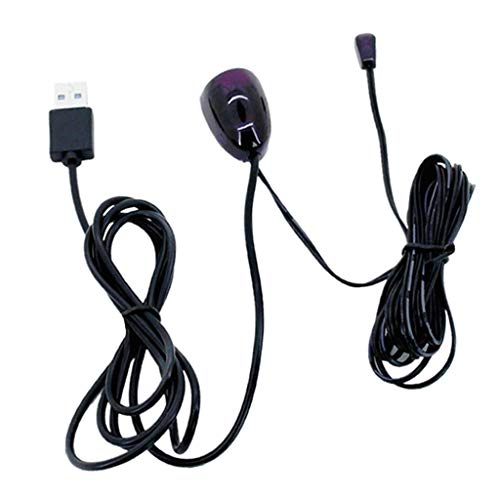
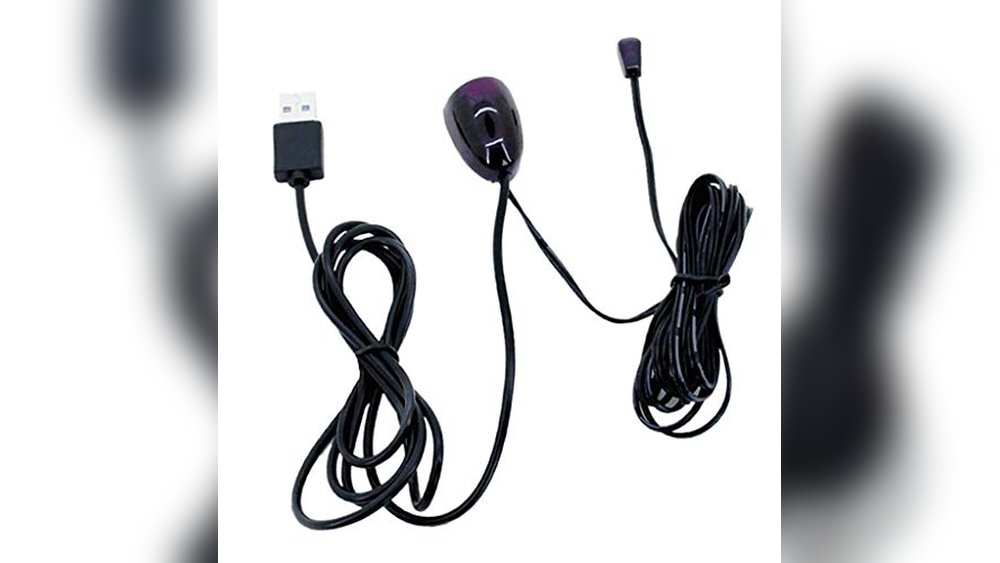
The FABLOFT USB Infrared Remote Receiver Kit lets you control devices hidden behind cabinet doors or inside closed entertainment units. It works with all remote control devices and is powered by a simple USB connection, making it easy to set up without extra adapters.
If you need to extend your IR remote signal to devices like amplifiers, cable boxes, or Blu-ray players, this kit does the job without requiring you to move your equipment.
Using this IR repeater feels seamless and reliable—no noticeable delay and flexible signal transmission mean you don’t have to point your remote perfectly. It’s especially handy when your Xbox One is stored out of sight, so you can relax and control your setup from the couch.
You’ll spend less time troubleshooting and more time enjoying your system.
What Makes It Stand Out
- Works with all IR remote devices for broad compatibility
- Allows control of hidden equipment without opening cabinets
- Simple USB power—no special adapters required
- Includes one receiver and two emitters for flexible placement
- Quick signal reception with no noticeable delay
- Suitable for a range of devices including amps and receivers
Potential Limitations
- No wireless or app-based control options
- Requires access to a USB port for power
- Does not include advanced smart home integration
Who This Fits Best
This kit is ideal if your Xbox One or other devices are tucked away inside cabinets or behind doors and you want reliable remote control without the hassle of opening everything up. It takes away the stress of line-of-sight issues and the frustration of remotes not working through obstacles.
For best results, position the IR receiver in a spot with a clear view from your main seating area.
The FABLOFT kit is dependable and consistent, giving you peace of mind that your commands will go through every time. If you value a neat setup and want your tech out of sight, this is a good fit. I like how it quietly does its job without fuss—just plug in and use.
| Best for | Why |
|---|---|
| Devices hidden in cabinets | Lets you control components behind closed doors |
| Multiple IR devices in one setup | Supports multiple emitters for different gear |
| Simple, no-fuss home theaters | Easy USB setup—no complex wiring |
| People who dislike remote lag | Delivers fast, responsive IR signals |
Obvis Ir Emitter Cable For Xbox One
For anyone seeking the Best Ir Blaster for Xbox One, this OBVIS extender cable offers an easy way to connect and control your devices without hassle.
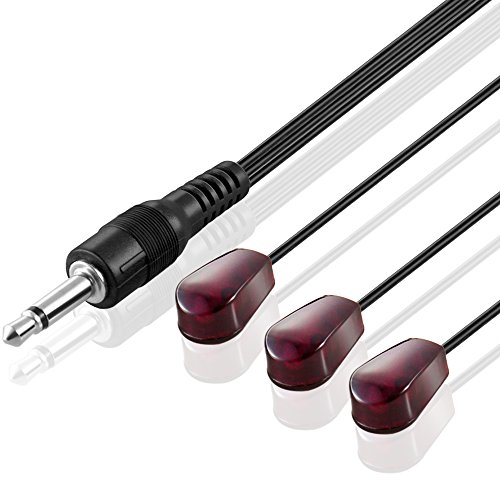
This cable is designed to extend the reach of your IR blaster system for Xbox One, helping you control devices that are tucked away or out of sight. The triple-head design lets you target multiple components, so you don’t have to worry about missing signals or repositioning your console.
Using it feels straightforward—just plug in the 3. 5mm jack, place the blink eye transmitters, and you’re ready. It’s lightweight and doesn’t clutter your setup, making daily use more consistent. You spend less time troubleshooting and more time enjoying seamless control over your entertainment gear.
Why It Stands Out For Home Setups
- Works well with Xbox One IR systems
- Triple head design covers multiple devices
- 10-foot extension reaches distant components
- Simple plug-and-play setup
- Lightweight and unobtrusive
- Reliable signal transmission for hidden devices
What To Consider Before Buying
- No advanced smart features included
- Limited to IR-compatible devices and setups
- Not ideal for very large rooms or complex home theaters
When I’d Pick This
This IR blaster cable is best for Xbox One owners who want to control devices tucked inside cabinets or behind TVs, without having to move them. It removes the hassle of line-of-sight issues and saves time by making remote commands more reliable. A quick tip: place the blink eye transmitters as close as possible to the IR sensors for the best results.
If you’re tired of guessing whether your commands will reach, this cable brings peace of mind—your gear responds consistently and you avoid frustration. It’s a simple solution that makes your setup easier to use, especially if you value a clean, uncluttered look.
I appreciate how it keeps things straightforward for everyday use.
| Best for | Why |
|---|---|
| Controlling hidden Xbox One devices | Triple head design targets multiple IR sensors |
| Cabinet or shelf setups | 10-foot cable extends reach for out-of-sight gear |
| Simple, plug-and-play installations | No need for technical adjustments or extra software |
| Lightweight accessory needs | Doesn’t add clutter or complexity to your setup |
Getzget Mini Mobile Ir Blaster For Ios
The Best Ir Blaster for Xbox One offers reliable universal remote control for multiple IR devices, perfect for users who want simplicity and portability.

This compact IR blaster turns your iPhone or iPad into a universal remote, letting you control TVs, ACs, set-top boxes, and more with the Uni TV Remote app. It’s a handy solution if you want to replace multiple remotes and reduce clutter, especially when traveling or moving between rooms.
Using the GetZget Mini Mobile IR Blaster feels easy and seamless. You simply plug it into your iOS device and get instant access to remote control functions, without needing to charge or manage extra batteries. Its lightweight design means you can carry it anywhere, and it’s quick to set up with clear instructions for troubleshooting app recognition.
Key Remote Control Advantages
- Works with many IR devices including TVs, ACs, DVD players, and fans
- No charging required for the adapter
- Up to 10 meters wireless control range
- Extremely compact and portable—fits on a keychain
- Dedicated app (Uni TV Remote) simplifies setup and use
- Ideal for travelers and anyone needing quick device access
Consider Before Buying
- Only compatible with iOS Lightning devices
- Requires app download and specific settings adjustments if not recognized
- Not designed for Android or Type-C without separate versions
Who This Fits Best
If you travel often or want a simple way to manage multiple IR devices, this mini blaster is a practical fit. It takes away the hassle of juggling remotes and saves time finding lost controllers. For Xbox One users, it bridges the gap to control entertainment setups smoothly.
Setup is straightforward, but if the adapter isn’t recognized by the app, turning off mono audio and equalizer settings usually solves the issue. Once configured, you get reliable performance and peace of mind knowing your device can handle most IR appliances without extra effort.
Personally, I like how it makes switching between devices feel effortless.
| Best for | Why |
|---|---|
| iPhone/iPad owners | Instant universal remote control via Lightning port |
| Travelers | Small, portable, and easy to carry on a keychain |
| Users with multiple IR appliances | Controls TVs, ACs, set-top boxes, and more from one device |
| Those wanting hassle-free setup | App-based control and no need for charging |
Careflection Mini Ir Remote Adapter (micro Usb)
The CareFlection Mini IR Remote Adapter stands out as the Best Ir Blaster for Xbox One users who want smartphone-based control without extra remotes.

The CareFlection Mini IR Remote Adapter (Micro USB) allows you to turn your Android smartphone into a universal remote. It solves the hassle of juggling multiple remotes by letting you control IR-enabled devices—like TVs, set-top boxes, and more—directly from your phone.
Its small, portable design means you can carry it anywhere, making it ideal for travelers or users needing compact solutions.
Using this adapter feels straightforward: just plug it into your phone, download the app, and start controlling devices from up to 10 meters away. You won’t need to worry about charging the adapter, and having everything on your phone can save time and reduce clutter. The confidence of always having a remote at hand—even when your original is lost—is a real bonus for multi-device households.
Why People Choose It
- Transforms your Android phone into a universal IR remote
- Eliminates the need for multiple traditional remotes
- Portable and compact; fits on a keychain for travel
- Long wireless control range (up to 10 meters)
- No charging required for the adapter
- Works with a wide variety of IR devices
Potential Limitations
- Requires Micro USB port (not compatible with all phones)
- App download and OTG function activation needed
- Not designed for use with non-IR or Bluetooth devices
Who This Fits Best
This adapter is a good fit for anyone who wants to control multiple IR devices with a single smartphone, especially if you often misplace remotes or travel frequently. It removes the hassle of searching for different remotes and streamlines device management, all from your Android phone.
For best results, make sure your device’s OTG function is enabled before use. This will help avoid setup surprises and ensure smooth operation. If you want a reliable solution that keeps your entertainment area organized and minimizes stress, this compact adapter delivers.
Personally, I appreciate how it keeps things simple and reduces the clutter of extra remotes.
| Best for | Why |
|---|---|
| Android users with Micro USB phones | Direct compatibility, plug-and-play convenience |
| Travelers needing portable remote control | Small enough to carry anywhere, no extra remotes needed |
| Homes with multiple IR devices | Controls TVs, set-top boxes, air conditioners, and more from one app |
| Users who lose remotes easily | Smartphone becomes a consistent backup remote |
Velura Ir Remote Control Extender Kit
Best Ir Blaster for Xbox One for those needing to control devices behind closed cabinets with reliable infrared coverage.
This IR extender kit lets you control audio and video equipment even if it’s hidden behind cabinet doors. It’s powered by USB and includes a receiver and two emitters, making it easy to link with devices that use IR remotes.
Using this extender feels seamless—you don’t need to open cabinets or point remotes at odd angles. The signal is fast and there’s no noticeable lag, so you can switch inputs, adjust volume, or power devices with confidence every time.
Key Benefits For Home Theater Control
- Works with all standard IR remote devices
- Makes hidden setups easy to control
- Reliable, fast signal with no delay
- Simple USB power—no extra adapters needed
- Supports multiple devices with two emitters
- Compact and easy to hide
Things To Consider Before Buying
- Not compatible with non-IR (RF/Bluetooth) remotes
- Requires a free USB port for power
- Setup may involve cable management behind cabinets
What I’d Tell A Friend
This extender kit is a solid fit if you have an Xbox One or other IR-controlled gear tucked away in a cabinet. It’s ideal for anyone tired of opening doors or dealing with spotty remote control through glass. The kit clears up the hassle of unreliable signals and brings back the convenience of direct control.
For best results, place the receiver in line-of-sight with where you usually sit. A quick test ensures the emitters are positioned to hit each device’s IR sensor directly—this avoids missed commands and keeps everything working smoothly. Having one less tech headache in your setup means more time enjoying your system, not fiddling with remotes.
| Best for | Why |
|---|---|
| Controlling hidden Xbox One consoles | Lets you use your remote even with doors closed |
| Home theater setups with multiple devices | Supports two emitters for controlling several components |
| Simple USB-powered solutions | No need for extra power adapters |
| Universal IR remote compatibility | Works with a range of IR-controlled devices |
Getzget Mini Ir Remote Adapter For Android
For those seeking the Best Ir Blaster for Xbox One, this compact adapter turns your Android phone into a universal IR remote with wide compatibility.

This GetZget Mini IR Remote Adapter is designed to help Android users control IR devices like TVs, set-top boxes, and air conditioners directly from their phones. It’s small, easy to carry, and eliminates the need for multiple remotes at home or when traveling.
Using the Zaza Remote app, you get a simple interface for managing your devices. The adapter’s long wireless control range means you don’t have to get up or move around, making daily routines smoother. It feels reliable and hassle-free, especially if you value a tidy, efficient setup.
Why This Adapter Stands Out
- Turns your phone into a universal IR remote
- Supports multiple device types (TV, DVD, AC, etc.)
- Works up to 10 meters away without charging
- Compact design fits on a keychain
- Ideal for travelers needing portable control
- Easy app integration for quick setup
Consider Before Buying
- Requires Micro USB port (not for iPhone or USB-C only devices)
- Must enable OTG function on your phone for compatibility
- No included app; download Zaza Remote separately
Who This Fits Best
This adapter is best for Android users who want a single, portable solution to control multiple IR devices, including the Xbox One and home entertainment gear. It removes the stress of juggling remotes and makes device management simple, especially in busy households or while traveling.
Enabling the OTG function on your phone is key for successful setup; this step avoids frustration and ensures everything works smoothly. With its consistent performance and easy integration, you can trust it to deliver reliable control without surprises. If you prefer minimalism and value convenience, this adapter is a smart choice.
| Best for | Why |
|---|---|
| Android users with Micro USB phones | Compatible plug and play design for most Android devices |
| Travelers needing portable remote control | Small size and keychain fit make it easy to carry |
| Controlling multiple IR devices | Works with TVs, set-top boxes, air conditioners, and more |
| Those tired of multiple remotes | Consolidates control into one smartphone app |
Careflection Mini Ir Remote Adapter For Iphone
A top pick for Best Ir Blaster for Xbox One users wanting simple, portable IR control from their iPhone or iPad.

This Careflection Mini IR Remote Adapter turns your iPhone or iPad into a universal infrared remote. It replaces the need for separate remotes and lets you control devices like TVs, set-top boxes, air conditioners, and more from your phone. If you want a compact solution without extra clutter, it’s a smart alternative.
Using it is straightforward: just plug it into your device and download the app. The 10-meter control range means you don’t have to be right next to your devices. Its small size makes it easy to carry, especially for travelers. You’ll find switching between devices is quick and hassle-free.
Key Advantages For Device Control
- Transforms your iPhone into a universal IR remote
- Works with a wide range of IR devices, including TVs, DVD players, and fans
- No charging required—ready to use anytime
- 10-meter wireless control range for flexibility
- Compact and lightweight, perfect for travel
- Easy app-based setup and switching
Points To Consider Before Buying
- Only compatible with iOS Lightning devices
- Requires app download and proper OTG settings
- Does not control non-IR devices
When I’d Pick This
This adapter is ideal for anyone who wants to control multiple IR devices—including Xbox One setups—using their iPhone or iPad. It cuts down on remote clutter and saves time searching for separate controllers. If you travel often or just want simplicity at home, it’s a practical fit.
With its plug-and-play design and long control range, you get reliable performance without worrying about batteries. A quick tip: make sure your device’s OTG function is enabled for smooth operation. This way, you’ll avoid setup hiccups and enjoy consistent control. I appreciate how it fits easily on a keychain for grab-and-go convenience.
| Best for | Why |
|---|---|
| iPhone/iPad owners | Fits Lightning port, easy app setup |
| Travelers | Compact, lightweight, no charging required |
| Multi-device households | Controls TV, AC, set-top box, fan, and more |
| Those tired of remote clutter | All-in-one solution removes extra remotes |
Shopora 1.5m Ir Blaster Extender Cable
Best Ir Blaster for Xbox One users who want fast, reliable remote control signal transmission without interference.

The SHOPORA 1. 5m IR Blaster Extender Cable helps you control your Xbox One or other devices from a distance using infrared signals. It solves the problem of remote commands not reaching your console or AV equipment, especially when devices are inside cabinets or out of direct line of sight.
The included small receiver is easy to hide, so your setup stays neat.
Using this IR blaster means you get fast, no-delay responses each time you use your remote. Its strong anti-interference ability ensures that other devices nearby won’t affect your controls. You’ll notice how quickly your inputs are received, giving you confidence that your Xbox One will respond reliably, even if you have multiple electronics in your setup.
Why This Blaster Makes A Difference
- Instant remote signal transmission with no delay
- Strong compatibility with various home AV devices
- Directional transmitter avoids interference with other appliances
- Receiver is compact and easy to conceal
- Works well even at longer distances
- Low power consumption for efficient use
Things To Keep In Mind
- No included price information for comparison
- Color is as per image, not customizable
- Physical dimensions may not suit very compact setups
Where This Shines
This IR blaster is best for Xbox One owners who have their console tucked away in a cabinet or want to operate multiple devices without line-of-sight hassles. It removes the worry about signal lag or interference, making your gaming or media experience smoother and less stressful.
For best results, aim the transmitter carefully to maximize response and avoid blocking the receiver with objects.
If you want reliable performance and fewer surprises during movie nights or gaming sessions, this SHOPORA extender is a solid choice. You’ll spend less time troubleshooting and more time enjoying your devices. Personally, I appreciate the small receiver, which keeps setups tidy and out of view.
| Best for | Why |
|---|---|
| Controlling Xbox One in closed cabinets | Infrared signal passes through barriers and responds quickly |
| Multi-device AV setups | Directional transmitter avoids cross-signals with other gear |
| Users wanting a discreet install | Small receiver is easy to hide, keeping setups neat |
| Reducing remote control delays | Sensitive signal reception means instant response |
Getzget Mini Ir Adapter For Iphone
A top pick for Best Ir Blaster for Xbox One users who want universal control from their iPhone.

The GetZget Mini IR Adapter for iPhone is a compact Type-C IR blaster that lets you control multiple devices like TVs, ACs, set-top boxes, and more right from your iPhone 15 or 16 series. It solves the hassle of juggling several remotes by turning your phone into a universal remote with just a quick plug-in and an app download.
If you’ve ever wished your phone could replace your remotes, this adapter is designed exactly for that purpose.
Using this IR adapter feels straightforward and reliable. Setup is quick—just connect it, enable Bluetooth, and launch the Uni TV Remote app. Once ready, switching between devices is simple, and you don’t have to hunt for lost remotes anymore. The portable size and included silicone case make it easy to keep on your keychain, so it’s always handy when you need it.
Key Benefits For Iphone Users
- Works with iPhone 15 and 16 series (Pro, Max, Plus)
- Universal compatibility with major brands and device types
- Plug-and-play setup for fast use
- Controls TVs, ACs, set-top boxes, bulbs, and more
- Includes a protective case and keychain ring for portability
- No need for multiple remotes—one device handles all
Things To Consider
- Requires iPhone 15 or 16 series with Type-C port
- Needs the Uni TV Remote app and Bluetooth enabled
- Mobile phone not included—adapter only
Where This Shines
This adapter is best for iPhone 15 or 16 owners who want a single, portable solution to control all their IR devices, including as a Best Ir Blaster for Xbox One. If you’re tired of misplacing remotes or switching between them, this tool cuts out the hassle and keeps everything at your fingertips.
The included keychain ring means you can always have it handy when visiting friends or traveling.
For best results, make sure Bluetooth is on and read the manual before first use—it’ll save you time and smooth out setup. You can trust this adapter to work reliably with most brands, giving you fewer surprises and more confidence when you need to change a setting or switch inputs.
I appreciate the simplicity it brings to daily living.
| Best for | Why |
|---|---|
| iPhone 15/16 users | Designed specifically for newer iPhones with Type-C |
| Universal device control | Works with TVs, ACs, set-top boxes, bulbs, and more |
| Travel and portability | Small size and keychain case for easy carrying |
| Quick setup | Plug-and-play with minimal configuration needed |
Frankever Smart Home Ir Blaster Hub
The FRANKEVER Smart Home IR Blaster Hub stands out as the Best Ir Blaster for Xbox One for users who want reliable control of multiple devices from one app or voice assistant.

The FRANKEVER Smart Home IR Blaster Hub is a versatile remote control solution that connects via Wi-Fi and lets you manage various IR devices—including TVs, set-top boxes, and more—from your phone or voice assistant. If your device isn’t already supported, you can easily teach the hub new commands, making it flexible for different setups.
Using this hub feels simple and reliable; you can control devices from anywhere with the Smart Life app or hands-free with Alexa or Google Home. Setting up timers and custom scenes reduces everyday hassle, and the ability to program buttons gives confidence that it will work with your entertainment gear.
It saves time by centralizing control, so you don’t need multiple remotes.
Why It’s A Smart Choice For Multi-device Control
- Works with over 50,000 IR-controlled devices for broad compatibility
- Supports Alexa, Google Home, and Siri voice control
- Easy remote access via Smart Life app on iOS and Android
- Customizable timers and scenes for automated routines
- Programming feature lets you add unsupported devices
- Compact design fits easily in most setups
- Helpful video guides and technical support available
Things To Consider Before Buying
- Requires a secure 2.4GHz Wi-Fi network (not 5GHz)
- Only controls IR devices—won’t work with RF-based gear
- No built-in display or physical remote included
What I’d Tell A Friend
If you want to streamline your living room or gaming setup, this hub is ideal for unifying control of devices like Xbox One, TV, and AC. It takes away the frustration of juggling multiple remotes and makes smart routines effortless.
The app and voice integration are especially handy for anyone who already uses Alexa or Google Home.
To get the most out of it, make sure your Wi-Fi is stable and only 2. 4GHz. Programming unsupported devices is straightforward, so you’ll rarely run into compatibility issues. The consistent performance means you can trust it for daily use, and having video guides adds peace of mind if you ever need help.
I appreciate how it lets me control everything from my phone, even when I’m away from home.
| Best for | Why |
|---|---|
| Controlling Xbox One and TV together | Centralizes IR commands for easy switching |
| Smart home users with Alexa or Google Home | Works with voice assistants for hands-free control |
| Automating AC and entertainment routines | Custom timers and scenes simplify daily tasks |
| Anyone tired of multiple remotes | Replaces traditional remotes with app or voice control |
How To Choose The Right Ir Blaster Or Extender
Compatibility Matters
Not all IR blasters and extenders work with every device. Check if your phone has the right port (Lightning, Type-C, or Micro USB) or if the extender supports your TV, AC, or other appliances. Universal compatibility is rare—verify details before buying.
Usage Environment
Consider where you’ll use the device. For home theater setups with closed cabinets, a repeater or extender with external emitters works best. For travel or controlling multiple brands, compact smartphone adapters are more practical.
Setup And App Support
Some products require specific apps or additional settings, like enabling OTG or Bluetooth. Research app reliability and ease of setup. App support can vary by phone model and software version.
Signal Range And Reliability
Signal strength and response speed affect usability. Long-distance control is useful for larger rooms, but not all devices perform equally well through obstacles or at longer ranges. Look for clear signal range specifications.
Common Buyer Mistakes
- Assuming all IR adapters work with every phone—check port type and OS version.
- Overlooking the need for third-party apps, which may not be available in all regions or for all devices.
- Ignoring power requirements, such as USB power for extenders.
- Placing emitters or receivers in poor line-of-sight positions, reducing effectiveness.
Who Should Avoid These Products
- If your devices use RF or Bluetooth remote controls instead of infrared, these products will not work.
- Users uncomfortable with downloading and configuring third-party apps may find smartphone adapters frustrating.
- If you need to control devices from very long distances or through many walls, consider alternatives.
Setup And Usage Tips
- Place IR receivers and emitters in direct line-of-sight with the device you want to control.
- Enable necessary phone settings, like OTG or Bluetooth, before plugging in adapters.
- Follow app instructions carefully; some require permissions or audio settings adjustments.
- Label cables and ports to avoid confusion during installation.
Care And Maintenance
- Keep IR emitters and receivers free from dust for optimal signal transmission.
- Avoid bending cables sharply, which can cause internal damage.
- Store smartphone adapters in a protective case when not in use to prevent loss or breakage.
Frequently Asked Questions
Can I Use These Ir Adapters With Any Smartphone?
No, you need the correct port type and sometimes a compatible app. Always check your device specifications first.
Do Ir Extenders Work Through Walls Or Cabinets?
Most IR extenders are designed to work through cabinet doors but may not function well through thick walls. Direct line-of-sight is ideal.
What If My Device Uses A Bluetooth Or Rf Remote?
IR blasters and extenders only work with infrared-controlled devices. They will not control Bluetooth or RF-only devices.
Is A Special App Required For Smartphone Ir Adapters?
Yes, most adapters require a specific app. App availability and compatibility may vary by region and phone model.
Are These Products Safe For Continuous Use?
Yes, they are low-power devices and safe for regular use. Avoid exposing them to moisture or extreme heat.
Do I Need Technical Skills To Set Up These Devices?
Basic setup is usually straightforward, but some familiarity with apps and device settings is helpful. Instructions are included with most products.
Summary And Final Thoughts
Choosing an IR blaster or extender comes down to compatibility, intended use, and setup preferences. Take a moment to confirm your device needs and environment. With the right fit, these tools can simplify your control over home electronics and mobile devices.