
Most people have a drawer full of remotes—one for the TV, another for the soundbar, a third for streaming boxes. You’re not alone if you’ve spent minutes hunting for the right one just to watch a show. The idea of one remote controlling everything sounds simple, but choosing the right universal remote can quickly get overwhelming.
Many remotes promise to replace your collection, but not all work with every device. Some are easy to set up, others require patience. There are trade-offs between price, features, and compatibility. People often end up with a remote that’s either too basic or more complicated than needed.
This guide will help you sort out what actually matters—so you can pick the best remote for your setup, without second-guessing your choice.
Who Needs A Multi-device Remote?
If you switch between several devices—like TVs, streaming boxes, Blu-ray players, and soundbars—a universal remote can reduce clutter and frustration. It’s helpful for anyone who wants fewer remotes, or for households where guests or less tech-savvy users need simple control.
What Trips Most People Up
Compatibility is the biggest sticking point. Not all remotes work with all brands or types of devices, especially streaming sticks and smart assistants. Setup can also be a pain if you’re not clear on the process. Some remotes are “universal” in name, but limited in practice.
Below, you’ll find a range of universal remotes chosen to fit different needs and budgets. Each one was selected for its balance of ease, compatibility, and reliability—so you can find an option that makes sense for your home.
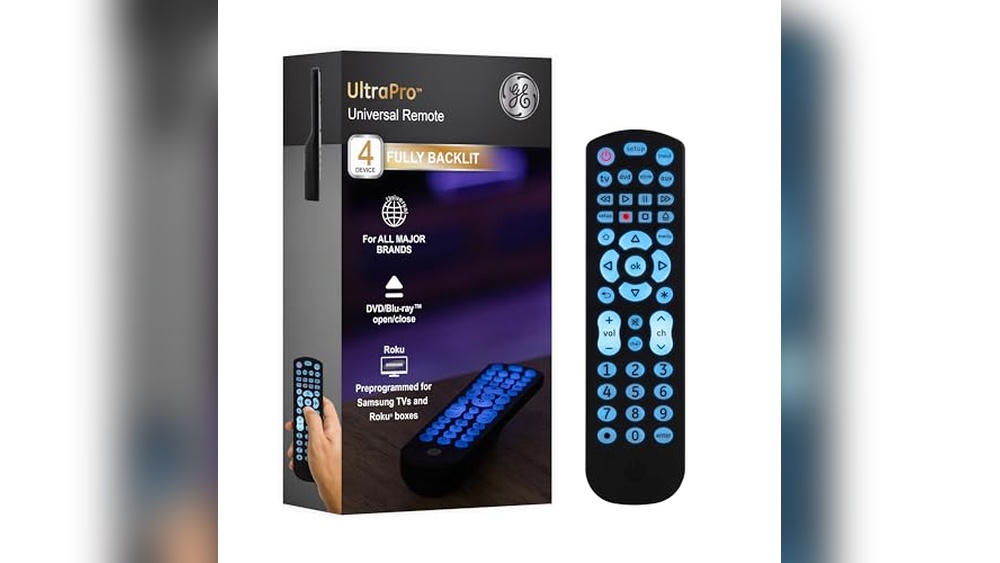
Ge Backlit Universal Remote For 4 Devices
The GE Backlit Universal Remote is the Best Remote Control for Multiple Devices for anyone seeking easy, reliable control over their home entertainment setup.

This remote is designed to control up to four devices, making it ideal for households with TVs, Blu-ray players, streaming boxes, and soundbars. It eliminates the clutter of multiple remotes and brings your entertainment under one easy-to-use controller. The backlit keys make it convenient for dark rooms, and automatic code search means setup is quick for most users.
Using the remote is straightforward: the buttons are clearly labeled, and the master volume control works across devices, saving time and frustration. With preprogrammed options for Samsung TVs and Roku boxes, you can start using it immediately for popular brands. The compact size fits comfortably in your hand, making everyday use effortless.
Key Advantages For Home Entertainment
- Controls up to four devices—TV, Blu-ray, DVD, cable, or streaming player
- Extensive code library supports thousands of major brands
- Easy setup with automatic code search and direct entry
- Preprogrammed for Samsung TVs and Roku streaming boxes
- Backlit buttons for clear visibility in low light
- Master volume control works across devices
- Compact and stylish design fits any living space
Things To Consider Before Buying
- Not compatible with radio frequency devices like Roku Streaming Sticks or Fire TV/Sticks
- Batteries (AAA) are required but not included
- Limited to controlling four devices at one time
- Some advanced device functions may not be accessible from the remote
Who This Fits Best
If you have a mix of TVs, streaming boxes, and disc players from major brands, this remote brings all your controls together. It’s perfect for anyone tired of juggling multiple remotes or hunting for codes every time something changes. The quick setup and preprogrammed options remove the guesswork, and the backlit keys make late-night viewing hassle-free.
One tip: take a minute to check the code library included in the manual for your specific devices—it makes setup even smoother. Once programmed, you’ll enjoy steady, reliable control with fewer surprises or device confusion. I like that it brings peace of mind knowing you won’t be stuck in the dark or searching for buttons when you need them.
| Best for | Why |
|---|---|
| Homes with multiple entertainment devices | Handles up to four devices with one remote |
| Users with Samsung TVs or Roku streaming boxes | Preprogrammed for immediate use with popular brands |
| Nighttime or low-light viewing | Fully backlit buttons for easy operation |
| Those wanting simple setup | Automatic code search and clear instructions |
Ge Universal Remote For Smart Tvs & Devices
The Best Remote Control for Multiple Devices if you want one remote that reliably manages TVs, soundbars, and streaming players from nearly any major brand.

The GE Universal Remote for Smart TVs & Devices is designed to replace multiple remotes, letting you control up to four different devices with one tool. It’s ideal for those tired of juggling remotes for their TV, soundbar, and streaming player.
The brushed silver finish and slim profile give it a modern look that fits into any living room.
Using this remote day-to-day means less time searching for the right buttons and more time enjoying your shows. Setup is straightforward, with an easy online guide to help you get started quickly. Features like master volume control and dedicated menu and navigation buttons make switching between devices simple and consistent.
It brings a sense of order to your entertainment setup, especially if you have equipment from different brands.
Why This Remote Stands Out
- Controls up to four devices—TVs, soundbars, streaming players, and more
- Works with all major brands, both new and legacy equipment
- Modern, brushed silver finish fits most décor
- Master volume control for convenience across devices
- Includes advanced buttons like DVR list and digital dot for sub-channels
- Simple setup with online video guidance
- Available in multiple colors for personal style
Consider Before You Choose
- Not compatible with Roku Streaming Stick or Amazon Fire TV/Stick
- Requires 2 AAA batteries (not included)
- Must review code list to confirm compatibility with some devices
Who This Fits Best
If you have several entertainment devices from different brands and want to simplify your setup, this remote is a practical choice. It removes the hassle of switching between remotes and guessing which one to use, making TV time more relaxing.
The online setup video helps you get started without frustration.
You’ll appreciate the peace of mind that comes from a single, reliable remote that covers your main devices. For best results, check your devices against the included code list before buying. If you value a tidy coffee table and smooth control over your entertainment system, this remote brings a sense of calm to busy living rooms.
| Best for | Why |
|---|---|
| Households with multiple brands | Works with nearly all major brands and device types |
| Users wanting to replace 3–4 remotes | Controls up to four devices, reducing clutter |
| Anyone seeking quick setup | Easy online video and comprehensive code library |
| People who need advanced navigation | Features dedicated buttons for DVR, menus, and sub-channels |
Acoyer Universal Tv Remote Control
Best Remote Control for Multiple Devices for anyone seeking a single remote that works with most TV brands and media devices in their home.

The Acoyer Universal TV Remote Control is designed to replace multiple remotes for your TVs, DVD/Blu-ray players, and media streaming devices. It solves the hassle of searching for the right remote, especially if you have different brands in your setup.
The simple setup process and wide compatibility make it a practical choice for homes with several devices.
Using this remote feels straightforward and dependable. Once programmed, you can switch between devices without the confusion of juggling remotes. The included code list and manual simplify setup, so you spend less time troubleshooting. It’s reassuring to have one remote that works with most major brands, reducing clutter and stress.
Why People Choose This Remote
- Works with a wide range of TV brands and devices
- Streamlines control for TVs, DVD/Blu-ray players, and media streaming devices
- Easy to set up with clear instructions and code list
- Reduces clutter by replacing multiple remotes
- Lightweight and comfortable to hold
- Responsive customer support for setup questions
What To Consider Before Buying
- Not compatible with Roku Sticks, Fire TV, Apple TV, or Chromecast
- Requires line-of-sight infrared (no Bluetooth or Wi-Fi)
- Batteries not included
Who This Fits Best
This remote is ideal for families or individuals who have several TVs and devices from different brands and want one simple controller for all of them. It removes the stress of mixing up remotes or losing track of which one works for what device.
The clear instructions help you get set up quickly, and support is available if you get stuck.
For best results, keep the code list handy during setup and check device compatibility if you use soundbars or streaming sticks. You’ll enjoy the peace of mind that comes with fewer surprises and less clutter on your coffee table. I appreciate how it brings order to a living room full of tech.
| Best for | Why |
|---|---|
| Homes with multiple TV brands | Covers Samsung, LG, Vizio, Sony, and more in one remote |
| Replacing lost or broken remotes | Serves as a reliable universal replacement |
| Reducing remote clutter | Combines control for TV, DVD/Blu-ray, and media players |
| People who prefer simple, manual setup | Includes clear instructions and code list for easy pairing |
Anderic Universal 4-device Remote
The Anderic Universal 4-Device Remote is a Best Remote Control for Multiple Devices that makes managing your entertainment setup easier and less cluttered.
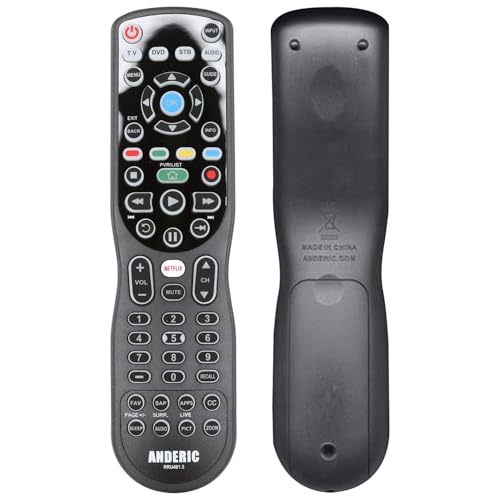
The Anderic Universal 4-Device Remote solves the common problem of juggling multiple remotes for your TV, streaming players, BluRay, audio, and cable devices. It combines control of up to four devices in one unit, reducing clutter and simplifying your entertainment space.
Its smart keys for Netflix, HOME, and APPS make accessing favorite content quick and easy.
Using this remote feels straightforward and reliable, even in low-light rooms thanks to full backlighting and large, easy-to-read buttons. Macro and learning functions let you tailor it to your setup, so you can replicate functions from other remotes and manage multiple device power with a single button.
It brings a sense of control and consistency to everyday use.
Key Advantages For Everyday Use
- Controls up to four devices with one remote
- Universal compatibility across TVs, streaming players, audio, and more
- Dedicated keys for Netflix, HOME, and APPS
- Learning and macro programming for custom control
- Full backlighting for easy navigation in dark rooms
- Single-press power management for multiple devices
Points To Consider Before Buying
- Does not support Bluetooth devices (IR only)
- Programming may take time for custom setups
- Limited to four devices at once
Who This Fits Best
This remote is ideal for anyone tired of switching between multiple remotes for their home entertainment system. It removes the hassle and stress of managing separate controls, streamlining your setup to a single, easy-to-use device. If you frequently use streaming apps like Netflix or manage several types of media equipment, this remote is a practical upgrade.
For best results, use the learning and macro functions to customize the remote to your devices—this can save time and reduce confusion. The full backlighting means you can confidently use it without fumbling, even in dim environments. I appreciate how it offers peace of mind by making daily control more consistent, and you won’t have to hunt for different remotes again.
| Best for | Why |
|---|---|
| Home entertainment setups with multiple devices | Reduces remote clutter and makes control simple |
| Users who want quick access to streaming apps | Dedicated Netflix and APPS keys |
| Anyone needing custom remote programming | Macro and learning features allow tailored control |
| Watching TV in low-light rooms | Full key backlighting improves visibility |
Ultrapro Backlit Universal Remote
Best Remote Control for Multiple Devices makes managing TVs and streaming simpler, especially for households with multiple brands.

This remote offers a straightforward solution for anyone juggling multiple TVs and devices. It replaces separate remotes for Samsung, LG, Sony, Vizio, and Roku, and gives direct access to key streaming apps. With its backlit design, it’s easy to use even in low light.
Setup is quick thanks to preprogrammed buttons, and the master volume control keeps things simple. You won’t waste time hunting for codes or switching remotes. Everyday use feels reliable, and support is available if you run into questions.
Key Benefits For Multi-device Homes
- One remote handles up to six devices
- Easy setup with preprogrammed brand buttons
- Direct streaming app access (Netflix, Disney+, Prime Video, Hulu, YouTube)
- Fully backlit for nighttime use
- Master volume control across devices
- U.S.-based technical support available weekdays
Things To Consider Before Buying
- Requires two AA batteries (not included)
- AUX button is preset for Roku boxes, may need reprogramming for other devices
- Does not support every TV or device brand beyond the main five
Who This Fits Best
This remote is ideal for families or anyone with TVs from Samsung, LG, Sony, Vizio, or Roku, plus a streaming box or soundbar. It takes away the confusion and hassle of multiple remotes, making daily use less stressful. With the backlit keys and master volume control, you’re less likely to fumble or miss a button.
If you want quick streaming access, the app hotkeys are a real time-saver. For best results, check your device compatibility and use the online programming videos. The U. S. -based support means you won’t be left guessing, and the remote’s reliability cuts down on surprises.
I appreciate the simple setup and peace of mind from having help available if needed.
| Best for | Why |
|---|---|
| Homes with multiple TV brands | Handles Samsung, LG, Sony, Vizio, and Roku TVs in one unit |
| Frequent streaming users | Direct access to popular apps via dedicated hotkeys |
| Anyone needing easy setup | Preprogrammed buttons and online help reduce setup time |
| Nighttime viewers | Backlit design makes operation simple in dark rooms |
Sofabaton X1s Universal Remote
Best Remote Control for Multiple Devices for anyone who wants seamless, centralized control across their entertainment setup.

The SofaBaton X1S Universal Remote is designed to simplify your media experience by replacing multiple remotes with one device. It helps you control TVs, soundbars, receivers, and more, all from one place, and sets up easily with the SofaBaton app.
The “One Touch Activities” feature lets you turn on devices and switch inputs automatically, so you can start watching or listening faster.
Day to day, the remote feels responsive and consistent, especially with the Raise to Wake function and customizable buttons. Integrating with Alexa or Google Assistant means you can also operate your entertainment system hands-free. This remote is about making your living room less cluttered and your routine more predictable.
Key Benefits For Home Entertainment
- Controls up to 60 devices, including TVs, projectors, and soundbars
- Simple setup and customization through the SofaBaton app
- One Touch Activities automate common routines
- Works with Alexa and Google Assistant for voice control
- Raise to Wake feature adds convenience
- Updated code database for broad compatibility
- Can reassign buttons and set favorite channels
What To Consider Before Buying
- Initial setup may take time for complex systems
- Not suitable if you only need to control one device
- Requires a hub and internet connection for advanced features
Why This Makes Sense
The SofaBaton X1S is ideal for families or enthusiasts who juggle several devices and want to avoid remote clutter. It removes the hassle of switching between remotes, guessing which input is needed, and repeating the same setup steps every time you watch TV or listen to music.
If you want to streamline your entertainment center and reduce daily stress, this remote is a solid pick. For best results, spend a few extra minutes customizing your activities and favorite channels in the app—this makes everyday use even smoother.
Consistent performance and broad compatibility mean fewer surprises and more time enjoying your shows.
| Best for | Why |
|---|---|
| Homes with multiple devices | Reduces remote clutter and confusion |
| Voice control users | Integrates with Alexa and Google Assistant |
| People who want automation | One Touch Activities automate routines |
| Those upgrading from older universal remotes | Enhanced compatibility and easier customization |
Hujidar Universal Tv Remote
Best Remote Control for Multiple Devices for those seeking one simple solution to operate TVs from major brands without the fuss.

The Hujidar Universal TV Remote is designed to replace multiple TV remotes with a single, easy-to-use device. It works with a wide range of TV brands, so you won’t need to hunt for the right remote when switching between TVs.
Its straightforward setup means you can get started without complicated steps—just pop in two AAA batteries and follow the simple instructions.
In day-to-day use, this remote feels solid and comfortable to hold. The quick response and long range mean you can sit back on your couch or bed and control your TV with confidence. Each button is clearly labeled, making channel surfing or adjusting settings easy and reliable.
It’s a handy backup for lost remotes or a practical upgrade if you want fewer remotes cluttering your living room.
Why It’s A Smart Pick
- Works with most major TV brands
- No programming needed for setup
- Quick response time (within 0.5 seconds)
- Long control distance up to 26 feet
- Durable, comfortable design
- Clearly labeled shortcut keys
- Acts as a replacement or backup remote
Potential Downsides To Know
- Not compatible with devices other than TVs
- Batteries are not included
- Some button issues may require troubleshooting or support
When I’d Pick This
This remote is a great fit for anyone who wants to control different TV brands with one tool, especially in homes with multiple TVs or as a reliable backup. It takes away the hassle of searching for the right remote or figuring out complicated setups.
If you often misplace remotes or have guests, this can make life simpler.
To get the best experience, read the user manual and make sure to insert new AAA batteries for optimal performance. You’ll appreciate having one remote that just works—no guesswork, no surprises. I find peace of mind knowing there’s always a remote ready for use when needed.
| Best for | Why |
|---|---|
| Households with multiple TV brands | Works with most major TVs, so one remote covers all. |
| People who lose remotes often | Acts as a quick backup or replacement when the original is missing. |
| Users who want easy setup | No programming or codes required; just add batteries and go. |
| Anyone wanting fewer remotes | Reduces clutter by replacing several TV remotes with one device. |
Sofabaton X1s Universal Smart Remote
For anyone seeking the Best Remote Control for Multiple Devices, this smart universal remote offers seamless integration across your entire entertainment setup.

The SofaBaton X1S Universal Smart Remote is designed to replace every remote in your living room with a single, easy-to-use controller. It connects to devices via IR, Bluetooth, and Wi-Fi, solving the hassle of managing multiple remotes and making it simple to control TVs, streaming boxes, soundbars, game consoles, and smart lights.
The included hub ensures reliable operation and eliminates signal blind spots.
Using the SofaBaton X1S feels effortless. With its smart one-click activities, you can automate routines like “Watch TV” or “Listen to Music,” saving time and reducing confusion. The backlit buttons and raise-to-wake screen make night use easy, while voice control via Alexa or Google Assistant adds extra convenience.
The “Find My Remote” feature is a reassuring touch for anyone who tends to misplace controllers.
What Makes This Stand Out
- Supports over 500,000 devices from 6,000+ brands
- Automates complex routines with one-touch activities
- 360-degree control hub eliminates aiming issues
- Voice control through Alexa and Google Assistant
- Backlit buttons and auto-wake screen for easy night use
- “Find My Remote” app feature for quick retrieval
Consider Before Buying
- Requires setup and app configuration for best results
- Hub must be plugged in and positioned for optimal coverage
- Voice control depends on existing Alexa or Google Assistant devices
Where This Shines
This remote is ideal for anyone with a complicated home entertainment setup—multiple devices, different brands, and a mix of IR, Bluetooth, or Wi-Fi controls. It takes away the frustration of juggling remotes and learning device codes, letting you automate routines and operate everything from your couch or even via voice commands.
With the “Find My Remote” feature, you don’t have to worry about misplacing it, and the hub’s wide coverage means no more pointing and clicking at awkward angles. To get the best results, take a few minutes to set up your activities and position the hub for full signal coverage.
The outcome is a consistently reliable experience, saving you time and reducing daily hassle. I appreciate that even late-night channel changes are effortless thanks to the backlit buttons.
| Best for | Why |
|---|---|
| Home theaters with many devices | Automates multi-step routines and controls all brands |
| Families tired of remote confusion | One remote manages everything, easy for all ages |
| Smart home users | Works with Alexa and Google Assistant for voice commands |
| People who misplace remotes | “Find My Remote” feature helps locate it quickly |
Loutoc Universal Tv Remote For Multiple Devices
The Best Remote Control for Multiple Devices offers a practical solution for managing TVs, DVD players, soundbars, and more with one easy-to-use remote.

This universal remote is designed to replace multiple remotes for a wide range of TV brands and other entertainment devices. Instead of juggling several controllers, you can use one simple remote for your Samsung, LG, Sony, and more. The included code list and manual help you set it up easily without complicated steps.
Using this remote feels straightforward, with fast response and reliable control from up to 26 feet away. It’s durable enough for daily use and has clear instructions for pairing with different devices. Switching between TV, DVD player, and soundbar is effortless, saving time and reducing clutter in your living room.
Key Advantages For Multi-device Control
- Works with many popular TV brands and entertainment devices
- Controls DVD, Blu Ray, soundbar, streaming players, and more
- Quick response and long-distance operation
- Durable design rated for 50,000 button presses
- Easy setup with code list and step-by-step manual
- No need to memorize complex instructions
Consider These Limitations
- Batteries are not included in the package
- Setup requires finding and entering device codes
- Does not support every device brand outside the listed ones
Who This Fits Best
This remote is ideal for anyone managing several devices from different brands—especially in homes where multiple remotes create confusion. It removes the stress of hunting for the right controller and the hassle of switching between devices.
Setup is straightforward if you keep the code list handy. For best results, have fresh AAA batteries ready and follow the pairing steps carefully. Once configured, the remote delivers reliable, fast control, giving you peace of mind and fewer surprises.
If you want a simple living room setup, I found that this remote makes daily use smooth and clutter-free.
| Best for | Why |
|---|---|
| Households with multiple TV brands | Compatible with Samsung, LG, Sony, TCL, and more |
| Users with DVD/Blu Ray players and soundbars | Controls entertainment devices beyond just TVs |
| Anyone seeking fewer remotes | Reduces clutter and confusion in living spaces |
| People valuing quick, reliable control | Fast response and durable build for everyday use |
Ge 3-device Universal Remote
Best Remote Control for Multiple Devices for those wanting a simple way to manage several home entertainment devices without extra hassle.

The GE 3-Device Universal Remote is designed to replace multiple remotes and simplify your TV area. With support for up to three devices, you can control your TV, Blu-ray/DVD player, and soundbar from one place, cutting down on clutter. The remote’s setup is straightforward, so you won’t spend much time programming or searching for codes.
In daily use, the remote feels comfortable and fits naturally in your hand thanks to its contoured design. The black finish blends easily with any living room setup, while master volume control means you don’t have to reach for another remote just to change the sound.
With preprogrammed support for Samsung TVs, you can get started even faster if you have that brand.
Why People Choose This Remote
- Controls up to three devices with one remote
- Compatible with major brands and thousands of models
- Simple setup with automatic code search and direct entry
- Master volume control across devices
- Preprogrammed for quick use with Samsung TVs
- Comfortable, ergonomic design
- Classic look fits with most decor
Things To Consider
- Not compatible with radio frequency devices like Roku Streaming Sticks or Amazon Fire TV/Sticks
- Supports only up to three devices
- Batteries (AAA) not included
Who This Fits Best
This universal remote is best for anyone who juggles multiple devices—like a TV, soundbar, and Blu-ray player—and wants a single, reliable way to control them. It takes away the confusion of remembering which remote does what and keeps the coffee table less cluttered.
If you have a Samsung TV, setup is even smoother since it’s ready out of the box.
One tip: use the automatic code search if you’re unsure of your device codes—it speeds up the process and reduces setup mistakes. For homes with a basic entertainment setup and mainstream brands, this remote gives you peace of mind that everything will work together consistently. I like how it feels sturdy without being complicated.
| Best for | Why |
|---|---|
| Controlling a TV, Blu-ray/DVD, and soundbar | Handles up to three devices with one remote |
| Homes with major TV brands | Wide code library supports most popular models |
| People who want easy setup | Automatic code search and preprogrammed buttons save time |
| Simple, clutter-free setups | One remote reduces confusion and mess |
Universal Remote Buying Guide
How Many Devices Do You Need To Control?
Most universal remotes handle 3–4 devices. If your setup is complex or includes smart home integration, look for models that support more devices or offer app/hub features.
Infrared, Bluetooth, Or Wi-fi?
Basic remotes use infrared. If you have streaming players or smart devices, you may need Bluetooth or Wi-Fi support. Check compatibility with your equipment before choosing.
Ease Of Setup
Some remotes are preprogrammed for popular brands, while others require manual code entry or app pairing. Consider your comfort level with setup steps and code lists.
Extra Features
Backlit buttons, macro functions, and app shortcuts can improve usability, especially in low light. Decide if these features matter for your routine.
Common Mistakes When Choosing Universal Remotes
- Assuming all streaming devices are supported. Many remotes do not control Fire TV or Roku sticks.
- Not checking compatibility lists. Some brands or device types require special codes or are excluded.
- Overlooking battery requirements. Most remotes need AAA batteries, but packs rarely include them.
- Ignoring setup complexity. Advanced models may need app pairing or code programming, which can be time-consuming.
Who Should Avoid Universal Remotes?
- If your devices rely mostly on RF (radio frequency), these remotes will not work.
- If you only have one device, a universal remote may be unnecessary.
- If you want voice control or advanced automation, entry-level remotes will not provide those features.
Setup And Usage Tips
- Read the manual before starting. Identify your device codes first for a smoother setup.
- Use the automatic code search only if direct entry fails.
- Test all key functions after setup, not just power and volume.
- For remotes with hubs or apps, place the hub in a central spot and keep the app updated.
Care And Maintenance Notes
- Replace batteries as soon as response slows or fails.
- Keep remotes clean—wipe with a dry cloth, avoiding moisture.
- Store in a consistent spot to avoid misplacement; some models offer beep tracking.
Frequently Asked Questions
Will These Remotes Work With All My Streaming Devices?
No. Many universal remotes do not support Fire TV or Roku sticks. Check device compatibility carefully.
Do I Need To Buy Batteries Separately?
Most universal remotes require AAA batteries, which are not included. Have them ready before setup.
Is Setup Difficult For These Remotes?
Setup varies by model. Some are preprogrammed for common brands; others require manual code entry or app pairing.
Can I Control Multiple Devices At Once?
Yes, but only certain remotes support macro or activity features for simultaneous control. Others switch between devices.
Do Universal Remotes Support Voice Control?
Only advanced models with hub/app integration offer voice control through Alexa or Google Assistant.
Will Backlit Buttons Drain Battery Faster?
Backlit features use more power. Replace batteries sooner if you use backlighting often.
Final Thoughts
Universal remotes solve common clutter and compatibility issues, but they differ in setup and supported devices. Take time to match your needs with features, and check compatibility lists before deciding. The right remote can simplify your entertainment system and make daily use easier.