
Most drivers have been there: stuck in traffic, juggling directions, calls, or playlists, all while trying to keep eyes on the road. Today, voice assistants promise to make driving smoother and safer, but picking the right one for your car isn’t as simple as it sounds.
The market is crowded with Bluetooth speakerphones, GPS units, dash cams with voice control, and full wireless CarPlay screens. Some are cheap and simple, others pack in navigation, cameras, and entertainment. Many look similar, but the experience can be very different.
Compatibility, audio quality, and everyday use feel can matter more than features or price tags alone. It’s easy to get lost in tech details or to buy something that doesn’t fit your driving style.
This guide will help you sort out what actually matters when choosing a voice assistant for your car—so you don’t end up frustrated or disappointed.
What Makes Choosing A Car Voice Assistant Confusing?
There’s no single “right” device. Some work best for hands-free calling, others for navigation or music. Some units replace your dashboard, while others just clip to the visor. App support, voice accuracy, and installation style all vary. If you’re not sure how you’ll actually use it day to day, it’s easy to pick the wrong type.
How To Think About Your Needs
Start with how much you want to interact with your car—are you just taking calls, or do you need directions, streaming, or safety features? Think about your car’s age, your phone’s compatibility, and how much tech you want to add.
Price doesn’t always match real-world convenience. Decide what you’ll use most, then match features to those habits.
Below you’ll find a range of voice assistant solutions. Each addresses different needs and driving styles, so you can find the best fit for your routine.
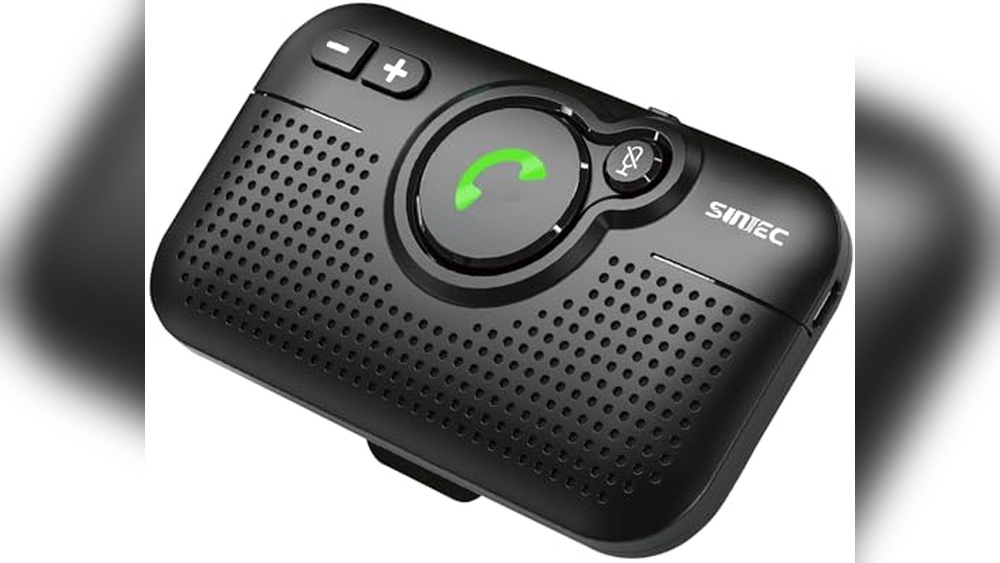
Sunitech Bluetooth Car Speaker With Voice Assistant
For drivers wanting the Best Voice Assistant for Car, this handsfree speaker makes safe, clear calls effortless in any vehicle.

The SUNITECH Bluetooth Car Speaker with Voice Assistant is a compact handsfree kit that clips to your sun visor and connects to your phone via Bluetooth. It’s designed to help you make calls, get directions, and use your phone’s voice assistant safely while driving, especially in cars without built-in Bluetooth.
Day-to-day, it feels reliable and simple—just get in, and it powers on automatically. The big button makes it easy to answer calls without fumbling, and the clear sound means you don’t have to raise your voice. It’s a relief for anyone who wants easy, distraction-free communication on the road.
Why Drivers Prefer It
- Automatic power on/off and reconnection keeps setup hassle-free
- Supports Siri and Google Voice Assistant for handsfree commands
- Noise cancellation for clear calls, even with road noise
- Works with most iPhone and Android devices
- Simple visor clip for fast, tool-free install
- Can double as a desktop speakerphone for meetings
Consider Before You Buy
- Speaker size is compact—may not fill the whole car with music
- Requires charging; not hardwired into your car’s power
- No display or advanced infotainment features
What I’d Tell A Friend
If you drive an older car or truck and want handsfree calls and voice assistant access, this is a smart choice. It removes the hassle of tangled wires and awkward phone mounts, letting you focus on the road. The automatic power feature means you don’t have to remember to turn it on or off.
You’ll spend less time worrying about missed calls or distractions, and more time driving safely. For best results, keep the speaker charged and positioned within easy reach on your visor. I like that you can just get in, drive, and trust it to work—peace of mind for everyday commutes.
| Best for | Why |
|---|---|
| Older cars without Bluetooth | Adds handsfree calling and voice assistant without complex installs |
| Frequent handsfree callers | Reliable auto-connect and clear audio for calls and texts |
| Users of both iPhone & Android | Wide compatibility with all major phone brands |
| Anyone needing a portable speakerphone | Doubles as a desktop speaker for meetings or outdoor use |
Garmin Drivesmart 76 Gps With Voice Assist
A top pick for Best Voice Assistant for Car, the Garmin DriveSmart 76 GPS helps drivers stay hands-free and focused with reliable navigation and easy voice commands.

The Garmin DriveSmart 76 GPS with Voice Assist is a large-screen navigator designed to make driving easier and safer. It solves the problem of needing quick, reliable directions without taking your hands off the wheel, thanks to its voice assist feature and clear, high-resolution display.
Using this GPS in daily driving feels smooth and intuitive. You can ask for directions, get live traffic updates, and enjoy hands-free calling, all while staying focused on the road. The smart notifications and driver alerts add an extra layer of confidence, helping you avoid surprises and stay informed throughout your trip.
Why Drivers Choose This Gps
- Voice Assist keeps navigation hands-free
- Large 7-inch display is easy to see and read
- Live traffic and weather updates reduce stress
- Hands-free calling when paired with smartphone
- Smart notifications and driver alerts for safer driving
- Tripadvisor ratings and HISTORY database for road trips
- National parks and POIs directory for adventure planning
What To Consider Before Buying
- Requires compatible smartphone for full features
- Unit size may not fit all dash spaces
- No built-in internet connectivity without phone pairing
Who This Fits Best
This GPS is ideal for drivers who want a simple, reliable voice assistant to help navigate busy roads without distraction. If you often drive in new areas, travel long distances, or value real-time updates, it removes the guesswork and keeps your attention on the road.
Pair it with your smartphone for maximum features—especially hands-free calling and smart notifications. A quick tip: set up the Garmin Drive app before your first trip for seamless integration. With its driver alerts and easy-to-read display, you’ll enjoy safer travels and fewer surprises. I appreciate how it makes every drive feel more organized.
| Best for | Why |
|---|---|
| Hands-free navigation | Voice Assist lets you ask for directions without touching the device |
| Long road trips | Tripadvisor, HISTORY database, and national parks directory enrich travel |
| Safety-conscious drivers | Driver alerts and smart notifications help avoid hazards and stay aware |
| Commuters in busy cities | Live traffic and parking updates save time and reduce frustration |
Lamtto 11″ Wireless Carplay Screen
For drivers seeking the Best Voice Assistant for Car, this LAMTTO screen brings hands-free navigation and entertainment together for a smarter commute.
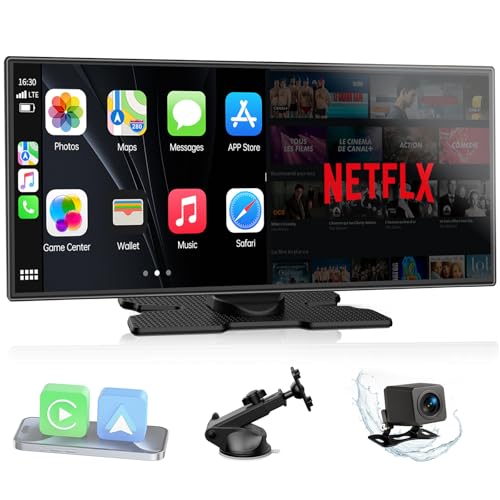
This is a wireless CarPlay and Android Auto display designed to add smart features to your car without a full system upgrade. It solves the hassle of outdated dashboards by letting you use apps, voice navigation, and hands-free calls—all on an 11-inch touchscreen.
Using it means you get seamless music, streaming, and GPS guidance while keeping your focus on the road. Calls and commands are handled by voice, making daily driving less distracting and more intuitive. The split-screen feature allows navigation and entertainment to run at the same time, which is useful for both drivers and passengers.
Why Drivers Choose This Screen
- Wireless CarPlay and Android Auto for modern connectivity
- Dual Bluetooth keeps calls and music clear through car speakers
- Voice-controlled navigation and hands-free calls enhance safety
- Built-in Netflix and YouTube for in-car entertainment
- Instant wake-up with an ultra-responsive touchscreen
- Customizable display with personal wallpapers and boot logos
- Split-screen mode for simultaneous navigation and streaming
Consider Before Buying
- No built-in CarPlay or Android Auto software—requires compatible phone
- Needs a stable hotspot for video streaming
- May not fit all dashboards due to size
Who This Fits Best
This device works best for anyone who spends a lot of time on the road and wants reliable voice control for maps and calls, without replacing their existing car system. It’s ideal if you want to cut down on dashboard clutter and remove the stress of handling your phone while driving.
A quick tip: set up your phone’s hotspot and Bluetooth connections before your first trip for a smoother experience. The system’s instant wake means you don’t lose time when starting your car, so you can get on the road quickly and trust your music and navigation will just work. I especially like the peace of mind from having hands-free control and clear audio for both calls and directions.
| Best for | Why |
|---|---|
| Drivers without built-in smart displays | Adds voice navigation and streaming without replacing the car’s system |
| Commuters who multitask | Split-screen lets you use maps and apps at the same time |
| Families on road trips | Passengers can stream movies while the driver navigates |
| Anyone needing hands-free calls | Voice assistant support keeps focus on driving, not the phone |
Avantree Ck11 Bluetooth Car Speaker
A top pick for Best Voice Assistant for Car, the Avantree CK11 makes hands-free driving simple and safe.

The Avantree CK11 Bluetooth Car Speaker is designed for drivers who want safe, hands-free calls and voice controls. It clips easily to your car visor and connects wirelessly to your phone, supporting Siri Assistant for making calls, sending texts, or getting directions.
Its main goal is to reduce distractions and help you keep your focus on the road.
Using the CK11 feels effortless—just pair, clip, and go. The motion wake function means it’s ready when you are, and the battery can last through long trips without worry. Adjusting the volume is as easy as turning a knob, making it feel like a natural part of your drive.
It’s confidence-boosting to know you can stay connected without fumbling with your phone.
Key Advantages For Drivers
- Supports Siri Assistant for true hands-free control
- Easy visor clip installation—no tools needed
- Clear calls with built-in 3W speaker
- Motion-activated auto on/off saves battery
- Up to 18 hours of talk time per charge
- Simple volume knob for quick adjustments
- Works with any Bluetooth-enabled phone
Consider Before Buying
- Not a full car stereo replacement—call audio only
- Physical On/Off switch must be set correctly for auto wake
- Requires periodic charging
Who This Fits Best
If you spend a lot of time driving and want a safer, hands-free way to manage calls and directions, the Avantree CK11 Bluetooth Car Speaker is a smart option. It removes the stress of handling your phone while driving and streamlines voice commands with Siri.
For best results, keep the device charged and make sure the On/Off switch is set properly for the motion wake feature. You’ll enjoy peace of mind knowing you’re reducing distractions and keeping your focus where it belongs—on the road. Personally, I like how quickly it springs to life when I open my car door.
| Best for | Why |
|---|---|
| Drivers who want voice-activated calls | Siri Assistant support enables easy hands-free commands |
| Car owners without built-in Bluetooth | Adds wireless calling to any vehicle with minimal setup |
| People who forget to turn devices on/off | Motion auto-on feature handles power management automatically |
| Long commuters | 18-hour battery life covers multiple trips without charging |
Garmin Drivesmart 66 Gps With Voice Assist
For drivers seeking the Best Voice Assistant for Car, this device offers a hands-free navigation solution with clear directions and reliable connectivity.

The Garmin DriveSmart 66 GPS with Voice Assist is a 6-inch in-dash navigator designed to make driving easier and safer. Its standout feature is Garmin Voice Assist, allowing you to ask for directions or find points of interest without taking your hands off the wheel.
With up-to-date maps of North America, it helps eliminate the frustration of outdated routes and missed turns.
Using this GPS in the car feels seamless and confidence-boosting. Hands-free calling and smart notifications keep distractions to a minimum. Real-time driver alerts and live traffic updates help you stay aware and in control, making every trip less stressful and more predictable.
Why Drivers Like It
- Voice Assist makes navigation hands-free
- Large, bright display is easy to read
- Driver alerts increase safety on the road
- Live traffic, fuel prices, and parking info via smartphone pairing
- Trip-ready extras like HISTORY database and Tripadvisor ratings
- Bluetooth hands-free calling for added convenience
Consider Before Buying
- Requires compatible smartphone for full smart features
- Physical size may not suit smaller dashboards
- Some features need the Garmin Drive app connection
Who This Fits Best
This GPS is ideal for drivers who want to reduce distractions and enjoy hands-free directions on every trip. It’s especially useful if you often drive in unfamiliar areas or like discovering new places along the way. The combination of voice assist and safety alerts removes much of the stress from navigating busy roads.
If you pair it with a compatible smartphone and use the Garmin Drive app, you’ll unlock the best features like live traffic and smart notifications. For more reliable routes and fewer last-minute turns, keep the maps updated and explore the built-in points of interest.
You’ll appreciate the peace of mind that comes from real-time alerts and easy-to-follow instructions.
| Best for | Why |
|---|---|
| Hands-free navigation | Voice Assist lets you ask for directions without distraction |
| Drivers in unfamiliar cities | Up-to-date maps and real-time traffic reduce wrong turns |
| Road trip planners | Built-in history, national parks, and traveler ratings add value |
| Safety-focused commuters | Driver alerts help avoid hazards and speed changes |
Kouenom 12″ Mirror Dash Cam With Voice Control
If you’re searching for the Best Voice Assistant for Car, this mirror dash cam stands out for its seamless CarPlay and Android Auto integration and voice control support.
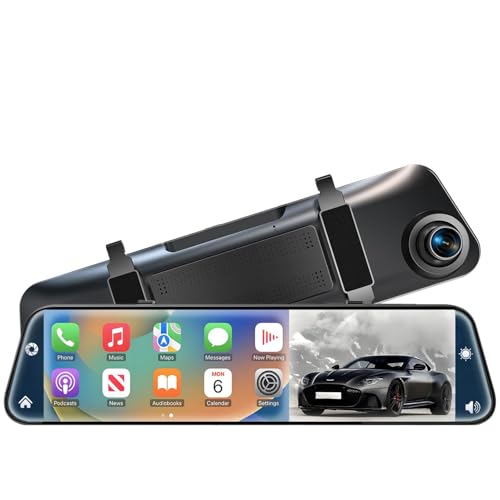
This is a rear view mirror dash cam that replaces your standard mirror, giving you sharp 4K front and 1080p rear video with a wide field of view. Its main benefit is hands-free operation with built-in CarPlay and Android Auto, letting you access navigation, calls, and music safely via voice commands while driving.
Using it feels intuitive thanks to the large 12-inch touch screen, which makes switching between camera and smartphone functions easy. The voice assistant integration means you can keep your attention on the road, while features like reverse assist and loop recording add peace of mind during daily commutes or long trips.
Why It’s Worth Considering
- Lets you use CarPlay and Android Auto with voice commands for safer, hands-free control
- Captures clear footage in front and behind your car for better incident recording
- Extra-wide viewing angles reduce blind spots and improve parking confidence
- Large, sensitive touch screen is easy to read and operate while driving
- Automatic loop recording and G-sensor add reliable event protection
- Comes with a 64GB card, so you’re ready to use it out of the box
Points To Weigh Before Buying
- Cannot be used as a standard rearview mirror—display is always digital
- Setup for Android Auto wireless connection may require extra steps and an additional app
- Larger size may not fit well in very compact vehicles
Where This Shines
This dash cam is best for drivers who want their car’s voice assistant experience upgraded without changing the factory head unit. If you dislike fiddling with your phone for music or directions, this system removes that hassle and helps you focus on safe driving.
It’s especially helpful if you park in tight spots, since the reversing assist and wide angles make it easier to see what’s behind you.
One tip: take a few minutes to follow the Android Auto setup instructions—once done, switching between apps and camera functions becomes smooth and almost effortless. With built-in safety features like the G-sensor and loop recording, you get reliable evidence capture and fewer worries about missing crucial moments. I found the touch controls responsive and the screen visibility clear, even in bright daylight.
| Best for | Why |
|---|---|
| Hands-free navigation and calls | Integrated CarPlay & Android Auto with voice control |
| Drivers needing wide-angle recording | 170° front and 140° rear views reduce blind spots |
| Parking and reversing confidence | Reverse assist and adjustable rear camera image |
| Evidence in case of incidents | Loop recording and G-sensor protect important videos |
Lehwey Wireless Carplay Dashcam Tablet
A solid pick for Best Voice Assistant for Car, this device combines hands-free controls with seamless smartphone integration for safer, smarter driving.
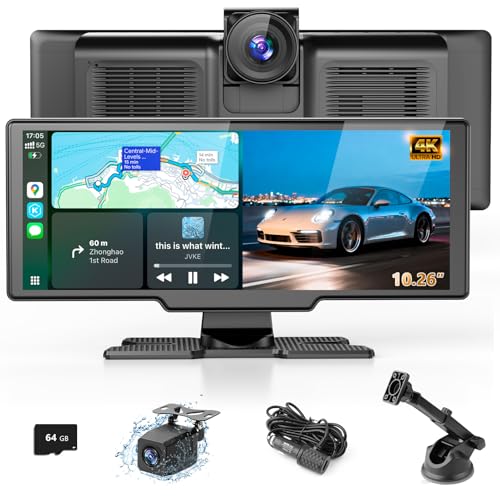
The Lehwey Wireless CarPlay Dashcam Tablet is an all-in-one device for drivers who want to add voice assistant functions, navigation, and camera capabilities to any car. It solves the problem of juggling your phone while driving by letting you control navigation, calls, messages, and music with your voice through CarPlay and Android Auto.
Built-in dashcam and backup camera features add extra safety and convenience.
In real use, this screen makes driving less distracting and more organized. Voice commands let you keep your focus on the road, and the split-screen view helps you monitor cameras and maps at the same time. Automatic reconnection to your phone means you can just get in and go, with no extra setup.
If you want a smarter, more connected drive without a complicated install, this is a practical solution.
Key Advantages For Drivers
- Hands-free voice control for navigation, calls, and music
- Wireless CarPlay and Android Auto for seamless phone integration
- 4K front dashcam and 1080p rear camera for added safety
- Large, clear 10.26-inch IPS touchscreen with split-screen capability
- Multiple audio output options: Bluetooth, FM, AUX, built-in speakers
- Easy smartphone mirroring with AirPlay and Miracast support
- Adjustable screen brightness for different lighting conditions
Consider Before You Buy
- Requires space on your dashboard for mounting
- May not integrate with factory steering wheel controls
- Some cars with advanced infotainment may find limited benefit
Where This Shines
This device is ideal for drivers who want voice assistant features and upgraded safety tech without replacing their entire car stereo. It removes the hassle of connecting your phone every time and cuts down on distractions by letting you use voice commands for most tasks. One tip: take a few minutes to set up camera angles and screen brightness during daylight for best results.
You get a more reliable, less stressful drive—especially in older cars lacking modern features. The automatic phone reconnection and multi-camera setup provide peace of mind for daily commutes or road trips. If you value convenience and safety, this setup makes daily driving feel more modern and less complicated.
| Best for | Why |
|---|---|
| Drivers of older cars without smart features | Adds wireless CarPlay, Android Auto, and voice commands easily |
| Anyone needing better parking safety | Dual cameras help with reversing and recording incidents |
| Frequent hands-free callers and navigators | Voice assistant keeps hands on the wheel and eyes on the road |
| Families on road trips | Screen mirroring and video playback keep passengers entertained |
Garmin Drivesmart 86 Gps Navigator
As a Best Voice Assistant for Car, Garmin DriveSmart 86 stands out for hands-free navigation and clear driver guidance.

The Garmin DriveSmart 86 GPS Navigator is an in-dash car assistant that makes driving easier with its large 8-inch high-resolution display. It solves the problem of distracted navigation by letting you use voice commands for directions, hands-free calls, and real-time traffic updates.
For drivers who want safer, smarter travel, this device offers reliable guidance without needing to touch the screen.
Using this navigator feels intuitive and consistent. Voice Assist responds quickly, letting you stay focused on the road while getting help with finding places, weather, or parking info. Driver alerts and smart notifications keep you aware of changes, so you can avoid surprises on trips.
It gives confidence by reducing the hassle of manual map checks and making every journey more predictable.
What Sets It Apart For Drivers
- Large, easy-to-read 8-inch display improves visibility
- Voice Assist enables hands-free navigation and calling
- Live traffic, fuel prices, and weather updates with smartphone pairing
- Driver alerts for speed changes, sharp curves, and school zones
- Tripadvisor ratings and national parks directory for road trips
- Smart notifications keep you informed without distraction
- Dual-orientation screen adapts to your car setup
Things To Consider Before Buying
- Requires compatible smartphone for full connectivity features
- Best suited for North America map coverage
- Device size may not fit smaller dashboards comfortably
The Simple Use Case
If you drive often and want a reliable, voice-powered assistant, the Garmin DriveSmart 86 is ideal. It removes guesswork and distractions by handling navigation, calls, and alerts without manual input. This is especially useful for long trips or city driving where keeping your hands on the wheel matters.
To get the best results, pair it with your smartphone and use Garmin Drive app for full live features like traffic and parking. You’ll gain peace of mind knowing you’re always updated and can focus on driving safely. Personally, I find the dual-orientation display makes it easy to adapt to any car setup.
| Best for | Why |
|---|---|
| Frequent commuters | Voice Assist and live traffic reduce navigation stress |
| Road trip planners | Tripadvisor ratings and national parks directory add value |
| Safety-focused drivers | Driver alerts improve awareness of hazards |
| Hands-free multitaskers | Bluetooth calling and smart notifications keep you connected |
Tianshili Bluetooth Visor Clip Speaker
A practical pick for drivers seeking the Best Voice Assistant for Car with hands-free calls and Google Assistant support.
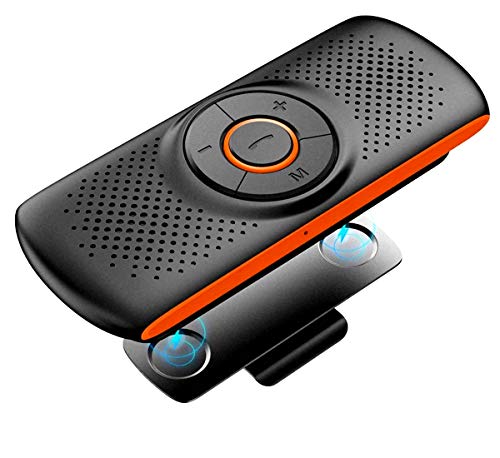
The TIANSHILI Bluetooth Visor Clip Speaker is a compact hands-free speakerphone designed for in-car use. It clips easily onto your sun visor and uses a built-in microphone with DSP technology for echo cancellation and noise reduction, making calls clearer and driving safer.
Its support for Google Assistant voice commands means you can access voice controls without touching your phone.
Day-to-day, the lightweight design makes it simple to move between cars or even take indoors. It connects quickly to most Bluetooth devices and can play music from a TF card, so you always have your tunes ready. Using this speaker in the car feels natural, and you can count on reduced distractions and more consistent audio for calls and navigation.
Where This Speaker Excels
- Truly hands-free calling with noise reduction
- Fast, stable Bluetooth 4.2 connection
- Works with Google Assistant and Siri
- Supports MP3 playback from TF card
- Lightweight and highly portable
- Magnetic clip for easy visor mounting
Consider Before Buying
- Small size may not deliver booming sound in large vehicles
- No built-in display for track or call info
- Orange color may not match all car interiors
Who This Fits Best
If you want a simple, portable voice assistant solution for your car, this speaker is best for you. It takes away the hassle of fumbling with your phone while driving and gives you easy access to voice commands and calls.
To get the most out of it, pair your phone and set your preferred voice assistant before you hit the road.
This speaker keeps things safe and reliable by minimizing distractions and providing clear audio. For busy commutes or frequent road trips, it lets you focus on the drive, not your device. I appreciate how it blends into daily use and keeps communication stress-free.
| Best for | Why |
|---|---|
| Hands-free phone calls in the car | Clear microphone with noise reduction for safer calling |
| Using Google Assistant while driving | Supports voice commands for navigation and messages |
| Listening to music from TF card | Direct MP3 playback without needing a phone |
| Switching between cars | Lightweight, portable, and easy to re-mount |
Volam Wireless Carplay Dashcam Screen
Best Voice Assistant for Car drivers who want hands-free navigation, calls, and music with wireless CarPlay or Android Auto in older vehicles.

This device is a wireless CarPlay and Android Auto screen with built-in dash cam and backup camera. It brings hands-free voice control, navigation, and safer driving to any car—even older models. The voice assistant lets you make calls or get directions without touching your phone.
Using it daily feels smooth and intuitive. Voice commands reduce distraction, and the adjustable display helps you see maps at a glance. Reliable connection and flexible audio options make it easy to enjoy music or directions through your car’s speakers.
You spend less time fiddling with settings and more time focused on the road.
Why Drivers Like This Setup
- Wireless Apple CarPlay and Android Auto for hands-free control
- Voice assistant support (Siri/Google Assistant) for safe commands
- Front and rear dash cams add safety and record trips
- Easy installation—no need to modify the car
- Flexible audio: Bluetooth, AUX, FM transmitter, or built-in speaker
- Reverse camera helps with parking and backing up
- Adjustable display for better viewing angles
Consider Before Buying
- May cover part of your dashboard if space is tight
- Built-in speaker is a backup, not as strong as car stereo sound
- Requires phone for navigation and voice assistant features
When I’d Pick This
If you drive an older car and want smart features like voice navigation, calls, and music streaming, this is a practical upgrade. It removes the hassle of tangled cords and the guesswork of juggling your phone while driving. The included dash cams add a layer of safety and peace of mind.
For best results, position the adjustable stand where the display doesn’t block your view, and connect to your car stereo via Bluetooth for the clearest audio. Reliable hands-free voice control means less stress and fewer surprises on the road. It’s a setup I’d recommend for anyone who values focus and convenience in daily driving.
| Best for | Why |
|---|---|
| Adding CarPlay to older cars | No need to change your factory stereo system |
| Drivers who want voice navigation | Supports Siri and Google Assistant for safe, hands-free use |
| Commuters seeking dash cam safety | Front and rear cameras record trips and help with reversing |
| Anyone needing flexible audio options | Connects via Bluetooth, AUX, FM, or built-in speaker |
Understanding Key Differences
- Functionality: Some devices focus on navigation, others on hands-free calling, and several combine entertainment with dashcam features. Consider which function you need most.
- Integration: Wireless CarPlay and Android Auto are not universal. Some products require your phone’s app to work fully. Check compatibility with your vehicle and smartphone.
- Audio Output: Options include built-in speakers, Bluetooth, AUX, and FM. Think about your car’s audio setup and whether you want sound through your stereo or just the device.
- Screen Size & Placement: Larger screens offer better visibility but may be harder to mount. Visor clip speakers are compact, while dashcams and entertainment screens require more space.
Common Mistakes When Choosing
- Assuming all devices work with any car. Check for compatibility, especially with older vehicles.
- Overlooking mounting requirements. Not all screens fit all dashboards or mirrors.
- Ignoring audio options. Some users are disappointed when the device cannot connect to their factory stereo.
- Confusing dashcam and backup camera features with standard entertainment screens.
Who Should Avoid These Products
- If your car already has built-in navigation, hands-free calling, or CarPlay/Android Auto, extra devices may add clutter.
- Drivers who dislike visible screens or devices may prefer integrated solutions.
- If you rarely use smartphone features while driving, visor clip speakers might be more practical than full entertainment screens.
Setup And Usage Tips
- Mount screens and visor speakers securely to avoid distractions or falls.
- Pair devices with your phone and test audio output before driving.
- Update map or app software regularly for navigation devices.
- Keep dashcam memory cards formatted and check loop recording settings.
- Charge battery-powered devices fully before longer trips.
Faqs
Will These Devices Work In Any Car?
Most are designed for wide compatibility, but check mount size and power options. Older cars may need adapters.
Is Wireless Carplay Or Android Auto Built-in?
Some screens require your phone to provide CarPlay or Android Auto. Read product details to confirm.
Can I Play Music Through My Car Stereo?
Yes, but connection options vary. Bluetooth, AUX, and FM are common. Verify your car supports the method you prefer.
Do Dashcam Models Include A Memory Card?
Some do, but others require you to purchase separately. Check included accessories before buying.
How Do I Update Maps Or Software?
Most navigation devices update via WiFi or a companion app. Follow manufacturer instructions for best results.
Are Visor Clip Speakers Loud Enough?
They work well for hands-free calls but may not replace your car stereo for music. Consider your needs.
Final Thoughts
Choosing between navigation, hands-free, and entertainment devices depends on your driving habits and vehicle setup. Focus on compatibility and practicality. Avoid extra features you won’t use. With careful selection, you can make your drive safer and more enjoyable.