
Setting up a voice assistant on a Raspberry Pi sounds simple, but quickly gets complicated. Maybe you’ve tried talking to your Pi from across the room and found it didn’t hear you, or you got stuck trying to pick the right microphone or sound card.
There are many options, and it’s easy to feel lost between terms like “far-field,” “noise cancellation,” and “plug-and-play. ”
Choosing the best voice assistant setup for Raspberry Pi means balancing clarity, compatibility, and how you plan to use it. Some people want hands-free room control, others need reliable note taking, and some just want to experiment. It’s not always obvious which features will really matter for your project—or which products will actually work together without extra hassle.
This guide will help you cut through the confusion, so you can pick a voice assistant solution that fits what you actually need.
What Matters Most For Raspberry Pi Voice Assistants?
- Microphone quality: If your Pi can’t hear you well, nothing else matters. Far-field mics help in bigger rooms; basic mics work for up-close use.
- Noise handling: Good noise cancellation can make a big difference, especially if you’re using your Pi in a busy or echo-filled room.
- Ease of setup: Some options are truly plug-and-play, while others need extra wiring or drivers. Know your comfort level.
- How you’ll use it: Controlling smart devices, recording meetings, or building something custom? Different uses may push you toward different hardware.
- Budget: Prices range from simple boards to more premium arrays. More expensive isn’t always better for your project.
Common Mistakes When Choosing
- Assuming all microphones or sound cards work the same way on the Pi
- Overlooking compatibility with your specific Pi model or OS
- Ignoring how much room noise will affect voice commands
- Buying extra features you don’t need—like advanced beamforming for a desktop setup
Below, you’ll find a range of products that cover most needs: from simple add-ons for DIY projects, to more advanced gear for smart home setups or transcription. Each was picked for compatibility with Raspberry Pi and for solving real user problems. Think about how you want to use your voice assistant—these options cover different strengths, so you can match the right tool to your plans.
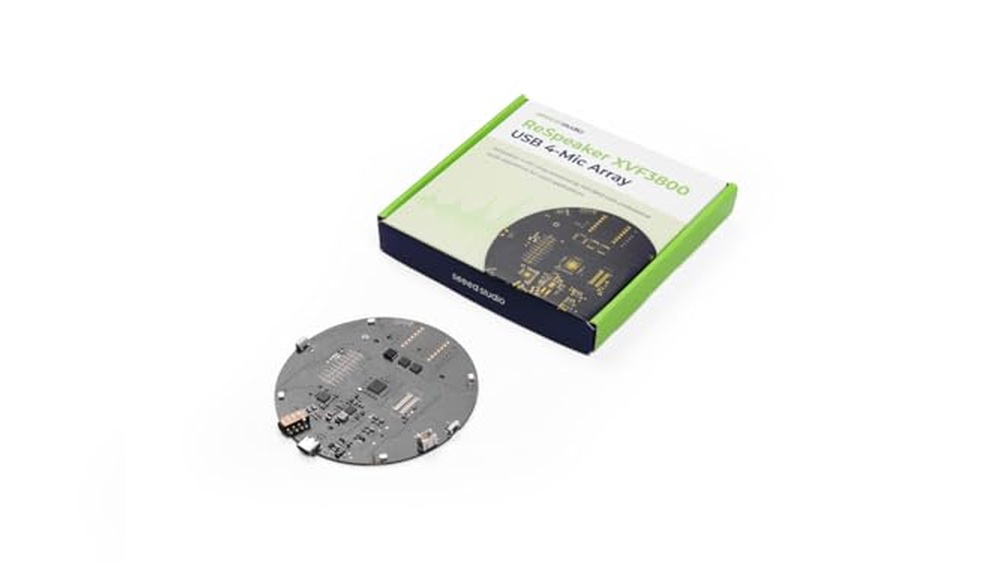
Respeaker Xvf3800 Usb Mic Array
Best Voice Assistant for Raspberry Pi for anyone needing clear, reliable voice capture in noisy or echo-prone spaces.
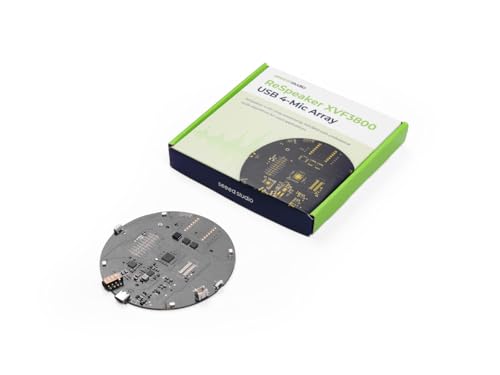
The reSpeaker XVF3800 USB Mic Array is a four-microphone unit designed to bring advanced voice recognition to Raspberry Pi and similar setups. It solves the issue of poor audio pickup in noisy environments by using noise cancellation, beamforming, and echo reduction.
With 360° far-field coverage, it ensures your voice is recognized from anywhere in the room.
Using this microphone array feels seamless and hassle-free. Plug-and-play USB support means no drivers or setup headaches, and the device works across Windows, macOS, Linux, and more. Whether for smart home projects or robotics, users can confidently expect consistent, clear voice input without constant tweaking or frustration.
Why This Microphone Array Stands Out
- Captures clear voice even in noisy or echo-filled rooms
- 360° far-field pickup up to 5 meters—great for large spaces
- Plug-and-play on Raspberry Pi, Jetson, Windows, macOS, Linux
- Advanced audio processing: Echo cancellation, gain control, de-reverberation
- Dual USB and I2S modes for flexible integration
- Ideal for voice assistant, conference, and smart home projects
Consider Before Buying
- Requires USB or I2S port; not suitable for analog-only setups
- Does not include built-in speaker; microphone array only
- Best results when used indoors—outdoor performance may vary
Who This Fits Best
This mic array is a strong fit for makers and developers building voice-enabled Raspberry Pi projects, especially in rooms where background noise or echoes are a problem. It takes away the hassle of unreliable voice capture, letting you focus on your project without second-guessing audio input.
If you want consistent voice detection for smart assistants, meetings, or robotics, this unit offers peace of mind through reliable performance and easy setup. For best results, position the array centrally in your space to maximize pickup range and clarity.
I found the plug-and-play setup genuinely saves time and stress.
| Best for | Why |
|---|---|
| Raspberry Pi voice assistant setups | Easy USB integration and advanced noise cancellation |
| Meeting room audio capture | 360° far-field pickup ensures all voices are heard |
| Smart home and IoT projects | Flexible modes for embedded systems and clear voice commands |
| Robotics with voice control | Accurate voice detection and speaker localization |
Respeaker Xvf3800 Usb Mic Array
A top choice for Best Voice Assistant for Raspberry Pi users who want clear voice capture and easy integration in noisy rooms.

The reSpeaker XVF3800 USB Mic Array is a 4-microphone device designed to make voice recognition work reliably with your Raspberry Pi or other AI projects. It cuts through background noise and echo, so your voice commands are picked up accurately, even in busy or reverberant rooms.
If you need to build a smart speaker or voice-controlled robot, this is a straightforward way to add far-field listening.
Using it feels simple: just connect it over USB and start capturing voices from anywhere in the room. Its enclosed case makes handling and setup easier, with less worry about damaging components. You can trust it to help your assistant respond consistently, without fiddling with settings every time the environment changes.
Why It Stands Out For Voice Projects
- Captures clear voice commands in noisy spaces
- 360° far-field pickup for whole-room coverage
- Reduces background noise, echo, and reverberation
- Plug-and-play USB connection
- Detects direction of arrival for smarter responses
- Protective case simplifies installation and transport
What To Know Before Buying
- Best suited for AI and development projects—not general music recording
- Needs a compatible device with USB input (e.g., Raspberry Pi or laptop)
- No built-in speaker—microphone input only
What I’d Tell A Friend
If you’re building a voice assistant, smart device, or robot with Raspberry Pi, this mic array is for you. It removes the hassle of unreliable voice detection and constant tweaking, especially when background noise is a problem. My tip: place it centrally in the room to get the most reliable pickup from all angles.
You’ll gain peace of mind knowing your device can “hear” you no matter where you are in the room. For anyone prototyping or integrating voice features, it’s a solid option that helps you focus on your project—not on troubleshooting audio issues.
| Best for | Why |
|---|---|
| Voice assistants on Raspberry Pi | Ensures accurate voice input in noisy environments |
| AI and robotics projects needing far-field mics | 360° pickup and direction detection for smart responses |
| Prototype and demo setups | Protective case makes setup and handling easier |
| Conference or meeting room voice input | Filters out room noise for clear speech capture |
Facmogu Portable Voice Changer
Best Voice Assistant for Raspberry Pi if you want fun, flexible voice effects and easy audio upgrades for creative projects or gaming.

The Facmogu Portable Voice Changer is a compact device that transforms your voice using several sound modes and offers advanced noise reduction. It’s ideal for bringing creative audio effects to Raspberry Pi projects, podcasts, or online games, and helps solve the challenge of boring or unclear sound.
Using it feels straightforward—just plug it in via USB or Type-C, pick your voice effect, and enjoy clear, enhanced audio without fuss. The controls are simple, so you can focus on your project or play rather than setup. It’s reassuring to know it works reliably across multiple devices, saving both time and troubleshooting.
Key Advantages For Raspberry Pi Creators
- Multiple voice modes for creative projects and streaming
- Advanced noise-canceling ensures clear audio
- Virtual 7.1 surround sound delivers immersive experience
- Plug-and-play compatibility with Raspberry Pi, Windows, MacOS, phones, and more
- Dual-headphone outputs for collaborative use
- Adjustable reverb and quick mute for precise control
Things To Consider Before Buying
- Requires Type-C support on mobile devices (or an extra adapter)
- No built-in battery; must be plugged in to work
- Focuses on fun and utility rather than professional studio needs
What I’d Tell A Friend
This device is best for makers, gamers, or streamers who want to add personality and clarity to their Raspberry Pi audio setup without getting bogged down in complicated configurations. It takes away the hassle of bad sound cards and the guesswork of software-based voice changers—just plug it in, and you’re ready.
For best results, check your phone or computer ports before connecting, and experiment with the seven voice modes to find the right effect for each project. You can count on it for reliable, clear audio and playful sound options—one less thing to worry about when you’re focused on your content or collaboration.
I find the quick mute and easy reverb controls especially handy for live settings.
| Best for | Why |
|---|---|
| Raspberry Pi DIY audio projects | Simple plug-and-play setup and creative voice effects |
| Online gaming and streaming | Multiple sound modes and surround sound add fun and clarity |
| Collaborative work or podcasts | Dual-headphone outputs and noise reduction support team use |
| Replacing faulty or basic sound cards | Instant audio upgrade without technical hassle |
Echonote X1 Smart Voice Recorder
The EchoNote X1 stands out as the Best Voice Assistant for Raspberry Pi users who need effortless, multi-language transcription and note-taking from any conversation.

The EchoNote X1 Smart Voice Recorder is built for people who need clear, accurate speech-to-text conversion in over 130 languages. It helps streamline meetings, lectures, and interviews by automatically transcribing and summarizing conversations, so you never miss key details.
Using it feels simple and reliable—just record, and your notes are ready in seconds. Its cloud sync and privacy features mean you can organize and access recordings without stress, while the portable design fits easily into any workflow. The device’s display and long battery life mean it’s always ready when you need it.
What Makes This Recorder Stand Out
- Real-time transcription in 135+ languages
- Automatic meeting notes and concise summaries
- Cloud sync with privacy-focused auto-delete
- 100-hour battery for extended use
- Effective noise-cancellation for clear voice capture
- Easy remote control via mobile app
- Lightweight, durable aluminum design
Consider Before You Buy
- No built-in memory card expansion
- Requires app/cloud for full feature access
- May be more than needed for simple recording tasks
What I’d Tell A Friend
This recorder is best for students, professionals, and teams who regularly capture discussions and want instant, organized transcripts. It takes away the hassle of manual note-taking and gives you searchable, shareable records in seconds. If you often switch between languages or need to keep your hands free, this tool saves a lot of time and stress.
To get the best results, try the dual recording modes for large meetings or phone calls—both help you capture the details you need with clarity. You can feel confident knowing your files sync securely and stay private. Personally, I appreciate how lightweight it is, so I never hesitate to bring it along.
| Best for | Why |
|---|---|
| Multi-language meetings | Handles over 130 languages with accurate, labeled transcripts |
| Lecture and class notes | Creates summaries and mind maps automatically |
| Long interviews or research sessions | 100-hour battery means less worrying about charging |
| Remote recording management | App control lets you organize and access files from anywhere |
Keyestudio Respeaker 2-mic Pi Hat
Best Voice Assistant for Raspberry Pi users who want a reliable, easy-to-integrate microphone and audio solution for AI and voice projects.

This add-on board is designed for anyone looking to build voice-controlled projects on the Raspberry Pi. With two built-in microphones, it allows your Pi to pick up voice commands for AI and assistant applications. Its compatibility with multiple Raspberry Pi models and low power usage make it a practical choice for DIY smart speaker builds.
In daily use, the HAT feels simple to set up and reliably captures voice input from across a small room. The integrated LEDs and user button add visual feedback and quick control, making prototyping more engaging. Using this board removes much of the setup guesswork, allowing you to focus on building your voice assistant rather than troubleshooting audio hardware.
Key Advantages For Voice Projects
- Dual microphones enable clear sound capture for voice control
- Easy hardware integration with popular Raspberry Pi models
- Low power stereo Codec ensures efficient operation
- Audio output options via 3.5mm jack or speaker connector
- Visual feedback with three onboard RGB LEDs
- User button and Grove connectors for easy expansion
Things To Consider Before Buying
- No onboard speaker included—requires external audio output
- Limited to Raspberry Pi 4/3/2 series compatibility
- May require basic setup for full assistant integration
Who This Fits Best
If you want to turn your Raspberry Pi into a hands-free voice assistant, this HAT is a straightforward way to get started. It takes away the hassle of finding compatible microphones and ensures your setup is ready for Amazon Alexa, Google Assistant, and similar services.
The included Grove connectors also make it flexible for expanding into more complex smart home projects.
For best results, connect a quality external speaker for clearer audio output. You can expect stable performance and fewer surprises when deploying your assistant in real-world settings. I like that it’s easy to add to an existing project without extra fuss—ideal for makers who want a reliable, no-nonsense audio input solution.
| Best for | Why |
|---|---|
| DIY voice assistant projects | Dual microphones and easy Pi compatibility |
| Smart home prototypes | Expandable with Grove connectors and user button |
| Audio-based AI applications | Reliable audio input and output options |
| Raspberry Pi learning kits | Simple setup for classroom or personal use |
Iunius 13.3″ Magic Mirror Voice Assistant
This device stands out as the Best Voice Assistant for Raspberry Pi by combining a smart mirror interface with Raspberry Pi 3A+ for seamless mini-computer functionality.

The Iunius 13. 3″ Magic Mirror integrates a voice assistant with a touchscreen display powered by a Raspberry Pi 3A+. It transforms instantly into a mini-computer, solving the need for a compact, interactive smart device that fits both personal and tech-savvy environments.
Its built-in dual MEMS microphones and Hi-Fi speakers support voice control and audio interaction.
Using this device feels intuitive and versatile, especially with up to 10-point touch control depending on your operating system. The mirror display combined with the embedded voice assistant offers a consistent and engaging experience, making daily tasks and information retrieval smoother and more accessible.
Key Advantages For Raspberry Pi Users
- Integrated Raspberry Pi 3A+ controller inside a sleek 13.3-inch magic mirror design
- Instantly transforms into a mini-computer with touch and voice control
- Multi-touch support enhances interaction based on OS capabilities
- Embedded dual MEMS microphones ensure clear voice recognition
- Hi-Fi dual track speakers deliver quality sound for voice responses
- Combines visual display with voice assistant in a single compact device
Considerations Before Buying
- Touch responsiveness depends on the operating system used
- Limited to Raspberry Pi 3A+ hardware, may not support newer models
- No detailed information on software compatibility or pre-installed voice assistant
Who This Device Works For
This product is ideal for Raspberry Pi enthusiasts looking to build a stylish smart mirror that doubles as a voice-activated mini-computer. It removes the hassle of assembling separate components by combining display, voice input, and processing hardware in one unit.
For users aiming to save time on setup and enjoy a consistent interactive experience, the integrated speakers and microphones enhance voice control reliability. To get the best results, ensure your operating system supports multi-touch features and voice assistant software.
Its design offers peace of mind with a compact, all-in-one form factor that minimizes clutter and technical surprises. It’s a practical choice for hobbyists and smart home projects requiring a visually appealing interface with voice assistant capabilities.
| Best for | Why |
|---|---|
| Raspberry Pi hobbyists | Combines display, voice assistant, and Pi controller in one device |
| Smart mirror projects | Large 13.3″ touch display with embedded voice control hardware |
| Compact mini-computer users | Instant transformation from mirror to functional computer |
| Voice-controlled interface developers | Built-in dual MEMS microphones and Hi-Fi speakers for clear audio |
Respeaker 2-mic Pi Hat For Raspberry Pi
Best Voice Assistant for Raspberry Pi users who want reliable far-field voice capture and easy hardware integration.
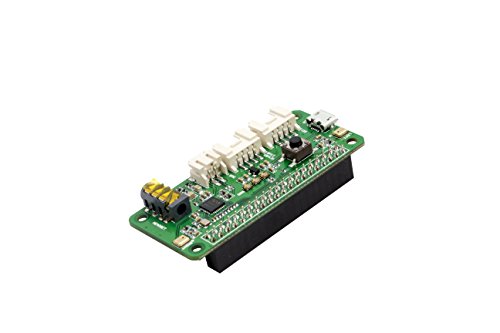
The ReSpeaker 2-Mic Pi HAT is a compact expansion board designed to bring strong voice recognition capabilities to your Raspberry Pi. It solves the challenge of adding high-quality dual-microphone input and far-field voice capture, which is essential for voice assistant projects.
In day-to-day use, this board lets you interact with your Pi from across the room, thanks to its far-field support. Setting it up is straightforward, and the programmable button and LEDs make feedback and control simple. Confidence comes from its reliable audio performance and seamless hardware compatibility, so you spend less time troubleshooting.
Why This Board Stands Out
- Works with nearly all Raspberry Pi models
- Dual microphones for clear, far-field voice capture (up to 3 meters)
- Onboard audio codec for consistent audio quality
- Flexible audio output options (3.5mm jack, speaker out)
- Programmable button and LEDs for custom controls
- Grove interfaces for easy hardware expansion
What To Consider Before Buying
- Not compatible with non-Raspberry Pi boards
- No built-in speaker; must add your own for audio output
- Physical size may limit stacking with larger HATs
When I’d Pick This
This HAT is ideal if you want to build a reliable voice assistant for your Raspberry Pi without hassle. It removes the guesswork of microphone compatibility and lets you focus on your software. The programmable button and LEDs simplify testing and feedback during setup.
For best results, place your Pi HAT in an open area to maximize far-field voice pickup. You can count on stable performance and consistent audio capture, reducing surprises in your project. Whenever I need clear voice input on a Pi, this is my go-to board.
| Best for | Why |
|---|---|
| Raspberry Pi voice assistant builds | Dual microphones and far-field support enable accurate voice commands |
| Hands-free smart home controls | Reliable voice pickup from up to 3 meters away |
| Projects needing GPIO/I2C expansion | Grove interfaces allow easy integration with other sensors or modules |
| Classroom or prototyping environments | Simple setup and clear visual feedback with programmable LEDs |
Respeaker 2-mic Pi Hat For Raspberry Pi
For those seeking the Best Voice Assistant for Raspberry Pi, this HAT offers streamlined audio input and compatibility with popular Pi models.
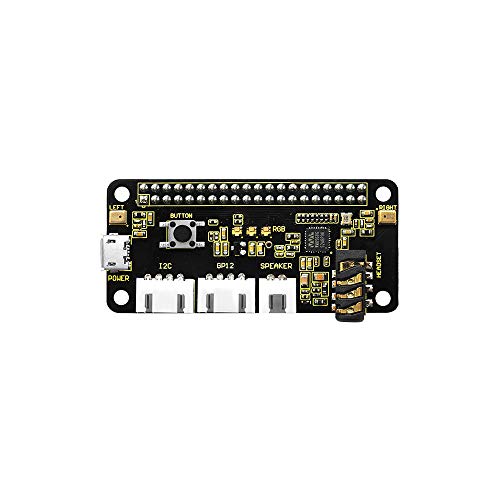
The ReSpeaker 2-Mic Pi HAT by KEYESTUDIO is an add-on board for Raspberry Pi that makes voice assistant projects easier. It connects directly to your Pi, giving you reliable microphone input for clear voice recognition. Designed for hobbyists and makers, it solves the hassle of finding a compatible audio interface.
Using this HAT feels straightforward and dependable. It fits well on the Pi, and you don’t have to worry about complex wiring or setup. The lightweight build means your project stays portable, and the small size doesn’t take up much space.
The black color blends in cleanly with most Pi setups.
Why It Works Well For Voice Assistant Builds
- Direct compatibility with Raspberry Pi 4, 3, and 2 models
- Compact design fits small enclosures
- Lightweight—keeps your Pi project portable
- Simplifies voice input for assistant applications
- Easy installation with Pi GPIO header
- Reliable audio performance for clear commands
Consider Before Buying
- No built-in speaker—external audio output needed
- Limited to 2 microphones—may not suit multi-user environments
- Not for advanced audio processing tasks
Where This Shines
This HAT is ideal for anyone building a voice assistant on Raspberry Pi, especially if you value quick setup and consistent input quality. It removes the hassle of finding compatible microphones and reduces guesswork about audio reliability.
If you want to avoid surprise compatibility issues, this board is a safe bet. For best results, make sure to use it with a supported Pi model and secure it firmly to prevent loose connections. You’ll appreciate the peace of mind knowing your assistant will respond reliably every time.
Personally, I like how it keeps the build clean and uncluttered.
| Best for | Why |
|---|---|
| Voice assistant projects | Simplifies microphone input and setup |
| Compact Raspberry Pi builds | Small size fits tight spaces |
| Portable Pi devices | Low weight keeps the device easy to move |
| DIY makers | Works smoothly with Pi GPIO header, no soldering needed |
Wonrabai Usb Sound Card & Speaker For Pi
For those seeking the Best Voice Assistant for Raspberry Pi, this USB sound card simplifies clear audio input and output with plug-and-play ease.

This compact USB sound card from Wonrabai is designed for Raspberry Pi and Jetson Nano users who need straightforward audio recording and playback. It comes with an onboard microphone and 8Ω 5W speaker, making it a practical solution for voice assistant projects or general audio needs.
The driver-free, plug-and-play setup removes setup hassles and lets you get started quickly.
Using this device feels effortless: plug it in, and it works across multiple systems, including Linux and Windows. Its standard USB 2.0 port and portable size mean you can move it between projects or devices without worry. The built-in microphone and speaker header make voice input and output reliable, helping you focus on your project rather than troubleshooting hardware.
Reliable Features For Voice Assistant Projects
- Plug-and-play—no driver installation required
- Onboard microphone for clear voice input
- Integrated 8Ω 5W speaker for instant playback
- Multiple sampling rates for flexible audio quality
- Compatible with Raspberry Pi, Jetson Nano, Linux, Windows, and Android
- Compact and portable for easy project integration
- Online tutorial and development resources included
Points To Consider Before Buying
- Speaker power may be limited for large rooms
- No advanced audio processing features
- Physical size may not fit ultra-compact Pi setups
- Not intended for high-end audio production
Who This Fits Best
This USB sound card is ideal for makers and hobbyists setting up a Best Voice Assistant for Raspberry Pi or Jetson Nano. It streamlines audio setup, removing the stress of driver hunting and compatibility issues, especially for those who value plug-and-play convenience.
If you’re building a smart assistant, you can trust it to handle voice commands and responses reliably.
A quick tip: use the included online tutorial to get started faster and ensure you’re tapping into all the features. With its broad compatibility, you avoid surprises when switching between operating systems or boards. Personally, I appreciate how it keeps the focus on coding and experimenting, not hardware troubleshooting.
| Best for | Why |
|---|---|
| Voice assistant projects on Raspberry Pi | Driver-free setup and reliable audio input/output |
| Quick prototyping on Jetson Nano | Plug-and-play, compatible with multiple systems |
| Portable audio recording/playback modules | Compact design and built-in microphone |
| Learning and experimenters | Online resources simplify development and troubleshooting |
Wwzmdib Max4466 Microphone Sensor
This sound sensor is a reliable choice for those seeking the Best Voice Assistant for Raspberry Pi with clear sound detection and amplification.

The WWZMDiB MAX4466 Microphone Sensor is designed to capture and amplify sound signals, making it suitable for voice recognition projects on Raspberry Pi. It preprocesses weak sound inputs effectively, which helps voice assistant algorithms perform better. Its low supply voltage and current make it efficient for long-term use.
Using this sensor means you get consistent sound quality for your Raspberry Pi voice assistant setup, improving sensitivity and clarity. It feels dependable and straightforward to integrate, saving time on calibration and troubleshooting.
Key Advantages For Voice Projects
- Amplifies weak sound signals for clearer voice detection
- Low power consumption suited for embedded systems
- Compatible with Raspberry Pi and other boards like Arduino and ESP32
- Wide gain bandwidth for accurate sound feature extraction
- Enhances audio system sensitivity and quality
Considerations Before Buying
- Does not include a built-in voice assistant software or processing unit
- Requires additional hardware and programming to function as a voice assistant
- Limited to sound sensing and amplification, not full voice command processing
When This Works Well
This sensor fits best for Raspberry Pi users who want a reliable microphone input module to build or improve a custom voice assistant. It removes the hassle of weak signal detection, making voice recognition more accurate and less frustrating.
A quick tip is to pair it with noise filtering software to maximize clarity. Its stable performance offers peace of mind during long sessions, reducing unexpected audio dropouts. For DIY enthusiasts, it’s a practical component to add precision without complexity.
| Best for | Why |
|---|---|
| DIY Raspberry Pi voice assistant builders | Improves sound input quality and sensitivity for voice commands |
| Projects needing low-power sound detection | Operates efficiently with low supply voltage and current |
| Users integrating multiple microcontroller platforms | Compatible with Arduino, ESP32, and Raspberry Pi |
| Audio systems requiring enhanced microphone sensitivity | Amplifies and preprocesses weak sound signals effectively |
Understanding Voice And Audio Devices For Raspberry Pi And Ai Projects
Choosing voice and audio accessories for Raspberry Pi, Jetson, and similar platforms means balancing compatibility, audio clarity, and integration needs. Buyers often face confusion about microphone arrays, sound cards, and expansion boards. Below are practical insights to help you decide.
Buying Guide: Key Considerations
Microphone Array Vs. Simple Mic Boards
Multi-microphone arrays offer improved noise cancellation, direction detection, and far-field pickup. Simple boards are easier to integrate and often cost less, but may struggle in noisy environments or larger rooms.
Audio Processing Features
Built-in echo cancellation, beamforming, and automatic gain control improve speech clarity. If your project involves voice assistants or conferencing, these features matter. For basic sound detection, simpler sensors may suffice.
Integration And Compatibility
Check USB, I2S, or HAT interface support. Plug-and-play USB devices are easier for beginners, while HAT shields and sensors require more setup but allow deeper hardware integration. Confirm compatibility with your board and operating system.
Deployment And Durability
Devices with protective cases are easier to handle and deploy, especially in prototyping or public setups. Bare boards may be suitable for advanced users or controlled environments.
Common Mistakes To Avoid
- Overlooking system compatibility—always check if your board and OS match the device specs.
- Ignoring background noise—basic microphones may not perform well in busy rooms.
- Assuming all devices support both recording and playback—some are input-only.
- Skipping setup instructions—misconfigured devices often lead to frustration.
Who Should Avoid These Products
- If you need professional studio audio, these devices may not deliver high-end quality.
- If you are looking for out-of-the-box smart home solutions, expect some manual setup.
- Users uninterested in basic DIY or programming may find integration steps challenging.
Setup Tips For Reliable Performance
- Update board firmware and drivers before connecting new devices.
- Use shielded USB cables to reduce interference.
- Place microphone arrays away from direct noise sources for best pickup.
- Read deployment guides for HAT shields—correct orientation and connection is key.
- Test audio settings at low volume first to avoid hardware damage.
Faqs
Do I Need Special Software For Usb Microphone Arrays?
Most USB arrays are plug-and-play, but advanced features may require vendor utilities or firmware updates.
Can I Use These Devices With Both Windows And Linux?
Many support both systems, but check for driver requirements and supported sampling rates.
Are Microphone Arrays Suitable For Voice Recognition Projects?
Yes, especially those with noise cancellation and far-field pickup. Simple boards may limit accuracy.
What Is The Difference Between A Hat Shield And A Usb Device?
HAT shields connect directly to the Raspberry Pi GPIO, while USB devices use the USB port. HATs offer deeper hardware integration but may require more setup.
Is Sound Card Output Strong Enough For External Speakers?
Some USB sound cards include speaker headers and support modest output. For larger speakers, use a dedicated amplifier.
How Many Microphones Do I Need For Group Conversations?
Arrays with 4 microphones capture voices from all directions and are better for meetings. Single or dual mics suit one-on-one interactions.
Summary And Final Thoughts
Voice and audio devices for Raspberry Pi and AI projects offer a range of features suited to various needs, from basic sound sensing to advanced conferencing. Consider your environment, integration comfort, and project goals when choosing. With careful selection and setup, these devices can reliably enhance your audio experience.