
Remote controls are everywhere in modern life. From televisions and air conditioners to car keys and smart home systems, these small devices give us power to control machines from a distance. We press a button, and something happens—lights turn on, a channel changes, or a door unlocks.
But how does this magic work? Why do some remotes work from far away while others need to be close? And what makes one remote different from another?
Understanding how the remote control works is not just interesting—it’s also useful. If you know the basics, you can solve common problems, buy the right device, and even use remotes in new ways. In this article, we’ll explore the science behind remote controls, different types, how signals travel, key components, and practical examples.
We’ll also look at the challenges, future trends, and answer some of the most common questions about remote controls.
The Basic Science Of Remote Controls
Remote controls are based on sending signals from one device to another. There are several ways this happens, but the most common methods are infrared (IR) signals, radio frequency (RF) signals, and Bluetooth.
Infrared (ir) Remotes
Most traditional remotes, like those for TVs and DVD players, use infrared light. This light is invisible to our eyes, but special sensors in devices can detect it.
When you press a button, the remote sends a series of infrared pulses. Each pulse represents a code for a specific command, such as “volume up” or “power off.” The device receives the pulses, decodes the command, and responds.
Key facts about IR remotes:
- Line of sight: IR remotes need a direct path to the device. If something blocks the signal, it won’t work.
- Range: Usually works up to 10 meters (33 feet).
- Simple: Cheap to produce and reliable for basic tasks.
Radio Frequency (rf) Remotes
RF remotes are common in garage door openers, car keys, and some smart home devices. These remotes use radio waves, which can travel through walls and objects.
- No line of sight needed: RF signals can go through obstacles.
- Longer range: Some RF remotes work up to 100 meters (328 feet) or more.
- More complex: Requires pairing and sometimes encryption for security.
Bluetooth And Other Wireless Remotes
Bluetooth remotes connect to devices like smartphones, speakers, and game consoles. Bluetooth allows two-way communication, meaning the device can send information back to the remote.
- Paired connection: Devices must be paired for security.
- Medium range: Usually works up to 10 meters, but newer versions can go further.
- Smart features: Remotes can show battery status, device feedback, and more.
Key Components Of A Remote Control
Let’s look inside a remote control to see what makes it work. Most remotes have these main parts:
- Buttons: Each button is linked to a unique command.
- Circuit board: The brain of the remote, where electrical signals are processed.
- Battery: Provides power, usually AA, AAA, or button cell.
- LED or transmitter: Sends the signal (IR LED, RF chip, or Bluetooth module).
- Microcontroller: Manages signal encoding and button presses.
- Plastic case: Protects the electronics and makes it easy to hold.
When you press a button, the circuit board sends a signal to the microcontroller. The microcontroller encodes the command, turns on the transmitter, and sends the signal. The receiver in the target device picks up the signal, decodes it, and acts.
How Remote Control Signals Travel
Signal transmission is the heart of remote control technology. Here’s how signals move from remote to device:
Infrared Signal Transmission
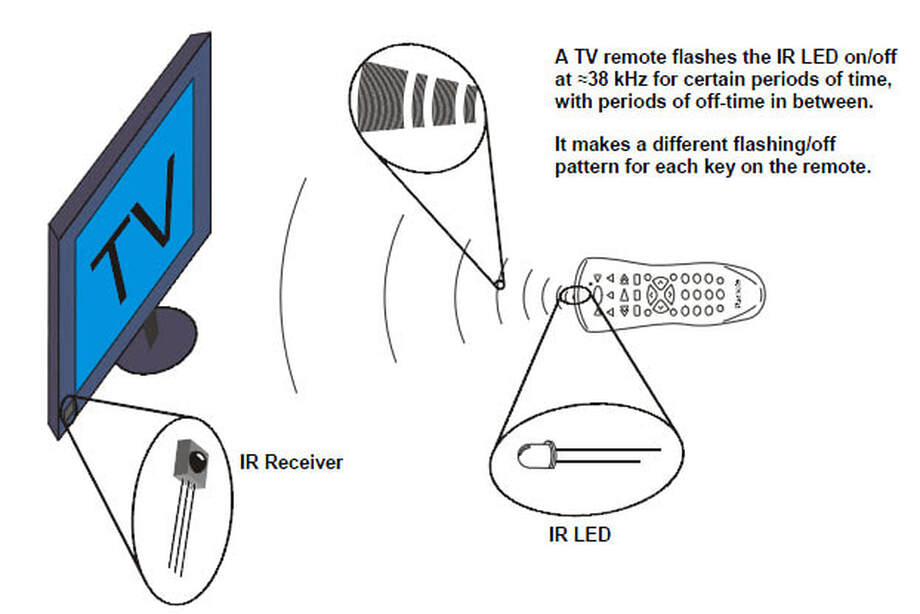
Infrared remotes use light pulses to communicate. The LED on the remote flashes quickly, sending bits of information. The receiver (often a photodiode) on the device catches these pulses and translates them into commands.
Example: Pressing “mute” on your TV remote sends a unique pulse pattern. The TV sees this pattern, recognizes it as “mute,” and turns off sound.
Radio Frequency Signal Transmission
RF remotes use radio waves, which are electromagnetic signals. The transmitter sends a coded signal at a specific frequency. The device’s receiver listens for that frequency and acts when it gets the right code.
Example: Pressing “unlock” on your car key sends a radio signal. The car receives the signal, checks the code, and unlocks the doors.
Bluetooth And Wi-fi Remotes
Bluetooth uses paired connections and digital codes. Wi-Fi remotes, like those in smart homes, use internet protocols to send commands.
Example: Using your phone to turn on smart lights sends a Wi-Fi signal to the light’s controller, which then turns on the bulbs.
Comparing Remote Control Technologies
Different technologies have strengths and weaknesses. Here’s a comparison of IR, RF, and Bluetooth remotes:
| Type | Range | Line of Sight | Security | Common Uses |
|---|---|---|---|---|
| Infrared (IR) | Up to 10 meters | Required | Low | TV, DVD, AC |
| Radio Frequency (RF) | Up to 100 meters | Not required | Medium-High | Car keys, garage doors |
| Bluetooth | Up to 10 meters | Not required | High | Speakers, game controllers |
| Wi-Fi | Up to 50 meters (indoor) | Not required | High | Smart home devices |
Credit: science8sc.weebly.com
Detailed Example: Tv Remote Control
Let’s break down how a TV remote works in detail:
- Button press: You press “power” on the remote.
- Microcontroller action: The microcontroller reads the button and prepares a command.
- Signal encoding: The command is turned into a unique binary code.
- IR LED transmission: The LED flashes the code as infrared pulses.
- TV receiver: The TV’s sensor picks up the pulses.
- Decoding: The TV decodes the binary code, recognizes the command, and turns on.
This process happens in less than a second. Each button has a different code, and the TV knows how to respond to each one.
The Role Of Encoding And Decoding
Remote controls don’t just send random signals. They use encoding to turn a command into a digital pattern. The receiver uses decoding to understand the pattern.
Common Encoding Methods
- Pulse Width Modulation (PWM): Sends different lengths of pulses for different commands.
- Manchester Encoding: Uses changes in signal to represent 0s and 1s.
- RC5/RC6: Special protocols used by Philips and other brands.
These methods help prevent interference and mistakes. If two remotes send signals at the same time, encoding keeps the commands clear.
Universal Remotes: How Do They Work?
Universal remotes are popular because they can control many devices. They do this by storing codes for different brands and models. You program the remote by entering a code or using automatic setup.
How universal remotes work:
- Code library: Contains thousands of device codes.
- Setup process: You select your device and enter the code.
- Signal matching: The remote sends the right code for your device.
Some universal remotes can learn commands from other remotes. You point the old remote at the new one, press a button, and the universal remote copies the signal.
Remote Control Frequency Bands
Remote controls use different frequencies depending on the technology:
- IR: 30–40 kHz (infrared light)
- RF: 315 MHz, 433 MHz, 868 MHz, and others
- Bluetooth: 2.4 GHz
- Wi-Fi: 2.4 GHz or 5 GHz
Choosing the right frequency is important for avoiding interference. For example, garage door remotes use special frequencies to prevent overlap with other devices.
Security In Remote Controls
Security is important, especially for devices like car keys and smart home remotes. Early remotes used simple codes, but today’s devices use encryption and rolling codes.
Rolling code: Each time you use the remote, it sends a new code. The device knows the sequence, so only your remote can unlock it. This stops thieves from copying signals.
Encryption: Bluetooth and Wi-Fi remotes use strong encryption to prevent hacking.
Common Remote Control Problems
Even the best remote controls can have issues. Here are some typical problems and solutions:
- Dead battery: Replace batteries if buttons don’t work.
- Blocked signal: Remove objects between remote and device.
- Dirty buttons: Clean remote with a soft cloth.
- Interference: Avoid using near other remotes or wireless devices.
- Wrong code: Reprogram or reset universal remotes.
Sometimes, the problem is with the device itself. Try using another remote to check if the receiver works.
Real-world Applications Of Remote Controls
Remote controls are used in many fields. Here are some examples:
- Home entertainment: TVs, sound systems, projectors
- Home appliances: Air conditioners, fans, lights
- Vehicles: Car locks, alarms, starters
- Industrial machines: Cranes, robots, conveyor belts
- Medical devices: Adjustable beds, patient lifts
Remote controls make life easier and safer. In factories, workers can control heavy machines from a distance, reducing risk.
Comparing Modern Remote Control Features
Modern remotes have more features than older models. Here’s a comparison of classic vs. smart remotes:
| Feature | Classic Remote | Smart Remote |
|---|---|---|
| Signal Type | Infrared | Bluetooth, Wi-Fi |
| Display | None | LCD screen, touch |
| Programmability | Limited | Advanced (multiple devices) |
| Voice Control | No | Yes (Alexa, Google) |
| Feedback | None | Battery, device status |
Smart remotes let you control more devices, use voice commands, and see information on a screen. Some even connect to your phone.
The Evolution Of Remote Controls
Remote controls have changed a lot in the past 50 years. Early remotes were wired—connected by a cable. In the 1950s, wireless IR remotes became popular. Today, RF, Bluetooth, and Wi-Fi are common.
Timeline of remote control evolution:
- 1950s: Wired remotes for TVs.
- 1960s: First wireless IR remotes.
- 1980s: Universal remotes introduced.
- 2000s: Bluetooth and smart remotes.
- 2020s: Voice and app-based controls.
Modern remotes are smaller, smarter, and more secure. Some even use sensors to detect movement or voice.
Remote Controls And Accessibility
Remote controls help people with disabilities control devices easily. Special remotes have larger buttons, voice control, or touch screens. Some remotes can be used with one hand or even by eye movement.
Examples:
- Accessible TV remotes: Large buttons, simple layout.
- Smart home remotes: Voice commands for lights, doors.
- Medical remotes: Control beds, lifts, and alarms.
Accessible remotes improve independence and safety for many people.
Signal Interference And Solutions
Interference happens when signals from different devices overlap. This can cause remotes to stop working or send wrong commands.
Common causes:
- Multiple remotes in the same room
- Wireless routers, phones, or other electronics
- Sunlight (for IR remotes)
Solutions:
- Change device position
- Use remotes with strong encoding
- Upgrade to RF or Bluetooth remotes for less interference
Most modern remotes are designed to resist interference, but problems can still happen in busy homes or offices.
Maintenance And Troubleshooting Tips
Taking care of your remote control is easy, but important. Here are some tips:
- Keep it clean: Dust can block buttons. Use a soft, dry cloth.
- Check batteries: Replace them every 6–12 months, even if the remote works.
- Avoid drops: Dropping can break internal parts.
- Store safely: Keep remotes away from liquids and heat.
- Update firmware: For smart remotes, check for updates.
If your remote stops working, try these steps:
- Test with new batteries
- Clean the battery contacts
- Check if the device’s receiver is blocked
- Reset or reprogram the remote
Credit: www.youtube.com
Remote Controls In Smart Homes
Smart homes use advanced remotes to control lights, security, and appliances. You can use a physical remote, smartphone app, or voice assistant.
Popular smart home remotes:
- Amazon Alexa: Voice control for lights, plugs, thermostats
- Google Nest: App and voice control for home devices
- Smart hubs: Central remotes for multiple devices
Smart home remotes can connect to hundreds of devices. You can set up routines—like “movie mode” that dims lights and turns on the TV.
Future Trends In Remote Control Technology
Remote controls are getting smarter every year. Here’s what to expect:
- Voice control: More remotes will listen and respond to spoken commands.
- Gesture control: Move your hand to change channels or volume.
- Artificial intelligence: Remotes will learn your habits and suggest actions.
- Integration: One remote for everything—TV, lights, security, and more.
In the future, remotes may disappear as devices respond to our voices, faces, or even thoughts. But for now, remotes are still essential.
Environmental Impact Of Remote Controls
Millions of remote controls are made every year. Most are plastic and use batteries, which can harm the environment.
Ways to reduce impact:
- Use rechargeable batteries
- Recycle old remotes
- Choose remotes made from recycled materials
Some brands now make eco-friendly remotes using solar panels or recycled plastics. This helps reduce waste and energy use.
Fun Facts And Statistics
- Over 400 million TV remotes are sold each year worldwide.
- The first wireless TV remote was called “Zenith Space Command” in 1956.
- Universal remotes can store codes for over 5,000 devices.
- Some remote controls are waterproof for outdoor use.
- More than 30% of homes now use smart remotes or apps.
Comparing Remote Control Brands
Let’s look at how three popular remote control brands compare in features:
| Brand | Type | Programmability | Voice Control | Smart Home Integration |
|---|---|---|---|---|
| Logitech Harmony | Universal (IR, Bluetooth, Wi-Fi) | High (many devices) | Yes | Yes |
| Sony RM Series | IR | Medium (TV, audio) | No | No |
| Samsung Smart Remote | IR, Bluetooth | High (TV, smart devices) | Yes | Yes |
Logitech Harmony is famous for controlling many devices and integrating with smart home systems. Sony and Samsung focus on entertainment and smart features.
Remote Controls And The Internet Of Things (iot)
IoT connects devices to the internet, making remote controls more powerful. You can control lights, cameras, and appliances from anywhere in the world.
Benefits:
- Control devices remotely through apps
- Set schedules and routines
- Receive alerts and updates
IoT remotes use Wi-Fi or cellular networks. Security is important, so choose remotes with encryption and strong passwords.
Credit: www.youtube.com
Non-obvious Insights For Beginners
- Signal strength matters: If your remote’s signal seems weak, try pointing it directly at the device, or check for objects blocking the path. For RF and Bluetooth, check for interference from other electronics.
- Universal remotes need updates: Codes for new devices are added regularly. If your universal remote doesn’t work with a new TV, update its software or code library.
- Smartphone apps as remotes: Many devices now let you use your phone as a remote. Download the app from the device’s manufacturer for easy setup.
Frequently Asked Questions
How Does The Remote Control Know Which Device To Control?
Each remote sends a unique signal or code. Devices listen for their specific codes. Universal remotes use code libraries, while smart remotes use pairing and digital IDs.
Why Do Some Remotes Work From Far Away While Others Don’t?
It depends on the signal type. IR remotes need a clear line of sight and have short range. RF, Bluetooth, and Wi-Fi remotes can go through walls and have longer range.
Can I Use One Remote For All My Devices?
Yes, universal remotes can control multiple devices. You need to program them with the right codes. Smart remotes can also use apps to control TVs, lights, and more.
What Should I Do If My Remote Stops Working?
First, change the batteries. Clean the buttons and check for blocked signals. If it still doesn’t work, try reprogramming or resetting the remote. For smart remotes, check for software updates.
Are Remote Controls Safe From Hacking?
Most modern remotes use encryption and rolling codes for security. RF car keys and smart home remotes are safer than old IR remotes. Always use strong passwords and keep your devices updated. For more information about remote control security, visit Wikipedia.
Remote controls make life easier and more comfortable. Whether you’re changing channels, locking your car, or managing your smart home, understanding how remote controls work helps you solve problems and use technology better. With advances in signal technology, security, and smart features, remotes are more powerful than ever.
As you use your remote, remember the science and innovation behind this simple device—making complex actions possible with just a single press.