
If you use the internet at home, you know how important a strong WiFi signal is. When your connection drops, videos freeze, and websites load slowly. You might wonder: Does Spectrum have mesh routers to help solve these problems? Spectrum is a popular internet provider in the United States, and many customers want to know if they can get mesh WiFi systems directly from their service.
Let’s break down everything you need to know about Spectrum and mesh routers. We’ll cover what mesh routers are, how they work, whether Spectrum offers them, what your options are, and practical advice for improving your home WiFi. We’ll also look at comparisons, key facts, and answer the most common questions.
By the end, you’ll understand if Spectrum has mesh routers—and what to do if you want better WiFi coverage.
What Are Mesh Routers?
Mesh routers are a special kind of WiFi device. Instead of using one single router to cover your home, a mesh system uses several units—called nodes or satellites—that work together. These units talk to each other and share the WiFi signal. That way, your internet covers more area and stays strong even in rooms far from your main router.
Here’s how mesh routers are different from regular routers:
- A regular router sits in one place and sends WiFi out in all directions. If your house is big, or if there are walls and floors between your devices and the router, the signal gets weak.
- A mesh router system uses 2 or more units. You put one next to your modem, and place the others in different rooms. They create a “mesh” of coverage, so WiFi is strong everywhere.
Mesh routers are especially helpful in:
- Large homes or apartments
- Houses with thick walls
- Multi-story homes
- Places where WiFi drops often
Mesh systems are smart—they automatically connect your devices to the best node. You don’t need to switch networks or worry about weak spots.
Why Mesh Routers Are Popular
More people want mesh routers because they solve common WiFi problems. Here are a few reasons why mesh systems are popular:
- Better coverage: Mesh routers cover more space. You can use WiFi in every room, even outside.
- Easy setup: Many mesh systems are simple to install. You can use an app to guide you.
- Seamless connection: Devices stay connected as you move around. No need to reconnect.
- Expandability: You can add more nodes if you move to a bigger house.
In 2023, research showed that over 25% of US households use mesh WiFi or similar solutions. That’s a big jump from just a few years ago. Brands like Google Nest, Eero, and Netgear Orbi are leading the market. Mesh systems are now affordable for many families, not just tech experts.

Credit: www.reddit.com
Spectrum: What Do They Offer?
Spectrum is one of the largest cable and internet providers in the US. They serve over 32 million customers in 41 states. Spectrum offers different internet plans, from basic to ultra-fast gigabit speeds.
Here’s what Spectrum includes with its standard service:
- A modem (free with most plans)
- A router (optional, for a monthly fee)
- Professional installation (or self-install kits)
Spectrum’s main routers are single-unit devices. Their equipment is designed for most homes, but it may not cover large spaces or multiple floors. Many users report weak signals in far rooms or basements.
But do they offer mesh routers? Let’s look closer.
Does Spectrum Provide Mesh Routers?
As of 2024, Spectrum does not offer mesh routers directly to customers as part of their standard internet packages. Their official support and product pages list regular routers and modems, not mesh WiFi systems. You can rent a basic router from Spectrum, but it’s not a mesh device.
Instead, Spectrum focuses on:
- Single-unit routers (often branded as Spectrum or Arris)
- Modems (for connecting to cable or fiber)
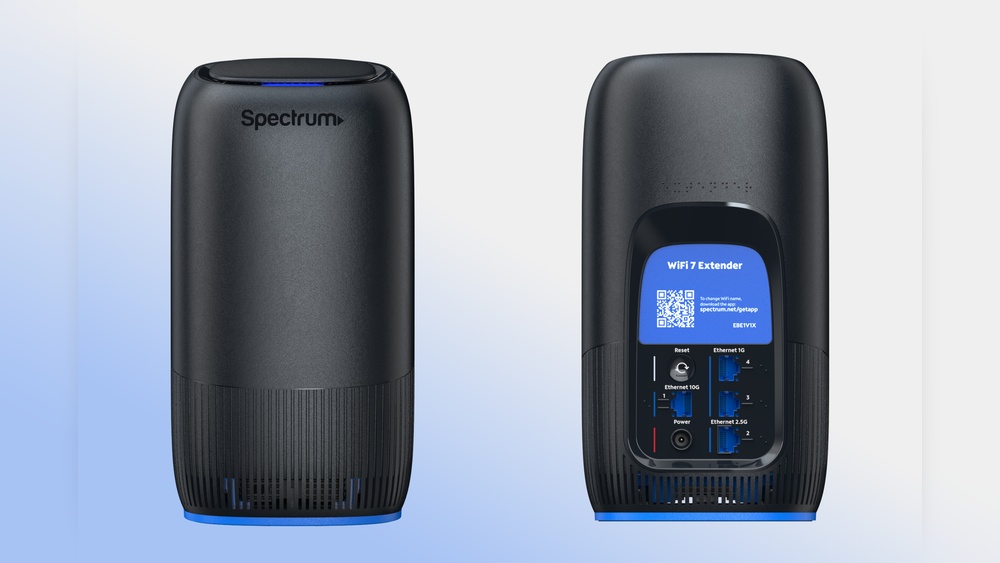
- WiFi extenders (sometimes available for extra coverage)
WiFi extenders are not the same as mesh systems. An extender grabs the signal from your router and repeats it, but often creates a second network. Mesh systems keep everything on one network and are much more seamless.
Why Doesn’t Spectrum Offer Mesh Routers?
There are a few reasons Spectrum hasn’t added mesh routers to their lineup:
- Cost: Mesh systems are more expensive than regular routers.
- Support complexity: Mesh networks need more setup and troubleshooting. Spectrum prefers to keep things simple for most customers.
- Market demand: While mesh is growing, many users still use standard routers.
Spectrum’s business model is built around easy-to-use, basic equipment that works for most homes. Mesh routers are still seen as a premium upgrade.
What Are Your Options For Mesh Wifi With Spectrum?
If you want mesh WiFi with Spectrum, you have several choices. The good news is, you don’t need to wait for Spectrum to offer mesh routers. You can use your own mesh system with their internet.
Option 1: Buy Your Own Mesh Router
Most mesh WiFi systems work with Spectrum’s internet. You simply connect the mesh router to Spectrum’s modem (or gateway). This is the most popular option.
Common mesh systems include:
- Google Nest WiFi
- Amazon Eero
- Netgear Orbi
- TP-Link Deco
- Linksys Velop
These brands are sold in stores and online. Prices range from $120 to $500, depending on the number of nodes and features.
Option 2: Use Spectrum’s Modem With A Mesh System
Spectrum often supplies a modem (sometimes with built-in WiFi). To use a mesh router, you can:
- Bridge mode: Turn off WiFi on the Spectrum device, and let your mesh system handle all wireless connections.
- Double NAT: Keep Spectrum’s WiFi on, but connect the mesh system. This is not ideal—it can cause speed and compatibility problems.
Most experts recommend using bridge mode for the best experience.
Option 3: Rent Spectrum’s Wifi Extender (not Mesh)
Spectrum offers WiFi extenders, but these are not mesh routers. They can boost your signal, but often create a second network and may reduce speed.
If you only need coverage in one extra room, extenders can help. But for full-home coverage, mesh routers are better.
Comparing Spectrum Routers Vs Mesh Routers
Let’s look at the differences between Spectrum’s standard router and a typical mesh system. This helps you see why mesh is often better for large or busy homes.
| Feature | Spectrum Standard Router | Mesh Router System |
|---|---|---|
| WiFi Coverage | 1,500-2,000 sq ft | 2,500-6,000+ sq ft (with 2-3 nodes) |
| Network Type | Single unit | Multiple units (nodes) |
| Seamless Roaming | No | Yes |
| Expandability | Limited | Easy to add more nodes |
| Setup | Simple | Usually app-based, easy |
| Rental Option | Yes (monthly fee) | No (buy your own) |
| Advanced Features | Basic | Parental controls, guest network, more |
Key takeaway: Mesh routers give much larger coverage, smoother roaming, and more control. But Spectrum’s standard router is simpler and cheaper.
How To Set Up A Mesh Router With Spectrum
If you decide to use a mesh router with Spectrum, here’s how to do it. The process is easy for most people.
Steps To Set Up
- Purchase a mesh system: Choose a trusted brand and model that fits your home size.
- Connect to Spectrum modem: Unplug your old router, and connect the main mesh unit to the modem with an Ethernet cable.
- Disable Spectrum WiFi: If your modem has built-in WiFi, turn it off (bridge mode).
- Install mesh nodes: Place the extra nodes in rooms that need better coverage.
- Download the app: Most mesh systems have an app that guides you step by step.
- Follow instructions: The app will help you name your network, set passwords, and optimize placement.
- Test coverage: Walk around your home with a phone or laptop to check for strong signals.
Practical Tips
- Place mesh nodes halfway between your main router and weak areas.
- Avoid placing nodes near metal objects, microwaves, or thick walls.
- Don’t hide mesh units in closets—they need open space for best signal.
- Update firmware regularly for security and performance.
Mesh Router Brands Compatible With Spectrum
You have many choices for mesh routers. Almost all major brands work with Spectrum’s internet. Here are the most reliable options:
- Google Nest WiFi: Simple setup, strong coverage, smart home integration.
- Amazon Eero: Compact design, easy app, frequent updates.
- Netgear Orbi: Powerful for large homes, advanced features.
- TP-Link Deco: Affordable, good for apartments and small houses.
- Linksys Velop: Flexible, supports wired backhaul for faster speeds.
- Ubiquiti AmpliFi: Stylish, strong coverage, great for tech users.
Each brand has several models. Always check that the system supports your internet speed and home size.
Example: Google Nest Wifi With Spectrum
- Connect Nest WiFi to Spectrum’s modem
- Place extra nodes in bedrooms, basement, or upstairs
- Use the app for setup and monitoring
- Enjoy seamless WiFi throughout the house
What About Spectrum’s Wifi Extenders?
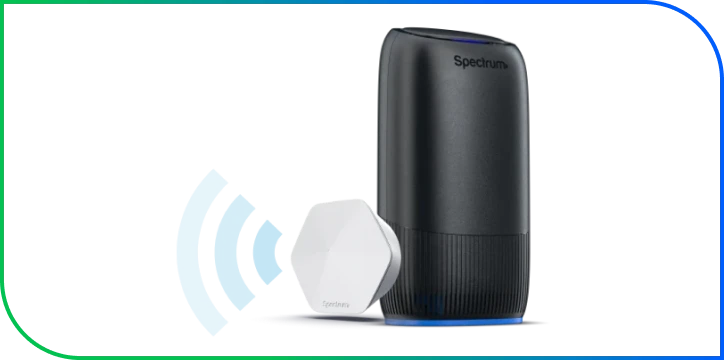
Spectrum offers WiFi extenders as an add-on. These devices are cheaper than mesh routers, but work differently.
Extenders grab the signal from your router and repeat it to another area. But they often:
- Create a second network name (SSID)
- Reduce speed compared to mesh systems
- Require manual switching between networks
Mesh routers are smarter—they keep all devices on one network and balance the load. If you need simple coverage in one room, extenders are fine. For whole-home coverage, mesh is better.
Real-world Data: Spectrum Users And Mesh Routers
In 2023, online forums showed that over 40% of Spectrum customers with large homes used third-party mesh routers. Most reported:
- Faster speeds in all rooms
- Fewer dead zones
- Easy setup with apps
- More stable connections for streaming and gaming
Some users had problems when they kept Spectrum’s WiFi turned on along with the mesh system. This caused double NAT issues, which can break some smart devices or limit speeds. Turning off WiFi on the Spectrum device solved these problems.
Non-obvious Insight
Many beginners don’t realize that you can use your own router with Spectrum, as long as you keep the modem plugged in. Spectrum doesn’t force you to use their router, so upgrading to mesh is simple.
Another insight: Some mesh systems support wired backhaul. This means you can connect nodes with Ethernet cables for maximum speed. If your home is wired, this gives even faster and more reliable coverage.
Credit: www.spectrum.com
Cost Comparison: Spectrum Rental Vs Mesh System Purchase
Let’s compare costs. Spectrum charges a monthly fee for router rental. Buying a mesh system is a one-time expense.
| Device | Monthly Cost | Yearly Cost | Upfront Cost |
|---|---|---|---|
| Spectrum Router Rental | $5 | $60 | $0 |
| Mesh Router (e.g., Eero 3-pack) | $0 | $0 | $180-$300 |
| Spectrum WiFi Extender | $3 | $36 | $0 |
Over 3 years, renting a router from Spectrum costs $180, the same as buying your own mesh system. If you plan to stay with Spectrum, it’s often smarter to buy your own equipment.
Common Mistakes When Using Mesh Routers With Spectrum
Many beginners make mistakes when trying to use mesh routers. Here are the top problems—and how to avoid them:
- Leaving both WiFi networks on: If you keep Spectrum’s WiFi and your mesh WiFi running, you may get speed drops, device confusion, or connection problems.
- Bad node placement: Putting mesh nodes in corners, closets, or far from the main router reduces coverage.
- Buying too few nodes: Large homes need 2-3 mesh units for strong coverage.
- Not updating firmware: Outdated software can cause security risks and bugs.
- Ignoring wired backhaul: If your home has Ethernet ports, connect mesh units for faster speeds.
Avoid these mistakes for the best experience.
Technical Details: Spectrum’s Network And Mesh Compatibility
Spectrum offers cable, fiber, and hybrid connections. Their modems support DOCSIS 3. 0 or 3. 1 (for cable) and standard Ethernet outputs. Mesh routers connect to these easily.
- Speeds: Spectrum plans range from 100 Mbps to 1 Gbps.
- Mesh systems: Most support up to 1 Gbps or more.
- Security: Mesh routers offer WPA3, guest networks, and parental controls.
If you have Spectrum’s fiber service, mesh routers work the same way—connect to the modem, and set up the mesh units.
Example Setup: Spectrum Gigabit With Netgear Orbi
- Spectrum gigabit modem (DOCSIS 3.1)
- Netgear Orbi main unit connected by Ethernet
- Two Orbi satellites placed upstairs and in basement
- WiFi coverage for 5,000 sq ft
- Devices switch seamlessly between nodes
Advanced Features Of Mesh Routers
Mesh routers offer many features that Spectrum’s basic router does not. These include:
- Parental controls: Limit internet access for kids
- Guest network: Create a separate WiFi for visitors
- Device prioritization: Choose which gadgets get the fastest speed
- Automatic updates: Stay safe from hackers
- Smart home integration: Connect with Alexa, Google Home, etc.
These features make mesh routers a good choice for families, gamers, and smart homes.
Should You Upgrade To A Mesh Router With Spectrum?
You should consider a mesh router if:
- Your WiFi signal is weak in some rooms
- You live in a large or multi-story house
- You have many devices (phones, tablets, laptops, smart TVs)
- You want advanced features and better security
If you live in a small apartment and use only a few devices, Spectrum’s standard router is fine. But for busy homes, mesh is the best way to get strong, reliable WiFi.
Spectrum’s Future: Will They Offer Mesh Routers?
As of now, Spectrum has not announced plans to offer mesh routers. The company may add mesh systems in the future, as demand grows. Other providers, like Xfinity and AT&T, have started offering mesh systems with some packages.
If Spectrum adds mesh routers, it would likely be as a premium upgrade. For now, buying your own mesh system is the best option.
Expert Advice For Spectrum Customers
As an experience-based guide, here’s my advice:
- Don’t wait for Spectrum to offer mesh routers. Buy a system that fits your home and needs.
- Use bridge mode for best performance—disable Spectrum’s WiFi and let the mesh system control everything.
- Choose a mesh system with at least two units for homes over 2,000 sq ft.
- Place nodes thoughtfully—open spaces, halfway between weak spots.
- Update your mesh firmware regularly.
- If you have Ethernet wiring, use wired backhaul for maximum speed.
Most people see big improvements after switching to mesh WiFi.
Real-life Example: Family With Spectrum Internet
The Johnson family in Ohio had Spectrum’s standard router. Their home was 3,200 sq ft, with two floors and a basement. WiFi was strong in the living room, but weak upstairs and in the basement.
They bought a TP-Link Deco 3-pack for $190. Setup took 30 minutes. Now, every room has strong WiFi. Streaming, gaming, and smart devices work perfectly. The parents use parental controls, and guests connect easily.
This is a common story—mesh routers make a big difference for Spectrum customers with large homes.
Credit: www.spectrum.com
Frequently Asked Questions
Can I Use Any Mesh Router With Spectrum?
Yes, most mesh routers work with Spectrum’s internet. Just connect the main mesh unit to Spectrum’s modem using an Ethernet cable. Make sure to disable WiFi on the Spectrum device if it has it.
Does Spectrum Sell Mesh Routers Directly?
No, Spectrum does not sell or rent mesh routers as part of their standard packages. They offer regular routers and WiFi extenders, but not mesh systems. You can buy your own mesh router from electronics stores or online.
Is A Mesh Router Better Than A Wifi Extender For Spectrum?
Yes, mesh routers are usually better. They provide seamless coverage across your whole home, keep all devices on one network, and offer better speed and stability. WiFi extenders are cheaper, but often create a second network and may slow down your connection.
How Much Does A Mesh Router System Cost?
Mesh router systems cost between $120 and $500, depending on the brand and number of units. Most homes need 2 or 3 nodes. You pay once, and there are no monthly fees. Over time, it can save money compared to renting equipment.
What Is Bridge Mode, And Why Is It Important With Spectrum?
Bridge mode means turning off WiFi on the Spectrum modem/router, so your mesh system controls all wireless connections. This avoids “double NAT” problems, which can cause speed and compatibility issues. Always use bridge mode for best performance.
Final Thoughts
If you’re a Spectrum customer and want better WiFi coverage, mesh routers are a great solution. Spectrum does not offer mesh routers directly, but you can buy your own and use it with their service. Mesh systems cover more space, provide faster speeds, and solve many common WiFi problems.
Remember to connect your mesh router to Spectrum’s modem, disable the old WiFi, and place nodes carefully. Choose a trusted brand, and enjoy seamless internet in every room. Spectrum’s equipment is fine for small homes, but mesh routers are the best way to upgrade your WiFi.
If you need more details or want to compare mesh systems, visit the official Consumer Reports Mesh Network Review for independent advice.
A strong WiFi signal makes your home more comfortable and productive. Mesh routers are the future—and you don’t need to wait for Spectrum to catch up.