
Wi-Fi is an essential part of daily life for many people. We use it for work, study, entertainment, and connecting with friends and family. But as more devices crowd into our homes, the old wireless router sometimes cannot keep up. You may have heard about mesh Wi-Fi systems and wondered if they are the answer to slow or spotty internet. Do mesh systems really replace routers, or do you still need both? This article explores how mesh systems work, how they compare to traditional routers, and whether they truly can take the place of your old router.
Understanding Traditional Routers
A traditional router is the main device that connects to your internet service provider (ISP). It sends data between your devices and the internet. Most homes have a single router, usually placed near where the internet cable enters the house.
Traditional routers broadcast Wi-Fi signals from one point. If you live in a small apartment, this may be enough. But in larger homes, or ones with thick walls, Wi-Fi signals can become weak or unstable in some rooms. This is sometimes called a dead zone.
Key Functions Of A Router
- Connects your home to the internet
- Creates a local network for your devices
- Assigns IP addresses to each device
- Manages traffic and security
Routers often have built-in firewalls and sometimes parental controls. They can be combined with a modem (a modem-router combo) or be a separate device.
What Is A Mesh Wi-fi System?
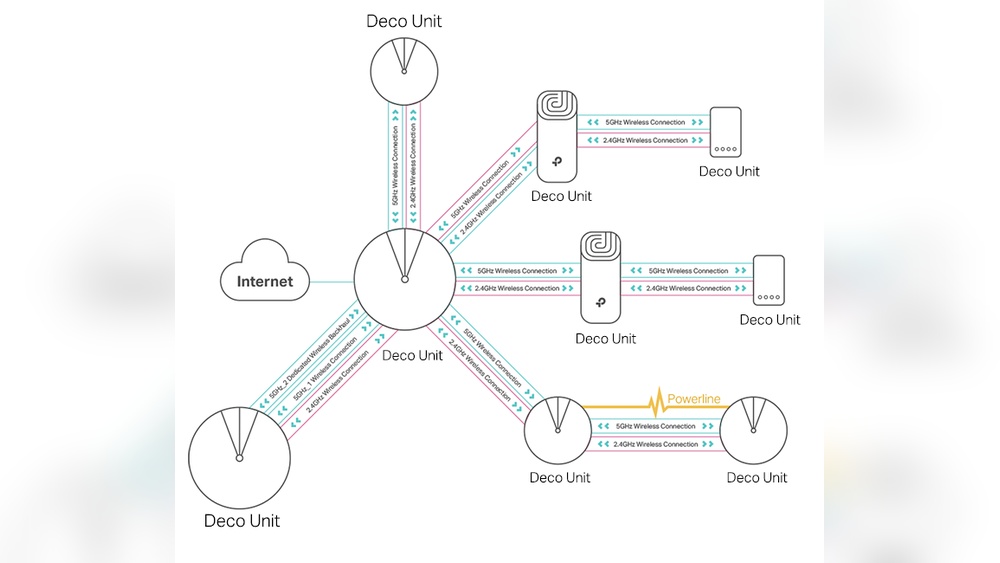
A mesh Wi-Fi system uses several devices, called nodes or satellites, to spread Wi-Fi signals throughout your home. Instead of one central point, mesh systems create a network of multiple access points.
Each mesh node communicates with the others. They share data and work together to cover a larger area. You usually have a main node that connects to your modem, and the other nodes are placed in different parts of the house.
Mesh System Basics
- Multiple nodes work together as one network
- Seamless coverage with fewer dead zones
- Single network name (SSID) for your whole home
- Easy setup using mobile apps
Mesh systems are designed for convenience. You can walk from room to room without losing your Wi-Fi connection or needing to switch networks.

Credit: www.amazon.com
Do Mesh Systems Replace Routers?
This is a common question. The answer is: Yes, in most cases, mesh systems do replace traditional routers. Here’s why:
- The main mesh node functions as a router: It connects directly to your modem and manages your home network.
- No need for a separate router: The mesh system handles routing, device management, and wireless coverage.
- Unified setup: Mesh systems are designed to be your main network, not just an add-on.
However, there are some situations where you may still use your old router, or where a mesh system works together with an existing router.
How Mesh Systems Work
Let’s look at how a mesh system replaces a traditional router.
- Main Node Connects to the Modem: The first mesh device connects to your modem, just like a router would.
- Creates the Wi-Fi Network: The main node sets up your wireless network, including assigning IP addresses and managing traffic.
- Other Nodes Extend Coverage: You place the other mesh nodes in different rooms. They connect wirelessly (or sometimes with cables) to the main node and to each other.
- Smart Routing: Mesh systems use smart algorithms to decide the best path for data. If one node fails, the system finds another way to send your data.
- Central Management: Most mesh systems have a user-friendly app that lets you manage the network, set up parental controls, and update security settings.
Example Scenario
You have a two-story house with a basement. The main mesh node is next to the modem in your office. You put another node in the living room and one upstairs. Now, your whole house gets strong, stable Wi-Fi, with no dead zones.
Mesh System Vs. Traditional Router: Key Differences
To help you understand the differences, here’s a comparison of mesh systems and traditional routers:
| Feature | Traditional Router | Mesh Wi-Fi System |
|---|---|---|
| Coverage Area | Limited to router’s range | Wide, covers large homes |
| Dead Zones | Common in large/complex layouts | Rare, easy to eliminate |
| Network Name | May need separate networks for extenders | Single SSID for entire home |
| Setup Complexity | Basic, but advanced settings can be hard | Usually simple, app-driven |
| Scalability | Limited, not designed to add many devices | Easy to add more nodes |
| Price | Cheaper upfront | More expensive, but more features |
| Performance in Crowded Homes | Can slow down with many users | Designed for many devices |
When Should You Use A Mesh System?
Mesh systems are not for everyone. They offer the most benefits in certain situations:
- Large Homes or Multi-Story Buildings: If your home is bigger than 2,000 square feet or has multiple floors, a mesh system can fix coverage problems.
- Homes with Thick Walls or Obstacles: Brick, concrete, and metal can block Wi-Fi signals. Mesh nodes placed in different rooms help signals reach everywhere.
- Many Devices Connected: Smart homes with lots of phones, tablets, cameras, and TVs need more bandwidth. Mesh systems can handle this load better.
- Frequent Wi-Fi Drops: If you notice your video calls or streaming often freeze, a mesh network may help.
- Desire for Simple Management: Mesh systems usually have easy-to-use apps for managing your network, checking speeds, and controlling who can connect.

Credit: www.walmart.com
When Is A Traditional Router Enough?
You may not need a mesh system if:
- You have a small apartment or single-story home with good coverage everywhere.
- Your router is modern and supports Wi-Fi 6. Newer routers can handle many devices and offer fast speeds.
- You don’t have many dead zones and rarely lose connection.
- You want to save money. Routers are usually cheaper than mesh systems.
Many people upgrade to a mesh system before trying other solutions. Sometimes, moving your router to a better spot or upgrading to a newer model is enough.
Can You Use A Mesh System With Your Existing Router?
Sometimes, people want to keep their old router and add a mesh system. This is possible, but you need to understand how it works.
Mesh In Access Point Mode
Most mesh systems can work in access point mode. In this setup, your old router still manages the network, and the mesh system just extends the Wi-Fi. This is useful if:
- You have special settings on your router (for gaming, VPN, etc.)
- Your ISP requires you to use a specific router
However, you lose some benefits of mesh, like central control and smart routing.
Mesh As The Main Router
For most people, it’s best to let the mesh system replace the router. The main mesh node connects to your modem and does all the work.
How Easy Is It To Set Up A Mesh System?
One reason mesh systems are popular is their simple setup. Most come with easy mobile apps that guide you step by step.
Typical Setup Steps
- Connect Main Node to Modem: Use an Ethernet cable to link the first mesh device to your modem.
- Download the App: Most brands have their own app (like Google Home, Eero, or TP-Link Deco).
- Follow Instructions: The app helps you create a network name, set a password, and place other nodes.
- Plug in Other Nodes: Put the extra nodes where you need stronger Wi-Fi (bedrooms, basement, upstairs).
- Test Coverage: The app usually tests your network and suggests better node placement if needed.
Common Mistakes To Avoid
- Placing nodes too close or too far apart: If they are too close, you waste coverage. Too far apart, the signal is weak.
- Hiding nodes in cabinets or behind furniture: This blocks signals. Try to keep nodes out in the open.
- Forgetting to update firmware: Mesh systems need security updates, just like any device.
Mesh System Features And Benefits
Mesh systems often have extra features not found in basic routers. Here are some you might see:
- Automatic Updates: Many mesh systems update themselves, keeping your network safe.
- Parental Controls: You can pause the internet for kids’ devices or set time limits.
- Guest Network: Easily create a separate network for visitors.
- Device Prioritization: Give more bandwidth to certain devices (like your work laptop).
- Smart Home Integration: Some mesh systems work with smart speakers or other smart devices.
Are Mesh Systems Faster Than Routers?
Mesh systems are designed to improve coverage, not necessarily speed. But in real homes, better coverage often means faster and more reliable Wi-Fi.
Speed In Real Life
If your old router gives slow speeds in some rooms, a mesh system can make those speeds much faster. But if you already get fast speeds everywhere, you may not notice much difference.
Mesh systems also support the latest Wi-Fi standards, like Wi-Fi 5 (802.11ac) and Wi-Fi 6 (802.11ax). Wi-Fi 6 is much faster and can handle more devices at once.
Backhaul Options
Mesh systems use “backhaul” to send data between nodes. There are two types:
- Wireless backhaul: Nodes connect over Wi-Fi. Easy to set up, but can be slower if many devices use the network at once.
- Wired backhaul: Nodes are connected with Ethernet cables. This gives the best speeds and reliability.
For the fastest mesh network, use wired backhaul when possible.
Mesh Vs. Wi-fi Extenders
Many people try Wi-Fi extenders before mesh systems. Extenders boost the signal from your router, but they have some downsides:
- Separate network names (unless you set up roaming)
- Half the bandwidth (most extenders can only send or receive at one time)
- More complicated setup
Mesh systems solve these problems. They create a single, seamless network and offer better performance.
Here’s a quick look at the differences:
| Aspect | Wi-Fi Extender | Mesh System |
|---|---|---|
| Setup | Often tricky, may require manual setup | Usually app-based, step by step |
| Network Name | Usually creates a new SSID | Single SSID for all nodes |
| Performance | Can cut speed in half | Maintains full speed (with good placement) |
| Roaming | May drop connection when moving between zones | Smooth, automatic handoff |
| Scalability | Limited, adding more can cause interference | Designed to scale up easily |
Security In Mesh Systems
Mesh systems usually provide strong security features. They are often updated automatically, fixing security holes before hackers can exploit them.
Common Security Features
- Automatic firmware updates
- Network encryption (WPA3 support)
- Easy password management
- Guest networks
- Device blocking
Most mesh systems also let you see which devices are connected, so you can spot anything suspicious.
However, not all mesh systems are equal. Some budget models may skip advanced features. Always check for WPA3 support and automatic updates when choosing a system.
What Should You Consider Before Switching To Mesh?
Before you replace your router with a mesh system, think about a few important factors:
Home Size And Layout
- Large homes with many rooms or thick walls need more nodes.
- Open-plan homes may need fewer nodes.
Number Of Devices
- If you have many smart devices, look for a mesh system that supports Wi-Fi 6.
- Some mesh brands limit the number of connected devices.
Budget
- Mesh systems cost more than routers. Expect to pay $150–$400 for a set.
- Extra nodes can be added but cost more.
Internet Speed
- Mesh systems won’t make your internet faster than what you pay for from your ISP.
- If your ISP package is slow, upgrade it first.
Wired Devices
- If you have gaming consoles or desktop PCs, check if the mesh nodes have enough Ethernet ports.
- Some mesh systems have only one or two LAN ports per node.
Isp Requirements
- Some ISPs require you to use their router or modem-router combo. Ask your provider before removing old equipment.
Advanced Features
- Power users may want advanced settings, like VPN, DNS changes, or custom firewalls. Not all mesh systems allow this.

Credit: www.amazon.com
Real-world Performance: Data And Examples
Let’s see how mesh and traditional routers compare in real homes. Independent tests show that mesh systems can double or even triple Wi-Fi speeds in hard-to-reach rooms.
A study by PCMag found:
- In a 3,000-square-foot house, a traditional router provided strong Wi-Fi in about 60% of rooms.
- The same house with a mesh system had strong Wi-Fi in 98% of rooms.
- Average download speeds in far rooms improved from 20 Mbps (router) to over 80 Mbps (mesh).
Another survey showed that 80% of mesh system users reported fewer dropped connections and easier management, compared to their old routers.
Still, in small apartments, the difference was much smaller. In some cases, a modern router performed just as well.
Common Myths About Mesh Systems
There are some misunderstandings about mesh networks. Let’s clear them up:
- Myth: Mesh systems always make your internet faster.
- Reality: They improve coverage, but your internet speed is limited by your ISP.
- Myth: You need both a mesh system and a router.
- Reality: The main mesh node is your router. You do not need both, except in rare cases.
- Myth: Mesh systems are hard to set up.
- Reality: Most have easy apps and guides.
- Myth: Only tech experts need mesh systems.
- Reality: They are perfect for families and anyone who wants simple, reliable Wi-Fi.
Choosing The Right Mesh System
If you decide to replace your router with a mesh system, here’s what to look for:
- Coverage area: Make sure the set covers your whole home. Most brands provide coverage estimates.
- Wi-Fi standard: Wi-Fi 6 is the latest and best for crowded homes.
- Number of nodes: Buy enough nodes for all floors and major rooms.
- Ethernet ports: Needed for wired devices or backhaul.
- App features: Check for parental controls, device management, and security.
- Brand reputation: Stick to well-known brands like Google Nest Wifi, Eero, Netgear Orbi, or TP-Link Deco.
For more details and reviews on mesh systems, check CNET’s guide.
Pros And Cons Of Mesh Systems
Here’s a summary of the main advantages and disadvantages:
Pros
- Eliminate dead zones in large or complex homes
- Easy to expand by adding more nodes
- Simple management with mobile apps
- Seamless roaming with one network name
- Automatic updates for better security
Cons
- Higher cost than most routers
- Not always faster than a good router in small homes
- Some advanced features missing in cheaper models
- Extra nodes may need power outlets in each room
Are There Any Downsides To Replacing Your Router With A Mesh System?
While mesh systems solve many problems, they are not perfect:
- Initial cost: Upfront price can be high.
- Learning curve: Some people need time to get used to app-based management.
- Power needs: Each node needs an electrical outlet.
- Overkill for small spaces: In a small apartment, a modern router is often enough.
Practical Tips For A Smooth Switch
Switching from a router to a mesh system is usually simple, but here are some tips:
- Disconnect your old router before setting up the mesh system.
- Update your modem if it’s old or does not support your internet speeds.
- Write down your old Wi-Fi name and password. Use the same ones for the mesh system so devices reconnect easily.
- Place nodes in central, open areas. Avoid corners or closets.
- Test each area after setup to check for weak spots.
- Use wired backhaul if you want maximum speed and reliability.
By following these tips, you can avoid common problems and get the best performance from your new system.
Frequently Asked Questions
What Happens To My Old Router If I Switch To A Mesh System?
You can repurpose your old router as a Wi-Fi extender, an access point, or a network switch. Some people use them for guest networks or in garages. If you do not need it, you can recycle it.
Can I Use Any Mesh System With Any Internet Provider?
Most mesh systems work with any ISP, as long as you have a separate modem. Some ISPs use special equipment or settings, so always check compatibility before buying.
Is It Possible To Use Wired Connections With Mesh Systems?
Yes. Most mesh nodes have Ethernet ports. You can connect computers, TVs, or gaming consoles directly for the fastest speeds. Wired backhaul between nodes also boosts performance.
Are Mesh Wi-fi Systems Secure?
Mesh systems are generally secure, especially if they support WPA3 encryption and automatic updates. Always set a strong password and keep your system updated.
How Many Mesh Nodes Do I Need For My Home?
This depends on your home’s size and layout. Most kits come with two or three nodes, enough for 3,000–5,000 square feet. Add extra nodes for larger or more complex homes.
Switching to a mesh system can make your home network faster, more reliable, and easier to manage. For many people, a mesh system is the best way to replace an old router and finally say goodbye to dead zones. But before you buy, think carefully about your home’s needs, your budget, and your ISP’s requirements.
With the right setup, you’ll enjoy smooth Wi-Fi wherever you go in your home.