
Lag, dropped signals, or dead spots can ruin a gaming session. If you’ve ever argued with housemates about Wi-Fi, or struggled to keep your ping low, you know how frustrating unreliable internet can be. Mesh routers promise smooth, consistent coverage—but picking the right one isn’t simple.
The market is full of mesh systems and advanced routers, each claiming to be ideal for gaming. Some are built for huge homes, others for apartments. Features and prices vary a lot. It’s easy to get lost in technical jargon or to buy something overkill—or not powerful enough for your setup.
Many people focus on the wrong things, or expect that any “gaming” router will fix all their issues.
This guide will help you make sense of the options, and find the right mesh router for your gaming needs—without confusion or regret.
What Actually Matters For Gaming Mesh Routers?
For gaming, stable connection and low latency matter more than raw speed. Coverage is important, but only if your home really needs it. Wired backhaul can help, but isn’t always necessary. Think about how many devices use your network and where you play most often.
Don’t get distracted by features you’ll never use.
Who Should Care About Which Features?
If you play on consoles far from your main router, mesh systems help cover dead zones. Competitive PC gamers may want more control and wired options. Families need simple setups and strong security. Not everyone needs Wi-Fi 7 or the latest standards—sometimes reliability is enough.
Below, you’ll find a range of mesh routers and gaming-focused systems. They were selected to fit different types of homes, gaming setups, and budgets. Read on to see which one matches what you actually need.
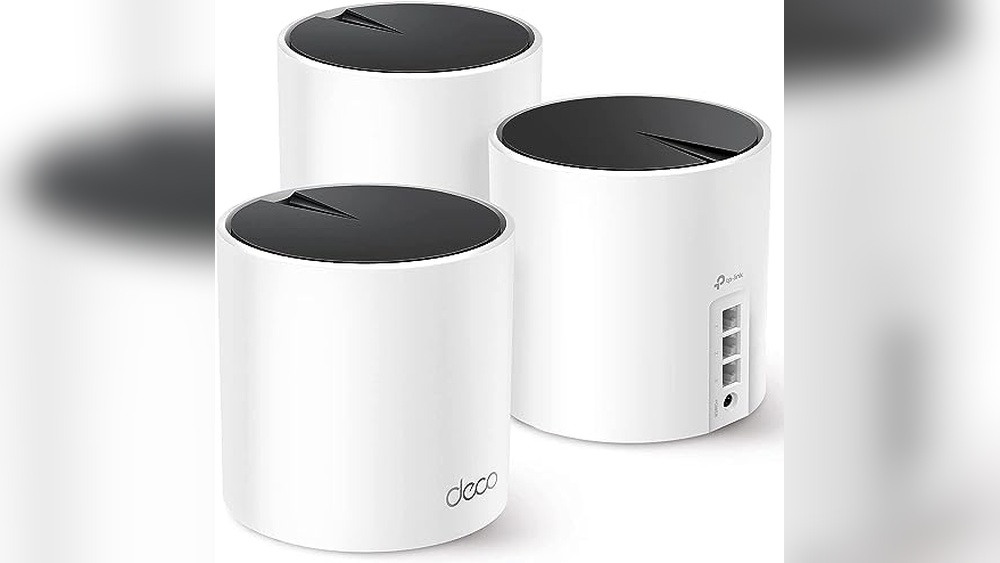
Tp-link Deco X55 Mesh Wifi 6 System
A top pick in Best Mesh Routers for Gaming, this system stands out for its strong coverage and stable connections across large homes.

The TP-Link Deco X55 Mesh WiFi 6 System creates seamless WiFi coverage for large homes, replacing your traditional router and extenders. It solves the problem of dead zones and slow speeds by using three mesh units that blanket up to 6500 square feet with reliable, high-speed WiFi 6.
One of its standout features is the ability to support wired Ethernet backhaul for faster, more stable connections.
In everyday use, you can expect steady gaming, streaming, and browsing even with many devices online at once. Setting it up is straightforward, and once running, the mesh system automatically handles connections as you move around the house. You get peace of mind knowing your signal won’t suddenly drop in the middle of an online match or video call.
What Sets This Mesh System Apart
- Consistent WiFi 6 speeds throughout large homes
- Eliminates dead spots and buffering for gaming
- Handles up to 150 connected devices reliably
- Each unit includes three Gigabit Ethernet ports for wired gaming rigs
- Supports Ethernet backhaul for faster, interference-free performance
- Designed with advanced security standards in mind
Keep In Mind Before You Buy
- Initial setup requires connecting multiple units—may not suit very small apartments
- No built-in gaming-specific traffic prioritization
- Bulky compared to single-unit routers
Who This Fits Best
This mesh system is best for gamers and families in large or multi-story homes who want to remove WiFi dead zones and enjoy steady, interruption-free online play. It takes away the hassle of constant disconnects and the need for range extenders or boosters in every room.
For homes with many devices or users, it can keep everyone connected without slowing down.
To get the best results, use Ethernet backhaul between units if possible—this boosts stability for gaming and streaming. You’ll feel confident knowing your network is both reliable and secure, with fewer surprises during important matches or work calls. If you value smooth coverage and easy management, this system is a practical pick.
| Best for | Why |
|---|---|
| Large homes with multiple gamers | Blankets up to 6500 sq.ft. with seamless WiFi 6 coverage |
| Homes with many connected devices | Supports up to 150 devices without slowing down |
| Gamers needing wired speed | Multiple Gigabit Ethernet ports and Ethernet backhaul support |
| Buyers prioritizing security | Built with advanced cybersecurity standards |
Tp-link Archer Axe75 Wifi 6e Mesh Router
For gamers seeking top-tier speed and stability, this model stands out in the Best Mesh Routers for Gaming roundup.

The TP-Link Archer AXE75 WiFi 6E Mesh Router is built to tackle the demands of fast-paced gaming and heavy streaming in modern homes. By adding the new 6GHz band, it solves the common issue of network congestion, keeping your connection responsive and reliable when you need it most.
Using this router, you get a smooth experience with minimal lag, even as multiple devices join the network. The design emphasizes stability and heat management, so you can game or stream for hours without worrying about drops or slowdowns. Setting up mesh coverage is straightforward, making whole-home connectivity easy to achieve.
Key Advantages For Gamers And Streamers
- Tri-band support reduces network congestion and lag
- WiFi 6E unlocks faster speeds and lower latency
- Handles multiple devices efficiently with OFDMA
- Optimized heat dissipation for long-term reliability
- OneMesh compatibility for seamless home coverage
- Strong security with WPA3 and VPN support
- PCMag Editors’ Choice winner for 2025
Points To Consider Before Buying
- Requires compatible devices to fully use WiFi 6E
- Mesh extension needs TP-Link OneMesh extenders
- Larger footprint may not suit compact spaces
When I’d Pick This
This router is ideal for gamers and streamers who want consistent, high-speed performance across the house. It removes the usual stress of dropped connections or crowded networks, letting you focus on your game or show without interruptions. If you have many devices and often host game nights, this router keeps everyone online smoothly.
A quick tip: pair it with TP-Link OneMesh extenders for the easiest way to cover every corner. You’ll gain peace of mind knowing the quad-core CPU and advanced memory handle demanding tasks, so reliability isn’t left to chance. Personally, I appreciate how its design blends into a tech setup without calling too much attention.
| Best for | Why |
|---|---|
| Multi-device gaming households | Tri-band and OFDMA keep connections fast and stable |
| 4K streaming families | WiFi 6E delivers high bandwidth for smooth playback |
| Large homes needing mesh coverage | OneMesh support enables easy whole-home networking |
| Privacy-conscious users | Built-in VPN and WPA3 security features |
Tp-link Archer Ax21 Wifi 6 Mesh Router
A strong contender among the Best Mesh Routers for Gaming, this model stands out for delivering reliable WiFi 6 performance and coverage for busy gaming households.

The TP-Link Archer AX21 WiFi 6 Mesh Router is designed for users who want fast, consistent internet throughout their home, especially for gaming and streaming. It solves common issues like lag and coverage gaps by supporting the latest WiFi 6 technology and mesh compatibility, making it a good fit for homes with multiple devices.
In daily use, this router helps keep your gaming sessions smooth and uninterrupted, even when the whole household is online. Setup is straightforward, and once running, it quietly delivers stable speeds and reliable connections room-to-room. You spend less time troubleshooting and more time enjoying fast, dependable WiFi.
Key Benefits For Gaming Homes
- WiFi 6 technology reduces lag and congestion during online play
- Strong, focused signal thanks to four high-gain antennas and Beamforming
- Handles many devices at once without slowing down
- Easy mesh support for whole-home coverage
- Certified security standards for peace of mind
- Simple setup process with helpful support
Things To Consider Before Buying
- Requires a separate modem (not included)
- No support for 6 GHz band (WiFi 6E)
- Performance may vary with distance and obstacles like walls
Who This Fits Best
This router is best suited for gamers and families needing stable, fast WiFi in homes with multiple connected devices. It removes the hassle of dropped connections and lag during intense online sessions, so you can focus on the game, not the network.
If you plan to use mesh networking or want future-ready WiFi 6 speeds, the Archer AX21 is easy to set up and maintain. For best results, place the router centrally and away from thick walls for maximum coverage. You’ll enjoy the confidence of reliable performance and robust security, with fewer network headaches.
Personally, I appreciate how quietly it gets the job done.
| Best for | Why |
|---|---|
| Online gaming households | Reduces lag and congestion during multiplayer play |
| Homes with many devices | Handles simultaneous connections without slowdowns |
| Mesh network upgrades | Easy Mesh support for expanded, seamless coverage |
| Security-conscious users | Certified security design for safer home networks |
Tp-link Deco S4 Mesh Wifi System
A top contender in Best Mesh Routers for Gaming, this system ensures seamless whole-home coverage for lag-free play.

The TP-Link Deco S4 Mesh WiFi System is designed to eliminate WiFi dead zones in your home. With three units working together, it covers up to 5,500 square feet and replaces both your router and WiFi extender. This means you get one strong, stable network throughout your house, making it easier to keep all your gaming devices connected with no interruptions.
In everyday use, you’ll notice smooth roaming from room to room with a single network name and password. Setting up is simple, and once running, the mesh system handles all device connections automatically. You don’t have to worry about switching networks or losing signal during important moments in your games.
The system feels consistent and reliable, letting you focus on your game instead of troubleshooting WiFi.
Why Gamers Appreciate This Mesh System
- Full-home coverage means no signal drops mid-game.
- Seamless roaming—move anywhere without losing connection.
- Handles up to 100 devices, great for busy households.
- Easy setup and simple management.
- Strong speeds for multiplayer gaming.
- Unified network name removes confusion.
Points To Consider Before Choosing
- No advanced gaming-specific features like QoS or port prioritization mentioned.
- White color may not blend in with all gaming setups.
- Requires space for three units across your home.
Who This Fits Best
This system is ideal for gamers who want reliable, whole-home WiFi without the hassle of switching networks or dealing with dead spots. If your household has lots of devices and you need smooth coverage in every room, the Deco S4 removes the stress of dropped connections and complicated setups.
For the best results, place each unit in a different part of your home to maximize coverage. The peace of mind comes from knowing your gaming won’t be interrupted, even during peak hours. I like how it keeps everything simple, so you can spend less time managing your network and more time playing.
| Best for | Why |
|---|---|
| Large homes with gaming zones | Eliminates dead zones up to 5,500 sq.ft. |
| Multiple device households | Handles up to 100 connected devices smoothly |
| Users who want simple setup | Easy to install and manage, no tech expertise needed |
| Gamers needing seamless roaming | Single network name for uninterrupted play while moving |
Netgear Orbi 370 Wifi 7 Mesh System
For gamers seeking the Best Mesh Routers for Gaming, this system delivers reliable, high-speed coverage for large homes.

This is a dual-band WiFi 7 mesh system from NETGEAR designed to blanket your entire home with fast, consistent wireless connectivity. It solves the common problem of weak spots and lag by covering up to 6,000 sq. ft. And supporting up to 70 devices.
If you need seamless gaming or streaming without interruptions, this setup offers a clear solution.
In daily use, you’ll notice stable connections even with multiple devices online. Setup is straightforward, and built-in security features provide peace of mind. Automatic firmware updates keep your network protected, and the system adapts well to older devices thanks to backward compatibility.
It feels reassuring knowing your gaming sessions won’t be interrupted by dropped signals.
Key Advantages For Gaming Households
- WiFi 7 delivers speeds up to 5 Gbps for smooth gameplay
- Covers large spaces up to 6,000 sq.ft. With consistent signal
- Supports up to 70 devices—ideal for busy homes
- Enhanced backhaul improves reliability across every room
- Automatic security updates for safer online experience
- Backward compatibility with older devices
Consider Before You Buy
- This is not a cable modem—requires separate modem if needed
- Dual-band, not tri-band—may matter for some power users
- Advanced features may be more than needed for small apartments
Who This Fits Best
This mesh system is ideal for families or roommates who game, stream, and work from home in large spaces. It’s for those tired of dead zones and inconsistent speeds, especially during online gaming. You won’t have to worry about lag or weak signals, even in far corners of the house.
By automating security updates and supporting many devices, it reduces the hassle of manual maintenance and troubleshooting. A quick tip: place the extenders thoughtfully to maximize coverage—near the edges of your main living areas. You can trust that your connection stays strong and safe, so you can focus on gameplay rather than tech headaches.
If you value reliability and want a mesh system that just works, this Orbi 370 is a practical choice. I’d suggest it to anyone who wants to upgrade their gaming experience and home connectivity with minimal fuss.
| Best for | Why |
|---|---|
| Large gaming households | Handles many devices with high-speed coverage |
| Homes with dead WiFi spots | Mesh system eliminates weak zones efficiently |
| Users needing built-in security | Automatic updates protect your network |
| Mixed device environments | Backward compatibility ensures older devices stay connected |
Asus Rt-ax1800s Wifi 6 Mesh Router
A smart pick for Best Mesh Routers for Gaming if you want WiFi 6 speed and robust home network protection without ongoing fees.

The ASUS RT-AX1800S WiFi 6 Mesh Router is designed for homes that need strong, stable internet across many devices. With support for the latest WiFi 6 standard and AiMesh compatibility, it helps eliminate weak spots and keeps gaming sessions smooth.
Its built-in security and parental controls take the stress out of managing who connects and what they access.
Day-to-day, you’ll notice fewer interruptions and faster connections, even when multiple people are streaming or gaming. Set up feels straightforward, and the router’s reliability means you spend less time troubleshooting. The subscription-free security brings peace of mind with no added costs or surprises down the road.
Why Gamers And Families Choose This Router
- Fast, consistent WiFi 6 speeds for gaming and streaming
- Handles many devices without slowdown using MU-MIMO and OFDMA
- Easy expansion with AiMesh support
- Subscription-free network security powered by Trend Micro
- Parental controls built in for safer browsing
- Includes built-in VPN for privacy away from home
- Four gigabit LAN ports for wired connections
Points To Consider Before Buying
- Basic, understated design may not appeal to all tastes
- Advanced features may require some setup time
- No bundled mesh satellites—expansion requires additional units
Who This Fits Best
If you need reliable WiFi for both gaming and everyday family use, the ASUS RT-AX1800S WiFi 6 Mesh Router fits well. It cuts out the worry of slowdowns when everyone’s online and removes the hassle of separate security subscriptions. For homes with multiple gamers or smart devices, this router brings consistency and control.
For best results, place it centrally and consider adding AiMesh units if you have a large home. The built-in parental controls keep things safe, while VPN support secures your data on the go. I like that you get strong performance and peace of mind without extra fees or complicated maintenance.
| Best for | Why |
|---|---|
| Homes with multiple gamers | Consistent WiFi 6 speeds even with several devices online |
| Families needing parental controls | Built-in tools for managing access and security |
| Users wanting future-ready mesh expandability | Easy AiMesh compatibility for whole-home coverage |
| Anyone avoiding subscription fees | Network security and VPN with no ongoing costs |
Gl.inet Flint 2 Wifi 6 Gaming Router
For gamers seeking the Best Mesh Routers for Gaming, this router delivers stable, high-speed Wi-Fi 6 performance ideal for low-latency play.

The GL. iNet Flint 2 WiFi 6 Gaming Router is designed to keep up with demanding online gaming and streaming, thanks to its blazing-fast 6 Gbps Wi-Fi 6 speeds. With support for up to a hundred devices and robust VPN capabilities, it easily handles busy households or small business setups that need secure, uninterrupted connectivity.
Using this router feels reliable and smooth, especially during intense gaming sessions or 4K streaming. You can trust your connection to remain steady, even when multiple people are online. Setup is straightforward, and updating the firmware at the start ensures you get the best possible performance.
Key Gaming Advantages
- Ultra-low latency for smooth gaming and video calls
- Handles over a hundred connected devices simultaneously
- High-speed VPN support (Wireguard and OpenVPN)
- AdGuard Home helps block unwanted ads and tracking
- Stable connections during heavy multiplayer battles
- Easy firmware updates improve reliability
Points To Consider
- Firmware update is strongly recommended before use
- Actual VPN speed may vary with your provider and setup
- Router size is larger than average (over 9 inches tall)
Who This Fits Best
The GL. iNet Flint 2 is best for gamers and power users who want hassle-free, high-speed performance at home or in a small office. It takes the stress out of lag spikes and connection drops, letting you focus on your game or work without distraction.
To get the best results, update the firmware right after setup—this simple step boosts both speed and reliability.
You’ll appreciate the peace of mind that comes from strong VPN support and network-wide ad blocking. If you have lots of connected devices or want to install plugins, this router keeps everything running smoothly. For anyone who’s tired of unstable Wi-Fi, this is a dependable solution that just works.
| Best for | Why |
|---|---|
| Low-latency online gaming | Wi-Fi 6 speeds and 8-stream tech minimize lag |
| Homes with many devices | Handles 100+ devices with stable performance |
| VPN users | Fast OpenVPN and Wireguard speeds up to 900Mbps |
| Ad blocking across the network | Built-in AdGuard Home support for privacy and fewer distractions |
Asus Rog Rapture Quad-band Wifi 7 Router
Among Best Mesh Routers for Gaming, this ASUS model stands out for gamers needing top-tier speed and stable connections across demanding setups.

This router from ASUS is built for high-performance gaming and streaming, handling multiple devices and large spaces with ease. The quad-band WiFi 7 technology ensures ultra-fast speeds up to 30 Gbps, solving lag and connection drops for serious gamers.
In daily use, you notice consistent, reliable connectivity—especially during intense online sessions or when sharing your network with others. Features like triple-level game acceleration and dual 10G ports give you confidence your gaming traffic gets priority, making every match smoother and less stressful.
Gaming-focused Advantages
- Ultra-fast WiFi 7 speeds with 320MHz channels for demanding games
- Multi-link operation ensures stable connections across devices
- External dual-feeding antennas boost signal strength for large homes
- Dual 10G ports maximize wired gaming and streaming flexibility
- Triple-level game acceleration prioritizes gaming traffic from device to server
- Supports AiMesh for easy expansion of coverage
- Subscription-free security features included
Consider Before Buying
- Size and weight may not suit compact spaces
- Advanced features require compatible devices to fully benefit
- Wired connections need high-end hardware for maximum speed
Where This Shines
If you’re a gamer or run a household with many devices, this router takes the stress out of keeping everyone connected at top speed. You won’t have to guess if your gaming traffic is getting priority—triple-level acceleration handles it for you.
Set up is straightforward, and AiMesh lets you easily expand coverage as your needs grow. For best results, use the dual 10G ports for your gaming PC or console. You’ll get peace of mind from consistent performance and built-in security, so you can focus on playing, not troubleshooting.
| Best for | Why |
|---|---|
| Competitive online gaming | Prioritizes gaming traffic, minimizes lag |
| Large homes with many devices | Strong signal and multi-band operation keeps connections stable |
| Users needing wired flexibility | Dual 10G and quad 2.5G ports support multiple high-speed wired devices |
| Mesh network upgrades | AiMesh support makes expanding coverage simple |
Wavlink Wifi 6 Mesh Gaming Router
A top pick in Best Mesh Routers for Gaming, this router delivers seamless whole-home speed and low latency for competitive play.

The WAVLINK WiFi 6 Mesh Gaming Router is designed for gamers and streamers who need fast, stable internet throughout the home. It solves the common problems of lag and dead zones by using mesh technology and the latest WiFi 6 standard.
With up to 3000Mbps speed, it ensures smooth gaming and streaming, even when multiple devices are connected.
Daily use feels consistent and reliable—no more dropping out mid-game or switching networks as you move. Setup is guided and straightforward, so you’re online in minutes. The single WiFi name makes roaming seamless, letting you focus on playing instead of troubleshooting connection issues.
Why Gamers Choose This Router
- Mesh coverage eliminates dead zones for uninterrupted gaming
- Low latency and high speeds with WiFi 6 for smooth online play
- Handles 256+ wireless devices without slowing down
- Strong security with WPA3 and advanced error correction
- Simple app-based setup saves time and frustration
- Beamforming and high-gain antennas boost signal strength
Consider Before You Buy
- Single unit covers up to 2,000 sq.ft.—larger homes may need extenders
- No built-in modem; requires existing internet service
- Advanced features may be more than casual users need
Where This Shines
This router is ideal for gamers, VR users, or anyone with a busy home network who wants to end lag and WiFi drops. It takes away the hassle of switching networks or troubleshooting slow speeds, letting you stay focused on your game or work.
If you add mesh extenders, coverage easily grows with your space—no need to buy a whole new system. For best results, use the WavRouter App for guided setup and adjust placement for the most reliable signal. With its robust security and consistent speeds, you get peace of mind and fewer surprises during critical moments.
| Best for | Why |
|---|---|
| Competitive Online Gaming | Low latency and high-speed stability reduce lag |
| Large Homes with Dead Spots | Mesh system covers up to 2,000 sq.ft. and can be extended |
| Multiple Device Households | Handles over 256 wireless connections without congestion |
| Easy, Guided Setup | App-based instructions minimize setup stress |
Eero 7 Dual-band Mesh Wi-fi 7 (3-pack)
For Best Mesh Routers for Gaming, this kit stands out by delivering strong, lag-free coverage for large homes or multi-device setups.

The eero 7 Dual-Band Mesh Wi-Fi 7 (3-Pack) is designed to eliminate Wi-Fi dead zones and keep your gaming sessions smooth in every room. With support for high-speed internet up to 2. 5 Gbps and coverage up to 6,000 sq.
Ft. , it solves the problem of inconsistent connections in larger homes or spaces with many devices. Its backward compatibility means you can upgrade part of your network without replacing every device.
Day-to-day, it feels stable and reliable, even when multiple people are gaming, streaming, or working at the same time. Setup is straightforward, and once installed, you spend less time troubleshooting slowdowns or interruptions. The mesh system handles device handoffs seamlessly, so you can move around without losing your connection.
You’ll notice less lag and more consistent speeds, which is key for competitive gaming and large households.
Why Gamers Appreciate It
- Minimizes dead spots for reliable gaming anywhere in the house
- Handles over 120 devices without slowing down
- Supports the latest Wi-Fi 7 for future-proofing
- Simple expansion or upgrade thanks to backward compatibility
- Easy setup and management for less tech hassle
- Fast wired ports for direct console or PC connections
Consider Before You Buy
- Does not include advanced gaming-specific features (like QoS prioritization)
- Three-pack may be more than needed for small apartments
- No built-in modem—requires separate modem for internet
When I’d Pick This
This mesh system is a great fit for gamers or families who need seamless, high-speed Wi-Fi across a large area or multiple floors. If you’re tired of dropped signals or lag when moving between rooms, it takes the guesswork and stress out of network coverage.
You don’t need to be a tech expert—installation and expansion are both straightforward.
For best results, place each unit in open areas to maximize coverage and minimize interference. That way, you’ll enjoy steady, low-latency connections for both gaming and daily use. If you want reliable Wi-Fi without constant tweaking or troubleshooting, this eero setup delivers peace of mind and fewer surprises, even as new Wi-Fi standards arrive.
I like how it keeps things simple.
| Best for | Why |
|---|---|
| Large homes or multi-story spaces | Strong mesh eliminates dead zones up to 6,000 sq. ft. |
| Households with many devices | Handles 120+ connections without slowdowns |
| Gamers seeking smooth, stable play | Minimizes lag and network drops during gaming sessions |
| Upgraders with older eero systems | Works with previous eero units for easy expansion |
How To Choose The Right Router Or Mesh System
Mesh Systems Vs. Single Routers
Mesh systems are useful for large homes or spaces with Wi-Fi dead zones. Single routers are better for smaller spaces or where coverage is less of a concern. Consider the layout of your home and whether thick walls or multiple floors impact your signal.
Wi-fi Standards And Their Impact
Wi-Fi 6 and 6E offer improved speed and device handling compared to older standards. Wi-Fi 7 is the newest and supports even more devices with lower latency but is only necessary if you have high-speed internet and many connected devices.
Wired Vs. Wireless Backhaul
Some mesh systems support Ethernet backhaul, which can improve reliability. If your home is wired for Ethernet, this may be valuable. Otherwise, consider whether wireless connections will be stable enough for your needs.
Security And Software Updates
Look for products with built-in security and regular software updates. This reduces the risk of vulnerabilities over time. Subscription-free security features can be a plus.
Common Buyer Mistakes
- Overestimating speed gains: Upgrading to a faster router does not make your internet faster than your service plan allows.
- Ignoring compatibility: Not all devices support the latest Wi-Fi standards. Make sure your devices can benefit from advanced features.
- Skipping placement planning: Router and mesh unit placement has a major effect on coverage. Central placement is usually best.
- Assuming all mesh kits are equal: Coverage and features differ widely. Read details on supported square footage and device capacity.
Who Should Avoid These Products
- If you live in a small apartment with minimal coverage issues, a basic router may be enough.
- Those with limited technical comfort may find advanced features unnecessary or confusing.
- Homes without high-speed internet connections may not benefit from the latest Wi-Fi 6E or Wi-Fi 7 models.
Setup And Usage Tips
- Update firmware during initial setup for best performance and security.
- Test your Wi-Fi signal in different rooms to optimize device placement.
- Use the manufacturer’s app or web interface for guided setup and troubleshooting.
- For mesh systems, start with the main unit connected to your modem and add satellites gradually.
- Take note of LED indicators to monitor device status and connectivity.
Faqs
Do I Need Wi-fi 7, Or Is Wi-fi 6 Enough?
Wi-Fi 6 covers most home needs and is compatible with a wide range of devices. Wi-Fi 7 is helpful for very fast internet or many simultaneous users, but not essential for most households.
Can I Use Mesh Systems With My Existing Modem?
Yes, mesh systems replace your router but still require a modem for internet access. Check compatibility with your internet provider.
Will Upgrading My Router Increase My Internet Speed?
Only if your current router is the limiting factor. Your internet plan’s speed is the maximum you can receive.
How Do I Know If I Need More Than One Mesh Unit?
Consider your home size and layout. Large or multi-story homes with weak spots benefit from extra units.
Is Wired Backhaul Necessary?
Wired backhaul can improve reliability, especially in homes with thick walls or interference. However, most mesh systems work well wirelessly for standard use.
Are These Routers Safe And Secure?
Most offer built-in security features and regular updates. Check for features like WPA3 and automatic firmware updates for added peace of mind.
Final Thoughts
Choosing between routers and mesh systems depends on your space, devices, and internet needs. Focus on coverage, compatibility, and ease of use. With a clear understanding of your priorities, you can select a device that fits your home and helps your network run smoothly.