
Many people upgrade to fiber internet and expect flawless WiFi, only to find dead zones or weak signals in parts of their home. Mesh routers promise to fix this, but the choices can feel overwhelming—especially when every brand claims to be perfect for fiber.
It’s confusing because mesh systems look similar, but their coverage, reliability, and features vary. Some are simple and cheap, others offer advanced controls or are built for large homes. Balancing price, coverage, and security isn’t obvious, especially with technical terms everywhere.
This guide will help you make sense of what matters and how to choose the right mesh router for fiber internet—without getting lost in specs or marketing claims.
What Actually Matters For Mesh Routers
Think about the size of your space and how many devices you use. Mesh systems work best for homes with thick walls or multiple floors. If you stream, work, or game in different rooms, seamless coverage is key. Don’t focus only on speed numbers—look for reliability, easy setup, and compatibility with your fiber connection.
Mistakes Buyers Often Make
Many people choose based on price or flashy features, but forget about coverage gaps, device limits, or how easy it is to manage. Overbuying for a small apartment or underestimating a busy household’s needs are common mistakes. It’s worth considering if you need parental controls, guest networks, or smart home support.
The products below were selected to cover a range of needs—from small homes to larger spaces, basic setups to advanced options. Each has strengths for different situations, so you can match what matters most to how you live.
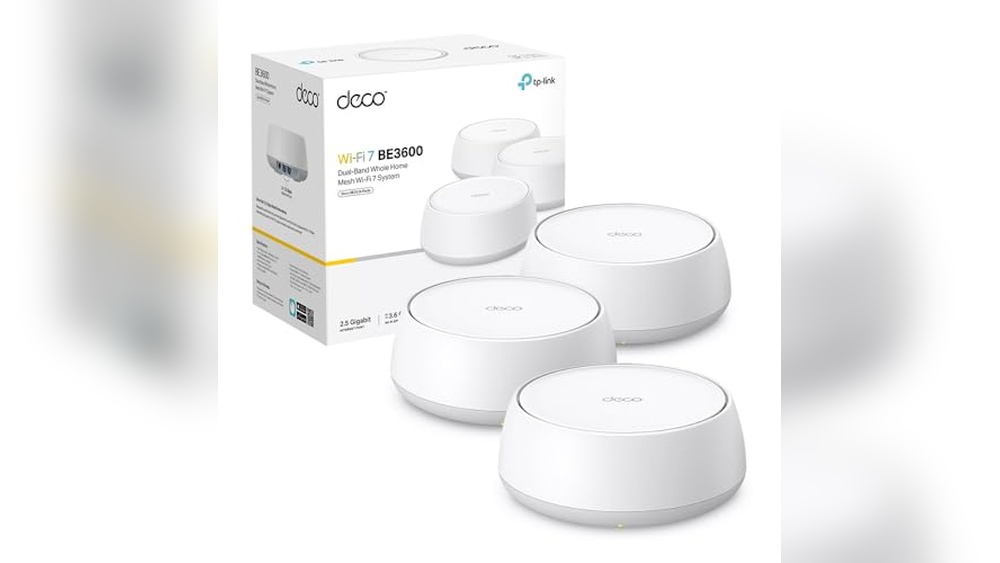
Tp-link Deco Be25 Wifi 7 Mesh
A top choice among Best Mesh Routers for Fiber Internet, the TP-Link Deco BE25 WiFi 7 Mesh makes high-speed connectivity simple for busy homes.

The TP-Link Deco BE25 WiFi 7 Mesh is a mesh system that helps eliminate dead zones and lag in homes with fiber internet. Its dual-band WiFi delivers up to 3. 6 Gbps, with both wired and wireless backhaul for smooth, uninterrupted coverage.
If you’re tired of signal drops or slow speeds, this system addresses those issues with smart roaming and multi-link operation.
In day-to-day use, it feels seamless—devices switch between nodes without disconnecting, so you don’t notice when you move between rooms. The AI-driven roaming and HomeShield features mean you spend less time troubleshooting and more time enjoying consistent, protected internet. Setup is quick, and once running, it maintains a stable connection even with many users online.
Why It Stands Out For Fiber Internet
- Handles high-speed fiber connections with ease
- Smart AI-roaming provides seamless coverage throughout the home
- Dual-band speeds reduce slowdowns for multiple devices
- Two 2.5 Gbps Ethernet ports for fast wired connections
- HomeShield adds real-time network security and parental controls
- Works with any ISP, modem, or Alexa
Potential Drawbacks To Consider
- Physical units are larger than some competitors
- Advanced features may require a learning curve for beginners
- No tri-band option for extreme device loads
Who This Fits Best
The Deco BE25 WiFi 7 Mesh is best for households with high-speed fiber and multiple users who want simple, reliable whole-home coverage. It removes stress by letting you roam freely without worrying about losing your signal or setting up complicated networks.
For big homes, placing units strategically is the key tip—aim for open spaces to maximize coverage.
If you want a network that just works and keeps your family safe online, this is a solid choice. The built-in HomeShield and seamless roaming mean fewer surprises and fewer calls for tech support. Personally, I like how it combines wired and wireless backhaul for extra flexibility without extra effort.
| Best for | Why |
|---|---|
| Fiber internet homes | Keeps up with gigabit speeds and reduces dead zones |
| Families with many devices | Smart roaming ensures smooth streaming and gaming |
| Users who want network security | HomeShield adds parental controls and device protection |
| People upgrading from single routers | Mesh setup is easy and removes coverage headaches |
Tp-link Deco X1500 Mesh Wifi 6 (2-pack)
A solid choice among the Best Mesh Routers for Fiber Internet, this TP-Link Deco X1500 set is ideal for homes needing wide, stable coverage with modern WiFi 6 speeds.

The TP-Link Deco X1500 Mesh WiFi 6 (2-Pack) is designed to solve spotty coverage and slow speeds in medium to large homes. With two units, you can extend fast, reliable WiFi to every corner, eliminating dead zones. Its WiFi 6 technology supports multiple devices at once, making it a practical solution for families or shared spaces where everyone is connected.
Living with this mesh system means seamless roaming as you move from room to room, without having to reconnect or worry about drops. Setup is straightforward, and the included parental controls add peace of mind for households. Once installed, you can expect stable internet for streaming, video calls, or gaming, without the hassle of constant resets or troubleshooting.
Key Benefits For Fiber Internet Users
- Strong, fast WiFi 6 coverage across up to 370㎡
- Handles many devices at once without slowing down
- Unified network for seamless roaming between rooms
- Low latency for gaming and smooth video chats
- Easy setup and built-in parental controls
- Compatible with Amazon Alexa for hands-free control
Things To Keep In Mind
- May be more than needed for very small apartments
- No advanced customization for power users
- Only two Ethernet ports per unit
When I’d Pick This
This mesh kit is a great fit for households with fiber internet looking for reliable, whole-home coverage—especially if your current router leaves weak spots or can’t keep up with everyone’s devices. The Deco X1500 cuts out the frustration of dropped connections and confusing network setups, letting you focus on enjoying your fast internet.
For best results, place each unit in open areas to maximize coverage and always update the firmware for the latest improvements. You’ll get peace of mind from fewer connection issues and a network that just works, even as your needs grow.
If you want to avoid the trial and error of mixing extenders or fiddling with settings, this system keeps things simple and dependable.
| Best for | Why |
|---|---|
| Homes with fiber internet | Takes full advantage of high-speed connections and wide coverage |
| Families with many devices | Handles multiple simultaneous connections without lag |
| Users wanting easy setup | Simple installation and unified network management |
| Gaming or video calls | Low latency performance for smooth, real-time experiences |
Tp-link Deco M4 Mesh Wi-fi System
One of the Best Mesh Routers for Fiber Internet, the Deco M4 excels at delivering seamless coverage for medium-sized homes.

The TP-Link Deco M4 Mesh Wi-Fi System is designed to eliminate dead zones and provide consistent, high-speed internet throughout your home. It’s a dual-band AC1200 setup that works as both a router and access point, making it flexible for different fiber internet connections.
If you need reliable coverage up to 260m², this two-pack solves the problem of weak signals in corners and multi-story spaces.
Using the Deco M4 feels effortless, with devices automatically roaming between units without dropped connections. Parents will appreciate the advanced parental controls, and prioritizing specific apps is easy with built-in QoS. Daily usage is smooth—streaming, gaming, and video calls stay strong and stable, so you spend less time troubleshooting and more time enjoying your fiber internet.
Why It Stands Out For Fiber Internet Users
- Seamless roaming keeps devices connected everywhere
- Fast mesh Wi-Fi up to 1167 Mbps for consistent speeds
- Simple expansion—add units for broader coverage
- Dual Ethernet Gigabit ports for stable wired connections
- Advanced parental controls for safer browsing
- Quality of Service settings to prioritize important apps
Potential Limitations To Consider
- Maximum coverage may require additional units for larger homes
- No Wi-Fi 6 support—AC1200 may not suit heavy future-proofing needs
- Design is minimalist but may not blend with all décor
Where This Shines
This mesh system is ideal for families and professionals who want stable fiber internet without the hassle of managing multiple routers. It removes the guesswork of signal strength and gives peace of mind with easy expansion and robust parental controls.
The Deco M4 is particularly useful in homes with thick walls or multiple floors, where basic routers often fail.
You’ll notice fewer interruptions and smoother transitions as you move around. To maximize results, place each unit in open spaces for the best signal flow. With TP-Link’s reliability, you can expect consistent coverage and fewer surprises—making everyday internet use stress-free.
Personally, I find its setup process refreshingly straightforward.
| Best for | Why |
|---|---|
| Medium-sized homes | Covers up to 260m² with two units |
| Families with kids | Advanced parental controls for safer browsing |
| Fiber internet users | Maintains high-speed, stable connections |
| Multiple device households | Seamless roaming and QoS prioritize performance |
Tp-link Archer Vr400 Mesh Router
For Best Mesh Routers for Fiber Internet, the TP-Link Archer VR400 stands out with reliable coverage and flexible mesh expansion.

The TP-Link Archer VR400 Mesh Router is a dual-band modem router that solves coverage issues for fiber internet users. It supports DSL, fiber, and ethernet connections, making it a flexible option for homes that need stable Wi-Fi. With OneMesh technology, you can easily add compatible TP-Link mesh extenders to improve coverage without replacing your existing router.
Using this router feels seamless: connection speeds are steady, and setup is straightforward. The dual antennas and beamforming tech keep your devices connected in more rooms, and MU-MIMO ensures multiple users get smooth streaming or downloads. You won’t have to worry much about dead spots or lag, which brings real confidence to daily use.
Reliable Performance Points
- Works with fiber, DSL, and ethernet for broad compatibility
- OneMesh lets you expand coverage with compatible extenders
- Dual-band Wi-Fi delivers fast speeds on both 2.4GHz and 5GHz
- Beamforming tech keeps connections stable throughout your space
- MU-MIMO reduces wait time for multiple devices
- Easy to set up and manage
- Four gigabit ports for wired connections
Points To Consider Before Buying
- Not suitable for VoIP phone services
- Mesh expansion requires specific TP-Link extenders
- No built-in advanced parental controls
Who This Fits Best
The Archer VR400 is ideal for households with fiber internet that want reliable Wi-Fi and flexible mesh upgrades without buying a full mesh system. If you value stable coverage and easy expansion, it takes away the hassle of dead zones and confusing setup steps.
It’s especially useful if you already own TP-Link OneMesh extenders or plan to add them. My tip: check compatibility with your ISP and existing devices before purchase, so you don’t run into surprises. Once set up, you get peace of mind from consistent speeds and fewer interruptions—perfect for streaming, remote work, or everyday browsing.
| Best for | Why |
|---|---|
| Homes with fiber or DSL internet | Compatible with multiple connection types |
| Users needing mesh expansion | OneMesh enables affordable coverage upgrades |
| Multiple device households | MU-MIMO keeps connections smooth for all |
| Those seeking simple setup | Quick installation and easy management |
Tp-link Deco X50 Wifi 6 Mesh (2-pack)
As one of the Best Mesh Routers for Fiber Internet, this TP-Link Deco X50 system covers large homes and supports many devices seamlessly.

The TP-Link Deco X50 WiFi 6 Mesh (2-Pack) is designed for homes with high-speed fiber internet, eliminating dead zones and giving strong, consistent coverage up to 400 m². It’s easy to set up, and connects over 150 devices at once, making it ideal for busy households or small offices.
Using this mesh system feels hassle-free. The Deco app guides you step-by-step, so you spend less time tweaking settings. Once installed, the network stays stable, and you don’t have to worry about dropped connections—even with multiple streaming, gaming, or work devices online.
Security features and parental controls add peace of mind, letting you focus on what matters.
Key Advantages For Fiber Internet Users
- Full home coverage with WiFi 6 mesh up to 400 m²
- Handles over 150 devices simultaneously
- Ultra-fast speeds up to 3000 Mbps
- Compatible with all fiber internet providers
- Easy setup and remote management via Deco app
- Advanced security: WPA3 encryption and parental controls
- Multiple Gigabit ports for wired connections
Points To Consider Before Buying
- May be oversized for small apartments
- White color might not suit all décor styles
- App setup required—less ideal for those who prefer manual controls
Who This Fits Best
If you have a large home or office and want dependable fiber internet coverage everywhere, this mesh kit is a practical choice. It removes the stress of weak signals and the guesswork of managing multiple devices. Families with lots of gadgets or parents needing easy controls will appreciate the built-in security and parental features.
For smoother streaming and gaming, connect your most demanding devices directly to the Gigabit ports. Once set up, you can manage the network from anywhere, so there are fewer surprises and more reliability. I find the Deco app makes setup less intimidating, even for those new to mesh routers.
| Best for | Why |
|---|---|
| Large homes with fiber internet | Blankets every corner with fast, stable WiFi |
| Families with many devices | Supports 150+ connections without lag |
| Parents wanting easy controls | Built-in parental settings and app management |
| Remote workers and gamers | Ultra-fast speeds and reliable wired ports |
Fritz!mesh Set 1600 Wi-fi 6 Mesh System
For those seeking Best Mesh Routers for Fiber Internet, this FRITZ!Mesh Set delivers reliable Wi-Fi coverage and easy setup for homes with multiple rooms.

This mesh system from FRITZ! Is designed to bring stable Wi-Fi 6 connectivity to homes with fiber internet. It solves the problem of weak signals in larger spaces by using three repeaters, ensuring seamless coverage for up to seven rooms.
The setup is simple, making it a good fit if you want to avoid complex installation steps.
In daily use, the FRITZ!Mesh Set delivers dependable internet throughout your home. You won’t have to worry about dead zones or lag when multiple devices are connected. The plug & play approach means you can get up and running quickly, and the system works with any existing router or modem for added flexibility.
Key Advantages For Fiber Internet Homes
- Wi-Fi 6 delivers fast speeds up to 3,000 Mbit/s
- Covers 5–7 rooms for whole-home connectivity
- Works with any router or fiber modem
- Quick plug & play setup saves time
- Stable mesh network reduces dropped connections
- High security standards for peace of mind
- Made in Europe for quality assurance
Points To Consider Before Buying
- May be oversized for small apartments or single-room use
- No advanced customization options mentioned
- Physical footprint could be noticeable in smaller spaces
Who This Fits Best
This mesh system is ideal for households with fiber internet who want consistent Wi-Fi in multiple rooms, especially in homes with 5 to 7 spaces. It takes away the hassle of dealing with complex setup and network interruptions, so you get a smoother online experience for work, streaming, and smart devices.
If you’re tired of moving your device around to find a strong signal, this kit solves that problem with its mesh coverage. To get the best results, place the repeaters in open areas between rooms to maximize reach and speed.
The strong security standards mean you can relax knowing your network stays protected without extra effort.
I appreciate how this system removes guesswork from network upgrades, making it a solid choice for anyone who values reliability and ease.
| Best for | Why |
|---|---|
| Homes with fiber internet | Supports fast Wi-Fi 6 speeds and works with fiber modems |
| Multi-room coverage | Mesh network extends reliable signal to 5–7 rooms |
| Quick, easy setup | Plug & play configuration gets you connected fast |
| Security-conscious users | High standards and European manufacturing for trust |
Tenda Nova Mw3 Mesh Wifi System
A reliable pick among Best Mesh Routers for Fiber Internet, ideal for users seeking seamless coverage and easy parental controls.

The Tenda Nova MW3 Mesh WiFi System is a dual-band solution designed to eliminate dead spots and extend WiFi throughout your home. With mesh technology and two units covering up to 200 m², it offers a stable connection for families who want hassle-free streaming, gaming, and browsing across multiple rooms.
Using the MW3 feels effortless—devices automatically connect to the strongest signal as you move around. Parental controls add peace of mind, letting you easily manage internet access for children. The system is simple to set up, and you’ll notice smoother video calls and reliable performance for all your devices.
What Makes Mw3 Stand Out
- Mesh technology eliminates WiFi dead zones
- Automatic seamless roaming for uninterrupted connectivity
- Handles up to 40 devices at once
- Dual-band speeds for smooth streaming and gaming
- Smart bandwidth allocation with MU-MIMO and QoS
- Easy parental controls for safer browsing
- Compact design fits discreetly in any room
Points To Consider Before Buying
- Fast Ethernet ports, not gigabit—may limit speed for wired fiber users
- Coverage limited to about 200 m² with two units
- No advanced guest network options beyond basic controls
Who This Fits Best
This mesh system is a solid match for families or small households with fiber internet who want consistent WiFi everywhere, without complicated setups. It’s especially useful for parents looking to manage kids’ online access effortlessly and those who need reliable coverage for multiple devices.
The MW3 removes the frustration of dropped connections and manual switching. To get the best results, place each unit in open spaces for optimal coverage. You’ll enjoy dependable internet with fewer interruptions and feel confident about your network’s stability.
If you prefer simplicity and want to avoid technical headaches, this is a practical pick. I appreciate how it quietly keeps everything connected without drawing attention.
| Best for | Why |
|---|---|
| Homes with fiber internet | Mesh system prevents WiFi dead spots and uses fiber speeds efficiently |
| Families needing parental controls | Built-in features make it easy to manage kids’ access |
| Multi-device households | Supports up to 40 devices without performance drops |
| Users prioritizing easy setup | Quick installation and automatic roaming for hassle-free use |
Gl.inet Opale Travel Mesh Router
A standout in Best Mesh Routers for Fiber Internet, this compact router is ideal for travelers needing secure, fast connectivity on multiple devices.

The GL. iNet Opale Travel Mesh Router is a dual-band AC1200 wireless router designed for secure, high-speed internet access. Its portable, lightweight build makes it easy to carry on trips, and the gigabit ports ensure reliable wired connections for fiber internet users.
Using this router feels straightforward and worry-free, especially when connecting to public WiFi or setting up a private network in unfamiliar places. It’s simple to switch between access point or repeater modes, giving peace of mind and consistent performance wherever you are.
Why It Stands Out For Travelers
- Compact and lightweight for easy travel
- Dual-band speeds handle streaming and gaming
- Gigabit ports support fast fiber connections
- Built-in VPN support for secure browsing
- Quickly turns public WiFi into private, safe access
- Supports IPv6 for modern internet compatibility
- Easy switch between access and repeater modes
Consider Before Buying
- Limited RAM may not suit heavy multi-user households
- No support for easy tethering from phones
- May require manual reconnection on timed public WiFi
Who This Fits Best
This router is best for frequent travelers who want reliable, private internet access in hotels, Airbnbs, or public spaces. It helps remove the hassle of worrying about security or slow connections when using fiber internet away from home.
If you want to protect your privacy and enjoy stable speeds wherever you go, the Opale is a smart pick. To get the most from it, set up VPN profiles in advance and keep the router handy for quick network switches.
You can count on consistent performance and safe browsing without surprises.
I like how it fits easily in my bag and simplifies networking on the road.
| Best for | Why |
|---|---|
| Travelers needing secure WiFi | Portable, easy setup, private network from public hotspots |
| Fiber internet users in hotels | Gigabit ports maximize fast fiber speeds |
| Remote workers on the move | VPN support ensures privacy and safe connections |
| Small apartments or temporary setups | Dual-band coverage handles streaming and browsing |
Tp-link Deco Ax1500 Mesh Wifi 6 Router
A smart pick for Best Mesh Routers for Fiber Internet if you want seamless coverage and simplified controls throughout your home.

The TP-Link Deco AX1500 Mesh WiFi 6 Router helps eliminate dead zones and inconsistent speeds by creating a unified wireless network in your home. Its mesh technology keeps your devices connected as you move, so you don’t have to worry about dropping off the network.
If you have fiber internet, this router is built to handle higher speeds and reduce lag.
Daily use feels easy and reliable. You can control advanced features like parental controls and security straight from an app. The setup process is guided and quick, which makes upgrading from an older router painless. Your devices stay connected, with fewer interruptions—even as your family moves from room to room.
Where This System Excels
- Unifies your WiFi coverage for seamless roaming
- Easy app-based setup and management
- Supports Wi-Fi 6 for faster, more efficient internet
- Advanced security and parental controls built-in
- Handles multiple devices without slowdowns
- Two gigabit ports for wired connections
Keep In Mind Before You Buy
- Single unit covers up to 190 m²—large homes may need more units
- No USB ports for storage or printer sharing
- Basic design may not appeal to those seeking premium aesthetics
Who This Fits Best
This mesh router is a strong fit for small to medium homes with fiber internet, especially if you want your devices to stay connected without interruption as you move around. It removes the hassle of switching networks or reconnecting when you walk from room to room, saving you time and frustration.
If you want to easily manage security or set limits for kids, everything is handled in one app—no tech expertise needed. For best results, place the router in a central spot and use the app’s coverage suggestions. You’ll enjoy steady, reliable speeds and peace of mind, knowing your network is protected and simple to control.
I appreciate how little attention this system needs once it’s running.
| Best for | Why |
|---|---|
| Homes with fiber internet up to 190 m² | Delivers fast, stable speeds throughout mid-sized spaces |
| Families with many devices | Handles simultaneous connections with MU-MIMO and OFDMA |
| Users wanting simple security controls | HomeShield app makes setup and monitoring easy |
| People upgrading from old routers | Guided setup reduces stress and guesswork |
Mercusys Halo H1500x Mesh Wifi 6
One of the Best Mesh Routers for Fiber Internet, the Mercusys Halo H1500X delivers wide coverage and simple controls for busy homes.

The Mercusys Halo H1500X Mesh WiFi 6 is a dual-pack system designed to blanket your entire home with strong, seamless WiFi. It solves the problem of dead zones and unreliable signals, especially in larger spaces, making it a fit for families or shared apartments.
Its standout feature is compatibility with all internet providers, including fiber, so you don’t need to worry about switching services.
Day-to-day, this mesh system means devices stay connected as you move from room to room, with no need to change networks. Setup is guided through the Mercusys app, which makes getting started straightforward, even for non-technical users. The parental controls add peace of mind if you have children online, and the fast speeds keep streaming and gaming smooth for everyone.
Key Advantages For Busy Households
- Reliable WiFi coverage up to 350㎡ with two units
- Handles over 150 devices at once without slowing down
- Easy setup and management through the dedicated app
- Supports WiFi 6 for faster speeds and better efficiency
- Works with all internet providers, including fiber
- Seamless roaming with one network name and password
- Built-in parental controls for safer browsing
Consider Before Buying
- Two-pack may be more than needed for smaller apartments
- No advanced customization for tech enthusiasts
- Limited to three wired connections per unit
The Simple Use Case
This system is ideal for families or anyone with a busy home who wants WiFi everywhere without the hassle. It’s especially useful if you have a mix of smart TVs, phones, tablets, and work devices that need a steady connection.
With simple controls and wide compatibility, it removes the stress of complex networking setups or changing ISPs.
If you want to get the best results, place each unit at opposite ends of your living space for even coverage. The Halo H1500X provides reliable performance, so you can trust your connection stays strong, even when everyone is online.
Personally, I appreciate how it makes home networking something you can set up once and then forget about.
| Best for | Why |
|---|---|
| Large homes with fiber internet | Expands fast WiFi to every corner without dead zones |
| Families with many devices | Supports over 150 connections at the same time |
| People who want hassle-free setup | Guided app makes installation simple and quick |
| Anyone needing parental controls | Built-in tools help manage internet access for kids |
How To Choose The Right Mesh Wifi System
- Coverage Needs: Consider the size of your home and the number of floors. Mesh systems vary in coverage, from small apartments to large multi-room houses. Adding extra units increases coverage, but too many can be unnecessary.
- Device Capacity: Think about how many devices you connect at once. Some systems are designed for dozens of devices, while others can handle hundreds. If you have smart home gadgets or stream on many screens, prioritize higher device support.
- Wired vs Wireless Backhaul: Wired connections between nodes offer lower latency and more stable speeds. If your home allows, look for models with multiple Ethernet ports. Wireless-only systems are easier to set up but may face more interference.
- Features That Matter: Parental controls, security tools, and easy app management are common. Decide which features you genuinely need. Advanced users might want VPN or custom settings, while most households value simple setup and stable roaming.
Common Mistakes When Setting Up Mesh Wifi
- Placing nodes too close or too far apart. This can lead to weak signals or wasted coverage.
- Ignoring interference sources like microwaves or cordless phones. These can disrupt WiFi performance.
- Not updating firmware. Keeping devices current prevents security risks and improves reliability.
- Overlooking wired backhaul options when available. Wired links often boost performance.
Who Should Avoid Mesh Wifi Systems
- Small apartments or single-room spaces. Traditional routers may be simpler and cheaper.
- Users needing very advanced network customization. Mesh systems often limit deep settings compared to prosumer routers.
- Anyone with internet speeds below 100 Mbps. Mesh benefits become more visible with faster connections and multiple devices.
Setup And Usage Tips
- Place the main unit near your modem and away from obstructions.
- Position satellites centrally on each floor for balanced coverage.
- Use app-guided setup to avoid manual errors.
- Schedule regular device reboots if you notice drops or lag.
Faqs
Will Mesh Systems Work With Any Internet Provider?
Most mesh systems are compatible with standard ISPs as long as you have a modem. Check specific requirements for DSL or fiber connections.
Can I Mix Different Brands Of Mesh Units?
Mixing brands is rarely supported. It’s best to use all units from the same manufacturer for seamless roaming and setup.
Do Mesh Systems Replace My Existing Router?
Yes, mesh systems act as your router. They connect to your modem and create a unified network throughout your home.
What Happens If One Node Loses Power?
The network may reroute traffic, but coverage in that area will drop. Restore power to maintain full coverage.
Are Mesh Systems Secure?
Most offer WPA3 encryption and parental controls. Updating firmware and using built-in security features protects your network.
Is A Mesh System Necessary For Fast Internet?
Mesh is most useful for large spaces or many devices. If your speed is high but your coverage is fine, a single router may suffice.
Final Thoughts
Mesh WiFi systems address coverage and reliability issues for modern homes. Before choosing, assess your space, device needs, and desired features. Consider whether mesh is the best fit or if a simpler setup meets your requirements. With thoughtful placement and regular updates, most users will see stable, seamless connectivity throughout their home.