
It’s easy to get frustrated when your Verizon Fios box is tucked away and your remote just won’t reach, or when the controls lag because the signal can’t get through. Many people want to clean up their TV setup, but end up confused when their remotes or IR blasters don’t work as expected.
Choosing an IR blaster or remote for Verizon Fios isn’t simple. Some options let you control devices in a closed cabinet, others extend the signal to another room. There are kits for universal setups and direct replacements for specific remotes.
Each trade-off affects convenience, compatibility, and budget.
This guide will help you figure out which type of IR blaster or remote makes sense for your setup, so you avoid common mistakes and end up with something that actually works in your home.
Why Picking The Right Ir Solution Can Be Tricky
There are universal kits and dedicated remotes. Some work with a wide range of devices, others only with specific Fios models. Not all extenders are truly wireless, and installation can range from plug-and-play to a tangle of cables. Price doesn’t always match ease of use or reliability.
Many people overlook whether their TV, sound system, and Fios box are all compatible with the same solution.
How To Think About Your Choice
Start with how you use your devices. If your gear is behind closed doors or in another room, look for a reliable IR extender. If you just need a replacement remote, a compatible model is enough. Think about who will use it—some setups are simple for anyone, others need more patience.
Decide what you want to control, how far you’ll be, and whether you want simple voice commands or standard button presses. This helps narrow your options without focusing on technical details.
Below you’ll find a range of IR blasters, extenders, and replacement remotes. Each one suits a different kind of setup and user. Look for the one that matches how you watch TV and control your devices.
Hdtvhookup Mini Ir Receiver For Verizon Fios
Best Ir Blaster for Verizon Fios users who want to hide their cable box while keeping remote control access reliable and simple.
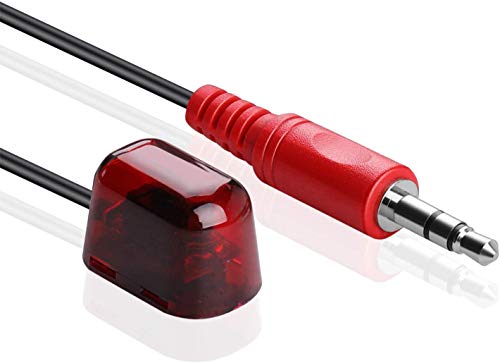
The HdtvHookup Mini IR Receiver helps you control your Verizon FiOS cable box even when it’s hidden away. Its compact size means you can easily place it in tight spots without drawing attention or cluttering your setup. If you want to keep your entertainment space tidy but still need reliable remote control, this receiver is designed for you.
Using it feels straightforward: plug it in, position the receiver, and operate your equipment as usual. There’s no complicated setup—just a simple, plug-and-play solution that works with your existing remote. You’ll notice the convenience right away, especially if you value a clean look without visible boxes.
Why People Choose This Ir Extender
- Lets you hide your cable box for a neat space
- Works reliably with Verizon FiOS and other major cable providers
- Very small—easy to place or conceal
- Simple plug-and-play installation
- Supports long IR range for flexible placement
- Compatible with multiple IR frequencies
- Replaces several legacy IR extender models
Consider Before Buying
- No advanced smart home integration
- Wired connection—cable must be managed
- Only for devices with IR IN port
My Practical Take
This IR receiver is a great pick if you want your Verizon FiOS box out of sight but still want full control. It takes away the hassle of pointing your remote at the box or leaving equipment exposed. Just remember to check if your box has an IR IN port before buying.
To get the best results, place the receiver where it has a clear path to your remote for reliable response. It brings peace of mind by working across a wide IR range, so you get consistent performance and fewer missed commands.
If you value a tidy, clutter-free TV area, this is a smart, straightforward solution.
| Best for | Why |
|---|---|
| Hiding cable boxes | Keeps devices out of sight while keeping remote use easy |
| Verizon FiOS users | Specifically compatible and reliable with FiOS boxes |
| Simple plug-and-play setups | No software or complex installation required |
| Replacing old IR extenders | Works as a direct replacement for several legacy models |
Zwp Voice Remote For Verizon Fios Tv One
The ZWP Voice Remote stands out as the Best Ir Blaster for Verizon Fios users needing reliable, easy control for their TV One set top box.

The ZWP Voice Remote for Verizon FiOS TV One is a replacement remote designed specifically for the RC552 model set top box. It solves the frustration of lost or malfunctioning remotes by offering quick pairing and reliable performance, especially for users who need strong IR signal from multiple angles.
Using it feels straightforward and dependable. The pairing process is simple, and once set up, you can control your TV box without worrying about line-of-sight issues. The remote’s sturdy ABS build adds confidence that it will withstand everyday drops and handling, making it practical for families or anyone prone to dropping remotes.
What Makes This Remote Stand Out
- Works seamlessly with Verizon FiOS TV One (RC552 models)
- Strong, stable infrared signal for consistent control
- Quick pairing process with clear LED feedback
- Fast 0.2s response time for instant action
- Durable ABS material resists damage from falls
- Multi-angle control—no need to point directly
- No chemical smell, safe for households
Points To Consider Before Buying
- Only compatible with specific Verizon FiOS TV One set top boxes
- Batteries are not included
- Not suitable for other brands or models
Where This Shines
This remote is best for Verizon FiOS users who want a straightforward, dependable replacement without compatibility headaches. It takes the hassle out of setup, thanks to its easy pairing process and clear LED indicators, so you won’t waste time guessing if it’s connected.
If you need consistent control from anywhere in the room, the strong IR signal gives you peace of mind and reduces the stress of missed button presses. For best results, insert fresh batteries before pairing and keep the simple instructions handy.
In my experience, this remote gives reliable, no-fuss operation day after day.
| Best for | Why |
|---|---|
| Verizon FiOS TV One RC552 users | Designed for exact compatibility and smooth pairing |
| Families with kids | Durable ABS material withstands drops and rough use |
| Multi-angle control needs | Strong IR signal works without precise aiming |
| Quick, frustration-free setup | Simple pairing process with LED status feedback |
Sofabaton R1 Ir Signal Extender
The Best Ir Blaster for Verizon Fios users who need seamless control of hidden devices without line of sight.

The SofaBaton R1 IR Signal Extender is designed to let you control IR-based devices, like TVs or set-top boxes, even if they’re hidden away in cabinets or separate rooms. It solves the common problem of remote signals not reaching your equipment when doors are closed or devices are out of sight, thanks to its strong IR broadcasting and RF-to-IR conversion capability.
Using this device is straightforward and makes daily TV or media use feel more reliable. With 360° IR coverage and simple app-based pairing, you don’t have to worry about pointing your remote precisely. It’s easy to set up, and you’ll quickly notice less hassle when managing your home theater or Verizon Fios box.
Key Functional Advantages
- Controls devices hidden behind doors or in other rooms
- 360° IR coverage with high-power emitters
- Flexible placement for optimal signal reach
- App-based pairing and updates
- Includes a 3m wired IR blaster for precise targeting
- Removes need for line-of-sight
- 1-year warranty provides extra confidence
Consider Before Buying
- Only compatible with Sofabaton X2/U3 and newer remotes
- Requires USB-C power (adapter included)
- Does not broadcast IR signals downward
Who This Fits Best
This IR signal extender is ideal for anyone using Verizon Fios equipment tucked away in cabinets or closets, especially if you already have a Sofabaton X2 or U3 remote. It removes the hassle of leaving doors open or aiming your remote perfectly, saving you time and keeping your setup looking neat.
A quick tip: Position the included wired blaster close to your device’s sensor for best results, especially if your gear is particularly hidden. With the 1-year warranty and reliable signal coverage, you can relax knowing your remote commands will get through consistently. If you like a clean, uncluttered entertainment area, this solution just fits.
| Best for | Why |
|---|---|
| Hidden Verizon Fios boxes | Enables control without opening cabinets or closets |
| Multiple devices in different rooms | 360° IR coverage and RF-to-IR conversion reach further |
| Sofabaton X2/U3 remote users | Seamless compatibility and easy setup |
| Neat, uncluttered entertainment centers | Removes the need for visible equipment or cables |
Tnp Wireless Ir Repeater Kit
Best Ir Blaster for Verizon Fios users who want seamless remote control across rooms and devices.

The TNP Wireless IR Repeater Kit lets you control your Verizon Fios set-top box and other devices even when they’re out of sight. It solves the common problem of needing a direct line of sight for IR remotes, extending control up to 500 feet through walls or doors.
Using this kit feels effortless—once installed, you can adjust channels or volume from another room without moving. The setup is straightforward, making it easy to add remote flexibility to multi-room homes or entertainment setups. It brings confidence that your remotes will just work, wherever you are in your space.
Where This Ir Blaster Excels
- Works through walls, doors, and obstacles
- Supports a wide range of IR-controlled devices
- Easy, all-in-one installation process
- No direct line of sight required
- Ideal for large or multi-level homes
- Modern, minimal design blends in easily
Things To Consider Before Buying
- Requires compatible IR devices (not for Bluetooth-only remotes)
- Performance may vary with complex wall structures
- No smart-home integration beyond IR compatibility
Who This Fits Best
This kit is best for people with Verizon Fios or similar setups who want true flexibility controlling devices hidden away or placed in different rooms. It removes the hassle of aiming remotes or walking between rooms, making entertainment control simple and frustration-free.
For best results, place the IR receiver and emitter in clear, unobstructed spots near your devices. This ensures reliable signal transmission and fewer surprises during daily use. If you value convenience and want to avoid remote control headaches, this is a practical upgrade that delivers peace of mind for busy households.
| Best for | Why |
|---|---|
| Controlling Fios boxes behind closed cabinets | No need for direct line of sight |
| Multi-room TV setups | Signal reaches through walls and floors |
| Households with multiple entertainment devices | Compatible with most IR-controlled electronics |
| Users wanting clutter-free setups | Minimal design keeps spaces tidy |
Verizon Fios Tv One Voice Remote
The Best Ir Blaster for Verizon Fios if you want a simple, voice-enabled replacement remote that’s quick to set up and covers all your devices.

The Verizon FiOS TV One Voice Remote is designed as a direct replacement for lost or broken FiOS remotes, especially for those using the 2019 MG3-R32140B and VRC4100 BLE models. It solves the hassle of juggling multiple remotes by letting you control your TV box, compatible TVs, and audio devices with a single unit.
The built-in microphone enables easy voice commands for fast navigation and searching.
Using this remote feels straightforward and modern. Voice search makes finding channels and apps quick, while the setup process is simple and stress-free. You won’t have to worry about compatibility, and switching between devices is seamless. It’s a hassle-free way to keep your entertainment system running smoothly.
Why Users Choose This Remote
- Compatible with Verizon FiOS TV One and specific 2019 models
- Voice control for hands-free operation
- Controls TV box, TV, and audio devices in one remote
- Quick and easy pairing process
- Reliable as a main or backup remote
Potential Considerations
- Only supports select FiOS TV One models (2019 MG3-R32140B & VRC4100 BLE)
- Not suitable for older FiOS boxes or non-Fios systems
- No advanced customization options beyond standard controls
What I’d Tell A Friend
If you need a remote that just works with your Verizon FiOS TV One system, this is a straightforward choice. It’s best for anyone who wants to skip the confusion of programming or pairing multiple remotes and just get back to enjoying their shows.
The voice feature removes the usual hassle of typing or navigating menus.
For the most reliable results, make sure your FiOS box matches the supported models before purchase. A quick pairing at setup means you can relax knowing your remote will work right away, with fewer surprises down the road. I like that it’s equally useful as a main or backup remote, so you’re never left without control.
| Best for | Why |
|---|---|
| Verizon FiOS TV One users (2019 models) | Direct compatibility and easy setup |
| Anyone replacing a lost/broken remote | No extra programming or configuration needed |
| People who prefer voice commands | Built-in microphone for hands-free control |
| Households with multiple devices | Controls TV box, TV, and audio devices together |
Fqoug Fios Tv One Voice Remote
Best Ir Blaster for Verizon Fios users who want seamless replacement and fast pairing for their TV One remote.

The FQOUG FiOS TV One Voice Remote is a direct replacement for your Verizon FiOS remote, designed for hassle-free pairing with compatible 2019 MG3-R32140B VRC4100 BLE models. It solves the frustration of unreliable remotes by offering easy step-by-step pairing and stable signal performance, so you can get back to controlling your entertainment quickly.
Using this remote feels smooth and reliable, thanks to its fast response and wide control range. The comfortable grip and durable build mean you can use it daily without worry, while the simple pairing process removes the usual guesswork. It’s made for users who want consistency and a straightforward setup with their FiOS system.
Key Decision Advantages
- Effortless pairing with FiOS TV One systems
- Lightning-fast response (≤0.2 seconds)
- Stable signal transmission and broad control angle
- Durable ABS body resists daily wear
- Comfortable grip and responsive silicone buttons
- Supports over 150,000 clicks for long-term reliability
- Easy voice remote programming for TV and audio
Things To Consider
- Only compatible with specific 2019 FiOS models
- No built-in learning for non-FiOS devices
- Requires manual setup for some TV brands
Who This Fits Best
This remote is best for Verizon FiOS users who need a reliable, quick-to-pair replacement for their TV One system. It removes the stress of complicated setups and unreliable button response, making daily use much easier. For those who value straightforward operation and durability, it checks all the boxes.
To get the best results, follow the pairing instructions closely—holding the [Play/Pause] and [0] buttons until the blue light flashes ensures proper connection. The robust build means fewer surprises from dropped or damaged remotes, so you can trust it for everyday use.
If you want a remote that simply works and feels good in your hand, this is a practical pick.
| Best for | Why |
|---|---|
| FiOS TV One users needing a replacement | Pairs easily with 2019 MG3-R32140B VRC4100 BLE models |
| People seeking fast remote response | Infrared 3.0 tech delivers instant control |
| Frequent remote users | Long-lasting build supports heavy daily use |
| Anyone wanting simple setup | Clear instructions and easy programming reduce hassle |
Pzl Voice Remote For Verizon Fios Tv One
Best Ir Blaster for Verizon Fios users who want a simple, compatible remote replacement without extra hassle.

This PZL Voice Remote is designed specifically to replace lost or non-working remotes for Verizon FiOS TV One systems. It solves the problem of missing or faulty remotes by offering reliable compatibility with the 2019 MG3-R32140B VRC4100 BLE models. The pairing process is straightforward, making it easy for anyone to set up without extra tech knowledge.
Using this remote in daily life means quick, frustration-free access to your FiOS TV features. You don’t have to worry about complex programming or compatibility issues—just pair and go. The buttons are responsive, and the remote feels comfortable in hand, giving you confidence every time you use it.
What Makes This Remote Stand Out
- Guaranteed compatibility with Verizon FiOS TV One (not Frontier)
- Simple pairing instructions—no technical skills needed
- Works as a backup or primary remote
- Solves immediate remote control failures
- Lightweight and easy to handle
- Responsive after-sales support within 24 hours
Points To Consider Before Buying
- Not compatible with Frontier systems
- Batteries and instructions are not included
- Only fits specific 2019 FiOS TV One models
What I’d Tell A Friend
This PZL Voice Remote is best for Verizon FiOS TV One users who want a fast, direct replacement without compatibility worries. It takes away the stress of searching for the right remote or struggling with setup. If your original remote stops working, this one helps you get back to watching TV quickly and easily.
To get started, just follow the pairing instructions—hold [Play/Pause] and [0] for three seconds—and you’re set. Having this as a backup means fewer surprises when the original remote fails. For peace of mind, keep a spare set of AAA batteries on hand so you’re never caught off guard.
| Best for | Why |
|---|---|
| Verizon FiOS TV One users needing a replacement | Designed for specific FiOS models, ensures compatibility |
| Households wanting a backup remote | Easy to pair and store for emergencies |
| Non-technical users | Simple setup without complex programming |
| Anyone replacing a broken or lost FiOS remote | Quick solution to restore TV control instantly |
Hdtvhookup Ir Blaster For Extender Systems
A top pick for Best Ir Blaster for Verizon Fios, this device is perfect for easily controlling multiple AV components without stick-on emitters.

This IR blaster from HdtvHookup lets you control devices like cable boxes and home theater systems through cabinets or walls—no need to attach small stick-on emitters directly to each device. Its main draw is the ability to flood multiple components with invisible infrared signals, making complex setups simpler and tidier.
In daily use, you’ll appreciate not having to worry about precise placement or fiddling with tiny parts. The blaster covers a generous area, so you can feel confident that your commands reach every device reliably. For those tired of the hassle of multiple remotes and direct line-of-sight issues, this solution saves both time and frustration.
Reasons To Choose This Ir Blaster
- Covers several devices at once—no need for multiple emitters
- Easy installation—just place in the cabinet or near devices
- Reliable IR signal with 180-degree coverage
- No visible light—discreet and unobtrusive
- Works with many IR extender systems from HdtvHookup
- Long cable for flexible placement (6 ft)
Consider Before Buying
- Requires compatible IR receiver/extender system
- Maximum effective range is about 3 feet
- Not for users who need pinpoint, device-specific control
The Simple Use Case
This IR blaster is best for people with multiple AV devices in a media cabinet—especially if you use Verizon Fios and want a single solution that works without sticking hardware onto every box. It removes the stress of managing several small emitters and makes remote control seamless, even when devices are tucked away.
To get the best results, check your IR extender or receiver for compatibility (especially if it’s not from HdtvHookup). Once set up, you’ll enjoy reliable, consistent control with fewer surprises or missed commands. If you’re like me and want less fuss in your entertainment setup, this brings welcome peace of mind.
| Best for | Why |
|---|---|
| Controlling multiple devices in a cabinet | Saturates the area with IR signals, no need for direct aiming |
| Verizon Fios or similar set-top boxes | Works well with cable boxes and home theater gear |
| Hiding AV equipment out of sight | No stick-on parts—just place and forget |
| Reducing setup complexity | One blaster replaces several individual emitters |
Nextgen Ir Remote Extender Kit
The Best Ir Blaster for Verizon Fios offers seamless control from any room, ideal for users needing reliable remote access through walls and floors.

The Nextgen IR Remote Extender Kit lets you control your Verizon Fios cable box, TV, and other IR devices from up to 100 feet away. It solves the problem of needing direct line of sight, so you can change channels or adjust volume from another room—even through walls or floors.
Using this kit feels easy and flexible. Installation is simple: just swap a battery in your remote for the transmitter, place the receiver near your device, and you’re set. The result is reliable, lag-free control, saving you trips across the house and making multi-room setups much smoother.
Key Remote Control Advantages
- Works through walls, floors, windows, and doors
- Extends remote range up to 100 feet
- No direct line of sight required
- Compatible with AA and AAA remotes
- Supports streaming device remotes (Chromecast, Roku Simple, Alexa voice)
- Easy battery transmitter installation
- Includes all needed components for setup
Consider Before Buying
- Not compatible with Roku voice remote, Apple TV, or Roku Remote Pro
- Limited to IR-controlled devices only
- Requires swapping battery for transmitter in remote
Who This Fits Best
If you want to control Verizon Fios or similar devices from any room without worrying about walls or direct sight, this kit is made for you. It removes the hassle of getting up or pointing remotes precisely, giving you freedom to use your TV or streaming setup wherever you like.
Setup is straightforward, but for best results, place the receiver in clear view of the device’s IR sensor and make sure your remote uses AA or AAA batteries. This approach minimizes surprises and ensures consistent performance. The peace of mind comes from knowing you won’t have to move around just to change channels or volume.
| Best for | Why |
|---|---|
| Multi-room TV control | Extends IR signal far beyond a single room |
| Cable box hidden setups | Lets you keep devices behind closed doors |
| Streaming device integration | Works with select streaming remotes for unified control |
| Remote users needing zero lag | Delivers flawless, responsive performance every time |
Spenfily Universal Ir Blaster Kit
This Best Ir Blaster for Verizon Fios is ideal for users needing reliable remote control of hidden IR devices without clutter.

The SPENFiLY Universal IR Blaster Kit is designed to solve the frustration of unresponsive remote controls for IR devices tucked away in cabinets or behind doors. It lets you control multiple infrared appliances from a single transmitter, without the need for separate emitters.
Easy USB power and flexible cable lengths make setup simple for most home and office environments.
Using this IR repeater feels seamless once installed. You can operate devices without moving or opening cabinets, and the wide-angle signal pickup means fewer missed commands. It’s a set-and-forget solution that helps keep your space neat and remote control interactions consistent.
Key Advantages For Remote Control
- Controls multiple IR devices at once
- No need to attach emitters to each appliance
- Long-range IR reception (over 7 meters)
- Wide-angle signal pickup (±45°)
- Simple USB 5V power supply
- Flexible cable lengths for easy placement
- Compatible with most IR devices
Consider Before Buying
- Requires USB power source near devices
- Not suitable for non-IR controlled appliances
- May need careful receiver placement for optimal signal
Where This Shines
This IR blaster kit is best for households and offices where cable boxes or amplifiers are hidden, and remote control signals often don’t reach. It removes the hassle of constantly adjusting devices or opening doors, and makes managing multiple IR appliances straightforward.
With its universal compatibility and long-range signal reception, you gain peace of mind knowing your commands will consistently register. For optimal performance, place the receiver where it can easily see your remote—this simple tip ensures you won’t have to repeat button presses.
I found its plug-and-play USB setup made installation quick and stress-free.
| Best for | Why |
|---|---|
| Hidden Cable Boxes | Lets you control devices inside cabinets without moving them |
| Multiple IR Appliances | One transmitter covers several devices at once |
| Home Theater Setups | Keeps the area tidy and remote-friendly |
| Office AV Systems | Simplifies remote access for shared equipment |
What To Consider Before Choosing An Ir Remote Extender Or Replacement Remote
Direct Line Of Sight Vs. Wireless Range
Some IR extenders require a clear line of sight or short distances, while others use wireless or RF technologies to transmit through walls. Think about your room layout and whether you need to control devices from another room or with doors closed.
Device Compatibility
Check compatibility with your cable box, streaming device, or audio equipment. Not all remotes or extenders work with every brand or model. Review any compatibility lists or notes about supported devices before purchasing.
Setup Complexity
Some products are plug-and-play. Others may require pairing, special button sequences, or app configuration. Consider your comfort with setup steps, especially if purchasing for someone less tech-savvy.
Single Vs. Multiple Device Control
Some IR blasters and repeaters can control several devices at once, while others are limited to one. Assess how many components you need to manage from a distance.
Common Mistakes When Buying Or Using Ir Extenders
- Assuming all extenders work with all devices—always check frequency and compatibility.
- Placing receivers or blasters where IR signal is blocked by heavy furniture or electronics.
- Overlooking the need for power (USB or wall outlet) for some kits.
- Forgetting to pair new remotes, leading to non-functioning buttons.
- Ignoring the difference between IR and RF remotes—mixing these can cause confusion.
Who Should Avoid These Products
- If all your devices already use Bluetooth or Wi-Fi remotes, an IR extender may not help.
- Those who want a single remote for a smart home ecosystem may need a universal remote with broader protocol support.
- Anyone unwilling to do basic setup or troubleshooting may find these products frustrating.
Usage Tips For Reliable Performance
- Test placement before finalizing receiver or emitter location—signals can reflect or be blocked by room materials.
- Keep batteries fresh in remotes and ensure extenders are powered as required.
- For multi-device use, position the blaster where it has a clear path to all target equipment.
- Consult the included instructions for pairing steps, especially for replacement voice remotes.
Faqs
Will Ir Extenders Work With All Remote Controls?
No, they only work with remotes that use infrared signals. RF or Bluetooth-only remotes are not compatible unless otherwise stated.
Can I Use One Extender Kit For Multiple Devices?
Some kits support multiple devices if they are within the IR blaster’s range. Others may require additional emitters or repeaters.
Do These Products Require Wi-fi Or Internet?
Most IR extenders and replacement remotes do not need Wi-Fi. They use infrared or radio frequency signals for communication.
How Do I Pair A Replacement Remote With My Set-top Box?
Pairing usually involves holding specific buttons or following on-screen prompts. Check your device’s manual or the instructions provided with the remote.
Will An Ir Extender Work Through Closed Cabinets?
Yes, IR repeaters and blasters are designed to transmit signals through cabinet doors if set up correctly.
What If My Remote Still Doesn’t Work After Setup?
Check batteries, ensure clear signal paths, and verify compatibility. Re-read setup steps and try re-pairing if needed.
Summary For Deciding
IR remote extenders and replacement remotes can simplify control of hidden or distant devices, but only when matched to your equipment and needs. Review compatibility, consider your room layout, and be ready for basic setup steps. With the right choice and placement, you can enjoy convenient control without constant line-of-sight or device shuffling.