
Getting WiFi to work well in a home with thick walls can feel impossible. Rooms lose signal, streaming gets choppy, and even basic browsing can be a headache. If you’ve tried range extenders or regular routers and still have dead spots, you’re not alone.
Choosing a mesh router for thick walls is confusing. There are many models that sound similar, but the differences aren’t obvious. Price doesn’t always match real-world performance. Features like WiFi 6, backhaul options, and mounting styles can add to the confusion.
Some systems promise more coverage, but the results depend on your home’s layout and construction. It’s easy to end up with something that doesn’t solve your problem—or costs more than you need.
This guide will help you figure out what matters when picking a mesh router for tough spaces. You’ll see what to pay attention to, and how to match options to your home and habits.
What Actually Matters For Thick Walls?
Not all mesh systems handle barriers the same way. Wireless signal can weaken fast with brick, stone, or older plaster. Systems with flexible placement, wired backhaul support, and newer WiFi standards usually perform better. But more units or higher speed numbers don’t always equal better coverage for your specific walls.
Think about how many floors you have, where you use devices most, and if you can run any Ethernet cables between units.
Mistakes People Often Make
Many buyers focus only on the biggest coverage number listed, or pick the newest WiFi version, expecting it to fix everything. Others buy a large bundle, only to find out placement is tricky or setup is more complex than expected.
It’s worth considering whether you need strong outdoor coverage, or if you want extra security features. Matching the system to your home’s real layout makes a bigger difference than just buying “the fastest” model.
Below you’ll find mesh router options chosen for their ability to handle thick walls and tricky layouts. Each pick serves a different type of home or user need, so you can find the right fit without guesswork.
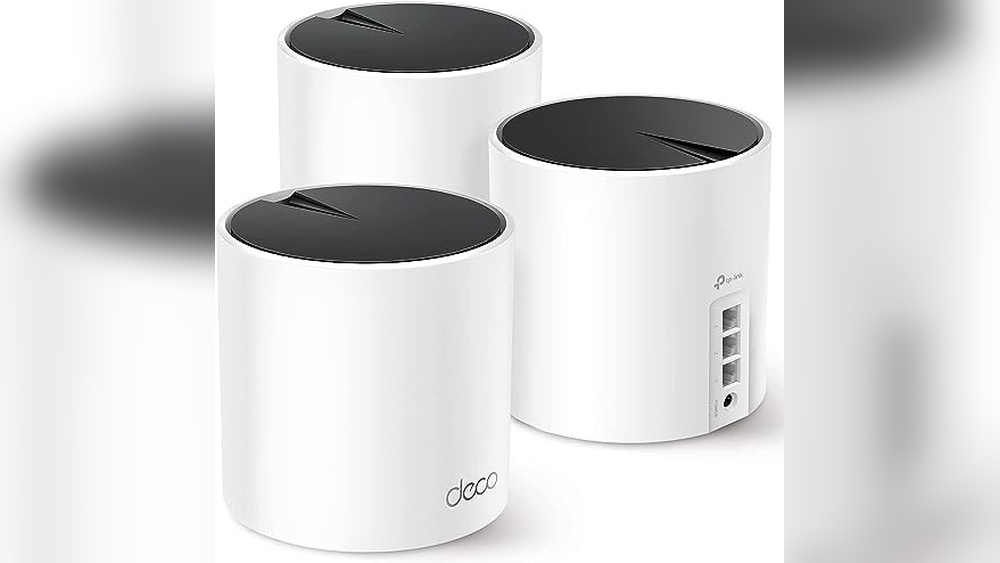
Tp-link Deco X55 Mesh Wifi 6 System
A top pick among Best Mesh Routers for Thick Walls, this system offers robust coverage and reliable connectivity for challenging home layouts.

The TP-Link Deco X55 Mesh WiFi 6 System is designed to solve the problem of weak Wi-Fi, especially in homes with thick walls or multiple floors. It offers seamless coverage up to 6,500 square feet, eliminating dead zones and buffering without the need for extra extenders.
This is a strong choice for households needing stable, whole-home Wi-Fi.
In daily use, this mesh system delivers a consistent and reliable connection—even when many devices are online. Setting it up is straightforward, and the network remains steady in hard-to-reach spots. You’ll notice less frustration with dropped connections and can move from room to room without interruption.
Key Advantages For Thick-walled Homes
- Excellent coverage for large or multi-story homes
- Reliable Wi-Fi 6 speeds for many devices at once
- Reduces buffering and eliminates dead zones
- Simple setup and easy expansion if needed
- Wired Ethernet backhaul for demanding setups
- Built-in security focus for safer home networking
Points To Consider Before Buying
- May be overkill for small apartments or open layouts
- Requires three power outlets for full coverage
- Color options limited to black and white
Who This Fits Best
If your home has thick walls, unusual layouts, or lots of devices, the Deco X55 stands out for making Wi-Fi problems a thing of the past. It takes away the hassle of constant troubleshooting and lets you enjoy stable internet in every room, even through tough barriers.
A quick tip: use Ethernet backhaul between units for the best speeds if your walls are extra dense. With this setup, you’ll gain peace of mind knowing your network just works—no more signal guesswork or dead zones. I especially appreciate how it’s designed for security, adding another layer of confidence for families and home offices.
| Best for | Why |
|---|---|
| Homes with thick walls or multiple levels | Mesh coverage fills hard-to-reach spaces |
| Families with many devices | Handles up to 150 connections reliably |
| Users wanting easy, set-and-forget Wi-Fi | Simple setup and seamless roaming |
| People concerned about network security | Designed with advanced security in mind |
Tp-link Deco X55 Wifi 6 Mesh System
If you’re searching for one of the Best Mesh Routers for Thick Walls, this system delivers whole-home coverage and reliable connectivity through challenging layouts.

The TP-Link Deco X55 WiFi 6 Mesh System is designed to replace your traditional router and extender setup, offering seamless Wi-Fi coverage up to 4,500 square feet. It helps eliminate dead zones and buffering, making it easier to get a strong signal even in homes with thick walls.
With support for Ethernet backhaul and three gigabit ports on each unit, it easily adapts to both wired and wireless needs.
Day to day, this mesh system feels dependable and fuss-free. You don’t have to worry about dropped connections or lag, even when several devices are running at once. The simple setup and ability to connect up to 150 devices means you can move from room to room without thinking about your Wi-Fi.
It’s about setting it up once and letting it do its job quietly in the background.
Why It Works Well For Dense Homes
- Strong Wi-Fi 6 mesh covers large areas, including homes with thick walls
- Eliminates dead zones and reduces buffering for smoother streaming
- Handles up to 150 devices for busy households
- Supports Ethernet backhaul for reliable, wired connections between units
- Three gigabit ports per unit for flexible wired device support
- Advanced security as part of TP-Link’s Secure-by-Design commitment
Things To Consider Before Buying
- Only two units included—very large or multi-story homes may need more
- No built-in modem; must connect to an existing internet source
- Physical size may be noticeable on shelves or desks
What I’d Tell A Friend
This mesh system is a fit for anyone with a home full of thick walls where Wi-Fi has always been a problem. It takes away the hassle of dropped signals and the guesswork of where to place extenders. If you want a set-it-and-forget-it solution, this is a solid choice.
For best results, use Ethernet backhaul if you can—it keeps speeds steady even between distant rooms. Once set up, you’ll rarely need to think about your network again, which is a relief if you just want Wi-Fi that works everywhere.
I appreciate having one less tech frustration in daily life.
| Best for | Why |
|---|---|
| Homes with thick or brick walls | Mesh network overcomes coverage gaps where normal routers struggle |
| Large apartments or multi-room houses | Up to 4,500 sq. ft. of seamless Wi-Fi 6 coverage |
| Households with many devices | Supports up to 150 connected devices without slowdowns |
| Users wanting wired stability | Multiple gigabit ports and Ethernet backhaul keep speeds consistent |
Tp-link Deco S4 Mesh Wifi System
If you’re searching for the Best Mesh Routers for Thick Walls, this TP-Link Deco S4 Mesh WiFi System stands out for reliable, seamless coverage throughout larger homes.

The TP-Link Deco S4 Mesh WiFi System is designed to solve weak signal problems in homes with thick walls. With three units working together, it creates a single, strong network that covers up to 5,500 square feet. You won’t have to deal with WiFi dead zones or confusing setups anymore.
Using the Deco S4 feels effortless. Devices switch automatically between nodes for the best speed, and you only need one network name and password. It’s easy to move around the house without losing connection, making streaming, gaming, and smart home use consistent and worry-free.
Reliable Wifi Features That Matter
- Mesh technology eliminates dead zones for whole-home coverage
- Single network name and password simplifies use
- Supports up to 100 devices for large households
- Stable connection even through thick walls
- Easy integration with Alexa for smart control
- Gigabit ports for fast wired connections
- Seamless roaming as you move around
Consider These Before Buying
- Requires placement of three units for optimal coverage
- No advanced customization for power users
- Physical size may not fit small spaces easily
Who This Fits Best
This system is ideal for families or anyone living in homes with thick walls or multiple floors. It takes away the hassle of dropped connections and confusing WiFi setups, letting you focus on enjoying your devices. If you want reliable coverage without technical headaches, this is a practical pick.
For best results, place the units where walls are thickest or signal drops most often. With the Deco S4, you’ll enjoy steady WiFi and fewer surprises, whether you’re working, streaming, or just browsing. I find the single network name especially stress-free for guests and kids.
| Best for | Why |
|---|---|
| Homes with thick walls | Mesh system maintains strong signals through obstacles |
| Large households | Handles up to 100 devices without slowing down |
| Multi-floor living spaces | Seamless roaming ensures consistent coverage everywhere |
| Smart home users | Works with Alexa for easier device management |
Tp-link Deco X50 Wifi 6 Mesh System
Among the Best Mesh Routers for Thick Walls, this system stands out for its flexible mounting and strong WiFi 6 coverage.

The TP-Link Deco X50 WiFi 6 Mesh System is designed to solve coverage issues in homes with thick walls. With three units that can be mounted on ceilings or walls, it replaces your router, access point, and extender. Its WiFi 6 mesh technology delivers ultra-fast speeds, making streaming and gaming smooth even in hard-to-reach areas.
Using this mesh system means fewer dead zones and less buffering, even with many devices connected. Installation is versatile thanks to powered options, and the units blend into your home easily. You get a consistent network experience without having to worry about signal drops or complicated setup.
Why This Mesh System Stands Out
- Strong WiFi 6 performance for large homes
- Ceiling/wall mounting options for flexible placement
- Dual 2.5G Ethernet ports for fast wired connections
- Powered via PoE+ or standard plug for easy installation
- Covers up to 6,500 sq.ft with up to 150 devices
- Secure-by-design with advanced cybersecurity commitment
Things To Consider Before Buying
- PoE+ switch required for some setups (not included)
- Three-pack may be more than needed for small spaces
- Mounting hardware may require extra installation effort
Who This Fits Best
This mesh system is ideal for homeowners or apartment dwellers dealing with thick walls and spotty WiFi. It takes away the hassle of weak signals, letting you set up reliable coverage where you need it most. The combination of WiFi 6 and flexible mounting is especially useful in older or multi-story buildings.
If you want stable streaming and gaming throughout your home, Deco X50 makes it easier by connecting up to 150 devices without lag. To get the best results, try mounting at ceiling height in central rooms for maximum coverage. You can count on its security features for peace of mind, knowing your network is protected by design.
| Best for | Why |
|---|---|
| Homes with thick walls | Ceiling/wall mounting and mesh coverage break through obstacles |
| Multi-device households | Supports up to 150 connections without slowing down |
| Users needing fast wired access | Dual 2.5G ports enable high-speed wired performance |
| Security-conscious buyers | Secure-by-design commitment for safer networking |
Netgear Orbi 370 Wifi 7 Mesh System
Among the Best Mesh Routers for Thick Walls, the NETGEAR Orbi 370 delivers fast WiFi 7 speeds and wide coverage for homes struggling with signal drops.

The NETGEAR Orbi 370 WiFi 7 Mesh System is designed to blanket your home—even with thick walls—with strong, fast wireless coverage. It comes as a three-pack, including a main router and two extenders, making it easier to reach dead zones and maintain a stable signal throughout up to 6,000 square feet.
For households with many devices or stubborn WiFi trouble spots, this mesh setup tackles the problem directly.
Day-to-day, this system means you can roam from room to room without losing connection or having to reconnect to a different network. The Orbi 370 is simple to set up and keeps your devices connected without fuss, making streaming, video calls, and smart home use more reliable.
Built-in security features and firmware updates run quietly in the background, so you can trust your network to stay safe and up to date.
Why Homeowners Choose The Orbi 370
- Reliable coverage for large homes and thick walls
- WiFi 7 speeds support many devices at once
- Dual-band mesh with enhanced backhaul for consistent signal
- Automatic security updates for peace of mind
- Handles up to 70 devices—ideal for busy households
- Easy to expand or adjust with extra extenders
Things To Consider Before Buying
- This is not a modem—requires a separate internet modem
- Overkill for small apartments or very modest device counts
- Setup involves three units, which may not suit minimalists
What I’d Tell A Friend
If your home has thick walls or multiple floors, the Orbi 370 WiFi 7 Mesh System is built to remove the hassle of dead zones and weak WiFi. It’s best for families, smart homes, or anyone who wants stable, fast internet everywhere without fiddling with settings or extenders.
The mesh network means less stress about dropped connections, and automatic security updates add a layer of safety that works in the background.
To get the best results, place the extenders strategically near thick walls or at the far ends of your home. Once set up, you can forget about WiFi issues and enjoy seamless coverage. For anyone tired of troubleshooting their network, this system brings a sense of reliability and ease that’s hard to beat.
| Best for | Why |
|---|---|
| Homes with thick walls or multiple floors | Mesh coverage overcomes barriers for stable WiFi everywhere |
| Busy families with many devices | Supports up to 70 devices without slowdown |
| Users needing hassle-free security | Automatic firmware and security updates built in |
| Large spaces up to 6,000 sq. ft. | Three-piece set ensures signal reaches every corner |
Tp-link Deco Outdoor Mesh Wifi 6
For Best Mesh Routers for Thick Walls, this TP-Link Deco Outdoor Mesh WiFi 6 stands out with reliable outdoor coverage and weatherproofing for tough environments.

The TP-Link Deco Outdoor Mesh WiFi 6 is designed to expand your home’s mesh network into challenging spaces like backyards, patios, or guest houses. With weatherproof protection, it solves the problem of weak WiFi signals through thick walls and outdoor barriers by providing consistent coverage where regular routers fall short.
Using this mesh router feels seamless—once set up, there’s no need to worry about drops or dead zones, even when moving between indoor and outdoor areas. Installation is flexible, letting you mount it on a pole, wall, or table, and the PoE support cuts down on extra cabling.
It’s a reliable extension to your existing Deco mesh system, keeping connections strong in hard-to-reach spots.
Reliable Outdoor Performance
- Extends mesh WiFi 6 outdoors for wider coverage
- Certified waterproof and dustproof for harsh weather
- Flexible mounting options (pole, wall, table)
- Dual Gigabit ports with PoE reduces cable clutter
- Works seamlessly with all TP-Link Deco Mesh systems
- Sleek, unobtrusive design blends into outdoor spaces
What You Should Consider
- Requires existing TP-Link Deco mesh system for full integration
- Outdoor placement may need careful planning for power or PoE access
- Single pack may not cover very large properties
Why This Makes Sense
This mesh router is ideal for homeowners who need strong WiFi in outdoor spaces and through thick walls, especially if you already use TP-Link Deco indoors. It removes the hassle of unreliable connections and fiddly setup, letting you confidently stream or work outside without interruptions.
For best results, plan your mounting location to maximize coverage and take advantage of the PoE feature to simplify power and data needs. The weatherproof build means you won’t stress about rain or dust, and you can enjoy stable performance with minimal surprises.
If you’ve struggled with patchy signals in your backyard, the Deco Outdoor Mesh WiFi 6 is a practical solution—I’d recommend it for anyone wanting consistent connectivity beyond the living room.
| Best for | Why |
|---|---|
| Outdoor coverage in tough weather | Waterproof and dustproof casing withstands rain and dust |
| Homes with thick walls | Mesh WiFi 6 extends strong signal through barriers |
| Existing TP-Link Deco users | Easy integration with current Deco mesh setup |
| Flexible mounting needs | Supports pole, wall, and table installation for varied environments |
Tp-link Archer Ax21 Wifi 6 Mesh Router
Among the Best Mesh Routers for Thick Walls, the Archer AX21 stands out for delivering strong WiFi coverage in challenging home layouts.

The TP-Link Archer AX21 WiFi 6 Mesh Router is designed to solve weak signal issues that often occur in homes with thick walls. With Wi-Fi 6 technology, it boosts speed and reduces congestion, making it a solid pick for reliable home networking.
Its Beamforming and high-gain antennas help focus signal strength where you need it most.
Using this router feels effortless thanks to its easy mesh compatibility and stable performance. Streaming, gaming, and connecting multiple devices remain smooth, even when the signal must pass through obstacles. It’s reassuring to know that the device is built with security in mind, giving you fewer worries about network safety.
Key Advantages For Challenging Spaces
- Strong and reliable WiFi coverage with Beamforming technology
- Handles thick walls and obstacles with focused signal strength
- Wi-Fi 6 ensures faster speeds and reduced congestion
- Connects multiple devices simultaneously using OFDMA
- Mesh-ready for expanding coverage in larger homes
- Advanced security built into the device
Important Considerations For Buyers
- Requires a separate modem for internet access
- No support for the 6 GHz band (dual-band only)
- Performance may vary based on device distance and physical obstacles
Where This Shines
This router is best for households where thick walls or floors cause WiFi dead zones. It helps remove the hassle of weak signals and inconsistent connections, especially if you depend on streaming or work from home. Set up is straightforward, and expanding coverage with mesh support is easy.
For better results, place the router in a central location to maximize the benefit of its Beamforming and high-gain antennas. You’ll notice more stable connections and fewer interruptions, which means less stress and more confidence in your home network. If you value security, the built-in safeguards offer peace of mind.
| Best for | Why |
|---|---|
| Homes with thick walls | Beamforming and high-gain antennas boost signal through obstacles |
| Busy households with many devices | Wi-Fi 6 and OFDMA handle multiple connections smoothly |
| Mesh network setups | Easy Mesh support allows seamless coverage expansion |
| Users concerned about security | Built with advanced cybersecurity standards |
Tp-link Deco X50-poe Mesh Wifi 6
A top contender among Best Mesh Routers for Thick Walls, this TP-Link Deco X50-PoE model delivers strong coverage and flexible mounting for challenging spaces.

The TP-Link Deco X50-PoE Mesh WiFi 6 is designed to give whole-home wireless coverage, especially in homes with thick walls. With WiFi 6 mesh technology and the ability to mount on ceilings or walls, it solves dead spots and replaces traditional routers or extenders.
The power-over-Ethernet (PoE) option lets you install it where regular outlets are hard to reach.
Day to day, it means more consistent WiFi in tricky areas, fewer interruptions, and the freedom to place your units for the best signal. Switching between rooms feels seamless, and network management takes less time. If you want to avoid guesswork and keep streaming or gaming smoothly, this mesh system makes it straightforward.
Why It Stands Out For Thick Walls
- Mounts on ceiling or wall for ideal signal placement
- PoE+ support for flexible power and fewer cables
- Dual-band WiFi 6 for faster, more stable connections
- Seamless mesh coverage with AI-driven optimization
- Works with all Deco models for easy expansion
- Two 2.5G Ethernet ports for high-speed wired devices
Keep In Mind Before Buying
- Requires a PoE+ switch for PoE setup (not included)
- Single pack may not cover very large homes without adding units
- Wall or ceiling installation may need extra effort
Who This Fits Best
This Deco X50-PoE is ideal for anyone with thick walls or hard-to-cover areas where standard routers struggle. It takes away the hassle of weak signals and complex setups, letting you place nodes exactly where they’re needed most. You won’t have to worry about switching networks or losing connection as you move around.
If you add a PoE+ switch, you can install units high up or out of sight for better reach—just plan the install before buying. For best results, start with one unit in the toughest spot, then add more only if you need extra coverage.
This approach means fewer surprises and more reliable WiFi where it matters. I like how it makes network upgrades less stressful.
| Best for | Why |
|---|---|
| Homes with thick walls | Flexible mounting and mesh help signals reach tough spots |
| Users needing ceiling or wall installs | PoE support allows placement away from outlets |
| Multi-device households | WiFi 6 and dual 2.5G ports prevent slowdowns |
| Expanding existing Deco networks | Fully compatible with other Deco models for easy mesh upgrades |
Tp-link Deco X20 Mesh Wifi System
For those seeking Best Mesh Routers for Thick Walls, this system stands out by providing broad, reliable coverage and easy management.

The TP-Link Deco X20 Mesh WiFi System is a three-unit setup designed to eliminate weak WiFi spots in larger homes, especially those with thick walls. It connects up to 150 devices and covers up to 5,800 square feet, giving you stronger signal and fewer dead zones compared to basic extenders.
Using it feels straightforward thanks to the Deco app, which guides setup visually and lets you manage your network from anywhere. The system is stable, and parental controls help keep internet use in check for every device. With Alexa compatibility, you can easily adjust guest access without extra steps.
Reliable Coverage Highlights
- Wide coverage across large homes and thick walls
- Supports up to 150 devices with consistent signal
- Parental controls for safer browsing
- Easy setup and remote management via app
- Works with Alexa for hands-free control
- Wired backhaul option for stable connections
- Dual-band WiFi 6 for faster speeds
What To Consider Before Buying
- No advanced customization for networking enthusiasts
- Requires mobile app for setup and management
- Limited color options (only white)
Who This Fits Best
If your home has thick walls and multiple floors, the TP-Link Deco X20 Mesh WiFi System removes the guesswork of WiFi coverage and lets you stay connected everywhere. It’s especially helpful for families who want easy control and reliable speeds without technical complexity.
Setup is easy, and managing devices is simple with the app and parental controls. For best results, place the units strategically where WiFi struggles, and use wired backhaul if possible for maximum stability. You’ll notice fewer interruptions and more confidence in your connection.
For anyone tired of dead spots or lag, this mesh system brings peace of mind and consistent performance. I appreciate its balance of simplicity and reliability, especially in homes that challenge standard routers.
| Best for | Why |
|---|---|
| Homes with thick walls | Mesh units overcome physical barriers and reduce dead zones |
| Large multi-story houses | Wide coverage ensures all rooms have strong signal |
| Families needing parental controls | Built-in features help manage and monitor online activity |
| Users needing easy setup | App guidance makes installation fast and simple |
Tp-link Deco Xe70 Pro Mesh Router
For homes with thick walls, the TP-Link Deco XE70 Pro stands out among the Best Mesh Routers for Thick Walls thanks to its strong coverage and reliable mesh connections.

The TP-Link Deco XE70 Pro Mesh Router is designed to eliminate Wi-Fi dead zones, especially in homes with thick walls. Its tri-band Wi-Fi 6E system ensures stable, fast connections for large spaces, handling up to 2,900 square feet and supporting up to 200 devices.
The mesh network keeps your devices connected under a single network name, so you don’t need to switch between signals as you move around your home.
In everyday use, you’ll notice smoother streaming and fewer drops, even when walls or floors separate rooms. You can set it up and forget it—AI-powered mesh and self-learning technology quietly optimize your network. Confidence comes from knowing that your smart TVs, phones, and computers all stay reliably online without manual tinkering or restarts.
What Makes It Stand Out
- Excellent coverage through thick walls and multiple floors
- Tri-band Wi-Fi 6E reduces signal congestion
- Handles many devices without slowing down
- Simple, unified network name for the whole home
- Fast wired ports for gaming PCs or servers
- AI-powered mesh adapts to your layout and usage
- Strong security design commitment
Possible Limitations To Consider
- Single unit may not cover very large or multi-building properties
- No built-in modem (requires existing internet service)
- Premium features may not be needed for small apartments
Why This Makes Sense
This mesh router is a smart fit for families or anyone struggling with Wi-Fi dropouts caused by thick walls or long distances. It removes the hassle of juggling multiple extenders and guessing which network to use. The AI mesh adapts as your needs change, so you don’t have to keep tweaking settings.
If you want reliable coverage with less stress, this model’s seamless network and fast ports help keep your devices connected and streaming smoothly. To get the most out of it, place the unit in a central spot and use the 2.
5 Gbps port for your highest-demand devices. The advanced security focus means you can trust your connection to stay protected, giving you one less thing to worry about. I appreciate how little attention it needs once set up.
| Best for | Why |
|---|---|
| Homes with thick or dense walls | Tri-band mesh and Wi-Fi 6E push signals through barriers |
| Large households with many devices | Stable connections for up to 200 devices |
| Gamers and streamers | Fast, congestion-free speeds and wired 2.5 Gbps port |
| Security-conscious users | Built with advanced security as a core requirement |
Mesh Wi-fi Buying Guide: What Matters Most
Coverage Vs. Device Capacity
Think about the size of your home and the number of devices you connect. Larger coverage is only useful if the mesh can handle your device load without slowing down.
Wi-fi Standards: 6, 6e, Or 7?
Wi-Fi 6 is now common and works well for most homes. Wi-Fi 6E and Wi-Fi 7 offer extra speed and less interference, but only help if your devices support them. Older devices won’t benefit from the latest standards.
Ethernet Backhaul And Port Options
Wired connections between mesh units improve speed and reliability. If your home has Ethernet wiring, look for models with multiple gigabit or 2. 5G ports. If not, wireless-only is fine but may be slower.
Indoor Vs. Outdoor Needs
Outdoor mesh units are weatherproof and designed for patios or guest houses. Standard mesh systems are not built for outdoor use. Choose based on where you need coverage.
Security Features And Updates
Modern mesh systems include automatic firmware updates and security features. Make sure the model you select supports ongoing updates and has clear security commitments.
Common Mistakes When Choosing Mesh Wi-fi
- Assuming all units cover the same area. Coverage varies by model and pack size.
- Ignoring device limits. Connecting too many devices can reduce speeds even with strong coverage.
- Overlooking Ethernet backhaul. Wireless-only setups may struggle in larger homes with thick walls.
- Mixing incompatible mesh units. Not all mesh systems work together. Check compatibility before adding units.
- Buying advanced Wi-Fi versions (6E/7) without compatible devices. Extra speed may go unused.
Who Should Avoid Mesh Wi-fi Systems
- Small apartments or single rooms. Standard routers are often sufficient.
- Homes with few devices. Mesh is designed for high device counts.
- Those needing only outdoor coverage. Dedicated outdoor access points may be better.
- Buyers uncomfortable with app-based setup. Most mesh systems require smartphone apps for installation and management.
Setup And Usage Tips
- Place units in open areas, not inside cabinets or behind large objects.
- Use Ethernet backhaul where possible for best performance.
- Update firmware regularly for security and stability.
- Check device compatibility before adding more mesh units.
- Use the app to monitor signal strength and adjust placement as needed.
Faqs
Do Mesh Systems Replace My Existing Router?
Yes, mesh systems are designed to replace traditional routers. They create a single Wi-Fi network across your home.
Can I Mix Different Mesh Models?
Some brands allow mixing models, but not all. Check compatibility lists before combining units.
Will Mesh Wi-fi Work With My Internet Provider?
Mesh systems work with most providers, but you still need a separate modem for cable or DSL connections.
Is Ethernet Backhaul Necessary?
No, but it improves speed and reliability. Wireless backhaul is fine for most setups unless you have thick walls or large spaces.
Are Mesh Systems Secure?
Most modern mesh systems include automatic updates and basic security features. Update regularly for best protection.
Do I Need Wi-fi 6e Or Wi-fi 7?
Only if you own devices that support these standards. Otherwise, Wi-Fi 6 is sufficient for most households.
Can Mesh Wi-fi Extend Outdoors?
Only weatherproof models are suitable for outdoor use. Standard mesh units are not designed for exterior environments.
Summary: Deciding On The Right Mesh Wi-fi
Mesh Wi-Fi systems solve coverage and device limits for larger homes and busy networks. Consider your space, device count, and whether you need advanced features like Wi-Fi 6E or outdoor units. Setup is straightforward, but placement and compatibility matter. Take your time matching your needs to the right model, and you’ll enjoy stable, high-speed Wi-Fi throughout your home.