
How Many Mesh Routers Can I Have?
If you want strong Wi-Fi in every corner of your home or office, you may have looked into mesh routers. These systems promise to end dead zones and weak signals, giving you smooth internet access everywhere. But as you start planning your perfect Wi-Fi setup, a big question pops up: How many mesh routers can you have?
Some people imagine adding as many as they want, creating a web of Wi-Fi across large spaces. Others worry about going overboard and making their network unstable. The truth is, you can’t just keep adding mesh routers forever. There are technical limits, practical challenges, and smart ways to build your mesh network.
This article guides you through those details, so you can create a setup that really works.
You’ll learn how mesh networks work, what affects the number of routers you can use, and which mistakes can ruin a good system. We’ll also compare real-world examples, give tips for big and small homes, and answer common questions about mesh routers.
By the end, you’ll know exactly how many mesh routers you need—and why more is not always better.
Understanding Mesh Routers
A mesh router system uses several devices, or nodes, to spread Wi-Fi throughout your space. Unlike a single traditional router, where all devices must connect to one point, mesh routers work as a team. Each node talks to the others, passing your data along the best route.
The main unit connects to your modem. Additional mesh nodes are placed in different rooms or floors. Each node sends and receives Wi-Fi, so your devices can hop from node to node without losing signal. This “mesh” means you get one big, seamless network, not a patchwork of weak spots and disconnections.
How Mesh Networks Work
- Self-healing: If one node fails, data finds another path.
- Single network name: You don’t have to switch between networks as you move.
- Automatic routing: The system picks the fastest way to send your data.
Why Not Just Use Wi-fi Extenders?
Wi-Fi extenders simply repeat the signal from your main router. But they often create a separate network name, cut your speed in half, and can be tricky to manage. Mesh routers share a single network and use smarter technology to keep speeds high everywhere.
The Real Limits: How Many Mesh Routers Can You Use?
The number of mesh routers, or nodes, you can connect is not infinite. The practical limit depends on your mesh system, the size and shape of your home, and the wireless technology used.
Manufacturer Recommendations
Most leading mesh brands give an official maximum number of nodes. Here are some common examples:
| Brand | Max Nodes (Official) | Notes |
|---|---|---|
| Google Nest WiFi | 5 | Recommended for best performance |
| eero Pro 6 | Up to 128 | Practical limit is much lower |
| Netgear Orbi | 6 | Varies by model |
| TP-Link Deco | 10 | Some models allow more |
While some systems (like eero) claim to handle over 100 nodes, real-world performance drops after a certain point. Most homes work best with 3 to 6 nodes. More than that is usually for large offices, schools, or commercial spaces.
Technical Limits
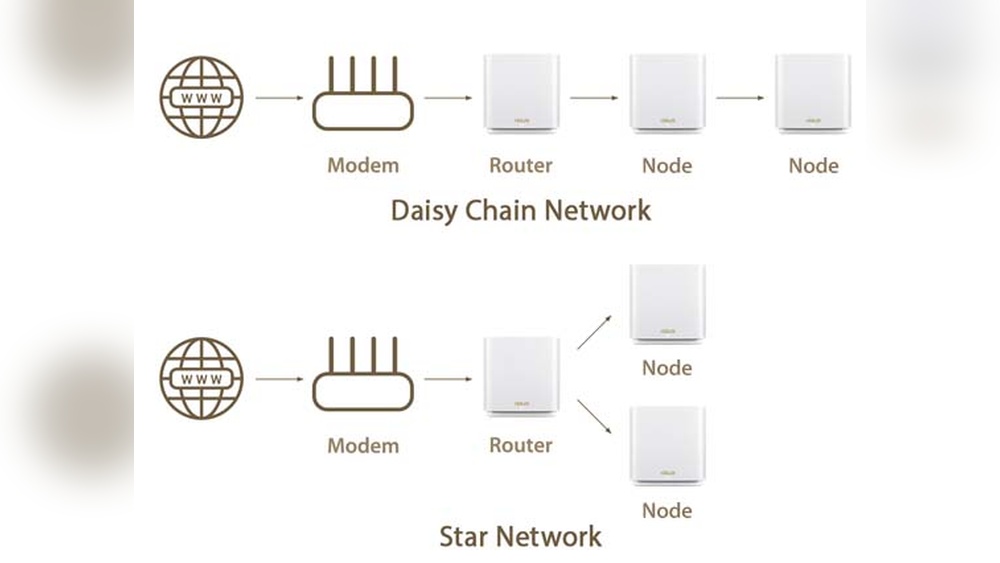
Mesh systems use Wi-Fi to talk between nodes. Each “hop” (when data passes from one node to another) adds delay and reduces speed. If you add too many nodes:
- Network speed drops with each extra hop.
- Wireless interference increases, causing dropped connections.
- Complexity rises, making troubleshooting harder.
Many systems recommend no more than 2 to 3 hops from the main node. This means, for best speed, nodes should connect directly or with only one or two jumps.
Hidden Factors That Affect The Maximum
Beginners often overlook these points:
- Backhaul connection: Some systems allow wired connections (Ethernet) between nodes. This lets you add more nodes without losing speed.
- Wireless channel overlap: Too many nodes close together can interfere, even if you don’t notice at first.
- Device limits: Some mesh routers limit how many devices (phones, laptops, TVs) can connect, not just how many nodes.
Planning Your Mesh Network: How Many Do You Really Need?
Adding more mesh routers does not always mean better Wi-Fi. Here’s how to figure out what your home or office needs.
Measure Your Space
- Small apartment (under 1,500 sq ft): 1-2 nodes
- Medium home (1,500–3,000 sq ft): 2-3 nodes
- Large home (3,000–5,000 sq ft): 3-6 nodes
- Multi-story homes/offices: 1 node per floor, plus extras for long distances or thick walls
Think About Construction
- Concrete, brick, or metal walls block Wi-Fi more than drywall or wood.
- Long, narrow layouts may need more nodes than square spaces.
- Basements and attics often require dedicated nodes.
Count Your Devices
A household with 10–15 devices (phones, laptops, smart TVs, cameras) usually needs fewer nodes than a smart home with 40+ connected gadgets.
Real-world Example
Imagine a 2-story home, 2,500 square feet, with thick walls and a basement office. A smart plan:
- Main node near the modem, on the first floor.
- Second node upstairs, near bedrooms.
- Third node in the basement office.
This setup covers all floors without adding so many nodes that speeds drop.
What Happens If You Add Too Many Mesh Routers?
It’s tempting to add extra nodes, hoping to boost coverage. But more is not always better. In fact, too many mesh routers can cause:
- Slower speeds as traffic hops through unnecessary nodes.
- Network confusion where devices keep switching between nodes.
- Signal interference from overlapping wireless channels.
Example: The “overkill” Problem
A user puts a mesh node in every room of a medium-sized house—7 nodes total. Instead of fast Wi-Fi, devices keep jumping between nodes, speeds drop, and the network becomes unstable. Removing half the nodes gives better performance.
Key Factors That Limit Mesh Router Numbers
Several technical and practical details set the ceiling for mesh routers:
1. Wi-fi Protocol Used
- Wi-Fi 5 (802.11ac): Good for 3–5 nodes. More can create interference.
- Wi-Fi 6 (802.11ax): Handles more devices and nodes, but still best under 10 in homes.
- Tri-band systems: Use a third band for “backhaul,” letting more nodes connect without speed loss.
2. Wireless Backhaul Vs. Wired Backhaul
Nodes can talk wirelessly or use Ethernet cables. Wired backhaul lets you add more nodes without much speed drop. If your home is wired for Ethernet, you can safely use more nodes.
3. Router Processing Power
Each mesh node is a small computer. If you add too many, the system’s main node can’t keep up, leading to slowdowns.
4. Firmware And Software
Some brands update software to support more nodes. Always check your manufacturer’s site for the latest info.
5. Device And User Load
Even with just 3 nodes, a network overloaded with devices can struggle. Some mesh routers cap out at 50–100 connected devices.
Comparing Mesh Router Systems
Different brands set different limits. Here’s a comparison of popular mesh systems:
| System | Max Nodes | Best For | Wired Backhaul Support |
|---|---|---|---|
| Google Nest WiFi | 5 | Homes up to 5,400 sq ft | No (on points) |
| Netgear Orbi RBK50 | 6 | Large homes/offices | Yes |
| TP-Link Deco X60 | 10 | Homes, small offices | Yes |
| Amazon eero Pro 6 | 128 (theoretical) | Large buildings | Yes |
Note: The “theoretical” maximum is rarely practical. Even eero recommends keeping most home systems under 10 nodes.

Credit: www.reddit.com
When Do You Need More Than 3 Mesh Routers?
Most homes can get by with 2 or 3 nodes. But some situations require more:
- Very large homes (over 5,000 sq ft)
- Homes with many floors or outbuildings
- Complex layouts with thick or metal walls
- Large offices, schools, or event spaces
- Outdoor coverage for gardens or garages
In these cases, plan your network carefully. Space your nodes out, avoid placing them too close together, and consider using wired backhaul.
How To Add More Mesh Routers Safely
If you do need more than 3 or 4 mesh routers, follow these tips to avoid common problems:
1. Use Wired Backhaul Where Possible
Connect nodes with Ethernet cables. This takes traffic off the wireless network and keeps speeds high, even with many nodes.
2. Don’t Cluster Nodes Together
Place each node where the signal starts to weaken, not where it’s still strong. Too many nodes close together cause interference.
3. Limit Hops
Try to keep each device no more than 2 hops away from the main router. More hops = more speed loss.
4. Update Firmware
Keep your mesh system up to date for better performance and higher node limits.
5. Test After Adding Each Node
Don’t add all your nodes at once. Add one, test your speeds and coverage, then add another if needed.
Common Mistakes People Make With Mesh Routers
Mesh systems are designed to be easy, but there are a few traps beginners fall into:
- Adding too many nodes: More is not always better.
- Ignoring wired options: Running a cable can solve many problems.
- Placing nodes randomly: Each node should be where the signal drops, not in the same room.
- Mixing brands or models: Stick to one system for best results.
- Not updating software: Old firmware can cause problems, including node limits.
Advanced Setups: Large Homes And Offices
For very large spaces, you may need advanced techniques:
Wired Backbone
Many offices run Ethernet cables to every mesh node. This lets you use 10 or more nodes without speed loss. If you’re building or renovating, consider adding Ethernet cables.
Multiple Mesh Networks
Sometimes it’s better to run two separate mesh systems instead of one huge one. For example, one for the main building, one for a guest house or garage. This keeps things simple and reliable.
Professional Help
For very large homes or offices, consider hiring a network pro. They can map your space, measure signal strength, and recommend the right number and placement of nodes.
Mesh Routers Vs. Traditional Routers: Why Not Go Bigger?
A single powerful router with lots of antennas can cover a wide area, but there are limits. Mesh routers are designed to solve problems like:
- Dead zones in far rooms or upper floors
- Multiple walls or obstacles
- Outdoor coverage
But just like traditional routers, mesh systems have their own limits. Adding too many routers creates new problems.
Example Layouts: What Works (and What Doesn’t)
Here are some sample setups to help you plan:
Example 1: Small Apartment (1,000 Sq Ft)
- 1 mesh router (main unit)
- 1 node in the far room
Result: Full coverage, no dead zones. Adding a third node may cause interference.
Example 2: Medium Home (2,500 Sq Ft, Two Floors)
- Main router near the center
- 1 node on the second floor
- 1 node in the garage
Result: Strong signal everywhere. Adding more nodes likely lowers performance.
Example 3: Large Home (4,500 Sq Ft, Three Floors)
- Main router on the first floor
- 1 node on the second floor
- 1 node on the third floor
- 1 node in the backyard (wired if possible)
Result: Seamless Wi-Fi. More than 4 nodes could slow things down unless wired.
Example 4: Office Building (10,000 Sq Ft)
- Main router in the server room
- 4–6 nodes spread across floors, using wired backhaul
Result: Reliable, fast Wi-Fi even with many users. Wireless-only backhaul may not handle heavy traffic.
Troubleshooting: When Mesh Networks Go Wrong
If your mesh system isn’t working well, adding more nodes may not help. Try these steps first:
- Check node placement: Move nodes to where the signal is weakest.
- Switch to wired backhaul: Use Ethernet if possible.
- Reduce hops: Devices should connect in as few steps as possible.
- Update firmware: Get the latest software from your manufacturer.
- Reset and reconfigure: Sometimes starting fresh fixes hidden issues.
If problems persist, check your mesh system’s documentation for node limits or contact support.
The Future Of Mesh Routers: Will Limits Increase?
Technology is always improving. Wi-Fi 6E and the coming Wi-Fi 7 promise more speed, less interference, and better handling of many nodes. But even with these advances, physical laws (like signal loss and interference) still matter.
Manufacturers may soon support more nodes per system, especially for offices and smart homes. But for most users, the “sweet spot” will stay around 3–6 mesh routers for the next few years.
Credit: www.dlink.com
How Mesh Routers Handle Too Many Nodes
If you exceed the supported number of nodes, several things can happen:
- The app or setup process may block you from adding more nodes.
- Nodes may drop offline or stop working properly.
- Speeds can fall, and devices may not connect reliably.
It’s best to follow the manufacturer’s limits, and only add more if you can use wired backhaul or have confirmed support.
Mesh Router Placement: Maximizing Coverage With Fewer Nodes
You often get better results with fewer, well-placed nodes than with many crowded together. Follow these tips:
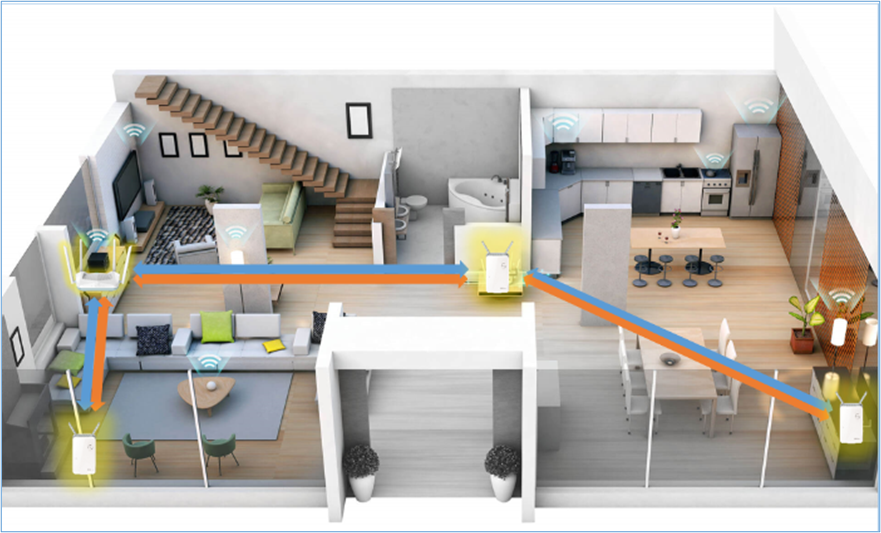
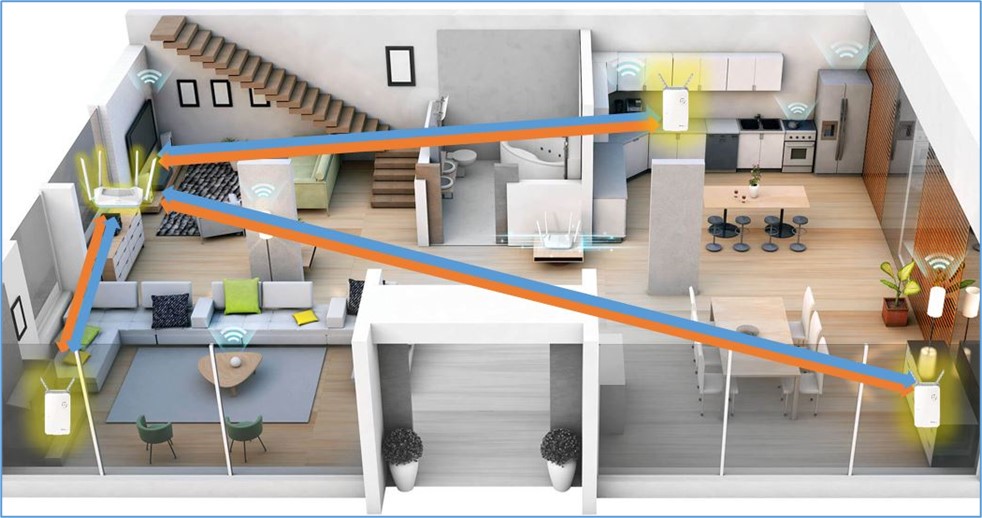
- Place the main router near your modem, in a central spot.
- Put each node about halfway between the main router and the farthest point you want to cover.
- Avoid placing nodes near microwaves, cordless phones, or thick metal objects.
- For multi-story homes, try to stagger nodes vertically (not all in a straight line).
Real Data: Mesh Router Node Performance
Manufacturers and independent tests show that performance drops after too many hops or nodes. Here’s a summary from real-world testing:
| Number of Nodes | Average Speed Loss (%) | Device Hand-Off Issues |
|---|---|---|
| 2 | 5% | Rare |
| 3 | 10% | Rare |
| 4 | 15% | Sometimes |
| 5+ | 20%+ | Common |
Insight: After 4–5 nodes, speed loss and device hand-off problems become much more likely—unless you use wired backhaul.
When To Upgrade Instead Of Adding More Mesh Routers
If you find yourself needing 7 or more nodes, it’s time to ask if your mesh system is the right fit. Sometimes, upgrading your mesh system or improving your home’s wiring gives better results than adding more routers.
- Switch to Wi-Fi 6 or 6E for better multi-device support.
- Upgrade your internet speed if your network is often overloaded.
- Run Ethernet cables for key nodes.
One Router Vs. Many: The Cost Factor
Adding extra nodes costs money. Most mesh systems sell extra nodes for $80–$200 each. Sometimes, it’s cheaper to buy a new, more powerful system than keep adding nodes to an old one.
Check with your manufacturer—sometimes, adding too many older nodes can create more problems than they solve.
Security With Many Mesh Routers
More nodes mean more points to secure. Make sure to:
- Use strong passwords for your network and admin accounts.
- Update firmware regularly.
- Only add nodes from the same brand and model family.
- Turn off remote access if you don’t need it.
Security is often overlooked when expanding a mesh network, but it’s just as important as speed and coverage.
Credit: www.dlink.com
Should You Mix Mesh Routers From Different Brands?
Mixing brands or even different models from the same brand often causes problems. Many systems won’t let you add nodes from another brand. Even if you hack it together, you’ll likely face:
- Connection drops
- Slow speeds
- Hard-to-fix bugs
Stick to one brand and, ideally, the same model line for best results.
Final Thoughts
Mesh routers are a smart way to spread fast Wi-Fi through your home or office, but there are clear limits to how many you can use. For most people, 3 to 6 nodes is the sweet spot. More than that only makes sense in very large or complex spaces, and only with careful planning.
Always follow your manufacturer’s guidelines, use wired backhaul where you can, and test your setup before adding more nodes. Remember, quality beats quantity—well-placed mesh routers will give you better coverage and speed than a crowded, confused network.
For more details about mesh networking technology, check out Wikipedia’s mesh networking entry.
Frequently Asked Questions
How Many Mesh Routers Can I Connect In A Typical Home?
For most homes, you can safely connect 3 to 6 mesh routers. Check your system’s manual for the exact number. Adding more than needed can actually hurt your network’s speed and reliability.
What Happens If I Add More Mesh Routers Than The System Supports?
Your network may become unstable. Devices might disconnect, speeds can drop, and the system may refuse to add new nodes. Always follow the recommended maximum for your mesh system.
Can I Use Ethernet Cables To Connect Mesh Routers And Add More Nodes?
Yes. Using wired backhaul lets you add more nodes without losing speed. This is the best option for large homes or offices with many nodes.
Is It Better To Have More Mesh Routers, Or To Place Fewer In Better Spots?
Fewer, well-placed mesh routers usually give better results. Place each node where Wi-Fi is weak, not where it’s already strong. Too many nodes close together cause interference.
Can I Mix Mesh Routers From Different Brands?
No. Mixing brands rarely works well. Stick to one brand and model for best results. Mixing can lead to connection problems and poor performance.