
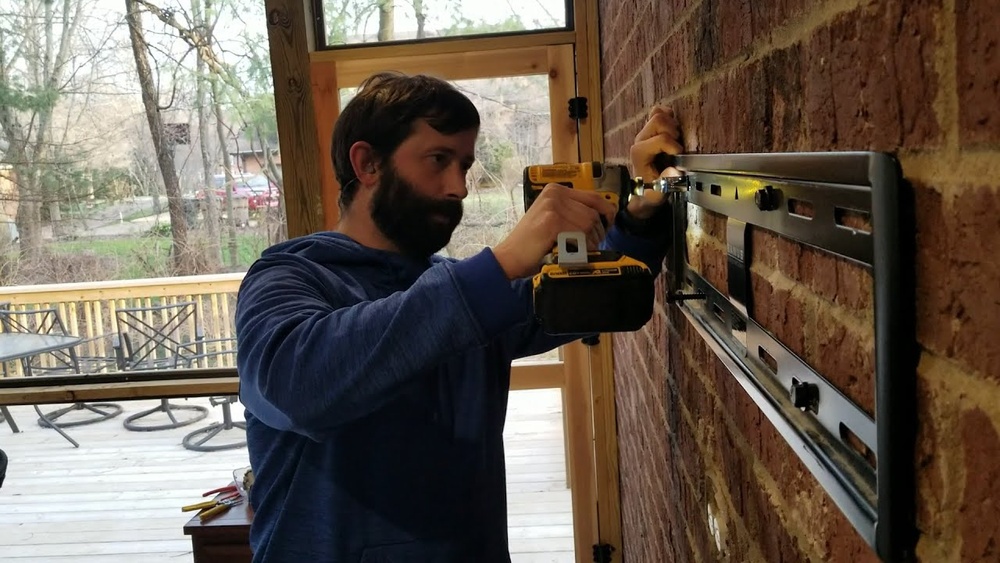
Mounting a TV on a brick wall is a project that can transform your living space. Many people worry about the difficulty, but with the right approach, tools, and knowledge, you can achieve a professional look and strong installation. This guide covers everything you need to know, from planning to finishing touches.
Whether you’re a first-timer or someone with basic DIY experience, you’ll find clear instructions, practical tips, and answers to common questions. By following the advice here, you’ll avoid mistakes, save time, and enjoy your mounted TV for years.
Why Mount A Tv On A Brick Wall?
Brick walls offer a unique backdrop. They’re strong, durable, and give rooms a modern or classic look. Mounting a TV on brick saves floor space and keeps your screen safe from bumps. It also lets you place your TV at the perfect height for viewing comfort.
However, brick is different from drywall or wood. It needs special anchors, tools, and careful planning. The effort is worth it—your TV will look sleek, and you’ll make the most of your room.
Many people also appreciate the way a mounted TV on brick becomes a focal point. The mix of technology and traditional building materials creates a striking style. For small rooms, mounting on brick frees up space for furniture or decorations.
In larger rooms, it helps organize your layout and makes movie nights more enjoyable.
What You Need: Tools And Materials
Before you start, gather the essential tools and materials. Having everything ready saves time and prevents frustration.
Tools
- Hammer drill (not just a regular drill)
- Masonry drill bits (for brick)
- Screwdriver
- Tape measure
- Level
- Pencil or chalk
- Stud finder (for locating mortar lines)
- Adjustable wrench
- Vacuum (for dust cleanup)
A few more tools can help: A small brush cleans out dust from drilled holes. A headlamp or work light improves visibility, especially in darker rooms or if you’re working near a fireplace. If you have a helper, walkie-talkies or a phone can make communication easier when one person holds the TV and the other checks alignment.
Materials
- TV wall mount (compatible with your TV size and weight)
- Masonry anchors (sleeve anchors, wedge anchors, or concrete screws)
- Lag bolts (sized for anchors and mount)
- Washers (for even pressure)
- Safety goggles
- Drop cloth (to catch brick dust)
If you’re unsure about the mount, check the TV’s weight and screen size. Most mounts list a maximum weight and VESA pattern—the spacing of holes on the back of your TV. Never use drywall anchors on brick; they’re not strong enough.
Extra tip: If your brick wall isn’t perfectly straight, buy a few rubber or plastic spacers. These help the mount sit flush and avoid twisting the TV.
Choosing The Right Tv Mount For Brick Walls
Not all mounts work well with brick. Your choice affects safety, appearance, and how easy it is to adjust your TV.
Types Of Tv Mounts
- Fixed mount: Holds the TV flat against the wall. Good for rooms where the viewing angle stays constant.
- Tilting mount: Lets you angle the TV up or down. Useful for higher placements.
- Full-motion mount: Swivels, tilts, and extends. Ideal for flexible viewing, but needs stronger anchors.
Fixed mounts are often chosen for bedrooms or small living rooms, where you don’t need to change the viewing angle. Tilting mounts are popular for mounting above fireplaces or higher up on the wall. Full-motion mounts suit open-plan spaces, playrooms, or rooms with multiple seating areas.
Key Factors
- Weight limit: Check your TV’s weight. Mounts and anchors must support it plus extra for safety.
- VESA compatibility: TV mounts have standard hole patterns. Match your TV’s VESA size.
- Mounting hardware: Look for mounts that include masonry hardware. If not, buy anchors separately.
- Extension range: Full-motion mounts need longer bolts and deeper anchors.
If you plan to upgrade your TV in the future, choose a mount with a higher weight limit. Some mounts are universal and can be reused if you change your TV later.
Comparison Table: Mount Types And Features
| Mount Type | Movement | Best For | Average Price | Brick Compatibility |
|---|---|---|---|---|
| Fixed | None | Low viewing angle rooms | $20–$50 | Excellent |
| Tilting | Up/Down | High wall placement | $40–$80 | Very Good |
| Full-Motion | Swivel, Tilt, Extend | Flexible viewing | $70–$200 | Good (needs stronger anchors) |
Pro tip: If your TV is over 50 inches or weighs more than 60 pounds, choose anchors rated for at least 100 pounds.
Another detail: Consider the wall plate size. Wider plates spread weight over more bricks, reducing stress on any single anchor point.
Preparing The Brick Wall
A solid start makes the whole project easier. Brick walls are strong, but not all bricks and mortar are equal.
Inspect The Wall
Look for cracks, loose bricks, or damaged mortar. Mounting on a weak area is risky. If you see damage, fix it first or pick another spot.
Sometimes, old homes have brick that’s softer or crumbling. Tap the bricks gently with a screwdriver handle—if you hear a dull sound or see dust fall, find a firmer area. Also, check for moisture stains. Wet or moldy brick can weaken the wall and should be repaired before mounting.
Clean The Area
Dust, soot, and loose particles can make anchors slip. Use a brush and vacuum to clean the spot. Lay a drop cloth to protect furniture and catch dust.
If your brick is painted, wipe it with a damp cloth to remove any chalky residue. This helps your marks stay visible and gives a better grip for the anchors.
Mark The Mounting Spot
Measure the height for comfortable viewing. Most people prefer the center of the TV at eye level when seated, which is about 42–48 inches from the floor. Use a pencil or chalk to mark the spot.
For a more customized viewing experience, measure from your favorite chair or couch. If your seating is low, adjust the height down an inch or two. Take into account glare from windows or lights as well.
Find The Mortar Lines
Mortar is softer than brick. For strength, drill into solid brick—not mortar. Use a stud finder or tap with a screwdriver to locate brick centers.
On some walls, bricks are uneven or have decorative finishes. If you need to adjust your template, focus on finding the best quality brick, even if it means shifting the mount slightly left or right.
Step-by-step Guide: Mounting Your Tv
Follow these steps for a safe, sturdy installation. Take your time and double-check each stage.
1. Attach The Mounting Bracket To The Tv
Use the screws that came with your mount. Align the bracket with the VESA holes on the back of your TV. Tighten evenly, but don’t overtighten. If your TV has a curved back, use spacers.
Check that no cables are trapped behind the bracket. Some TVs have small vents or buttons—make sure the bracket isn’t blocking these.
2. Measure And Mark Drill Holes
Hold the wall plate against the wall. Use a level to make sure it’s straight. Mark the holes on the brick—not the mortar. Double-check height and spacing.
If you’re working alone, tape the plate in position or use a small nail to hold one end while you mark the rest.
3. Drill Into The Brick
Put on safety goggles. Use a hammer drill with a masonry bit. Drill holes at least 2. 5 inches deep. Keep the drill steady and apply firm pressure.
Common mistake: Drilling into mortar or using a regular drill. Mortar is weak, and regular drills can’t handle brick.
Extra detail: Start the drill at a slow speed to avoid wandering. If the bit slips, make a small starter hole with a masonry nail.
4. Install Masonry Anchors
Insert sleeve anchors, wedge anchors, or concrete screws. Tap them gently with a hammer if needed. Use washers for a tight fit. Make sure the anchor is flush with the brick.
Some anchors require you to tighten the bolt to expand inside the hole. Read the anchor instructions carefully—each type works a little differently.
5. Secure The Wall Plate
Line up the mount plate with the anchors. Insert lag bolts and tighten with a wrench. Don’t overtighten—brick can crack if you force it. Check with a level again.
If the plate isn’t perfectly flush, add a spacer or rubber washer behind the plate at the high points.
6. Hang The Tv
With help, lift the TV and hook it onto the mount. Secure locking screws or clips. Check stability by gently pushing the TV.
Tip: Before letting go, make sure all fasteners “click” or lock in place, as some mounts have safety catches.
7. Manage Cables
Route power and HDMI cables. Use cable covers or clips to keep them neat. Avoid pinching or bending cables behind the mount.
For longer cable runs, use zip ties to bundle cables together. This prevents tangles and makes future maintenance easier.
8. Final Checks
Sit in your viewing spot and check the angle. Adjust tilt or swivel if your mount allows. Make sure the TV is secure and all bolts are tight.
Ask a friend or family member to check from different spots in the room. Sometimes small adjustments make a big difference in overall comfort.
Safety And Best Practices
Mounting a TV on brick is safe if you follow best practices. Brick is strong, but mistakes can be costly.
Key Safety Tips
- Always drill into solid brick.
- Wear safety goggles.
- Use anchors rated for at least double your TV’s weight.
- Get help to lift and hang the TV.
- Don’t overtighten bolts—stop when snug.
If you’re working above shoulder height, use a stable ladder and don’t stretch to reach. Take breaks to avoid fatigue, which can lead to mistakes.
Real World Data: Tv Mount Failures
A study from the Consumer Product Safety Commission showed that most TV mount failures came from improper anchors or drilling into mortar. Brick is strong, but mortar crumbles under weight.
| Failure Cause | % of Cases | Preventable? |
|---|---|---|
| Wrong anchor type | 42% | Yes |
| Drilled into mortar | 35% | Yes |
| Overtightened bolts | 13% | Yes |
| TV too heavy for mount | 10% | Yes |
Non-obvious insight: Even experienced DIYers sometimes overtighten bolts, which can crack brick and loosen anchors over time.
Additional detail: Some failures happen months later, not immediately. This is why checking the install every few months is smart, especially in older homes.

Credit: pinehallbrick.com
Dealing With Common Problems
It’s normal to face some challenges. Here’s how to solve the most frequent issues.
Brick Dust Everywhere
Drilling creates dust. Cover furniture with a drop cloth. Use a vacuum with a hose next to the drill as you work.
Some people tape a small paper bag or plastic cup just below the drill spot. This can catch most of the falling dust and makes cleanup much faster.
Uneven Brick Surface
If the wall plate doesn’t sit flat, use spacers behind the mount. Don’t force the mount—this can bend the plate or crack brick.
You can stack washers or rubber shims behind the mount to even it out. Check the level after tightening.
Holes Too Big
If you drilled a hole too wide, insert a larger anchor or use a masonry repair compound. Let it cure before re-drilling.
Patience is key—rushing this step can lead to loose mounts and unsafe installations.
Tv Not Level
Loosen mount bolts and adjust. Use a level and re-tighten. Avoid adjusting with the TV attached—remove it first.
If the TV seems level but looks crooked due to uneven bricks, use a laser level or measure from the floor and ceiling to double-check.
Cables Hard To Reach
Use longer cables or a cable management kit. Plan cable routes before mounting.
If possible, plug in all necessary cables before hanging the TV. This saves effort and reduces risk of damaging ports.
Hiding Cables For A Clean Look
Visible cables can spoil the appearance. There are several ways to hide them.
Options For Cable Management
- External covers: Plastic cable raceways run along the wall. Paintable to match brick.
- In-wall kits: Let you run cables behind the wall. These need extra tools and care.
- Cord clips: Stick-on clips keep cables tidy along the brick.
Pro tip: For brick, external covers are easiest and safest. In-wall kits are possible but require masonry drilling and can be complex.
Another suggestion: Hide power strips or streaming boxes in a small box or behind furniture for a tidier look.

Credit: www.mantelmount.com
Mounting A Tv Over A Fireplace
Brick fireplaces are common spots for TVs. This adds style but needs extra care.
Consider Heat And Height
Fireplaces can get hot. Electronics and heat don’t mix well. Check the temperature above the mantel; if it gets over 100°F, reconsider the spot. Mount the TV higher, but angle it down for comfortable viewing.
A quick test: Light a fire for an hour and use a kitchen thermometer to check the temperature at the planned TV spot. If it stays cool, you’re good to go.
Use A Tilting Mount
Tilting mounts help compensate for higher placement. Ensure anchors are strong, as brick over fireplaces can be older and more fragile.
Real Example
A homeowner in Chicago mounted a 55-inch TV above a brick fireplace using sleeve anchors and a tilting mount. They measured heat with a thermometer and used external cable covers. After two years, the mount and TV remain secure.
Another homeowner found their brick too brittle above the fireplace and moved the TV to a nearby wall, avoiding costly repairs.
Comparing Masonry Anchors
Anchors are the foundation of your installation. Choosing the right type is crucial.
Types Of Anchors
- Sleeve anchors: Expand inside the brick for tight holding. Good for most TVs.
- Wedge anchors: Very strong, best for heavy TVs and full-motion mounts.
- Concrete screws: Easy to install, but not always as strong for big TVs.
Note: Some hardware stores also sell toggle bolts labeled for masonry, but these are best for hollow block, not solid brick.
Comparison Table: Masonry Anchors
| Anchor Type | Max Load | Ease of Install | Best For | Cost (per anchor) |
|---|---|---|---|---|
| Sleeve | 100 lbs | Moderate | Medium TVs | $2 |
| Wedge | 150 lbs | Difficult | Heavy TVs | $3 |
| Concrete Screw | 75 lbs | Easy | Small TVs | $1.50 |
Non-obvious insight: Sleeve anchors fit most home projects, but wedge anchors are best for full-motion mounts. Concrete screws are quick, but not ideal for TVs over 50 inches.
Extra detail: When in doubt, use more anchors rather than fewer. This spreads the weight and increases safety.
Professional Installation Vs. Diy
You might wonder if you should hire a pro or do it yourself. Both options have pros and cons.
Diy
- Lower cost
- Flexible timing
- Personal satisfaction
DIY is rewarding, but make sure you have the right tools. If you hit unexpected problems—like hidden pipes or wires—stop and call a pro.
Professional
- Experience and tools
- Guaranteed safety
- Faster results
Average cost for professional installation is $150–$350, depending on TV size and location. If you’re unsure or the wall is old, hiring a pro can be wise.
Extra tip: Ask for a warranty on the installation. Good pros stand by their work.
How Long Does It Take?
Most DIY installations take 2–3 hours if you have the tools and follow the steps. Professional installers usually finish in under 2 hours.
If you need to repair brick or run in-wall cables, add another hour or two. Don’t rush—taking your time leads to better results and less mess.

Credit: pinehallbrick.com
Cleaning Up And Caring For Your Mounted Tv
Brick dust settles everywhere. After finishing, use a vacuum and damp cloth to clean the area. Keep the mount bolts tight—check every six months. Avoid hanging extra weight (like shelves) from the same anchors.
For ongoing care, dust your TV and mount regularly. Avoid using harsh cleaners on the brick, which can break down mortar.
Mounting Tvs In Older Homes
Older brick can be softer or uneven. Drill slowly and check for loose spots. If bricks crumble, use a larger anchor or masonry repair compound. Avoid mounting on painted brick, as paint can hide cracks.
In homes over 50 years old, walls may have shifted or settled. Double-check your measurements and test anchor strength before hanging the TV.
Environmental And Structural Concerns
Mounting a TV may affect your wall’s structure. Brick is strong, but some walls are load-bearing. Don’t drill near edges or corners. If your home is historic or has thin brick, ask a contractor before drilling.
Some building codes require permits for altering masonry, especially in historic districts. Always check local guidelines to avoid fines.
Where To Find Quality Anchors And Mounts
Buy anchors and mounts from hardware stores or trusted brands. Avoid cheap kits—low-quality anchors can fail. Look for UL-listed mounts and anchors.
For more details on anchor types and safety ratings, see Family Handyman.
Frequently Asked Questions
Is It Safe To Mount A Tv On A Brick Wall?
Yes, brick is strong and reliable if you use proper masonry anchors and drill into solid brick. Avoid mortar, and check the wall for cracks or damage before starting.
Can I Use A Regular Drill Instead Of A Hammer Drill?
A regular drill won’t be powerful enough for brick. Use a hammer drill with a masonry bit. This saves time and prevents damage to your tools and wall.
What If My Brick Wall Is Painted?
Painted brick is fine if the paint is not peeling or hiding cracks. Check for loose paint and underlying damage. Drill carefully, and clean the area after installation.
How Do I Hide Cables On A Brick Wall?
Use external cable covers or cord clips to route cables neatly. For a permanent solution, install an in-wall cable kit, but this requires extra tools and skill.
Can I Mount A Heavy Or Large Tv On Brick?
Yes, but you must use anchors and mounts rated for the TV’s weight. For TVs over 60 pounds or 55 inches, use wedge anchors and a strong mount. Always check manufacturer recommendations.
Mounting a TV on a brick wall can feel intimidating, but with careful planning and the right tools, you’ll create a clean, modern look that lasts. Take your time, follow each step, and enjoy your new setup. If you ever feel unsure, don’t hesitate to ask for help or consult a professional.
Your TV and your wall—and your peace of mind—will thank you.