

Programming a Chamberlain remote control might seem confusing if you’ve never done it before. Maybe you just moved into a new house, bought a new remote, or need to replace an old one. Whatever the reason, learning how to program your Chamberlain remote control will help you control your garage door with ease and keep your home secure. This guide will show you step-by-step how to do it, explain the process in simple words, and answer common questions. Whether you’re a beginner or just need a refresher, you’ll find everything you need right here.
Understanding Chamberlain Remote Controls
Before you start programming, it’s important to know a bit about Chamberlain remote controls and garage door openers. Chamberlain is a well-known brand for garage door openers, offering models that are reliable and easy to use. Their remotes come in different designs and can control one or multiple doors.
Remote controls communicate with your opener using radio signals. When you press a button, the remote sends a code to the opener. If the code matches, the door opens or closes. Modern Chamberlain remotes use rolling code technology, which changes the code every time you press the button. This makes your garage more secure, as it’s harder for someone to intercept the signal.
Rolling code technology is especially important today because thieves can use code grabbers to copy old fixed codes. With rolling codes, each code is used only once, so even if someone tries to copy the signal, it won’t work the next time you use your remote.
This is why most modern garage door openers, including Chamberlain, have switched to rolling code systems for better safety.
Types Of Chamberlain Remotes
Chamberlain offers several types of remotes. Here are the most common:
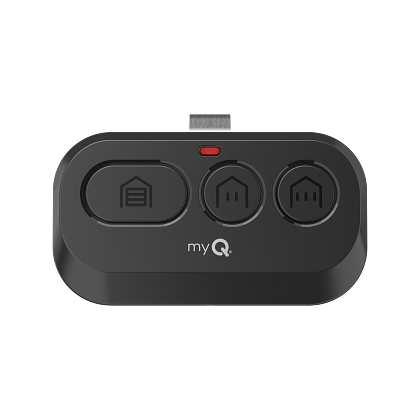
- Single-button remotes: Control one garage door or gate. These are simple and great for families with just one door.
- Multi-button remotes: Can operate two or three doors/gates. If you have a two-car garage, you can open each door separately.
- Universal remotes: Work with Chamberlain and other brands. These are useful if you have an opener from a different brand or want a backup remote.
Some remotes have extra features, like built-in LED lights or the ability to work with smart home systems. For example, some Chamberlain remotes have a flashlight function, which can help if you return home at night. Others offer larger, easy-to-press buttons, designed for seniors or people with limited hand mobility.
If you have a smart home, some Chamberlain remotes can connect to systems like MyQ. This lets you use your phone as a remote, or even set up schedules for your garage door to open or close automatically.
Compatibility And Model Numbers
Remote compatibility depends on your garage door opener’s model. Older openers use fixed codes, while newer ones use rolling codes. You can usually find the model number on the back of your opener or in your manual. Chamberlain remotes often list the compatible models on their packaging or website.
If you’re unsure which remote to buy, check the color of the learn button on your opener. This button is used to program remotes and its color tells you which remotes will work. Common colors are yellow, purple, green, or red/orange.
It’s easy to get confused by all the models and colors. For example, a purple learn button means your opener uses Security+ technology, while yellow means Security+ 2. 0. Universal remotes can sometimes work with multiple colors, but it’s always best to check the packaging or Chamberlain’s website for a compatibility chart.
If you have an older opener with a black learn button, you may need to look for a fixed code remote, or consider upgrading your system for better security and ease of use.
| Learn Button Color | Compatible Remote Series | Rolling Code? |
|---|---|---|
| Yellow | Security+ 2.0 | Yes |
| Purple | Security+ | Yes |
| Green | Security+ | Yes |
| Red/Orange | Security+ | Yes |
| Black | Fixed Code | No |
What You Need Before Programming
Programming a Chamberlain remote is straightforward, but you need a few things before you start:
- Chamberlain remote control (new or old)
- Garage door opener unit (installed and working)
- Step ladder (if your opener is mounted high on the ceiling)
- User manual (optional, but helpful)
- Working batteries in your remote
Double-check that your garage door opener is plugged in and the door works with the wall button. If your remote is brand new, check the battery. Most Chamberlain remotes use a CR2032 coin cell battery.
It’s also helpful to have a second person assist, especially if you need to press the learn button and the remote button within a short time. If you’re working alone, make sure everything is within easy reach. Sometimes, the garage opener is dusty or has spider webs around it—take a moment to clean the area so you can see the learn button clearly.
If you’re replacing an old remote, keep it handy. Sometimes, comparing the model numbers or button layouts helps avoid mistakes. And if you’re programming for a rental property or shared garage, check with others before erasing remotes or changing settings.

Credit: www.youtube.com
Step-by-step Guide: Programming A Chamberlain Remote Control
Programming your remote can be done in less than five minutes. The steps are simple, and you don’t need special tools. Here’s how to do it:
Step 1: Locate The Learn Button
The learn button is usually found on the back or side of your garage door opener. You may need to remove a light cover or panel to see it. The button color indicates your opener’s technology, as shown in the table above.
Common locations:
- Back of the opener
- Under the light cover
- Near the antenna wire
Sometimes the learn button is hidden by a small plastic cover for safety. It’s usually labeled “LEARN” or may have a small LED next to it. If you’re having trouble finding it, look for a small, square, or round button.
The LED light next to the button can help you know if you’re pressing the right one.
Step 2: Prepare Your Remote
Make sure your remote has a working battery. If it’s new, remove any plastic tabs covering the battery. Identify the button you want to use for programming.
If your remote is multi-button, decide which garage door you want to control with each button. Some people label the buttons with stickers to avoid confusion, especially in families with several remotes.
Step 3: Press The Learn Button
Press and release the learn button on your opener. Don’t hold it for more than one second. A small LED near the button will light up, showing the opener is ready to learn a remote.
Some openers beep or flash their main light to show they’re in programming mode. Don’t worry if your opener looks a bit different—just follow the timing for your specific model.
Step 4: Press The Remote Button
Within 30 seconds of pressing the learn button, press and hold your remote’s button (the one you want to program). Hold it for about two seconds, then release.
- If programming a multi-button remote, choose the button for the specific door.
- For universal remotes, follow the instructions provided with the remote.
The opener’s light may blink or you may hear a click. This means programming was successful.
If nothing happens, try again, making sure to press the remote button within the 30-second window. In some rare cases, you may need to hold the remote button longer, up to five seconds, depending on your opener model.
Step 5: Test The Remote
Press the remote button again to test. The garage door should open or close. If it doesn’t work, repeat steps 3 and 4. Make sure you’re close enough to the opener.
If you have more than one remote, test each one to be sure you haven’t accidentally erased any settings.
Step 6: Finish And Secure
Once programmed, put back any covers you removed. Store your remote safely and avoid pressing random buttons.
Some people keep their remote on a keychain or clip it to their car visor. If you have children, teach them not to play with the remote for safety reasons.
Extra Steps For Multiple Doors
If you have a multi-door opener or multi-button remote:
- Repeat the process for each door and button.
- Each button can be programmed to a different opener.
You can program up to three remotes per opener, depending on the model.
If you have more than three remotes, some openers allow you to add extra accessories, but you may have to check with Chamberlain support or upgrade your system.
Example: Programming With Security+ 2.0
Let’s say you have a Chamberlain opener with a yellow learn button (Security+ 2.0). Here’s a real-world example:
- Climb the ladder and remove the light cover.
- Press and release the yellow learn button.
- Within 30 seconds, press and hold your remote’s main button.
- The opener light blinks twice.
- Test the remote — the door opens.
This process works for most Chamberlain remotes, but always check your model’s instructions.
If your opener is in a tight space, use a mirror or your phone’s camera to see the learn button before starting.
Troubleshooting Common Problems
Programming doesn’t always go smoothly. Here are solutions to common issues:
Remote Not Working After Programming
- Check battery: Replace if old or weak.
- Distance: Stand closer to opener.
- Learn button timing: Press remote within 30 seconds.
- Interference: Move away from metal objects or other electronics.
Also, make sure you’re not accidentally pressing two remote buttons at once. Even a small mistake, like holding the button too short, can stop programming from working.
Remote Works Sometimes, Not Always
- Battery may be low.
- Signal interference from Wi-Fi routers or LED lights.
- Antenna wire on opener may be damaged or missing.
Check for sources of interference. For example, some LED bulbs near the opener can block the signal. Switching to a different bulb may solve the problem.
Can’t Find The Learn Button
- Check your user manual.
- Look under light covers or panels.
- Some older models may not have a learn button.
If you have an old opener without a learn button, you might need a different programming method, such as DIP switches. These are small switches inside the remote and opener that must match. This method is less secure and less common today.
Garage Door Opens Unexpectedly
- Someone else’s remote may be programmed by accident.
- Reset opener and reprogram your remotes.
This can happen in shared garages or condos. After a reset, give new remotes only to trusted people.
Resetting Remotes
If you want to erase all programmed remotes (for security or after moving):
- Press and hold the learn button for about 6–10 seconds until the LED goes off.
- All remotes are erased.
- Reprogram each remote as needed.
This is important if you lose a remote or move into a new home. Don’t skip this step if you want to keep your garage secure.
Advanced Programming: Universal Remotes & Smart Controls
Some Chamberlain remotes are universal, meaning they work with other brands like LiftMaster, Craftsman, or Genie. Universal remotes may require extra steps:
- Enter manufacturer codes (found in manual)
- Use remote programming modes (like “smart” or “learn” modes)
For example, a universal remote might have a small switch or button inside. You hold it while pressing the main button to enter programming mode. Then, you enter a code or follow a sequence to match your opener.
Smart controls let you use your phone to operate your garage door. Chamberlain’s MyQ technology allows you to connect your opener to Wi-Fi and control it with an app.
MyQ can send alerts to your phone if you forget to close the door. You can also share access with family members or service people, and even integrate with Amazon Key for secure package delivery inside your garage.
| Remote Type | Programming Steps | Compatibility |
|---|---|---|
| Standard Remote | Learn button + remote button | Chamberlain only |
| Universal Remote | Enter codes + learn button | Chamberlain, LiftMaster, Craftsman, Genie |
| Smart Control (MyQ) | App setup + Wi-Fi pairing | Chamberlain, LiftMaster |
Security Tips For Chamberlain Remotes
Garage remotes are convenient, but they can be a weak spot if not secured properly. Here are some important tips:
- Erase old remotes when moving to a new house.
- Never leave your remote in your car if parked outside.
- Use rolling code remotes for better security.
- Replace batteries regularly.
- If your remote is lost or stolen, reset your opener to remove access.
A less obvious tip: Don’t lend your remote to service people or neighbors. Instead, open and close the garage for them yourself, or use smart controls to share access temporarily.
Chamberlain remotes with Security+ and Security+ 2. 0 technology are safer because they use rolling codes. Older remotes with fixed codes are easier to hack.
If you want even more security, consider adding a keypad outside your garage. Most Chamberlain openers can be paired with a wireless keypad, allowing you to open the door with a PIN code. Change the code often and never use easy numbers like “1234.
”
Programming Multiple Remotes And Vehicles
Many people want to use more than one remote, or program a built-in car remote (like HomeLink). Here’s how:
Programming Extra Remotes
- Repeat the programming steps for each remote.
- Up to three remotes can be programmed to most Chamberlain openers.
If you reach the limit and need to add another, you must erase all remotes and start again. Write down which remote is for each person to avoid confusion.
Programming Car Remotes (homelink)
- Hold the car’s HomeLink button.
- Hold your Chamberlain remote close and press both buttons.
- The car’s indicator light will blink.
- Go to the opener, press the learn button.
- Press the HomeLink button again.
Check your car’s manual for detailed steps.
Some vehicles require two people: one to press the buttons in the car, and one to press the learn button on the opener. If your car system doesn’t work the first time, clear it and try again, or check for firmware updates in newer vehicles.
Common Mistakes To Avoid
Beginners often make errors when programming remotes. Here are two non-obvious mistakes:
1. Holding the learn button too long: Press and release it quickly. Holding it erases all remotes.
2. Not programming within 30 seconds: After pressing the learn button, you must press your remote button soon. If you wait too long, the opener exits programming mode.
Other mistakes include:
- Using a dead battery
- Trying to program from far away
- Not matching remote model to opener
One thing people often miss: After erasing all remotes, you must reprogram even the remotes you want to keep. Don’t forget this step, or you’ll be locked out.
Real-world Example: Programming For A Family
Imagine a family with two cars and three garage doors. They want each car to open different doors.
- Dad programs his remote to Door 1.
- Mom programs hers to Door 2.
- They use a multi-button remote for Door 3.
Each remote is programmed following the steps above. If they get a new car, they use the HomeLink system.
If a child loses a remote at school, the parents erase all remotes and reprogram only the ones they want to keep. This keeps the garage secure.
Data: Chamberlain Remote Usage In The Us
Chamberlain is a leading brand in the US. According to a 2023 market report, Chamberlain holds about 35% market share in garage door openers.
- Over 10 million Chamberlain remotes are sold annually.
- Security+ 2.0 is the most popular technology.
Most US homes with garages use rolling code remotes for security. Programming is a common task for homeowners, especially after moving or upgrading systems.
Another insight: Many realtors and home inspectors recommend resetting garage door remotes when buying or selling a home. This simple step prevents old owners or renters from accessing your garage.
Credit: www.chamberlain.com
Practical Tips For Smooth Programming
Here are some tips to make the process easier:
- Read your opener’s manual before starting.
- Keep your remote close to the opener while programming.
- Label your remotes if you have several.
- If your opener is in a dark area, use a flashlight.
- Program during the day for better visibility.
Many people miss the step of checking their opener’s model number. This can cause frustration if the remote isn’t compatible.
Another tip: Write down the date you program the remote and the type of battery inside. This helps you remember when to replace the battery or troubleshoot problems in the future.
If you’re in a hurry, take a photo of the opener’s serial and model numbers for reference. This saves time if you need to buy a new remote or call support later.
Comparison: Chamberlain Vs. Other Brands
Chamberlain isn’t the only brand for garage remotes. Here’s a quick comparison:
| Brand | Rolling Code | Remote Types | Programming Difficulty |
|---|---|---|---|
| Chamberlain | Yes (Security+, Security+ 2.0) | Single, Multi, Universal | Easy |
| LiftMaster | Yes | Single, Multi, Universal | Easy |
| Genie | Yes | Single, Multi, Universal | Medium |
| Craftsman | Yes | Single, Multi | Medium |
| Older Brands | No (Fixed Code) | Single | Hard |
Chamberlain and LiftMaster are considered the easiest brands for programming remotes, thanks to the learn button system.
Genie remotes often require more steps, such as toggling switches or entering codes. Craftsman openers are similar to Chamberlain but may have different button placements.
If you’re switching brands, always check compatibility. Some universal remotes work across brands, but not all. Reading reviews before buying a remote can save time and money.
Maintenance And Battery Replacement
Maintaining your remote keeps it working well. Here’s what to do:
- Replace batteries every 1–2 years.
- Clean buttons and check for damage.
- If your remote gets wet, dry it immediately.
- Store remotes away from heat or cold.
To change the battery:
- Open the remote’s case.
- Remove the old battery.
- Insert a new CR2032 coin cell battery.
- Close the case.
Some remotes have a small screw, while others snap open with gentle pressure. Use a small screwdriver or a coin if needed.
If your remote still doesn’t work after battery replacement, try reprogramming.
It’s also a good idea to wipe the remote with a soft cloth every few months. Dust and dirt can build up inside the buttons, causing them to stick or stop working.
Upgrading To Smart Garage Door Controls
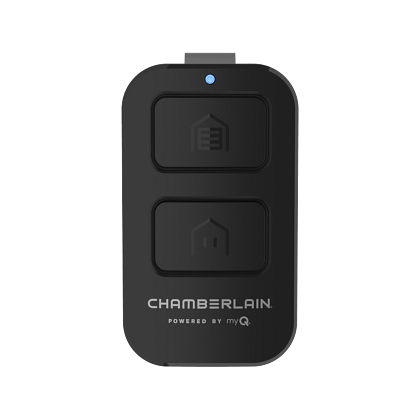
Smart garage controls are popular today. Chamberlain’s MyQ system allows you to open, close, and monitor your garage door from your phone.
- Install the MyQ hub near your opener.
- Download the MyQ app.
- Follow instructions to connect to Wi-Fi.
- Program your phone as a remote.
Smart controls add convenience and extra security. You can get alerts if your garage door is open or close it remotely.
With MyQ, you can even automate routines, such as closing the garage door every night at 10 pm. Some users link MyQ to smart speakers or security systems for voice control and extra peace of mind.
For more info, visit the official Chamberlain site: Chamberlain Smart Garage Door Openers.
Credit: www.chamberlain.com
Frequently Asked Questions
How Many Remotes Can I Program To My Chamberlain Opener?
Most Chamberlain openers allow up to three remote controls to be programmed at once. Some newer models support more, especially with smart controls.
If you need to give access to more people, consider using the MyQ system, which can support multiple users through the app.
What Do I Do If My Remote Is Lost Or Stolen?
Erase all programmed remotes by holding the learn button for 6–10 seconds. Then reprogram your remotes. This prevents someone from using the lost remote to enter your garage.
It’s a good habit to erase old remotes whenever you move into a new home, even if the previous owner says they returned all remotes.
Can I Use A Chamberlain Remote With Other Brands?
Universal Chamberlain remotes can work with brands like LiftMaster, Craftsman, and Genie. Check compatibility and use the correct programming steps. Not all remotes are universal.
Some older openers, especially those with DIP switches, may not be compatible with new universal remotes.
Why Does My Garage Door Opener Have A Blinking Light After Programming?
A blinking light signals that the remote was successfully programmed. If the light blinks but the remote doesn’t work, check battery or repeat programming.
If the light blinks rapidly when trying to program, it could mean you reached the remote limit or there’s a compatibility issue.
How Often Should I Replace My Remote’s Battery?
Replace the battery every 1–2 years, or if your remote starts working only occasionally. Most Chamberlain remotes use a CR2032 battery.
If you notice the range decreasing, try a new battery before replacing the remote.
Programming a Chamberlain remote control is easy once you know the steps. With rolling code technology, clear instructions, and a bit of patience, you’ll have reliable control over your garage door. Remember to check compatibility, secure your remotes, and keep batteries fresh.
If you want even more convenience, consider upgrading to smart controls. Now you’re ready to enjoy the security and ease of your Chamberlain system, knowing your remote is set up perfectly.