
Ever struggled with slow Wi-Fi or dead spots while using your Mac? Many people find that their old router just can’t keep up, especially in larger homes or apartments.
Choosing a mesh router for Mac can feel overwhelming. There’s a mix of new tech jargon, Wi-Fi standards, and price differences. Some models promise speed, others focus on coverage, and it’s hard to know which matters most for your setup.
The trade-offs aren’t obvious—what works for one household might be overkill or too basic for another.
This guide will help you make sense of the options, so you can find a mesh router that fits your needs and works smoothly with your Mac.
How To Think About Mesh Routers For Mac
Mesh systems are popular because they solve Wi-Fi gaps, but not every model suits every user. Think about how many devices you connect, the size of your space, and how much you rely on stable, fast internet. For Mac users, compatibility is rarely an issue, but performance can vary depending on how you use your device—streaming, working from home, or gaming.
Common Confusion Points
It’s easy to get lost comparing numbers—speed ratings, coverage claims, and features like backhaul or security. Many buyers focus on technical specs, but overlook simple things like setup, expandability, or how well the mesh handles multiple Macs and smart devices.
Price doesn’t always equal better performance for your actual needs.
The products below were chosen to reflect different home sizes, budgets, and usage styles. Each option fits a slightly different situation, so you can pick what matches your life.
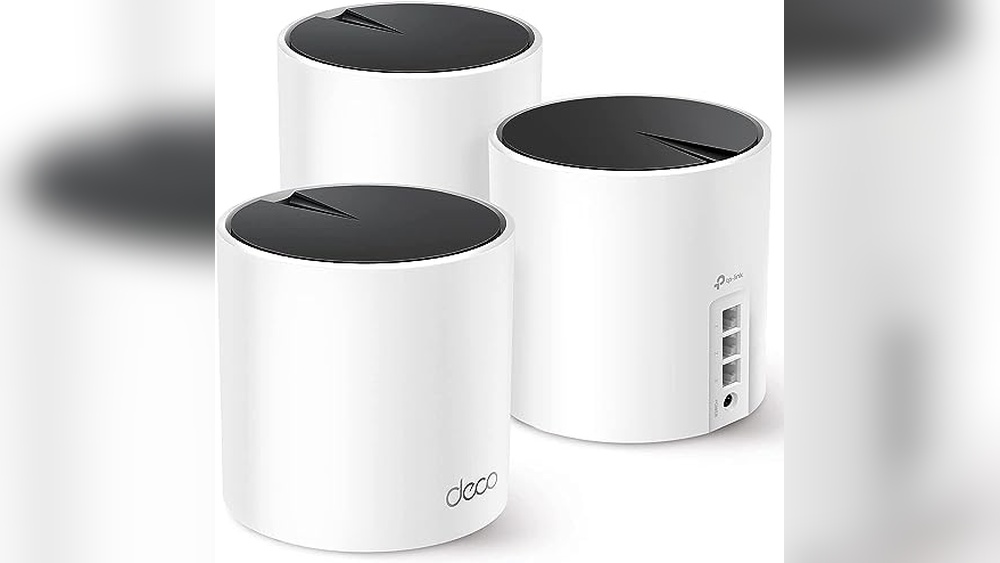
Tp-link Deco X55 Mesh Wifi System
One of the Best Mesh Routers for Mac users who want reliable coverage and easy setup across larger homes.

The TP-Link Deco X55 Mesh WiFi System is designed to replace traditional routers and extenders, offering seamless Wi-Fi 6 coverage for homes up to 6500 square feet. It eliminates dead zones and buffering, making it easier to maintain a strong connection in every room.
With multiple gigabit ports and support for Ethernet backhaul, it’s flexible for wired or wireless setups.
Using this mesh system feels effortless—Wi-Fi stays consistent as you move around, and connecting devices is straightforward. You don’t have to worry about dropped signals or complicated network management. The Deco units blend in quietly, and once it’s set up, you’re free from the usual Wi-Fi headaches.
Reliable Advantages For Mac Households
- Whole home Wi-Fi 6 coverage up to 6500 sq. Ft.
- Connects up to 150 devices with stable performance
- Three gigabit Ethernet ports per unit for flexible wired connections
- Supports Ethernet backhaul for improved speed
- Advanced security commitment from TP-Link
- Seamless roaming between units
- Any unit can work as a router
Points To Consider Before Buying
- May be overkill for small apartments or single rooms
- Requires multiple units for full coverage
- Does not include built-in parental controls or advanced features
What I’d Tell A Friend
This mesh system is ideal for Mac users who want hassle-free, whole-home Wi-Fi without constantly fiddling with settings. It’s best for households with multiple devices and a need for coverage in every corner, including garages or outdoor spaces. You won’t have to worry about buffering or unreliable connections.
The Deco X55 removes the stress of troubleshooting Wi-Fi, and its Ethernet ports offer flexibility for those who prefer a wired option for some devices. For best results, place the units evenly throughout your home and use Ethernet backhaul if possible.
You’ll enjoy consistent speeds and peace of mind from the enhanced security approach.
If you value reliability and want to stop thinking about your Wi-Fi, this model makes everyday internet use feel effortless.
| Best for | Why |
|---|---|
| Large homes with many rooms | Eliminates dead zones and weak signal areas |
| Mac users with multiple devices | Handles up to 150 connections smoothly |
| People needing wired connections | Offers 3 gigabit Ethernet ports per unit |
| Security-conscious buyers | Built with advanced cybersecurity in mind |
Tp-link Deco S4 Mesh Wifi System
As one of the Best Mesh Routers for Mac, this system delivers seamless coverage for busy homes needing reliable WiFi everywhere.

This is a mesh WiFi system designed to cover large spaces and eliminate dead zones. It replaces traditional routers and extenders with a unified network, so you get strong, fast WiFi in every corner. If you’ve struggled with patchy connections in your home, this solves that by creating one seamless signal.
Using the Deco S4 feels smooth and worry-free. Devices stay connected as you move around, with no need to switch networks or remember multiple passwords. It’s easy to set up and lets you focus on your work or streaming, not troubleshooting WiFi.
The single network name makes managing your Mac and other devices simple.
What Sets This Mesh System Apart
- Covers up to 5,500 square feet—ideal for bigger homes
- Seamless roaming with one network name and password
- Handles up to 100 devices without slowing down
- Works with Alexa for voice control
- Easy setup and unified management
- Strong signal in every room, reducing WiFi stress
Points To Consider Before Buying
- No advanced customization for power users
- Requires space for three units
- Not the fastest option for heavy gaming
Where This Shines
The Deco S4 is best for families and remote workers who want dependable WiFi for Macs and other devices in every room. It removes the hassle of dealing with multiple networks, weak signals, and confusing setups. Once installed, you don’t have to worry about your connection dropping as you move around.
If you want consistent coverage without fuss, this system makes life easier. For best results, place the units evenly throughout your home—don’t hide them in closets. You’ll get peace of mind knowing your WiFi just works, whether you’re on video calls or streaming movies.
I like that you can manage everything simply from one app.
| Best for | Why |
|---|---|
| Large homes with Macs | Eliminates dead zones and keeps all devices connected |
| Multiple device households | Handles up to 100 devices without lag |
| Users wanting easy setup | Unified network name and simple app management |
| Voice control fans | Works with Alexa for added convenience |
Eero 7 Dual-band Wi-fi 7 Mesh Kit
A top pick among Best Mesh Routers for Mac users who want fast, reliable Wi-Fi with wide coverage throughout their home.
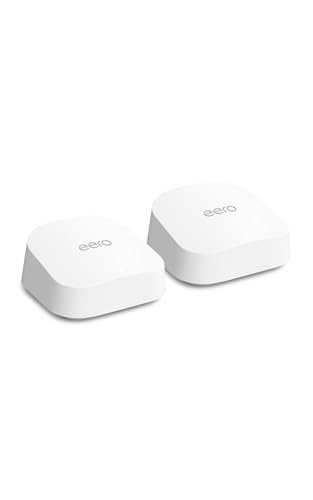
The eero 7 Dual-Band Wi-Fi 7 Mesh Kit is designed to cover large homes with seamless, fast Wi-Fi. With support for the latest Wi-Fi 7 standard, it helps eliminate dead spots and keeps your Mac and other devices connected reliably.
The two-pack system handles over 120 devices and up to 4,000 square feet, so you don’t have to worry about weak signals in any room.
Daily use feels smooth and consistent, with fewer drops and less buffering. You can set it up and forget about it—no need to tinker or troubleshoot. Streaming, video calls, and big downloads all just work, letting you spend more time online and less time fixing Wi-Fi issues.
This mesh system aims to make your home network feel invisible and dependable.
Why Mac Users Appreciate It
- Strong, stable coverage for large homes
- Reduces Wi-Fi dead zones
- Easy to expand or integrate with older eero devices
- Handles many devices without slowdowns
- Simple, hassle-free setup process
- Supports fast internet plans up to 2.5 Gbps
Things To Consider Before Buying
- No advanced customization for tech enthusiasts
- Does not include extra features like built-in security subscriptions
- Two-pack may be more than needed for smaller spaces
Who This Fits Best
This mesh system is ideal for Mac owners who want solid Wi-Fi everywhere without having to think about it. If you’re tired of weak spots or slow connections, the eero 7 helps remove the stress of unreliable internet so you can focus on work, streaming, or calls.
Setup is straightforward—just follow the app and you’re done in minutes.
For best results, place each unit in open areas to maximize coverage. You’ll notice fewer interruptions and smoother performance, giving you peace of mind whether you’re working from home or just relaxing. If you like things that “just work,” this router kit fits that style perfectly.
| Best for | Why |
|---|---|
| Larger homes with Wi-Fi dead spots | Covers up to 4,000 sq. ft. and minimizes drops |
| Households with many devices | Handles 120+ devices at once with reliable speeds |
| Users wanting simple setup | Easy app-guided installation, no guesswork |
| Existing eero users upgrading | Backward compatible with previous eero models |
Tp-link Deco X55 Wifi 6 Mesh Router
For those seeking Best Mesh Routers for Mac, this model stands out with seamless whole-home coverage and advanced security features.

The TP-Link Deco X55 WiFi 6 Mesh Router is designed to cover up to 2500 square feet, replacing your traditional router and extender with a single, modern unit. It solves the problem of weak Wi-Fi spots in your home, offering strong, consistent connections for all your devices.
With WiFi 6 technology and Ethernet backhaul support, it ensures high-speed performance throughout.
Using this mesh router feels easy and reliable—no more dead zones or buffering when streaming or working. Setup is straightforward, and once installed, you can move around your home with your Mac or other devices without losing signal or speed.
The three gigabit ports allow flexible wired connections, which is helpful for desktop or office setups.
Key Advantages For Mac Users
- Covers large areas up to 2500 sq.ft. With one unit
- Reliable WiFi 6 performance for fast speeds
- Seamless mesh system—add more units as needed
- Supports Ethernet backhaul for stable connections
- Works as a standalone router or part of a mesh network
- Advanced security design with Secure-by-Design pledge
- Three gigabit Ethernet ports for flexible wired setups
Consider Before You Buy
- Single pack covers medium-sized homes; larger spaces need additional units
- No built-in modem—requires existing internet service
- Not all features may be needed if you have few devices
My Practical Take
This mesh router is ideal for Mac users who want dependable Wi-Fi across their home or workspace and value security. It removes the hassle of dealing with weak signals, multiple extenders, or guessing where to place your router. If you’ve struggled with dead zones, Deco X55 simplifies things by letting you add more units for extra coverage.
To get the best results, place the Deco unit in a central area and use wired connections for devices that need the most stability, like your desktop Mac. The peace of mind comes from knowing your network is built with security in mind, reducing risks and surprises.
I appreciate that everything works together easily, with minimal fuss after setup.
| Best for | Why |
|---|---|
| Mac users in medium-sized homes | Strong, consistent Wi-Fi coverage and easy expansion |
| Remote work setups | Reliable Ethernet backhaul and stable WiFi 6 speeds |
| Security-conscious households | Secure-by-Design pledge for advanced protection |
| Users tired of Wi-Fi dead zones | Mesh system eliminates weak spots and buffering |
Netgear Orbi 370 Wifi 7 Mesh System
A top pick among the Best Mesh Routers for Mac for users needing strong, seamless coverage and advanced security in larger homes.

The NETGEAR Orbi 370 WiFi 7 Mesh System is designed to provide fast, reliable wireless coverage throughout your entire home. With its mesh setup, dead zones and dropped connections become a thing of the past, making it easy to keep all your Apple devices connected.
If you struggle with inconsistent WiFi or have many devices, this system offers a real solution thanks to its advanced dual-band technology and robust network speeds.
Using the Orbi 370 feels effortless once it’s set up—there’s no need to worry about where you are in your house, as the signal stays strong and stable. The built-in security features keep your network safer without much input, and updates happen automatically.
For anyone who values simplicity and uninterrupted connectivity, this mesh system helps you stay productive and worry-free.
Key Advantages For Mac Users
- Consistent, high-speed WiFi 7 coverage across large homes
- Handles up to 70 devices—ideal for Apple-centric households
- Automatic security updates for added peace of mind
- Simple mesh setup with included extenders
- Dual-band Enhanced Backhaul for stable connections
- Backward compatibility with older WiFi devices
Points To Consider Before Buying
- Does not include a built-in modem; you need your own
- May be more than needed for smaller apartments
- Initial setup may require some patience for first-time mesh users
When I’d Pick This
If you live in a larger home or work in a busy household with many Macs and other devices, the Orbi 370 is a solid fit. It eliminates the stress of WiFi dead zones and the hassle of juggling slow connections.
Setting it up in a central spot and placing the extenders strategically will give you the best results.
Families and remote workers will appreciate the peace of mind that comes from reliable coverage and built-in security. You’ll spend less time troubleshooting and more time doing what matters. Personally, I like how it just quietly works in the background without needing constant attention.
| Best for | Why |
|---|---|
| Large homes or multi-level spaces | Blankets up to 6,000 sq.ft. with strong signal everywhere |
| Apple-centric households | Supports up to 70 devices, keeping all Macs and accessories connected |
| Security-conscious users | Automatic firmware updates and advanced protection features |
| Users needing backward compatibility | Works seamlessly with both new and older WiFi devices |
Tp-link Deco 7 Mesh Wifi 7 Router
One of the Best Mesh Routers for Mac, the Deco 7 delivers strong, seamless coverage and next-gen speed for Apple users who want hassle-free Wi-Fi across the home.

The TP-Link Deco 7 Mesh WiFi 7 Router is designed for homes that need fast, stable Wi-Fi in every room. It solves common dead spot issues with wide coverage up to 2,500 square feet and supports up to 150 devices without slowing down.
If your Mac devices are struggling with inconsistent speeds, this mesh system offers a simple upgrade.
Using the Deco 7 feels reliable and effortless. Once set up, you get strong, uninterrupted connections for work, streaming, or video calls—even in remote corners of your house. The system is easy to maintain, and you don’t need to tinker with settings to keep it running smoothly.
Why Mac Owners Like It
- Seamless Wi-Fi for the whole house
- Strong, stable connections for all Apple devices
- Handles many devices at once without drops
- Wired 2.5 Gbps ports for ultra-fast connections
- Built with advanced security in mind
- Easy setup and free expert support
Points To Consider
- One unit covers medium-sized homes; larger spaces need more units
- No built-in modem—requires an existing internet connection
- Some advanced features may be more than casual users need
Who This Fits Best
This router is a great fit for Mac users who want dependable Wi-Fi without the stress of frequent dropouts or confusing setup steps. If you’re working from home, streaming, or using smart devices, it removes the guesswork of network management and lets you focus on what matters.
A quick tip: place the Deco unit in a central location for the best coverage. You’ll appreciate fewer surprises when devices stay connected, even as you move around. I find the peace of mind especially valuable when I need uninterrupted video calls or cloud syncs.
| Best for | Why |
|---|---|
| Mac households with many devices | Handles up to 150 devices with reliable speed |
| Remote workers and students | Keeps video calls and uploads smooth |
| Homes with Wi-Fi dead spots | Covers up to 2,500 sq. ft. with strong signal |
| Anyone needing simple setup | Easy app-based installation and expert help if needed |
Tp-link Deco 7 Be25 Mesh Router
A top pick among Best Mesh Routers for Mac users who want strong, consistent coverage and easy roaming across their home.

The TP-Link Deco 7 BE25 Mesh Router offers reliable, whole-home Wi-Fi for users who need robust signal in every room. With wide coverage up to 2,600 sq. Ft. and support for over 150 devices, it’s designed to eliminate dead zones and keep Macs and other devices connected without hassle.
The dual 2. 5G ports make it a good fit for homes with faster internet or wired backhaul needs.
Using this router means moving from room to room without worrying about dropped connections or fiddling with settings. The AI-driven roaming adapts as you move, so streaming and video calls stay smooth on your Mac. Setup is simple, and once in place, daily use feels seamless and dependable, freeing you from the usual Wi-Fi headaches.
What Sets This Mesh Apart
- Wide, seamless coverage for large homes
- Handles many devices at once without slowdowns
- AI-driven roaming keeps your Mac always connected
- Dual 2.5G ports for high-speed wired connections
- Strong security standards by design
- Supports latest Wi-Fi 7 devices
- Simple, unified network setup
Points To Consider Before Buying
- Covers a single large area—may need extra units for very big homes
- No built-in modem—requires a separate device for most ISPs
- Some advanced features specific to Wi-Fi 7 may not benefit older Macs
When I’d Pick This
The Deco 7 BE25 is a smart choice for Mac users in homes where Wi-Fi reliability and range matter most. It’s especially useful if you have multiple Apple devices and want to avoid connection drops or confusing network setups. By creating one strong, unified network, it removes the guesswork and constant troubleshooting that can come with weaker routers.
If you want to maximize performance, place the unit in a central location and use the wired backhaul ports for high-demand devices. This approach helps maintain top speeds and stability, so you can work or stream with confidence. You’ll appreciate the peace of mind that comes with fewer interruptions and a network that just works, even as your device lineup grows.
| Best for | Why |
|---|---|
| Mac households needing whole-home Wi-Fi | Eliminates weak spots and delivers strong signal everywhere |
| Homes with many devices | Handles 150+ connections without congestion |
| Users upgrading to Wi-Fi 7 | Future-proofs your network for the latest Apple devices |
| Anyone wanting easy network management | Unified setup and seamless roaming reduce daily hassles |
Tp-link Deco S4 Mesh Wifi System
A top pick among the Best Mesh Routers for Mac, this system offers seamless whole-home WiFi with simple setup for Mac users who want consistent coverage.

The TP-Link Deco S4 Mesh WiFi System is designed to eliminate WiFi dead zones by creating a single, unified network across your home. With two units, it covers up to 3,800 sq. Ft. , making it a strong choice for anyone tired of dropped connections in larger spaces.
The system replaces traditional routers and extenders, letting you move freely without reconnecting to different networks.
Everyday use feels smooth, with devices automatically switching between units for the best signal—no need to remember different network names. Setup and management are simple, so you spend less time troubleshooting and more time connected. It’s especially easy for Mac households looking for hassle-free, stable internet in every room.
Where This Mesh System Excels
- Reliable whole-home WiFi coverage up to 3,800 sq. Ft.
- Single network name for seamless roaming
- Easy management and setup
- Supports many devices (up to 75)
- No more switching networks as you move around
- Parental controls for safer browsing
Points To Consider Before Buying
- Not the fastest option for heavy multi-gigabit users
- Advanced features may be limited compared to pricier models
- Two-pack may not be enough for very large homes
Who This Fits Best
This mesh router is ideal for Mac users in medium-sized homes who want reliable WiFi without fuss. It’s for those who want to stop worrying about losing signal in corners or upstairs and prefer a simple, unified network name everywhere.
The hassle of reconnecting to different networks is gone, making daily work and streaming smoother.
For best results, place the units in open areas between rooms to maximize coverage. With the Deco S4, you can expect more consistent speeds and fewer tech surprises—especially useful if you work from home or have lots of Apple devices.
If you like things to just work, this system fits that style well.
| Best for | Why |
|---|---|
| Mac users in multi-story homes | Eliminates WiFi dead zones with mesh coverage |
| Families with many connected devices | Supports up to 75 devices for uninterrupted streaming and work |
| Anyone wanting simple setup | Single network name and easy management tools |
| Parents needing control | Built-in parental controls for safer browsing |
Eero 6 Mesh Wi-fi Router
The eero 6 stands out among the Best Mesh Routers for Mac by offering reliable, whole-home Wi-Fi 6 coverage for users who value effortless connectivity.

The eero 6 Mesh Wi-Fi Router is designed for easy, seamless coverage throughout your home. It solves the problem of dead spots and buffering by intelligently routing Wi-Fi traffic, so you can stream, game, or video conference confidently. With support for up to 75 devices and speeds up to 900 Mbps, it’s well suited for busy households using Macs and other devices.
In daily use, setup is quick thanks to the eero app, and managing your network is straightforward. Users can rely on consistent connectivity without needing to fiddle with complicated settings. The built-in Zigbee smart home hub adds convenience for those who use Alexa-compatible devices, making smart home integration smoother and less cluttered.
What Makes Eero 6 Stand Out
- Whole-home Wi-Fi 6 coverage up to 1,500 sq. Ft.
- TrueMesh technology reduces drop-offs and buffering
- Supports over 75 connected devices
- Easy setup and remote management via app
- Built-in Zigbee hub for smart home devices
- Reliable speeds up to 900 Mbps
- Free US customer support available 7 days a week
Consider Before Buying
- Coverage may not be enough for larger homes without additional units
- Single pack includes only one router
- Requires the eero app for setup and management
Who This Fits Best
This router is ideal for Mac users in apartments or small homes who want fast, reliable Wi-Fi with minimal hassle. It removes the stress of weak signals and complicated setup, letting you focus on work, entertainment, or smart home tasks.
For the best results, place the router in a central spot and use the app to optimize device connections.
You’ll enjoy dependable performance and fewer surprises, knowing your network is actively managed to avoid interruptions. If you value simplicity and want your smart devices to work smoothly together, eero 6 is a reassuring choice. I appreciate how the app streamlines everything, even for those less tech-savvy.
| Best for | Why |
|---|---|
| Mac users in small homes | Delivers strong, consistent Wi-Fi coverage in compact spaces |
| Smart home setups with Alexa | Built-in Zigbee hub reduces device clutter and setup time |
| Households with many devices | Supports up to 75+ connections without slowdowns |
| Quick and easy installation | App-guided setup saves time and avoids technical headaches |
Tp-link Deco Xe70 Pro Mesh Router
For those seeking Best Mesh Routers for Mac, this model stands out for its fast tri-band Wi-Fi 6E and wide coverage in busy households.

This mesh router is designed to cover up to 2,900 sq. Ft. , making it suitable for homes with multiple rooms and floors. It addresses the common problem of Wi-Fi dead zones and slow speeds when several devices are connected, thanks to its tri-band Wi-Fi 6E technology.
The added AI-powered mesh helps unify your network under one name, streamlining the connection process for all your devices.
Using this router means less time spent troubleshooting Wi-Fi issues and more time enjoying a stable connection, whether you’re streaming, working, or gaming. The easy network handoff ensures you don’t lose connection as you move around the house. You get peace of mind knowing your network adapts on its own and supports up to 200 devices, so everything from your Mac to your smart TV stays reliably online.
Key Advantages For Mac Users
- Strong Wi-Fi 6E coverage up to 2,900 sq. Ft.
- Supports up to 200 connected devices with minimal drop in speed
- AI-powered mesh ensures seamless roaming between rooms
- Tri-band design reduces congestion in busy homes
- 2.5 Gbps port supports high-speed wired connections
- Designed with advanced security standards in mind
Potential Limitations To Consider
- Single unit may not cover very large homes without add-ons
- Setup may require some technical familiarity for optimal results
- Premium features best utilized with newer devices that support Wi-Fi 6E
Who This Fits Best
If you use a Mac and want a mesh system that handles lots of devices with little fuss, this router is a solid fit. It removes the stress of juggling connections and helps avoid the guesswork of where your Wi-Fi might drop off.
For busy homes or small offices, it saves time and hassle by managing connections automatically.
To get the most out of it, place the unit in a central spot and connect demanding devices (like a desktop Mac) via the 2. 5 Gbps port for even more stability. With its AI-driven mesh and strong security focus, you can count on fewer Wi-Fi surprises and a consistently smooth experience.
I’d suggest it for anyone who wants home networking to just work, with minimal attention required.
| Best for | Why |
|---|---|
| Mac households with many devices | Handles up to 200 connections and keeps speeds reliable |
| Homes with Wi-Fi dead zones | Strong coverage up to 2,900 sq. ft. with seamless roaming |
| Users wanting simple, unified networks | AI-powered mesh creates one network name and auto-optimizes |
| Those needing secure, fast wired connections | 2.5 Gbps port supports demanding tasks like backups or streaming |
How To Choose The Right Mesh Wi-fi System For Your Home
Understand Your Coverage Needs
Start by measuring your home’s size and layout. Larger homes or those with multiple floors often need multi-unit packs for full coverage. Small apartments may only need a single unit.
Speed Vs. Device Capacity
Consider both internet speed and the number of devices you plan to connect. Newer Wi-Fi 6 and Wi-Fi 7 systems handle more devices and provide better speeds, but not all homes require the highest specifications.
Compatibility And Backward Support
If you have older devices, check for backward compatibility. Some newer mesh systems work well with previous generations but others focus mainly on the latest standards.
Wired Vs. Wireless Backhaul
For homes with thick walls or interference, models that offer Ethernet backhaul can provide more stable connections. If wiring is not possible, look for strong wireless backhaul features.
Common Mistakes When Setting Up Mesh Wi-fi
- Placing units too close or too far apart, which can cause coverage gaps or signal overlap.
- Ignoring the number of supported devices and overloading a basic system.
- Not updating firmware, which can reduce security and performance.
- Mixing units from incompatible brands or models, which can limit features.
Who Should Consider Alternatives
- Those with simple, small apartments may not need a full mesh system. A traditional router may be enough.
- Buyers with strict budgets might find entry-level routers more cost-effective if coverage needs are limited.
- Advanced users seeking deep customization might prefer standalone routers with advanced firmware options.
Faqs
Do I Need Wi-fi 6 Or Wi-fi 7?
Wi-Fi 6 is strong for most households, especially with many devices. Wi-Fi 7 is best if you have new devices and need the highest speeds or future-proofing.
Can I Mix Different Brands In My Mesh System?
Mixing brands is not recommended. Most mesh features only work within the same brand and model family.
Will These Systems Work With My Existing Modem?
Yes. Mesh routers connect to your existing modem, replacing your old router. They do not replace the modem itself.
How Many Units Do I Need?
Most homes need two or three units for full coverage. Very small spaces may only require one.
Is Ethernet Wiring Required?
No, but using Ethernet for backhaul can improve reliability and speed, especially in challenging layouts.
Can I Expand My System Later?
Yes. Many mesh systems allow you to add more units from the same model line if you need more coverage in the future.
Summary: Making Your Mesh Wi-fi Choice
Mesh Wi-Fi systems offer flexible coverage for a range of homes and needs. Consider your space, device usage, and future requirements before choosing. The best system is one that matches your environment, is easy to maintain, and keeps your home connected without fuss.