
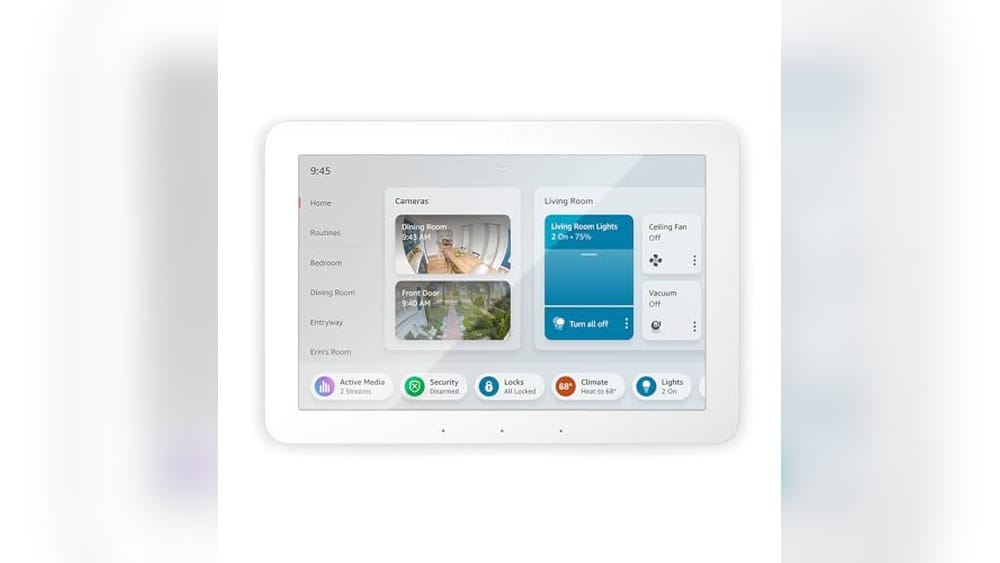
Finding The Right Smart Home Hub For Android
Setting up a smart home often starts with a hub that connects all your devices. If you use Android, you’ve likely noticed there are many options, each with different features and compatibilities.
Choosing the right hub can be tricky. Some focus on voice assistants, others on wide device compatibility or security features. You might need to balance ease of use, device support, and how much control you want over automation.
This guide will help you understand what matters most in a smart home hub for Android. It aims to clear up confusion and offer a straightforward way to pick a hub that fits your needs.
What To Keep In Mind When Choosing A Smart Home Hub
Not all hubs work the same way. Some are designed to work best with certain ecosystems or brands, while others offer broader compatibility. Think about the devices you already own or plan to buy.
Consider how you want to control your smart home — whether through voice, apps, or physical controls. Also, think about the hub’s role in security and monitoring if that’s important to you.
Price can vary widely, from basic hubs that cover essentials to more advanced setups with added features. Finding the right balance depends on your priorities and budget.
Common Confusions And What To Avoid
Many buyers get overwhelmed by technical specs or assume a hub will work perfectly with all devices. It’s important to check compatibility, especially with Android-specific apps and services.
Another common misunderstanding is expecting a hub to do everything without setup or customization. Smart home hubs often require some effort to tailor them to your lifestyle.
Keep in mind that some hubs include extras like smart plugs or bulbs, which might be useful if you’re starting fresh but less so if you already have gear.
With these points in mind, you’ll be better prepared to find a smart home hub that matches how you want to live and control your space.
Next, we’ll explore a selection of smart home hubs suited for Android users, each catering to different needs and preferences. This range reflects various approaches to smart home control, so you can find a good fit for your setup.
Amazon Echo Hub Smart Control
This is the Best Smart Home Hub for Android users who want a simple, versatile Alexa-enabled control panel for managing multiple smart devices.

The Amazon Echo Hub is an 8-inch smart home control panel designed to centralize your smart devices with Alexa voice control and a touch display. It solves the problem of managing multiple smart products by offering a single dashboard to control lights, plugs, cameras, and more with ease.
Using the Echo Hub feels intuitive and smooth, allowing quick access to device controls and routines. Its compatibility with thousands of Alexa-enabled devices means it fits well into existing Android smart home setups, offering reliable security and convenience right at your fingertips.
Key Benefits for Smart Home Control
- Easy-to-use Alexa-enabled panel for voice or touch control
- Customizable dashboard to streamline device management
- Supports thousands of compatible smart home devices
- Built-in hub supports WiFi, Bluetooth, Zigbee, Matter, and Thread
- Enables arming/disarming of compatible security systems
- Flexible installation options including wall mount or tabletop stand
- Compact design with a clear 8” display
Considerations Before Buying
- Requires Alexa ecosystem for full functionality
- Power-over-ethernet and wall mount accessories sold separately
- No built-in battery; needs constant power outlet
Who Should Consider This Hub
This smart home hub is ideal for Android users who want a centralized, voice-activated control panel compatible with a wide range of devices. It removes the hassle of juggling multiple apps and remotes by consolidating controls in one place.
To get the most from this hub, customize your dashboard with frequently used devices and routines for quick access. The reliable connection to security devices also adds peace of mind by allowing remote monitoring and control.
If you prefer hands-free or touchscreen operation with a trusted brand like Amazon, this Echo Hub balances ease of use with robust smart home integration.
| Best for | Why |
|---|---|
| Android users with Alexa devices | Seamlessly integrates with Alexa ecosystem and Android-compatible apps |
| Homeowners wanting smart security control | Allows arming/disarming and camera monitoring from one panel |
| Users with multiple smart devices | Customizable dashboard simplifies managing lights, plugs, and sensors |
| Installers seeking flexible mounting | Supports wall mounting or tabletop stand with cable management options |
Amazon Echo Hub 8” Smart Panel
The Amazon Echo Hub 8” Smart Panel stands out as the Best Smart Home Hub for Android users seeking seamless Alexa control over a wide range of devices.

The Amazon Echo Hub is an 8-inch smart home control panel designed to simplify managing your smart devices through Alexa voice commands or a touchscreen display. It supports thousands of compatible devices, making it a central point for controlling lights, locks, cameras, and more. Being a certified refurbished unit, it offers like-new functionality backed by a limited warranty.
Using the Echo Hub feels intuitive and responsive, helping you streamline your home automation without fumbling through multiple apps. Customizable controls and widgets make it quick to access routines, check security cameras, or adjust connected devices, providing peace of mind and convenience at your fingertips.
Advantages for Smart Home Control
- Works with thousands of Alexa-compatible devices including locks, thermostats, and cameras
- Easy voice or tap control via Alexa-enabled display
- Customizable dashboard for quick access to favorite controls and routines
- Supports multiple smart home protocols: WiFi, Bluetooth, Zigbee, Matter, Sidewalk, and Thread
- Allows arming and disarming compatible security systems from one panel
- Certified refurbished with warranty for reliable performance
Considerations Before Buying
- Refurbished device may arrive in generic packaging
- Limited to Alexa ecosystem, less ideal for non-Alexa users
- Screen size (8”) may be small for some users wanting larger displays
Who This Hub Serves Well
This Echo Hub is best for Android users who want a dependable, Alexa-powered control center compatible with a wide variety of smart home devices. It removes the hassle of juggling different apps or voice assistants by consolidating control into one easy-to-use panel.
To get the most from it, customize the dashboard with your most-used devices and routines for faster access. This setup reduces guesswork and provides reliable control and security checks, making your smart home management straightforward and less stressful.
| Best for | Why |
|---|---|
| Users heavily invested in Alexa devices | Seamless integration with thousands of Alexa-compatible smart home products |
| Home security monitoring enthusiasts | Ability to arm/disarm systems and view compatible cameras from one screen |
| Smart home beginners | Simple setup with voice and touch controls reduces complexity |
| Those seeking a certified refurbished option | Like-new performance with warranty at a potentially lower price point |
Amazon Smart Home Starter Kit
This all-in-one option is a solid choice as the Best Smart Home Hub for Android, simplifying smart home setup for new users.

This kit bundles the Echo Hub with smart plugs and bulbs, making it easy to start controlling your smart home devices from one place. It solves the common challenge of juggling multiple apps by integrating thousands of Alexa-compatible devices into a single hub.
Using the kit feels straightforward; unboxing and setup require just a few taps. It brings peace of mind by allowing you to simulate occupancy with included smart bulbs when away, enhancing home security with minimal effort.
Key Benefits for Smart Home Control
- Simple guided setup streamlines getting started with smart home devices.
- Works with thousands of Alexa-compatible devices, including cameras and thermostats.
- Includes smart bulbs that help simulate occupancy for added security.
- Combines multiple device types—plugs, lights, hub—into one convenient kit.
- Compact and lightweight design fits easily into any home space.
Considerations Before Buying
- Limited to Alexa ecosystem; not compatible with other voice assistants.
- No advanced customization or automation features included out of the box.
- Kit does not include a display or touch controls on the hub itself.
When This Kit Works Well
This starter kit is ideal for Android users new to smart homes who want a simple, reliable hub that connects many devices under Alexa. It removes the hassle of complicated setups and multiple apps, letting you manage your smart home easily.
For better results, connect compatible security cameras or additional Alexa devices to expand your smart home ecosystem seamlessly. You gain peace of mind knowing your home looks occupied even when you’re away, improving security without extra effort.
It’s a practical choice for anyone seeking straightforward smart home control without overwhelming features.
| Best for | Why |
|---|---|
| Beginners to smart home technology | Easy guided setup removes guesswork and complexity. |
| Users invested in Alexa devices | Seamless compatibility with thousands of Alexa-compatible products. |
| Homeowners wanting basic security features | Included smart bulbs simulate occupancy for peace of mind. |
| Those who prefer a compact all-in-one kit | Includes hub, smart plug, and bulbs in one convenient package. |
Eufy Smart Display E10 Hub
The eufy Smart Display E10 stands out as the Best Smart Home Hub for Android users looking for instant alerts and multi-view monitoring.

The eufy Smart Display E10 Hub is a compact home security control panel designed to bring ease and awareness to your smart home setup. It helps you monitor your property through four live video feeds simultaneously, so you always know what’s happening in real time. Instant hands-free door alerts ensure you never miss someone at the door.
Using the E10 feels straightforward and reassuring, with its 8-inch touchscreen offering simple access for all family members. You can quickly view live events or replay past moments without delays, making it easier to stay connected and in control no matter where you are.
Key Benefits for Home Security
- Instant hands-free alerts with live video and voice notifications
- Four simultaneous live video views on one screen for full property monitoring
- Instant playback from local storage with no buffering delays
- Smart daily security reports with facial and package recognition
- User-friendly touchscreen suitable for all ages
- Compact design fits well in common living spaces
Considerations Before Buying
- Limited to compatibility with devices supported by eufy Security systems
- No integrated voice assistant mentioned, focusing more on security alerts
- Relies on local storage, so cloud backup options are not detailed
Who This Suits Well
This smart home hub is ideal for Android users who prioritize quick, hands-free awareness of visitors and security events. It removes the guesswork by providing clear, immediate video and alerts, reducing stress about home safety. To get the most from it, place the display in a central area where everyone can access it easily.
With reliable local event playback and intelligent daily summaries, it offers peace of mind by keeping you informed without overwhelming you with data. The simple interface means even less tech-savvy family members can stay connected, making it a solid choice for households wanting consistent, straightforward security control.
| Best for | Why |
|---|---|
| Families wanting hands-free security alerts | Instant live video and voice notifications when someone approaches |
| Users needing multi-camera monitoring at a glance | Four live feeds displayed simultaneously on one screen |
| Households seeking simple, easy-to-use controls | 8-inch touchscreen designed for all ages |
| People wanting quick review of past events | Instant playback from locally stored video with no buffering |
Senckit Zigbee Smart Hub
The SENCKIT Zigbee Smart Hub is the Best Smart Home Hub for Android users looking to control all their Tuya Zigbee devices seamlessly from anywhere.

The SENCKIT Zigbee Smart Hub acts as a central bridge for all Tuya Zigbee 3.0 smart products, allowing you to wirelessly connect and control various smart devices at home. It supports voice control through Alexa and Google Assistant, simplifying smart home management through app or voice commands.
Using this hub feels convenient and reliable, as it enables remote control of your smart devices no matter where you are. The ability to share device control with family members adds to the ease and flexibility of managing a smart home environment.
Key Features That Enhance Your Smart Home
- Works with all Tuya Zigbee 3.0 devices for broad compatibility
- Remote control through Tuya or Smart Life app from anywhere
- Supports voice commands with Alexa and Google Assistant
- Allows up to 100 smart devices to connect simultaneously
- Enables automation and scene creation for seamless device interaction
- Compact wireless design fits easily into any home setup
- Device sharing supports multiple users without re-pairing
Considerations Before Buying
- Requires compatible Tuya Zigbee devices to function fully
- Relies on WiFi and app connectivity; no offline control
- Minimal physical controls; mainly app and voice operated
Who This Hub Works Best For
This smart hub is ideal for Android users invested in the Tuya Zigbee ecosystem who want centralized control over their smart home devices. It removes the hassle of juggling multiple apps by unifying device management in one place.
With voice control and remote access, it cuts down on the time and stress of managing smart devices manually. For the best experience, ensure your devices are compatible and take advantage of the app’s automation features to customize your home environment.
| Best for | Why |
|---|---|
| Tuya Zigbee device owners | Offers seamless integration and control of all Zigbee 3.0 devices |
| Users needing remote smart home access | Enables device control from anywhere via app |
| Voice control enthusiasts | Supports Alexa and Google Assistant voice commands |
| Families sharing smart home control | Allows multiple users to manage devices without re-pairing |
Delumu Smart Air Tracker Tags
The Delumu Smart Air Tracker Tags offer reliable tracking with Google Find Hub support, making them a top choice for the Best Smart Home Hub for Android users.

The Delumu Smart Air Tracker Tags are Bluetooth-enabled devices designed to help you locate important items like keys, wallets, or luggage using your Android device. They connect seamlessly with Google’s Find Hub app, providing precise positioning and an easy setup process without compatibility issues for Android users.
Using these tags gives you peace of mind by alerting you when your items leave Bluetooth range and enabling lost mode to anonymously share location updates. The replaceable batteries and sharing mode add convenience, making it straightforward to keep track of your belongings with family or friends.
Key Advantages for Tracking
- Works smoothly with Google Find Hub for Android with no compatibility worries.
- Bluetooth sound alerts help you pinpoint items within a 100-meter range.
- Lost Mode securely updates you through the Google network without fees.
- Sharing mode allows real-time location sharing with trusted contacts.
- Replaceable batteries extend device life and reduce waste.
- Compact and lightweight design fits easily on keys or luggage.
Considerations Before Buying
- Not compatible with iOS or Huawei phones.
- Bluetooth range limits precise sound location to about 100 meters.
- Relies on Google Find Hub network, so coverage depends on user density.
Who Benefits Most from These Trackers
This product is ideal for Android users seeking a straightforward way to locate everyday items without complex setup or monthly fees. It removes the stress of losing keys or luggage by providing timely alerts and location sharing options.
For the best results, enable sharing mode with family members to multiply the chances of quick recovery. This device offers reliable tracking and privacy-focused features, making it a practical companion for busy households or travelers.
| Best for | Why |
|---|---|
| Android users | Fully compatible with Google Find Hub app for seamless tracking. |
| Families or groups | Sharing mode helps locate shared items quickly in emergencies. |
| Frequent travelers | Compact tags attach easily to luggage and notify when lost. |
| Eco-conscious buyers | Replaceable batteries reduce waste and extend device life. |
Frisatpow 12-port Usb Charger Hub
This Best Smart Home Hub for Android offers fast, multi-device charging with safety features ideal for busy households and offices.

The FRISATPOW 12-Port USB Charger Hub is a compact charging station designed to power multiple devices at once. It solves the problem of limited outlets by providing a centralized hub for smartphones, tablets, smartwatches, and other USB-powered gadgets.
Using this charger hub makes managing several devices simple and organized. Its lightweight design and individual port protections help you feel confident your devices charge safely without overheating or overloading the circuit.
Key Benefits for Multi-Device Charging
- Charges up to 12 devices simultaneously with independent current per port.
- Offers fast charging up to 2.4A per port for efficient power delivery.
- Compatible with Android smartphones and a wide range of other USB devices.
- Compact and lightweight design fits desktop or travel use.
- Includes multiple safety protections: overcharge, overcurrent, overload, short-circuit, and flame-retardant shell.
- Helps reduce clutter by consolidating chargers into one station.
Considerations Before Buying
- Not a traditional smart home hub with voice assistant or automation features.
- Requires a wall outlet; no wireless charging support.
- White color may show dirt or discoloration over time.
Who This Works Well For
This charger hub suits households or small offices needing to keep multiple Android devices powered simultaneously without fuss. It removes the hassle of juggling many individual chargers and outlets, streamlining your charging setup.
To get the most out of it, place the hub in a central, well-ventilated area to maintain safe operating temperatures. This ensures reliable charging and longer device battery life. I appreciate its simple, no-nonsense approach to multi-device charging.
| Best for | Why |
|---|---|
| Families with multiple Android devices | Keeps all smartphones and tablets charged in one place |
| Small offices or workstations | Reduces clutter by consolidating chargers for team devices |
| Travelers with many gadgets | Lightweight and compact for easy packing and fast charging |
| Users prioritizing device safety | Multiple safety protections help prevent overheating and damage |
Sepox Wi-fi Smart Hub
The SEPOX Wi-Fi Smart Hub is a reliable choice for the Best Smart Home Hub for Android users seeking seamless remote control of fingerprint door locks.

The SEPOX Wi-Fi Smart Hub enables remote control of smart fingerprint door locks through the Tuya Lock or Smart Life apps. It solves the problem of managing multiple locks from a distance by connecting your smart locks to your home Wi-Fi network. Compatibility is limited to these apps, which ensures focused and reliable functionality for supported devices.
Using the hub feels straightforward and secure, allowing you to monitor door lock status and set custom passwords remotely. It supports a range of Android devices and iPhones, making it easy to manage access permissions and view logs anytime, which helps maintain control and peace of mind in everyday use.
Key Advantages for Smart Lock Control
- Supports multiple door locks on one gateway with the same account
- Enables remote lock control and status monitoring via trusted apps
- Compatible with popular Android brands and iOS devices
- Supports smart management features like fingerprint and access sharing
- Compact size fits easily in your smart home setup
- Includes at least one-year warranty and responsive customer support
Considerations Before Buying
- Works only with Tuya Lock App or Smart Life Lock App; not compatible with other apps
- Requires a 2.4G Wi-Fi network and close proximity (within 32 ft) to door locks for stable connection
- Smartphone and gateway must be on the same Wi-Fi network during setup
Who This Fits Best
This smart hub is ideal for Android users who want a simple and dependable way to control multiple fingerprint door locks remotely. It removes the hassle of physical key management and guesswork about lock status, saving time and reducing stress.
For best results, ensure your Wi-Fi network is stable and the gateway is placed near your locks. This setup provides reliable access monitoring and control, giving you greater confidence in home security and visitor management.
| Best for | Why |
|---|---|
| Android users managing multiple smart locks | Supports pairing several locks via one gateway with compatible apps |
| Hosts and property managers | Enables remote access control and permission sharing, ideal for rentals |
| Users seeking simple app-based lock control | Works exclusively with Tuya Lock and Smart Life apps for focused functionality |
| Homes with strong 2.4G Wi-Fi networks | Requires stable Wi-Fi and proximity for reliable lock connectivity |
Samsung Smartthings Station Hub
The Samsung SmartThings Station Hub is a top choice for the Best Smart Home Hub for Android users seeking seamless device control and fast wireless charging.
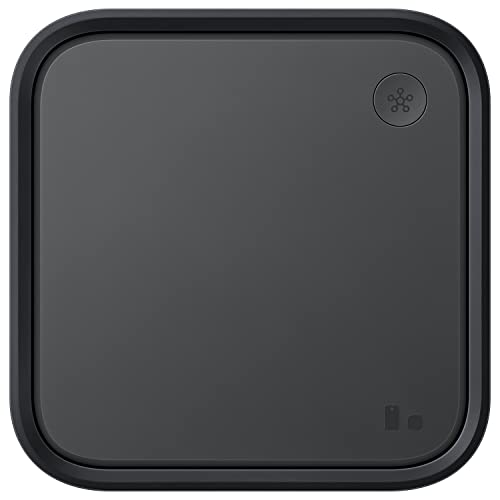
The Samsung SmartThings Station Hub combines a smart home controller with a 15W super fast wireless charger, helping you simplify your connected devices in one central place. It solves the problem of managing multiple smart devices by offering intuitive setup and automated experiences through the SmartThings app.
Using this hub feels smooth and straightforward, with quick connection via QR scanning and seamless remote control of your home devices. It saves time and reduces the hassle of juggling different apps or remotes, making daily routines easier and more reliable.
Key Benefits for Smart Home Users
- Integrates smart home control with wireless charging in one device
- Fast and efficient charging speeds for compatible phones
- Easy setup through SmartThings app with QR code scanning
- Device location tracking with SmartThings Find feature
- Customizable automations for personalized home experiences
- Compact design fits neatly on desks or nightstands
Considerations Before Buying
- Works best with Samsung and compatible Android devices
- Lacks detailed price information and customer reviews publicly available
- Limited to wireless charging at 15W, not suitable for faster charging standards
My Practical Take
This hub is well suited for Android users who want a simple and unified way to manage smart home devices while also needing a reliable wireless charger. It removes the guesswork of setting up devices and keeps them easily accessible in one app, reducing daily stress.
To get the most out of it, preset your devices in the SmartThings app to create smooth automations. The peace of mind from device tracking and consistent control makes it a dependable addition to any smart home setup. Its compact style fits my personal preference for minimal clutter.
| Best for | Why |
|---|---|
| Android users seeking central smart home control | Offers seamless device integration and app-based management |
| Users wanting wireless charging and smart hub in one | Combines 15W fast wireless charging with home automation |
| People who value easy setup and device tracking | Supports quick QR scanning and SmartThings Find feature |
| Those looking for compact, stylish smart home devices | Small footprint fits well on desks or bedside tables |
Kasa Smart Plug Power Strip
The Kasa Smart Plug Power Strip stands out as a reliable Best Smart Home Hub for Android users looking to control multiple devices easily.

The Kasa Smart Plug Power Strip is a power strip with three smart outlets and two USB ports designed to manage multiple devices simultaneously. It simplifies controlling your electronics without needing a separate hub, working smoothly with Alexa and Google Assistant for voice commands.
Using this power strip feels straightforward and efficient. The Kasa app lets you control your devices remotely and set schedules, giving peace of mind that your devices are protected and energy use is optimized without constant manual effort.
Key Benefits for Smart Home Control
- Controls up to five devices at once with independent outlet management.
- Compatible with Alexa and Google Assistant for hands-free voice control.
- ETL-certified surge protection safeguards sensitive electronics.
- Remote control via intuitive Kasa app enhances convenience.
- Set timers and schedules to reduce energy waste and save money.
- No hub required, simplifying setup and reducing clutter.
Considerations Before Buying
- Lacks built-in smart home hub features beyond outlet control.
- USB ports are always on, which might not suit all charging needs.
- Not ideal if you want a device that manages smart devices beyond plugs.
Where This Fits Well
This power strip is ideal for Android users who want to control multiple plugs easily without adding a hub to their setup. It removes the guesswork of managing several devices by enabling remote and voice control, reducing everyday hassle.
For best results, use the Kasa app to schedule outlets based on your routine, ensuring energy efficiency and device safety. Its surge protection offers peace of mind, protecting your electronics from unexpected power spikes.
Its straightforward design suits those who prefer simple, reliable smart home upgrades without complex installations.
| Best for | Why |
|---|---|
| Users controlling multiple appliances | Offers 3 smart outlets plus 2 USB ports for simultaneous device management |
| Voice assistant enthusiasts | Compatible with Alexa and Google Assistant for convenient voice commands |
| Those seeking surge protection | ETL-certified surge protector shields connected electronics |
| People wanting simple remote control | Kasa app allows easy device control from anywhere without a hub |
Understanding Your Smart Home Hub Needs
Smart home hubs serve as the central control point for your connected devices. When choosing one, consider the types of devices you already own or plan to buy, such as lights, locks, cameras, or plugs. Compatibility with voice assistants like Alexa or Google Assistant can influence ease of use.
Connectivity protocols supported by the hub, including WiFi, Zigbee, Bluetooth, Matter, or Thread, affect device integration and network stability. If you want to control many devices seamlessly, look for hubs that support multiple protocols.
Think about your home’s layout and size. Some hubs offer wall-mount options or compact designs suitable for different spaces. Also, consider the hub’s role—whether you want it primarily for security, automation, or convenience.
Key Features To Prioritize In Smart Home Hubs
Device Compatibility
Ensure the hub supports your preferred smart devices and ecosystems. Some hubs work best with specific brands or standards.
Ease of Setup and Use
Look for hubs with guided setup, intuitive interfaces, and mobile app controls. Features like voice control and customizable dashboards improve daily interaction.
Security and Monitoring
If home security is a priority, choose hubs that integrate with cameras, alarms, locks, and sensors. Instant alerts and remote monitoring capabilities add peace of mind.
Expandability
Consider whether the hub allows adding more devices over time and supports automation scenarios or routines.
Common Buyer Concerns
Some buyers worry about compatibility issues between hubs and smart devices. Confirming supported protocols and ecosystems helps avoid this.
Another concern is network reliability, especially when multiple wireless standards are involved. Choosing a hub with robust connectivity options mitigates interruptions.
Privacy and data security are important, so review how the hub manages data and whether it supports local processing or cloud reliance.
Power and placement can also be a challenge. Consider hubs that offer flexible installation options and cable management.
Setup And Usage Tips
Position your smart hub centrally in your home to ensure optimal wireless coverage. Avoid placing it near thick walls or metal objects that can interfere with signals.
Use the provided app to customize device controls and dashboard widgets for quick access to frequently used functions.
Regularly update the hub’s firmware to maintain security and access new features.
For security-focused setups, enable notifications and check device statuses remotely when away from home.
Frequently Asked Questions
Can I use one hub for devices from different brands?
Yes, many smart hubs support multiple protocols and ecosystems, enabling control of devices from different manufacturers.
Do I need a separate hub for voice assistant control?
Most smart home hubs include built-in voice assistant support, but verify compatibility with your preferred voice platform.
How many devices can a smart hub typically support?
It varies by model, but many hubs can handle dozens of devices, sometimes up to 100 or more, depending on protocols and network conditions.
Is professional installation required for smart hubs?
Most smart hubs are designed for easy DIY installation, but some setups involving wired connections might benefit from professional help.
What happens if my internet goes down?
Some hubs offer local control for certain devices even without internet, but features like remote access or cloud services will be unavailable.
Final Thoughts On Choosing A Smart Home Hub
Selecting the right smart home hub involves balancing compatibility, ease of use, and the features that matter most to you. Understanding your current and future smart devices helps narrow down options.
Consider the hub’s role in your home—whether it focuses on security, automation, or convenience—and ensure it fits your lifestyle and technical comfort level.
Taking time to plan your smart home setup can lead to a more cohesive and satisfying experience with your connected devices over time.