
Smart home technology is growing fast, making life more comfortable and connected. For many, Zigbee devices are a key part of this world. These devices use a wireless protocol that allows many smart products to talk to each other, even if they come from different brands. The Aqara Hub is a popular choice for people who want to control Zigbee devices. But a common question is: *Can the Aqara Hub work with other Zigbee devices?* The answer is not as simple as yes or no. This article will help you understand how Aqara Hub handles Zigbee connections, what works, what does not, and how to get the most out of your smart home setup.
Understanding Zigbee And Aqara Hub
Before you can connect devices, you need to understand Zigbee and how the Aqara Hub uses it. Zigbee is a wireless standard, like Wi-Fi or Bluetooth, but it is made for devices that do not need to send a lot of data, such as sensors and smart bulbs. Zigbee is popular because it is energy efficient, supports mesh networking, and allows many devices to work together in a single home.
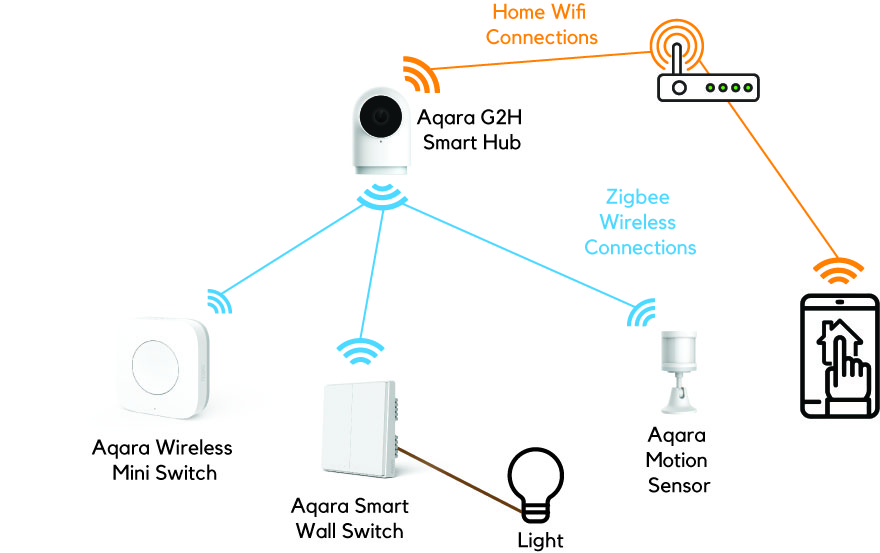
The Aqara Hub is a small device made by Aqara, a brand under the Xiaomi ecosystem. It acts as a bridge between your Zigbee devices and your smartphone or smart speaker. Aqara Hubs can connect to many sensors, switches, and other products, letting you control them with an app or voice commands.
Zigbee Interoperability: What Does It Mean?
When people hear that Zigbee is a standard, they often think all Zigbee devices will work together. In theory, Zigbee-certified devices should communicate. But in practice, things are more complicated. Each brand can add its own features or software layers, which can make some devices incompatible with certain hubs.
For example, Philips Hue, IKEA Tradfri, and Aqara all use Zigbee, but they may not always work together out of the box. This is because of differences in Zigbee profiles, device whitelisting, and how brands handle pairing and security.
Aqara Hub Models And Zigbee Versions
Not all Aqara Hubs are the same. There are several models, such as Aqara Hub M1S, Aqara Hub M2, and the Aqara Camera Hub G2H. Each model supports slightly different features, but they all use Zigbee to connect devices. Most newer Aqara Hubs use Zigbee 3.0, which is the latest version and supports better compatibility. Older models may use Zigbee 1.2, which can limit what devices you can add.
How Aqara Hub Connects To Zigbee Devices
The Aqara Hub is designed to work best with Aqara and Xiaomi Zigbee devices. These include door sensors, motion detectors, switches, smart plugs, and more. Pairing these devices is usually simple: you open the Aqara app, start adding a device, and press a button on the device you want to add.
But what happens if you want to use a Zigbee device from another brand? Here is where things get tricky. The Aqara Hub does not always support third-party Zigbee devices directly. Compatibility depends on several factors:
- The Zigbee version used by the device
- If the device uses standard Zigbee profiles
- Whether Aqara has “whitelisted” the device in its software
Device Whitelisting
Aqara Hub uses a closed system for its Zigbee network. This means it has a whitelist of supported devices. If a Zigbee product is not on this list, the Hub may not recognize it, even if it uses standard Zigbee signals. This is different from more open Zigbee hubs like SmartThings or Home Assistant with Zigbee adapters, which let you add almost any Zigbee device.
Aqara Hub And Third-party Zigbee Devices
What Third-party Devices Can Work?
Some non-Aqara Zigbee devices can connect to the Aqara Hub, but there are limits. Devices that use basic Zigbee Home Automation (ZHA) profiles have the highest chance of working. For example:
- Some IKEA Tradfri bulbs may pair and allow simple on/off or dimming control.
- Basic Zigbee switches or plugs may work if they use standard commands.
But advanced features, such as color-changing for bulbs or power monitoring for plugs, might not show up in the Aqara app.
Devices That Usually Do Not Work
Many Zigbee devices from brands like Philips Hue, Innr, Sengled, or even Zigbee sensors from Sonoff often do not work with the Aqara Hub. This is because Aqara’s software does not support their profiles or has not tested them for compatibility.
Example
You may try to pair a Philips Hue bulb with an Aqara Hub. The hub may see the device, but you cannot control brightness or color, or it may not show up at all. This is because Hue bulbs use extra features and a different Zigbee profile (Zigbee Light Link) that Aqara does not support.
Zigbee 3.0 And Compatibility
Zigbee 3. 0 was designed to improve compatibility between brands. Aqara’s newer hubs (like M2 and M1S) use Zigbee 3. 0. In theory, this should allow more third-party devices to connect. In reality, Aqara still keeps a whitelist, so most non-Aqara devices are blocked or only partly supported.
Real-world Testing: Aqara Hub With Other Zigbee Brands
To see what works, many smart home fans have tested the Aqara Hub with various Zigbee devices. Here are some common results:
| Device Brand | Pairing Success | Functions Available |
|---|---|---|
| IKEA Tradfri Bulb | Sometimes | On/Off, Basic Dimming |
| Philips Hue Bulb | Rarely | Usually none |
| Sonoff Zigbee Sensor | No | Not detected |
| Innr Plug | No | Not detected |
| Tuya Zigbee Switch | Sometimes | On/Off only |
This shows that even with Zigbee 3. 0, the Aqara Hub is mostly “closed. ” Some basic devices may work, but you lose advanced features or stability.
Why Aqara Keeps Its Zigbee Network Closed
Aqara’s “walled garden” approach is not unique. Many brands close their Zigbee networks for several reasons:
- Quality control: They can test and guarantee that only supported devices work well.
- User experience: Fewer problems for beginners who just want devices to “work.”
- Support: Easier for customer service to help with a known list of products.
- Business reasons: They want you to buy more Aqara products.
While this keeps things simple for some users, it limits options for people who want to mix and match brands.
When And Why To Use Aqara Hub
Best Use Cases
The Aqara Hub is best if you plan to use mostly Aqara or Xiaomi Zigbee devices. It is easy to set up, reliable, and integrates well with Apple HomeKit, Alexa, and Google Assistant. You get strong security, local automation, and good battery life for sensors.
When It’s Not Ideal
If you want to use many different Zigbee devices, or brands like Philips Hue, Sengled, or Sonoff, the Aqara Hub is not the best choice. In this case, an open Zigbee hub (like SmartThings, Home Assistant with a Zigbee dongle, or a Zigbee2MQTT setup) will work better.
How To Add Third-party Zigbee Devices To Aqara Hub
If you still want to try connecting other Zigbee devices, here is what you can do:
- Check compatibility lists: Look for updated lists online showing which devices other users have paired with Aqara Hubs. Forums and the Aqara community can help.
- Try pairing: Put the Aqara Hub into pairing mode using the app, then reset your Zigbee device and try to add it.
- Test functionality: Even if the device pairs, test every feature. You may only get basic on/off or no functions at all.
- Consider firmware updates: Sometimes, Aqara releases updates that add new devices. Keep your hub updated.
But remember, most advanced features (color changing, power monitoring, advanced sensors) will not work unless the device is officially supported.
Aqara Hub Vs. Other Zigbee Hubs: Compatibility
To help you understand the difference, here is a comparison of Aqara Hub and other popular Zigbee hubs for third-party device support:
| Hub | Third-Party Zigbee Support | Open/Closed System |
|---|---|---|
| Aqara Hub M2/M1S | Limited (mainly Aqara/Xiaomi) | Closed |
| SmartThings Hub | Wide (many brands supported) | Open |
| Philips Hue Bridge | Mostly Hue and Friends of Hue | Semi-Closed |
| Home Assistant + Zigbee2MQTT | Very Wide (almost all Zigbee devices) | Open |
| Amazon Echo with Zigbee | Moderate (common brands only) | Semi-Open |
This shows that if you want maximum flexibility, Aqara Hub is not the best option for mixing brands.

Credit: www.reddit.com
Practical Tips For Building A Zigbee Smart Home
Decide Your Main Ecosystem
Before buying devices, decide if you want to stick with one brand (like Aqara) or build a system with many brands. If you choose Aqara, you get easy setup and stability, but less choice.
Use Zigbee Repeaters For Better Coverage
Zigbee devices create a mesh network, meaning each powered device (like a plug or bulb) extends the signal. But with Aqara Hubs, third-party repeaters may not work well. Use Aqara plugs or bulbs as repeaters to keep your network strong.
Use Multiple Hubs For More Flexibility
Some advanced users run more than one hub—an Aqara Hub for sensors, plus a SmartThings or Zigbee2MQTT hub for other Zigbee devices. This requires extra setup but gives you more options.
Integrate With Other Platforms
Aqara Hubs work with Apple HomeKit, Amazon Alexa, and Google Assistant. You can control devices with your voice or in routines, but only for devices that the Aqara Hub supports.
Keep Software Updated
Aqara often updates its app and hub firmware to add features or new devices. Always check for updates to improve compatibility.
Non-obvious Insights Most Beginners Miss
- Not all Zigbee 3.0 devices are equal: Even if two devices use Zigbee 3.0, extra features or different profiles may block pairing. Always check if a device is officially supported before buying.
- Pairing order matters: When building a Zigbee mesh, always pair repeaters (like plugs or powered bulbs) before sensors. This makes your network more stable, but with Aqara Hubs, only Aqara repeaters are guaranteed to work well.
- HomeKit integration is limited: Aqara Hubs can expose some devices to Apple HomeKit, but not all features show up. For example, an Aqara sensor may appear in HomeKit, but a third-party Zigbee switch may not.
- Migrating devices is hard: If you later switch to a more open Zigbee hub, you often have to reset and re-pair every device. Aqara devices are “sticky” to their hub and do not always move easily.
Credit: homesmart.sg
Common Problems And Troubleshooting
Device Not Detected
If your Zigbee device is not found by the Aqara Hub, check if it is on the supported list. If not, it likely will not work.
Device Pairs But Does Not Function
Sometimes a device will pair but show no controls or sensor data. This means the hub does not understand its functions. Remove the device and use a supported product.
Automations Not Working
If you create an automation using a third-party Zigbee device, it may not trigger as expected. Stick to Aqara devices for reliable automations inside the Aqara app.
Firmware Issues
After a hub or device update, some devices may stop working. Check forums or the Aqara support site for help.
The Future: Matter And Multi-protocol Hubs
A new smart home standard called Matter promises better compatibility across brands. Aqara has announced support for Matter in some hubs, but this mainly applies to Wi-Fi and Thread devices, not Zigbee yet. Zigbee will be around for years, but Matter may change how hubs talk to each other.
Some newer hubs, like the Aqara Hub M3, support multiple protocols and may allow better third-party device support in the future.

Credit: www.amazon.com
Real-world Examples Of Aqara Hub Setups
Example 1: Pure Aqara Smart Home
Sarah uses an Aqara Hub M2 with Aqara door sensors, motion detectors, and smart plugs. She controls everything from the Aqara app and Apple HomeKit. Everything works smoothly, and automations are fast.
Example 2: Trying To Add Third-party Devices
Mike wants to add a Tuya Zigbee plug to his Aqara Hub. The device pairs, but only the on/off function works. Power monitoring and timers are missing. He decides to stick with Aqara plugs for full features.
Example 3: Advanced Smart Home With Multiple Hubs
Jin uses an Aqara Hub for sensors and a Zigbee2MQTT dongle with Home Assistant for other Zigbee devices. He links both systems using virtual switches, so his automations work across all brands.
Security And Privacy Considerations
Aqara Hubs use strong encryption for device communication. Only devices paired to your hub can join the Zigbee network. But using only supported devices reduces the risk of security gaps. Third-party devices might not get security updates, so using Aqara’s closed system is safer for most users.
Summary Table: Aqara Hub Compatibility At A Glance
Here’s a quick summary to help you decide if Aqara Hub fits your needs:
| Scenario | Is Aqara Hub Suitable? | Notes |
|---|---|---|
| All-Aqara devices | Yes | Best performance and features |
| Mixing brands | No | Limited support for third-party Zigbee devices |
| HomeKit integration | Yes | Only for supported devices |
| Advanced automations | Yes | But only with supported devices |
| Philips Hue, Sengled, Sonoff | No | Use their own hubs or open platforms |
Frequently Asked Questions
Can I Add Philips Hue Bulbs To The Aqara Hub?
No, Philips Hue bulbs are not officially supported by the Aqara Hub. Even if they pair, you will not get full control, and most features will not work. For full Hue support, use the Philips Hue Bridge.
Will Zigbee 3.0 Devices From Other Brands Work With The Aqara Hub?
Most Zigbee 3.0 devices from other brands do not work with the Aqara Hub. Aqara uses a closed system and only supports devices on its whitelist. Basic switches or bulbs may pair, but advanced features are not available.
Is The Aqara Hub A Good Choice For A Mixed-brand Zigbee Smart Home?
No, the Aqara Hub is not ideal for mixed-brand setups. It is designed for Aqara and Xiaomi products. If you want to use many brands, consider a more open Zigbee hub like SmartThings or Home Assistant with Zigbee2MQTT.
Can The Aqara Hub Connect To Amazon Alexa Or Google Assistant?
Yes, the Aqara Hub integrates with Alexa and Google Assistant. You can control supported devices by voice, but only devices paired to the Aqara Hub will be available. Third-party Zigbee devices are usually not supported.
Where Can I Find An Updated List Of Compatible Zigbee Devices For Aqara Hub?
You can find compatibility information on the official Aqara website and active user forums. For more details and updates, visit the Aqara Compatible Devices List.
Smart homes offer many choices, and the right hub can make things easy or complex. If you want a reliable, easy-to-use system and do not need many brands, the Aqara Hub is a strong choice. But if you want full freedom with all Zigbee devices, you will need a more open hub.
Choose wisely based on your needs, and your smart home will run smoothly.