
Many people are discovering the power of smart homes, and Home Assistant is one of the most popular ways to control everything. If you want to connect devices like smart bulbs, sensors, or plugs, you will often see the word Zigbee. But do you really need a Zigbee hub for Home Assistant? The answer depends on your needs, the devices you want to use, and how much you want to customize your setup. Let’s explore what Zigbee is, how Home Assistant works with it, and how to make the best choice for your smart home.
Understanding Zigbee And Home Assistant
Zigbee is a wireless protocol that allows smart devices to talk to each other. It is different from Wi-Fi or Bluetooth. Zigbee is often used in smart home products because it uses very little energy and creates a stable network, even if you have many devices. For example, many popular smart sensors, light bulbs, and switches use Zigbee.
Home Assistant is an open-source platform that lets you control and automate smart home devices from different brands in one place. It is very flexible and works with a huge range of devices and protocols, including Zigbee, Z-Wave, Wi-Fi, and Bluetooth.
But Home Assistant does not have Zigbee built in. To connect Zigbee devices, you need a way for Home Assistant to “speak” Zigbee. This is where the question comes in: do you need a dedicated Zigbee hub, or is there another way?
What Is A Zigbee Hub?
A Zigbee hub (sometimes called a bridge or gateway) is a device that connects Zigbee devices to your home network. It acts as a translator between your Wi-Fi (or Ethernet) and the Zigbee devices. Some well-known examples are the Philips Hue Bridge and Samsung SmartThings Hub.
A Zigbee hub can be:
- A manufacturer’s own hub, like the Hue Bridge.
- A general hub, like SmartThings, that works with many brands.
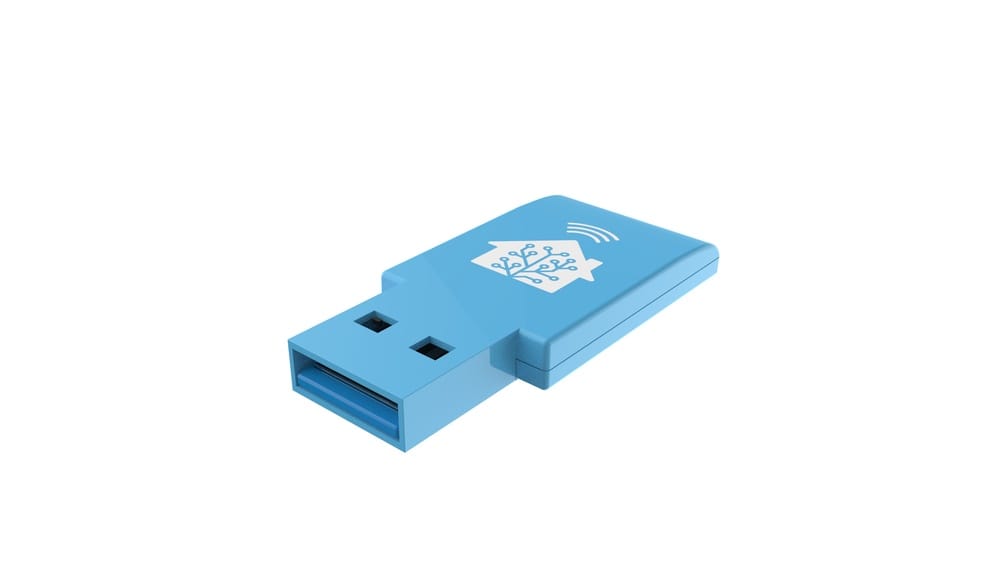
- A USB stick or dongle that you plug into your Home Assistant device.
The hub gathers signals from your Zigbee devices and sends them to Home Assistant, so you can control everything from one app or automate actions.
How Home Assistant Connects To Zigbee Devices
Home Assistant can talk to Zigbee devices in several ways. Let’s look at the most common methods:
- Using a Manufacturer’s Hub: For example, you set up a Philips Hue Bridge and connect it to Home Assistant through an integration. Home Assistant sends commands to the bridge, and the bridge controls your Zigbee bulbs.
- Using a Zigbee USB Stick: You plug a Zigbee USB adapter (like a ConBee II or Sonoff Zigbee 3.0 Dongle) into your Home Assistant server (often a Raspberry Pi or similar). Home Assistant runs software like Zigbee2MQTT or ZHA (Zigbee Home Automation) to directly manage Zigbee devices—no external hub needed.
- Using a Multi-protocol Hub: Some hubs (like SmartThings) support Zigbee, Z-Wave, and other protocols. Home Assistant connects to the hub, which manages the devices.
Let’s compare these options in a simple table:
| Method | Needs Zigbee Hub? | Direct Device Control? | Custom Automation? | Typical Cost |
|---|---|---|---|---|
| Manufacturer Hub | Yes | Limited (depends on brand) | Some (depends on integration) | Medium ($40–$60) |
| Zigbee USB Stick | No (acts as hub itself) | Yes (full access) | Yes (very flexible) | Low ($15–$40) |
| Multi-protocol Hub | Yes | Limited (through hub) | Some (depends on hub) | High ($70–$120) |
Do You Need A Zigbee Hub With Home Assistant?
The simple answer: No, you do not always need a separate Zigbee hub. But sometimes it makes things easier.
If you want to control Zigbee devices with Home Assistant, you have two main choices:
- Use the manufacturer’s hub and connect it to Home Assistant.
- Use a Zigbee USB stick/dongle and let Home Assistant control Zigbee devices directly.
Let’s break down when you should use each method.
When A Zigbee Hub Makes Sense
There are times when a Zigbee hub is the best choice:
- You already own devices that require a specific hub. For example, Philips Hue bulbs work best with the Hue Bridge for full features like software updates and color scenes.
- You want a plug-and-play solution. Manufacturer hubs usually have easy setup, mobile apps, and support. They may also offer cloud access when you are not at home.
- You want to mix brands easily. Some hubs, like SmartThings, allow you to connect both Zigbee and Z-Wave devices in one place.
- You don’t want to tinker. If you prefer not to handle technical details, a hub keeps things simple.
When You Don’t Need A Hub (use A Zigbee Usb Stick)
You can skip a separate hub if:
- You want full control over your Zigbee network. Using a USB dongle with software like Zigbee2MQTT or ZHA gives you deep access to device settings and automations.
- You want to avoid cloud connections. This method keeps all data inside your home (local control), which is better for privacy.
- You want to save money. A USB stick is usually cheaper than a full hub.
- You want to avoid vendor lock-in. Some manufacturer hubs work only with their own products; a USB stick works with many brands.
Here’s a quick comparison:
| Scenario | Zigbee Hub | Zigbee USB Stick |
|---|---|---|
| Easy setup, less technical | Yes | No |
| Full device control | Limited | Yes |
| Mix different brands | Depends | Yes |
| Lowest cost | No | Yes |
| Updates and support | Yes | Sometimes |
How Zigbee Works In A Home Assistant Setup
Let’s look at how everything connects:
- Home Assistant runs on a device like a Raspberry Pi, mini PC, or a server.
- If you use a Zigbee hub (like Philips Hue), Home Assistant talks to the hub over the network. The hub manages the Zigbee devices.
- If you use a Zigbee USB stick, Home Assistant manages the Zigbee network directly. You control pairing, automations, and even firmware updates.
Here’s what often surprises beginners: A Zigbee USB stick IS a hub, just not a separate box. When you plug in a Zigbee dongle and use the right software, your Home Assistant device becomes the Zigbee hub. You don’t need an extra piece of hardware.
Pros And Cons: Zigbee Hub Vs Usb Stick
Let’s look deeper at the advantages and disadvantages of each method.
Zigbee Hub (manufacturer Or Multi-protocol)
Pros:
- Simple setup and management
- Official support from the manufacturer
- Mobile app for easy control
- Sometimes supports cloud features (remote access, voice assistants)
Cons:
- May work only with that brand’s products
- Less control over devices and automations
- Often more expensive
- Some features require an internet connection
- Can be a single point of failure (if hub goes offline, devices stop working)
Zigbee Usb Stick (direct Integration)
Pros:
- Full local control (no cloud needed)
- Works with many Zigbee brands and models
- Cheaper overall
- Flexible automation and advanced features
- Avoids vendor lock-in
Cons:
- Setup can be more technical
- Some devices need manual configuration
- Fewer “official” support options
- Firmware updates for devices may be harder
The Most Popular Zigbee Hubs And Usb Sticks
Here are some common choices:
Zigbee Hubs
- Philips Hue Bridge – Best for Hue bulbs and lights
- Samsung SmartThings Hub – Works with Zigbee, Z-Wave, and Wi-Fi devices
- Amazon Echo with Zigbee – Some Echo models have a built-in Zigbee hub
Zigbee Usb Sticks
- Sonoff Zigbee 3.0 Dongle Plus – Affordable, widely supported
- ConBee II – Good compatibility, works with deCONZ software
- CC2652-based adapters – Popular for Zigbee2MQTT
Not all sticks work with every device. Always check compatibility lists before buying.
Setting Up Zigbee With Home Assistant
If you decide to skip the separate hub and use a USB stick, here’s a basic overview:
- Buy a Supported Zigbee USB Stick: Sonoff Zigbee 3.0 Dongle, ConBee II, or similar.
- Plug It Into Your Home Assistant Device: Usually a Raspberry Pi or mini PC.
- Install Zigbee Integration: Add the ZHA (built-in) or Zigbee2MQTT (add-on) integration in Home Assistant.
- Pair Devices: Put your Zigbee sensors or bulbs into pairing mode and add them.
- Create Automations: Use Home Assistant’s automation tools to control devices, set schedules, and more.
This method gives you deep control, but the steps can be technical for beginners.
Common Mistakes When Setting Up Zigbee With Home Assistant
Many people run into problems because they miss a few key points:
- Using the Wrong USB Port: Some Zigbee sticks need a USB 2.0 port (not 3.0) for best reliability.
- Poor Device Placement: Zigbee signals are weak. Placing the stick behind a metal computer or near Wi-Fi routers can cause problems.
- Not Enough Routers: Zigbee builds a mesh network. Devices like smart plugs or bulbs act as repeaters. If you only use battery-powered sensors, the network may be weak.
- Compatibility Issues: Not all Zigbee devices work with all hubs or sticks. Always check the supported device list for your integration.
- Ignoring Firmware Updates: Old firmware can cause bugs or unreliable connections.
Here’s a quick look at Zigbee network strength:
| Device | Acts as Router? | Helps Mesh Network? |
|---|---|---|
| Smart bulb (always powered) | Yes | Yes |
| Smart plug | Yes | Yes |
| Battery sensor | No | No |
| Switch (wall powered) | Yes | Yes |
To build a strong Zigbee network, you need several always-powered devices (bulbs, plugs, or switches).
Security And Privacy: Zigbee Hub Vs Direct Integration
Security and privacy are important for smart homes.
- Manufacturer Hubs: Often use cloud services. Your device data may be sent to the company’s servers. You may need to register an account.
- USB Stick/Direct Integration: All control stays inside your home. No cloud needed. This is better for privacy and data control.
However, with direct integration, you are responsible for keeping your Home Assistant device secure. Change default passwords and use a strong network password.
Firmware Updates And Device Support
A common beginner’s mistake is to forget about firmware updates.
- Manufacturer Hubs: The hub usually updates itself and the devices automatically. This keeps things working well.
- USB Stick/Direct Integration: Some Zigbee devices can update through Home Assistant, but many cannot. You may need a special tool or app.
Before buying Zigbee devices, check if you can update them without the manufacturer’s app or hub. This is especially important for security devices.
Mixing Zigbee With Other Smart Home Protocols
Home Assistant is great because it can talk to many protocols: Zigbee, Z-Wave, Wi-Fi, Bluetooth, and more. You are not limited to just Zigbee.
If you already have Z-Wave or Wi-Fi devices, you do not need a Zigbee hub just to use Home Assistant. But if you want to add Zigbee sensors or bulbs, you will need a way to connect them (hub or USB stick).
Some hubs, like SmartThings or Homey, support multiple protocols. But most Home Assistant users prefer direct USB sticks for more control and privacy.

Credit: www.amazon.com
Real-world Example: Zigbee With And Without A Hub
Let’s look at two homes:
Home 1: With Manufacturer Zigbee Hub
- Uses Philips Hue Bridge to control 10 smart bulbs.
- Adds the Hue integration in Home Assistant.
- Can turn bulbs on/off, dim, change color from Home Assistant.
- Uses Hue app for advanced features.
- Limited to Hue bulbs and accessories.
Home 2: With Zigbee USB Stick
- Uses Sonoff Zigbee 3.0 Dongle in a Raspberry Pi.
- Installs Zigbee2MQTT in Home Assistant.
- Pairs bulbs from Philips Hue, sensors from Aqara, and plugs from IKEA.
- Controls all devices and creates custom automations in Home Assistant.
- No cloud needed; everything works locally.
- Can mix many brands.
Both methods work, but the second offers more flexibility and control.
Insights Most Beginners Miss
Two important points often surprise new users:
- A Zigbee USB stick is already a hub. You do not need a separate hub if you use one of these adapters with the right software.
- Zigbee devices build their own mesh network. The range and reliability depend on how many always-powered devices you have (bulbs, plugs, etc. ), not just the hub or stick location.
Another thing: Many people expect all Zigbee devices to work together. In reality, there are sometimes small differences between how brands use Zigbee. Checking compatibility before buying saves a lot of frustration.
Choosing The Best Setup For Your Needs
How Do You Decide?
- If you want the easiest setup and use mostly one brand (like Hue), use the manufacturer’s hub.
- If you want the most flexibility, privacy, and lowest cost, use a Zigbee USB stick with Home Assistant.
- If you have many types of devices (Zigbee, Z-Wave, Wi-Fi), Home Assistant can handle them all with the right hardware.
Think about your skills, the devices you want to use, and how much you want to tinker. Some people start with a hub, then move to a USB stick as they learn more.
Future-proofing Your Zigbee Network
Smart homes change quickly. Here’s how to stay ready for the future:
- Choose open platforms: Avoid hubs that only work with one brand.
- Look for Matter support: Matter is a new standard that will help different brands work together. Some Zigbee hubs and USB sticks can be updated to support Matter.
- Keep your hardware updated: New features often come with software updates. Choose USB sticks and hubs with good community support.
- Build a strong mesh: Add powered Zigbee devices to improve network strength.
Credit: www.home-assistant.io
Resources For Learning More
If you want to learn more about Zigbee and Home Assistant, check out the official documentation and community forums. These are great places to see which devices work well together and get help if you have problems. For more technical details, you can visit the Zigbee Alliance.
Frequently Asked Questions
Do I Need A Zigbee Hub To Use Zigbee Devices With Home Assistant?
No, you do not need a separate Zigbee hub if you use a Zigbee USB stick or dongle with Home Assistant. The USB stick acts as the hub and lets Home Assistant manage Zigbee devices directly.
Can I Use Both A Zigbee Hub And A Usb Stick With Home Assistant?
Yes, you can use both. For example, you might have a Philips Hue Bridge for some bulbs and a Zigbee USB stick for other brands. Home Assistant can control devices from both, but they will be on separate Zigbee networks.
Is A Zigbee Usb Stick Difficult To Set Up?
It can be more technical than using a manufacturer hub. You need to plug in the stick, install an integration like Zigbee2MQTT or ZHA, and pair your devices. Many people find online guides and community forums helpful for step-by-step instructions.
Will All Zigbee Devices Work With Any Hub Or Usb Stick?
Not always. While Zigbee is a standard, some brands use special features that may not work with all hubs or sticks. Always check compatibility lists for your integration before buying new devices.
What Happens If I Lose Power Or Restart Home Assistant?
If you use a manufacturer’s hub, it will usually come back online when power returns. If you use a USB stick, your Zigbee network is saved on the stick and in Home Assistant. Devices will reconnect automatically, but it may take a few minutes for the network to rebuild.
Smart homes are all about choice and flexibility. With Home Assistant, you have the power to build your system your way—whether that means using a Zigbee hub or going direct with a USB stick. The right answer depends on your needs, skills, and how much you want to control.

Credit: community.home-assistant.io