
If you’re considering a Ring Video Doorbell, you might wonder: Does Ring Video Doorbell record? This is a common question for anyone wanting to boost home security or monitor visitors. Many people expect a doorbell with a camera to automatically record video, but the answer is not as simple as “yes” or “no.” In this article, you’ll learn how Ring Video Doorbells work, when they record, what triggers recording, how long clips are saved, and what you need for full access. You’ll also see comparisons with other brands, practical insights, and answers to frequent questions. By the end, you’ll know exactly what to expect from a Ring Video Doorbell’s recording features.
How Ring Video Doorbell Recording Works
Ring Video Doorbells are smart devices that combine a traditional doorbell with a camera and motion sensor. When someone approaches your door or presses the button, the device can record video clips. But recording is not always automatic.
Event-based Recording
Ring Video Doorbells record video when certain events happen:
- Motion is detected near your door
- Doorbell button is pressed
- Live View is activated from the Ring app
These events trigger the camera to start recording. If nothing happens, the doorbell does not record continuously.
Continuous Recording
Unlike some security cameras, Ring Video Doorbells do not record 24/7. The camera only records when triggered by an event. This helps save battery, storage, and privacy.
What Triggers Recording?
The device uses infrared sensors to detect movement. When someone walks near your door, the sensor activates recording. Pressing the button also starts a clip. You can also open the Ring app and start a Live View—this records as long as you are watching.
What Is Recorded?
The camera records HD video (usually 1080p) and audio. The clip length depends on settings:
- Motion events: Usually 30 seconds, can be adjusted up to 120 seconds
- Button press: Similar length
- Live View: Records as long as you are watching
These clips are saved to the Ring cloud, but only if you have a Ring Protect subscription.
Ring Protect Subscription And Recording Access
Ring Video Doorbells come with basic features out of the box. But to access recorded videos, you need a Ring Protect plan.
Free Vs Subscription
Without a subscription, you get:
- Live View from the app
- Real-time notifications
- Snapshot images (may be limited)
But you cannot access recorded video clips after an event. You only see what is happening live.
With a Ring Protect subscription, you get:
- Access to recorded videos
- Ability to download clips
- Video history (up to 180 days)
- Sharing videos with others
Ring Protect Plans
There are two main subscription options:
- Ring Protect Basic: Covers one device, costs about $3.99/month or $39.99/year.
- Ring Protect Plus: Covers all Ring devices in one location, costs about $10/month or $100/year.
Both plans give you access to recordings. Without them, your doorbell records events, but you cannot watch them later.
Example: What Happens Without A Subscription?
Imagine someone rings your doorbell at 2 p. m. You miss the notification. Without Ring Protect, you cannot go back and watch the video. With a subscription, you can review the clip, download it, or share it.
Key Features Of Ring Video Doorbell Recording
Ring Video Doorbells offer several recording features that help you monitor your home.
Motion Zones
You can customize motion zones in the app. This lets you choose which parts of the camera’s view trigger recording. For example, you can ignore cars on the street and focus on your walkway.
Adjustable Sensitivity
You can adjust motion sensitivity to reduce false alerts. If you live on a busy street, lowering sensitivity helps prevent unnecessary recordings.
Privacy Zones
Ring lets you mask certain areas so the camera does not record those spots. This helps protect your neighbors’ privacy.
Snapshot Feature
Some Ring models offer Snapshot Capture—the camera takes periodic photos, not videos. This fills the gap between motion events but is not a substitute for full recording.
Video Quality
Most Ring Video Doorbells record in 1080p HD, with clear images and audio. Some newer models offer HDR for better contrast.
Audio Recording
Ring devices record audio along with video. You can hear conversations at your door. This is useful for identifying visitors or capturing evidence.
Comparing Ring Recording To Other Brands
Ring is popular, but not the only option. Let’s compare how Ring stacks up against other video doorbells.
| Brand | Recording Type | Subscription Needed? | Video Quality | Cloud Storage Duration |
|---|---|---|---|---|
| Ring | Event-based | Yes | 1080p HD | Up to 180 days |
| Nest Hello | Event + Continuous | Yes | 1080p HD | Up to 60 days |
| Arlo Video Doorbell | Event-based | Yes | 1536p HD | Up to 30 days |
| Eufy Video Doorbell | Event-based | No (local storage) | 2K HD | Depends on SD card |
Ring does not offer continuous recording, unlike Nest Hello. Eufy offers local storage, so you can access videos without a monthly fee. Arlo has higher video quality but shorter storage.
What Makes Ring Unique?
- Easy app integration
- Reliable motion detection
- Flexible subscription plans
- Wide compatibility with smart home devices
But if you want 24/7 recording or free storage, other brands may suit you better.
How Long Are Videos Stored?
The Ring Protect plan keeps your videos for up to 180 days. You can download or delete clips anytime. After 180 days, older videos are deleted automatically.
Downloading And Sharing Videos
You can download clips to your phone or computer. This is useful if you need to keep evidence. You can also share clips with neighbors, police, or social media.
Deleting Videos
Ring lets you delete clips to manage privacy or storage. There is no manual limit, but clips are removed after 180 days.
Privacy And Security Concerns
Many people worry about privacy when cameras record outside their homes. Ring has several features to help.
Video Encryption
Ring uses AES-128 encryption for clips stored in the cloud. This protects your data from hackers.
Two-factor Authentication
You can enable two-factor authentication in the Ring app. This adds extra security to your account.
Privacy Zones
You can block certain areas from being recorded. For example, exclude your neighbor’s window.
Data Sharing
Ring lets you share clips, but you control who sees them. You can keep videos private or share with local police through the Ring Neighbors program. Participation is optional.
Battery Vs Wired Models: Recording Differences
Ring Video Doorbells come in battery-powered and wired versions. Recording features may vary.
| Model Type | Recording Trigger | Clip Length | Power Source | Additional Features |
|---|---|---|---|---|
| Battery-powered | Motion/button/Live View | 30-120 seconds | Rechargeable battery | Lower frequency to save battery |
| Wired | Motion/button/Live View | Up to 120 seconds | Hardwired | Higher frequency, more features |
Battery models record less often to save power. Wired models can record more frequently and for longer clips.
Battery Life And Recording
If you set longer clips or frequent recording, battery drains faster. Wired models don’t have this problem.
Practical Example
If you want frequent recordings (every motion event), choose a wired model. If you prefer simple recording and easy installation, battery models are good, but you must recharge them.
Common Recording Problems And Solutions
Some users face issues with Ring Video Doorbell recording. Here are common problems and how to fix them.
Not Recording Events
- Check motion settings in the app
- Adjust motion zones and sensitivity
- Make sure device firmware is updated
- Check Wi-Fi connection strength
Clips Too Short
- Extend clip length in settings (up to 120 seconds)
- Note: Longer clips drain battery faster
No Access To Videos
- Confirm Ring Protect subscription is active
- Check account login and permissions
Audio Not Recorded
- Make sure microphone is enabled in settings
- Check device placement for clear audio
Example: Missed Recording
If your Ring Video Doorbell missed an event, review your motion zones. Sometimes, the default settings are too narrow. Expand zones to cover all approach paths.

Credit: www.bwi-ziviltechniker.com
Advanced Features: Smart Alerts And Integration
Ring Video Doorbells are more than simple cameras. They offer smart alerts and integration.
Smart Motion Detection
Ring uses AI-powered motion detection to reduce false alerts. For example, it can ignore cars or animals and focus on people.
Integration With Smart Home Devices
Ring Video Doorbells connect with:
- Amazon Alexa: View video feed on Echo Show devices
- Smart locks: Unlock doors from the app
- Other security cameras: Combine footage for full coverage
Practical Use Cases
- See who is at the door from your phone or Echo Show
- Get alerts on your smartwatch
- Unlock doors for trusted guests remotely
Ring Video Doorbell Recording Settings
Customizing settings is important for the best experience.
Setting Up Recording
- Download the Ring app
- Connect the doorbell to Wi-Fi
- Choose motion zones
- Adjust sensitivity
- Enable audio recording
Changing Clip Length
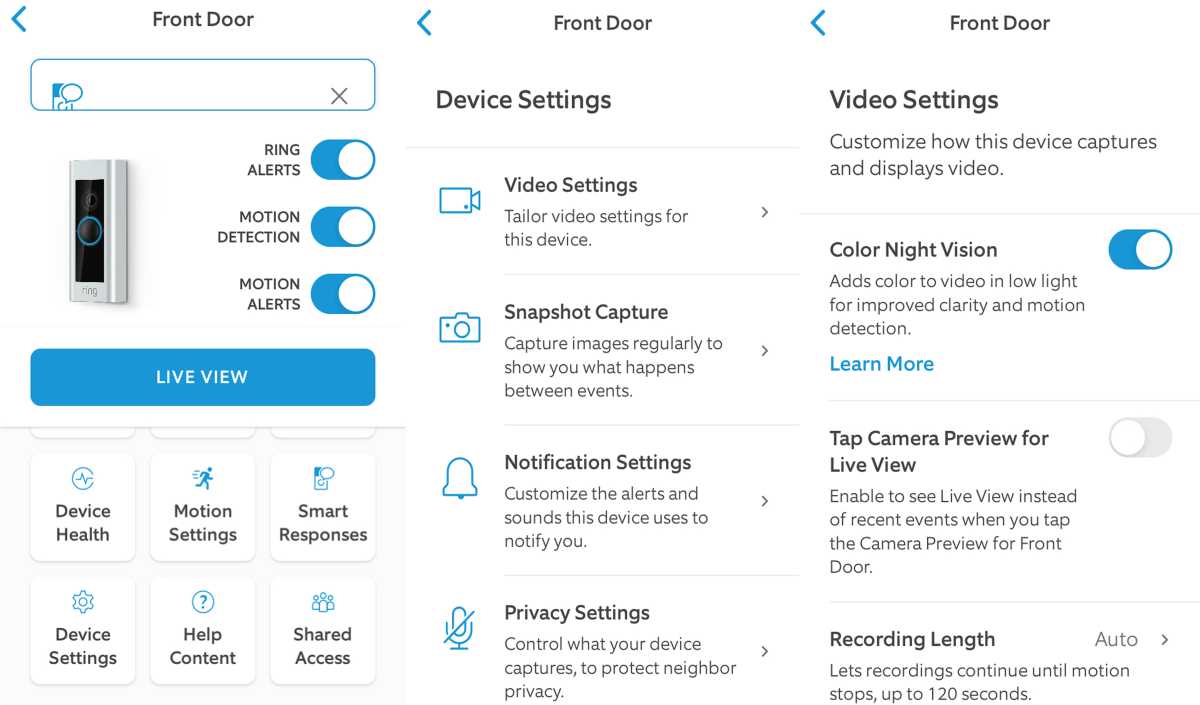
- Open app, go to device settings
- Select “Video Recording Length”
- Choose between 15, 30, 60, 90, or 120 seconds
Enabling Advanced Features
- Turn on Smart Alerts for person detection
- Set up Privacy Zones
- Enable Snapshot Capture
Example: Adjusting For Busy Streets
If you live near traffic, set motion zones to exclude the street. This prevents unnecessary recordings and saves battery.
Credit: www.sepr.es
Real-world Data: Ring Doorbell Recording Statistics
Ring Video Doorbells are used worldwide. Here are some statistics:
- Over 4 million Ring Video Doorbells sold in the US as of 2023
- Average user receives 30-50 motion alerts per week
- Most users save 10-25 video clips per week
- 80% of users review recorded clips after missed visitors
These numbers show how often Ring devices record and how people use them.
Example: Urban Vs Suburban Use
Urban users may get more alerts due to foot traffic. Suburban users may get fewer alerts, focusing on deliveries or guests.
Practical Insights: What Beginners Often Miss
Many first-time users misunderstand how Ring records videos. Here are two insights:
- Recording is not automatic: Ring only records when triggered. There is no 24/7 recording, unless you use another camera system.
- Subscription is required for playback: Without Ring Protect, you can’t review or download past events. Many people assume video history is included for free.
Tip: Don’t Rely Only On Live View
If you miss a notification, Live View won’t help you see past events. Always consider a subscription for full access.
Tip: Customize Your Zones
Default motion zones may not cover all approaches. Adjust them to fit your home’s layout.
Comparing Ring Doorbell Models
Different Ring models offer different recording features. Here’s a comparison:
| Model | Video Quality | Recording Trigger | Clip Length | Subscription Needed? |
|---|---|---|---|---|
| Ring Video Doorbell 2 | 1080p HD | Motion/button/Live View | Up to 120 sec | Yes |
| Ring Video Doorbell Pro | 1080p HD + HDR | Motion/button/Live View | Up to 120 sec | Yes |
| Ring Video Doorbell 3 | 1080p HD | Motion/button/Live View | Up to 120 sec | Yes |
| Ring Video Doorbell Wired | 1080p HD | Motion/button/Live View | Up to 120 sec | Yes |
All models require a subscription for recorded video access. The main differences are power source and video enhancements.
How To Access Recorded Videos
Once you have a Ring Protect plan, accessing recordings is easy.
- Open the Ring app
- Select your device
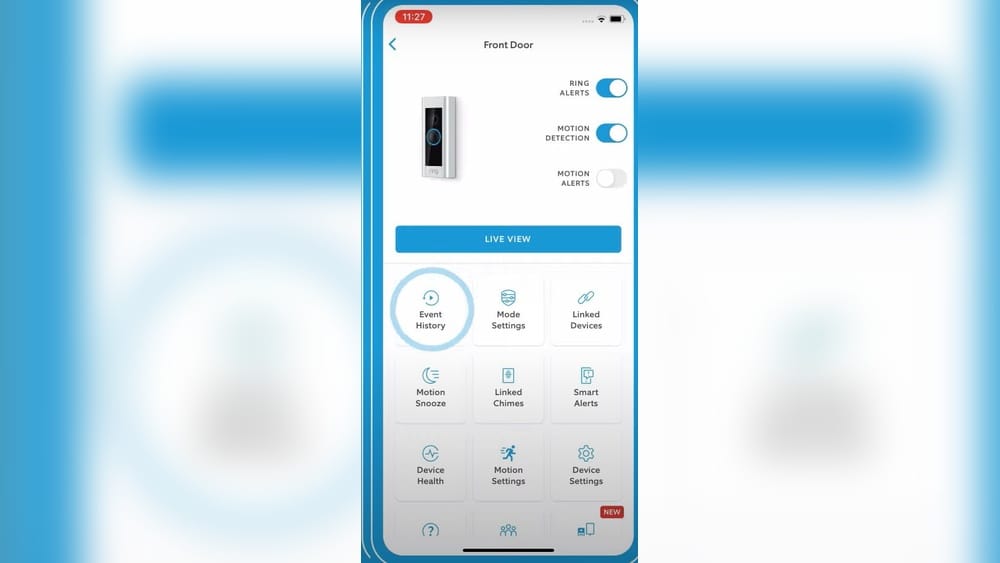
- Tap “Event History”
- Choose an event to watch, download, or share
You can also access videos from a computer through the Ring website.
Sharing Videos
Ring lets you send clips by email, text, or upload to social media. You can also share with local police if needed.
Example: Sharing A Delivery Clip
If a package arrives and you want to confirm delivery, you can share the clip with the delivery company.

Credit: www.bwi-ziviltechniker.com
Legal Considerations For Recording
Using a Ring Video Doorbell is legal in most places, but there are rules.
Recording Outside Your Property
You can record your front door and walkway. Avoid pointing the camera at neighbors’ windows or private areas.
Audio Recording Laws
Some states require consent for audio recording. Check local regulations before enabling audio.
Sharing Videos
Be careful when sharing clips publicly. Make sure there is no private or sensitive information.
Example: Neighborhood Watch
If you share clips with neighbors, get their consent if faces are visible.
For more details on privacy laws, visit Electronic Frontier Foundation.
Frequently Asked Questions
Does Ring Video Doorbell Record All The Time?
No, Ring Video Doorbells do not record continuously. They only record when triggered by motion, button press, or Live View.
Can I Access Recorded Videos Without A Subscription?
No, you need a Ring Protect plan to access recorded videos. Without a subscription, you only get Live View and real-time alerts.
How Long Are Ring Videos Stored?
With a Ring Protect plan, videos are stored for up to 180 days. You can download or delete them anytime.
Is Ring Video Doorbell Recording Legal?
Yes, recording your door area is usually legal, but check local laws for audio recording and privacy rules.
What Happens If The Wi-fi Disconnects?
If your Ring Video Doorbell loses Wi-Fi, it cannot record events or upload clips. Once the connection returns, normal recording resumes.
Ring Video Doorbells are powerful tools for home security, but understanding how recording works is essential. The device records events—not everything—and accessing those recordings requires a subscription. Customizing settings, knowing privacy features, and understanding legal rules help you make the most of your Ring doorbell.
If you’re looking for event-based recording, easy access, and smart alerts, Ring is a strong choice. But always review your needs, compare with other brands, and set up the device carefully for the best results.