
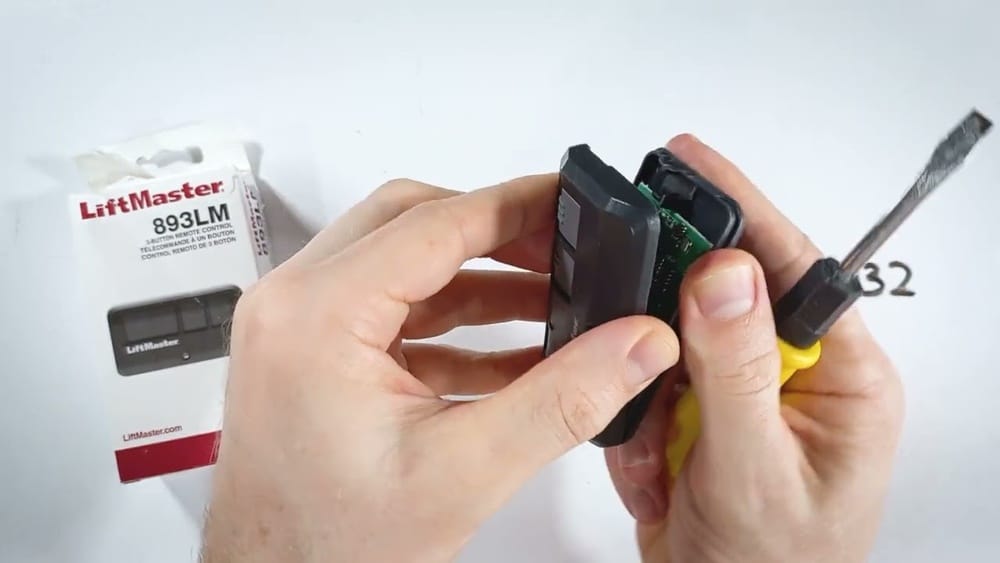
Losing the power in your Liftmaster remote control can turn a simple task like opening your garage into a hassle. Maybe you pressed the button and nothing happened, or the range seems shorter than before. Most of the time, the problem is a weak or dead battery. Replacing the battery is a quick job, but many people worry they’ll break the remote or lose their settings. The good news: changing the battery in a Liftmaster remote is simple, safe, and takes just a few minutes if you know what to do.
In this guide, you’ll learn every detail about changing the battery in your Liftmaster remote control. We’ll cover the types of remotes and batteries, the tools you’ll need, step-by-step instructions, safety tips, troubleshooting, and what to do if things go wrong.
You’ll also find practical advice that helps you avoid common mistakes—plus answers to the most frequent questions. By the end, you’ll feel confident changing your remote’s battery and keeping your garage working smoothly.
Understanding Liftmaster Remotes
Liftmaster is a leading brand for garage door openers. Their remotes come in different models and styles, but most work in a similar way. Knowing your remote’s model and battery type is key to a successful battery replacement.
Common Liftmaster Remote Models
Here are some of the most popular Liftmaster remote models:
- 371LM / 373LM – Standard “visor clip” remotes with one to three buttons. Very common in homes.
- 891LM / 893LM – Slim, compact remotes often attached to keychains.
- 375UT – Universal remotes that work with multiple opener brands.
- 895MAX – Multi-function remotes with extra features.
- 877LM – Wireless keypad models (not hand-held, but battery-operated).
Each remote may use a slightly different battery type or have a different way to open the case. But the process is similar for most.
Why Does The Battery Matter?
Using the correct battery type is important. The right battery ensures your remote works reliably and prevents damage. Most Liftmaster remotes use button cell batteries (like CR2032 or CR2016), while some older models use small 12V batteries.
Here’s a comparison of the most common battery types:
| Battery Model | Size (Diameter x Thickness) | Voltage | Common Remote Models |
|---|---|---|---|
| CR2032 | 20mm x 3.2mm | 3V | 893LM, 895MAX |
| CR2016 | 20mm x 1.6mm | 3V | 891LM, 371LM |
| A23 | 10mm x 28mm | 12V | 375UT, some older models |
Tip: Always check your remote’s back cover or inside the battery compartment. The battery model is usually printed there.
Signs Your Liftmaster Remote Battery Needs Changing
Before you replace the battery, make sure it’s really the problem. Here are signs your battery is weak or dead:
- Remote only works close to the garage – Reduced range is a classic symptom.
- Remote works inconsistently – Sometimes it opens, other times nothing happens.
- LED indicator is dim or doesn’t light up – Most remotes have a small LED that should glow when you press a button.
- Remote stopped working suddenly – If it was working yesterday and not today, the battery may be dead.
- Other remotes or wall buttons still work – This points to a remote-specific battery issue.
If you notice any of these, it’s time to change the battery.
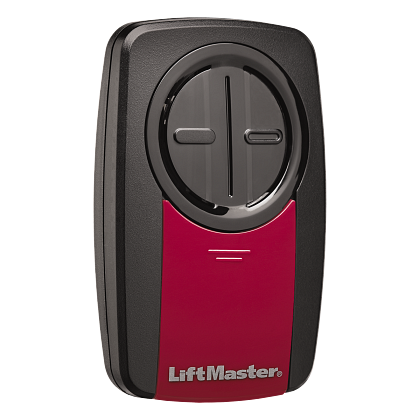
Credit: www.liftmaster.com
Tools And Supplies Needed
Changing a Liftmaster remote battery is simple. You don’t need special tools, but having the right items ready will make the job smoother:
- Replacement battery (the correct type for your remote)
- Small flathead screwdriver or coin (for opening the case)
- Clean cloth (optional, for handling the new battery)
- Eyeglasses screwdriver (for remotes with tiny screws)
Pro tip: Avoid using sharp knives or metal objects that can slip and damage the case or your fingers.
Step-by-step Guide: How To Change Battery In Liftmaster Remote Control
Now, let’s get into the practical steps. The process is similar for most Liftmaster remotes, but always check your specific model for differences.
1. Identify Your Remote Model
Turn your remote over and look for the model number—usually printed on a sticker or stamped inside the battery cover. Knowing the model helps you buy the right battery and find the correct opening method.
2. Get The Correct Replacement Battery
Purchase a fresh battery of the right type. It’s best to buy from a reliable source, since old or cheap batteries may not last long.
- CR2032 and CR2016 are the most common.
- A23 (12V) is used in some universal and older remotes.
- Never mix old and new batteries.
3. Open The Remote Case
Most Liftmaster remotes open with a gentle pry—no force needed.
- Standard Remotes (e.g., 371LM, 893LM): Locate the seam around the edge. Insert a small flathead screwdriver or coin into the notch and twist gently.
- Keychain Remotes: Some have a small screw on the back. Remove it with a tiny screwdriver, then pry apart.
- Universal Remotes: Look for a battery door or release button.
Warning: Do not force the case. If it doesn’t open easily, double-check for hidden screws.
4. Remove The Old Battery
Carefully pop out the battery with your tool or fingernail. Note the battery’s orientation: which side (plus or minus) faces up. Most remotes show a small diagram inside the compartment.
- Don’t bend the battery contacts. They are delicate.
- Dispose of the old battery safely. Button cells are hazardous if swallowed.
5. Insert The New Battery
With clean hands, place the new battery in the same orientation as the old one. For most remotes, the positive (+) side faces up.
- Make sure it sits flat and the contacts touch the battery.
- If the battery feels loose, check for bent contacts.
6. Reassemble The Remote
Snap the case halves together, or replace any screws. The remote should fit tightly, with no rattling parts.
- Test the remote before putting it back on your keychain or car visor.
7. Test The Remote
Stand near your garage door opener and press a button. The LED light should glow brightly, and the door should respond.
- If nothing happens, check the battery orientation and contacts.
- Try again from a distance to make sure the range is restored.
You’re done! Your remote should now work like new.
Special Cases: Changing Battery In Keypad And Mini Remotes
Some Liftmaster products, like wireless keypads or mini remotes, have slightly different procedures.
Wireless Keypad Models (e.g., 877lm)
- Open the battery cover on the bottom or back.
- Remove the battery (usually a 9V or AA).
- Insert the new battery as shown in the diagram.
- Replace the cover and test by entering your code.
Mini Keychain Remotes
- Remove the key ring if it blocks the case.
- Open the case with a small screwdriver or by prying.
- Change the button cell battery as usual.
Tip: Always handle small screws or springs carefully—they can get lost easily.
Table: Quick Reference For Battery Replacement By Remote Model
Here’s a handy lookup for the most common Liftmaster remotes:
| Remote Model | Battery Type | How to Open | Special Notes |
|---|---|---|---|
| 371LM / 373LM | CR2032 | Pry open at notch | Button cell; check orientation |
| 891LM / 893LM | CR2016 | Screw or pry case | Some models have tiny screws |
| 895MAX | CR2032 | Pry open side | Keychain style |
| 375UT | A23 (12V) | Slide battery door | Universal remote |
| 877LM | 9V | Battery door on back | Wireless keypad |
Note: If you have a rare or older model, check the manual or visit the official Liftmaster support page for guidance.
Common Mistakes To Avoid
Changing a remote battery is easy, but these errors can cause headaches:
- Using the wrong battery type – Always double-check before inserting.
- Inserting the battery backwards – This can damage the remote or make it not work.
- Bending or breaking contacts – Gently remove and insert batteries.
- Forcing the case open – Look for screws or tabs before prying.
- Mixing old and new batteries – Always use a single, fresh battery.
- Touching battery contacts with dirty hands – Oils can reduce contact quality.
- Losing tiny screws or springs – Work over a tray or towel.
Practical insight: Most remotes use a small spring or metal tab for contact. If the remote doesn’t work after battery replacement, gently bend the contact so it presses firmly on the battery.
How To Maximize Battery Life
Getting the most from your remote battery saves money and hassle. Here’s how:
- Use quality batteries – Cheap brands often die quickly.
- Keep remotes out of extreme heat or cold – Temperature swings drain batteries.
- Avoid pressing buttons for long periods – Each press uses power.
- Store spares in a cool, dry place – Old batteries lose charge even if unused.
- Clean battery contacts occasionally – A cotton swab with a little rubbing alcohol keeps contacts shiny.
Did you know? Button cell batteries can last 1–3 years in a remote, depending on use and storage conditions.
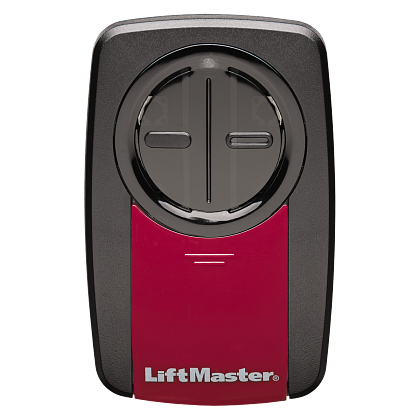
Credit: www.liftmaster.com
What To Do If Your Remote Still Doesn’t Work
Sometimes, changing the battery doesn’t fix the problem. Here are steps to troubleshoot:
Check The Battery Orientation And Contacts
- Make sure the new battery is installed in the correct direction.
- Inspect the metal contacts for dirt, rust, or bending.
Try A Second New Battery
- Rarely, new batteries are dead out of the package.
- Swap in another fresh one to rule this out.
Reprogram The Remote
- Some remotes lose programming if the battery is out for too long.
- Check your opener manual for programming instructions.
Test With Another Remote
- If another remote works, the problem is isolated.
- If all remotes fail, the opener may have a larger issue (power loss, antenna problem, etc. ).
Reset The Opener
- Unplug your garage door opener for 30 seconds, then plug back in.
- Try the remote again.
Seek Professional Help
- If none of these work, contact a Liftmaster dealer or local garage door technician.
Insider tip: Some remotes have a tiny “reset” button inside the case. Pressing it after battery change can restore normal function.
Recycling And Disposing Of Old Batteries
Old batteries should never go in the trash. Button cell and 12V batteries contain chemicals that can leak into the environment.
- Recycle at electronics stores – Many accept small batteries for free.
- Check local hazardous waste programs – They often have battery drop-off days.
- Keep out of reach of children and pets – Swallowed batteries can cause serious harm.
Important: Never burn or crush old batteries.
When To Replace The Remote Instead
Most remotes last many years, but sometimes replacement is smarter:
- Physical damage – Cracked cases, broken buttons, or water damage can be hard to fix.
- Corroded battery contacts – White or green powder inside means corrosion, which is often irreversible.
- Remote is lost or stolen – For security, replace and reprogram your opener.
- Compatibility issues – Newer openers may not work with very old remotes.
Liftmaster remotes are widely available online and at hardware stores. Make sure to get a genuine replacement for best results.
Safety And Security Considerations
Changing a remote battery is safe, but keep these points in mind:
- Unplug the garage door opener if you need to work near the opener itself.
- Keep batteries away from children – Button cells are a swallowing hazard.
- Reprogram remotes if lost or stolen – This prevents unauthorized access.
- Test the door’s auto-reverse function regularly, especially after changing remotes.
Stat: According to the U.S. Consumer Product Safety Commission, more than 2,800 children in the U.S. swallow button batteries every year. Safe storage is critical.
Expert Tips: Making Battery Changes Easier
Over years of experience, some small tricks make this task even simpler:
- Keep a spare battery in your car’s glove box – You’ll never be caught with a dead remote.
- Mark your calendar to change batteries once a year, even if they seem fine.
- Clean the remote’s exterior with a damp cloth before opening to avoid dirt inside.
- Photograph the battery orientation before removal—use your phone so you remember.
- Label the remote with its battery type using a sticker, so you don’t forget.
Hidden insight: If you have more than one remote, change all their batteries at the same time. This reduces the risk of one failing at a critical moment.
Real-world Example: A Battery Change In Action
Let’s walk through an example with a common remote, the Liftmaster 893LM.
- Identify the model: “893LM” is printed on the back.
- Buy a CR2032 battery: Picked up at a pharmacy.
- Open the case: Used a small coin to twist the notch open.
- Remove the old battery: Noted the “+” side faces up.
- Insert the new battery: Snapped into place.
- Reassemble: Clicked the halves together.
- Tested: LED glows bright, garage opens from the end of the driveway.
Result: The job took less than five minutes and cost less than $3.
Table: Cost Comparison – Diy Vs. Professional Replacement
Some people prefer to have a professional change their remote battery. Here’s a cost comparison:
| Option | Average Cost | Time Required | Pros | Cons |
|---|---|---|---|---|
| DIY Battery Change | $2 – $5 | 5-10 minutes | Cheap, quick, convenient | Requires minimal effort |
| Professional Service | $20 – $40 | 1-2 days (including travel) | No effort, guaranteed fix | Expensive, slow |
Bottom line: DIY is much cheaper and faster for most people.
Frequently Asked Questions
Can I Use Any Brand Of Battery In My Liftmaster Remote?
Yes, you can use any brand as long as the battery type matches (CR2032, CR2016, A23, etc.). Trusted brands like Energizer, Duracell, or Panasonic are recommended for longer life and reliability.
Will Changing The Battery Erase My Remote’s Programming?
No, changing the battery usually does not erase programming. However, if the battery is out for a long time or if your remote is very old, you may need to reprogram it. Instructions are in your opener’s manual.
How Often Should I Change My Liftmaster Remote Battery?
Most users change the battery every 1–2 years, depending on usage. If you notice reduced range or slow response, change the battery sooner.
What Should I Do If The Remote Doesn’t Work After A Battery Change?
First, check that the battery is installed correctly (right side up, making contact). Try a second new battery to rule out a dud. If it still fails, consult your opener manual for reprogramming steps or contact a professional.
Are There Safety Risks With Old Or Leaking Batteries?
Yes. Leaking batteries can damage your remote and pose health risks. Always replace old batteries promptly and dispose of them safely at a recycling center.
Changing the battery in your Liftmaster remote is a simple job that pays off with reliable garage access. With the steps and tips above, you’ll save time, money, and avoid frustration—keeping your day running smoothly. If you’re ever unsure, remember that resources like the Liftmaster Wikipedia page have additional information. Take a few minutes once a year to check and change your batteries, and you’ll rarely be caught out by a dead remote again.

Credit: www.youtube.com