
Does Zigbee Need A Hub?
Smart homes are changing the way we live. Lights, thermostats, security systems, and appliances are all becoming more connected. One name you will see often is Zigbee. It’s a popular wireless technology that helps smart devices talk to each other. But one question comes up repeatedly for homeowners and tech lovers: Does Zigbee need a hub?
If you’re buying smart home products or planning a new system, understanding Zigbee’s hub requirements is key. It affects your costs, setup complexity, and how well your smart home will work. In this article, you’ll get clear answers—without tech jargon or confusing details.
By the end, you’ll know exactly when a Zigbee hub is needed, when it’s not, and how to make the best choice for your situation.
What Is Zigbee? A Simple Explanation
Zigbee is a wireless communication protocol. It lets smart devices talk to each other using radio signals, similar to Wi-Fi or Bluetooth, but with some important differences. Zigbee was created especially for smart home devices like bulbs, plugs, door sensors, and thermostats.
A few important things to know about Zigbee:
- Low power usage: Zigbee devices use little energy, so batteries last a long time.
- Mesh networking: Zigbee devices can pass messages to each other, forming a strong, flexible network.
- Short range: It works best for devices that are not too far apart (usually 10–30 meters indoors).
- Popular brands: Philips Hue, IKEA TRÅDFRI, Samsung SmartThings, and others use Zigbee.
Unlike Wi-Fi, Zigbee is not meant for fast internet or streaming. It’s designed for simple, reliable communication between many small devices.
What Is A Hub? Why Do People Use One?
A hub is a device that connects smart gadgets together and lets you control them in one place. Think of it as a translator or central manager. For Zigbee, a hub is often called a Zigbee gateway or Zigbee bridge.
Common Zigbee hubs:
- Philips Hue Bridge (for Hue bulbs and accessories)
- SmartThings Hub (works with many brands)
- Amazon Echo devices (some have built-in Zigbee support)
- Home Assistant SkyConnect (for DIY smart homes)
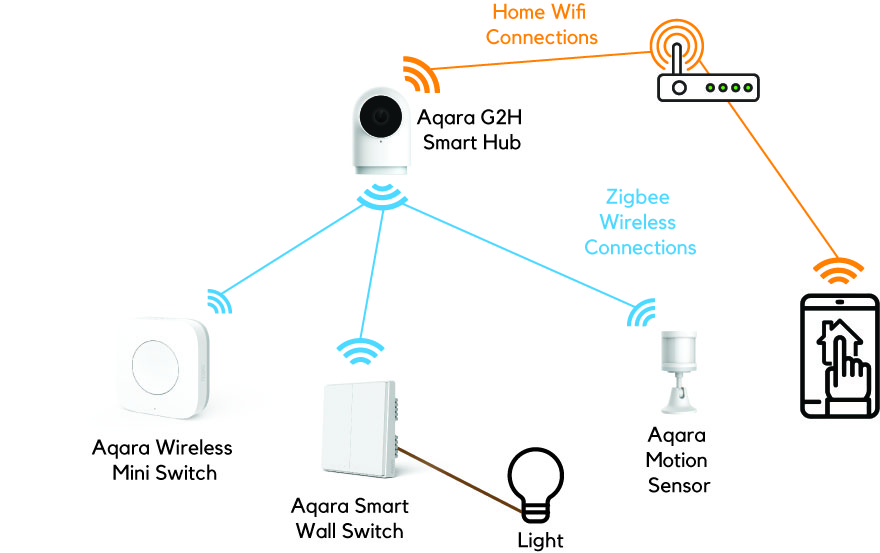
A hub connects to your home Wi-Fi or wired network, then links up with Zigbee devices. It lets you:
- Control devices from your smartphone (even when away from home)
- Set schedules and automations (like “turn lights on at sunset”)
- Combine devices from different brands
- Use voice assistants (Alexa, Google Assistant, Siri) with Zigbee products
But do you always need a hub? That’s where things get interesting.

Credit: www.amazon.com
Does Zigbee Always Need A Hub?
The short answer is: Usually, yes—but not always. Let’s break down the reasons.
Why Zigbee Often Needs A Hub
Most Zigbee devices are simple. For example, a light bulb or a door sensor doesn’t have Wi-Fi or a fancy app. It only “speaks” Zigbee. A hub acts as the translator between Zigbee and your smartphone or the internet.
Without a hub, you cannot:
- Control Zigbee devices from your phone (unless you use special tricks)
- Set up automations or scenes easily
- Connect devices from different manufacturers
If you want your Zigbee devices to work together smoothly, or to control them when you’re not at home, a hub is almost always required.
When Zigbee Does Not Need A Hub
There are a few exceptions. Some Zigbee devices can talk directly to each other. This is called direct binding or device-to-device control. For example:
- A Zigbee motion sensor turns on a Zigbee light bulb, without a hub.
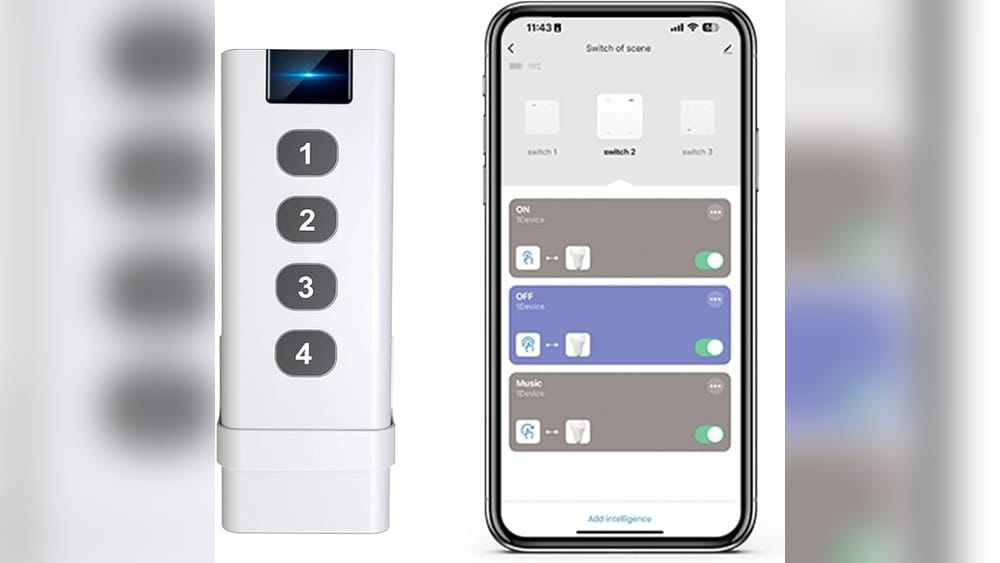
- A Zigbee remote controls a group of Zigbee bulbs directly.
But this approach has limits:
- You can’t use your smartphone to control devices from anywhere.
- Automations are basic (just on/off or dim).
- Device compatibility is limited; not all brands support this feature.
- Setting up direct binding can be tricky and often requires special tools or apps.
Some smart home platforms are changing the rules. For example, Amazon Echo devices with built-in Zigbee (like the Echo Plus, Echo Show 10, and some others) can act as a hub. You don’t need to buy a separate box.
Comparison: Zigbee With Hub Vs Zigbee Without Hub
Here’s a simple comparison to make the difference clear:
| Feature | Zigbee With Hub | Zigbee Without Hub |
|---|---|---|
| Remote control via phone | Yes | No |
| Voice assistant support | Yes | No |
| Easy automations | Yes | Limited |
| Device-to-device actions | Yes | Yes (basic) |
| Works when internet is down | Yes (local control) | Yes |
| Supports many brands | Yes | Limited |
How Zigbee Mesh Networking Affects The Need For A Hub
One of Zigbee’s strengths is mesh networking. In a mesh, devices can pass messages to each other, not just to the hub. This means:
- If one device is too far from the hub, another device can relay its signal.
- The network is more reliable and covers a wider area.
But the mesh needs a central controller—usually a hub—to manage everything. Some devices (like smart bulbs) can act as repeaters, making the network bigger and stronger. Still, a hub is needed for:
- Initial setup and management
- Remote access and integration with apps
Non-obvious insight: Many beginners think mesh means “no hub needed.” But mesh and hub are different ideas. Mesh is about how devices talk to each other; the hub is about controlling and connecting with the outside world.
Credit: homesmart.sg
Common Zigbee Hub Options Explained
If you decide you need a hub, you have several choices. Each has its benefits and drawbacks.
1. Brand-specific Hubs
Some brands make their own Zigbee hubs, designed to work best with their products.
- Philips Hue Bridge: Best for Hue lights and accessories. Very reliable, simple to set up. Limited support for non-Hue Zigbee devices.
- IKEA TRÅDFRI Gateway: For IKEA smart products. Works with some other Zigbee devices, but not all.
2. General Zigbee Hubs
These support many brands and device types.
- Samsung SmartThings Hub: Works with a huge range of Zigbee, Z-Wave, and Wi-Fi devices. Good for mixed-brand smart homes. The app is user-friendly, but advanced users may want more control.
- Home Assistant with Zigbee stick: For tech-savvy users. You plug a USB Zigbee radio into a Raspberry Pi or PC running Home Assistant. Supports almost any Zigbee device, but setup can be complex.
3. Voice Assistant Devices With Zigbee
Some smart speakers and displays have Zigbee built in.
- Amazon Echo Plus, Echo Show 10: You can pair Zigbee bulbs and sensors directly. No extra hub box is needed. Simple for basic setups, but advanced automation options are fewer.
- Echo 4th Gen: Also includes Zigbee radio.
Non-obvious insight: Even if you use an Echo device with Zigbee, you may not get every feature the device supports. For example, some advanced settings or automations may only work with the brand’s own hub.
4. Diy And Open-source Hubs
For power users, there are open-source options like Zigbee2MQTT or deCONZ. These require more technical skill, but offer full control and compatibility.
Advantages Of Using A Zigbee Hub
Why bother with a hub at all? For most people, the benefits are clear.
- Unified control: Manage all your Zigbee devices in one app.
- Remote access: Turn lights on or off from anywhere in the world.
- Automations: Set up complex routines, like “if door opens, turn on hallway lights.”
- Voice control: Use Alexa, Google Assistant, or Siri to control devices.
- Mix and match brands: Add devices from different manufacturers to one system.
- Local operation: Many Zigbee hubs work even if your internet is down—unlike most Wi-Fi devices.
Data point: According to a 2022 survey by Statista, over 40% of US smart home users prefer using a hub for easier device management and automation.

Credit: us.aqara.com
Downsides Of Using A Zigbee Hub
Of course, there are some drawbacks to hubs:
- Extra cost: Hubs usually cost $30–$100 or more.
- More setup steps: You need to connect, configure, and sometimes update the hub.
- One more device: Hubs take up space and need power.
- Possible compatibility issues: Not every Zigbee device works with every hub.
Important tip: Always check the supported device list before buying a hub. Some hubs lock you into their ecosystem.
When Can You Avoid A Zigbee Hub?
Some people want the simplest setup possible. Here are situations where you might skip the hub:
- You only need basic control (like a remote paired with bulbs).
- You are okay with limited features (no phone app or voice assistant).
- All your devices are from one brand that supports direct binding.
- You enjoy experimenting and don’t mind manual setup.
Example: If you buy only Philips Hue bulbs and remotes, you can bind them together for simple control. But if you want to use your phone or Alexa, you’ll still need the Hue Bridge.
Zigbee Vs Other Smart Home Protocols
Zigbee isn’t the only wireless standard. How does it compare to others, especially regarding hubs?
| Protocol | Hub Needed? | Main Use | Pros | Cons |
|---|---|---|---|---|
| Zigbee | Usually | Smart home | Mesh, low power, many brands | Hub often required |
| Wi-Fi | No | Cameras, plugs, bulbs | Easy setup, direct app control | Higher power, crowded network |
| Z-Wave | Yes | Smart home | Mesh, less interference | Hubs can be expensive |
| Bluetooth | Rarely | Locks, speakers | Low power, easy pairing | Short range, limited automation |
| Thread | Border router needed | Smart home (Matter-ready) | Mesh, future-proof | New, fewer devices |
Key takeaway: Zigbee is flexible, but the hub makes it powerful. Wi-Fi is simpler for basic setups, but can slow your network if you add many devices. Thread is an emerging standard designed to fix some of Zigbee’s limits.
Real-world Examples: When A Zigbee Hub Is And Isn’t Needed
Example 1: Smart Lighting
You have 10 Philips Hue bulbs and a Hue remote. If you want to dim the lights with the remote, you can bind them together—no hub needed. But if you want to control the lights from your phone, set schedules, or use Alexa, the Hue Bridge (hub) is required.
Example 2: Security Sensors
You buy Zigbee door and window sensors for your home. Most of these require a hub to send alerts to your phone or trigger other actions (like turning on lights). Without a hub, you won’t get notifications or be able to automate.
Example 3: Amazon Echo Devices
You have an Echo Show 10 (with built-in Zigbee) and Zigbee smart plugs. You can pair them directly and control them with your voice. In this case, the Echo acts as your hub—no separate box is needed.
Example 4: Advanced Home Automation
You want to combine Zigbee bulbs, Z-Wave locks, and Wi-Fi cameras into one system. You’ll need a multi-protocol hub like SmartThings or a DIY solution like Home Assistant with Zigbee and Z-Wave radios.
Common Mistakes When Setting Up Zigbee Devices
- Assuming all Zigbee devices work together: Not every Zigbee device is compatible with every hub. Check the compatibility list.
- Not buying a hub when needed: Some users get Zigbee bulbs expecting them to work with their Wi-Fi router or phone app. Most need a hub.
- Mixing too many brands: The more brands you mix, the higher the chance of issues. Stick to well-known brands and supported devices.
- Ignoring firmware updates: Zigbee hubs and devices sometimes need updates for new features or bug fixes.
- Placing the hub in a bad spot: Hubs should be central, not hidden in a corner or behind thick walls.
Pro tip: If you’re starting out, pick a single ecosystem (like Hue, SmartThings, or Echo Zigbee) and build slowly.
Zigbee And The Future: Matter, Thread, And The Changing Role Of Hubs
Smart home technology is evolving fast. The new Matter standard promises to make devices from different brands and protocols work together. Zigbee devices won’t disappear, but their role may change.
- Thread is a new mesh technology, similar to Zigbee but designed for modern homes and Matter compatibility.
- Some hubs (like Echo, SmartThings, Apple HomePod) are becoming “multi-protocol” to support Zigbee, Thread, and more.
- Zigbee Alliance has rebranded as the Connectivity Standards Alliance (CSA) to focus on Matter and future technologies.
Non-obvious insight: Many current Zigbee hubs will support Matter through software updates. If you’re investing in a hub today, check if it’s “Matter-ready” to avoid future upgrades.
For the latest details on Matter and Zigbee compatibility, see the Matter standard Wikipedia page.
How To Choose The Right Zigbee Hub (if You Need One)
Picking the right hub is a big decision. Here are important factors:
- Brand compatibility: Make sure your hub supports the devices you already own or plan to buy.
- Future-proofing: Choose a hub that will receive updates and support new standards like Matter.
- Ease of use: Some hubs are plug-and-play, others need more setup. Pick what fits your skill level.
- Features: Do you need advanced automations, multiple protocols, or voice assistant support?
- Price: More expensive doesn’t always mean better. Consider your needs and budget.
Quick comparison of popular Zigbee hubs:
| Hub | Price Range | Supported Brands | Voice Assistant | Matter Support |
|---|---|---|---|---|
| Philips Hue Bridge | $50-60 | Hue, some third-party | Yes | Expected |
| Samsung SmartThings | $70-100 | Many | Yes | Yes |
| Amazon Echo (4th Gen, Show 10) | $80-250 | Many Zigbee devices | Alexa | Yes |
| IKEA TRÅDFRI Gateway | $35-40 | IKEA, some others | Yes | Unknown |
| Home Assistant with Zigbee stick | $50-100 | Most Zigbee | Via integrations | Yes (with updates) |
Should You Use A Zigbee Hub? Decision Guide
Still unsure? Here’s a simple guide:
- Yes, you need a hub if:
- You want to control devices from your phone or voice assistant.
- You have devices from multiple brands.
- You want to use automations or schedules.
- You plan to expand your smart home.
- You might NOT need a hub if:
- You only use a few devices (like bulbs with a remote).
- You don’t care about remote control or automation.
- Your devices support direct binding and you are okay with basic features.
Final advice: For most users, a Zigbee hub is the best choice. It unlocks all the features that make smart homes truly smart.
Frequently Asked Questions
Do All Zigbee Devices Need A Hub?
Not all, but most Zigbee devices need a hub for advanced features like smartphone control and automations. Some can work together directly for basic functions, but this is limited.
Can I Use Zigbee Devices With Alexa Or Google Home Without A Hub?
Only if your smart speaker/display has a built-in Zigbee radio (like Echo Plus or Echo Show 10). Otherwise, you’ll need a separate Zigbee hub to connect Zigbee devices to Alexa or Google Home.
What Happens If My Zigbee Hub Goes Offline?
Most Zigbee devices will stop working with your phone or voice assistant if the hub is offline. However, some direct device-to-device actions (like a remote linked to a bulb) may still work.
Is Zigbee Better Than Wi-fi For Smart Home Devices?
Zigbee is often better for low-power, always-on devices (sensors, bulbs) because it uses less energy and supports mesh networking. Wi-Fi is better for high-bandwidth devices (cameras, speakers), but can slow down if you add too many devices.
Will Zigbee Devices Work With The New Matter Standard?
Some existing Zigbee devices can work with Matter through software updates to their hubs. It depends on the manufacturer. If future compatibility is important, choose a hub that promises Matter support.
Smart home technology is moving fast, but one thing is clear: knowing whether Zigbee needs a hub will help you avoid costly mistakes and build a system that works for you. If you want the smartest, most flexible home, a hub is the key that unlocks the true power of Zigbee.