
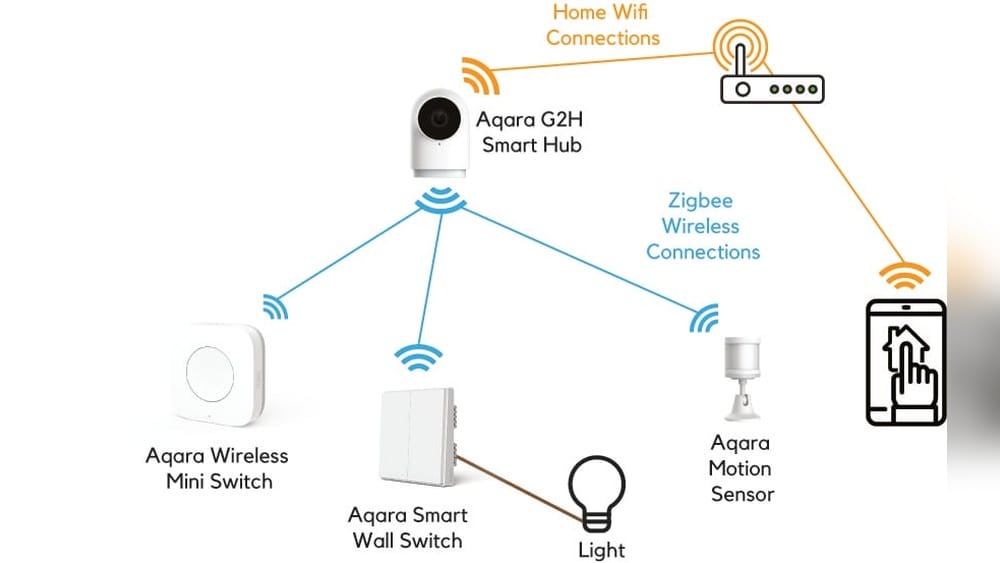
Smart homes are becoming more common each year, and behind the scenes, special devices are working to connect everything together. One of the most popular technologies for smart devices is Zigbee. If you have ever wondered how a Zigbee hub works or why so many smart home gadgets talk about Zigbee compatibility, this article will give you clear answers. We will break down the basics, explain the technology, show real examples, and help you understand the real benefits and limitations. Whether you are just starting with smart devices or want to make your home automation more reliable, learning about Zigbee hubs will help you make better decisions.
What Is Zigbee?
Zigbee is a wireless communication standard designed for smart home devices, sensors, and automation products. Unlike Wi-Fi or Bluetooth, Zigbee is made for devices that need to send small amounts of data, like turning on a light or reporting a door opening. It uses low power, so batteries last a long time, and it allows many devices to talk to each other in a network.
Key Zigbee Features
- Low Power Use: Zigbee devices can run for months or even years on a small battery.
- Mesh Networking: Devices can pass messages to each other, making the network stronger and larger.
- Short Range: Each device covers a small area, but together they can cover a whole house.
- Interoperability: Many brands use Zigbee, so their devices can usually work together.
Zigbee is often found in smart bulbs, plugs, sensors, door locks, and more. It is trusted because it is stable, safe, and easy to expand.
What Is A Zigbee Hub?
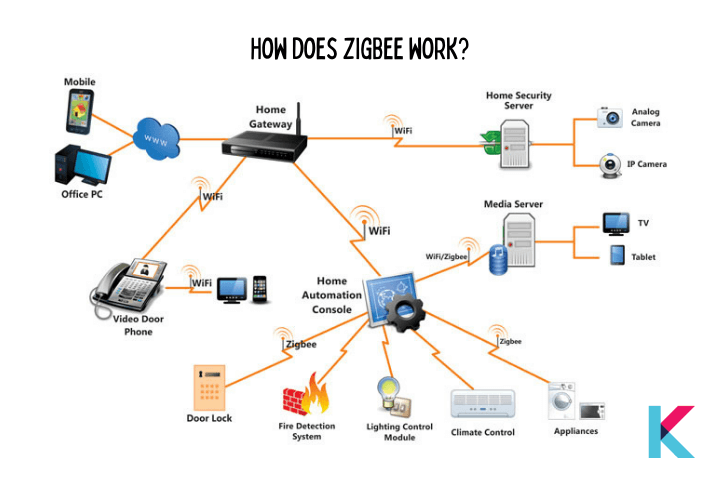
A Zigbee hub is a central device that connects Zigbee gadgets to each other and to the internet. Think of it as a translator between your smart devices and your home Wi-Fi or your smartphone. Without a hub, most Zigbee devices cannot talk directly to your phone or smart assistant.
Main Roles Of A Zigbee Hub
- Device Management: The hub adds and removes Zigbee devices from your network.
- Data Conversion: It translates Zigbee signals to Wi-Fi or Ethernet, so your smartphone or cloud service can understand.
- Automation Control: The hub can trigger actions, like turning off all lights when you leave home.
- Security: It adds a layer of safety by keeping device communication local or encrypted.
For example, if you have Zigbee door sensors and smart bulbs, the hub lets you set a rule: when the door opens, the hallway light turns on. The hub makes all the devices work together.
How Does Zigbee Communication Work?
Zigbee uses a mesh network. This means that each device can send and receive signals, and also pass them along to other devices. If one path is blocked (by a wall or distance), messages can find a new route through other devices. This is different from Wi-Fi, where every device talks to one main router.
Zigbee Mesh Explained
Imagine people in a room, where each person can whisper to their neighbor. If you want to pass a message across the room, you tell your neighbor, who passes it to the next, and so on. If someone steps out, the message can go a different way.
That is how Zigbee mesh works.
Types Of Zigbee Devices
- Coordinator: Usually the hub. It starts and manages the network.
- Router: Devices plugged into power, like smart plugs or bulbs, help pass messages.
- End Device: Battery-powered sensors or remotes. They use the mesh but do not pass messages.
This structure makes Zigbee networks very reliable. If one device fails, the rest can still talk.
How A Zigbee Hub Connects Everything
The Zigbee hub is the heart of your smart home network. It brings together all Zigbee devices and connects them to your smartphone, voice assistant, or automation system.
Typical Zigbee Hub Setup
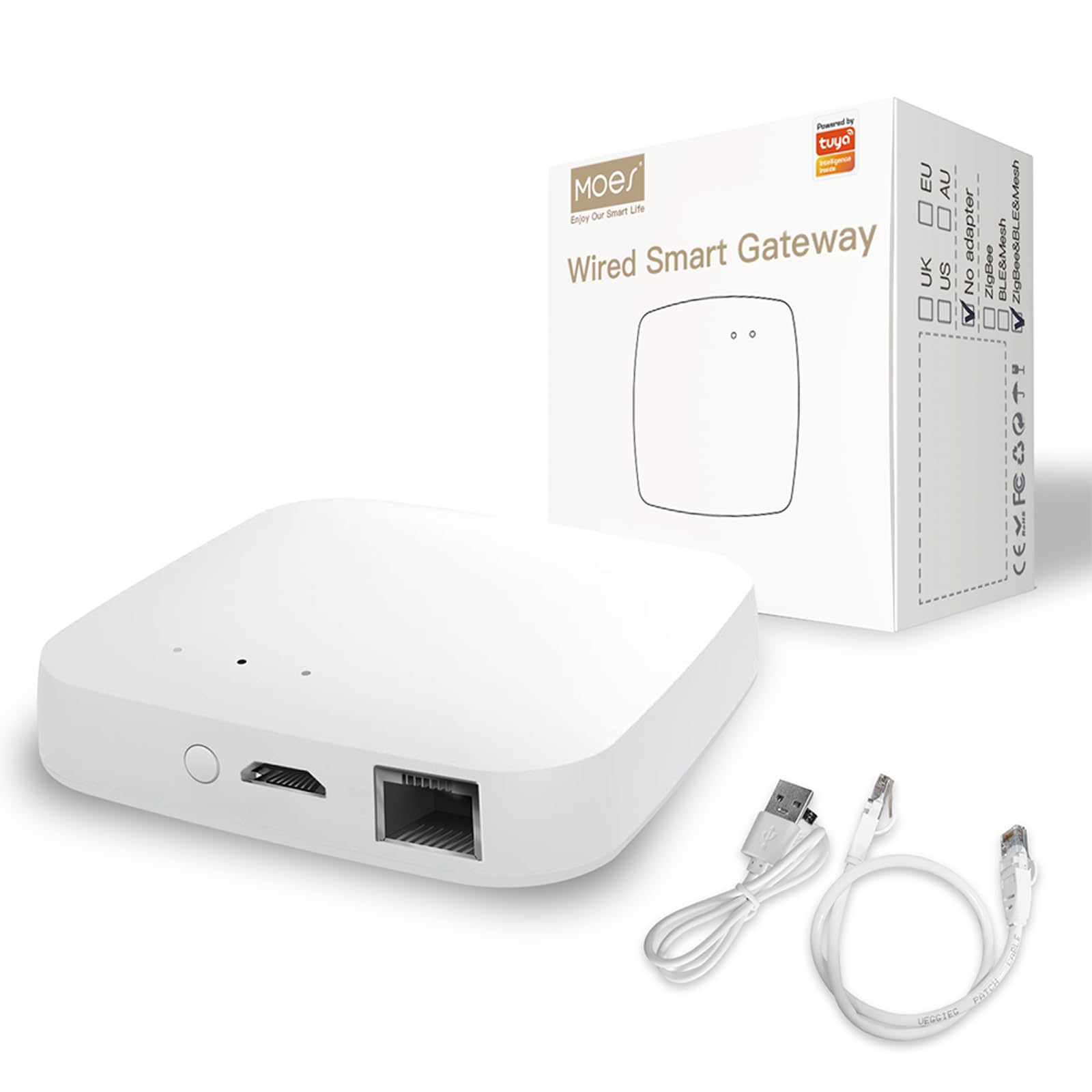
- The hub plugs into power and connects to your Wi-Fi or with an Ethernet cable.
- You add Zigbee devices (like bulbs or sensors) using the hub’s app or software.
- The hub manages communication, making sure every device stays connected.
Many hubs also let you group devices, set schedules, or create automation rules. For example, you can group all living room lights and turn them off with one tap.
Connecting To Other Systems
Most Zigbee hubs can work with voice assistants like Amazon Alexa or Google Assistant. This lets you control devices with your voice. Some hubs also connect to cloud services for remote control when you are not home.
Zigbee Hub Vs. Other Smart Home Hubs
There are many smart home hubs, but not all use Zigbee. Some use Z-Wave, Bluetooth, or just Wi-Fi. Choosing the right hub depends on your devices and needs.
Here is a comparison of Zigbee and other common smart home protocols:
| Feature | Zigbee | Z-Wave | Wi-Fi | Bluetooth |
|---|---|---|---|---|
| Frequency Band | 2.4 GHz | 908/868 MHz | 2.4/5 GHz | 2.4 GHz |
| Range (per device) | 10-20 meters | 30-40 meters | 30-50 meters | 10 meters |
| Mesh Network | Yes | Yes | No | No |
| Power Use | Very Low | Very Low | High | Low |
| Device Limit | ~65,000 | ~232 | Varies | 7 (classic) |
| Interference Risk | Medium | Low | High | Medium |
Zigbee is best for large homes with many battery devices. Z-Wave is similar but runs on a different frequency, which can mean less interference with Wi-Fi. Wi-Fi is fast but drains batteries quickly. Bluetooth is easy for short distances but supports fewer devices.
Inside A Zigbee Hub: Hardware And Software
A Zigbee hub may look simple, but inside it is a mix of hardware and software working together.
Hardware Components
- Zigbee Radio Chip: Sends and receives Zigbee signals.
- Processor: Handles data, automation, and communication with the cloud.
- Memory: Stores device data and automation rules.
- Wi-Fi/Ethernet Module: Connects to your home network.
Some advanced hubs add extra radios for Z-Wave or Bluetooth, letting you mix devices from different protocols.
Software And Firmware
The hub runs special firmware that manages the Zigbee mesh, device pairing, and rules. User apps or web interfaces let you add devices, set automations, and monitor status. Some hubs update automatically to fix bugs or add new features.
Setting Up A Zigbee Hub: Step-by-step
Setting up a Zigbee hub is usually simple, but each brand is a little different. Here is a general process:
- Plug in the Hub: Connect to power and your router (Wi-Fi or Ethernet).
- Install the App: Download the manufacturer’s app on your phone.
- Create an Account: Register or sign in for cloud features.
- Add Zigbee Devices: Put each device in pairing mode and add it through the app.
- Organize Devices: Name them (like “Living Room Light”) and group by room.
- Set Automations: Create rules, like turning on lights at sunset.
Practical Example
Suppose you buy a Philips Hue Bridge (a popular Zigbee hub) and three Hue bulbs:
- You plug in the Bridge and connect it to your router.
- Using the Hue app, you press “Add Light” and turn on each bulb.
- The app finds each bulb and adds it to your network.
- You set all bulbs in the “Bedroom” group and create a rule to turn them off at midnight.
This is the basic flow for most Zigbee hubs.
Real-world Examples Of Zigbee Hubs
Many brands offer Zigbee hubs, each with unique features. Here are a few popular examples:
1. Philips Hue Bridge
- Controls Hue bulbs, lamps, and accessories.
- Connects up to 50 lights.
- Integrates with Alexa, Google Assistant, and Apple HomeKit.
2. Samsung Smartthings Hub
- Supports Zigbee, Z-Wave, and Wi-Fi.
- Connects with hundreds of devices, including sensors, locks, and switches.
- Advanced automation and voice control.
3. Amazon Echo (with Zigbee)
- Some Echo models (like Echo Plus, Echo 4th Gen) have a built-in Zigbee hub.
- Lets you control Zigbee devices by voice.
4. Aeotec Smart Home Hub
- Works with SmartThings platform.
- Supports Zigbee and Z-Wave, plus Wi-Fi devices.
The best hub for you depends on your devices and how much you want to automate.
Credit: kodmy.com
Zigbee Hub Use Cases
A Zigbee hub is more than just a “connector.” It can handle many smart home tasks:
- Lighting Control: Turn groups of lights on/off or dim them with one tap.
- Security: Link door/window sensors, motion detectors, and alarms.
- Climate: Control smart thermostats, fans, and heaters.
- Energy Saving: Automate lights and plugs to turn off when not needed.
- Voice Commands: Use Alexa or Google to control devices.
- Remote Access: Check and control your home from anywhere.
For example, you can set a rule: if a motion sensor detects movement at night, turn on hallway lights at 30% brightness.
Zigbee Hub Advantages
Zigbee hubs have strong benefits for smart homes. Here are the main reasons people choose them:
1. Reliable Mesh Network
The mesh system means your network becomes stronger with more devices. If one device fails, others fill the gap. This is a big advantage over Wi-Fi or Bluetooth.
2. Low Power Use
Most Zigbee sensors and remotes use tiny batteries that last for months or years. No need to recharge often.
3. Large Device Support
You can connect dozens or even hundreds of Zigbee devices to one hub. Great for growing your smart home.
4. Multi-brand Compatibility
Many Zigbee devices from different brands work together. This lets you mix and match without being locked into one brand.
5. Local Control
Many Zigbee hubs can run automations locally, without the cloud. If your internet goes down, lights and rules still work.
Zigbee Hub Disadvantages And Limitations
No technology is perfect. Zigbee hubs have some limitations you should know:
1. Requires A Hub
Most Zigbee devices cannot connect directly to your phone or router; they need a hub. This adds cost and setup time.
2. Limited Range Per Device
Each device covers a small area (often 10–20 meters). You may need more routers (powered devices) to reach every corner.
3. Interference Risk
Zigbee uses the 2.4 GHz band, which is busy with Wi-Fi and Bluetooth. Too many signals can cause problems, though the mesh design helps.
4. Compatibility Challenges
Some Zigbee devices use custom features. Not all Zigbee products work perfectly with every hub. Always check compatibility lists.
5. Learning Curve
Setting up and managing a hub, especially with automations, can take time to learn for beginners.
Zigbee Hubs And Smart Home Security
Security is a key reason to use a hub. Zigbee uses AES-128 encryption for device communication, which is similar to what banks use for online protection.
Security Features
- Encrypted Communication: Hard for hackers to read or change signals.
- Device Authentication: Only approved devices can join your network.
- Local Processing: Many actions happen inside your home, not the cloud.
However, the hub itself must be kept secure (strong passwords, firmware updates). If the hub is hacked, your whole network can be at risk.
Expanding Your Zigbee Network
One of the best features of Zigbee is how easy it is to expand. As your needs grow, you can add more devices without starting over.
Adding Devices
- New devices can join the mesh at any time.
- Each powered device (bulb, plug) extends the network range.
- No need to rewire or move your hub.
Zigbee Repeaters
If you have dead zones, adding a Zigbee smart plug or bulb acts as a repeater, helping signals reach farther areas. Some people do not realize that powered Zigbee devices help the network, while battery devices do not.
Common Problems And How To Solve Them
Zigbee hubs are reliable, but some issues can happen. Here are common problems and how to fix them:
Devices Not Pairing
- Check if the device is in pairing mode.
- Move the device closer to the hub during setup.
- Make sure the hub’s firmware is up to date.
Devices Unresponsive
- Check battery levels for sensors or remotes.
- Restart the hub or affected device.
- Add a powered Zigbee device nearby to strengthen the mesh.
Interference
- Place the hub away from Wi-Fi routers or microwaves.
- Use different Wi-Fi channels if possible.
Automations Not Working
- Check that all devices are connected and online.
- Review automation rules for errors.
- Update the app and hub firmware.

Credit: www.amazon.com
Zigbee Hub And Matter: The New Standard
A recent development in smart homes is the Matter standard. Matter is an open protocol designed to make smart devices from different brands work together easily. Many Zigbee hubs are adding Matter support or will soon.
Zigbee And Matter
- Some Zigbee hubs can act as a Matter bridge, letting Zigbee devices join Matter networks.
- This increases future compatibility and protects your investment.
For example, a Zigbee motion sensor connected to a Matter-enabled hub could trigger lights that use a different standard. This is a big step toward a more open, flexible smart home.
Choosing The Right Zigbee Hub
With many options, how do you pick the best Zigbee hub for your home? Here are key factors:
| Factor | Why It Matters | What to Check |
|---|---|---|
| Device Compatibility | Not all hubs work with every Zigbee device. | Check the hub’s supported device list. |
| Integration | Connect with voice assistants or other platforms. | Look for Alexa, Google, or HomeKit support. |
| Automation Features | Advanced automations make your home smarter. | See if the hub allows custom rules and schedules. |
| Local Control | Automations work even if the internet is down. | Prefer hubs with local processing options. |
| Future Proofing | Support for Matter or other new standards. | Read about upcoming software updates. |
| Price | Some hubs are very affordable, others cost more. | Balance features with your budget. |
Two often-missed tips:
- Some Zigbee hubs can connect to multiple Zigbee networks (useful for large homes or separate areas).
- If you plan to use advanced automation, check if the hub supports local scripting or third-party plugins.
Credit: www.amazon.com
Future Of Zigbee Hubs
Zigbee is still growing, but the smart home world is changing fast. With Matter and other open standards, future hubs may support even more device types.
Trends To Watch
- More Devices: New Zigbee products are launched every year, from sensors to appliances.
- Better Security: Updates add stronger encryption and safer device joining.
- Hybrid Hubs: Many hubs now support Zigbee, Z-Wave, Wi-Fi, and Matter all in one.
- Cloud and Local Mix: Users can choose which actions run locally and which use the cloud.
The key is that Zigbee hubs will stay important as long as battery-powered, low-cost smart devices are popular.
Frequently Asked Questions
What Is The Main Advantage Of Using A Zigbee Hub?
The biggest advantage is the mesh network. Zigbee hubs let you connect many smart devices, and each device helps the network grow stronger. This means fewer dead spots and more reliable control compared to Wi-Fi or Bluetooth systems.
Can I Use Zigbee Devices Without A Hub?
Most Zigbee devices need a hub to work. Some voice assistants like the Amazon Echo (with built-in Zigbee) can act as a hub. However, Zigbee devices cannot connect directly to your smartphone or regular Wi-Fi router.
How Many Devices Can A Zigbee Hub Support?
A single Zigbee network can support up to 65,000 devices, but in practice, most hubs handle 50 to 200 devices easily. The real limit depends on the hub’s hardware and software.
Is Zigbee More Secure Than Wi-fi?
Zigbee uses strong AES-128 encryption, making it very secure for smart home use. However, Wi-Fi security depends on your router and network settings. Both can be safe if set up correctly, but Zigbee hubs often keep more control local, reducing internet risks.
Where Can I Learn More About Zigbee Technology?
You can find more technical details on the Wikipedia Zigbee page.
Smart homes are all about making life easier and more secure. Zigbee hubs are a key part of this, offering reliable, low-power communication for dozens of devices. By understanding how they work and what to look for, you can build a smart home that fits your needs today and grows with you in the future.