
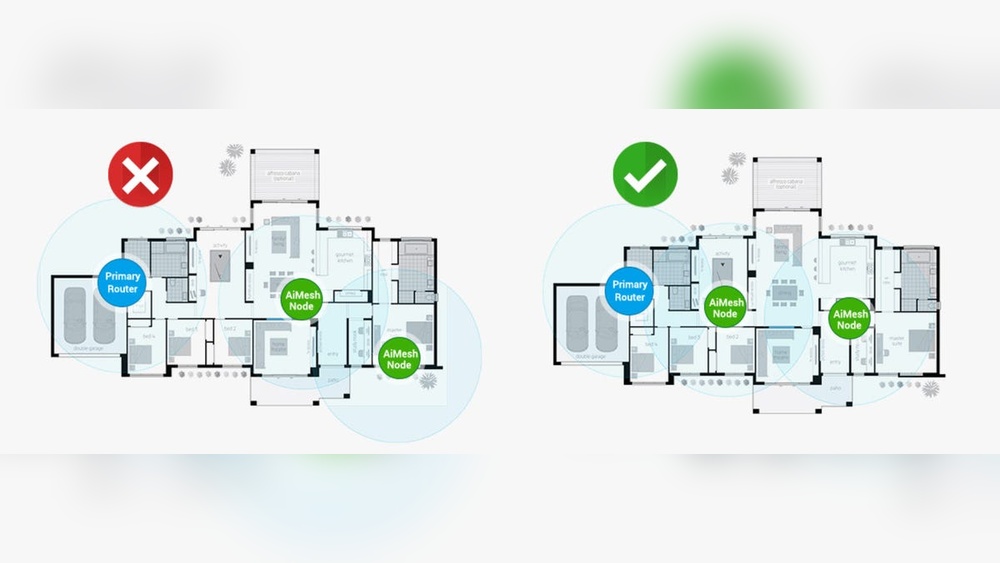
Mesh Wi-Fi systems have changed the way homes and offices connect to the internet. If you live in a large house, have thick walls, or struggle with dead zones, you may have already considered mesh routers. These devices promise to give you fast, stable Wi-Fi everywhere. But one question often comes up: How far apart can mesh routers be and still work well?
This is not a simple “one size fits all” answer. The distance depends on several factors, including your home’s layout, the type of mesh system, interference from other devices, and even the building’s materials. If you place your mesh routers too close together, you waste their potential.
If you place them too far apart, you risk losing signal and speed. In this article, we’ll dive into what really matters when spacing mesh routers, share practical tips, and help you avoid common mistakes. You’ll find guidance for small apartments, big houses, and everything in between.
What Is A Mesh Router System?
To understand spacing, you first need to know what a mesh router system is. A mesh system is made up of a main router (often called the “primary node” or “base station”) and one or more secondary devices (called “satellites” or “nodes”). Instead of one router trying to reach everywhere, mesh nodes work together to cover your space with a single Wi-Fi network.
Each node talks to the others, creating a web of connections. This setup makes it easy to move around your home without losing your connection or needing to switch between different networks. Some systems use wired backhaul (Ethernet cables between nodes), but most home mesh systems rely on wireless connections.
Why Distance Between Mesh Routers Matters
The distance between mesh routers affects everything: speed, coverage, stability, and even how many devices can connect without issues. If nodes are too close, you waste money and space—your signal overlaps too much. If they’re too far apart, you’ll see slowdowns, dropped connections, or even dead zones.
Most mesh systems use wireless backhaul. This means the connection between each node is made using Wi-Fi. Like all Wi-Fi signals, the strength drops as you move farther from the router. Walls, floors, and even furniture can block or weaken the signal. If a node is too far away, its connection to the main router becomes weak, and the whole system slows down.
Getting the right spacing means you get the best possible speed and seamless coverage—no matter where you are in your home.

Credit: www.asus.com
Typical Range Of Mesh Routers
Manufacturers often advertise that a single mesh node covers a certain area (for example, 1,500 square feet per node). But real-world performance is usually less. Here’s why:
- Obstacles: Walls, floors, and doors weaken Wi-Fi signals.
- Interference: Microwaves, Bluetooth devices, and even neighbors’ Wi-Fi can disrupt the signal.
- Node Placement: Placing nodes behind thick walls, inside cabinets, or near metal objects can reduce range.
Approximate Ranges
Most mesh systems recommend spacing nodes 30 to 50 feet (9 to 15 meters) apart with a clear line of sight. In a home with many walls or on different floors, you may need to reduce this to 20 to 30 feet (6 to 9 meters).
The following table shows the typical range for popular mesh router brands:
| Brand/Model | Recommended Node Distance | Advertised Coverage per Node |
|---|---|---|
| Google Nest Wifi | 30–40 ft (9–12 m) | 1,500 sq ft |
| Netgear Orbi | 30–50 ft (9–15 m) | 2,000 sq ft |
| TP-Link Deco | 30–40 ft (9–12 m) | 1,600 sq ft |
| Amazon eero | 30–40 ft (9–12 m) | 1,500 sq ft |
Pro tip: These ranges assume there are few obstacles and not much interference. In real homes, especially older ones with thick walls, these numbers often drop by 20–40%.
Factors That Influence Mesh Router Distance
Knowing the advertised range is only the start. The real distance you can use depends on several factors:
1. Building Materials
Materials like concrete, brick, and stone block Wi-Fi signals much more than drywall or wood. Metal (like pipes or filing cabinets) can also cause major problems. If your home has thick or reinforced walls, keep nodes closer—sometimes just 15–20 feet apart.
2. Floor Plan And Layout
A wide-open floor plan allows signals to travel farther. In homes with many small rooms, signals weaken faster as they pass through walls and doors. For multi-story houses, try to place nodes so they have a line of sight through stairwells or open spaces between floors.
3. Interference
Other electronics, especially microwaves and cordless phones, use the same 2.4GHz and 5GHz frequencies as Wi-Fi. This can block or slow the mesh network. To reduce interference:
- Avoid placing nodes near microwaves, baby monitors, or Bluetooth speakers.
- Place nodes higher up (on shelves or furniture) rather than on the floor.
4. Wired Vs. Wireless Backhaul
If you can run Ethernet cables between your mesh nodes (wired backhaul), the distance between them can be much greater. The cable carries data without signal loss. With wireless backhaul, distance and obstacles matter much more.
5. Number Of Devices
If you have many devices (phones, TVs, laptops), placing nodes too far apart can overload the nearest node. Spacing them properly ensures that devices connect to the closest, strongest node.
6. Mesh Router Model And Antenna Strength
Higher-end mesh systems often have stronger antennas and better “beamforming” technology, which directs the signal toward connected devices. This means they can work over longer distances or through more obstacles. But even the best hardware has limits.

Credit: www.reddit.com
How To Find The Best Distance For Your Mesh Routers
There’s no perfect answer for every home. But here’s a simple process to get close to ideal spacing:
- Start With the Main Router: Place it in a central, open area—not hidden in a closet or corner.
- Place the First Satellite Node: Start about 30 feet (9 meters) away, with as few walls between nodes as possible.
- Test the Signal: Use your mesh system’s app or a Wi-Fi analyzer app to check the connection strength between nodes.
- Adjust as Needed: If the signal is weak (often shown as “poor” in the app), move the node closer. If the signal is strong and you still have dead spots, try moving the node a bit farther.
- Repeat for Additional Nodes: Each new node should be close enough to connect to the previous one with a strong signal, but far enough to extend coverage.
Example Placement In A Two-story Home
Suppose your house is 60 feet long and 30 feet wide. You might:
- Place the main router near the center of the ground floor.
- Place a second node about 30 feet away, toward the far end of the house.
- Place a third node on the upper floor, roughly above the main router, to cover upstairs bedrooms.
This setup gives overlapping coverage and avoids dead zones.
Common Mistakes When Spacing Mesh Routers
Even smart users make mistakes when setting up mesh routers. Here are common errors to avoid:
- Placing Nodes Too Far Apart: If a node’s connection is weak, your network slows down everywhere. Always check the signal strength.
- Putting Nodes in Hidden or Blocked Spots: Avoid closets, cabinets, or behind large TVs. Wi-Fi needs open space.
- Ignoring Interference: Don’t place nodes near microwaves, wireless cameras, or thick metal objects.
- Overlapping Coverage Too Much: Placing nodes too close together means you’re not using their full range.
- Not Adjusting for Different Floors: Wi-Fi travels upward better than downward. For upstairs coverage, place nodes below open stairwells or in rooms with minimal floor separation.
Mesh Router Placement Strategies For Different Homes
Every home is unique, but certain patterns help most users. Here are practical tips for different layouts:
Small Apartments (under 1,000 Sq Ft)
- Usually, one main router and one satellite node are enough.
- Place the main router in the living area, the satellite near bedrooms or the far end.
- Keep nodes 20–30 feet apart—walls are usually the main problem.
Medium Homes (1,000–2,500 Sq Ft)
- Two or three nodes are typical.
- Start with the main router centrally located.
- Add nodes on opposite ends or floors, spacing each 25–40 feet apart.
- Check every room for strong signal; adjust as needed.
Large Homes (over 2,500 Sq Ft)
- Three or more nodes are needed.
- Place the main router near where the internet enters the home.
- Place additional nodes to cover each floor or wing of the house.
- Use wired backhaul if possible for distant nodes.
Multi-story Buildings
- Place one node per floor, near stairwells or open spaces.
- Try to stack nodes vertically so that each is almost directly above the previous one.
- If floors are separated by concrete, use more nodes or wired connections.
The Role Of Wired Backhaul In Mesh Systems
While most people use mesh routers wirelessly, wired backhaul can change everything. With Ethernet cables between nodes, you can:
- Place nodes much farther apart (even 50–100 feet)
- Avoid problems from thick walls or interference
- Get faster, more stable connections, especially for streaming or gaming
If your home is being built or renovated, consider running Ethernet cables to possible mesh node locations. Even if you only use two or three, it can make a big difference.
Testing And Optimizing Your Mesh Network
Setting up your mesh system is only the first step. Testing and fine-tuning can boost performance even further.
Tools For Testing
- Mesh System App: Most brands (eero, Orbi, Deco, etc.) Provide an app that shows signal strength and connection quality.
- Wi-Fi Analyzer Apps: These apps (like NetSpot or WiFi Analyzer) let you see signal strength and interference in every room.
- Speed Test Websites: Test your internet speed in different rooms to check for slow spots.
Steps To Optimize
- Walk Around: Use your phone or laptop to walk from room to room, watching for drops in signal or speed.
- Check Each Node: Make sure each node has a “good” or “strong” connection to the main router.
- Move Nodes if Needed: If a node has a weak connection, move it a few feet closer to the previous node.
- Update Firmware: Keep your mesh system’s software up to date for security and performance improvements.
- Limit Overlap: Try to keep some overlap between nodes, but not so much that they interfere with each other.
Advanced Tip: Use 5ghz For Backhaul
Many mesh systems let you choose which frequency band to use for backhaul (the link between nodes). The 5GHz band is faster but doesn’t travel as far or through walls as well as 2.4GHz. If possible, keep nodes close enough for a strong 5GHz connection. If that’s not possible, wired backhaul is best.
Comparing Mesh Routers And Traditional Extenders
Some people wonder if they should just use a regular Wi-Fi extender instead of a mesh system. Here’s how they compare:
| Feature | Mesh Routers | Wi-Fi Extenders |
|---|---|---|
| Network Name | Single (seamless) | Often multiple (need to switch) |
| Roaming | Smooth; automatic | Manual; may drop connection |
| Performance | Consistent speeds | Often slower on extender |
| Setup | Simple, app-based | Manual, can be tricky |
| Best Node Distance | 30–50 ft (wireless) | 20–30 ft (wireless) |
Mesh systems are more expensive but provide better coverage, speed, and ease of use—especially in large or complex homes.
How Many Mesh Nodes Do You Really Need?
It’s easy to think “more is better,” but adding too many nodes can actually hurt performance. Each node takes up wireless bandwidth for backhaul. Here’s a simple guide:
- Small spaces: 1–2 nodes
- Medium homes: 2–3 nodes
- Large homes: 3–5 nodes
If you find some rooms still have poor coverage after adding the recommended number, check for obstacles or interference before buying extra nodes.
Real-world Examples: Mesh Router Distance In Action
To see how these guidelines work in practice, let’s look at some real setups.
Example 1: Ranch-style Home (one Floor, 2,000 Sq Ft)
- Main router in living room
- First node 30 feet away in kitchen
- Second node 30 feet away in master bedroom
- Good signal everywhere except garage (thick wall blocks signal); an extra node in the hallway near garage fixes the issue
Example 2: Townhouse (three Floors, 1,800 Sq Ft)
- Main router on ground floor near modem
- First node on second floor above stairwell (20 feet up)
- Second node on top floor, stacked above the first
- All nodes 20–25 feet apart, through wood floors
- Full coverage on all floors, with strong speed for work-from-home video calls
Example 3: Historic Home (thick Brick Walls, 2,500 Sq Ft)
- Main router in central hallway
- First node only 15 feet away (brick wall between)
- Second node 20 feet from first, line of sight through doorway
- Nodes closer than usual due to signal loss from brick
- Good coverage after adding one more node near the back patio
Non-obvious insight: In homes with thick walls, you may need to use more nodes, but space them closer. Sometimes, moving a node just a few feet can make a big difference.

Credit: www.asus.com
Mesh Router Brands: Maximum Supported Distances
Manufacturers usually suggest maximum distances between nodes for best performance. Here’s a quick look at some popular brands:
| Brand | Max Recommended Wireless Distance | Best for |
|---|---|---|
| Google Nest Wifi | 40 ft (12 m) | Open layouts, apartments |
| Netgear Orbi | 50 ft (15 m) | Large homes, multi-story |
| TP-Link Deco | 40 ft (12 m) | Medium homes |
| Asus ZenWiFi | 50 ft (15 m) | Large homes, advanced users |
| Amazon eero | 40 ft (12 m) | Easy setup, smart home |
Always check your brand’s manual for the latest guidelines.
Advanced Tips: Getting The Most From Your Mesh Network
Even with perfect spacing, you can do more to improve your mesh network:
- Update Regularly: Firmware updates often fix bugs and improve performance.
- Use Wired Backhaul Where Possible: Even connecting one node by Ethernet can help.
- Manage Device Load: If one node is overloaded (too many devices), try moving some to another node or adjusting placement.
- Avoid Overcrowding: Don’t put too many nodes in one area.
- Secure Your Network: Use strong passwords and keep your system updated to prevent hacking.
- Test After Major Changes: If you move furniture, remodel, or buy new electronics, re-test your mesh network.
Less obvious insight: Some mesh systems let you adjust the “signal strength” or “coverage area” of each node in the app. Lowering the power on overlapping nodes can reduce interference and improve overall speed.
When To Call A Professional
Sometimes, no matter what you try, you can’t get perfect coverage. In these cases, a professional network installer can:
- Run Ethernet cables for wired backhaul
- Use specialized tools to measure signal strength and interference
- Recommend the best locations for each node
- Suggest upgrades if your current system isn’t powerful enough
Professional setup can be expensive, but for very large or complex homes, it may save time and frustration.
Frequently Asked Questions
How Far Apart Can Mesh Routers Be In A Typical Home?
Most mesh routers work best 30 to 50 feet apart (9 to 15 meters), with a clear line of sight. This distance drops if you have thick walls, lots of floors, or interference. Test your setup and move nodes as needed for the strongest signal.
Can I Place Mesh Nodes On Different Floors?
Yes. Place nodes near open stairwells or in rooms with minimal floor separation. Wi-Fi travels upward better than downward, so putting a node below an open stairwell can help cover upstairs rooms.
Does Using Wired Backhaul Let Me Space Mesh Routers Farther Apart?
Absolutely. Wired backhaul (Ethernet cables between nodes) removes most distance and interference limits. You can often space nodes 50–100 feet apart if they’re connected by cable.
What Happens If My Mesh Nodes Are Too Close Together?
If nodes are too close, their coverage areas overlap too much, which wastes resources and may cause unnecessary interference. Try to space them far enough to cover new areas, but close enough for a strong connection.
Are There Any Health Risks With Multiple Mesh Routers In My Home?
No. Mesh routers use the same radio frequencies as regular Wi-Fi routers, which are considered safe by health authorities. For more information, visit the FCC’s Radio Frequency Safety page.
Setting up a mesh network can feel complicated, but with the right strategy, you’ll get smooth, fast Wi-Fi everywhere you need it. Remember, the key is to balance distance, obstacles, and connection strength for each node. Take your time to test and adjust, and you’ll enjoy reliable coverage in every corner of your space.