
Are you frustrated by slow Wi-Fi in certain parts of your home? You might be wondering, “How many mesh routers do I need to fix this?” Getting the right number can make a huge difference in speed and coverage.
Too few, and you’ll still face dead zones. Too many, and you could be wasting money and complicating your network. You’ll discover simple ways to figure out exactly how many mesh routers will give you strong, seamless Wi-Fi everywhere you need it.
Keep reading to unlock the secret to better internet in your home.
Credit: eyenetworks.no
Factors Affecting Mesh Router Quantity
Choosing the right number of mesh routers depends on several key factors. These factors help you decide how many units your home needs. Understanding them ensures strong Wi-Fi coverage throughout your space.
Home Size And Layout
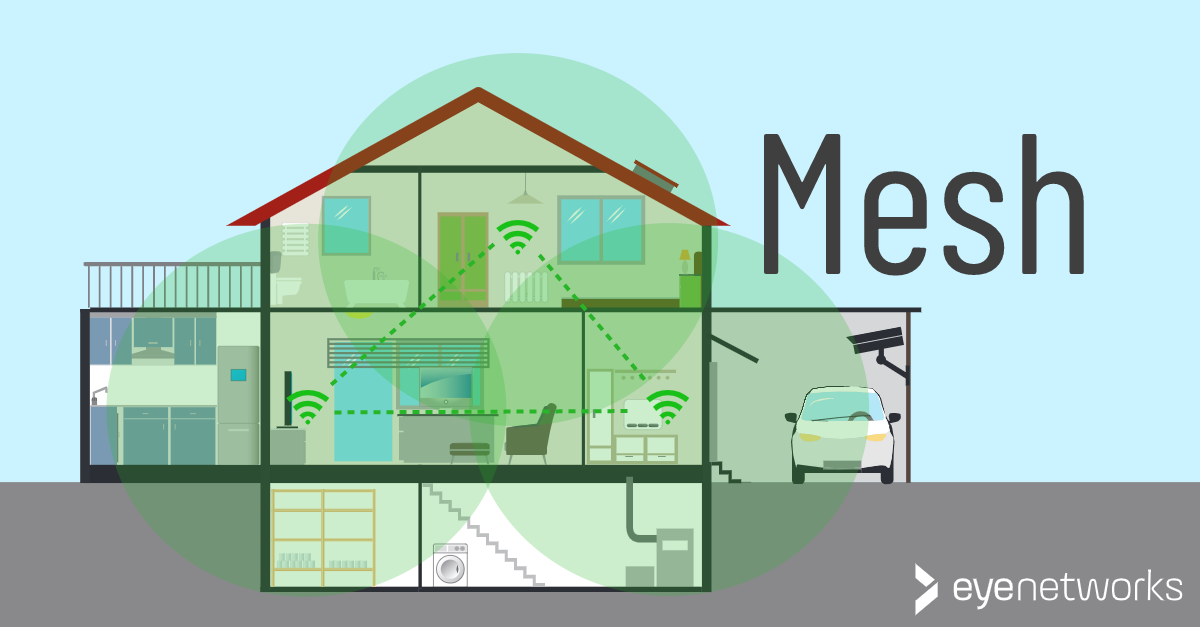
The size of your home directly affects mesh router quantity. Larger homes need more mesh units for full coverage. Open layouts may require fewer routers than homes with many walls. Multi-story houses often need one router per floor. Room shapes and hallway lengths also influence signal strength.
Number Of Devices
More devices using Wi-Fi means more demand on your network. Smartphones, laptops, smart TVs, and other gadgets all connect at once. Multiple devices in one area may require extra mesh points. This helps prevent slow internet and connection drops.
Internet Usage Patterns
How you use the internet matters. Streaming videos, online gaming, and video calls need stable connections. Heavy internet users benefit from more mesh routers. This setup reduces lag and buffering. Light users may need fewer units to cover basic needs.
Obstacles And Interference
Walls, furniture, and appliances block Wi-Fi signals. Thick walls or metal objects reduce router range. Electronic devices can cause interference and weaken connections. More mesh routers help bypass these obstacles. Placing routers strategically improves signal strength and speed.
Mesh Router Coverage Areas
Understanding mesh router coverage areas helps decide how many devices you need. Coverage depends on your home size and walls. A mesh system uses multiple units to spread Wi-Fi evenly. This avoids weak signals and dead spots. Knowing coverage limits helps plan your network better.
Single Router Range
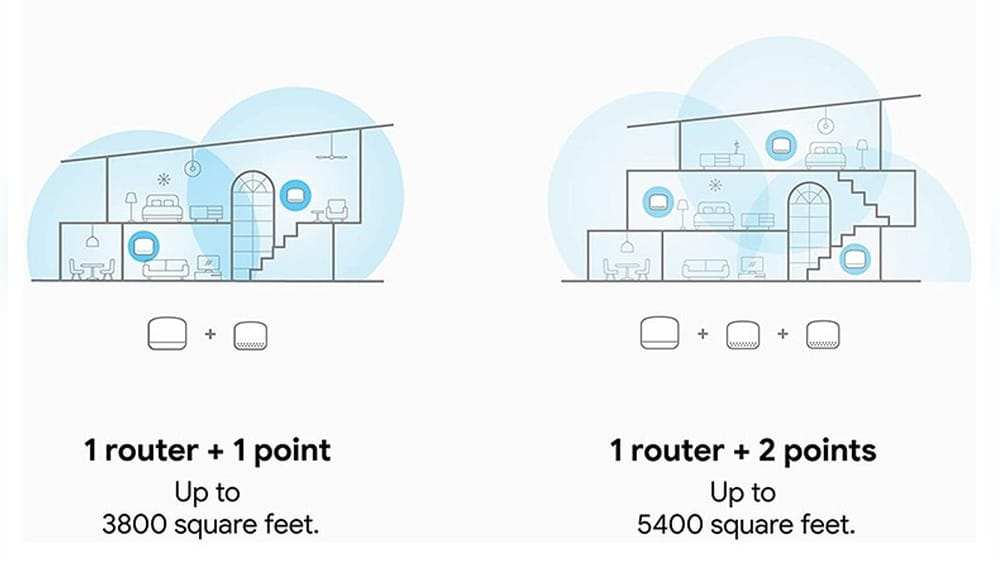
One mesh router covers about 1,500 to 2,500 square feet. Walls and furniture can reduce this range. Thick walls block signals more than thin ones. A single unit works well for small apartments or rooms. Large homes usually need extra devices for full coverage.
Adding Nodes For Expansion
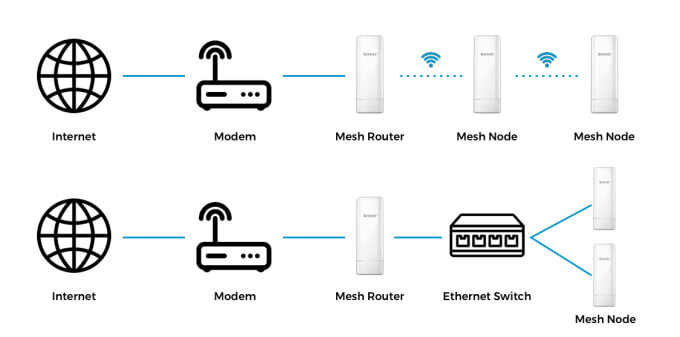
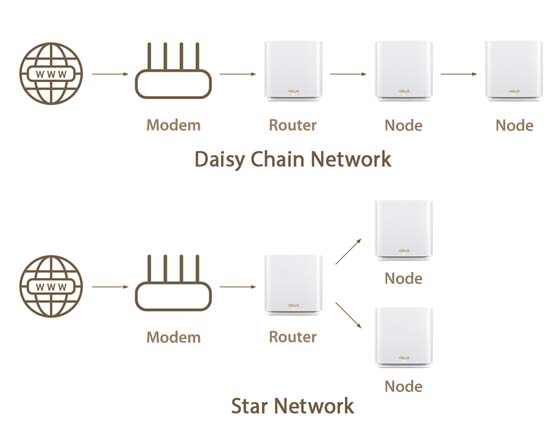
Adding nodes extends your Wi-Fi signal to new areas. Each node adds about 1,500 square feet of coverage. Place nodes where the signal is still strong to keep speed high. Nodes talk to each other to create one large network. More nodes mean better coverage but also higher cost.
Optimal Placement Tips
Place the main router near your internet source. Nodes should sit halfway between the router and dead zones. Avoid placing nodes near metal objects or microwaves. Higher spots like shelves improve signal reach. Keep nodes visible, not hidden in cabinets or behind furniture.
Calculating Your Mesh Network Needs
Calculating your mesh network needs starts with understanding your space and usage. This helps you decide how many mesh routers to install. A few simple steps make this easier. Focus on coverage, devices, and speed to get it right.
Estimating Coverage Requirements
Measure your home or office size in square feet. Large areas need more mesh routers to avoid dead spots. Walls and floors block signals, so count them. Open spaces require fewer routers than divided rooms. Aim for full coverage without gaps.
Assessing Device Density
Count the devices that will connect to your network. Phones, laptops, smart TVs, and smart home gadgets all add up. More devices mean more routers to handle the traffic. High device density can slow down your network if not planned well.
Accounting For Speed And Bandwidth
Think about how fast your internet should be everywhere. Streaming videos and gaming need strong, fast connections. More mesh routers help keep speed steady across all rooms. Check your internet plan speed and match your network setup to it.
Popular Mesh Router Systems
Popular mesh router systems help improve Wi-Fi in homes and offices. They use several devices working together. This creates a strong and wide Wi-Fi network. Choosing the right system depends on your needs and space size. Here is a look at some popular mesh router systems to guide your choice.
Top Brands And Models
Several brands lead the market for mesh routers. Google Nest Wifi offers easy setup and reliable coverage. Netgear Orbi is known for fast speeds and good range. Eero by Amazon provides user-friendly controls and solid performance. TP-Link Deco models balance price and features well. Each brand has different models for various home sizes.
Coverage Capabilities
Mesh systems cover different areas depending on the model. Some cover up to 5,000 square feet with two units. Others may need three or more units for larger homes. Coverage depends on wall thickness and interference. Check the square footage each system supports before buying. This helps avoid Wi-Fi dead zones in your space.
Scalability Options
Most mesh systems allow adding more units later. This helps expand coverage as your needs grow. Some brands support mixing different models in one system. Others require all units to be the same model. Choose a system that lets you add units easily. Scalability keeps your Wi-Fi strong over time.
Common Mistakes To Avoid
Choosing the right number of mesh routers can be tricky. Many make common mistakes that hurt their Wi-Fi experience. Avoiding these errors helps you get strong, steady coverage without overspending.
Overestimating Coverage Needs
Adding too many mesh routers does not always improve Wi-Fi. More nodes can cause signal interference. This lowers speed and connection quality. Measure your space first. Know the exact areas needing coverage. Avoid guessing or buying extra units just in case.
Poor Node Placement
Where you put your mesh nodes matters a lot. Placing nodes too far apart weakens the signal. Putting them near walls or metal objects blocks Wi-Fi waves. Find open, central spots for each node. Keep them away from thick obstacles to improve signal flow.
Ignoring Future Growth
Your home or office may grow over time. New rooms or floors can need Wi-Fi too. Plan for future coverage needs before buying mesh routers. Choose a system that can add nodes easily. This saves money and effort later.
Credit: www.signalboosters.com
Cost Vs Performance Considerations
Choosing the right number of mesh routers depends on cost and performance. You want good Wi-Fi coverage and fast speeds without spending too much. Understanding how cost affects performance helps you decide how many nodes to buy. This section breaks down the key points for making smart choices.
Budgeting For Multiple Nodes
Each mesh node adds to your total cost. More nodes mean better coverage but higher expenses. Think about the size of your home and your budget before buying. You can start with two nodes and add more if needed. Look for deals and compare prices to get the best value.
Balancing Speed And Coverage
Adding nodes improves Wi-Fi reach but may reduce speed if too many are used. Each node passes the signal, which can slow down your connection. Place nodes strategically to avoid weak spots while keeping speed high. Fewer well-placed nodes can work better than many poorly placed ones.
Long-term Investment Benefits
Investing in a quality mesh system saves money over time. Good coverage reduces the need for extra equipment. Reliable Wi-Fi means fewer interruptions and less frustration. A strong network supports smart devices and future technology upgrades. Think of mesh routers as a smart home foundation.
Setting Up And Optimizing Your Mesh
Setting up and optimizing your mesh network is key for strong Wi-Fi across your home. Proper setup ensures every corner gets a steady connection. Optimization helps keep your network fast and reliable over time.
Follow simple steps to place your mesh routers well and keep their software updated. Fixing small problems quickly avoids big connection issues later. This section guides you through the best practices for installation, updates, and troubleshooting.
Installation Best Practices
Place mesh nodes in open areas, not inside cabinets. Keep them away from thick walls and metal objects. Spread the nodes evenly to cover all rooms. Avoid placing nodes too far apart. Test signal strength from each node’s spot. Use the main router as a central point. Connect nodes using the app provided by your router brand. Follow the app instructions carefully during setup.
Firmware Updates And Maintenance
Check for firmware updates regularly. Updates fix bugs and improve performance. Enable automatic updates if your system supports it. Restart mesh nodes once a month to clear memory. Clean the devices and keep them dust-free. Monitor network speed and coverage through the app. Update firmware promptly to avoid security risks.
Troubleshooting Connectivity Issues
Start by restarting your mesh router and nodes. Check if cables and power are connected properly. Use the router app to identify weak signal areas. Move nodes closer if the signal is weak. Reset nodes to factory settings if problems persist. Contact support if issues continue after basic fixes. Keep your network simple to avoid interference.
Credit: www.asus.com
Frequently Asked Questions
How Many Mesh Routers Cover A 2000 Sq Ft Home?
Typically, 2 mesh routers cover a 2000 sq ft home well. One acts as the main router, and the other extends the signal. This setup eliminates dead zones and ensures stable Wi-Fi throughout the house.
Can One Mesh Router Cover A Multi-story House?
Usually, one mesh router is insufficient for multi-story homes. Additional nodes improve coverage on each floor. Multiple mesh units ensure consistent Wi-Fi strength and reduce connectivity issues across different levels.
What Factors Affect The Number Of Mesh Routers Needed?
Home size, layout, wall thickness, and interference affect mesh router needs. Larger homes with thick walls require more nodes. Consider device count and usage for optimal mesh router placement and quantity.
Is It Better To Have More Mesh Routers Or Stronger Single Router?
More mesh routers provide better coverage than one strong router. Mesh systems distribute Wi-Fi evenly, reducing dead spots. Multiple nodes improve signal strength in large or complex spaces more effectively.
Conclusion
Choosing the right number of mesh routers depends on your home size and layout. Small homes may need just one or two units. Larger homes or spaces with thick walls often require three or more. Place routers evenly for the best coverage.
Avoid dead spots by testing signal strength. Remember, more routers do not always mean better performance. Start with fewer units and add more if needed. This approach saves money and keeps your network fast. A well-planned mesh system keeps your Wi-Fi strong everywhere.
Simple steps lead to smooth internet all day.