
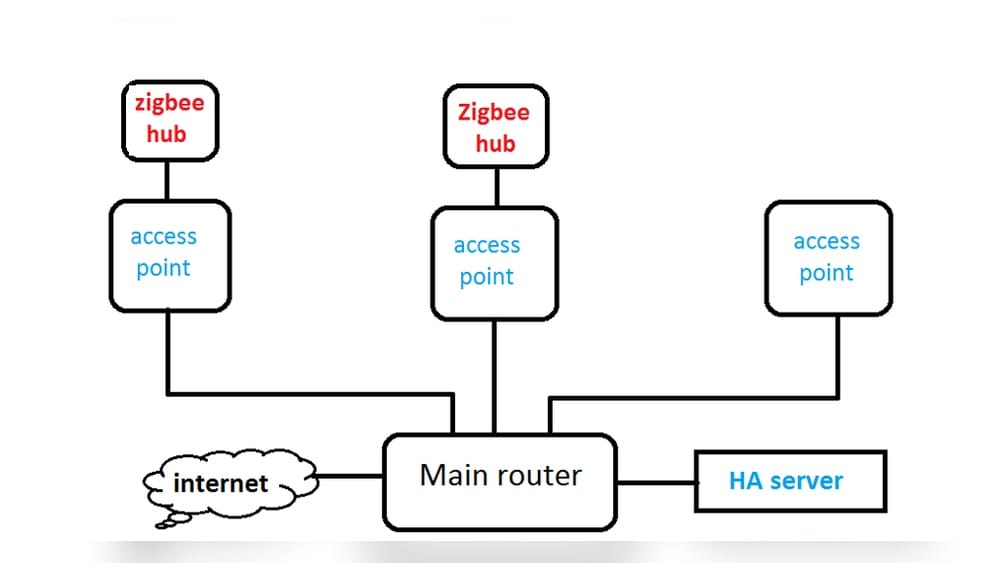
Smart homes are becoming more common, and Zigbee is one of the most popular wireless protocols for connecting devices like lights, sensors, and thermostats. If you are starting a smart home project or expanding your system, you may wonder: How many Zigbee hubs do I need? This question is important because the right number of hubs affects reliability, coverage, and convenience. Too few hubs can lead to connection problems, while too many can complicate your setup and cost more money.
Choosing the correct number of Zigbee hubs depends on your home’s size, the types of devices you use, and how you want to control them. Many beginners guess or follow vague advice, but understanding the details helps you build a stable and efficient Zigbee network. This article will guide you through the decision, using clear explanations, practical examples, and real data, so you can confidently set up your smart home.
What Is A Zigbee Hub And Why Is It Needed?
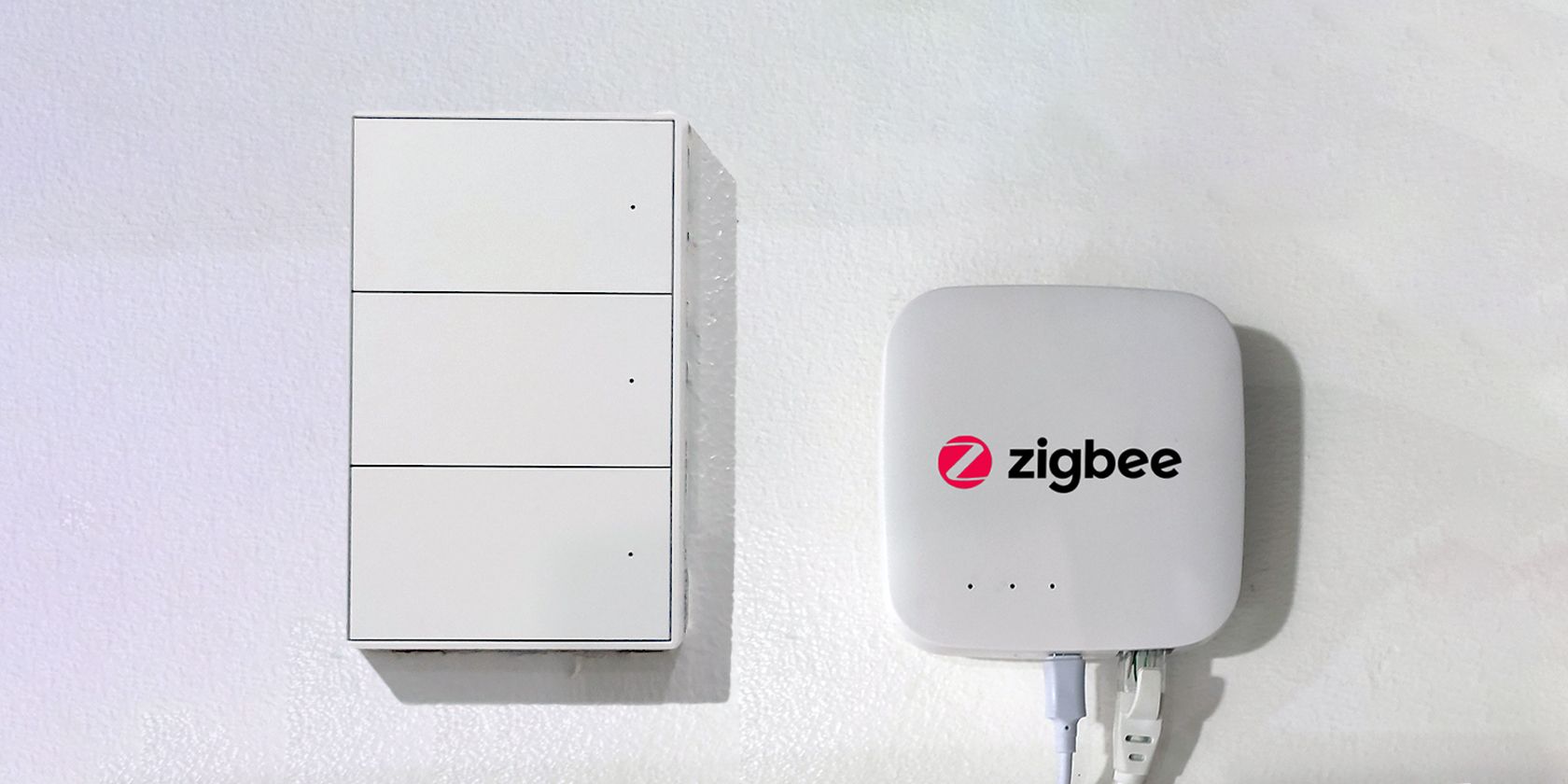
A Zigbee hub is a device that acts as the central controller for Zigbee devices. It connects sensors, lights, and other smart gadgets to your home network and often links them to your phone or smart speaker. Without a hub, Zigbee devices cannot communicate with each other or with your phone.
How Zigbee Hubs Work
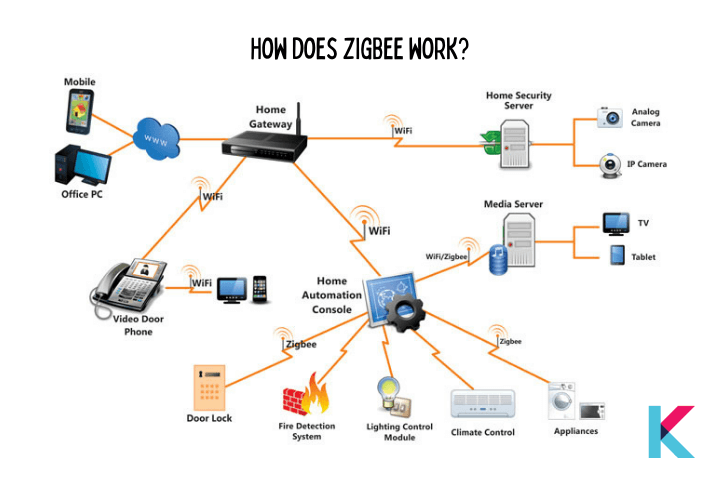
Zigbee hubs use the Zigbee protocol, a wireless standard designed for low-power, short-range communication. Zigbee is different from Wi-Fi and Bluetooth. While Wi-Fi is good for streaming and internet access, Zigbee is made for small messages between devices, such as turning on a light or checking a sensor.
A Zigbee hub connects to your Wi-Fi router and talks to Zigbee devices using radio signals. Most hubs offer an app or web interface for setup and control.
Benefits Of A Zigbee Hub
- Reliable connections: Zigbee hubs manage device traffic, reducing delays or dropped signals.
- Central control: Control all Zigbee devices from one app or platform.
- Automation: Create rules or routines, like turning off all lights at night.
- Security: Hubs often have built-in security features to protect your data.
Zigbee Hub Vs. Zigbee Coordinator
Some people use the word coordinator instead of hub. Technically, the coordinator is the device that starts the Zigbee network and manages routing. Most commercial Zigbee hubs include a coordinator, so the terms are often used interchangeably.
Factors That Influence How Many Zigbee Hubs You Need
There is no single answer to how many Zigbee hubs you need. Several factors influence your decision. Understanding these will help you avoid common mistakes.
1. Size Of Your Home
The bigger your home, the more coverage you need. Zigbee devices have a limited range—usually 30–50 feet indoors. Walls, floors, and furniture can block signals.
- Small apartments: One hub is usually enough.
- Medium homes (1500–2500 sq ft): One hub, plus some Zigbee repeaters, can cover most areas.
- Large homes (over 3000 sq ft, multi-story): You might need two or more hubs, especially if you have many devices spread across floors.
2. Number Of Devices
Zigbee networks can support up to 65,000 devices, but most hubs limit the number to 30–60 direct connections. Devices like bulbs and plugs can act as repeaters, helping expand the network. If you plan to use many devices, check your hub’s specs.
- Fewer than 30 devices: One hub is usually enough.
- More than 30 devices: You may need a second hub or use Zigbee repeaters.
3. Building Materials And Layout
Concrete, brick, and metal walls block Zigbee signals. Open layouts are easier to cover, while homes with many rooms or thick walls may need extra hubs or repeaters.
- Open-plan homes: Signals travel further.
- Thick walls/metal structures: Consider more hubs or repeaters.
4. Types Of Zigbee Devices
Some Zigbee devices (like battery-powered sensors) do not repeat signals. Others (bulbs, plugs) act as routers and help extend the network. Your device mix affects coverage.
- Many routers: Easier to extend network, fewer hubs needed.
- Mostly sensors: More hubs or repeaters may be required.
5. Integration Needs
If you want to use devices with different brands or platforms (like Alexa, SmartThings, or Home Assistant), you may need multiple hubs for compatibility.
- Single platform: One hub is enough.
- Multiple platforms: Each may require its own hub.
6. Frequency Interference
Zigbee uses the 2.4 GHz frequency, which is also used by Wi-Fi. In crowded environments, interference can reduce range. Adding more hubs or repeaters can help, but proper placement is key.
7. Outdoor Coverage
If you want to connect Zigbee devices outside (garden, garage), you may need a hub closer to those areas. Zigbee signals weaken outdoors.
Understanding Zigbee Mesh Networking
One feature that makes Zigbee strong for smart homes is its mesh network. Unlike Wi-Fi, where each device connects directly to the router, Zigbee devices can relay signals for each other.
How Mesh Networking Works
Each Zigbee device that is plugged in (not battery-powered) acts as a repeater. Signals can hop from one device to another, extending coverage. This means you do not always need more hubs—sometimes adding more repeaters (like smart plugs) is enough.
Benefits Of Mesh Networking
- Extended coverage: Devices relay signals, reaching further areas.
- Self-healing: If one device fails, the network finds another path.
- Fewer hubs needed: Mesh often reduces the need for extra hubs.
Mesh Network Limitations
Mesh works best with many repeating devices. If most devices are battery-powered sensors (which do not repeat), the mesh is weaker. Also, mesh can slow down with too many hops or large distances.
Single Hub Vs. Multiple Hubs: Pros And Cons
Should you use one hub or several? There are advantages and disadvantages to both choices.
| Feature | Single Hub | Multiple Hubs |
|---|---|---|
| Coverage | Good for small/medium homes | Better for large homes or separate areas |
| Complexity | Simple to set up | More complex, needs careful management |
| Cost | Lower (one device) | Higher (multiple devices) |
| Integration | One app/platform | May need multiple apps/platforms |
| Reliability | Depends on mesh strength | Can improve reliability in weak areas |
When A Single Hub Is Enough
- Small homes or apartments.
- Few Zigbee devices.
- Open layout.
- All devices compatible with one platform.
When Multiple Hubs Make Sense
- Large homes, multiple floors.
- Devices in detached areas (garage, garden).
- Need for different platforms (Alexa, SmartThings, Home Assistant).
- Many devices, especially if mesh is weak.
Practical Guide: Deciding How Many Zigbee Hubs You Need
Let’s walk through a practical method for choosing the right number of hubs. This is not a one-size-fits-all answer, but a step-by-step process.
Step 1: Map Your Home
Draw a simple map of your home. Mark rooms, floors, and areas where you want Zigbee devices.
Step 2: List Your Devices
Write down all Zigbee devices you plan to install. Note which are routers (bulbs, plugs) and which are end devices (sensors).
Step 3: Check Hub Specs
Look up your hub’s specs:
- Maximum direct device connections.
- Mesh network support.
- Compatible platforms.
Step 4: Estimate Coverage
Zigbee hubs cover about 30–50 feet indoors. Walls and floors reduce this. Use your map to see if one hub can reach all areas. If not, consider extra hubs or repeaters.
Step 5: Consider Repeaters
If coverage is weak, adding Zigbee repeaters (smart plugs or bulbs) may solve the problem without extra hubs.
Step 6: Review Integration Needs
If you use devices from different brands or want to connect to multiple smart home platforms, check if you need extra hubs.
Step 7: Test And Adjust
Start with one hub and test signal strength in all areas. Use apps to check device status. If you notice delays or dropped connections, try adding repeaters or another hub.
Examples: Real-world Zigbee Hub Setups
Let’s look at some practical examples.
Example 1: Small Apartment
- Size: 800 sq ft, 2 rooms
- Devices: 10 (mix of bulbs, plugs, sensors)
- Setup: One Zigbee hub in central area
- Result: All devices connect easily, mesh strong, no repeaters needed
Example 2: Medium Home
- Size: 2000 sq ft, 2 floors
- Devices: 25 (bulbs, sensors, smart plugs)
- Setup: One hub in ground floor, several smart plugs used as repeaters
- Result: Coverage reaches upstairs, mesh network ensures reliability
Example 3: Large House With Detached Garage
- Size: 3500 sq ft, 3 floors, garage 40 feet from main house
- Devices: 40 (including outdoor sensors)
- Setup: One hub in main house, one hub in garage, smart plugs as repeaters
- Result: Reliable connections everywhere, no signal loss
Example 4: Mixed Platform Use
- Size: 2500 sq ft, 2 floors
- Devices: 30 (mix of brands)
- Platforms: Alexa and SmartThings
- Setup: One Alexa hub, one SmartThings hub
- Result: Seamless control from both platforms, no device conflicts

Credit: community.home-assistant.io
Zigbee Hub Brands And Their Differences
Not all Zigbee hubs are the same. Different brands offer unique features, device limits, and integration options.
| Hub Brand | Device Limit | Platform Integration | Repeater Support |
|---|---|---|---|
| Samsung SmartThings | Up to 60 | SmartThings, Alexa, Google Home | Yes |
| Amazon Echo (with Zigbee) | Up to 30 | Alexa | Yes |
| Hubitat Elevation | Up to 60 | Hubitat, Alexa, Google Home | Yes |
| Philips Hue Bridge | Up to 50 | Hue, Alexa, Google Home, Apple HomeKit | Yes |
| Home Assistant Zigbee Coordinator | Up to 50 | Home Assistant | Yes |
Brand Differences
- Integration: Some hubs work with Alexa, Google Home, Apple HomeKit, others don’t.
- Device Limit: Each hub has a maximum number of devices. Exceeding this can cause problems.
- Repeater Support: Most hubs support repeaters, but check compatibility.
Practical Insight
If you use many brands, check hub compatibility before buying. Mixing brands without checking can cause device conflicts, a problem many beginners overlook.
Common Mistakes When Setting Up Zigbee Hubs
Many people make mistakes when setting up Zigbee hubs. Learning from these helps you build a better smart home.
Mistake 1: Ignoring Device Limits
Each hub can only handle a certain number of devices. Adding more devices than the hub supports leads to unreliable connections.
Mistake 2: Poor Placement
Placing a hub in a corner or behind thick walls reduces coverage. Place hubs in central, open areas for best results.
Mistake 3: Not Using Repeaters
Relying only on battery-powered devices weakens the mesh. Add smart plugs or bulbs as repeaters to improve coverage.
Mistake 4: Mixing Incompatible Devices
Some Zigbee devices use proprietary versions of Zigbee. Mixing incompatible devices can cause network problems.
Mistake 5: Overlapping Networks
Having multiple hubs too close together can cause interference. Space hubs apart and set them to different channels if possible.
Advanced Tips For Optimizing Zigbee Hub Placement And Network
Beyond the basics, there are expert tricks for maximizing your Zigbee network.
Use Zigbee Channel Management
Zigbee supports channels 11–26. If you have more than one hub, set them to different channels to avoid interference. Many hubs offer channel selection in their settings.
Upgrade Firmware
Always keep your hub firmware up to date. Updates fix bugs and improve performance.
Monitor Signal Strength
Use apps or web interfaces to check signal strength and device health. Move hubs or repeaters as needed to improve weak areas.
Plan For Future Expansion
If you plan to add more devices, leave room in your network. Don’t max out your device limit right away.
Consider Backup Power
If your home experiences frequent power outages, use hubs with battery backup or connect them to a UPS (uninterruptible power supply).
Zigbee Hubs Vs. Zigbee Repeaters: What’s The Difference?
A common confusion is between Zigbee hubs and Zigbee repeaters. Both help your network, but in different ways.
| Feature | Zigbee Hub | Zigbee Repeater |
|---|---|---|
| Main Function | Central controller | Extend signal range |
| Device Control | Manages devices | No direct control |
| Setup | Needs app/web interface | Plug and play |
| Cost | Higher | Lower |
| Network Impact | Starts and manages network | Strengthens mesh |
Practical Advice
Don’t confuse repeaters with hubs. If you only need to expand coverage, add repeaters first. Only add extra hubs when necessary.
When Should You Add Another Zigbee Hub?
Adding more hubs is not always the answer. But in certain cases, it’s smart.
- Coverage gaps: If repeaters don’t fix coverage issues, add a hub.
- Device limit exceeded: When your hub can’t handle more devices.
- Separate platforms: If you want to use Alexa and SmartThings, each needs its own hub.
- Outdoor or detached areas: Garage, garden, or shed out of range.
- Interference: If Wi-Fi or other Zigbee networks cause interference.
Cost Considerations: Budgeting For Zigbee Hubs
Price is a key factor. Zigbee hubs range from $30–$150, depending on features and brand.
Typical Costs
- Basic hubs: $30–$60
- Advanced hubs (with extra features): $80–$150
- Repeaters (smart plugs, bulbs): $10–$30 each
Smart Spending Tips
- Start with one hub and test.
- Use repeaters before buying extra hubs.
- Buy hubs from reputable brands with good support.
- Plan for future device expansion.
Hidden Costs
- Some hubs require subscriptions for advanced features.
- Mixing brands may require extra apps or integrations.
Zigbee Hub Security And Privacy
Security is important. Zigbee hubs connect to your home network and control many devices.
Key Security Tips
- Change default passwords.
- Update firmware regularly.
- Use hubs from brands with strong security policies.
- Enable encryption if available.
Privacy Concerns
Some hubs collect data about your devices. Check privacy policies before buying.
Non-obvious Insights: What Most Beginners Miss
Many beginners focus only on coverage and device count. Here are two insights most people miss:
- Mesh strength depends on device placement, not just number of hubs. Placing repeaters in the right spots can often fix coverage issues without more hubs.
- Hub software and firmware matter as much as hardware. Outdated firmware can cause device drops, even if you have enough hubs. Always check for updates.
Credit: www.makeuseof.com
Recommended Zigbee Hub Setup For Different Scenarios
Let’s summarize some common scenarios and the best setup for each.
Small Apartment (up To 1000 Sq Ft)
- One hub in central location.
- Use smart plugs as repeaters if needed.
Medium House (1000–2500 Sq Ft)
- One hub, placed centrally.
- Repeaters in far rooms or upstairs.
Large House (over 2500 Sq Ft, Multi-story)
- One hub per floor, or use strong mesh with many repeaters.
- Extra hub for detached areas.
Multi-platform Home
- One hub per platform (Alexa, SmartThings, Home Assistant).
- Repeaters for coverage.
Outdoor Coverage
- Hub near outdoor area, or use repeaters to reach outside.
Zigbee Hub Placement Tips
Placement affects coverage more than most people realize.
- Place hubs in central, open areas.
- Avoid corners, closets, or behind thick walls.
- Keep hubs away from Wi-Fi routers to reduce interference.
- Test signal in all rooms before finalizing placement.
Future Trends: Zigbee Hub Evolution
Zigbee hubs are getting smarter. New models support Matter, a universal protocol for smart homes. This will make integration easier and reduce the need for multiple hubs.
- Matter support: Future hubs may control many device types.
- Improved mesh: More advanced mesh algorithms.
- Better security: Stronger encryption and privacy.
If you are planning a new smart home, consider hubs that support Matter and future standards.
Frequently Asked Questions
How Far Can A Zigbee Hub Cover Indoors?
A Zigbee hub can typically cover 30–50 feet indoors. Thick walls, metal, or concrete can reduce this range. Using repeaters can extend coverage.
Can I Use Zigbee Devices From Different Brands With One Hub?
Usually, yes—if the devices use standard Zigbee. Some brands use proprietary Zigbee, so always check compatibility before buying.
What Happens If I Exceed My Hub’s Device Limit?
Exceeding the device limit can cause devices to drop off or respond slowly. If you need more devices, add repeaters or another hub.
Do I Need A Zigbee Hub For Every Room?
No. One hub can often cover several rooms if placed centrally. Use repeaters in rooms far from the hub to improve coverage.
Is Zigbee Better Than Wi-fi For Smart Home Devices?
For simple, low-power devices like sensors and lights, Zigbee is usually better. It uses less energy and supports mesh networking. For cameras or streaming, Wi-Fi is better.
Smart home technology is changing fast. Zigbee hubs offer strong, reliable connections for many devices, but choosing the right number—and placing them well—is key to a trouble-free smart home. With the right setup, you’ll enjoy automation, security, and convenience for years. For further reading, visit Wikipedia Zigbee.
Credit: kodmy.com