
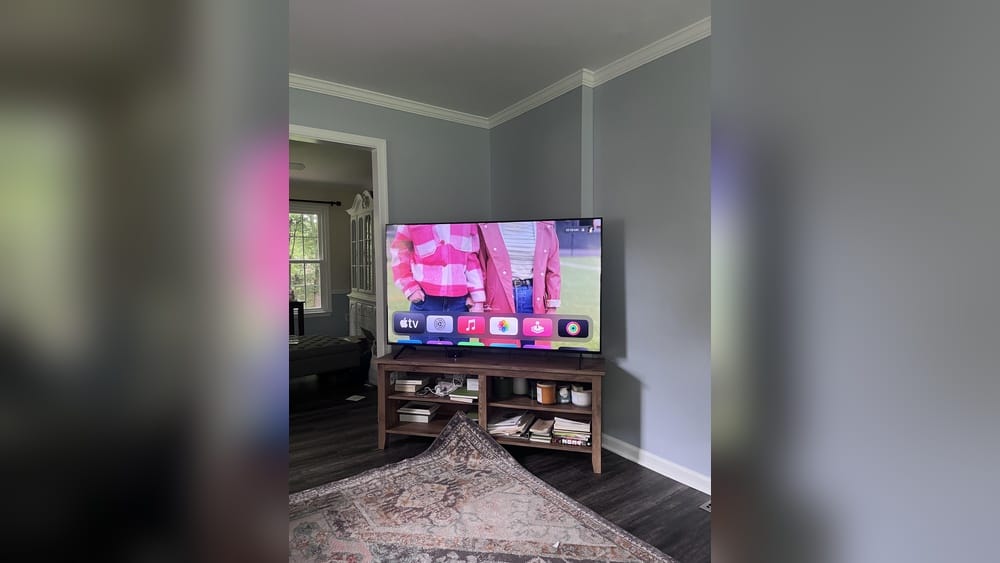
Mounting a TV in a corner can transform your living space, making the room feel larger and the viewing angle more comfortable. Many people think mounting a TV on a flat wall is the only option, but corner mounting actually solves several common problems.
It works well for small rooms, awkward layouts, and open spaces where a traditional setup doesn’t fit. However, getting it right takes careful planning and the right tools. In this guide, I’ll walk you through every step, from choosing the best mount to hiding cables and ensuring your TV is safe and secure.
Why Mount A Tv In The Corner?
Corner mounting isn’t just about saving space—it also improves how you watch TV. By placing your screen in the corner, you can often see it from more seats in the room. This setup is especially useful in rooms with large windows, fireplaces, or lots of doors.
If you have children or pets, mounting the TV higher and out of reach can also protect your investment. Plus, it just looks modern and clean.
Key Benefits
- Maximizes space in smaller rooms
- Offers better viewing angles
- Reduces glare from windows and lights
- Keeps wires and electronics out of reach
- Adds a unique, modern look to your space
Many people overlook corners, but with the right approach, you can create a cozy entertainment area even in tricky layouts.
Understanding Corner Tv Mounts
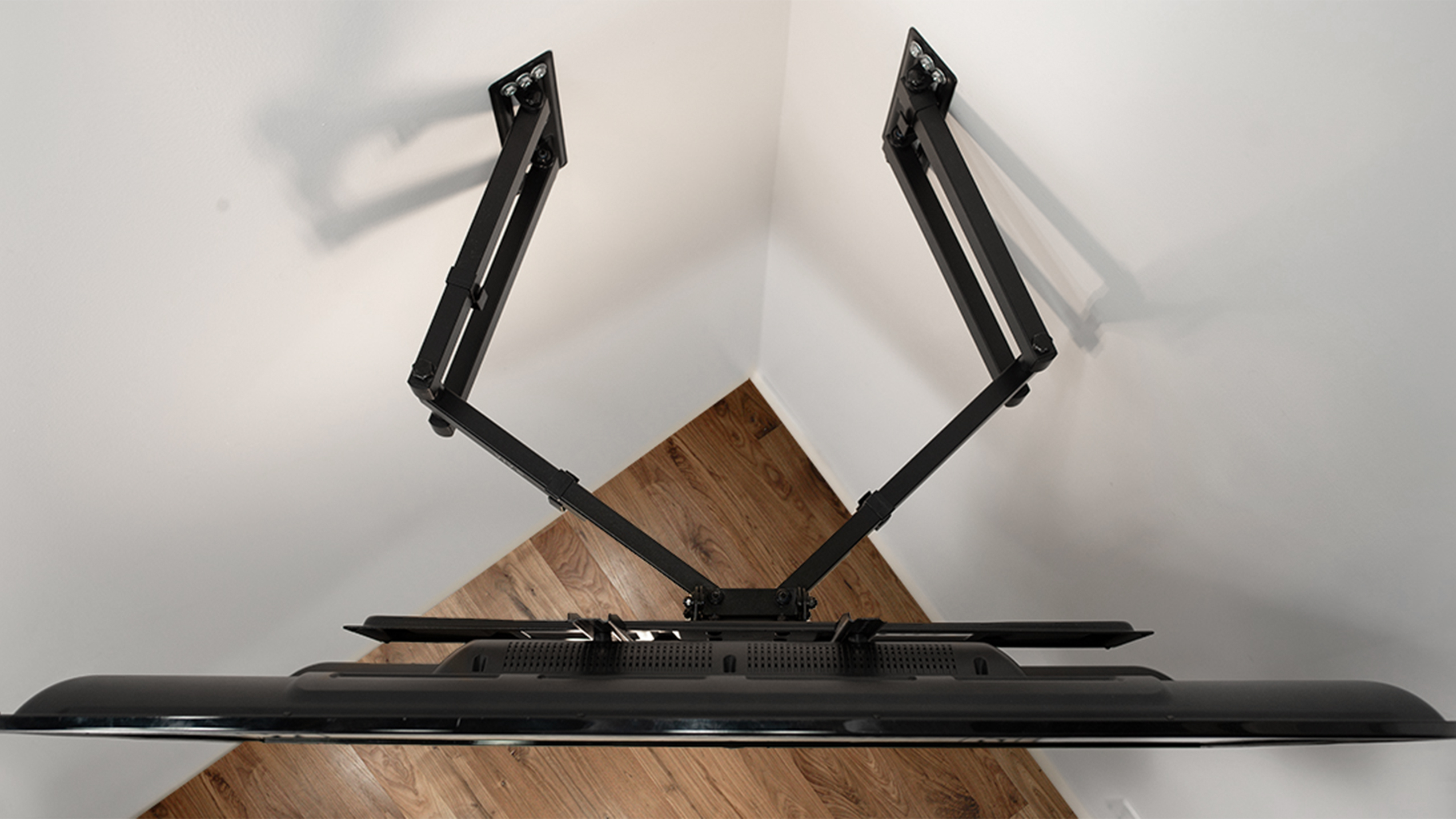
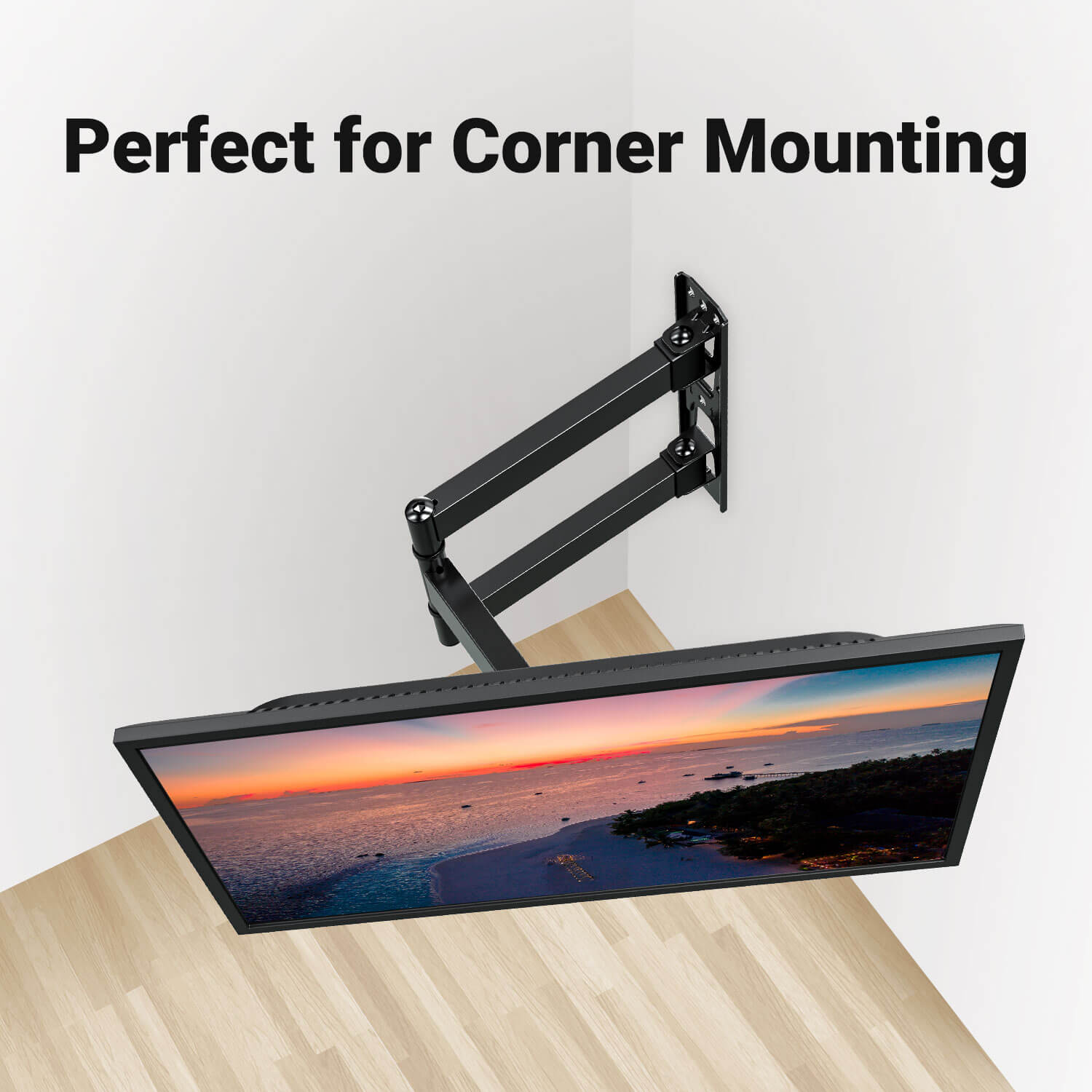
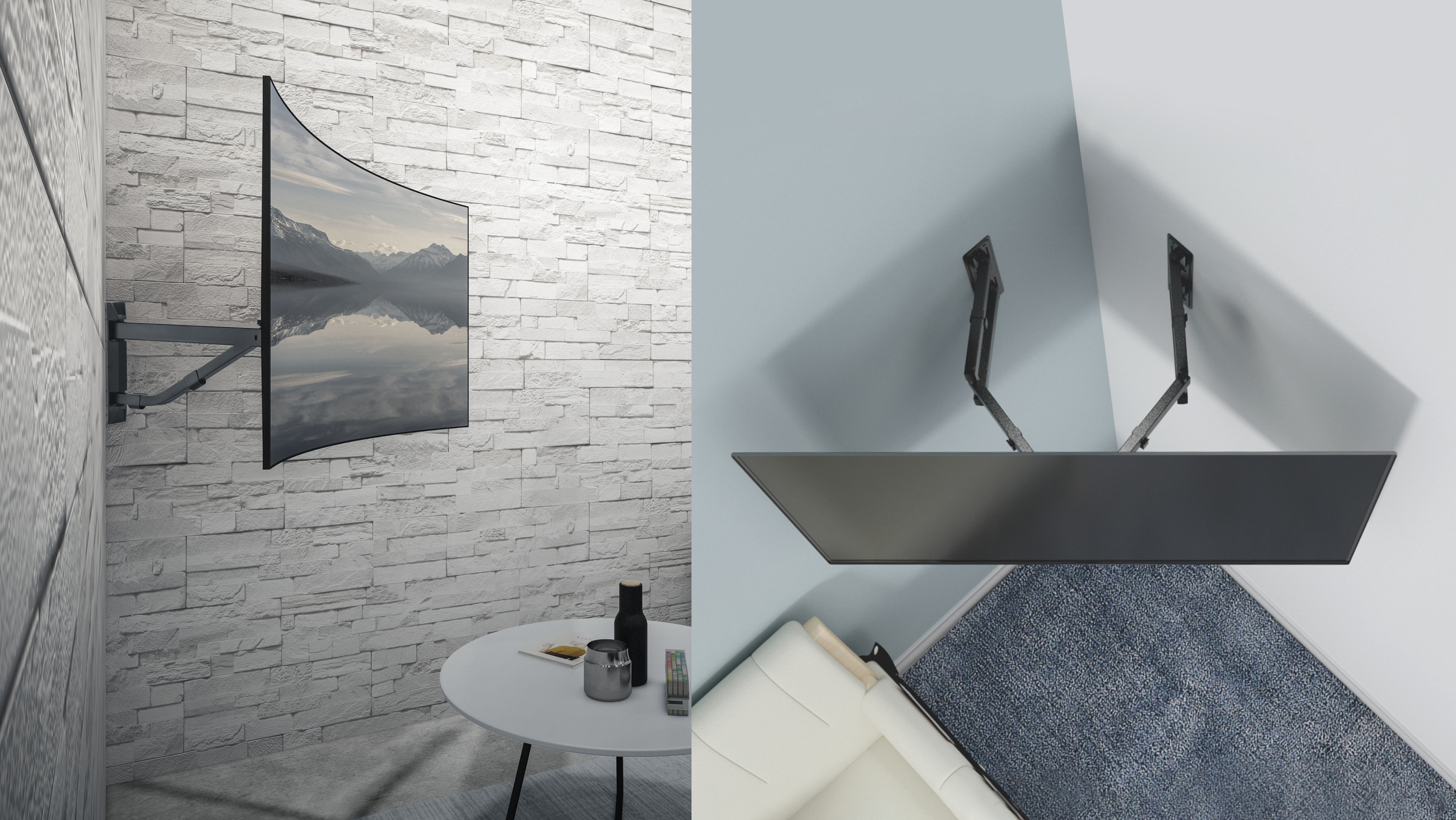
Not all TV mounts are the same, and corner mounting has special requirements. You’ll need a mount that can extend, swivel, and tilt so the screen faces the main viewing area—not just the wall. The most common types for corners are full-motion and articulating mounts.
Main Types Of Corner Tv Mounts
| Mount Type | Best For | Features | Price Range |
|---|---|---|---|
| Full-Motion | Corner & Flexible Spaces | Swivel, extend, tilt | $50–$150 |
| Articulating Arm | Wide Viewing Angles | Multiple joints, adjustable | $60–$200 |
| Dual-Arm Corner Mount | Heavier TVs | High support, stable | $100–$250 |
Most flat or tilting mounts won’t work for corners unless specially designed. Always check the product’s description for “corner compatible” or “corner mount. ”
Vesa Compatibility
Your TV will have a VESA pattern on the back—this is the distance between mounting holes. Before buying a mount, check your TV’s VESA size (e.g., 200x200mm, 400x400mm). Your mount must match this pattern.
Weight Limits
Every mount has a maximum weight. Never guess—look up your TV’s weight (including the stand, if you’re unsure) and buy a mount that supports more than this number. Overloading a mount is a safety risk.
Tools And Materials You’ll Need
Being prepared makes the whole process smoother. Gather these items before you start:
- Corner-compatible TV mount
- Stud finder
- Drill and drill bits
- Level (24-inch or longer)
- Measuring tape
- Phillips screwdriver
- Pencil
- Socket wrench
- Lag bolts and anchors (usually included with your mount)
- Cable management kit (optional, but recommended)
- Painter’s tape (for marking spots)
- A friend or helper (for heavy lifting)
Having a helper is especially important—TVs are heavy and awkward. Don’t try to mount one solo.
Choosing The Best Spot For Your Corner Tv
Corner mounting isn’t just about sticking the TV in any corner. The right spot will give you the best view and keep the screen at a comfortable height. Take a few minutes to plan before you drill.
Factors To Consider
- Seating Arrangement: Where do you usually sit? The TV should face the main seats.
- Window Glare: Avoid placing the TV where sunlight hits it directly.
- Wall Structure: Use a stud finder to make sure you’ll be drilling into solid wood—not just drywall.
- TV Height: The center of the screen should be at eye level when sitting (usually 42–48 inches from the floor).
- Power Outlets: Make sure there’s an outlet nearby or plan for extension cords.
How To Mark The Best Position
- Sit in your favorite spot and look toward the corner.
- Ask a helper to hold a piece of painter’s tape on the wall where your eyes naturally focus.
- Measure from the floor to this spot.
- Mark the height with pencil or tape.
It’s easy to mount too high or low, so always double-check your marks before drilling.
Credit: www.amazon.com
Step-by-step Guide: How To Mount A Tv In A Corner
Let’s break down the process into clear, manageable steps.
1. Find The Wall Studs
TV mounts must be anchored into wall studs (the wooden beams behind drywall). Corner mounting is tricky because you’ll use two walls.
- Use a stud finder on both walls forming the corner.
- Mark the center of each stud with a pencil.
- Double-check—you must hit the center for maximum strength.
Pro tip: If your walls are brick or concrete, you’ll need special masonry anchors.
2. Test-fit The Mount
Before drilling, hold the wall plate of the mount up to your marks.
- Use a level to ensure the mount is straight—both horizontally and vertically.
- Adjust as needed; corners can be uneven.
- Mark the drilling holes with a pencil.
3. Drill Pilot Holes
- Use a drill bit slightly smaller than your lag bolts.
- Drill slowly to avoid splintering the wood.
- Depth should match your bolts (usually 2–3 inches).
Never use screws directly in drywall—they will not hold the weight.
4. Attach The Mount To The Wall
- Line up the mount’s plate with your pilot holes.
- Insert lag bolts and tighten with a socket wrench.
- Do not overtighten—this can strip the wood.
- Double-check with your level.
For dual-arm mounts, make sure both sides are attached securely, using the correct holes for your stud spacing.
5. Attach The Mounting Brackets To The Tv
- Lay the TV face down on a soft, clean surface (like a blanket).
- Line up the VESA holes with the mount’s arms.
- Use the bolts included—never force them.
- Tighten with a screwdriver, but don’t overtighten.
Important: Some TVs have plastic covers over their mounting holes—remove these first.
6. Lift And Hang The Tv
This step requires two people.
- Carefully lift the TV and align the brackets with the wall mount.
- Double-check both sides are secure before letting go.
- You may need to slide or lock the TV into place, depending on your mount.
Tip: Don’t rush. Most accidents happen here.
7. Adjust The Viewing Angle
- Use the mount’s arms to pull the TV away from the wall.
- Swivel and tilt until the screen faces your seating area.
- Step back and check from different spots in the room.
- Tighten any adjustment bolts to lock in your angle.
8. Hide The Cables
Nothing ruins a corner TV setup like messy wires. You have a few options:
- Cable management kits: These stick to the wall and hide cords.
- In-wall power kits: Let you run cables behind the drywall (more advanced).
- Cord covers: Paintable channels that blend with your wall color.
Always follow safety rules—never run power cords inside the wall unless the kit is UL-listed.
9. Clean Up And Final Checks
- Wipe down the TV and mount.
- Make sure all bolts are tight.
- Test the TV—plug it in and check the picture from all angles.
- Add any soundbars, streaming devices, or consoles.
Take a final walk around the room to admire your work.
Common Mistakes To Avoid
Mounting a TV in a corner is simple with planning, but these errors can cause problems:
- Skipping the stud finder: Drywall alone can’t hold a TV.
- Mounting too high: Strains your neck and ruins the view.
- Ignoring cable management: Leads to tangled messes and safety hazards.
- Choosing the wrong mount: Not all mounts are “corner ready.”
- Forgetting to check VESA size: The mount won’t fit.
- Not asking for help: Solo lifting leads to injuries and broken screens.
- Ignoring the TV’s weight: Overloading a mount is dangerous.
- Drilling without double-checking: Measure twice, drill once.
Non-obvious insight: Some corner walls hide water pipes or wiring. If your house is older or you’re unsure, use a pipe/wire detector before drilling.
Credit: mountup.com
Comparing Corner Mounts Vs. Flat Wall Mounts
Is it really worth mounting your TV in the corner? Here’s a simple comparison:
| Feature | Corner Mount | Flat Wall Mount |
|---|---|---|
| Space Efficiency | High | Medium |
| Viewing Angle Flexibility | Excellent | Limited |
| Installation Difficulty | Moderate to Hard | Easy to Moderate |
| Room Layout Adaptability | Best for awkward spaces | Best for standard rooms |
| Wire Management | More challenging | Easier |
Corner mounting wins for flexibility and space but takes more effort. If you’re handy and want the best view, it’s worth the extra work.
Safety Tips And Load-bearing Concerns
Mounting a TV isn’t just about looks—safety matters. TVs are heavy, and corners can be tricky. Here’s how to keep your setup safe for everyone.
Weight Limits
Always check the weight rating of your mount and your wall. Exceeding either can cause the TV to fall and cause injury or damage.
- Mount rating: Found in the product specs.
- Wall strength: Standard 2×4 studs hold up to 100 lbs per anchor point, but old or damaged wood may be weaker.
Anchor Placement
Use all the anchor points provided. Skipping screws may void the warranty and reduce safety.
Non-obvious insight: For very large TVs (over 70 inches), you may need to reinforce the wall with plywood or special brackets.
Child And Pet Safety
- Keep cords short and hidden.
- Use anti-tip straps for furniture below the TV.
- Avoid placing toys or remotes on top of the TV (kids will climb to reach them).
Hiding Devices And Accessories
With your TV in the corner, you might wonder where to put streaming boxes, game consoles, or cable boxes.
Options For Device Placement
- Floating shelves: Mount below or beside the TV.
- Corner cabinets: Specially designed for electronics.
- Behind-the-TV mounts: Some accessories attach directly to the back of the TV.
Always allow for airflow—electronics need space to stay cool.
Cable Solutions
- Use HDMI extenders if your cables are too short.
- Consider Bluetooth streaming devices to reduce wires.
Pro tip: Label both ends of each cable before connecting. This saves time if you ever need to disconnect or replace something.
Tips For Different Wall Types
Not every home has drywall and wooden studs. Here’s how to handle other wall materials.
Concrete Or Brick Walls
- Use a hammer drill and masonry bits.
- Install special concrete anchors (never use wood screws).
- Clean out the holes before inserting anchors.
Plaster Walls
- Plaster is brittle; always aim for the wooden lath or studs behind.
- Use a stud finder that works with thick walls.
- Drill slowly to avoid cracking.
Metal Studs
- Use toggle bolts or special metal-stud anchors.
- Never rely on self-tapping screws alone.
If you’re unsure, consult a professional installer.
Credit: www.lumi.cn
Advanced Corner Tv Mounting Ideas
Want to take your setup to the next level? Try these ideas for a truly custom look.
Add Led Backlighting
LED light strips behind the TV add a modern touch and reduce eye strain. Choose color-changing options for a fun atmosphere.
Build A Custom Enclosure
Carpenters can build a corner media cabinet that hides your TV when not in use. This is great for formal living rooms.
Swivel For Multiple Rooms
If your corner is near an open floor plan, aim the TV toward the kitchen or dining area for flexible viewing.
Integrate With Smart Home Systems
Connect your TV to smart speakers or home automation for voice control and routines. Imagine saying, “Movie time,” and your lights dim automatically.
Real-world Example: A Compact Apartment
Let’s imagine a small city apartment, where the living room is also the dining area. The only free wall is interrupted by a radiator and a window. By mounting a 50-inch TV in the corner, you can see the screen from the couch, dining table, and even the kitchen.
Using a full-motion mount, the owner can tuck the TV away when not in use, making the space feel less crowded.
This setup used:
- A full-motion articulating mount ($120)
- Cable covers painted to match the wall
- A floating corner shelf for a streaming box and remote
- Total installation time: About 2 hours with one helper
The result: a more open room and a TV that’s easy to enjoy from anywhere.
Comparing Popular Corner Mount Models
To help you choose, here’s a quick look at three highly rated corner TV mounts:
| Brand & Model | TV Size Range | Max Weight | Extension | Price |
|---|---|---|---|---|
| Mount-It! MI-484C | 42–70 in | 132 lbs | 24 in | $110 |
| PERLESMITH PSLFK1 | 37–70 in | 99 lbs | 16 in | $80 |
| FORGING MOUNT Corner TV Mount | 32–75 in | 100 lbs | 30 in | $140 |
All prices are approximate and vary by retailer.
Insider tip: Longer extension arms are better for deep corners or when you want to aim the TV across a wide space.
When To Hire A Professional
Most DIYers can mount a TV with the right tools, but sometimes it’s best to call an expert. Consider hiring help if:
- You’re unsure about wall strength or stud location
- Your TV is over 65 inches or very heavy
- You don’t have help to lift the TV
- You want to run wires inside the wall
- Your walls are concrete, brick, or metal
A professional can finish the job in about an hour and ensure your TV is safe and secure.
Interesting fact: According to the Consumer Technology Association, about 43% of TV owners use a professional installer for wall-mounting, especially for complex setups.
Saving Money And Time
Mounting a TV in the corner can be affordable. Here’s how to keep costs down:
- Shop for mounts during sales (Black Friday, online deals)
- Reuse cables and power strips you already own
- Do the cable management yourself—kits are cheap and easy to install
- Borrow tools from friends or neighbors
But never cut corners on safety—use the best mount you can afford and follow all instructions.
Final Thoughts
Mounting a TV in a corner is a smart way to make the most of your space, improve your viewing experience, and add style to your room. It takes careful measuring, the right tools, and some patience, but the result is worth it.
Remember, choose a mount that’s truly designed for corners, double-check your stud placement, and always ask for help when lifting. With a little planning, you’ll have a setup that looks professional and works perfectly for your lifestyle.
If you want even more tips on TV mounting, check out this helpful resource from Crutchfield.
Frequently Asked Questions
What Is The Best Height To Mount A Tv In A Corner?
For most people, the center of the TV screen should be 42–48 inches from the floor when seated. This keeps your neck and eyes comfortable. Adjust slightly for your sofa height and personal preference.
Can I Mount A Tv In A Corner Without Drilling Into Studs?
It’s not safe to mount a TV with just drywall anchors. TVs are heavy, and only studs provide enough support. If there are no studs in the right spot, use a mounting plate that spreads the load across more area, or hire a pro.
How Do I Hide Cables With A Corner-mounted Tv?
You can use cable covers that stick to the wall, paintable cord channels, or in-wall power kits. Always follow electrical safety rules—never run power cords inside the wall unless using a kit designed for that purpose.
Will A Regular Wall Mount Work For A Corner?
Most standard wall mounts don’t extend far enough or swivel wide enough for corners. Look for a full-motion or articulating corner TV mount. These are designed for awkward angles and deeper corners.
What If My Tv Is Too Heavy For My Wall Or Mount?
Never risk it. Check your wall type and the mount’s max weight rating. For very heavy TVs, you may need to reinforce the wall or use a floor stand. If you’re unsure, call a professional installer.
With these tips, you’re ready to tackle your corner TV project with confidence. Happy mounting!