
Is Philips Hue Hub Zigbee
Smart home lighting has changed the way people control, customize, and enjoy their homes. Philips Hue is one of the most popular brands in this space. But many buyers and users wonder: Is the Philips Hue Hub Zigbee? This question is more important than it sounds. It affects compatibility, reliability, and how you expand your smart home. If you want clear answers, practical guidance, and real-world examples, this article is for you.
Let’s break down the technology behind Philips Hue, what Zigbee means, why it matters, and how the Philips Hue Hub fits into the picture. You’ll also discover how to use Zigbee devices with Hue, compare Hue with other hubs, and learn tips to avoid common mistakes.
Whether you’re starting your smart home or upgrading, you’ll find everything you need right here.
What Is Zigbee?
Zigbee is a wireless communication protocol. It helps smart devices talk to each other. Unlike Wi-Fi or Bluetooth, Zigbee is designed for low-power, low-data use. That’s perfect for smart lights, sensors, and small gadgets.
Key features of Zigbee:
- Uses the 2.4 GHz radio frequency
- Supports mesh networking (devices relay messages for each other)
- Low energy use, so batteries last longer
- Can connect hundreds of devices in one network
Zigbee was created by the Zigbee Alliance (now known as the Connectivity Standards Alliance). It’s open and widely used in smart home products. Many brands, including Philips, IKEA, Samsung, and Amazon, use Zigbee in their products.
Why mesh networks matter: Imagine you have 20 smart bulbs in your house. With mesh networking, each bulb can pass messages along. If one bulb is far from the hub, it gets help from its neighbors. This means your network is more reliable and covers a larger area. Wi-Fi and Bluetooth don’t do this as well.
Philips Hue Hub: What Is It?
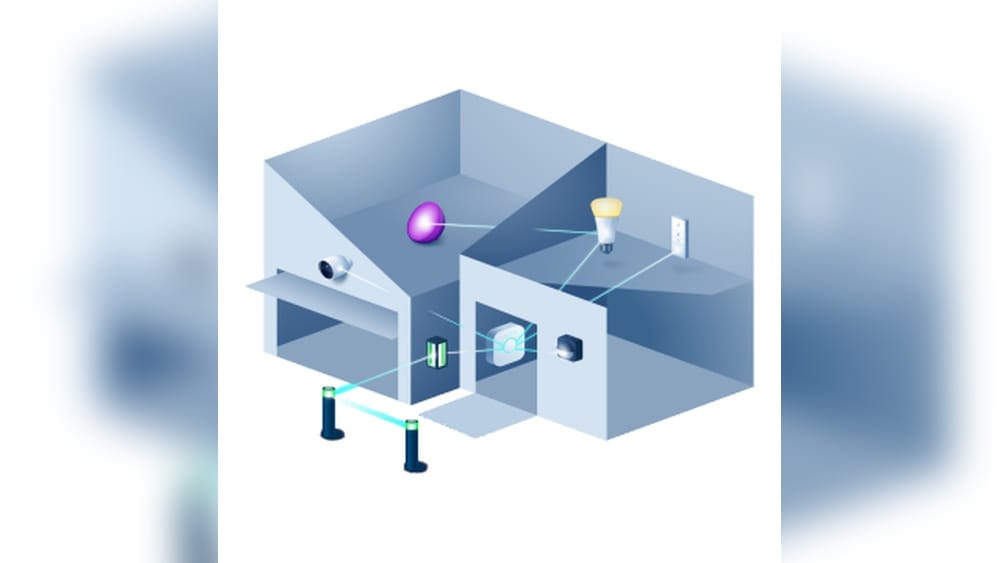
The Philips Hue Hub is also called the Hue Bridge. It’s a small device that connects to your Wi-Fi router. The hub lets your Philips Hue bulbs and accessories talk to each other and to your phone or smart speaker.
How the Hue Hub works:
- Connects to your router with an Ethernet cable
- Communicates with Hue bulbs using Zigbee
- Lets you control lights with the Hue app, voice assistants, or automation
Without the Hue Hub, you can only use Bluetooth to control a few bulbs. But with the hub, you get full features: remote access, routines, scenes, and integration with other smart home systems.
The Hue Hub is the brain of the Hue system. It keeps everything in sync, sends commands, and helps devices work together. If you want to use more than 10 bulbs, or connect sensors and switches, the hub is essential.

Credit: www.amazon.com
Is The Philips Hue Hub Zigbee?
Yes, the Philips Hue Hub uses Zigbee. In fact, Zigbee is the core technology behind how the Hue Hub communicates with bulbs and accessories.
Here’s what that means:
- All Philips Hue bulbs talk to the hub using Zigbee
- The hub acts as a Zigbee coordinator (the main controller)
- Zigbee mesh networking lets your bulbs help each other connect
- You can use Zigbee-compatible devices with Hue (with some limits)
The Hue Hub does not use Wi-Fi or Bluetooth for bulb communication. It uses Zigbee because it’s reliable, fast, and ideal for smart lighting.
Technical details:
- The Hue Bridge uses Zigbee Light Link (ZLL) and Zigbee 3.0 protocols
- Zigbee 3.0 is the latest version, improving compatibility and security
- The hub can support up to 50 bulbs and many accessories
Many users confuse Bluetooth and Zigbee. Some Hue bulbs have Bluetooth for basic control. But the hub itself, and the main network, are Zigbee-based. If you want advanced features, you need the Zigbee hub.
Why Zigbee Matters In Philips Hue
Zigbee is not just a technical detail. It shapes how your Hue system works, and how you expand it.
Advantages of Zigbee in Hue:
- Mesh Networking: Zigbee devices create a network where each device helps pass messages. That means you can cover your whole home, even if the hub is far away.
- Low Power: Zigbee uses much less power than Wi-Fi. Bulbs and sensors last longer, and you don’t need to worry about charging often.
- High Reliability: Zigbee is designed for smart homes. It’s less likely to drop connections or get interference.
- Easy Expansion: You can add more bulbs, switches, and sensors. Zigbee handles hundreds of devices in one network.
- Interoperability: Many brands use Zigbee. That makes it easier to add new devices (with some compatibility checks).
Limitations:
- Zigbee is not as fast as Wi-Fi for large data.
- Not all Zigbee devices work perfectly with Hue (sometimes brand differences cause issues).
- You need a Zigbee hub (like Hue Bridge) to unlock full features.

Credit: www.researchgate.net
Philips Hue Bridge Vs Other Zigbee Hubs
There are many Zigbee hubs on the market. Each has its own features and compatibility. How does the Philips Hue Bridge compare?
Let’s look at the main differences in this HTML table:
| Hub | Zigbee Support | Max Devices | Compatibility | Features |
|---|---|---|---|---|
| Philips Hue Bridge | Zigbee 3.0 | 50 bulbs | Hue bulbs, some 3rd-party Zigbee | Scenes, automations, remote access |
| Samsung SmartThings Hub | Zigbee 3.0 | 200+ devices | Wide Zigbee device support | Multi-protocol, advanced automations |
| Amazon Echo with Zigbee | Zigbee 3.0 | Unknown | Selected bulbs, sensors | Voice control, routines |
| IKEA TRÅDFRI Gateway | Zigbee 3.0 | Up to 50 devices | IKEA, some other Zigbee | Scenes, basic automations |
Key insights:
- The Hue Bridge is focused on Hue products, but supports some other Zigbee devices.
- SmartThings and Amazon Echo hubs support more brands and devices.
- Hue Bridge has deep integration with lighting features, scenes, and remote access.
If your main goal is smart lighting, Hue Bridge is the best choice. If you want to mix many brands and device types (locks, sensors, cameras), SmartThings or Amazon Echo may suit you better.
Zigbee Versions In Hue Hub
The Philips Hue Bridge has evolved over time. There are two main versions:
- Hue Bridge v1: Older, supports Zigbee Light Link (ZLL). Limited features, no Zigbee 3.0.
- Hue Bridge v2: Current, supports Zigbee 3.0. More devices, better compatibility, improved security.
Zigbee 3.0 combines old Zigbee profiles and adds better device support. If you want to use third-party Zigbee devices or future-proof your setup, the v2 Bridge is essential.
How to check your Hue Bridge version:
- V1: Circular shape, older design
- V2: Square shape, supports Apple HomeKit
Most new Hue systems use v2. If you have v1, consider upgrading. Zigbee 3. 0 makes your network stronger and more flexible.
Philips Hue Zigbee Device Compatibility
Many users ask: Can I connect other Zigbee devices to my Hue Hub?
The answer is: Sometimes, but with limits.
Philips Hue Bridge is designed for Hue bulbs and accessories. It uses Zigbee Light Link and Zigbee 3. 0. That means some third-party Zigbee lights may work, but not all features are supported.
Devices that often work:
- IKEA TRÅDFRI bulbs (with basic functionality)
- Some GE, Osram, and Cree Zigbee bulbs
- Some Zigbee switches and dimmers
Devices that rarely work:
- Zigbee sensors (motion, door, temperature) not made by Hue
- Zigbee locks, cameras, or advanced gadgets
Why is compatibility limited?
- Hue Bridge uses a “whitelist” approach. It only allows certain devices.
- Even if a device connects, advanced features (color control, scenes) may not work.
- Philips wants to ensure a stable, reliable system.
If you want to mix lots of Zigbee brands, consider a hub like SmartThings or Home Assistant. But for lighting, Hue Bridge is strong.
How To Add Zigbee Devices To Hue Hub
Adding Zigbee bulbs to your Hue Bridge can save money and expand your setup. Here’s a step-by-step guide:
- Reset the Zigbee bulb: If it was used with another hub, reset it. Check the bulb’s manual for the reset sequence (often turning it on/off several times).
- Open the Hue app: Go to Settings > Lights > Add light.
- Search for the bulb: The app will scan for Zigbee devices. Make sure the new bulb is close to the hub.
- Wait for detection: If the bulb appears, add it and assign a room.
- Test control: Try changing brightness and color. Some bulbs may only support basic functions.
Pro tips:
- Not all Zigbee bulbs will be found. If your bulb doesn’t show up, it may not be compatible.
- Use Zigbee repeaters (plug-in bulbs, smart plugs) to extend your network.
- Sometimes, third-party bulbs may lose connection or not update firmware.
Common mistake: Trying to add Zigbee sensors or non-light devices to Hue Bridge. These usually won’t work. Stick to bulbs and Hue accessories.

Credit: www.amazon.com
Philips Hue Vs Zigbee Alternatives: Real-world Scenarios
It’s helpful to see how Hue compares to other Zigbee hubs in daily life. Here are three common scenarios:
Scenario 1: All Hue Lights, One App
If you have only Philips Hue bulbs and want easy control, Hue Bridge is perfect. You get:
- Full color and scene support
- Fast, reliable response
- Remote access and automations
Scenario 2: Mixing Brands
You want to add IKEA bulbs or other Zigbee lights. Hue Bridge can handle basic functions, but you may lose color or advanced control. If you want full compatibility, SmartThings or Home Assistant may be better.
Scenario 3: Smart Sensors And Devices
You want to connect Zigbee sensors, locks, and switches. Hue Bridge only supports its own accessories. Use a broad Zigbee hub if you want to mix many devices.
Key tip: Hue Bridge is best for lighting. For full smart home control, look at multi-protocol hubs.
Zigbee Range And Network Strength
Zigbee is great for coverage, but it has limits. The Hue Bridge can reach bulbs up to 30 meters indoors, but walls and floors can block signals.
Ways to improve Zigbee range:
- Add more bulbs (each bulb acts as a repeater)
- Place your Hue Bridge in a central spot
- Avoid metal objects or thick walls near the hub
Data from real users:
- Most homes can cover 2-3 floors with Hue Bridge and 10+ bulbs.
- Outdoor bulbs may need special placement for signal.
Advanced tip: Zigbee channels can overlap with Wi-Fi. If you see interference, use the Hue app to change Zigbee channel.
Security And Privacy In Zigbee Hue Hub
Zigbee is designed for secure communication. The Hue Bridge uses AES-128 encryption for all Zigbee messages. That keeps your lighting commands safe.
Privacy facts:
- Hue Bridge does not send Zigbee data to the internet.
- Remote control uses encrypted links (HTTPS).
- Firmware updates improve security over time.
Non-obvious insight: If you use third-party Zigbee bulbs, firmware updates may not work through Hue Bridge. That can leave those bulbs less secure.
Pro tip: Keep your Hue Bridge and app updated. That’s the best way to avoid vulnerabilities.
Common Mistakes With Philips Hue Zigbee
Many beginners make mistakes when setting up Hue and Zigbee devices. Here are the top errors:
- Trying to connect Zigbee sensors to Hue Bridge: Only Hue sensors are supported. Other brands won’t work.
- Adding too many bulbs: The Hue Bridge supports up to 50 lights. If you go over, devices may drop.
- Poor placement: Putting the Hue Bridge next to your router or metal objects can block Zigbee signals.
- Mixing Zigbee versions: Older bulbs may not work with Zigbee 3.0. Check before buying.
- Ignoring firmware updates: Updates fix bugs and improve security. Always update your Hue Bridge.
Non-obvious insight: Zigbee networks grow stronger as you add more plug-in bulbs (not battery-powered devices). That’s because plug-in bulbs repeat Zigbee signals.
Comparing Zigbee To Other Protocols
Smart home devices use several protocols. How does Zigbee stack up against Wi-Fi and Bluetooth?
Here’s a quick comparison in this HTML table:
| Protocol | Range | Power Use | Device Limit | Best For |
|---|---|---|---|---|
| Zigbee | 30m indoor | Very low | 100+ | Lighting, sensors |
| Wi-Fi | 50m indoor | High | 20-30 | Cameras, streaming |
| Bluetooth | 10m indoor | Low | 7 | Short-range control |
Insights:
- Zigbee is best for smart lighting and sensors.
- Wi-Fi is strong for high-data devices (cameras).
- Bluetooth is good for simple, short-range control.
Expanding Your Philips Hue Zigbee Network
If you want to grow your Hue system, Zigbee makes it easy. Here’s how:
- Add more Hue bulbs: Each bulb strengthens the mesh network.
- Use Hue accessories: Switches and sensors connect via Zigbee.
- Add compatible Zigbee bulbs: IKEA, GE, or Cree bulbs can work for basic functions.
- Install Zigbee repeaters: Plug-in devices (smart plugs) help extend the signal.
Practical tip: Plan your layout. Place bulbs in each room, so Zigbee signals can hop from one to another.
Advanced tip: For large homes, consider using multiple Hue Bridges. Each bridge supports its own network and up to 50 bulbs.
Philips Hue Zigbee Troubleshooting
If you run into problems, here are the best fixes:
- Bulbs not connecting: Reset the bulb, move it closer to the hub, and try again.
- Devices dropping offline: Check for signal interference. Move the hub or add more bulbs.
- Slow response: Update the Hue Bridge firmware. Change the Zigbee channel if needed.
- Limited features on third-party bulbs: Not all bulbs support color or scenes. Use Hue bulbs for best results.
- Network crowded: If you have many devices, Wi-Fi interference can affect Zigbee. Try changing Zigbee channel.
Extra tip: The Hue app has troubleshooting guides. Follow step-by-step instructions for common issues.
The Future Of Zigbee And Philips Hue
Zigbee continues to evolve. The new Matter standard (created by the Connectivity Standards Alliance) aims to unify smart home protocols. Matter uses Zigbee and Thread technologies.
Philips Hue is committed to Zigbee. The Hue Bridge will support Matter via firmware updates. That means your Zigbee devices will work with Matter-compatible hubs and apps.
What to expect:
- Easier integration with other brands
- Improved security and speed
- More devices supported
Real-world example: If you buy new Hue bulbs, they’ll work with Zigbee now and with Matter in the future. The Hue Bridge will get updates to support both.
Frequently Asked Questions
Can I Use Philips Hue Bulbs Without The Hue Bridge?
Yes, but with limits. Some Hue bulbs have Bluetooth. You can control them with your phone, but only up to 10 bulbs and limited features. The Hue Bridge unlocks full Zigbee features: remote access, routines, and more bulbs.
Is Philips Hue Bridge Compatible With All Zigbee Devices?
No. The Hue Bridge supports Hue bulbs and accessories, plus some Zigbee bulbs from other brands. Sensors, locks, and advanced Zigbee devices from other brands usually won’t work.
How Many Devices Can The Hue Bridge Support?
Up to 50 bulbs and many Hue accessories (switches, sensors). If you need more, you can use multiple Hue Bridges, but each bridge is separate.
What Is The Difference Between Zigbee And Wi-fi In Smart Lighting?
Zigbee uses less power, supports mesh networking, and handles more devices. Wi-Fi is faster, but uses more energy and is less reliable for low-power devices. Zigbee is ideal for smart bulbs and sensors.
Will Philips Hue Support Matter In The Future?
Yes. Philips Hue has announced that the Hue Bridge will support Matter via firmware updates. That means your Zigbee Hue devices will work with Matter-compatible hubs and apps.
Final Thoughts
The Philips Hue Hub is Zigbee-based. This core technology makes Hue smart lighting reliable, easy to expand, and simple to use. Zigbee brings mesh networking, low power, and wide compatibility. While the Hue Bridge focuses on Hue products, it also supports some third-party Zigbee bulbs. For advanced smart home setups, consider multi-protocol hubs. But for lighting, Hue Bridge and Zigbee are a strong choice. Keep your bridge updated, plan your network carefully, and enjoy the benefits of smart lighting. If you want more details on Zigbee standards, visit the Zigbee Wikipedia page.
Smart lighting is not just about technology—it’s about creating a home that fits your lifestyle, mood, and needs. Philips Hue and Zigbee make that possible.