
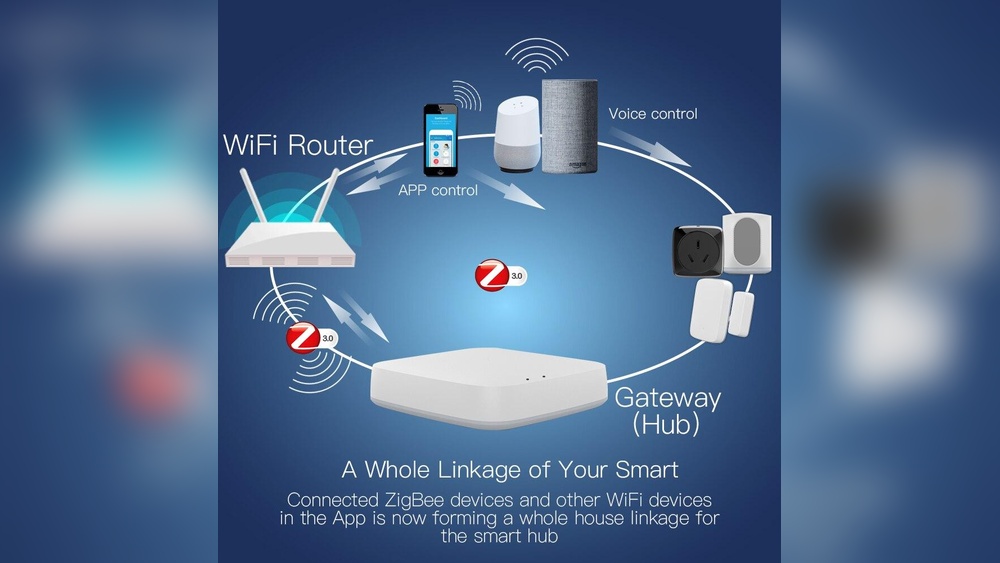
Smart homes are changing the way people live. Lights turn on when you walk into a room. Doors unlock with your phone. Thermostats learn your routine. Behind this magic, there’s often a small device making it all work smoothly: the Zigbee smart home hub. If you’re curious about what Zigbee hubs are, how they work, and why they matter, you’re in the right place. This article will help you understand Zigbee smart home hubs in detail, with simple language, practical examples, and useful tips.
What Is A Zigbee Smart Home Hub?
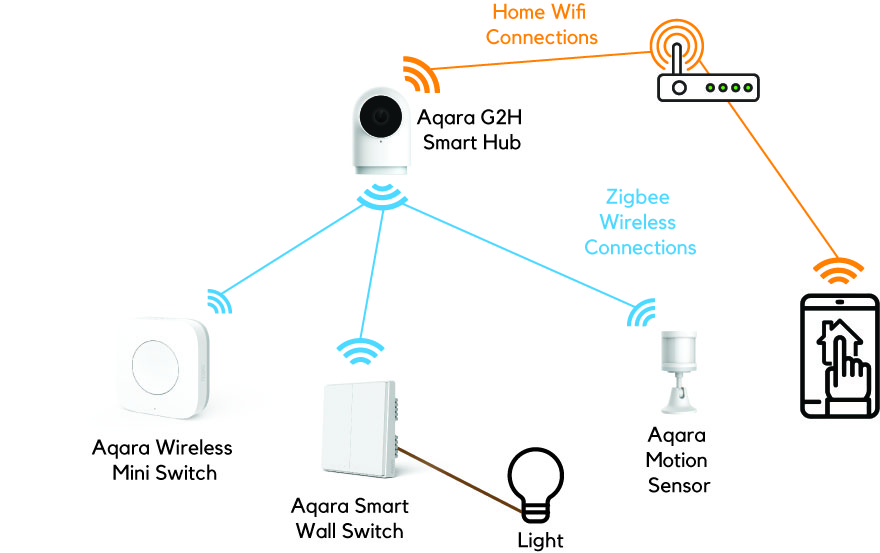
A Zigbee smart home hub is a central device that connects and controls smart home gadgets using the Zigbee wireless protocol. Zigbee is a special way for devices to communicate, similar to Wi-Fi or Bluetooth, but designed for smart home needs. The hub acts as the “brain” of your smart home, letting you manage lights, sensors, locks, and other devices from one place.
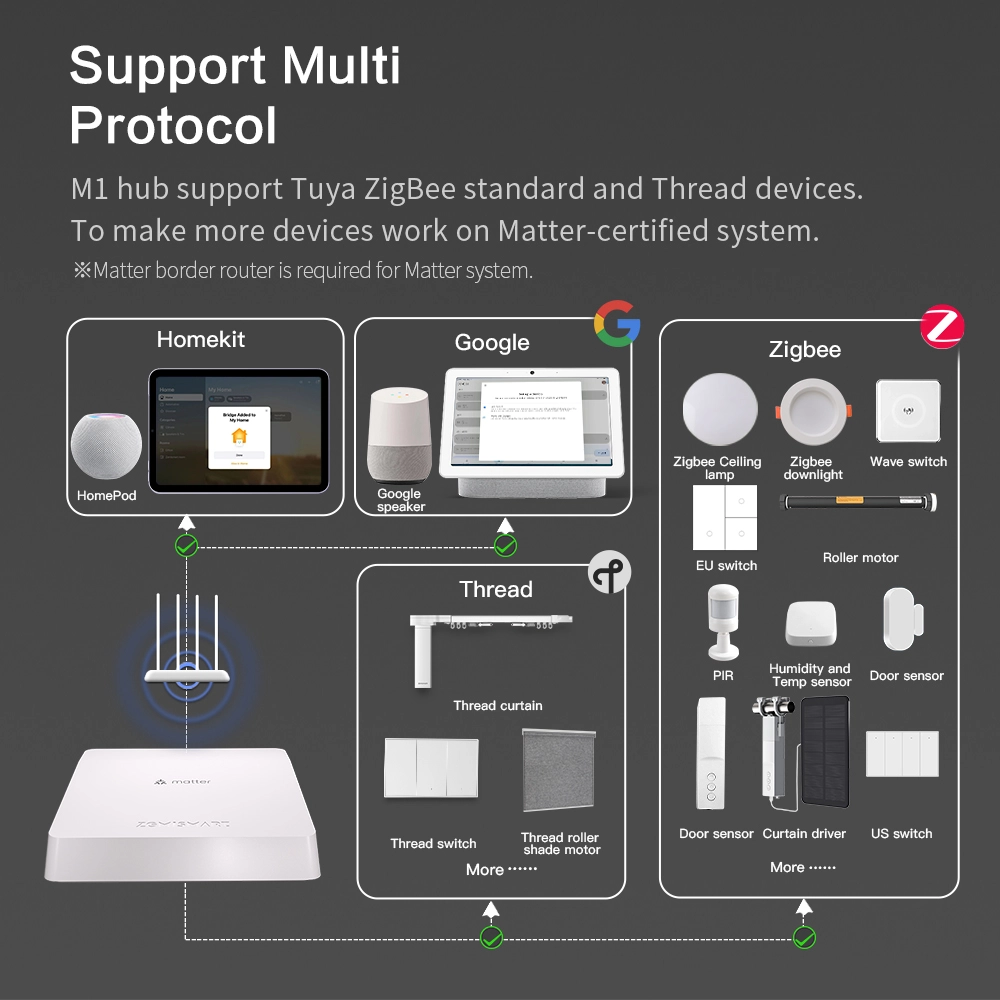
Zigbee hubs are especially popular because they support many brands and device types. Unlike hubs that only work with one company’s products, Zigbee hubs can connect to hundreds of devices from different manufacturers. This flexibility makes them a favorite for people who want a smart home that fits their lifestyle.
How Zigbee Works: The Basics
Zigbee is a wireless communication standard. It was created for simple, low-power devices that need to talk to each other. Let’s break down what makes Zigbee special:
- Low power use: Zigbee devices use less energy than Wi-Fi or Bluetooth, so batteries last longer.
- Mesh network: Zigbee creates a network where devices relay messages to each other. This allows signals to travel farther and makes the system stronger.
- Fast communication: Zigbee devices send commands quickly, so lights or sensors respond almost instantly.
Mesh Network Explained
Unlike Wi-Fi, where devices only talk to the router, Zigbee devices talk to each other. If a signal can’t reach directly from the hub to a device, it hops through other devices. This is called a mesh network. It means you can cover a large house without worrying about weak signals.
For example, if your hub is in the living room and you have a smart bulb in the garage, the signal may pass through the kitchen light and hallway sensor before reaching the garage bulb. Each device helps extend the coverage.
Comparison With Other Protocols
Here’s a quick look at how Zigbee compares to Wi-Fi and Bluetooth in smart home use:
| Protocol | Power Use | Range | Devices Supported | Speed |
|---|---|---|---|---|
| Zigbee | Very Low | Up to 100m (with mesh) | Hundreds | Fast for commands |
| Wi-Fi | High | Up to 50m (no mesh) | Few dozen | Very fast for data |
| Bluetooth | Low | Up to 10m | Few | Fast for commands |
Zigbee is not for streaming video or music. It’s for simple tasks like turning on lights, checking sensors, or locking doors.
What Devices Can Zigbee Hubs Control?
Zigbee hubs can manage a wide range of smart home devices. Here are some common examples:
- Smart bulbs: Change color, dim, or turn off/on remotely.
- Sensors: Door/window sensors, motion detectors, temperature sensors.
- Smart plugs: Control appliances and monitor energy use.
- Locks: Keyless entry and remote locking.
- Thermostats: Adjust heating or cooling.
- Switches: Wall switches for lights and fans.
- Curtain controllers: Open or close curtains automatically.
Many major brands make Zigbee-compatible devices, such as Philips Hue, Samsung SmartThings, and Ikea Tradfri. But some lesser-known brands also use Zigbee because it’s reliable and efficient.
Device Compatibility: What To Know
Not every Zigbee device works with every hub. This is one of the most common beginner mistakes. Always check the hub’s list of supported devices before buying. If you want to use products from different brands, look for hubs with broad compatibility.
The Role Of The Zigbee Hub In Your Smart Home
The Zigbee hub is more than just a connector. It plays several important roles:
- Central control: You can manage all devices through one app or interface.
- Automation: Set rules like “Turn on the porch light when motion is detected after sunset.”
- Remote access: Control devices from anywhere, not just inside your home.
- Integration: Connect Zigbee devices with other smart systems, like Alexa or Google Assistant.
Without a hub, Zigbee devices cannot talk to your phone or work together. The hub makes everything work smoothly.
Automation Examples
Some practical automation ideas with a Zigbee hub:
- When you unlock the front door, turn on the hallway light.
- If a window sensor detects the window is open, turn off the air conditioner.
- When motion is detected at night, send a notification to your phone.
Automations can save energy, increase security, and make life easier.
Popular Zigbee Smart Home Hubs
There are several well-known Zigbee hubs on the market. Here are three of the most popular:
- Samsung SmartThings Hub: Supports Zigbee, Z-Wave, and Wi-Fi devices. Easy to use and works with Alexa and Google Assistant.
- Amazon Echo Plus: Built-in Zigbee hub. Lets you control Zigbee devices by voice.
- Philips Hue Bridge: Mainly for Hue lights, but also supports other Zigbee bulbs and accessories.
Other brands include Hubitat Elevation, Aeotec Smart Home Hub, and Ikea Tradfri Gateway. Each hub has unique features, so compare carefully before buying.
Quick Comparison Of Top Zigbee Hubs
Here’s a comparison of three Zigbee hubs:
| Hub Name | Protocols Supported | Voice Assistant Integration | Device Limit | Best For |
|---|---|---|---|---|
| SmartThings | Zigbee, Z-Wave, Wi-Fi | Alexa, Google Assistant | Up to 200 | Mixed devices, automation |
| Echo Plus | Zigbee, Wi-Fi | Alexa | Up to 50 | Voice control |
| Hue Bridge | Zigbee | Alexa, Google Assistant | Up to 50 | Lighting |
Setting Up A Zigbee Smart Home Hub
Setting up a Zigbee hub is straightforward, but there are some steps and tips you should know. Here’s a typical process:
- Plug in the hub: Connect it to power and your home router (if needed).
- Install the app: Download the app for your hub on your smartphone.
- Create an account: Sign up and log in.
- Add devices: Follow the app instructions to pair Zigbee devices with the hub.
- Arrange devices: Name them and place them in rooms for easy control.
- Set automations: Use the app to create rules and routines.
Tips For Smooth Setup
- Place the hub in a central location for best coverage.
- Start with a few devices and add more gradually.
- If a device won’t connect, reset it and try again.
- Keep your hub’s firmware updated for security and compatibility.
One non-obvious tip: Zigbee hubs work best when there are several devices plugged in (like smart plugs or bulbs). These act as “repeaters” and strengthen the mesh network.
Credit: homesmart.sg
Benefits Of Zigbee Smart Home Hubs
Why choose a Zigbee hub over other options? Here are some key benefits:
- Reliability: Zigbee mesh networks are stable, even in large homes.
- Low energy use: Devices last longer on batteries.
- Interoperability: Many brands and device types can work together.
- Scalability: Add more devices without slowing down the system.
Security And Privacy
Zigbee uses encryption to protect messages between devices. This makes it harder for hackers to access your smart home. But, the hub itself must also be secure. Choose reputable brands, and change default passwords.
A common mistake: forgetting to secure the hub. Always update firmware and use strong passwords.
Common Challenges And Solutions
Zigbee hubs are powerful, but not perfect. Here are some frequent issues and ways to fix them:
- Device not connecting: Move the device closer to the hub. Add more Zigbee-powered devices to strengthen the mesh.
- Signal interference: Wi-Fi and Zigbee both use the 2.4 GHz band. If you have problems, try changing your Wi-Fi channel.
- Firmware updates: Outdated firmware can cause problems. Update your hub and devices regularly.
- Compatibility issues: Not all Zigbee devices work with every hub. Check device lists before buying.
A less obvious insight: Zigbee hubs may need a stable internet connection for remote control, but local automation can often work even if the internet goes down.
Zigbee Vs Other Smart Home Hubs
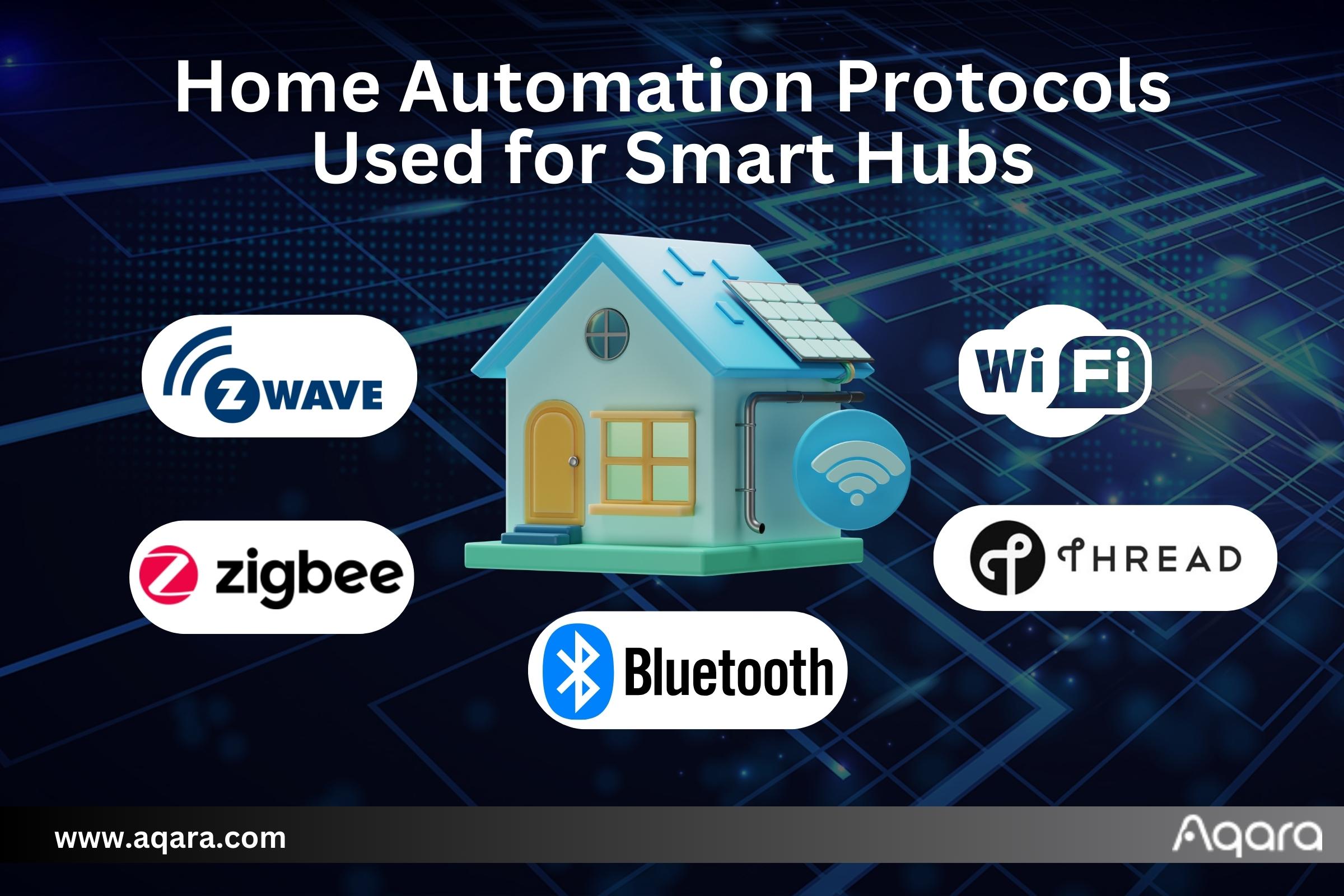
Many smart home hubs use other protocols like Z-Wave, Wi-Fi, or Bluetooth. Here’s how Zigbee hubs compare:
| Feature | Zigbee Hub | Z-Wave Hub | Wi-Fi Hub |
|---|---|---|---|
| Device Variety | Wide | Moderate | Limited |
| Power Efficiency | Very High | High | Low |
| Mesh Network | Yes | Yes | No |
| Range | Up to 100m | Up to 100m | Up to 50m |
| Interference | Can clash with Wi-Fi | Less interference | High interference |
Zigbee and Z-Wave are both strong choices for smart homes. Z-Wave is less affected by Wi-Fi interference, but supports fewer devices.
How Zigbee Hubs Support Smart Home Ecosystems
A Zigbee hub is often just one part of a larger smart home setup. Many hubs can connect with voice assistants like Alexa, Google Assistant, or Apple HomeKit. This means you can control Zigbee devices with your voice or link them to other smart gadgets.
For example, you could say, “Alexa, turn on the living room lights,” and the Echo Plus will send the command to your Zigbee bulbs. Or, use the SmartThings app to set up routines across Zigbee and Wi-Fi devices.
Integration makes your smart home more flexible. But remember, each ecosystem has its own rules and limits.
Local Vs Cloud Control
Some Zigbee hubs process commands locally, inside your home. Others send commands to the cloud. Local control is faster and keeps your data private. Cloud control lets you manage your home from anywhere. Many users prefer hubs that offer both options.
Zigbee Hub Installation: Step-by-step Example
Let’s walk through setting up a Zigbee hub, using SmartThings as an example:
- Unbox the hub and connect it to power and your router.
- Download the SmartThings app on your phone.
- Create an account and sign in.
- Follow the app prompts to add the hub.
- Place the hub in a central spot (like the living room).
- Add Zigbee devices: Put each device in pairing mode, then use the app to find and connect it.
- Name devices for easy control (“Kitchen Light”, “Front Door Lock”).
- Set up automations like “Turn on porch light at sunset.”
If a device doesn’t connect, try resetting it or moving it closer to the hub. Add more Zigbee devices plugged into outlets (like smart plugs) to boost the network.
Real-world Examples Of Zigbee Smart Homes
Many homes use Zigbee hubs for daily convenience and safety. Here are some practical scenarios:
- Energy savings: Set lights to turn off automatically when no one is home. Use smart plugs to monitor energy use.
- Security: Door sensors send alerts if someone opens a door at night. Motion sensors trigger alarms.
- Comfort: Thermostats adjust temperature based on your schedule. Curtain controllers open in the morning.
- Accessibility: Elderly or disabled people can control devices by voice or from their phone.
A less obvious benefit: Zigbee devices can work together even if the internet fails, as long as the hub is still powered.
Key Factors To Consider Before Buying A Zigbee Hub
Choosing the right Zigbee hub is important. Here’s what to look for:
- Device compatibility: Make sure the hub supports the devices you want.
- App quality: The app should be easy to use and reliable.
- Voice assistant integration: Works with Alexa, Google Assistant, or Apple HomeKit?
- Local vs cloud control: Prefer local processing for privacy and speed.
- Automation features: Look for advanced automation options.
Common Buyer Mistakes
- Buying before checking compatibility: Always check if your chosen devices will work with the hub.
- Ignoring the mesh network: Not placing enough Zigbee-powered devices to build a strong mesh.
- Overlooking firmware updates: Failing to update can cause bugs and security risks.
- Not considering future needs: Choose a hub that can grow with your smart home.
Zigbee Hub Security: What Users Need To Know
Security is a big concern for any smart home. Zigbee uses encryption, but the hub itself is the weak point if not protected.
Tips For Better Security
- Change default passwords for the hub and app.
- Keep firmware updated.
- Use hubs from trusted brands.
- Enable two-factor authentication if available.
- Don’t share your account with others unless necessary.
If you’re worried about hacking, know that Zigbee hubs are safer than many Wi-Fi-only devices, but only if you follow basic security steps.
Credit: www.zemismart.com
Zigbee Hub Maintenance And Troubleshooting
Keeping your Zigbee hub running smoothly isn’t hard, but there are some best practices:
- Regularly check for firmware updates.
- Restart the hub if devices stop responding.
- Add more Zigbee-powered devices to boost the mesh.
- Remove devices you no longer use.
If you run into problems, check the manufacturer’s support website or forums. Many issues are solved by resetting devices or updating software.
Zigbee Smart Home Hub Trends And Future
Zigbee continues to grow. More brands and devices support it every year. The new Matter standard (supported by Zigbee Alliance) aims to make smart homes even more compatible and easier to use.
Statistics show that Zigbee is now used in over 500 million devices worldwide. It’s a trusted choice for both beginners and advanced users.
Smart homes are moving toward more open systems, where devices from different brands work together. Zigbee hubs are leading this change.
For more technical details, see Wikipedia’s Zigbee page.
Credit: www.aqara.com
Frequently Asked Questions
What Is The Main Purpose Of A Zigbee Smart Home Hub?
A Zigbee hub connects and manages smart home devices using the Zigbee protocol. It acts as a central controller, letting you automate routines, control devices, and integrate with voice assistants.
Can I Use Zigbee Devices Without A Hub?
Most Zigbee devices need a hub to communicate with your phone or other systems. Some Zigbee bulbs can be controlled by special remotes, but for full automation and remote access, a hub is required.
How Many Devices Can A Zigbee Hub Support?
Many Zigbee hubs can support up to 50-200 devices, depending on the model. The mesh network helps handle large numbers of devices smoothly.
Is Zigbee Better Than Wi-fi For Smart Home Use?
Zigbee is better for low-power, simple devices like sensors and bulbs. Wi-Fi is good for high-data devices like cameras. Zigbee uses less energy, has a strong mesh network, and supports many devices.
How Do I Fix Zigbee Device Connection Problems?
First, move the device closer to the hub. Add more Zigbee-powered devices to build the mesh. Check for interference from Wi-Fi. Update firmware, and reset the device if needed.
Smart homes are more than just gadgets—they’re about convenience, safety, and energy savings. Zigbee hubs make it possible for all kinds of devices to work together. By understanding how Zigbee works, what hubs do, and how to choose one, you can build a smart home that fits your needs.
As technology improves, Zigbee hubs will keep playing a key role in making homes smarter and more connected.