
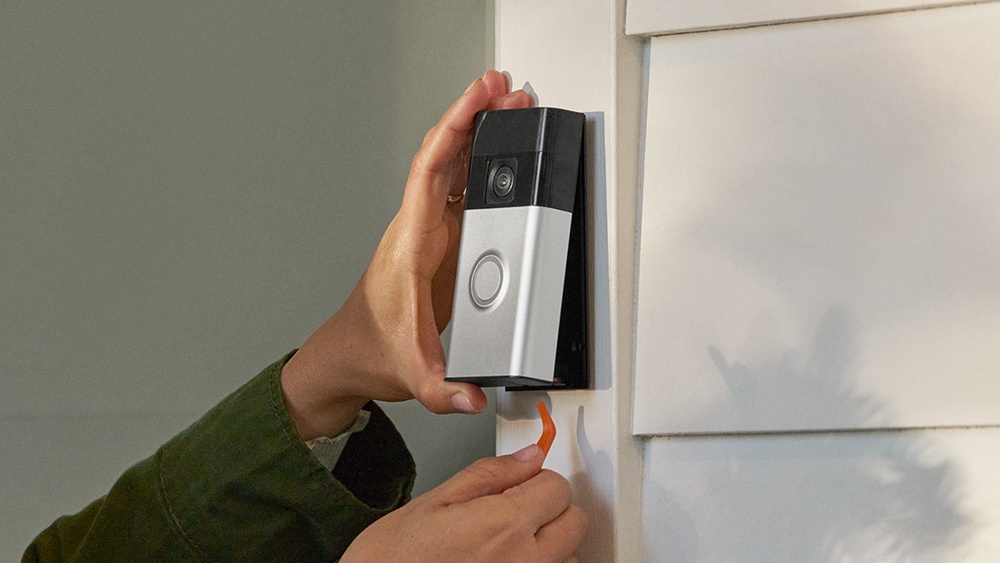
A Ring Video Doorbell makes your home smarter and safer. It lets you see who is at your door, talk to visitors, and even record what happens outside. But like any device, your Ring doorbell needs power. Charging it is simple, but mistakes can cause problems or shorten battery life.
This guide helps you charge your Ring Video Doorbell the right way, whether you are new to smart home tech or want to avoid common issues. You will learn step-by-step instructions, discover which models need charging, and get tips to keep your device working longer.
By the end, you will feel confident handling your Ring doorbell’s battery.
Understanding Ring Video Doorbell Models
Ring makes several doorbell models. Each has different features and battery systems. Knowing your model is important because charging steps vary.
Battery-powered Vs Wired Models
Ring offers battery-powered and wired doorbells. Most wired models get power from your home’s electrical system, so they do not need charging. Battery-powered models must be charged regularly.
Battery-powered models include:
- Ring Video Doorbell (1st, 2nd, 3rd generation)
- Ring Video Doorbell 3 Plus
- Ring Video Doorbell 4
- Ring Video Doorbell (2020 release)
- Ring Video Doorbell Plus
Wired models include:
- Ring Video Doorbell Pro
- Ring Video Doorbell Elite
- Ring Video Doorbell Wired
Hybrid models: Some models, like Ring Video Doorbell 3 and 4, can run on battery or connect to existing wires for trickle charging.
How To Identify Your Ring Model
Check the back of your device or the original box for the model number. You can also find it in the Ring app under “Device Settings”. If you see a removable battery or if the manual mentions charging, your model is likely battery-powered.
Why Model Matters For Charging
Battery-powered models need regular charging. Wired models do not. Hybrid models charge less often if connected to wires. If you are unsure, look for a battery compartment or check the app for battery status.
When Should You Charge Your Ring Video Doorbell?
Charging frequency depends on usage, model, and weather.
Typical Battery Life
A Ring doorbell’s battery usually lasts 3–6 months. Heavy use can lower this to 1–2 months. Cold weather reduces battery life. According to Ring, average use means about 20–30 events per day.
Signs Your Doorbell Needs Charging
Your device will notify you when battery is low:
- Ring app sends a battery alert
- LED ring flashes red or shows a warning
- Video feed stops or becomes unreliable
Do not wait until battery is dead. Charging when battery drops below 20% keeps your device working and prevents deep discharge, which can damage the battery.
Checking Battery Level In The App
Open the Ring app, go to your doorbell device, and check “Device Health”. Battery percentage is shown. Ring recommends charging before it drops below 10–15%.
Credit: ring.com
Preparing To Charge Your Ring Video Doorbell
Charging is easy, but a few steps make it smoother.
What You Need
- Micro-USB cable (included with most models)
- Wall charger (5V/1A recommended)
- Clean, dry workspace
- Optional: Screwdriver (for some models)
Safety Tips
- Unmount the device carefully to avoid damaging wires or casing
- Charge indoors, away from moisture
- Use only Ring-approved chargers or cables
Removing Your Ring Doorbell
Most battery-powered models must be removed from the wall to charge. Wired models stay in place.
- Locate the security screws at the bottom
- Use the Ring screwdriver to loosen screws
- Gently slide the doorbell up and away from the mount
- Avoid pulling too hard; wires may be attached if hybrid
For models with removable batteries (Ring Doorbell 3, 4, Plus), you do not have to remove the whole device—just the battery.
How To Charge Ring Video Doorbell: Step-by-step
Charging steps differ by model. Here is a complete guide for the two main types.
Charging Ring Doorbells With Built-in Batteries
- Remove the doorbell from the mount
- Locate the micro-USB port on the back
- Plug in the micro-USB cable
- Connect the other end to a wall charger or USB port
- Charging LED will light up (usually blue)
- Wait 4–8 hours for full charge (depends on battery size)
- Check battery level in the app if possible
- When fully charged, unplug and remount
Charging Ring Doorbells With Removable Batteries
- Remove the battery from the doorbell (press release tab)
- Find the micro-USB charging port on the battery
- Plug in cable and connect charger
- Battery LED turns red while charging, green when finished
- Charging takes about 5–6 hours
- Insert battery back into the doorbell
- Remount device
Quick Comparison Of Charging Methods
Here’s a table comparing charging for built-in vs removable battery Ring doorbells:
| Model Type | Charging Method | Charge Time | LED Indicators | Remount Needed? |
|---|---|---|---|---|
| Built-in Battery | Charge via micro-USB port on device | 4–8 hours | Blue ring | Yes |
| Removable Battery | Charge battery separately | 5–6 hours | Red/Green LEDs | No (just battery) |
Important Charging Tips
- Use a wall charger for faster charging; computer USB ports are slower
- Do not use fast chargers (over 5V/1A), as these can damage the battery
- Charging outdoors in cold weather takes longer
- Avoid dropping the battery—damage can affect performance
Reinstalling Your Ring Doorbell After Charging
Once your device is fully charged, remount it securely.
Steps For Reinstalling
- Line up the doorbell with the mounting bracket
- Slide it down until it clicks into place
- Tighten security screws with the Ring screwdriver
- Open the Ring app and check battery status
Testing After Reinstallation
- Press the button to see if chime or app notification works
- Check live video feed
- Review battery status in the app
If you notice any issues, such as missing notifications or no video, double-check the battery placement and Wi-Fi connection.
Common Charging Mistakes To Avoid
Many users make simple errors that can cause problems.
Charging Too Late
Waiting until battery is dead can lead to deep discharge, which shortens battery life. Charge at 20% or higher.
Using Fast Chargers
Using a charger over 5V/1A can damage the battery. Only use standard chargers.
Charging In Extreme Temperatures
Cold or hot environments slow charging. Charge indoors where possible.
Incorrect Remounting
Improperly mounted doorbells can cause connection issues. Always align carefully and tighten screws.
Ignoring App Notifications
Ring app alerts are important. Ignoring them means your doorbell may stop working at the worst time.
Extending Your Ring Doorbell’s Battery Life
You can make your battery last longer with a few adjustments.
Adjust Motion Settings
Ring doorbells use battery for every motion event. Lower sensitivity or limit zones to reduce triggers.
- In the Ring app, go to “Motion Settings”
- Reduce range or select fewer zones
- Turn off “People Only Mode” for fewer alerts
Reduce Live View Usage
Using Live View drains battery. Only check when needed.
Disable Unnecessary Features
Features like Snapshot Capture and frequent video recording use extra power. Adjust these in the app.
Seasonal Adjustments
Cold weather reduces battery life. If possible, install your device where it’s less exposed to wind and cold.
Table: Battery Life By Usage Pattern
Here’s a table showing expected battery life based on activity level:
| Usage Type | Events per Day | Approx. Battery Life |
|---|---|---|
| Low | 10–15 | 6 months |
| Medium | 20–30 | 3–4 months |
| High | 50+ | 1–2 months |
Getting A Spare Battery
For models with removable batteries, buying a spare battery lets you swap and charge without downtime. This is useful for busy households.
Troubleshooting Charging Issues
If your Ring doorbell won’t charge, try these steps.
Doorbell Not Charging
- Check cable and charger—use only Ring-approved devices
- Inspect charging port for dust or debris
- Try a different wall outlet
- Restart the doorbell (hold button for 15 seconds)
Battery Drains Quickly
- Reduce motion sensitivity and alerts
- Update device firmware in the app
- Check for Wi-Fi signal problems
Doorbell Won’t Remount
- Make sure the bracket is aligned
- Check for bent screws or broken clips
Video Feed Issues After Charging
- Confirm battery is inserted fully
- Check Wi-Fi connection
- Restart the device
If problems persist, contact Ring support or visit their website for troubleshooting guides.

Credit: ring.com
Charging Ring Video Doorbell In Cold Weather
Cold temperatures affect battery performance. Charging outside below 32°F (0°C) is not recommended.
Effects Of Cold
- Battery drains faster
- Charging is slower
- Device may shut down temporarily
Solutions
- Charge indoors whenever possible
- Install doorbell where it is sheltered from wind
- Use a wired connection if your model supports it
Example: Real Winter Battery Test
In a user test in Minnesota, a Ring Video Doorbell lost 50% battery in 2 weeks during winter (0°F to 20°F). Charging inside was faster than outside.
Ring Doorbell Charging Statistics And Real-world Data
Understanding how often people charge their Ring doorbells can help you plan.
- On average, Ring users charge their battery every 3 months
- About 80% of Ring owners use battery-powered models
- 15% report charging more often in winter
- Removable batteries are popular: 60% of users prefer models with swappable batteries
These numbers show that charging is a regular task for most Ring owners.
Comparing Ring Doorbell Charging To Other Smart Doorbells
Ring is not the only video doorbell with batteries. Here’s a comparison table of popular brands:
| Brand | Battery Life (Avg.) | Charging Method | Removable Battery? |
|---|---|---|---|
| Ring | 3–6 months | Micro-USB, removable | Yes (some models) |
| Arlo | 6 months | Removable battery | Yes |
| Google Nest | 2–3 months | Built-in battery | No |
| Eufy | 4–6 months | Built-in battery | No |
Ring is competitive, especially with models that offer swappable batteries for easy charging.
Expert Tips For Charging Ring Doorbell Safely
Charging is simple, but a few expert tips can make it safer and easier.
Use The Right Charger
Always use the original Ring charger or a trusted 5V/1A charger. Avoid third-party chargers with higher voltage.
Keep Charging Ports Clean
Dust or dirt in the charging port can block power. Clean gently with a dry cloth before charging.
Charge Before Battery Is Empty
Charging before the battery is fully drained extends battery life. Deep discharge harms lithium batteries.
Store Spare Batteries Properly
Keep spare batteries at room temperature and away from moisture.
Monitor Battery Health
Check battery performance in the app. If battery drains quickly, it may need replacement.

Credit: www.youtube.com
Real User Experiences: Charging Ring Doorbells
Learning from others can help you avoid mistakes.
Case Study 1: Busy Family Home
A family with two Ring doorbells had to charge every 2 months. They bought spare batteries and set a calendar reminder for charging. This reduced downtime.
Case Study 2: Cold Climate
In Canada, a Ring owner noticed battery drained in 1 month during winter. Charging indoors helped, and lowering motion settings improved battery life.
Case Study 3: Apartment User
An apartment owner charged every 4 months. They used lower motion sensitivity and checked battery status regularly. Their battery lasted longer than average.
These examples show that usage and environment affect charging needs.
Questions Beginners Often Miss About Charging
Many beginners miss important points. Here are two non-obvious insights:
- Charging time varies—Using a computer USB port takes twice as long as a wall charger.
- Battery health matters—If your battery drains fast even after adjusting settings, it may be worn out. Replacing the battery solves the problem.
Frequently Asked Questions
How Do I Know When My Ring Video Doorbell Needs Charging?
The Ring app will send a battery alert when your doorbell’s battery is low. You can also check the battery level in “Device Health” in the app. If you notice missed notifications or the LED ring flashing red, it is time to charge.
Can I Use A Fast Charger To Charge My Ring Video Doorbell?
No, you should not use a fast charger. Ring recommends a standard 5V/1A charger. Fast chargers can damage the battery and shorten its life. Always use the original Ring charger or a trusted replacement.
How Long Does It Take To Fully Charge A Ring Video Doorbell?
Charging time depends on your model and battery type. Built-in batteries take about 4–8 hours. Removable batteries take 5–6 hours. Charging with a computer USB port may take longer. Always check the battery status before remounting.
What Happens If I Charge My Ring Doorbell In Cold Weather?
Charging in cold weather is slower and less efficient. Your doorbell may not charge properly below 32°F (0°C). It is best to charge indoors, away from cold and moisture, to protect the battery.
Can I Keep My Ring Doorbell Plugged Into Wires To Avoid Charging?
Some Ring models (like Ring Video Doorbell 3 and 4) can be connected to existing doorbell wires for trickle charging. This reduces how often you need to charge. However, fully wired models (like Ring Pro) do not need charging at all.
Final Thoughts
Charging your Ring Video Doorbell is a simple task, but doing it right keeps your device reliable and extends battery life. Always check your model, follow safe charging practices, and monitor battery health in the app. With regular charging and smart settings, your Ring doorbell will help keep your home secure with fewer interruptions. If you ever have trouble, Ring support and their website are good resources for guidance. For official information, visit Ring Support. Whether you live in a busy home or a cold climate, the right charging habits will keep your doorbell working for years to come.