
Can Mesh Routers Be Too Close?
Wi-Fi has become as important in homes as electricity and running water. For many people, having a strong, stable connection in every room is a must. That’s why mesh routers have exploded in popularity. They promise to wipe out dead zones and give you seamless coverage everywhere. But as people set up their mesh systems, a common question appears: *Can mesh routers be too close together?* Or is closer always better for Wi-Fi strength?
This is an important issue. Too much distance between mesh nodes can cause weak signals and slow speeds. But few users realize that putting routers too close can also hurt performance. This article explains why placement matters, how close is *too* close, and what happens if you get it wrong.
We’ll look at real-world examples, technical details, and practical steps so you can set up your mesh system for the best possible results.
What Is A Mesh Router System?
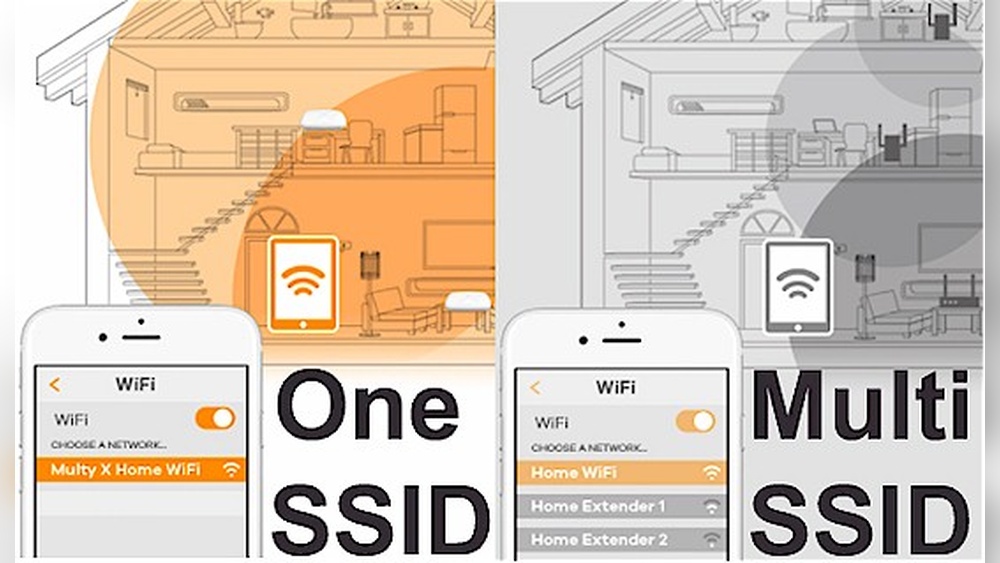
Mesh routers are a modern solution for home Wi-Fi. Unlike a traditional router, which broadcasts from one spot, a mesh system uses multiple devices called nodes or satellites. These nodes work together, creating a single large network that covers your entire house.
Here’s how it works:
- One node connects to your internet modem (this is the main router).
- Other nodes are placed around your home to extend coverage.
- All nodes communicate with each other, sharing data and managing connections.
The big advantage is consistent coverage. Instead of one signal getting weaker as you move away, the mesh system hands off your connection smoothly from one node to the next. You won’t have to switch networks or reconnect as you move around.
Most popular mesh systems (such as Google Nest WiFi, Netgear Orbi, and TP-Link Deco) are designed for easy setup and automatic optimization. They adjust channels, signal power, and connections in the background so users don’t have to be network experts.
Why Does Placement Matter In Mesh Networks?
Some people think mesh routers can be placed anywhere and still work. The truth is, placement is critical for getting the best out of your mesh system. If nodes are too far apart, you’ll get weak connections. But if they’re too close, you might run into interference and wasted potential.
Mesh networks rely on wireless backhaul—the way nodes talk to each other. If the signal is too weak, data moves slowly and you get lag or buffering. If the signal is too strong (because nodes are almost touching), the system can get confused, leading to signal overlap, interference, and even lower speeds.
Most manufacturers recommend specific distances between nodes. Not following these guidelines can make your expensive mesh system perform worse than a cheap old router.
The Science Behind Mesh Node Distance
To understand why distance matters, let’s look at how Wi-Fi signals behave.
- Wi-Fi signals are radio waves. They lose strength as they move through walls, floors, and furniture.
- When two Wi-Fi transmitters (like mesh nodes) are too close, their signals overlap too much. This can cause co-channel interference—they end up “talking over” each other.
- If they’re too far apart, the signal becomes weak, and the backhaul connection suffers.
Most mesh systems use 5 GHz or even 6 GHz for backhaul (the “fast lane” for node-to-node communication), and 2.4 GHz for device connections. Higher frequencies carry more data but don’t travel as far or penetrate walls as well.
Signal Strength And Speed
Here’s a simple rule: Stronger signal doesn’t always mean faster speed. If nodes are too close, Wi-Fi congestion can actually slow things down.
- RSSI (Received Signal Strength Indicator) is a measure of how strong the signal is. Too high (close to 0 dBm), and you may see interference. Too low (below -70 dBm), and speeds drop.
- SNR (Signal-to-Noise Ratio) is also important. If nodes are close, the noise increases, which can confuse devices.
Real-world Example
Imagine two mesh nodes in the same room, just three feet apart. Instead of helping each other cover more of your house, they’re fighting for the same airspace. Your devices might jump between the two nodes, leading to disconnects or unstable speeds.
Can Mesh Routers Be Too Close? The Technical Truth
The short answer is yes—mesh routers can definitely be too close together.
What Happens When Mesh Nodes Are Too Close?
- Signal Overlap: Both nodes broadcast strong signals in the same area. Devices may “see” both signals and switch back and forth, causing unstable connections.
- Increased Interference: The nodes use the same or similar frequencies. Their transmissions interfere, which reduces speed and reliability.
- Channel Congestion: Too many Wi-Fi signals on the same channel can lead to congestion. Think of it like two people shouting the same message at the same time—you can’t hear either clearly.
- Wasted Coverage: The main benefit of mesh is to extend coverage. If nodes are clustered together, large parts of your house may still have poor signal.
Manufacturer Guidelines
Most brands suggest placing nodes:
- 30 to 50 feet apart (about 10–15 meters) for best results.
- At least one room apart, not side-by-side.
Some systems (like Eero or Nest WiFi) will warn you if you try to set up nodes too close together. Others might let you, but you’ll notice performance problems.
Mesh Systems And Automatic Adjustment
Modern mesh routers try to optimize automatically. If two nodes are very close, some systems will lower their transmission power or switch channels to avoid interference. But this is just a workaround—it can’t fix the core issue of wasted potential and overlap.
How To Find The Best Distance Between Mesh Routers
So, how far apart should you place your mesh nodes? The answer depends on your home’s size, shape, and construction. But there are general rules you can follow.
General Distance Guidelines
- One node per 1,500–2,000 sq ft is a common rule.
- Place nodes halfway between your main router and weak-signal areas.
- Avoid placing nodes less than 15 feet (5 meters) apart unless you have thick walls or special circumstances.
Factors That Affect Placement
- Wall Material: Concrete, brick, and metal block signals more than drywall or wood.
- Floors: Wi-Fi has a harder time going through floors than through walls.
- Interference: Microwaves, cordless phones, baby monitors, and Bluetooth devices can all interfere with Wi-Fi.
- Open Spaces vs. Obstacles: Large, open spaces let signals travel farther.
Practical Steps To Set Up Your Mesh System
- Start with the main node near your modem.
- Place the second node halfway between the main router and the farthest room where you want coverage.
- Check signal strength using the system’s app or your phone’s Wi-Fi analyzer.
- Adjust placement if the app warns of weak or overlapping signals.
- Test speeds in different rooms to confirm coverage.
Common Mistakes When Placing Mesh Routers
Even with clear guidelines, many users make mistakes that reduce their mesh network’s performance. Here are some of the most frequent problems:
1. Placing Nodes Too Close
People often put mesh nodes just a few feet apart, thinking it will boost the signal. In reality, this causes interference and can confuse your devices.
2. Putting Nodes In Hidden Or Enclosed Spaces
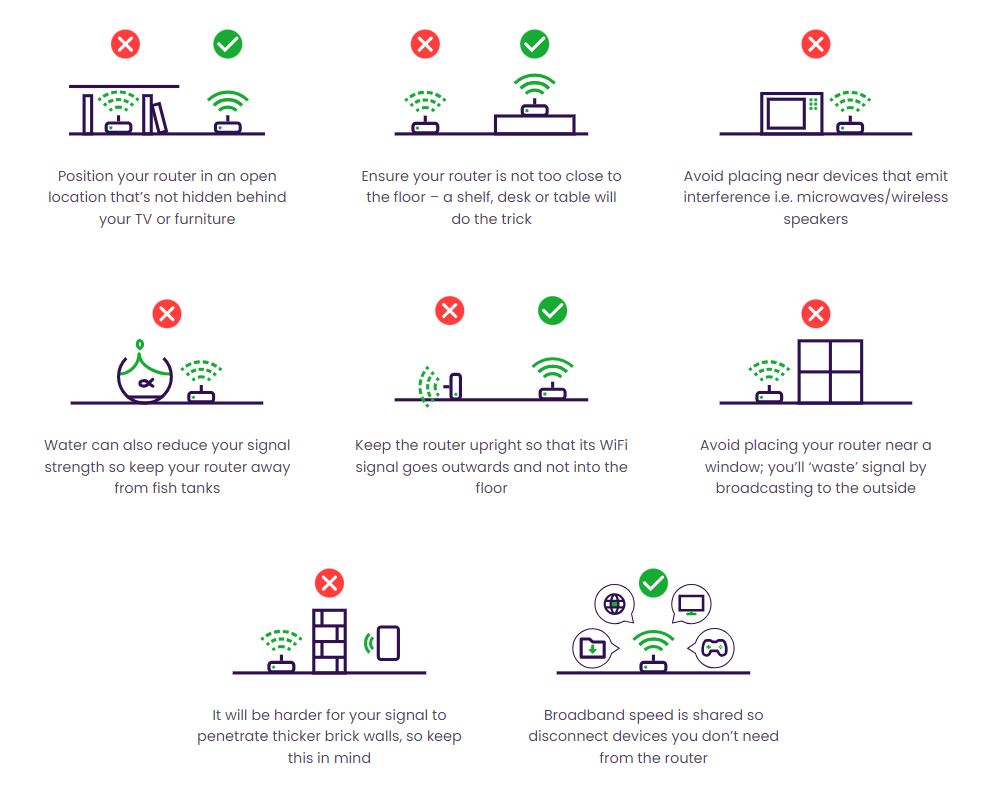
Placing a node inside a cabinet or behind a TV can block the signal. Nodes should be in open spaces, at table or shelf height.
3. Ignoring Obstacles
Thick walls, large appliances, and metal objects all reduce Wi-Fi strength. Don’t just measure distance—consider what’s in between nodes.
4. Overcrowding With Too Many Nodes
Adding more nodes than needed can create excessive overlap and slow down your network. Follow the manufacturer’s guidelines for your home size.
5. Not Updating Firmware
Outdated mesh firmware can cause bugs and poor optimization. Always keep your system updated for the latest fixes.
Testing And Optimizing Your Mesh Network
Once your nodes are placed, it’s important to test and optimize your network. Here’s how you can do it:
Using A Mesh System’s App
Most mesh systems come with a mobile app. These apps often include:
- Signal strength tests
- Speed tests for each node
- Placement suggestions based on real-time data
Follow the app’s recommendations, but also use your own experience—test video calls, streaming, and downloads in different rooms.
Using Wi-fi Analyzer Tools
There are free and paid tools that show you:
- Signal strength in each room (measured in dBm)
- Which channels your nodes are using
- Areas of interference
Popular apps include NetSpot, WiFi Analyzer, and Acrylic WiFi.
Example Optimization Scenario
Let’s say you have a three-node system in a two-story home:
- Main node in the living room, near the modem.
- Second node at the top of the stairs.
- Third node in a home office.
You notice slow speeds in the office. The mesh app shows the second and third nodes are only 10 feet apart, with almost no wall between them. Try moving the office node farther away, perhaps to the next room, and retest.
Usually, you’ll see a jump in both speed and stability.
Mesh Router Placement: Data And Comparisons
Sometimes it helps to see the effects of node spacing with real data. Below is a comparison of mesh network performance based on node distance, tested in a typical 2,000 sq ft house.
| Node Distance | Download Speed (Mbps) | Stability | Coverage |
|---|---|---|---|
| 5 feet | 110 | Poor (frequent drops) | Poor (overlap only) |
| 20 feet | 230 | Good | Moderate |
| 40 feet | 210 | Excellent | Full |
| 60 feet | 90 | Fair (signal weak) | Partial |
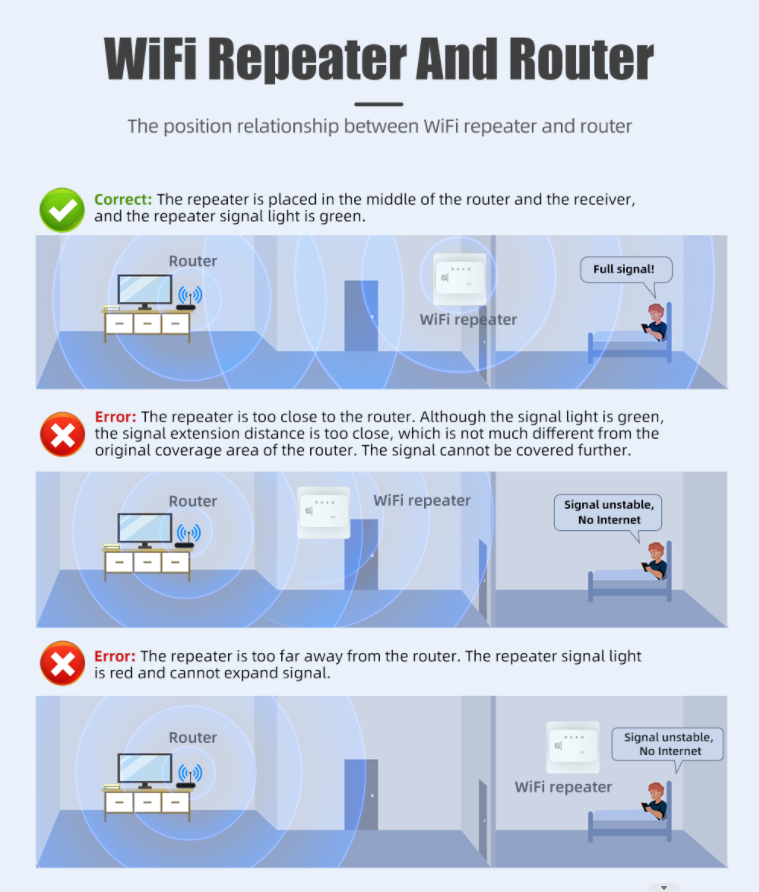
This data shows that 20–40 feet is the sweet spot for most homes. Closer than that, and speeds drop due to interference.
Credit: www.lintratek.com
Mesh Router Placement In Different Home Types
Every home is different, and the best mesh router setup depends on your space.
Apartments And Small Homes
- Fewer nodes needed
- Place main node near the center of the unit
- Place second node toward the far end, but at least 15 feet away
Multi-story Houses
- Vertical placement matters
- Put one node on each floor
- Try to align nodes vertically, so signals pass through the fewest floors
Large, Open-plan Homes
- Space nodes out along the length of the home
- Avoid placing nodes in open sight of each other if possible—spread them for better coverage
Houses With Thick Walls
- Move nodes closer than the usual 30-50 feet if walls are concrete or brick
- Test to find the point where speeds are highest
Advanced Tips For Mesh Router Placement
Beyond the basics, here are tips to get the absolute best performance from your mesh network.
Use Wired Backhaul If Possible
Many mesh systems allow you to connect nodes via Ethernet cable. This removes the need for a strong wireless backhaul and lets you place nodes farther apart. Wired backhaul is the gold standard for speed and reliability.
Adjust Channel Settings
If your system allows, manually set channels to reduce overlap with other Wi-Fi networks. This is especially useful in apartments with many neighbors.
Check For Firmware Updates Regularly
Manufacturers often improve mesh performance with software updates. Check your app for new firmware every few months.
Avoid Placing Near Electronics
Keep nodes away from microwaves, cordless phones, and Bluetooth speakers. These devices all use similar frequencies and can cause interference.
Don’t Stack Nodes Vertically Without Walls
If you have a multi-level open space (like a loft), avoid placing nodes directly above or below each other with no walls between. This creates overlapping coverage and can reduce performance.
Credit: help.communityfibre.co.uk
Mesh Network Performance: Overlap Vs. Separation
Let’s compare two common setups in a typical home:
| Placement | Average Device Speed (Mbps) | Latency (ms) | User Experience |
|---|---|---|---|
| Nodes 10 feet apart (high overlap) | 140 | 35 | Poor (buffering, drops) |
| Nodes 35 feet apart (proper separation) | 210 | 18 | Excellent (smooth streaming) |
This makes it clear: proper separation improves speed and reliability.
What The Experts And Research Say
Network engineers and wireless experts agree—mesh routers can be too close. In fact, some advanced systems automatically disable radios if they detect another node within a few feet.
A study published in the *IEEE Communications Surveys & Tutorials* found that node density (putting too many nodes close together) causes increased interference, higher packet loss, and reduced throughput.
The Wi-Fi Alliance also recommends:
- Optimizing node spacing
- Testing in real conditions
- Using manufacturer tools for placement
For those interested in deeper research, the Wikipedia page on mesh networking has links to technical resources and studies.

Credit: www.youtube.com
Real User Experiences: What Happens In Practice
Many users on tech forums and support sites report problems after placing mesh nodes too close:
- “My devices kept disconnecting until I moved the node farther away.”
- “Speed tests were better after I moved the node to the next room.”
- “I thought more nodes meant more speed, but I actually got more lag.”
This highlights an easy mistake: thinking that adding or clustering nodes always helps. In reality, smart placement beats more hardware.
How To Troubleshoot Issues With Mesh Nodes Too Close
If you suspect your mesh routers are too close, try these steps:
- Move one node 10–15 feet farther away and retest.
- Use your mesh app’s placement checker to look for warnings or suggestions.
- Run speed tests before and after moving nodes.
- Watch for device “bouncing” (switching rapidly between nodes).
- If problems persist, try temporarily turning off one node to see if things improve.
In most cases, increasing the distance between nodes leads to immediate improvements.
Mesh Router Brands And Their Placement Advice
Here’s a summary of what some leading mesh brands recommend for node spacing:
| Brand | Recommended Minimum Distance | Recommended Maximum Distance | Special Notes |
|---|---|---|---|
| Google Nest WiFi | 1 room apart | 2 rooms apart | App gives placement feedback |
| Netgear Orbi | 20 feet | 40 feet | Prefers wired backhaul if possible |
| TP-Link Deco | 30 feet | 50 feet | Uses AI for optimization |
| Eero | 1 room | 2 rooms | App tests placement automatically |
Always read your specific system’s instructions for the best advice.
Key Takeaways: How Close Is Too Close?
- Less than 10 feet is almost always too close for mesh nodes (unless separated by thick walls).
- 15–50 feet is usually ideal, depending on your home and obstacles.
- Place nodes where their coverage just overlaps—not where it’s identical.
- Use your mesh system’s app to test, but trust your own speed tests as well.
- More nodes are not always better—proper spacing is more important.
Frequently Asked Questions
How Far Apart Should Mesh Routers Be Placed?
Most mesh router brands suggest keeping nodes at least one room apart—usually 20 to 50 feet. The exact distance depends on your home’s layout and wall materials. If you’re unsure, start at 30 feet and adjust based on signal strength and speed tests.
What Are The Signs That Mesh Routers Are Too Close Together?
Common signs include unstable Wi-Fi, devices switching between nodes, slow speeds, and frequent disconnects. If your mesh system’s app warns about overlap or interference, try moving nodes farther apart.
Can I Put Mesh Routers On Different Floors?
Yes, and it’s often the best way to get full-home coverage. Try to place nodes vertically aligned (one above the other) and not too close together. Signals travel through floors, but thick concrete or metal can weaken the connection.
Is It Bad To Have Too Many Mesh Nodes?
Yes, adding more nodes than needed can cause interference and slow down your network. Stick to the number recommended for your home size, and make sure each node is well placed for coverage, not just clustered together.
Do All Mesh Routers Automatically Fix Placement Problems?
Most modern mesh systems try to optimize placement automatically, but they can’t solve everything. If nodes are too close, some systems lower power or change channels, but performance can still suffer. Manual adjustment is usually necessary for best results.
Mesh routers are powerful tools for whole-home Wi-Fi, but placement matters as much as the hardware. Avoid putting nodes too close together, test your setup, and enjoy strong, stable connections everywhere you need them.