
Dead spots, dropped connections, and slow WiFi can turn a smart home into a frustrating place. Many people struggle to keep their devices connected and their networks secure, especially as homes get bigger and tech needs grow.
Picking the right Asus router or mesh system for AiMesh isn’t simple. There are different models, features, and price levels. Some are made for speed, others for coverage or advanced controls. But the choices blend together, and it’s hard to know what matters most.
This guide will help you make sense of the options, so you can decide what fits your space and needs.
How To Think About Choosing An Aimesh Router
Start by considering the size of your home and how many devices you connect. Coverage, reliability, and security matter more than raw speed for most people. If you often stream, game, or work from home, stable connections and easy network management should be priorities.
Mesh systems help larger spaces, while single routers suit smaller homes or apartments.
Common Mistakes When Buying
Many buyers focus too much on technical specs or latest standards, and overlook ease of setup, ongoing support, or compatibility. It’s easy to overspend on features you won’t use, or buy a model that doesn’t fit your layout. Make sure to check AiMesh support if you plan to expand coverage later.
The products below are chosen to suit a range of homes and budgets. Each pick addresses a different type of WiFi need, so you’ll find options for both simple setups and complex smart homes.
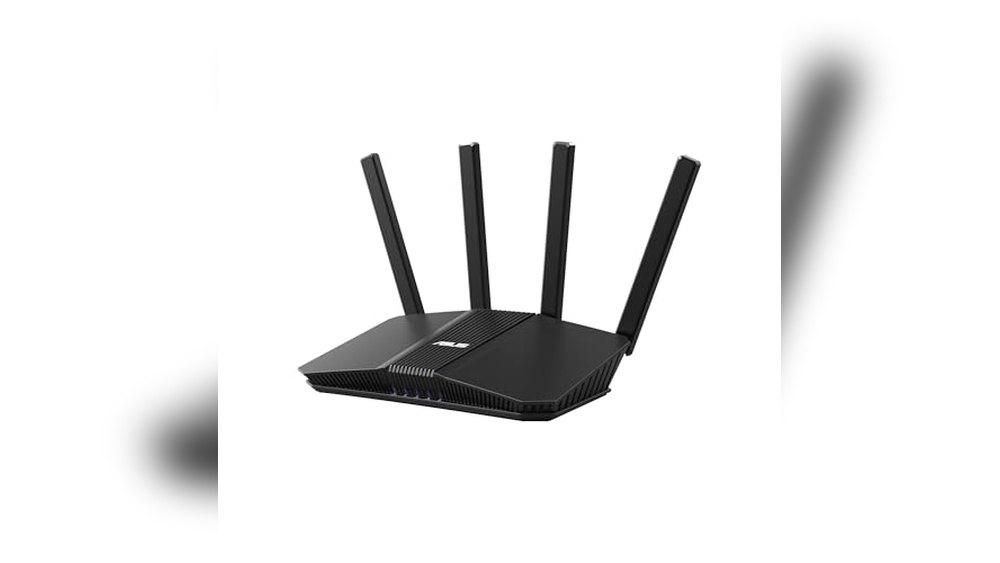
Asus Rt-be58u Wifi 7 Mesh Router
One of the Best Asus Routers for Ai Mesh, this model delivers ultra-fast speeds and versatile connectivity for demanding home networks.

The ASUS RT-BE58U WiFi 7 Mesh Router is built for anyone who wants fast, reliable wireless coverage throughout their home. With support for WiFi 7 and dual-band operation, it delivers up to 3. 6 Gbps for smooth streaming, gaming, and work.
It’s designed to simplify network setup and provide flexibility with features like multi-link operation and easy WAN configuration.
In daily use, this router offers a sense of stability and ease—you get consistent coverage, smooth data transfers, and quick device management. The setup feels straightforward, whether you’re connecting smart home devices or creating separate networks for guests. Security features and parental controls add peace of mind, making it a solid choice for households that want fewer hassles and more control.
Key Advantages For Home Networks
- WiFi 7 speeds for demanding streaming and gaming
- Mesh compatibility extends coverage to every room
- Supports multiple SSIDs for easy device management
- Dual-WAN options and mobile tethering increase reliability
- Commercial-grade security with AiProtection Pro
- Simple parental controls and VPN options
Things To Consider Before Buying
- Requires WiFi 7 devices to get top speeds
- More advanced features may be overkill for basic users
- Physical size might be larger than some alternatives
Who This Fits Best
This router is best for busy households or home offices where multiple devices need fast, stable WiFi across large spaces. If you’re tired of dead zones or dropped video calls, its mesh and dual-WAN features cut out a lot of stress and troubleshooting.
The ability to set up several SSIDs makes it easier to separate work, guest, and smart home devices, reducing network confusion.
For anyone wanting peace of mind, the built-in commercial-grade security helps protect your data automatically. A quick tip: take a few extra minutes to set up parental controls and Safe Browsing for safer internet use right from the start. Personally, I appreciate how it lets you manage everything in one place without feeling complicated.
| Best for | Why |
|---|---|
| Large homes with many devices | Mesh capability and high speeds cover big spaces reliably |
| Families with kids or guests | Multiple SSIDs and parental controls for safer, organized access |
| Remote work and streaming | Dual-WAN and VPN support boost uptime and privacy |
| Smart home enthusiasts | Easy IoT management and separate device networks |
Asus Rp-be58 Aimesh Wifi 7 Extender
For those seeking Best Asus Routers for Ai Mesh, this extender delivers seamless coverage and reliable performance.

The ASUS RP-BE58 AiMesh WiFi 7 Extender is designed to boost your home’s wireless signal, eliminating dead zones and providing stable connectivity. It works with nearly any existing WiFi router, making it a flexible solution for expanding your network. Dual-band WiFi 7 capability means faster speeds and smoother data transfers, ideal for busy households.
Using this extender feels straightforward: setup is quick with the ASUS app, and once connected, your devices stay linked without interruptions. The seamless AiMesh integration means you can move throughout your home without worrying about dropped connections. It’s a quiet, reliable upgrade that saves time and reduces frustration over weak signals.
Smart Advantages For Seamless Home Wifi
- Supports WiFi 7 for faster and more stable wireless speeds
- Works with virtually any WiFi router or modem
- AiMesh compatibility for seamless whole-home coverage
- Multi-link operation keeps connections steady
- Quick setup with ASUS Router or Extender app
- Compact, lightweight design fits most spaces
Points To Consider Before Choosing
- Requires AiMesh-compatible devices for mesh functionality
- No built-in Ethernet ports for wired connections
- May be overkill for smaller homes or basic needs
Who This Fits Best
This extender is best for users who already own ASUS routers and want to build or expand an AiMesh system, especially in larger homes or spaces with WiFi dead spots. It removes the hassle of manual network switching and guessing which device to connect to, letting you roam freely while staying online.
A quick tip: place the extender halfway between your main router and the area with weak signal for optimal coverage. You’ll enjoy reliable, consistent internet with less stress over buffering or dropped connections. If you value quiet tech that just works, this extender delivers peace of mind.
| Best for | Why |
|---|---|
| Expanding ASUS AiMesh networks | Ensures seamless roaming and consistent coverage |
| Homes with WiFi dead spots | Eliminates weak signal areas easily |
| Multi-device households | Handles many connections without slowdowns |
| Users wanting easy setup | App-based installation is fast and intuitive |
Asus Rt-ax1800s Wifi 6 Mesh Router
One of the Best Asus Routers for Ai Mesh, this model combines fast WiFi 6 speeds with strong network security for seamless home coverage.

The ASUS RT-AX1800S WiFi 6 Mesh Router is designed for homes needing fast, reliable wireless coverage and future-ready features. Its AiMesh compatibility lets you expand your network easily without replacing your whole setup. With built-in network security and parental controls, it helps keep your family safe online.
Daily use feels smooth and consistent, whether streaming, gaming, or just browsing. Connecting many devices at once doesn’t slow things down, so there’s less frustration and more time saved. The setup is straightforward, and the interface is easy to manage, giving you confidence your network just works.
Key Advantages For Home Networking
- Supports WiFi 6 for faster speeds and better efficiency
- AiMesh compatibility for easy network expansion
- Simple parental controls to manage kids’ access
- Subscription-free security with AiProtection
- Five Gigabit ports for fast wired connections
- Handles multiple devices with MU-MIMO and OFDMA
- Built-in VPN for secure remote access
What To Consider Before Buying
- No built-in modem, so you need a separate one for DSL/cable
- Basic design—lacks advanced customization for power users
- Not the fastest available for ultra-high bandwidth homes
Why This Makes Sense
This router is best for someone who wants reliable mesh-ready WiFi without complicated setup or hidden costs. It’s a smart choice for families and anyone who values hassle-free security and smooth device management. You won’t have to stress about dropped connections, even if you add more devices or expand coverage later.
The subscription-free security and simple parental controls mean less guesswork and ongoing worry. For better results, place the router in a central spot and use AiMesh nodes to cover dead zones. Once set up, you get peace of mind knowing your home network is secure and stable.
If you like things that “just work,” this is a solid pick.
| Best for | Why |
|---|---|
| Expanding home WiFi with AiMesh | Works seamlessly with other Asus AiMesh routers |
| Homes with many devices | Handles multiple connections without slowing down |
| Security-conscious families | Built-in, subscription-free network protection and parental controls |
| Remote workers | Easy built-in VPN for safe access outside home |
Asus Rt-be82u Wifi 7 Mesh Router
Among the Best Asus Routers for Ai Mesh, this model stands out for seamless whole-home coverage and next-gen WiFi 7 speed.

The ASUS RT-BE82U WiFi 7 Mesh Router is designed for users who want fast, stable internet across every room. It solves the challenge of inconsistent WiFi by supporting AiMesh for whole-home coverage and offering WiFi 7 speeds up to 6.
5 Gbps. Its multi-link operation and five 2. 5GbE ports mean you get strong, reliable connections for both wireless and wired devices.
In daily use, this router makes streaming, gaming, and working from home feel effortless. You don’t have to worry about dead zones or complex setup—just smooth roaming and easy management. The built-in security features add peace of mind, letting you focus on what matters rather than troubleshooting network problems.
Why This Router Stands Out
- Extremely fast WiFi 7 speeds for demanding households
- Seamless AiMesh compatibility for consistent coverage
- Prioritized wired connectivity with five 2.5GbE ports
- Multi-band linking ensures stable connections
- Strong, automatic network security with AiProtection Pro
- Simple setup and expansion for future needs
Consider Before Buying
- Larger footprint may not suit very tight spaces
- Advanced features may be more than basic users need
- Premium price compared to entry-level routers
Who This Fits Best
If your home struggles with WiFi dropouts or you have lots of devices, this router is a strong match. It removes the hassle of weak signals and frequent reboots, making it ideal for busy families or anyone working from home who needs reliability.
Setting up AiMesh is straightforward and ensures you won’t spend time troubleshooting coverage.
A quick tip: Pair it with other AiMesh-compatible Asus routers for even better results in multi-story homes. The commercial-grade security also means fewer worries about online threats. For me, knowing the network “just works” is a real relief, especially when everything from streaming to smart devices depends on it.
| Best for | Why |
|---|---|
| Large homes needing strong coverage | AiMesh support extends WiFi to every corner |
| Heavy streaming and gaming | WiFi 7 and multi-link operation reduce lag and buffering |
| Power users with lots of wired devices | Multiple 2.5GbE ports enable fast, prioritized connections |
| Security-conscious households | Built-in AiProtection Pro and safe browsing features |
Asus Zenwifi Bt6 Mesh System
For those seeking Best Asus Routers for Ai Mesh setups, this mesh system offers robust coverage and advanced security for large homes.

The ASUS ZenWiFi BT6 Mesh System is a tri-band WiFi solution designed to eliminate dead zones and provide reliable, fast internet across your entire home. With AI-powered AiMesh technology, it’s easy to extend your network and maintain seamless connectivity, making it ideal for homes with multiple floors or thick walls.
Using this mesh router feels effortless; set up is quick, and coverage is strong even in tricky spots. You get consistent speed and security, so streaming and working from home are smooth without worrying about dropped connections or lag. It’s reassuring to know your devices are protected and your network is easy to manage.
Standout Benefits For Large Homes
- Tri-band WiFi 7 delivers high-speed connections up to 9.4 Gbps
- AI-powered AiMesh extends coverage to 5800 sq.ft. With two units
- Seven internal antennas help remove WiFi dead zones
- Built-in commercial-grade security and parental controls
- Supports Smart Home Master SSIDs for easy device management
- Easy setup for VPN and IoT networks
Consider Before Buying
- May be more coverage than needed for small apartments
- Requires compatible ASUS routers for optimal AiMesh integration
- Initial setup may require basic networking knowledge
Where This Shines
This mesh system is best for families or anyone in a large home who wants reliable WiFi everywhere without the hassle of weak spots or manual troubleshooting. It takes the guesswork out of network setup, letting you focus on everyday tasks like streaming, gaming, and working.
By combining strong security with easy parental controls, it helps keep your home network safe and organized. For best results, place the two units in opposite corners of your house to maximize coverage. The peace of mind comes from knowing your WiFi works reliably day and night, with protection built in.
If you value simplicity and consistency, I’d recommend this as a dependable upgrade for your home network.
| Best for | Why |
|---|---|
| Large homes (multi-story) | Extends coverage up to 5800 sq.ft. and eliminates dead zones |
| Families with many devices | Smart Home Master SSIDs and parental controls simplify management |
| Users needing strong security | Commercial-grade AiProtection Pro safeguards all connected devices |
| Smart home enthusiasts | Easy setup for IoT devices and VPN support out of the box |
Asus Rp-ax58 Wifi 6 Aimesh Extender
One of the Best Asus Routers for Ai Mesh, this extender is ideal for reliable whole-home coverage without complicated setup.

The ASUS RP-AX58 WiFi 6 AiMesh Extender is designed to expand your home network and eliminate dead zones. With support for AiMesh, it pairs smoothly with compatible Asus routers, creating a seamless mesh experience throughout your space. Its WiFi 6 technology delivers fast speeds for streaming, gaming, and everyday use.
The built-in security features help keep your network protected.
Using this extender feels effortless—once set up, you don’t have to think about switching networks or losing signal as you move around your home. Parental controls and privacy features are simple to manage, giving peace of mind for families. The device is compact, so it fits into most spaces without drawing attention or taking up much room.
Where This Extender Excels
- Seamless AiMesh integration for whole-home coverage
- Fast WiFi 6 speeds up to 3000 Mbps
- Commercial-grade security with lifetime free AiProtection Pro
- Parental controls allow for easy management of kids’ internet access
- Instant Guard for secure access when away from home
- Works with any WiFi router, not just Asus models
Potential Limitations To Know
- Requires AiMesh-compatible routers for mesh features
- May be more advanced than needed for smaller apartments
- No detailed performance tuning for power users
Who This Fits Best
If you want to boost your WiFi signal and enjoy a seamless experience across your home with Best Asus Routers for Ai Mesh, the ASUS RP-AX58 is a smart pick. It’s best for users who want reliable mesh coverage without the hassle of complex network settings.
The device removes the guesswork from expanding your network, letting you focus on what matters—strong, consistent WiFi everywhere.
A quick tip: Use the parental control features to set internet schedules for different age groups, keeping your family’s online time balanced and safe. With lifetime security updates and easy setup, you can count on fewer surprises and a more secure home network. Personally, I found the compact size makes it easy to place in any room without clutter.
| Best for | Why |
|---|---|
| Homes with WiFi dead zones | Expands coverage to hard-to-reach areas with mesh support |
| Families needing easy parental controls | Lets you manage internet access by age group |
| Users wanting robust security | Includes lifetime AiProtection Pro for peace of mind |
| Remote access on the go | Instant Guard provides one-click secure connections anywhere |
Asus Rt-be88u Wifi 7 Aimesh Router
Among the Best Asus Routers for Ai Mesh, this model stands out for users needing ultra-fast wireless and wired networking at home or in small offices.

The ASUS RT-BE88U WiFi 7 AiMesh Router delivers next-generation wireless speeds and flexible wired connections for demanding users. If you need one device to handle streaming, gaming, and smart devices without lag, this router’s bandwidth and port selection are designed to keep everything running smoothly.
Daily use feels stable and consistent, even with many devices connected. Features like Guest Network Pro and built-in VPN give extra confidence for privacy and easy setup. Managing network access or adding new devices is straightforward, saving time and guesswork for families or small offices.
Why It’s A Top Choice For Mesh Networks
- Exceptional WiFi 7 speed for fast, stable connections
- Supports multiple high-speed wired devices with dual 10G and 2.5G ports
- Easy mesh expansion for large homes or offices
- Built-in network security and parental controls
- Versatile WAN setup, including mobile tethering options
- Guest network features simplify device management
Consider Before Buying
- Larger size may not suit all spaces
- High-end features may be more than needed for basic users
- Premium price compared to entry-level routers
Who This Fits Best
This router is best for tech-focused households, small offices, or anyone planning to run many wired and wireless devices at top speeds. It removes the stress of network slowdowns, and the flexible port selection means you won’t have to guess which devices get priority.
For best results, set up the mesh with compatible ASUS nodes and use the Guest Network feature for visitors or smart home devices. You can trust the built-in security tools to help keep your network safe, reducing surprises or hassles later.
If I wanted a router I wouldn’t need to replace for years, this would be my pick.
| Best for | Why |
|---|---|
| Homes with many devices | Handles lots of connections without slowing down |
| Power users needing fast wired and wireless | Dual 10G, multiple 2.5G/1G ports, WiFi 7 support |
| Mesh setups for large spaces | AiMesh compatibility makes expansion simple |
| Privacy-conscious users | Built-in VPN and network security features |
Asus Zenwifi Bq16 Pro Mesh Router
As one of the Best Asus Routers for Ai Mesh, this system is ideal for those who need whole-home coverage with advanced smart home features.

The ASUS ZenWiFi BQ16 Pro Mesh Router is a high-end quad-band WiFi 7 mesh system designed to eliminate dead zones and provide steady internet across large homes. With coverage up to 8,000 sq. ft. For two units, it solves the problem of weak connections in multi-story spaces or homes filled with smart devices.
Its AiMesh technology makes it easy to expand your network as your needs grow.
Using this mesh router feels seamless—you get steady, fast WiFi in every room, so streaming, gaming, and working from home happen without interruptions. Features like easy multi-SSID setup and built-in parental controls keep management simple. You spend less time troubleshooting and more time enjoying reliable connectivity.
Why It Stands Out For Home Networking
- Wide coverage (up to 8,000 sq.ft.) For large spaces
- Future-ready WiFi 7 speeds and quad-band connections
- Easy expansion with AiMesh compatibility
- Supports multiple SSIDs for smart home and guests
- Built-in VPN and parental controls—no extra fees
- Handles many devices at once without slowdowns
- Always-on internet options with 4G/5G mobile tethering
Things To Consider Before Buying
- Larger physical units may not suit small spaces
- Premium features come with a higher price
- Advanced setup options might be more than basic users need
Who This Fits Best
If you need strong, reliable coverage for a big home or want to avoid WiFi dead spots, this system is made for you—especially if you already use or plan to expand with other ASUS AiMesh routers. It removes the hassle of constant connectivity issues and saves you time spent troubleshooting network problems.
For best results, place the two units on different floors or at opposite ends of your house.
You get peace of mind knowing your whole home is covered and your security is built-in, with no ongoing subscription costs. I appreciate how the multiple SSID feature keeps my smart devices organized and easy to manage. This mesh router is a smart choice if you want less worry and more consistent internet, especially with a busy household.
| Best for | Why |
|---|---|
| Large homes or multi-story spaces | Strong coverage up to 8,000 sq.ft. prevents dead zones |
| Smart home setups | Multi-SSID and device management simplify IoT integration |
| Families needing parental controls | Built-in, easy-to-use controls with no subscription |
| Users planning to expand networks | AiMesh lets you add compatible ASUS routers as needed |
Asus Zenwifi Ax6600 Mesh System
For those seeking Best Asus Routers for Ai Mesh, this tri-band system excels at blanketing larger homes with consistent, secure WiFi coverage.

The ASUS ZenWiFi AX6600 Mesh System is designed to eliminate dead zones and provide seamless WiFi coverage throughout homes up to 5,500 sq. ft. With tri-band technology and Wi-Fi 6 support, it solves the frustration of weak signals and spotty connections, especially for multi-story or larger spaces.
Its easy setup is approachable for anyone, making it a solid option if you want dependable whole-home internet without the headache.
Daily use feels steady and straightforward. The ASUS Router App makes managing your network simple, even if you’re not tech-savvy. Features like parental controls and built-in security work quietly in the background, giving you confidence that devices are protected without constant tinkering.
Once set up, you can go about your day with reliable, fast WiFi and fewer interruptions.
Where This Mesh System Excels
- Covers large homes or multiple rooms with consistent WiFi
- Tri-band design helps reduce congestion for many devices
- Easy app-based setup and management
- Lifetime internet security included at no extra cost
- Supports AiMesh for future network expansion
- Parental controls for safer browsing
Points To Consider Before Buying
- May be overkill for small apartments or single-room coverage
- Larger footprint compared to basic routers
- White finish might not suit all decor preferences
Who This Fits Best
This system suits families or anyone in a larger home who needs strong WiFi in every corner, without patchy spots or constant resets. It removes the hassle of complex setup and ongoing worry about online safety, letting you focus on work, streaming, or gaming.
If you plan to add more Asus routers later, AiMesh support makes upgrades easy.
For best results, place the two units at opposite ends of your home to maximize coverage. Once installed, you can trust the network to quietly do its job, giving peace of mind that your devices—and your privacy—are well protected. Personally, I like how it just works without fuss, freeing up time for more important things.
| Best for | Why |
|---|---|
| Whole-home coverage | Eliminates dead zones in large or multi-room spaces |
| Busy households | Handles many devices with tri-band WiFi 6 technology |
| Families with children | Built-in parental controls for safer internet use |
| Future-proofing your network | AiMesh support allows easy expansion later |
Asus Rt-be92u Tri-band Wifi 7 Mesh Router
A top pick in Best Asus Routers for Ai Mesh, this model excels for users who want WiFi 7 speeds and seamless whole-home coverage.

The ASUS RT-BE92U Tri-Band WiFi 7 Mesh Router is designed for homes needing fast, reliable wireless with the flexibility of AiMesh. It solves the problem of slow or unreliable WiFi by supporting the latest WiFi 7 standard and advanced features like multi-link operation, making it easy to keep multiple devices connected without slowdowns.
In daily use, it feels stable and hassle-free, even with many devices online. Setting up separate networks for smart home gadgets, guests, and family is straightforward, and the router’s built-in security lets you skip complicated subscriptions. You spend less time troubleshooting and more time enjoying consistent, fast connections throughout your home.
Why It Stands Out For Home Mesh Networks
- Supports the latest WiFi 7 for higher speeds and better performance
- Works seamlessly with other AiMesh devices for whole-home coverage
- Multiple SSIDs for easy smart home and guest management
- Subscription-free security features built-in
- Flexible WAN options, including mobile tethering via USB
- Stable connections with multi-link operation
Points To Weigh Before Buying
- Requires compatible devices to benefit fully from WiFi 7
- Larger size may not suit very compact spaces
- Premium features may be more than needed for simple setups
Who This Fits Best
This router is best for families or small offices that want strong WiFi throughout the house and plan to use AiMesh with other ASUS routers. It removes the stress of dead zones and the guesswork of device compatibility, especially if you’re adding smart home tech or streaming in multiple rooms.
To get the most out of it, place the router in a central spot and use the Smart Home Master feature to organize your networks. The built-in security gives peace of mind without extra fees, and you’ll notice fewer connection drops or slowdowns.
If you’re tired of WiFi surprises, this is a reliable choice.
| Best for | Why |
|---|---|
| Whole-home mesh setups | Works with AiMesh for seamless coverage |
| Homes with many devices | Multi-link operation and tri-band support more connections |
| Secure smart home networks | Multiple SSIDs and built-in security without subscription |
| Users wanting future-proof speeds | WiFi 7 ensures top performance as new devices emerge |
What To Consider When Choosing An Asus Wifi Solution
Router Vs. Mesh Vs. Extender
Decide if you need a single powerful router, a mesh system for large coverage, or a range extender for filling weak spots. Larger homes or those with thick walls often benefit from mesh systems.
Wifi Standard And Speed Needs
WiFi 7 models offer future-proof performance but only some devices support them yet. WiFi 6 is mature and widely compatible. Choose based on your current and upcoming devices.
Wired Connectivity
Look at the type and number of Ethernet ports. Heavy wired network users or those with multi-gig internet should prioritize routers with 2. 5G or 10G ports.
Security And Parental Controls
All ASUS options here include strong security, but features and ease of use differ. Consider how much control you want over devices and access.
Expandability And Flexibility
If you anticipate needing more coverage later, focus on AiMesh compatibility. This makes it easier to add units and manage a single, seamless network.
Common Mistakes To Avoid
- Overestimating speed improvements—actual internet speed depends on your plan and device compatibility.
- Mixing WiFi standards without checking device compatibility.
- Ignoring placement—mesh and extenders need optimal locations for best performance.
- Not planning for future needs, like more smart devices or wired connections.
Who Should Avoid These Products
- Those with a small apartment and few devices—entry-level routers may suffice.
- Buyers with a tight budget—premium mesh and WiFi 7 routers may be overkill for basic needs.
- Anyone uncomfortable with some setup steps—while ASUS apps help, advanced features can be confusing if you want total plug-and-play simplicity.
Setup And Usage Tips
- For mesh setups, place nodes in open areas and avoid stacking them close together.
- Update firmware after installation to get the latest features and security fixes.
- Label SSIDs clearly if using multiple networks for IoT or guests.
- Use the ASUS app for guided setup and ongoing management—it simplifies many advanced options.
Faqs
Do I Need Wifi 7 If I Already Have Wifi 6 Devices?
WiFi 7 is backward compatible, but its full benefits require WiFi 7 devices. WiFi 6 remains a solid choice for most homes.
Can I Mix Different Asus Routers And Extenders In A Mesh Network?
Yes, if they support AiMesh. Mixing WiFi 6 and WiFi 7 units is possible, but speeds depend on the slowest link.
How Do I Know If I Need A Mesh System?
If you have dead zones or poor signal in parts of your home, mesh is worth considering. Single routers may struggle in large or multi-story homes.
Is It Hard To Set Up Parental Controls?
ASUS offers user-friendly interfaces and apps. Most users find basic controls easy to set, but advanced filtering takes some learning.
Will These Routers Work With My Existing Internet Provider?
Yes, ASUS routers are compatible with most ISPs. You may need to set them up in bridge or access point mode if you have a modem/router combo.
Do I Have To Pay Extra For Security Features?
Most ASUS models include subscription-free security. Some advanced features or VPN services may require extra setup or third-party subscriptions.
Final Thoughts
Choosing the right ASUS WiFi device means matching your space, devices, and expectations. Consider future needs, not just current ones. The options here cover everything from simple upgrades to high-performance, whole-home coverage. Take your time, weigh the trade-offs, and select what aligns with your everyday needs.