

Are you tired of slow Wi-Fi or dead zones in your home? You might be wondering if a mesh router could be the solution you need.
But are mesh routers really better than traditional routers? This article will help you understand how mesh routers work, what makes them different, and whether they are the right choice for your home or office. Keep reading to discover how you can boost your internet experience and say goodbye to frustrating connection drops.
Mesh Router Basics
Understanding mesh routers helps you decide if they fit your internet needs. These devices offer a new way to cover your whole home with Wi-Fi. Unlike traditional routers, mesh systems use multiple units working together. This setup can improve signal strength and reduce dead zones.
Mesh routers are growing popular in homes and offices. Knowing how they work gives insight into their benefits and limits. Here are the basics of mesh routers and their networks.
What Is A Mesh Router
A mesh router is part of a group of devices that create one large Wi-Fi network. Each device, called a node, connects to others and spreads the signal. This design helps cover large areas better than a single router. Mesh routers share data to keep your connection smooth and fast. They are easy to set up and manage with simple apps.
How Mesh Networks Work
Mesh networks use multiple nodes to send Wi-Fi signals across a space. Each node communicates with others to find the best path for data. This way, your device always connects to the strongest signal nearby. The network adapts if one node fails or faces interference. It keeps your internet stable and reliable everywhere in your home.
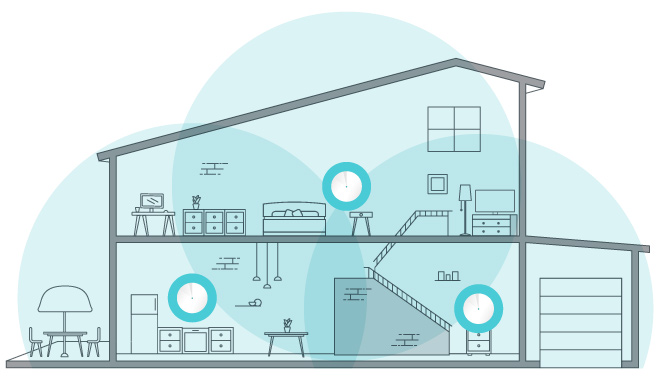
Credit: www.tp-link.com
Benefits Of Mesh Systems
Mesh systems bring many benefits for home and office Wi-Fi. They solve common problems like weak signals and dead spots. These systems create a strong and reliable network that covers large areas. Users enjoy better internet performance and fewer interruptions.
Mesh routers work together to make your wireless connection smooth and simple. Each part of the system helps spread the Wi-Fi signal evenly. This design offers advantages over traditional routers.
Improved Coverage
Mesh systems use multiple units to spread Wi-Fi across your space. This helps cover big homes or offices with strong signals. No more areas where Wi-Fi disappears or slows down. Every corner gets reliable internet access.
Seamless Connectivity
Devices switch between mesh nodes without losing connection. You can move around without Wi-Fi drops or slowdowns. Streaming videos and video calls stay clear and steady. The network feels like one single system.
Easy Expansion
Adding more mesh units is simple and quick. Just place a new node where coverage is weak. The system automatically adjusts and improves the network. This flexibility fits growing homes or changing layouts.
Comparing Mesh And Traditional Routers
Comparing mesh and traditional routers helps you decide the best fit for your home or office. Both serve the same basic purpose: to provide Wi-Fi. Yet, they differ in design, function, and user experience.
This section explores these differences in three key areas: performance, setup, and cost. Understanding these points can guide your choice.
Performance Differences
Traditional routers send Wi-Fi signals from one device. This can cause weak spots far from the router. Mesh routers use multiple units to cover larger areas. Each unit talks to others, creating a strong network. This design reduces dead zones and keeps speed steady. Mesh routers handle many devices better than traditional ones.
Setup And Management
Traditional routers often need manual setup. Configuring settings can be complex for beginners. Mesh systems usually offer easy setup through apps. These apps guide you step-by-step and simplify management. Mesh networks automatically connect units and optimize signals. Managing a mesh system is more user-friendly for most people.
Cost Considerations
Traditional routers usually cost less upfront. They fit well in small spaces or apartments. Mesh systems cost more because they include several units. The price reflects wider coverage and easier use. For large homes or offices, mesh systems may save money by avoiding extra equipment. Smaller spaces might not need the extra cost of mesh.

Credit: www.vsolcn.com
Factors Affecting Wi-fi Speed
Wi-Fi speed depends on many things. These factors affect how fast your internet runs and how strong the signal is. Understanding these helps you choose the best router for your home or office. Mesh routers can help, but other elements also play a big role.
Interference And Obstacles
Walls, floors, and furniture block Wi-Fi signals. Thick materials like concrete or metal cause more trouble. Other electronics, such as microwaves and cordless phones, create interference. This slows down your internet speed and reduces coverage.
Device Compatibility
Older devices may not support the latest Wi-Fi standards. This limits the speed they can reach. Newer devices work better with mesh routers and faster signals. Using compatible devices ensures you get the best connection.
Network Traffic
Many devices using the same network slow down Wi-Fi speed. Streaming, gaming, and downloads use lots of data. Mesh routers help by balancing the load across multiple points. Still, heavy network use affects overall speed and performance.
Choosing The Right Mesh Router
Choosing the right mesh router can improve your home Wi-Fi a lot. It helps spread the signal evenly in every room. Picking a good one depends on your needs and space. Some mesh routers cover bigger areas. Others handle many devices at once. Price is also an important factor to think about.
Coverage Needs
Think about the size of your home. Larger homes need mesh routers with wide coverage. Small apartments might only need a basic set. Consider walls and floors that can block signals. More nodes in a mesh system can help cover dead zones.
Number Of Devices
Count how many devices will connect to Wi-Fi. Phones, laptops, smart TVs, and smart home gadgets add up fast. Some mesh routers support more devices without slowing down. Choose one that can handle your device count easily.
Budget Tips
Mesh routers come in many prices. Decide how much you want to spend. Basic models work well for small homes. Higher-end models offer faster speeds and extra features. Look for sales or bundles to save money. Balance cost with your coverage and device needs.

Credit: www.pcworld.com
Optimizing Mesh Network Performance
Optimizing mesh network performance helps improve speed and coverage. A well-tuned mesh system delivers strong Wi-Fi signals throughout your home or office. Small changes can make a big difference in connection quality and reliability. This section explains key steps to get the best from your mesh router setup.
Placement Strategies
Place mesh nodes in open, central areas for better signal flow. Avoid walls, metal objects, and large furniture that block signals. Keep nodes away from microwaves and cordless phones to reduce interference. Position nodes about two rooms apart to balance coverage and speed.
Firmware Updates
Regularly update your mesh router’s firmware to fix bugs and add features. Updates improve security and enhance network stability. Check for updates through your router’s app or web interface. Set automatic updates if available to keep your system current.
Channel Selection
Select the right Wi-Fi channel to avoid interference from nearby networks. Use router tools to scan and find less crowded channels. Choose channels 1, 6, or 11 for 2.4 GHz to reduce overlap. For 5 GHz, pick channels with the least noise for better performance.
Common Issues And Fixes
Mesh routers offer strong Wi-Fi coverage, but they are not without problems. Users often face issues like connection drops, slow speeds, and device compatibility. Knowing common problems and their fixes helps keep your network smooth. This section covers key issues and simple solutions for mesh router users.
Connectivity Drops
Connection drops happen when the mesh nodes lose contact. This can cause internet interruptions in your home. Place nodes closer to each other to keep strong signals. Avoid walls and metal objects that block signals. Restart nodes regularly to refresh connections. Update firmware to fix bugs causing drops.
Slow Speeds
Slow Wi-Fi speeds slow down your online activities. Many factors cause this, such as distance from nodes or interference. Move closer to a node for better speed. Limit the number of devices using the network at once. Change the Wi-Fi channel to avoid interference. Check if your internet plan supports your speed needs.
Device Compatibility Problems
Some devices do not work well with mesh networks. Older gadgets may struggle to connect or stay online. Update device software to improve compatibility. Use the mesh system’s app to check device status. Separate devices on different bands (2.4GHz or 5GHz) for better performance. Consider upgrading very old devices for smoother use.
Frequently Asked Questions
What Are Mesh Routers And How Do They Work?
Mesh routers are multiple devices working together to create one seamless Wi-Fi network. They use nodes to extend coverage and reduce dead zones. This system improves signal strength across large areas, providing consistent internet speeds everywhere in your home or office.
Are Mesh Routers Better Than Traditional Routers?
Mesh routers offer better coverage and seamless connectivity than traditional routers. They eliminate dead zones and support multiple devices efficiently. However, traditional routers may be sufficient for small spaces. Mesh systems are ideal for large homes or areas with Wi-Fi challenges.
How Much Do Mesh Routers Cost Compared To Regular Routers?
Mesh routers generally cost more than traditional routers. Prices start around $150 and can go up based on features and coverage. Traditional routers are usually cheaper but may lack the advanced coverage and performance benefits mesh systems provide in bigger spaces.
Can Mesh Routers Improve Wi-fi Speed And Reliability?
Yes, mesh routers improve Wi-Fi speed and reliability by distributing signals evenly. They prevent signal drops and maintain strong connections for all devices. This ensures smoother streaming, gaming, and browsing in every corner of your home or office.
Conclusion
Mesh routers offer strong Wi-Fi for larger homes. They spread the signal evenly to reduce dead zones. Setup is usually simple and user-friendly. They can support many devices at the same time. For some, a mesh system costs more than regular routers.
Still, the benefits often outweigh the price. Decide based on your home size and internet needs. Mesh routers suit busy households with many gadgets. They provide steady and fast connections everywhere. Consider mesh routers if your current Wi-Fi drops often.