
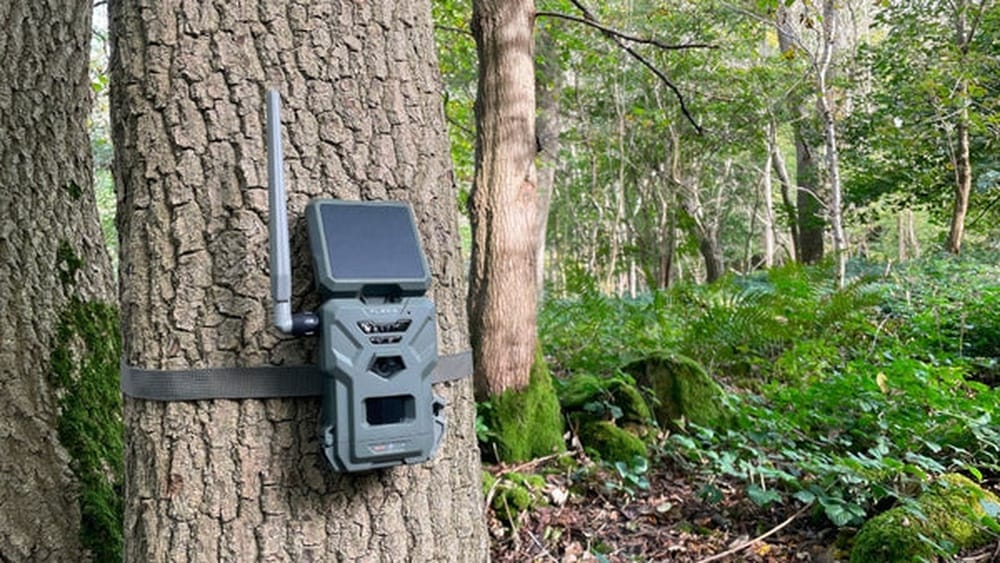
Are Solar Cameras Any Good?
Home security is changing fast. More people want easy ways to keep an eye on their homes, businesses, and farms. One solution that is quickly gaining popularity is the solar-powered camera. These cameras promise to work anywhere, without wiring or monthly bills. But are solar cameras any good? Do they really work in all weather? Can they give the same results as traditional security cameras?
If you’re thinking about upgrading your security or just curious about the technology, this guide is for you. We’ll break down how solar cameras work, their real-world strengths and weaknesses, and who should (and should not) consider them. You’ll also find honest comparisons, practical tips, and answers to common questions.
By the end, you’ll know if solar cameras are a smart choice for your situation—or if you should look elsewhere.
How Do Solar Cameras Work?
Solar cameras use energy from the sun to power themselves. They have a solar panel (often included, sometimes separate) that collects sunlight and turns it into electricity. This electricity charges a built-in battery. The camera uses the battery to run, even at night or on cloudy days.
Most solar cameras also connect wirelessly to your phone or Wi-Fi network. They record video, send alerts, and let you watch live feeds. Some models store recordings on a memory card, while others use cloud storage.
Main Parts Of A Solar Camera
- Solar Panel: Captures sunlight and creates energy.
- Rechargeable Battery: Stores energy for use at night or when it’s cloudy.
- Camera Unit: Includes the lens, motion sensors, and video processor.
- Wireless Module: Connects the camera to your phone or the internet.
- Storage: Either a microSD card slot, cloud storage, or both.
Solar cameras are usually designed for easy installation. You don’t need to run wires for power or data, which is a big reason why people choose them.
Benefits Of Solar Cameras
Why are so many people interested in solar security cameras? Here are the main advantages that make them stand out.
1. Wire-free Installation
You don’t need an electrician or special tools. Just mount the camera and solar panel where they get good sunlight. This is perfect for places far from power outlets, like barns, gates, or backyards.
2. Works In Remote Areas
Since they run on solar power, these cameras are ideal for cabins, farms, construction sites, or rural properties. As long as there’s enough sunlight, the camera will work.
3. Lower Long-term Costs
You don’t pay extra on your electric bill. Most cameras don’t require a monthly fee unless you want cloud storage. There are no wires to replace or maintain.
4. Eco-friendly
Solar cameras use renewable energy. This means you’re reducing your carbon footprint while keeping your property safe.
5. Quick Setup And Relocation
If you move or want to change the camera’s position, it’s simple. Just unscrew and mount it in a new spot.
6. Power Outage Protection
Even if the main power goes out, your solar camera keeps working. The battery stores enough energy for night use or cloudy days.
Key Features To Look For In Solar Cameras
Not all solar cameras are the same. Here are the most important factors to check before you buy:
Battery Size And Quality
A bigger battery means more backup power. High-quality lithium-ion batteries last longer and handle more charge cycles. Look for cameras with at least a 5000 mAh battery if you want overnight operation.
Solar Panel Efficiency
Panels are rated by wattage (W). Higher wattage means faster charging. A 3–6W panel is common for small cameras, but 8–10W is better for places with less sunlight.
Video Resolution
Most solar cameras offer 1080p HD video. Some newer models provide 2K or even 4K. Higher resolution means clearer images, especially for facial recognition or license plates.
Night Vision
Look for infrared (IR) LEDs or color night vision. Good night vision is a must for security after dark.
Motion Detection
Smart cameras use PIR (passive infrared) sensors to spot humans or animals. Better models can filter out small movements (like leaves or insects) to avoid false alarms.
Connectivity
Wi-Fi is standard, but some cameras offer 4G LTE connections for very remote locations. Check if your area has good cellular signal if you need this option.
Storage Options
Some cameras only record when they detect motion (to save battery). Choose a camera with SD card support or reliable cloud storage, depending on your privacy needs.
Weatherproof Rating
A good outdoor camera should be at least IP65-rated (dustproof and water-resistant). For harsh weather, IP66 or IP67 is better.
App And Software Quality
You’ll use the camera’s app to view footage, get alerts, or change settings. Read reviews to make sure the app is user-friendly and reliable.
Comparing Solar Cameras Vs. Traditional Cameras
To help you decide, here’s a clear side-by-side look at how solar cameras compare to regular wired or plug-in wireless cameras.
| Feature | Solar Cameras | Traditional Cameras |
|---|---|---|
| Power Source | Solar panel + battery | Wired (AC/DC) or plug-in |
| Installation | Wire-free, easy DIY | Often needs wiring, pro install |
| Location Flexibility | Anywhere with sunlight | Must be near power outlet |
| Works During Outage | Yes (battery backup) | No (unless on UPS) |
| Maintenance | Clean panel, replace battery (5+ years) | Check wiring, power supply |
| Operating Cost | Low/none (solar power) | Electricity cost |
Insight: Many buyers forget that battery-powered cameras can be affected by cold weather. In freezing climates, battery efficiency drops, so the camera may not last all night unless you choose a high-capacity model.
When Solar Cameras Work Best
Solar cameras are not for everyone. They shine in certain situations and struggle in others. Here’s when they are a great choice:
1. Remote Or Off-grid Locations
If you want security where there’s no power, like a farm gate, remote cabin, or storage shed, solar is usually the only practical option.
2. Temporary Or Mobile Installations
If you need to monitor a construction site, festival, or event for a few weeks or months, solar cameras can be moved and reused easily.
3. Areas With Plenty Of Sunlight
Solar cameras need at least 2–4 hours of direct sun each day. They are most reliable in places with sunny weather.
4. Low To Moderate Security Needs
Solar cameras are perfect for general monitoring, like watching for trespassers, checking animal pens, or seeing who’s at the gate.
When Solar Cameras May Not Be The Best Fit
Even with their advantages, solar cameras have some limitations. Here are times when you might want to look for another solution.
1. Shady Or Dark Locations
If your property is surrounded by tall trees or buildings, solar panels might not get enough energy. The camera may run out of battery quickly.
2. High-security Needs
If you need 24/7 recording, super-high resolution, or advanced analytics, a hard-wired camera with a large local storage drive is more reliable.
3. Extreme Cold Or Wet Climates
While many models are water-resistant, solar batteries lose power faster in freezing weather. In heavy snow or rain, the panel might get blocked.
4. Poor Wi-fi Or Cellular Signal
Solar cameras need a stable connection to send alerts or let you view live feeds. If your area has weak Wi-Fi or cell signal, you may get delays or missed footage.

Credit: naturespy.org
Real-world Performance: What To Expect
Let’s dig into what you can honestly expect from a solar camera in daily use. Many buyers have high hopes, but it’s important to know what’s realistic.
Battery Life
Most good solar cameras can last 1–3 days on a full charge, depending on battery size and how often the camera records. If your area has several cloudy days, battery backup is critical. Some models let you add an extra battery or larger panel for more runtime.
Video Quality
Expect clear, sharp video in daylight. Night vision is usually good within 30–50 feet, but not as crisp as high-end wired cameras. Some solar cameras now offer color night vision with built-in spotlights.
Motion Alerts
Most cameras only record or send alerts when motion is detected to save battery. Some allow you to adjust motion zones or sensitivity. However, sudden weather changes (like wind or rain) can sometimes trigger false alerts.
App Experience
Basic features like live view, two-way talk, and motion clips are standard. More advanced options—like person detection or activity zones—may cost extra or require a subscription.
Durability
Good models last 2–5 years with basic care. The most common failure is battery aging. Cleaning the solar panel every few months keeps charging strong.
Non-obvious insight: Many users don’t realize that solar cameras need their panels tilted at the correct angle for your location. A panel pointed straight up may not get enough winter sun. Adjusting the tilt by season can greatly improve charging.
Pros And Cons At A Glance
For a quick summary, here’s a table showing the main pros and cons of solar cameras:
| Pros | Cons |
|---|---|
| Easy, wire-free setup | Needs good sunlight |
| No ongoing power cost | Battery performance drops in cold |
| Works in remote locations | Limited continuous recording |
| Eco-friendly | Requires panel cleaning |
| Portable and flexible | Not ideal for high-security needs |
Common Solar Camera Myths
There are some misunderstandings about solar cameras that can lead to disappointment. Let’s clear up the most common ones.
Myth 1: “solar Cameras Work Even In Complete Shade”
Fact: No sunlight means no charging. Even the best panels need at least some direct or strong indirect light.
Myth 2: “they Record All The Time, Like Wired Cameras”
Fact: Most solar models only record on motion to save battery. Continuous recording drains the battery quickly.
Myth 3: “any Solar Panel Will Work”
Fact: The panel’s wattage and quality matter. Low-quality panels may not deliver enough charge, especially on cloudy days.
Myth 4: “solar Cameras Are Maintenance-free”
Fact: You need to clean the panel every few months, and the battery may need replacing after a few years.
Myth 5: “wi-fi Always Works Far From The House”
Fact: Wi-Fi range is often less than 100 feet outdoors. For remote spots, you may need a camera with a 4G LTE SIM card.
Top Solar Camera Brands And Models (2024)
Some manufacturers stand out for their reliability, app quality, and battery life. Here’s a quick look at popular models:
- Reolink Argus Series: Known for strong battery life, clear video, and easy setup. The Argus 3 Pro and Argus PT (pan-tilt) are favorites for their features and value.
- Arlo Essential XL Spotlight: Offers color night vision, smart alerts, and a sturdy solar panel. App is user-friendly.
- EufyCam S220/S230: No monthly fees for local storage. Long battery life and sharp video.
- Ring Stick Up Cam Solar: Great integration with the Ring app and Alexa, but requires a subscription for cloud storage.
- Soliom S600: Affordable, with pan/tilt and two-way talk. Good for large outdoor areas.
- Zumimall Solar Camera: Value pick, with wide-angle lens and reliable motion alerts.
- Wyze Cam Outdoor v2 with Solar Panel: Budget-friendly, with solid app support and basic features.
Non-obvious insight: Some “no-name” brands offer cheap solar cameras, but support and app updates can disappear quickly. Stick with brands that have good reviews and regular software updates.

Credit: www.youtube.com
Installation Tips For Best Results
Getting the most out of your solar camera isn’t just about buying the right model. Placement and setup matter just as much.
1. Maximize Sun Exposure
Mount the solar panel facing south (in the US) at a 30–45 degree angle. Avoid shadows from trees, eaves, or walls.
2. Mount High Enough
Place the camera at least 7–8 feet above the ground to cover a wide area and prevent tampering.
3. Test Wi-fi Or Signal First
Before drilling holes, check your phone’s signal strength at the spot. A weak signal means missed alerts.
4. Clean The Panel Regularly
Dirt, snow, or leaves can block sunlight. Wipe the panel clean every few months for best charging.
5. Adjust Motion Sensitivity
Start with medium settings to avoid too many false alarms, then tweak as needed.
How To Choose The Right Solar Camera
With so many options, here’s a simple checklist to help you pick the best camera for your needs.
- Location: How much sun does the spot get? Is it within Wi-Fi range?
- Security Needs: Do you need alerts only, or 24/7 recording?
- Video Quality: Is 1080p enough, or do you need higher resolution?
- Night Vision: Check range and if you want color or black-and-white.
- Storage: Do you want local SD card, or are you okay with cloud storage?
- App Reliability: Read recent reviews for bugs or connection problems.
- Expandability: Will you add more cameras later? Some brands allow linking multiple cameras in one app.
- Budget: Solar cameras range from $70 to $250+ depending on features.
Buyer mistake to avoid: Don’t buy the cheapest camera without checking reviews. Poor video quality, weak apps, or unreliable batteries can make a “bargain” camera useless.
The Hidden Costs And Limitations
While solar cameras are low-cost to operate, there are some extra costs you should know about:
- Replacement Batteries: Most last 2–5 years, then need replacing ($20–$50).
- Cloud Storage Fees: Optional, but can range from $2–$10/month if you want full access to recordings.
- Extra Solar Panels: Some brands charge extra for a bigger or second panel.
- Mounting Hardware: Special mounts for poles, trees, or gutters often cost extra.
Some models may also throttle video quality or alert speed to conserve battery. Always check the specs before buying.
Are Solar Cameras Secure?
Security means more than just capturing footage. Is your data safe? Can hackers access your camera?
Most reputable brands use encrypted connections and regular firmware updates. However, cheap or off-brand cameras may have weak security. Always:
- Change the default password right away.
- Keep the app and firmware updated.
- Avoid cameras with poor online reviews about hacking.
For sensitive areas (like inside your home), consider wired models for extra privacy.

Credit: www.ibz-kunststofftechnik.de
Environmental Impact
Solar cameras are praised for being eco-friendly, but what does that mean in practice?
- Lower Energy Use: Each camera saves about 2–5 kWh per month compared to a plug-in camera.
- Longer Life: No wires means fewer resources used for installation.
- Battery Recycling: Old batteries should be recycled properly to prevent pollution.
For more on solar technology’s impact, see the EPA Green Power Market.
Latest Innovations In Solar Camera Tech
The solar camera market is growing fast. Here are some new features you’ll see in 2024:
- AI Person Detection: Distinguishes humans from animals or cars for smarter alerts.
- Pan-Tilt-Zoom (PTZ): Some models can turn or zoom remotely for better coverage.
- Color Night Vision: With built-in spotlights, you can see in color even at night.
- Longer Range Wi-Fi: New antennas boost connection distance.
- Integrated Sirens and Lights: Deter intruders automatically when motion is detected.
These features are bringing solar cameras closer to what wired security systems offer—without the hassle of wires.
Frequently Asked Questions
How Long Do Solar Camera Batteries Last?
Most solar camera batteries last 2 to 5 years before needing replacement. Daily battery life depends on camera use, sunlight, and battery size. With good sun, a camera can run day and night without problems.
Can Solar Cameras Work In Winter Or Rainy Seasons?
Yes, but with limits. Solar panels make less power in cloudy or short winter days. Look for a camera with a large battery and panel. Clean snow and dirt off the panel often. In dark, rainy climates, you may need extra charging or a backup plan.
Do Solar Cameras Need Internet To Work?
Most solar cameras need Wi-Fi or 4G LTE to send alerts and let you watch live feeds. Some models can record to an SD card without internet, but you must take out the card to view the videos.
Are Solar Cameras Easy To Install?
Yes! Most people can set them up with a screwdriver and ladder. The hardest part is mounting the camera and panel in a sunny, secure spot. No wiring makes it much easier than wired systems.
Is The Video Quality As Good As Wired Cameras?
Solar cameras usually have clear 1080p or 2K video. Wired cameras can offer higher 4K quality and more advanced features. For most home uses, solar cameras are sharp enough, but for critical security or large properties, wired cameras may be better.
Solar cameras are a smart, flexible solution for many people. They offer true wire-free security, low running costs, and eco-friendly operation. However, they’re not perfect for every situation. If your property gets enough sun and you want an easy, DIY option, a solar camera is a great choice.
For more demanding needs—like 24/7 recording, harsh weather, or high-security zones—a wired camera may still be best. Take time to match your needs to the right technology, and you’ll enjoy reliable, modern security for years to come.