
Solar security cameras are becoming a common sight in neighborhoods, on farms, and at construction sites. Their promise is simple: reliable security monitoring without the need for electrical wiring. But are solar panel security cameras really worth it? Many homeowners and business owners are curious, but also cautious. A camera that works on sunlight sounds ideal, but there are real questions about performance, cost, and reliability.
Let’s explore the facts about solar-powered security cameras. This guide will show how they work, their real-world pros and cons, and whether they make sense for your needs. You’ll get practical examples, detailed comparisons, and insights most beginners overlook. By the end, you’ll know if a solar panel security camera is the right choice for your property.
How Solar Panel Security Cameras Work
Solar panel security cameras use solar energy to power their surveillance system. Each camera comes with a small solar panel—sometimes built-in, sometimes attached with a cable. The panel collects sunlight and converts it to electricity, which charges a battery inside the camera. This battery stores enough energy to keep the camera working even at night or during cloudy weather.
Most solar cameras are wireless. They connect to your Wi-Fi or use a cellular network to send live video and alerts to your phone or computer. Some record footage to a memory card, while others store video in the cloud.
Key Parts Of A Solar Security Camera System
- Solar panel: Captures sunlight and turns it into electricity.
- Rechargeable battery: Stores power for use when there is no sun.
- Camera unit: Records video, detects motion, and often has night vision.
- Connectivity: Uses Wi-Fi or cellular data for remote access and alerts.
- Mounting kit: Lets you install the camera on walls, roofs, or poles.
Basic Operation
- During the day, the solar panel charges the battery.
- The camera runs on battery power, even at night.
- When motion is detected, the camera records and can send you an alert.
- Some cameras let you watch live video anytime from your phone.
Example: A camera with a 5-watt solar panel might charge enough in four hours of sunlight to work all day and night, depending on how often it records or streams video.
Advantages Of Solar Panel Security Cameras
Many people choose solar cameras for their flexibility and cost savings. But there are other important advantages that may surprise you.
1. Easy Installation
You don’t need to run wires or hire an electrician. Most solar cameras can be installed with simple tools. This means you can put them in places far from your house—like a shed, gate, or field—where there is no power outlet nearby.
2. Low Operating Costs
After you buy the camera, you usually pay nothing for electricity. The sun does the work. Over several years, this can save you money, especially if you would need to hire someone to run electrical cables for a wired camera.
3. Reliable During Power Outages
Because they use batteries, solar security cameras keep working even if the power goes out. This is a big advantage in areas with unreliable electricity or frequent storms.
4. Environmentally Friendly
Solar cameras use renewable energy. If you want to reduce your carbon footprint or just use less grid electricity, they are a smart choice.
5. Flexible Placement
You can put a solar camera almost anywhere with sunlight. Need to watch a remote driveway or a back fence? As long as the solar panel gets enough sun, you’re not limited by where your electric lines run.
6. Expandability
If you need more coverage, you can add more solar cameras without worrying about wiring or overloading your home’s power system.
Non-obvious insight: Many solar cameras are portable. If you move, you can take them with you and set them up in your new location.

Credit: www.aosulife.com
Disadvantages And Limitations
Solar security cameras are not perfect for every situation. Here are some of the main drawbacks to consider.
1. Dependent On Sunlight
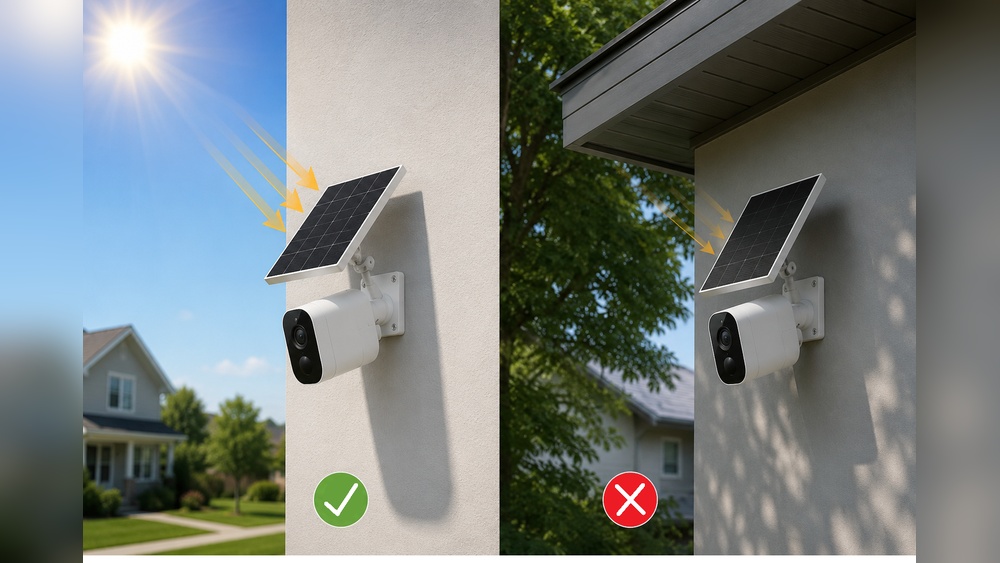
If your camera is in the shade, or you live in a region with long winters and little sun, the battery may not stay charged. Poor placement or bad weather can reduce performance.
2. Limited Power For Some Features
Solar cameras often have to balance power use. Features like continuous 24/7 recording, powerful night vision, or high-resolution video use more energy. Some solar cameras only record when they detect motion to save battery.
3. Battery Maintenance
Batteries wear out over time. Most last between two and five years. Replacing a battery is usually cheaper than rewiring, but it is a cost to keep in mind.
4. Wi-fi Or Cellular Signal Needed
Solar power doesn’t help if your camera can’t connect to the internet. In remote areas, you may need a camera with a built-in SIM card for cellular data, which can add to your monthly cost.
5. Initial Price
Solar cameras can be more expensive up front than simple wired models. You pay for the solar panel, bigger battery, and wireless features.
6. Security Concerns
Because solar cameras are often installed outdoors and can be portable, they may be more vulnerable to theft or tampering. Some models have anti-theft screws or alarms, but not all.
Non-obvious insight: Dust or bird droppings on the solar panel can reduce charging efficiency. Regular cleaning is a small but important maintenance task.
Comparing Solar Security Cameras To Wired And Plug-in Models
Choosing the right security camera depends on your property and your priorities. Let’s look at some important differences.
| Feature | Solar Security Camera | Wired Security Camera | Plug-in (AC) Camera |
|---|---|---|---|
| Installation | Easy, no wiring | Professional wiring needed | Needs power outlet |
| Location Flexibility | Anywhere with sun | Limited by wiring | Limited by outlets |
| Works During Power Outage | Yes (battery) | No (unless has backup) | No (unless has backup) |
| Maintenance | Battery replacement | Little (unless wired issues) | Little (unless power issues) |
| Upfront Cost | Medium to high | High (wiring cost) | Low to medium |
| Continuous Recording | Limited | Yes | Yes |
| Best For | Remote/outdoor areas | Permanent, high-traffic spots | Home interiors, garages |
Where Solar Security Cameras Make The Most Sense
Solar panel cameras are not always the best option. But in some cases, they are ideal.
1. Remote Locations
If you need to monitor a farm, construction site, or cabin where there is no power, solar cameras are often the only practical solution.
2. Large Properties
For big yards, fields, or parking lots, running wires can be expensive or impossible. Solar cameras let you cover more ground for less money and effort.
3. Temporary Installations
If you need security during a short-term event or while building a new house, you can set up solar cameras and remove them later.
4. Rental Properties
Landlords often don’t want to change wiring or drill holes in walls. Solar cameras offer a non-permanent way to add security.
5. Areas With Unstable Power
In places where the electricity goes out often, a solar camera will keep recording when other systems fail.
Example: A ranch in Arizona uses solar cameras on its perimeter fences because there are no power lines nearby. The cameras are mounted on poles and send video over cellular data to the owner’s phone.
Key Features To Look For
Not all solar panel security cameras are the same. Here’s what matters most when choosing one.
1. Solar Panel Size And Efficiency
A bigger or more efficient panel will charge faster, especially important in areas with less sunlight. Check the watt rating and read reviews about real-world performance.
2. Battery Capacity
Look for cameras with at least 4000 mAh battery or higher. A bigger battery stores more energy for cloudy days or nights with lots of activity.
3. Video Quality
High-definition (HD) video (at least 1080p) is standard now, but some models offer 2K or 4K for sharper images. Consider your needs—higher quality uses more power and storage.
4. Motion Detection
Smart motion detection can reduce false alarms and save battery. Some cameras let you adjust sensitivity or set detection zones.
5. Night Vision
Infrared LEDs allow the camera to see in the dark. Check the stated night vision range, usually between 20 to 100 feet.
6. Connectivity Options
Some solar cameras work only with Wi-Fi, others offer 4G LTE cellular connections for truly remote sites. Make sure your location has the needed signal.
7. Storage Options
You can choose between:
- Local storage: Usually a microSD card (good for privacy, but may fill up).
- Cloud storage: Video is sent to a secure server (often requires a monthly fee).
8. Weatherproof Rating
Look for cameras with an IP65 or higher rating. This means they can handle rain, dust, and heat.
9. App And Alerts
A good app lets you view live video, get instant alerts, and review recorded footage. Check user reviews for app reliability.
Non-obvious insight: Some solar cameras offer two-way audio, so you can talk to visitors or warn off intruders in real time.

Credit: www.arlo.com
Real-world Performance: What To Expect
It’s important to set realistic expectations. Solar panel security cameras work best when they get enough sunlight and are matched to the right task.
Video Quality
Most solar cameras now provide clear HD video in daylight. Night vision is often good for basic monitoring, but small details (like license plates) may not be as sharp as with wired cameras.
Response Time
When motion is detected, most solar cameras send a push notification within 2-5 seconds. However, a weak Wi-Fi or cellular signal can cause delays.
Battery Life
With average use (5-15 motion events per day), a good solar camera can run indefinitely as long as it gets at least 2-4 hours of direct sunlight. If there are many cloudy days, or the camera is triggered very often, the battery may need help from a USB charger.
Durability
Quality solar cameras can last for years outdoors. Extreme cold can reduce battery efficiency, so check the operating temperature range.
Example: In Seattle, a solar camera with a 10,000 mAh battery and a 5-watt panel worked through winter, but needed manual charging twice when there was no sun for a week.
Cost Breakdown: Are Solar Security Cameras A Good Value?
Let’s look at the true costs, not just the price tag.
Upfront Costs
- Solar security camera: $80–$300 per camera, depending on features.
- Wired camera: $40–$150 per camera, plus $200–$1,000 for installation.
- Plug-in camera: $30–$200 per camera.
Ongoing Costs
- Solar camera: Usually none, except battery replacement every few years ($20–$50).
- Wired camera: Minimal, unless wires are damaged.
- Plug-in camera: Small increase in electric bill.
Cloud Storage Or Data
- Cloud video storage: $3–$10/month (optional).
- Cellular data (for 4G cameras): $5–$20/month, only for remote sites.
Maintenance
- Solar panel cleaning: Once every 2–3 months.
- Battery replacement: Every 2–5 years.
Real Value
If you need to secure a place with no power, a solar camera is often the most cost-effective choice. For a regular home near power outlets, the value depends on how much you want to avoid wiring and how important backup power is to you.
Credit: www.truelook.com
Common Mistakes When Buying Solar Security Cameras
Many first-time buyers make errors that reduce camera performance or satisfaction.
- Choosing too small a solar panel: If your area has many cloudy days, a bigger panel is a must.
- Ignoring battery size: A small battery runs out fast, especially at night or during storms.
- Placing the camera in shade: Even a little shade can cut charging by half.
- Overlooking Wi-Fi or cellular signal: No signal, no alerts or remote viewing.
- Buying the cheapest model: Cheaper cameras often have poor night vision, weak batteries, or unreliable apps.
- Not cleaning the panel: Dirt or snow blocks sunlight and drains the battery.
Tip: Before buying, check your location’s average sunlight hours per day. Southern US states usually get more than six hours; northern states may get less than four in winter.
Best Practices For Installing And Using Solar Security Cameras
A little planning makes a big difference in how well your camera works.
1. Choose A Sunny Spot
Mount the solar panel (or the camera, if the panel is built-in) where it gets direct sunlight for as many hours as possible. South-facing spots are best in the US.
2. Angle The Panel Correctly
Tilt the panel at an angle equal to your latitude for year-round performance. Adjust if you notice battery problems in winter.
3. Secure The Camera
Use tamper-proof screws or mounts if theft is a concern. Some users add a sign warning that cameras are in use.
4. Test Wi-fi Or Cellular Signal
Before final installation, use your phone to check signal strength at the camera location.
5. Set Up App Alerts
Customize your alert settings so you only get notified about real events, not every moving branch.
6. Regular Maintenance
Clean the solar panel every few months and check the camera lens for dirt or spider webs.
7. Check The Battery
If the app shows low battery often, consider moving the panel, adding a second panel, or charging manually during bad weather.
Non-obvious insight: Some users install the solar panel several feet away from the camera, running a cable between them. This lets you place the camera in the best spot for viewing, and the panel in the best spot for sunlight.
Security And Privacy Considerations
Solar security cameras increase safety, but it’s smart to think about privacy and data security.
Data Encryption
Choose cameras that use end-to-end encryption for video, especially with cloud storage. This keeps your footage private.
User Access
Set strong passwords for your camera app and change them regularly. Give access only to trusted people.
Privacy Zones
Many cameras let you block out areas from recording, like neighbor’s windows. Use this feature to avoid legal issues.
Physical Security
Install cameras out of easy reach, or use anti-theft brackets. Some models alert you if the camera is moved.
Tip: Always check your local laws about video and audio recording.
Alternatives To Solar Panel Security Cameras
If a solar camera isn’t right for you, there are other options.
Wired Cameras With Battery Backup
Some traditional cameras have built-in batteries. They use grid power but keep working during outages.
Plug-in Wi-fi Cameras
Great for indoor use or places with easy access to outlets.
Trail Cameras
Used by hunters, these battery-powered cameras are designed for remote use. Most do not stream video but save footage to a memory card.
Professional Monitoring Systems
Some security companies offer cellular or battery-powered cameras as part of a monitored package. This is more expensive but includes emergency response.
Example: A homeowner uses a solar camera for the backyard gate and a wired camera for the front door, combining the strengths of both.
Recent Innovations And Trends
Solar security cameras are improving quickly. Here’s what’s new:
- Smart AI motion detection: Reduces false alarms by recognizing people, animals, and cars.
- Longer-lasting batteries: New lithium batteries work better in cold weather and last longer.
- Integrated floodlights and alarms: Some cameras include bright lights or sirens to scare off intruders.
- Better app integration: Many cameras now work with smart home systems like Alexa and Google Assistant.
- Expandable solar panels: Some brands let you add more panels for extra charging power.
Non-obvious insight: Some companies are testing solar cameras with built-in 5G support for faster video uploads and better coverage in rural areas.
Case Studies: Real-world Examples
Rural Farm Security
A dairy farm in Wisconsin installed five solar security cameras around the property. The cameras are placed at the barn, entrance gate, and storage sheds—none of which have power outlets. The owner gets instant alerts when vehicles arrive, and the system has worked through snow, rain, and power outages.
Annual maintenance is limited to cleaning the panels and replacing one battery after three years.
Construction Site Monitoring
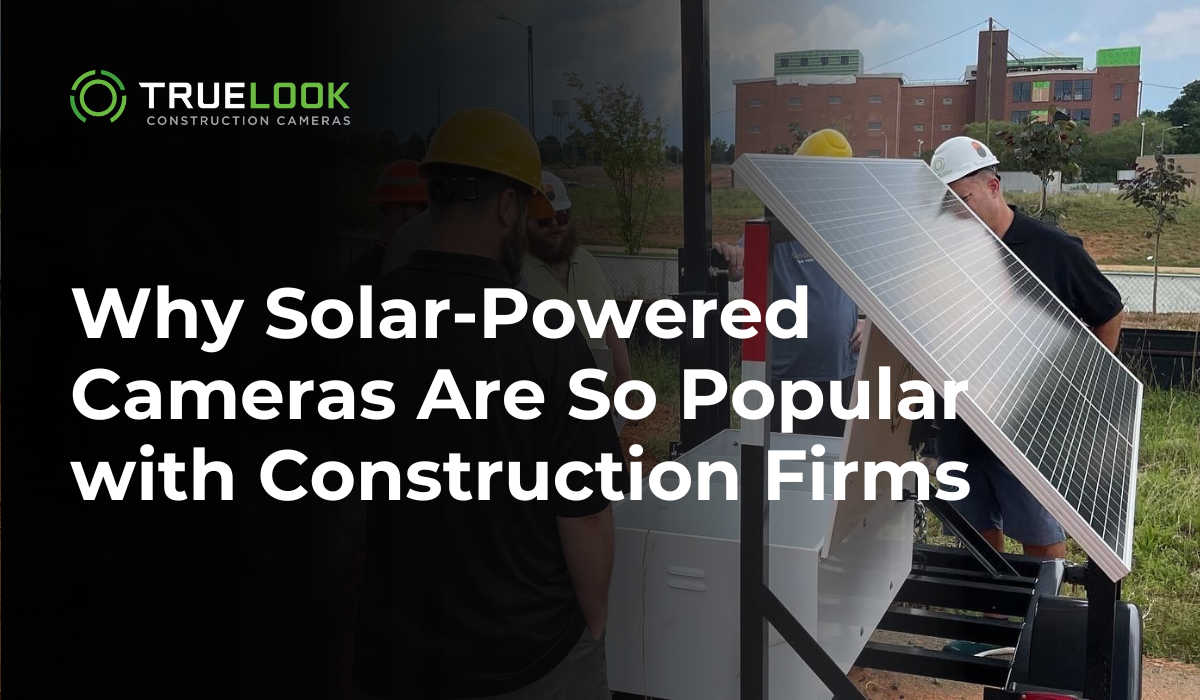
A contractor uses solar cameras on a new building site. The cameras are mounted on portable stands and moved as construction progresses. This prevents theft of tools and materials. The system uses a cellular connection, so no Wi-Fi is needed.
When the project is complete, the cameras are moved to the next site.
Suburban Homeowner
A homeowner wanted to monitor a backyard gate far from the house. Running power would have cost $600. Instead, a solar camera was installed for $150. The camera is checked weekly and the solar panel is cleaned every two months.
The camera has operated for two years with only one battery replacement.
Future Outlook
Solar panel security cameras are expected to become even more popular as technology improves. Panels are getting more efficient, batteries are lasting longer, and smart features are reducing false alarms. As more people look for eco-friendly and flexible security options, solar cameras will likely play a bigger role in home and business protection.
For a deeper look at how solar power is changing security and other industries, you can visit the Wikipedia page on solar power.
Frequently Asked Questions
How Long Does A Solar Panel Security Camera Battery Last?
Most batteries last between 2 and 5 years before needing replacement. How long each charge lasts depends on sunlight, camera use, and battery size. With enough sun, a camera can run for months without manual charging.
Do Solar Security Cameras Work In Winter Or Rainy Weather?
Yes, but performance can drop if there is little sunlight for several days. Choose a model with a large battery and efficient panel, and consider manual charging during long periods of bad weather.
Are Solar Security Cameras Easy To Install?
Yes. Most are DIY-friendly and come with mounting kits. You only need basic tools and a ladder. No wiring is needed, but check your Wi-Fi or cellular signal before choosing a location.
Can I Use A Solar Security Camera Indoors?
It’s possible, but usually not practical. The solar panel needs direct sunlight, which is hard to get inside. Plug-in cameras are better for indoor use.
Is Cloud Storage Necessary For Solar Security Cameras?
No, but it’s helpful. Many solar cameras support local storage on a microSD card, but if the camera is stolen, the footage is lost. Cloud storage keeps your video safe but may require a monthly fee.
Solar panel security cameras aren’t perfect for every situation, but for many people, they offer a powerful mix of flexibility, reliability, and eco-friendly operation. By understanding their strengths and limits, you can make a smart decision for your home or business security.