
Remote Play sounds simple, but actually playing your PlayStation games away from the TV can be frustrating. You might have tried connecting a controller to your phone or laptop, only to find lag, awkward layouts, or buttons that just don’t feel right.
Choosing a controller for PS Remote Play is confusing because there are so many options—and not all of them work well on every device. Some focus on features, others on price, and it’s hard to know what really matters until you’re stuck with the wrong one.
Trade-offs between comfort, compatibility, and extra functions aren’t always obvious.
This guide will help you cut through the noise and find the controller that actually fits how and where you want to play.
What Matters Most For Ps Remote Play?
Compatibility is key. Not every controller pairs smoothly with every device you might use for Remote Play. Comfort and layout also matter, especially if you plan on longer sessions. Features like haptic feedback, programmable buttons, or built-in audio can be nice, but only if you’ll actually use them.
Price can range from budget to premium, but expensive doesn’t always mean better for your situation.
Common Mistakes When Choosing
Many buyers grab the cheapest controller or the one with the most features, then run into issues with pairing, lag, or awkward feel. Others overlook how often they switch between devices—or forget to check if their favorite games support all functions.
It’s easy to get caught up in specs and miss what you’ll actually use day to day.
Below, you’ll find a range of controllers that stand out for different reasons—whether you care about price, comfort, or switching between devices. Each one was picked to help with a specific kind of Remote Play experience.
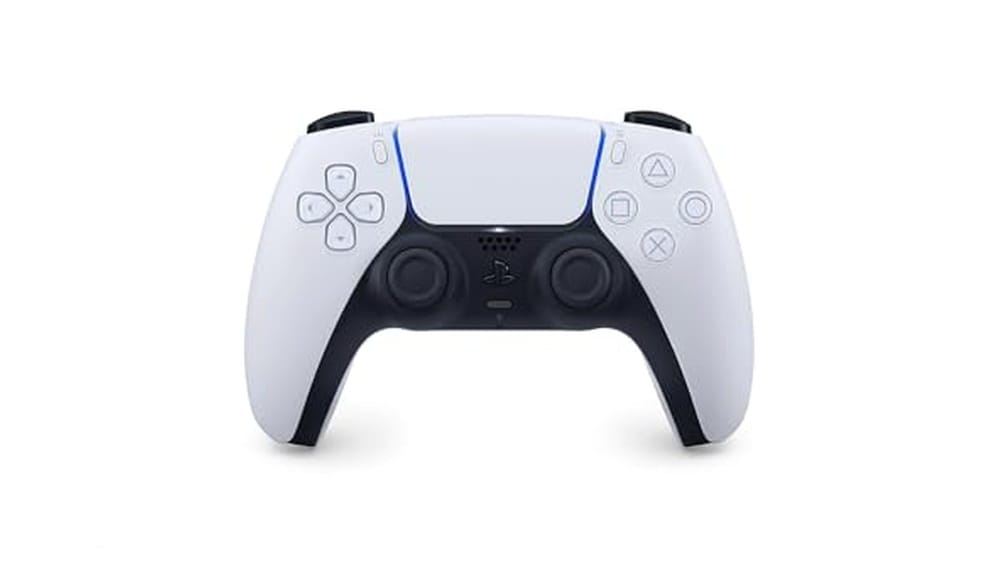
Playstation Dualsense Wireless Controller
For seamless gaming, the PlayStation DualSense Wireless Controller stands out as the Best Controller for Ps Remote Play thanks to its cross-device compatibility and immersive features.

The PlayStation DualSense Wireless Controller is designed to work with PS5, PC, Mac, and mobile devices, solving the hassle of switching between platforms. Its adaptive triggers and haptic feedback mean you get a more responsive gaming experience, which is a major plus for remote play sessions.
In everyday use, it feels comfortable and balanced in your hands, making long gaming sessions less tiring. The built-in microphone and easy headset connection add convenience for online play, while Bluetooth and USB-C give you flexibility to connect wherever you need.
You get reliable performance and a familiar PlayStation layout, so you can focus on the game instead of the controls.
Why Gamers Like This Controller
- Works with PS5, PC, Mac, Android, and iOS
- Haptic feedback for immersive gaming
- Adaptive triggers enhance realism
- Built-in microphone for instant chat
- Easy headset connection with 3.5mm jack
- Simple Bluetooth or USB-C setup
- Comfortable grip for long sessions
What To Consider Before Buying
- No custom button mapping for advanced users
- White color may show wear more easily
- Best features require compatible games
What I’d Tell A Friend
This controller is a great fit if you want to play PlayStation games remotely or switch between devices without fuss. It removes the hassle of juggling multiple controllers and keeps your experience consistent, whether you’re on console, PC, or mobile.
For the smoothest results, keep a USB-C cable handy when switching devices.
You can count on reliable connections and a familiar feel, which means fewer surprises when you launch your favorite game. If you value comfort and want immersive features like haptic feedback during remote play, this is a strong pick. I appreciate how it just works—no complicated setup or steep learning curve.
| Best for | Why |
|---|---|
| Remote Play on Multiple Devices | Seamlessly connects to PS5, PC, Mac, and mobile |
| Gamers Who Value Immersion | Haptic feedback and adaptive triggers add realism |
| Online Play with Friends | Built-in mic and headset jack simplify communication |
| Those Who Prefer PlayStation Layout | Familiar design makes switching easy |
Dualsense Wireless Controller Sterling Silver
The best controller for PS Remote Play, offering immersive feedback and seamless multi-device connectivity.

The PlayStation DualSense Wireless Controller in Sterling Silver is designed to enhance your gaming experience, especially when using PS Remote Play. It replaces traditional rumble motors with dual actuators for responsive vibrations that simulate real in-game sensations, making gameplay more engaging and precise.
Using this controller feels natural and comfortable, with an intuitive layout and adaptive triggers that respond to your actions. Its Bluetooth pairing and USB Type-C connectivity allow smooth play across multiple devices, ensuring consistent performance whether on PC, Mac, or Apple devices.
Key Benefits For Remote Play
- Dynamic vibrations for immersive feedback during gameplay
- Built-in microphone and 3.5mm jack for easy communication
- Adaptive triggers and enhanced sticks for precise control
- Bluetooth pairing with iPad, iPhone, Mac, and Apple TV
- USB Type-C support for wired or wireless multi-device use
- Comfortable ergonomic design for long gaming sessions
- Iconic two-tone design with reimagined light bar
Considerations Before Buying
- May feel heavier compared to older controllers at 0.94 pounds
- Advanced features like adaptive triggers require compatible games
- No included charging cable in some packages
When This Controller Makes Sense
This controller is ideal for gamers who frequently use PS Remote Play and want a tactile, immersive experience that bridges multiple devices. It removes the hassle of switching controllers or missing key feedback, so your remote sessions feel as smooth as local play.
To get the best results, pair it via Bluetooth for wireless freedom but keep a USB Type-C cable handy for uninterrupted play during longer sessions. Its reliable build and familiar layout help reduce surprises and let you focus on the game.
| Best for | Why |
|---|---|
| PS Remote Play users | Offers adaptive triggers and vibration feedback that enhance remote gaming immersion |
| Multi-device gamers | Bluetooth and USB-C connectivity support seamless play on PC, Mac, and Apple devices |
| Online multiplayer chat | Built-in microphone and headset jack facilitate clear communication |
| Long gaming sessions | Ergonomic design reduces hand fatigue and maintains comfort |
Nonbliep Rgb Wireless Ps5 Controller
Best Controller for Ps Remote Play for players wanting seamless device switching and immersive gameplay across PS5 and PC.

The Nonbliep RGB Wireless PS5 Controller is designed for gamers who want effortless pairing and reliable control for both PS5 and PC. Switching devices is simple, letting you jump between your favorite console and PC games with no extra drivers or hassle.
Its RGB lighting gives your gaming setup a personal touch, while programmable buttons offer extra flexibility for custom combos.
Using this controller feels natural and responsive, especially for fast-paced shooters or story games. Dual vibration and a 6-axis gyro add more immersion, so every action feels crisp and realistic. You can enjoy long sessions without worrying about stick drift thanks to the advanced joystick technology.
It’s a solid pick for anyone who wants consistency and quick setup every time.
Where This Controller Excels
- Instant plug & play connection on PS5 and Windows PC
- Programmable buttons and turbo mode for faster combos
- Vivid 9-mode RGB lighting for a customized look
- Dual haptic feedback and 6-axis gyro for immersive play
- Built-in 3.5mm audio jack and speaker for direct sound
- High-precision, drift-resistant hall sensor joysticks
Consider Before Buying
- No Bluetooth connectivity; requires USB-C for initial setup
- RGB lights may not appeal to minimalists
- Only available in red color option
What I’d Tell A Friend
This controller is ideal for gamers who often switch between PS5 and PC and want features that make every session smoother. It takes away the hassle of complicated pairing and lets you focus on your game, not your gear. If you like customizing your setup or programming shortcuts for complex moves, this will fit right in.
For best results, use the turbo mode in games that require fast repeated actions—it really helps during boss fights or competitive rounds. With its solid build and reliable joysticks, you’ll have fewer surprises and more consistent performance over time. I like the peace of mind that comes from not worrying about stick drift after long gaming sessions.
| Best for | Why |
|---|---|
| Multi-device gamers | Quick switching between PS5 and PC without drivers |
| Action/FPS players | Accurate aiming and immersive feedback with gyro and dual vibration |
| Gamers who want customization | Programmable buttons and RGB lighting for personal setups |
| Long-session players | Drift-resistant joysticks for reliability over time |
Okhaha Wireless Ps3 Controller 2-pack
A top pick for Best Controller for Ps Remote Play with true wireless freedom and strong compatibility for PlayStation 3 and PC users.

The OKHAHA Wireless PS3 Controller 2-Pack is designed for PlayStation 3 and PC gamers who want reliable wireless play without complicated setup. Plug and play functionality makes it simple to get started, and the bundle includes two controllers and charging cables—solving the need for backups or two-player action.
In real use, the controllers feel responsive and comfortable, thanks to sensitive buttons and 360-degree analog sticks. The double shock and motion sensor features add immersion, making gaming sessions more engaging and consistent. You spend less time troubleshooting and more time playing.
What Stands Out For Gamers
- True wireless connection for PS3—no cords needed
- Works with PC (Windows 7/8/10) using included USB cable
- Double shock and motion sensing for immersive play
- Long battery life (5–8 hours) with auto-sleep to save power
- Pack of two controllers—great for multiplayer
- Quick, zero-delay button response
- Durability tested for long-term use
Consider Before Buying
- PC play requires a wired USB connection
- Not compatible with PlayStation 4 or newer systems
- Medium size may not fit very large hands comfortably
Where This Shines
This controller set is best for PS3 gamers who want to jump right into remote play without fussing over setup or pairing issues. It’s also handy for families or friends who need a reliable second controller without buying an expensive official model.
The auto-sleep function helps you avoid running out of battery unexpectedly, reducing hassle.
If you want simple, consistent performance with the option to use on PC, this pack removes the guesswork from your setup. My tip: keep both controllers charged so you’re always ready for a long gaming session. With lifetime after-sales support included, you can play with more confidence and fewer surprises.
| Best for | Why |
|---|---|
| PS3 Remote Play Fans | Wireless, immersive controls with plug-and-play simplicity |
| PC Gamers (Windows 7/8/10) | Easy USB connection for PC compatibility |
| Couch Co-op or Family Play | Comes as a 2-pack, ready for multiplayer sessions |
| Gamers Needing Durability | Tested for 10 million button strokes for long-term use |
Playstation Dualsense Wireless Controller Midnight Black
Best Controller for Ps Remote Play if you want seamless control and flexibility for gaming across PC, PlayStation, and mobile devices.

The PlayStation DualSense Wireless Controller Midnight Black is designed for gamers who want comfortable, reliable control while using PS Remote Play on their PC. It pairs easily with Windows via Bluetooth or the included USB Type-C cable, letting you play while charging or wirelessly.
The controller supports over 10,000 Steam games, so you can use it beyond just PlayStation streaming.
Using this controller for PS Remote Play feels smooth and natural, whether you’re on your PC, Mac, or smartphone. Switching between different devices is simple, and you can stay connected to up to four Bluetooth devices. You don’t have to worry about complicated setups, and updating the firmware is straightforward with the PlayStation Accessories app.
What Sets It Apart
- Pairs quickly with Windows, Mac, PS5, and smartphones
- Supports both Bluetooth and wired USB connections
- Comfortable grip for long gaming sessions
- Easy to update firmware via PC app
- Works with over 10,000 Steam games
- Can play while charging via USB Type-C
Consider Before You Buy
- No built-in wireless dongle for PCs without Bluetooth
- Firmware updates require the PlayStation Accessories app
- Some advanced features only work on PlayStation consoles
Why This Makes Sense
This controller is a strong choice for anyone who streams PS5 or PS4 games to their PC and wants easy switching between devices. It removes the hassle of re-pairing or fiddling with connections every time you move from PC gaming to console or mobile.
The grip and button layout give you confidence during longer sessions, so you can focus on gameplay instead of setup issues.
If you want the fewest surprises, keep the PlayStation Accessories app handy for quick updates. For smoother transitions, pair your main devices once and use the controller’s multi-device memory. I like that you don’t have to worry about battery life during long sessions—just plug in the USB-C cable and keep playing.
| Best for | Why |
|---|---|
| Streaming PS5/PS4 games to PC | Native compatibility with PS Remote Play and easy device pairing |
| Switching between multiple devices | Remembers up to four Bluetooth connections for fast switching |
| PC gaming on Steam | Works with 10,000+ supported Steam games |
| Playing while charging | USB Type-C cable lets you keep gaming without battery worries |
Dualsense Wireless Controller Midnight Black
The DualSense Wireless Controller Midnight Black stands out as the Best Controller for Ps Remote Play, offering adaptive triggers and haptic feedback that enhance remote gaming immersion.

The PlayStation DualSense Wireless Controller in Midnight Black is designed for PlayStation 5 and compatible devices like Windows PC and Mac. It solves the challenge of remote play control by providing precise haptic feedback and adaptive triggers that simulate in-game forces, making gameplay feel more natural and immersive.
Using this controller feels comfortable and intuitive thanks to its evolved ergonomic design and enhanced sticks. Whether you’re playing remotely or locally, the built-in microphone and speaker add convenience, allowing easy chat and sound effects without extra accessories.
Key Features That Enhance Remote Play
- Adaptive triggers provide realistic tension for immersive gameplay
- Haptic feedback simulates in-game actions and environments
- Built-in microphone and 3.5mm jack for easy voice chat
- Comfortable design with improved stick layout for long sessions
- Multi-device connectivity via USB Type-C or Bluetooth
- Built-in speaker for higher-fidelity sound effects in supported games
- Compatible with Windows PC and Mac for versatile use
Considerations For Remote Play Users
- Wireless battery life may limit extended remote sessions without charging
- Some advanced features may not be supported on all PC games
- Heavier than some third-party controllers, which may affect comfort for some users
Who This Works Best For
This controller is ideal for gamers who want an authentic PlayStation experience while using remote play, especially those invested in PS5 and PC gaming. It removes the uncertainty of compatibility and delivers consistent, tactile feedback that enhances immersion.
For better results, connect via USB Type-C when possible to reduce input lag. The reliable build and multi-device support mean fewer disruptions and a dependable gaming session every time. It’s a solid choice if you value comfort and modern features in your remote play setup.
| Best for | Why |
|---|---|
| PS5 remote play users | Designed specifically for PlayStation consoles with adaptive triggers and haptics |
| PC and Mac gamers | Supports Bluetooth and USB-C connectivity for versatile use |
| Voice chat enthusiasts | Built-in microphone and headset jack simplify communication |
| Players who value immersion | Advanced haptic feedback simulates in-game actions realistically |
Playstation Dualsense Edge Wireless Controller
As the Best Controller for Ps Remote Play, this model stands out for its customizable controls and comfort tailored to serious gamers.

The PlayStation DualSense Edge Wireless Controller is a premium gamepad designed to give PS Remote Play users more control and comfort. Its modular stick design means you can easily swap out stick modules and caps, helping keep your controller in top shape and tailored to your grip.
This is especially handy for players who value a precise, personalized setup.
In day-to-day gaming, the controller feels solid and responsive. The mappable back buttons and adjustable trigger lengths make it easy to adapt to different game genres—whether you want faster shooting in shooters or a more gradual throttle in racing games.
Switching between saved control profiles is quick, letting you focus on gameplay instead of fiddling with settings.
Why It Stands Out For Remote Play
- Highly customizable controls to match personal preferences
- Swappable stick modules extend controller lifespan
- Mappable back buttons for quick access to key actions
- Adjustable trigger lengths for different play styles
- Comfortable grip with changeable stick caps
- Quick-swap control profiles save time between games
What To Consider Before Buying
- Premium price compared to standard controllers
- May be more features than needed for casual users
- Requires initial setup time to personalize controls
Who This Fits Best
If you want the most control over your PS Remote Play experience, this controller is best for you—especially if you play a mix of fast-paced shooters and racers. The ability to remap buttons and swap profiles removes the hassle of constantly adjusting settings, saving both time and frustration.
A quick tip: Take advantage of the mappable back buttons to put your most-used actions right at your fingertips, which can really streamline your gameplay. Once set up, you’ll appreciate the reliability and consistency, with fewer surprises during intense gaming sessions. I’d pick this controller for anyone who wants a pro-level setup without the guesswork.
| Best for | Why |
|---|---|
| Competitive gamers using Remote Play | Customizable controls give a clear edge in fast matches |
| Players who switch between game genres | Quick-swap profiles adapt instantly to different games |
| Gamers who value comfort during long sessions | Changeable stick caps and ergonomic design reduce fatigue |
| Anyone wanting a future-proof controller | Swappable parts keep the controller working like new |
Playstation Portal Remote Player Midnight Black
The Best Controller for Ps Remote Play for those who want instant, seamless access to their PS5 and PS4 games from anywhere at home.
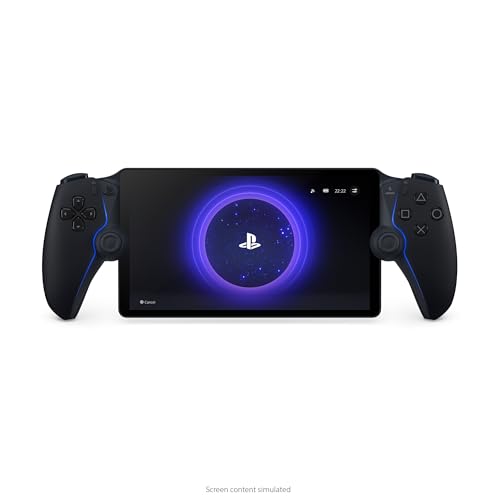
The PlayStation Portal Remote Player Midnight Black is designed for PS5 owners who want to play their game collection away from the main TV. It solves the hassle of fighting over screen time by letting you stream compatible PS5 and PS4 games directly from your console, wherever you are at home.
Using it feels intuitive and familiar, especially for anyone who already enjoys PlayStation controls. The large 8” LCD screen provides a bright, crisp view, making games look vivid and clear. You can jump into a session quickly and enjoy immersive sound with supported headphones, making gaming comfortable and consistent every time.
Why Gamers Choose This Device
- Stream your PS5 and PS4 games instantly without the main TV
- Access a huge library of games with PlayStation Plus Premium
- No need to download streamed games—play right away
- Immersive 3D audio support with compatible devices
- Large, vibrant 8″ LCD screen for detailed visuals
- Familiar PlayStation controls in a portable form
Consider These Limitations
- Requires a PS5 console for most features
- Cloud streaming needs PlayStation Plus Premium
- Only compatible with installed or select digital games
Who This Fits Best
This device is a smart choice for families or roommates who share a TV but want uninterrupted PS gaming at home. It removes the hassle of waiting for the living room to free up and means less stress about missing out on game time.
You’ll get the most out of it by making sure your internet connection is strong for smooth streaming. Having a good pair of headphones can also make a real difference in audio quality. With its reliable controls and easy setup, you can count on consistent, enjoyable sessions—no surprises.
| Best for | Why |
|---|---|
| Playing PS5 games away from the main TV | Streams your collection to a handheld device instantly |
| Accessing PlayStation Plus game catalogs | Lets you stream hundreds of titles with a subscription |
| Immersive portable play at home | Full HD screen and 3D audio support enhance the experience |
| Quick gaming sessions without setup hassle | No need to download or move the console |
Boowen Wireless Ps4 Controller 2-pack
As the Best Controller for Ps Remote Play, this Boowen pack offers seamless compatibility and immersive features for PlayStation gamers.

This is a wireless controller set designed for PlayStation 4, Pro, and Slim models. It solves the hassle of finding a reliable and comfortable controller for PS Remote Play by offering full compatibility and a design focused on user comfort.
Using these controllers feels natural and responsive, thanks to their ergonomic grip and sensitive touchpad. The immersive vibration and motion sensors enhance every gaming moment, making it easy to focus and play for hours without hand fatigue.
Why Gamers Appreciate This Pair
- Works with PS4, PS4 Pro, and PS4 Slim
- Comfortable grip for long gaming sessions
- Dual motors and 6-axis sensor for immersion
- Built-in speaker and 3.5mm headset jack
- Easy sharing of gameplay with Share button
- Distinct Blue Galaxy and Black Ghost designs
What To Keep In Mind
- Requires USB cable for first connection setup
- Not compatible with consoles outside the PS4 series
- No advanced customization options
When I’d Pick This
This controller set is best for anyone who wants a reliable, comfortable experience with PS Remote Play, especially if you game on multiple PS4 models or need a spare for friends and family. It takes away the frustration of laggy or uncomfortable third-party controllers and brings peace of mind with its familiar layout and responsive controls.
If you’re new to wireless pairing, remember to connect the controller with a USB cable for the first setup—this ensures smooth syncing. For consistent performance and fewer mid-game surprises, keep the controllers charged and within range of your console. I like that the grip feels secure even after hours of play, adding to the overall sense of reliability.
| Best for | Why |
|---|---|
| PS Remote Play on PS4/Pro/Slim | Full compatibility and wireless freedom |
| Extended gaming sessions | Ergonomic grip reduces hand fatigue |
| Gamers who want immersive feedback | Dual motors and motion sensor add realism |
| Gift for PlayStation owners | Unique design and practical features |
Dualsense Wireless Controller Galactic Purple
Best Controller for Ps Remote Play for those seeking immersive feedback and multi-device compatibility.

The DualSense Wireless Controller Galactic Purple is a PlayStation controller designed to make gaming sessions on PS Remote Play feel natural and responsive. It brings advanced haptic feedback and adaptive triggers to your hands, so your in-game actions feel more lifelike.
If you want a controller that supports both PlayStation and PC gaming, this one stands out for its easy Bluetooth and USB Type-C connectivity.
Using it day-to-day, you’ll notice how comfortable the design feels, even during long streams or remote sessions. The built-in microphone and 3. 5mm jack let you chat or plug in a headset without extra steps. You can also quickly capture highlights with the create button, making it simple to share your best moments.
The iconic layout and enhanced sticks help keep your input steady and reliable.
Where The Dualsense Excels
- Immersive haptic feedback and adaptive triggers enhance gameplay
- Comfortable grip for extended remote play sessions
- Works with PS5, Windows PC, and Mac via Bluetooth or USB-C
- Built-in microphone and headset jack for instant communication
- Easy sharing of gameplay moments with the create button
- High-quality sound effects through the built-in speaker (in supported games)
Consider Before Buying
- Some advanced features only supported on select PC games
- Requires Bluetooth or USB-C connection for non-PS5 devices
- Not the lightest controller for ultra-portable setups
Why This Makes Sense
This controller is best for gamers who want seamless switching between PS Remote Play and PC gaming without fussing with multiple devices. It removes the guesswork from setup, so you can connect and start playing quickly, whether you’re on your console or computer.
If you’re new to remote play, start with Bluetooth pairing for the fastest connection.
Its reliable wireless performance and iconic PlayStation feel mean fewer surprises and more consistent control, no matter what device you use. For those who value comfort and advanced feedback, it’s a practical pick that just works. I find the purple finish adds a touch of style that stands out in any setup.
| Best for | Why |
|---|---|
| PS Remote Play users | Immersive feedback and easy multi-device support |
| PC and Mac gamers | Plug-and-play connectivity with advanced features |
| Long gaming sessions | Ergonomic design reduces fatigue |
| Content creators | Quick sharing tools built in |
Choosing The Right Playstation Controller
Platform Compatibility
Decide which devices you want to use. Some controllers are designed for PS5, while others work with PS4, PS3, or PC. Not all models support every platform, so check compatibility before purchasing.
Features That Matter
Consider what features are important for your gaming style. Haptic feedback, adaptive triggers, back buttons, and RGB lighting all add to the experience, but not every gamer needs them. Focus on comfort and reliability if you game for long sessions.
Wired Vs. Wireless Play
Wireless controllers offer flexibility but require charging. Wired options may reduce input lag and never run out of battery. Think about your setup and whether you prefer to be untethered or always connected.
Budget And Value
Premium controllers provide more customization, but budget models can be suitable for casual play. Decide if advanced features justify the higher cost for your needs.
Common Mistakes To Avoid
- Ignoring platform compatibility and ending up with a controller that does not work with your device.
- Overlooking comfort—some designs or sizes may not fit well in your hands for extended play.
- Assuming all features are supported on every platform. Some functions like adaptive triggers may only work on PS5.
- Not checking for firmware updates, which can affect compatibility and performance on PCs.
Who Should Avoid These Controllers
- If you only play on Xbox or Nintendo systems, these controllers will not be compatible.
- Gamers needing specialized accessibility features may need to look for dedicated options.
- Anyone seeking ultra-low input lag for competitive PC gaming may prefer wired-only or specialized eSports controllers.
Setup And Usage Tips
- Always charge wireless controllers fully before first use.
- For PC or Mac, check if a specific driver or app is recommended for best compatibility.
- Bluetooth pairing can sometimes require resetting the controller or device. Refer to the official support site if issues arise.
- Save your preferred button profiles if your controller supports customization.
Care And Maintenance Notes
- Keep controllers clean and dry. Avoid eating or drinking while playing to prevent stickiness.
- Use a soft cloth for cleaning, and avoid harsh chemicals on buttons or touchpads.
- Store controllers in a cool, dust-free place to extend their lifespan.
- Periodically check for firmware updates, especially if using on multiple devices.
Frequently Asked Questions
Can I Use A Ps5 Controller On My Pc?
Yes, most PS5 controllers support both wired and Bluetooth connection to PCs. Some features may require additional software for full functionality.
Will All Functions Work On Older Playstation Consoles?
Advanced features like haptic feedback and adaptive triggers may not be supported on PS4 or PS3. Basic controls should still function.
How Long Does The Battery Last On Wireless Models?
Battery life varies by model and usage. Expect anywhere from 6 to 12 hours on a full charge for most wireless PlayStation controllers.
Are Third-party Controllers Reliable?
Many third-party controllers offer good performance, but quality and compatibility can vary. Check reviews and return policies before buying.
Is There Input Lag With Wireless Controllers?
Modern wireless controllers have minimal input lag, but some gamers may notice a slight delay compared to wired options, especially on PC.
Can I Connect Multiple Controllers To One Console?
Yes, PlayStation consoles support multiple controllers for multiplayer gaming. Follow the pairing instructions for your specific model.
Final Thoughts
Choosing a PlayStation controller depends on your platform, play style, and comfort preferences. Focus on compatibility and the features you value most. With attention to setup and care, any of these options can provide a reliable gaming experience.