

Remote Play on the PS5 sounds simple, but using it smoothly can be anything but. Maybe you’ve tried to play away from your console, only to feel awkward with touch controls or an old controller that just doesn’t feel right.
Lag, awkward grip, or missing features can quickly turn a great game into a headache.
Picking a controller for PS5 Remote Play is trickier than it looks. Some work across many devices, others only with certain setups. You’ll see cheap options alongside premium picks, all promising the best experience. But it’s not always clear what actually matters—or what’s just marketing.
Features like vibration, battery life, and extra buttons sound useful, but not everyone needs the same things. Compatibility, comfort, and reliability are easy to overlook until you run into problems.
This guide will help you sort through the noise. You’ll get clarity on what to look for, and find the controller that fits how and where you play.
What Actually Matters For Ps5 Remote Play?
It helps to think about where and how you’ll play. Will you be on a phone, tablet, or computer? Do you need wireless, or is wired fine? Comfort and familiar controls matter most for long sessions. If you care about precise aiming or extra features, look at options with programmable buttons or improved sticks. Battery life can be a deal-breaker for some. And don’t forget: true compatibility with your device is key—some controllers work great on PS5 but not as well on mobile or PC.
Common Mistakes When Choosing
Many people assume all PS5 controllers are the same, or that cheaper ones do the job just as well. That’s not always true. Some budget controllers skip features like adaptive triggers, while others may have connection issues. It’s easy to get distracted by flashy lights or extra modes you might never use.
Focus on build quality and comfort if you play for hours. Double-check compatibility with your main device before buying.
Below, you’ll find a range of controllers chosen for different play styles, devices, and budgets. Each one has strengths that suit certain needs better—so you can match your pick to how you actually play.
Dualsense Wireless Controller Midnight Black
This is the Best Controller for Ps5 Remote Play, offering responsive haptic feedback and adaptive triggers that enhance gameplay across multiple devices.

The DualSense Wireless Controller in Midnight Black is designed for PS5 and compatible with PC, Mac, and mobile devices, providing haptic feedback and adaptive triggers to make remote play more immersive. It addresses the challenge of feeling disconnected when playing remotely by delivering tactile responses that match in-game actions.
Using this controller feels natural and consistent, with built-in microphone options and easy connectivity via Bluetooth or USB Type-C. It offers confidence in control and quick setup, making your remote gaming sessions smooth and enjoyable without interruptions.
Key Features That Improve Remote Play
- Haptic feedback provides physical response for deeper immersion
- Adaptive triggers simulate force and tension for realistic gameplay
- Built-in microphone and 3.5mm jack for seamless communication
- Dedicated mute button for quick voice control
- Multi-device compatibility with Bluetooth and USB Type-C connection
- Comfortable design with dimensions suited for extended use
Considerations Before You Buy
- May require charging or USB connection for extended playtime
- Primarily designed for PS5, some features may be limited on other devices
- Midnight Black color may not suit all style preferences
Who Benefits Most From This Controller
This controller is ideal for PS5 gamers who want to enjoy remote play with immersive feedback and reliable connection on various devices. It removes uncertainty from remote gaming by offering tactile responses that match your actions, enhancing focus and enjoyment.
To get the most out of it, use the USB Type-C cable when possible for stable connectivity and faster charging. This controller provides peace of mind with its trusted PlayStation quality and consistent performance during long sessions.
| Best for | Why |
|---|---|
| PS5 Remote Play users | Responsive feedback and adaptive triggers enhance remote gameplay immersion |
| Multi-device gamers | Compatible with PC, Mac, and mobile via Bluetooth or USB Type-C |
| Players who communicate online | Built-in microphone and headset jack support clear voice chat |
| Long gaming sessions | Ergonomic design and easy voice mute button reduce fatigue and distraction |
Gamrombo Led Wireless Ps5 Controller
Best Controller for Ps5 Remote Play for anyone who wants easy connection, custom lighting, and immersive in-game sound without the extra fuss.

The Gamrombo LED Wireless PS5 Controller is built for gamers who want a fresh look and straightforward use for their PlayStation 5 or PC. With a simple first-time connection using the included USB-C cable, setup is quick and stress-free. You get customizable LED colors, dual vibration, and a built-in speaker for added game immersion.
Using this controller feels familiar but adds a touch of personal flair with its lighting options. The sound feature and precise joysticks make remote play sessions more enjoyable and responsive. You can plug in a headset for audio, and the controller remembers your preferred settings each time.
It helps you focus on the game, not tech problems.
What Sets It Apart
- Quick and easy first-time setup with PS5 or PC
- Customizable LED colors with memory function
- Built-in speaker for in-game sound immersion
- Upgraded joysticks minimize dead zones for better control
- Dual vibration for more engaging gameplay
- One-click wake-up for fast access
- Works with headsets via 3.5mm jack
Consider Before Buying
- Not compatible with PS4 or Apple headphones
- Requires included or original USB-C cable for first connection
- No built-in microphone (external headset needed for voice)
Who This Fits Best
This controller is ideal for PS5 or PC gamers who want plug-and-play ease and a touch of personalization without worrying about compatibility issues. It removes the hassle of complicated setup and gives you consistent performance, whether you’re gaming at home or remotely.
If you prefer reliable controls and like customizing your gear’s look, this makes sense.
One quick tip: Always use the included USB-C cable for the initial pairing to avoid connection hiccups. This controller delivers reliable results and removes guesswork, so you spend less time troubleshooting and more time playing. I appreciate how it remembers lighting preferences—one less thing to adjust each session.
| Best for | Why |
|---|---|
| PS5 Remote Play Users | Fast connection and wake-up make remote play smooth |
| Gamers who love custom lighting | Easy one-click color changes and memory function |
| Players needing precise control | Upgraded joysticks reduce dead zones for accuracy |
| Those using headsets | Standard 3.5mm jack supports most gaming headsets |
Nonbliep Wireless Rgb Ps5 Controller
For gamers wanting the Best Controller for Ps5 Remote Play, this Nonbliep model offers quick device switching and impressive customization for flexible play.

The Nonbliep Wireless RGB PS5 Controller is designed for players who want easy setup and reliable performance across PS5, PS5 Slim/Pro, and Windows PC. It lets you switch quickly between devices without extra drivers, making it a smart choice if you play on both console and PC.
Its standout feature is the customizable RGB lighting, letting you match your controller to your gaming mood or setup.
Using this controller feels intuitive, with responsive buttons and dual vibration motors that bring games to life. Macro programming and turbo mode add flexibility for both beginners and experienced gamers, simplifying complex moves and boosting reaction speed. The high-precision joysticks help reduce drift, so your gameplay stays consistent even after hours of use.
Why This Controller Stands Out
- Switches instantly between PS5 and PC—no drivers needed
- Nine RGB color modes for custom style
- Dual vibration and 6-axis gyro for immersive feedback
- Macro and turbo modes for easier combos and rapid fire
- Built-in audio jack and speaker for in-game sound
- Durable hall sensor joysticks prevent drift
Things To Consider
- No mention of battery life specifics
- Red color may not suit all preferences
- First setup requires USB-C cable connection
Who This Fits Best
If you want a controller that handles both PS5 Remote Play and PC gaming, this is a strong match. It removes the hassle of complicated pairing, and the programmable buttons save you time during intense games. The customizable lights are a bonus if you care about your gaming setup’s look.
For best results, set up your macros before jumping into fast-paced games—this keeps your focus on playing, not fumbling for controls. With fewer worries about stick drift or connectivity, you can enjoy longer sessions with steady performance. I appreciate how it streamlines multi-device gaming for anyone who hates switching controllers.
| Best for | Why |
|---|---|
| Remote play on PS5 & PC | Instant pairing and easy device switching |
| Gamers who love RGB customization | Nine lighting modes to match your style |
| Players needing reliable joysticks | Hall sensor tech reduces drift issues |
| Competitive and casual gamers | Macro and turbo modes make combos easier |
Gamrombo Led Wireless Ps5 Controller
The Best Controller for Ps5 Remote Play for gamers wanting customizable lighting, dual vibration, and smooth compatibility with PS5 and Windows PC.
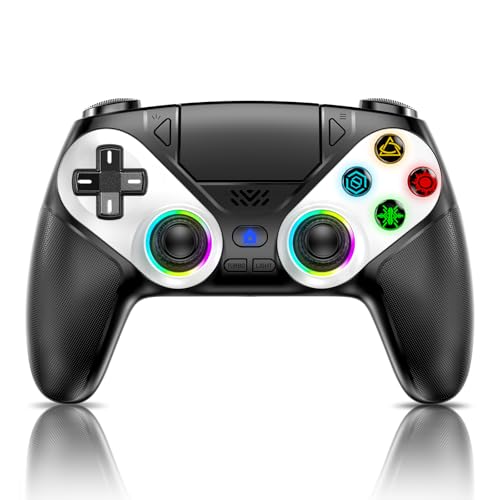
The Gamrombo LED Wireless PS5 Controller is designed to work seamlessly with PS5 consoles and Windows PCs. It solves the hassle of unreliable third-party controllers by providing steady connection and essential features like dual vibration, 6-axis motion, and a color-customizable LED system.
If you want immersive sound and easy setup, this controller has you covered.
In real use, the controller feels responsive and comfortable, making long play sessions enjoyable. The customizable lighting adds a personal touch, and the one-click wake-up feature means you spend less time getting started. Plug in a headset for private audio, and the improved joysticks reduce drift so your movements stay accurate game after game.
Why Gamers Pick This Up
- Compatible with PS5 Pro, Slim, and Windows PC
- Customizable LED colors with memory function
- 6-axis motion and dual vibration for immersive play
- One-click wake-up for fast starts
- 3.5mm audio jack for headsets
- Upgraded joysticks minimize dead zone issues
Consider Before You Buy
- Not compatible with PS4 consoles
- No built-in microphone (external headset needed for mic use)
- Apple headphones not supported in the audio jack
Who This Fits Best
This controller is a good fit for PS5 and PC gamers who want a reliable, wireless solution with customizable features. It’s best when you want to skip the stress of complicated pairing or frequent disconnects, and just play without fuss.
The one-click wake-up and solid build mean fewer surprises and less hassle every time you game.
If you like personalizing your setup, the LED memory lets you keep your favorite color scheme. For best results, use the included USB-C cable for initial setup to ensure smooth activation. This controller is about confidence: you know what to expect, and it just works. I appreciate the little details that make a difference during daily play.
| Best for | Why |
|---|---|
| PS5 Remote Play users | Simple connection and wake-up streamline play sessions |
| Custom lighting fans | Colorful LED options with memory for consistent style |
| PC gamers | Reliable compatibility with Windows operating systems |
| Players needing accurate controls | Enhanced joysticks reduce drift and improve precision |
Dinosoo Rgb Wireless Ps5 Controller
This is a reliable choice for the Best Controller for Ps5 Remote Play, especially if you want versatile wireless connectivity and customizable RGB lighting.

The Dinosoo RGB Wireless PS5 Controller is designed for PS5 and PC gamers who need a dependable controller for remote play and gaming sessions. It offers wireless and wired connection options, with a quick wake-up feature to easily access your console.
The addition of adjustable RGB lighting adds a stylish touch without overwhelming the core functions.
Using this controller feels comfortable and responsive thanks to its six-axis motion control and dynamic vibration features. The built-in speaker enhances game audio, and the turbo function helps with fast-paced game controls. Overall, it provides a steady and immersive gaming experience without extra complications.
Key Advantages For Remote Play
- Wireless and wired connectivity options for flexible use with PS5 and PC
- Quick one-touch wakeup to easily resume your PS5 console
- Adjustable RGB lighting for a personalized look
- Built-in speaker for enhanced game sounds without headphones
- Six-axis motion sensors improve control and precision
- Turbo function aids in fast repetitive button presses
- 3.5mm audio jack supports external headphones (except Apple 3.5mm)
Considerations Before Buying
- Not compatible with PS4 consoles
- No built-in microphone, requiring separate headphones for voice chat
- Requires initial wired connection to pair with PS5 before wireless use
When This Controller Makes Sense
This controller is best for gamers who want an easy-to-connect PS5 controller with enhanced audio options and customizable lighting for remote play. It removes the hassle of complex setup by offering quick wake-up and dual connection modes. To get the most from this controller, pair it via wired connection first, then enjoy wireless freedom.
It provides peace of mind through stable performance and responsive controls, helping you avoid surprises during gameplay. If you appreciate extra features like the turbo function and motion sensors without overpaying for extras you won’t use, this is a practical choice.
| Best for | Why |
|---|---|
| PS5 Remote Play Users | Easy wireless connection with quick wake-up to resume games seamlessly |
| Gamers Wanting Custom Lighting | Adjustable RGB lights add style without sacrificing function |
| Players Needing Turbo and Motion Control | Turbo button and six-axis sensors improve precision and gameplay speed |
| Users Requiring External Audio | 3.5mm jack and built-in speaker provide multiple audio options |
Vidppluing Wireless Ps5 Gamepad
For Best Controller for Ps5 Remote Play, this VidPPluing Wireless PS5 Gamepad offers seamless compatibility and flexible customization for serious and casual gamers alike.
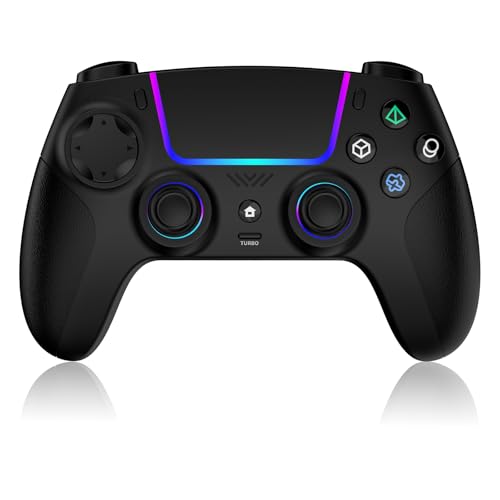
The VidPPluing Wireless PS5 Gamepad is designed to work right out of the box with your PS5, Steam Deck, or PC, making it a smart choice if you want one controller for multiple devices. With programmable back buttons and a turbo function, it helps you simplify tough in-game moves and adapt your play style without fuss.
Using this controller feels natural, thanks to its ergonomic, non-slip grip that stays comfortable even during long sessions. The adjustable RGB lighting adds a personal touch, while the reliable triggers and quick button mapping make gaming feel smooth and consistent.
What Sets It Apart
- True plug-and-play for PS5, PC, and Steam Deck
- Customizable RGB lighting to match your setup
- Rear programmable buttons for flexible control
- Three-speed turbo for rapid actions
- Ergonomic grip prevents slips during intense play
- Hall effect triggers for precise input
- Dedicated headset jack for private audio
Keep In Mind
- No mention of official PlayStation licensing
- Some advanced features may require setup time
- Only available in black
Who This Fits Best
If you want a controller that works seamlessly across PS5, PC, and Steam Deck, the VidPPluing Wireless PS5 Gamepad is a smart pick. It removes the hassle of switching controllers or fiddling with compatibility settings, letting you focus on your game instead of your gear.
For best results, try mapping your most-used in-game commands to the rear buttons—this small tweak can make your remote play sessions smoother and more responsive. You’ll get peace of mind knowing your inputs will be consistent, with fewer surprises even during long or competitive sessions.
I especially like how it feels sturdy without being too heavy.
| Best for | Why |
|---|---|
| PS5 Remote Play | Instant compatibility and customizable controls for remote sessions |
| Multi-platform gamers | Works on PS5, Steam Deck, and PC without extra adapters |
| Customization fans | Programmable buttons and adjustable RGB lighting |
| Long gaming sessions | Ergonomic grip and comfortable materials reduce fatigue |
Dinosoo Rgb Wireless Controller For Ps5/pc
A strong pick for Best Controller for Ps5 Remote Play, offering multi-platform support and easy switching for flexible gaming.

The Dinosoo RGB Wireless Controller for PS5/PC is designed for gamers who want to play on both PS5 and PC without hassle. It tackles the common headache of switching between devices, thanks to its quick connection and plug-and-play support. If you need a controller that feels familiar and is ready to go, this one covers both platforms easily.
In daily use, it offers a comfortable grip and responsive controls, making remote play feel smooth and reliable. The customizable RGB lighting adds a personal touch, while features like the 6-axis motion and dual vibration motors make gameplay more immersive.
You can focus on your game, not on troubleshooting connections or adjusting settings every time you switch.
Key Advantages For Gamers
- Switches quickly between PS5 and PC with no drivers
- Customizable RGB lighting saves your favorite mode
- Macro and Turbo features for easier combos and rapid actions
- Dual vibration and 6-axis motion for more immersive play
- Hall Effect joysticks reduce stick drift
- Built-in speaker and 3.5mm jack for audio options
- Long-lasting 1000mAh battery for extended sessions
Things To Consider
- Initial USB-C pairing needed for PS5 connection
- Headphone mic support requires TRRS (not Apple 3.5mm)
- No mention of mobile or Mac compatibility
Who This Fits Best
This controller is a great fit for anyone who plays PS5 remote play but also wants the option to game on a Windows PC without buying a separate controller. It removes the hassle of constant re-pairing and driver installs, letting you focus on your games instead of setup.
If you often switch between platforms, this can save you time and frustration.
For best results, keep a USB-C cable handy for the first setup with your PS5, then enjoy instant switching after. The memory for your RGB lighting means you don’t have to redo your settings every session. Overall, this controller brings peace of mind by being reliable and flexible—just what you need for stress-free remote play.
I appreciate how it blends style and function without over-complicating things.
| Best for | Why |
|---|---|
| Gamers switching between PS5 and PC | Instant multi-platform support with fast switching |
| Players who value custom lighting | 7 RGB modes with memory for preferred style |
| Competitive gamers needing macro/turbo features | Easier execution of combos and rapid actions |
| Long play sessions | 1000mAh battery for fewer interruptions |
Nacon Revolution 5 Pro Wireless Controller
For gamers seeking the Best Controller for Ps5 Remote Play, this model delivers advanced features for smooth and precise play on PS5, PS4, and PC.

The NACON Revolution 5 Pro Wireless Controller is designed for players who need reliable performance during PS5 remote play sessions. It tackles common issues like stick drift with magnetic sensors and offers up to 10 hours of wireless gaming, letting users enjoy freedom of movement without worrying about frequent charging.
Using this controller feels stable and responsive. The trigger blockers and remappable paddles make adapting to different games easy, so you can play competitively or casually with confidence. Switching between D-Pad styles for fighting or classic games adds a layer of customization that helps you stay consistent in your gameplay.
Standout Features For Remote Play
- Magnetic Hall Effect sensors prevent stick drift for precise control
- Wireless adapter for PS5, PS4, and PC compatibility
- Up to 10 hours of battery life per charge
- Trigger blockers for adjustable responsiveness
- Four remappable back paddles for quick actions
- Customizable D-Pad for fighting or traditional games
- Wired mode option for competitive play
Things To Consider Before Buying
- May feel bulky for those preferring lighter controllers
- Customization requires some setup time
- No official customer reviews for reliability insights
Who This Fits Best
This controller is ideal for remote play users who want maximum precision and flexibility while gaming across PS5, PS4, or PC. It reduces stress from stick drift and trigger inconsistency, letting you focus on your gameplay instead of controller issues.
If you often switch between genres—like fighting games and shooters—the swappable D-Pad and customizable triggers help you get the most out of each session. For best results, take a few minutes to set up the paddles for your favorite shortcuts before you dive in.
The solid build and magnetic sensors mean fewer surprises and more reliability, so you can game with peace of mind.
| Best for | Why |
|---|---|
| PS5 Remote Play sessions | Wireless adapter and long battery life keep you connected |
| Competitive multiplayer gaming | Trigger blockers and remappable paddles for fast reactions |
| Fighting game fans | Specialized D-Pad designed with pro input for accuracy |
| PC gaming with controller | Reliable compatibility and customization options |
Gamrombo Ps5 Wireless Controller
This Gamrombo controller is a reliable choice as the Best Controller for Ps5 Remote Play, offering seamless connection and immersive sound features for remote gaming.
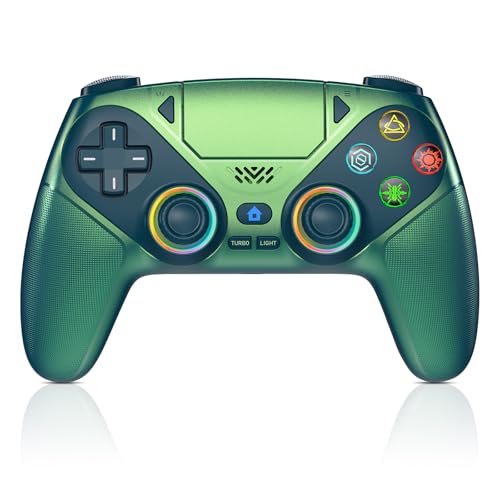
The Gamrombo PS5 Wireless Controller is designed for PlayStation 5 and Windows PC gamers who want a smooth, responsive controller experience. It solves the problem of compatibility by supporting PS5 consoles only, ensuring you get the most from your remote play sessions.
The integrated 3. 5mm audio jack and built-in speaker add to the immersive feel without extra equipment.
Using this controller feels natural and consistent with high-precision joysticks that reduce dead zones. Its quick connection and one-click wake-up feature make setup easy and hassle-free, perfect for long remote gaming sessions where responsiveness matters.
Key Features For Remote Play
- Quick and easy connection to PS5 and Windows PCs with one-click wake-up
- Built-in speaker adds immersive sound without needing a headset
- Customizable LED colors with memory function for personal style
- High-precision joysticks reduce dead zones and improve control
- Macro and turbo functions allow for advanced gameplay customization
- Compatible with PS5 Pro and Slim models, ensuring broad console support
- 3.5mm audio jack for external headphone use (not for Apple headphones)
Considerations Before Buying
- Must connect via USB-C cable initially; only compatible with PS5 series and Windows PC
- No built-in microphone, so external headset needed for voice chat
- Not compatible with PS4 consoles
Who This Controller Works Well For
This controller is best for PS5 owners who use Remote Play and want a reliable, responsive controller with extra sound features. It removes the guesswork of compatibility and connection issues by supporting only PS5 and Windows, which keeps your setup straightforward.
To get the most from this controller, use the included data cable for the initial setup and customize the LED lighting to enhance your gaming atmosphere. You can count on it to stay connected and respond accurately during extended remote play sessions, providing a consistent experience.
| Best for | Why |
|---|---|
| PS5 Remote Play Users | Designed specifically for PS5 consoles with quick connection and wake-up features |
| Gamers Seeking Immersive Sound | Built-in speaker and 3.5mm jack add audio immersion without extra devices |
| Players Wanting Custom Controls | Macro and turbo functions allow gameplay customization for better control |
| Windows PC Gamers | Compatible with Windows systems for flexible use beyond PS5 |
Jyeluk Wireless Rgb Ps5 Controller
For those seeking the Best Controller for Ps5 Remote Play, this model stands out with its customizable lighting and reliable wireless performance.

The JYELUK Wireless RGB PS5 Controller is designed for gamers who want smooth, wireless gameplay without the hassle of drift or lag. It solves the problem of unreliable controls and adds a fun touch with customizable RGB lighting. The integrated turbo and dual vibration features help elevate your play, especially during intense sessions.
Using this controller feels comfortable and responsive, whether you’re gaming on PS5, Windows PC, Android, or iOS. The long-lasting battery means fewer interruptions and more consistent play. The included Type-C makes recharging easy, so you can focus on your game instead of worrying about downtime.
Reasons To Choose This Controller
- Works seamlessly with PS5 Remote Play and other platforms
- Customizable RGB lighting with four dynamic modes
- No drift or delay for reliable controls
- Turbo and dual vibration enhance gameplay
- Up to 10 hours of battery life per charge
- Easy Type-C charging included
What You Should Consider
- RGB lighting may not appeal to all users
- Only available in gray color
- Does not include advanced customization for button mapping
Who This Fits Best
This controller is a great pick for gamers who value stable wireless performance and want a bit of style with RGB lighting during PS5 Remote Play. It removes the usual stress of drifting joysticks and frequent recharging, so you can play longer and with more confidence.
For best results, try the different lighting modes to match your gaming setup or mood. The Type-C charger keeps things simple and reliable, so you’re less likely to run into surprises mid-session. If you want a controller that feels consistent and looks cool, this is worth considering.
| Best for | Why |
|---|---|
| PS5 Remote Play users | Reliable wireless connection and responsive controls |
| Long gaming sessions | 10-hour battery keeps you playing without frequent charging |
| Gamers who like customization | RGB lighting adds a personal touch to your setup |
| Multi-platform players | Works across PS5, Windows PC, Android, and iOS |
How To Choose The Right Ps5 Controller For Your Needs
- Platform Compatibility: Check if the controller works with your devices. Many models support PS5, PC, and mobile, but not all work with PS4 or Apple headphones.
- Core Features vs. Extras: Decide if you need advanced options like programmable buttons, turbo, RGB lighting, or just reliable basics like vibration and precise sticks.
- Wired vs. Wireless Use: Most controllers offer wireless play, but some require initial setup with a cable. Consider if you prefer a wired connection for latency-sensitive games.
- Ergonomics and Comfort: Look for grip shape, weight, and materials. If you play for hours, comfort matters more than extra features.
- Durability Concerns: Hall Effect sensors and stick upgrades help avoid drift and wear. If you’re rough on gear or play fast-paced games, choose controllers with these improvements.
Common Mistakes When Buying Ps5 Controllers
- Assuming all controllers work on every platform. Many are PS5 and PC only.
- Overlooking initial setup needs. Some require first-time pairing with a cable.
- Ignoring headphone jack limitations. Not all support Apple headphones or built-in microphones.
- Buying for looks alone. RGB lighting is appealing, but core performance is more important for most users.
- Neglecting battery life. Long sessions need a controller with a reliable battery.
Who Should Avoid These Controllers
- PS4-only gamers. Most featured controllers are not PS4 compatible.
- Users needing integrated microphones. Several options offer speakers only.
- Those seeking ultra-lightweight models. Most controllers are mid-weight and balanced for comfort, not minimalism.
- Buyers wanting Apple headphone compatibility. Most do not support Apple’s 3.5mm headset standard.
Setup And Usage Tips
- Always use the included USB-C cable for first-time pairing with your console.
- Update your console or PC drivers before connecting a new controller.
- Check lighting and macro settings after connecting to preserve your preferred configuration.
- Use the dedicated mute button to manage in-game audio if your controller supports it.
- Store controllers in a cool, dry place to extend battery and sensor life.
Care And Maintenance Notes
- Wipe the controller gently after use to avoid buildup on buttons and sticks.
- Charge batteries fully before long play sessions to prevent performance dips.
- Avoid dropping or exposing to moisture; advanced sensors are sensitive to damage.
- Periodically check for firmware updates if your controller supports them.
Frequently Asked Questions
Can I Use These Controllers On Ps4?
Most controllers listed are not compatible with PS4. Check each model’s compatibility before buying.
Do All Controllers Support Bluetooth Audio?
No, some support Bluetooth for connectivity only. Audio features may require wired headphones.
How Do I Program Macros Or Turbo?
Follow the manufacturer’s instructions for mapping buttons. Usually, there are dedicated controls or software.
Will Rgb Lighting Affect Battery Life?
Yes, using RGB lighting can reduce battery runtime. You can turn it off or adjust brightness to conserve power.
Are Hall Effect Joysticks Worth It?
They help prevent stick drift and improve accuracy. If you play often, they’re a good investment.
Do I Need To Update Firmware?
Some controllers benefit from firmware updates for bug fixes or added features. Check the brand’s website regularly.
What If My Headset Does Not Work?
Ensure your headset uses the correct TRRS plug. Apple headphones are often not supported by these controllers.
Final Thoughts
Choosing a PS5 controller comes down to your play style, device needs, and comfort preferences. Think carefully about which features matter most, and double-check compatibility. Most modern controllers offer reliable performance and useful extras, so you can focus on gaming without worry.
With proper setup and care, your controller should last through many sessions.