
Finding The Right Controller For Remote Play
Trying to enjoy games remotely often means juggling comfort, compatibility, and responsiveness. You’ve likely felt frustrated when a controller doesn’t quite sync well or lacks the features you need for smooth gameplay across devices.
Choosing the best controller for remote play can be tricky. Different models offer various trade-offs between wireless and wired connections, device compatibility, and additional features like motion controls or customizable buttons. Some focus on premium build and advanced haptics, while others aim for wider platform support or budget-friendly options.
This article will help you understand the key factors to consider and guide you toward a controller that fits your remote play needs without overwhelming you with technical jargon.
What Really Matters For Remote Play Controllers
At its core, a good remote play controller should be easy to connect and responsive across multiple devices like PC, Mac, mobile phones, and consoles. Comfort during long sessions is important, but so is reliable wireless performance and battery life.
Features such as built-in microphones, headphone jacks, or motion sensors can enhance the experience but may not be essential for everyone.
Keep in mind that not all controllers work perfectly with every platform, and some require initial wired setup before wireless use. It’s also common to find controllers that specialize in either console compatibility or PC and mobile use, so knowing your primary devices helps narrow the options.
Common Pitfalls To Avoid
One frequent mistake is assuming all controllers labeled “wireless” or “compatible” will work seamlessly across all devices. Firmware updates, connection methods, and proprietary features can affect performance. Another is overlooking ergonomics; a controller that feels great in your hands can make a big difference in remote play enjoyment.
Also, pay attention to how easy it is to switch between devices. Some controllers remember only the last connection, requiring re-pairing when changing platforms. Understanding these limitations can save frustration down the line.
With these points in mind, let’s explore a range of controllers selected for their compatibility, features, and user experience across remote play setups. Each offers a different balance to suit varying preferences and budgets.
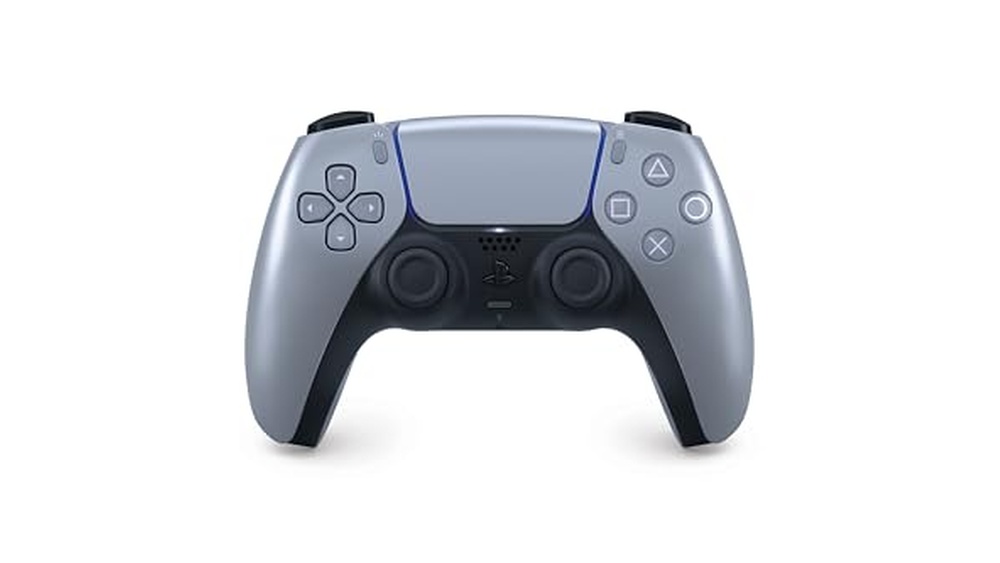
Dualsense Wireless Controller Sterling Silver
The Best Controller for Remote Play if you want PlayStation comfort and seamless device pairing across your Apple and PC setups.

The DualSense Wireless Controller Sterling Silver is PlayStation’s next-gen controller designed for seamless remote play. With Bluetooth pairing, it connects to your iPad, iPhone, Mac, Apple TV, and even Windows PCs, letting you play across devices with the familiar PlayStation feel.
Its advanced haptic feedback brings games to life in your hands, making every action feel more immersive.
Using this controller feels natural and responsive, whether you’re gaming on a console or streaming remotely on a computer or mobile device. The evolved design is comfortable to hold for long sessions, and the built-in microphone makes voice chat easy without extra gear.
Switching between devices is quick, so you spend less time setting up and more time playing.
Standout Benefits For Remote Play
- Pairs easily via Bluetooth with Apple devices and PCs
- Immersive haptic feedback for a realistic gaming feel
- Comfortable, intuitive design for long play sessions
- Built-in microphone for instant voice chat
- Touch pad and motion sensor supported in compatible games
- USB Type-C and Bluetooth connectivity options
Potential Drawbacks To Consider
- Some features require compatible games or devices
- May feel bulky for users with smaller hands
- No included charging cable or dock
Who This Fits Best
If you game on multiple devices or want a reliable controller for remote play, the DualSense Wireless Controller Sterling Silver is a practical choice. It removes the hassle of switching controllers for each device and eliminates worries about inconsistent controls or comfort.
For smoother setup, pair it via Bluetooth first and check if your games support advanced features like adaptive triggers. Once set up, you’ll enjoy reliable performance and a consistent feel across your devices. For anyone who wants a dependable and comfortable experience without surprises, this controller stands out.
I appreciate how quickly it connects and how solid it feels in hand.
| Best for | Why |
|---|---|
| Remote play on Apple devices | Direct Bluetooth pairing for iPad, iPhone, Mac, and Apple TV |
| Cross-platform gaming | Works with PlayStation 5, Windows PC, and Mac |
| Immersive gameplay | Advanced haptic feedback and adaptive triggers |
| Long gaming sessions | Ergonomic design reduces hand fatigue |
Dualsense Wireless Controller Techno Red
The Best Controller for Remote Play if you want immersive feedback and seamless device compatibility across PS5, PC, Mac, and mobile.

The DualSense Wireless Controller Techno Red from PlayStation is designed for gamers who want a reliable and immersive way to play remotely on multiple platforms. This controller solves the hassle of switching between devices by supporting PS5, PC, Mac, and mobile through USB Type-C or Bluetooth.
The built-in microphone and headset jack also make it easy to chat without extra accessories.
Using this controller feels natural and responsive, whether you’re gaming on your console or connecting to a laptop or phone. The haptic feedback and adaptive triggers add a layer of realism that makes remote sessions more engaging. Its shape is comfortable for extended use, so you can focus on your game and not on your grip.
Why Gamers Love This Controller
- Works smoothly across PS5, PC, Mac, Android, and iOS
- Haptic feedback for lifelike in-game sensations
- Adaptive triggers add immersion to supported titles
- Built-in microphone for quick voice chat
- Comfortable to hold for long gaming sessions
- Simple Bluetooth pairing and USB-C connectivity
Things To Consider Before Buying
- Advanced features like haptics may not work on all games or platforms
- No included charging cable or dock
- Color may not appeal to everyone
Who This Fits Best
If you want a controller that lets you play remotely on nearly any device, the DualSense Techno Red is a strong fit. It removes the hassle of pairing different controllers for each platform and gives you reliable controls wherever you play. One tip: For the best remote play experience, pair it via USB-C for the lowest possible input lag.
With its dependable connection and comfortable feel, this controller means fewer surprises and smoother gaming sessions. You’ll enjoy knowing your gear just works, so you can focus on your game. I find that the immersive feedback makes even short sessions more enjoyable.
| Best for | Why |
|---|---|
| Remote play on multiple platforms | Easy Bluetooth/USB-C connection to PS5, PC, Mac, and mobile |
| Immersive gaming sessions | Haptic feedback and adaptive triggers enhance gameplay |
| Quick voice communication | Built-in microphone and headset jack for easy chat |
| Long play sessions | Comfortable design reduces hand fatigue |
Gamrombo Led Wireless Ps5 Controller
Best Controller for Remote Play for those seeking quick pairing and customizable LED lighting with PS5 or Windows PC.

The Gamrombo LED Wireless PS5 Controller is designed for gamers who want a reliable and comfortable way to play remotely on their PS5 or Windows PC. It features a quick connection process and includes customizable LED lighting, helping users personalize their experience.
This controller is a practical choice if you often switch between gaming sessions and want something that just works with minimal hassle.
In real use, the controller feels responsive and solid. The upgraded joysticks and dual vibration add to the immersion, while the 6-axis motion control helps with precise movements. Switching colors is simple, and the sound output from the built-in speaker adds another layer to gameplay.
It’s straightforward to set up, which saves time and reduces guesswork.
What Makes This Controller Stand Out
- Quick pairing with PS5 and Windows PC
- Customizable LED lighting with color memory
- Responsive, upgraded joysticks for accurate control
- Dual vibration and 6-axis motion for immersive play
- 3.5mm headphone jack for private listening
- Built-in speaker for in-game audio cues
Consider Before Buying
- Not compatible with PS4 consoles
- Requires original or included data cable for first setup
- No built-in microphone (headset needed for chat)
Who This Fits Best
This controller is best for PS5 and Windows PC users who want a dependable remote play experience without complex setup. It removes the stress of pairing and lets you jump into your games quickly, making remote sessions feel seamless.
If you value personal touches, the LED color memory is a nice bonus. For best results, use the included data cable during initial setup to avoid connection issues. You can count on consistent performance, so there are fewer surprises during long gaming sessions.
Personally, I appreciate how the sound and lighting add fun without extra steps.
| Best for | Why |
|---|---|
| Remote play on PS5 or PC | Simple pairing and reliable performance |
| Gamers who like visual customization | LED color modes and memory function |
| Players needing private audio | 3.5mm headphone jack support |
| Those who want immersive feedback | Dual vibration and motion control features |
Dualsense Wireless Controller Black
This model stands out as the Best Controller for Remote Play by offering smooth connectivity and compatibility with PC and multiple devices.

The DualSense Wireless Controller Black by PlayStation is designed for PC gamers who want a comfortable and precise control experience when streaming games remotely. It connects easily via Bluetooth or USB Type-C cable, allowing seamless play without interruptions. This controller supports over 10,000 Steam games, making it a versatile choice for various game types.
Using this controller feels natural thanks to its ergonomic design and reliable connection options. You can switch between multiple Bluetooth devices, which makes moving from your PC to other platforms hassle-free. The ability to update the controller firmware directly from your PC also keeps the performance consistent over time.
Key Advantages For Remote Play
- Supports over 10,000 Steam games with precise control
- Easy Bluetooth pairing and wired play via USB Type-C cable
- Stay paired with up to four devices including PC, Mac, PS5, and smartphones
- Firmware updates available directly through PC app
- Compatible with PS Remote Play App for smooth streaming
Points To Consider Before Buying
- Heavier weight may not suit users who prefer very lightweight controllers
- No built-in rechargeable battery; relies on USB cable for charging
- Limited to PlayStation brand ecosystem for firmware and support
Who This Controller Is Best For
This controller is ideal for PC gamers who often stream PlayStation games and want a reliable, easy-to-pair device with broad game support. It reduces the hassle of reconnecting devices and managing updates, saving time and avoiding connection issues.
To get the best experience, use the USB cable during long sessions to avoid battery interruptions. The controller’s compatibility with multiple devices offers peace of mind when switching between platforms without re-pairing.
For those who value convenience and consistent performance, this DualSense model brings a familiar console feel to PC gaming with minimal fuss.
| Best for | Why |
|---|---|
| PC users streaming PlayStation games | Seamless Remote Play compatibility with PS5 and PS4 consoles |
| Gamers who switch between devices | Can stay paired with up to four Bluetooth devices for easy transitions |
| Players wanting wide game compatibility | Supports precise control over 10,000+ Steam games |
| Users valuing firmware updates | Access latest controller updates directly from PC app |
Dinosoo Wireless Rgb Controller For Ps5/pc
The Best Controller for Remote Play offers quick wireless connectivity and versatile controls for gamers wanting smooth sessions on PS5 or PC.

This controller from Dinosoo is designed for PS5 and PC users who need reliable remote play performance. It connects quickly via Bluetooth or wired, making gaming sessions seamless. The built-in speaker and 3. 5mm audio jack give you flexible sound options without extra gear.
Using the controller feels comfortable and responsive, thanks to dynamic vibration and six-axis motion controls. Turbo and macro functions help you react fast in competitive games. The RGB lighting adds a personal touch, and the share button makes capturing moments easy.
What Sets This Controller Apart
- Quick wireless or wired connection for PS5 and PC
- One-touch wakeup for fast access
- Integrated speaker for in-game audio
- Dynamic vibration feedback
- Turbo mode for fast action
- Customizable RGB lighting
- Share button for instant highlights
Things To Consider Before Buying
- Not compatible with PS4 consoles
- Microphone only works through compatible headphones
- Apple 3.5mm headphones are not supported
My Practical Take
This controller is ideal for gamers who want dependable remote play on PS5 or PC, especially those looking for quick setup and flexible audio options. It helps eliminate the hassle of laggy connections and fiddling with sound settings, so you can focus on gameplay.
If you switch between wired and wireless play, remember the first connection to PS5 needs a cable. After that, it’s smooth sailing. The adjustable RGB lights offer a fun way to personalize your setup, and the turbo feature is great for action-heavy games.
You can expect steady performance and fewer surprises during long sessions.
| Best for | Why |
|---|---|
| Remote PS5 gaming | Fast wakeup and reliable wireless connectivity |
| PC players seeking console controls | Easy Bluetooth pairing and comfort in hand |
| Action game enthusiasts | Turbo mode and dynamic vibration enhance response |
| Gamers who want custom style | RGB lighting with seven color options |
Dualsense Wireless Controller Volcanic Red
For those seeking the Best Controller for Remote Play, this model offers seamless device switching and immersive feedback for smoother gaming sessions.
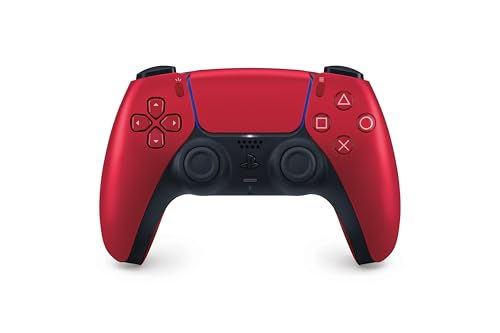
This is a PlayStation DualSense Wireless Controller in Volcanic Red, designed for use across multiple devices. It solves the hassle of switching between gaming on your PS5, PC, or Apple devices, making remote play more flexible. With Bluetooth and USB-C connectivity, you can quickly pair and jump into games without complicated setups.
In daily use, the controller feels intuitive and comfortable, thanks to its familiar layout and enhanced grip. Dynamic haptic feedback adds a layer of immersion, so each action feels distinct. Voice chat is easy with the built-in microphone, and sharing gameplay moments is just a button press away.
Overall, it gives you a reliable, consistent experience, whether you’re on the couch or playing remotely.
What Stands Out For Remote Play
- Pairs easily with PS5, PC, Mac, iPhone, and iPad via Bluetooth or USB-C
- Immersive haptic feedback for a realistic gaming feel
- Built-in microphone for quick voice chat without extra gear
- Intuitive button layout and comfortable grip for long sessions
- Touch pad and adaptive triggers supported in compatible games
- Easy sharing of gameplay with the create button
Things To Consider Before Buying
- Some features (like adaptive triggers) only work in supported games
- No included charging cable or stand
- Larger size may not suit very small hands
Who This Fits Best
This controller is ideal for gamers who regularly switch between PS5, PC, and Apple devices for remote play. It removes the hassle of juggling multiple controllers and guessing which device will connect smoothly. If you value consistent feedback and quick setup, this model covers your needs.
One tip: keep Bluetooth on and pair your devices once—after that, connection is nearly instant. You’ll enjoy fewer surprises and reliable performance, letting you focus on your game. I find the comfortable shape means less hand fatigue during long sessions.
| Best for | Why |
|---|---|
| Frequent device switchers | Works with PS5, PC, Mac, and Apple devices via Bluetooth |
| Remote play users | Quick pairing means less setup time between sessions |
| Gamers who value immersion | Haptic feedback and adaptive triggers enhance play |
| Voice chat fans | Built-in mic allows instant chat without extra equipment |
Dualsense Wireless Controller Galactic Purple
The Best Controller for Remote Play if you want versatile connectivity and immersive feedback for both PlayStation and PC gaming.

The DualSense Wireless Controller Galactic Purple is designed for PlayStation 5 but stands out for remote play on multiple devices. Its advanced haptic feedback and adaptive triggers let you feel in-game actions more realistically, making gaming away from your console more engaging.
You get easy connections via Bluetooth or USB-C, so it adapts to Windows PCs and Macs as well as your PS5.
Using it feels comfortable thanks to the familiar layout and improved ergonomics. The built-in microphone and headset jack help you join chats quickly without extra gear. Controls are precise and consistent, so you can jump into remote play sessions with less fuss and more confidence.
The vibrant color also adds a fun touch to your setup.
Why Gamers Choose This Controller
- Immersive haptic feedback and adaptive triggers enhance gameplay
- Works with PS5, Windows PC, and Mac for flexible remote play
- Comfortable, evolved design for long sessions
- Built-in microphone and 3.5mm jack for quick voice chat
- Easy Bluetooth and USB-C connectivity
- Create button for recording or sharing gaming moments
- Vivid Galactic Purple color stands out
What To Consider Before Buying
- Some features like haptics may be limited on non-PlayStation platforms
- No bundled charging dock or cable included
- Not the lightest controller for travel
Who This Fits Best
This controller is best for anyone who wants one device for both PlayStation and PC/Mac remote play. It takes away the hassle of switching controllers or dealing with awkward setups when moving between devices. If you value immersive gameplay, the haptic feedback and adaptive triggers provide a satisfying edge.
It’s a smart pick if you want reliable performance and simple plug-and-play connections. My tip: update your device drivers and firmware to unlock all features, especially on PC. This brings peace of mind that your controller will stay consistent, so you can focus on gaming, not troubleshooting. The Galactic Purple look is a bonus if you like your gear to show some personality.
| Best for | Why |
|---|---|
| Remote Play on PS5 and PC | Seamless Bluetooth or USB-C connectivity and full feature support |
| Gamers seeking immersive feedback | Haptic feedback and adaptive triggers make gameplay feel real |
| Quick voice chat in-game | Built-in mic and headset jack cut out extra accessories |
| Players who value style | Galactic Purple color stands out on any setup |
Playstation Dualsense Wireless Controller
The PlayStation DualSense Wireless Controller stands out as the Best Controller for Remote Play, offering immersive feedback and versatile connectivity for smooth gameplay.

The PlayStation DualSense Wireless Controller is designed for PlayStation 5 users seeking a high-quality gamepad that enhances remote play experiences. Its adaptive triggers provide varying force and tension, making in-game actions feel more natural and immersive.
Using this controller feels comfortable and intuitive thanks to its evolved design and enhanced sticks. The built-in microphone and multi-device connectivity add convenience, allowing seamless gaming across consoles and computers without hassle.
Key Advantages For Remote Play
- Adaptive triggers simulate realistic in-game force and tension for immersive control
- Built-in microphone and 3.5mm jack enable easy voice chat and headset use
- Comfortable ergonomic design supports long gaming sessions without fatigue
- Multi-device Bluetooth and USB-C connectivity for flexible remote use
- Integrated speaker delivers higher-fidelity sound effects in supported games
- Create button allows quick recording and sharing of gameplay moments
Considerations Before Buying
- Primarily optimized for PlayStation 5, with some features limited on other devices
- Wireless range and latency may vary depending on Bluetooth connection quality
- Higher price point compared to basic controllers might not suit casual users
Where This Controller Excels
This controller is best for players who want a more immersive remote play experience without sacrificing comfort or connectivity. It removes guesswork by providing precise adaptive feedback that aligns with game actions, reducing frustration and enhancing control.
To get the best results, ensure your system supports Bluetooth 5. 1 or higher for stable wireless performance. Its reliable build and versatile features offer peace of mind for extended remote gaming sessions. For anyone serious about remote play, this controller balances innovation with practical usability.
| Best for | Why |
|---|---|
| PS5 users wanting immersive feedback | Adaptive triggers and haptic feedback enhance gameplay realism |
| Remote players needing versatile connections | Bluetooth and USB-C allow use on multiple devices including PC and Mac |
| Gamers who value built-in voice chat | Integrated microphone and headset jack simplify communication |
| Those seeking comfort in long sessions | Ergonomic design and enhanced sticks reduce hand fatigue |
Nonbliep Rgb Wireless Ps5 Controller
The Nonbliep RGB Wireless PS5 Controller stands out as the Best Controller for Remote Play with easy device switching and immersive features for gamers.

This wireless controller is made for PS5, PS5 Slim/Pro, and PC users who want a hassle-free gaming experience. Its quick connect feature means you just press HOME for instant pairing, whether you’re gaming on console or switching to your PC—no drivers or long setup needed.
Using it feels natural, responsive, and comfortable, especially during long sessions or fast-paced games. The RGB lighting lets you personalize the look, while dual vibration and high-precision joysticks keep every move accurate. Its audio jack and speaker bring game audio closer, making remote play feel much more immersive.
What Sets This Controller Apart
- Instant plug & play pairing for PS5 and PC
- Switch devices in seconds, no setup hassle
- 9 RGB light modes for custom effects
- Dual haptic vibration and 6-axis gyro for immersive gameplay
- Programmable buttons and turbo mode for advanced combos
- Built-in 3.5mm audio jack and speaker
- Hall sensor joysticks for long-lasting precision
Points To Consider Before Buying
- Only available in red color
- No bundled software or app for customization
- First-time setup requires USB-C cable connection
Who This Fits Best
This controller is ideal for gamers who switch between PS5 and PC, or anyone who wants to play remotely without worrying about connection issues or stick drift. It removes the need for complicated driver installs, making remote play sessions smoother and less stressful.
If you often move between games or devices, this model saves you time and keeps your controls consistent. As a tip, try out the programmable buttons and turbo mode for easier combos in action or fighting games. The reliable hall sensor joysticks mean fewer surprises over time—your controller stays accurate, session after session.
For anyone tired of fiddling with settings or dealing with worn-out sticks, this controller brings peace of mind and a bit of style with its RGB lighting.
| Best for | Why |
|---|---|
| Remote play on PS5 and PC | Quick connect, no setup delays |
| Gamers seeking customizable lighting | 9 RGB modes for personalized setups |
| Competitive action and FPS players | Dual vibration, turbo, and precise joysticks |
| Long gaming sessions | Hall sensor joysticks reduce drift, last longer |
Betmi Wireless Ps5 Remote Controller
A top pick for Best Controller for Remote Play, this model is perfect for users who want multi-platform convenience with customizable controls.

The BETMI Wireless PS5 Remote Controller is designed for gamers who play across different systems and want a reliable device for smooth remote play. It solves connection hassles with simple pairing to PS5, Mac, Windows, Android, and Steam Deck, supporting both wired and Bluetooth.
The customizable RGB lighting and programmable buttons let you personalize your gaming setup in practical ways.
Using this controller feels natural and consistent, whether at a desk or on the couch. With features like Hall Effect joysticks to reduce drift and a comfortable grip, you can focus on your game instead of technical issues. The setup is straightforward, and switching between devices is easy once you know the pairing process.
Why Gamers Like This Model
- Works with PS5, Mac, Windows, Android, and Steam Deck
- Hall Effect joystick helps prevent drift
- Programmable buttons and turbo mode for custom play
- 9-color RGB lighting and multiple effects
- Dual vibration and 6-axis support for immersive feedback
- 3.5mm headset jack and speaker for flexible audio
- Lightweight design at just over half a pound
Things To Keep In Mind
- Not compatible with PS4 consoles
- Initial pairing to PS5 requires USB cable and setup step
- Remembers only the last connected device
What I’d Tell A Friend
This controller is best for players who jump between devices and want one tool to cover remote play on PlayStation, PC, Mac, and more. It removes much of the hassle of switching controllers and guessing about compatibility. One tip: always use the included cable for first-time PS5 pairing to avoid connection issues.
Once you get used to the pairing process, it’s reliable and consistent, so you spend less time fiddling with settings and more time gaming. If you want to tweak your controls or lighting without a fuss, this model keeps things simple.
I like that it just works across platforms—no surprises once you learn the basics.
| Best for | Why |
|---|---|
| Multi-platform gamers | Works with PS5, Mac, Windows, Android, and Steam Deck |
| Players who want no joystick drift | Hall Effect joystick reduces drift and is easily recalibrated |
| Custom macro and turbo users | Programmable buttons and turbo modes for fast input |
| Fans of visual customization | 9 RGB colors and 4 lighting effects for a personal touch |
Choosing The Right Ps5 Controller: What Actually Matters
- Compatibility: Confirm your controller works with your devices—PS5, PC, Mac, mobile, or Steam Deck. Some third-party models are not compatible with PS4.
- Features vs. Needs: Decide if you need extras like RGB lighting, programmable buttons, turbo modes, or just reliable basics like haptic feedback and adaptive triggers.
- Build Quality: Consider joystick technology. Hall effect joysticks help avoid drift but are mostly found in third-party models.
- Multi-Device Use: If you switch between consoles and PC, look for easy Bluetooth pairing and quick device switching.
- Audio Support: Built-in speakers and 3.5mm jacks vary. Some controllers lack microphones and may not support Apple headphones.
Common Mistakes When Buying Ps5 Controllers
- Assuming all controllers work on any PlayStation console. PS5 controllers rarely support PS4.
- Overlooking initial setup. Many third-party controllers require a USB cable for first-time pairing.
- Ignoring device switching friction. Some controllers need re-pairing when moving between PC and console.
- Expecting microphone functionality from built-in speakers. Most alternatives only offer speakers, not mics.
- Buying for lighting features without checking customization limits.
Who Should Avoid These Controllers?
- If you want native PS4 compatibility.
- If you require advanced audio (integrated microphone for online chat).
- If you dislike extra setup steps or frequent device re-pairing.
- If you need Apple headset support via the 3.5mm jack.
Setup And Usage Tips
- For first use, connect with the included USB-C cable and press Home to pair.
- Always use the original or supplied data cable for reliable connection.
- To switch devices, re-pair using the cable as needed.
- Check RGB lighting settings—some controllers save your last mode, while others reset.
- For programmable buttons, consult the manual for macro setup steps.
Care And Maintenance Notes
- Keep controllers away from dust and moisture.
- Store in a cool, dry place to avoid stick drift or battery wear.
- Use gentle cleaning—avoid harsh chemicals on buttons or joysticks.
- Update firmware for official controllers using the PlayStation Accessories app.
Faqs
Can I Use A Ps5 Controller On A Ps4?
No, PS5 controllers are not natively compatible with PS4 consoles. Some remote play workarounds exist, but core features may not function.
Do Third-party Controllers Support All Ps5 Games?
Most third-party controllers support standard PS5 gameplay. Some advanced features like adaptive triggers may not be fully available.
How Do I Connect A Controller To Pc Or Mac?
Use Bluetooth or a USB-C cable. For first-time setup, connect via cable and follow pairing instructions.
Do All Controllers Have Built-in Microphones?
No, many controllers only offer speakers. Use a headset for microphone functions.
Will Rgb Lighting Drain The Battery?
RGB lighting can impact battery life, but modern controllers are designed to minimize this. Battery life still varies by usage and settings.
Why Does My Joystick Drift After Some Use?
Joystick drift occurs from wear. Hall effect joysticks in some models help prevent this issue, but calibration may be needed occasionally.
Is The 3.5mm Audio Jack Compatible With All Headphones?
Most standard headphones work. However, some controllers do not support Apple headphones due to connector differences.
Final Thoughts
When choosing a PS5 controller, match features to your gaming habits and devices. Consider compatibility, setup needs, and unique options like lighting or programmable buttons. If you value plug-and-play simplicity or advanced customization, the market offers both. Carefully review connection steps and maintenance tips for long-term performance.
With the right fit, you’ll enjoy responsive play and lasting reliability.